
Core Workflow
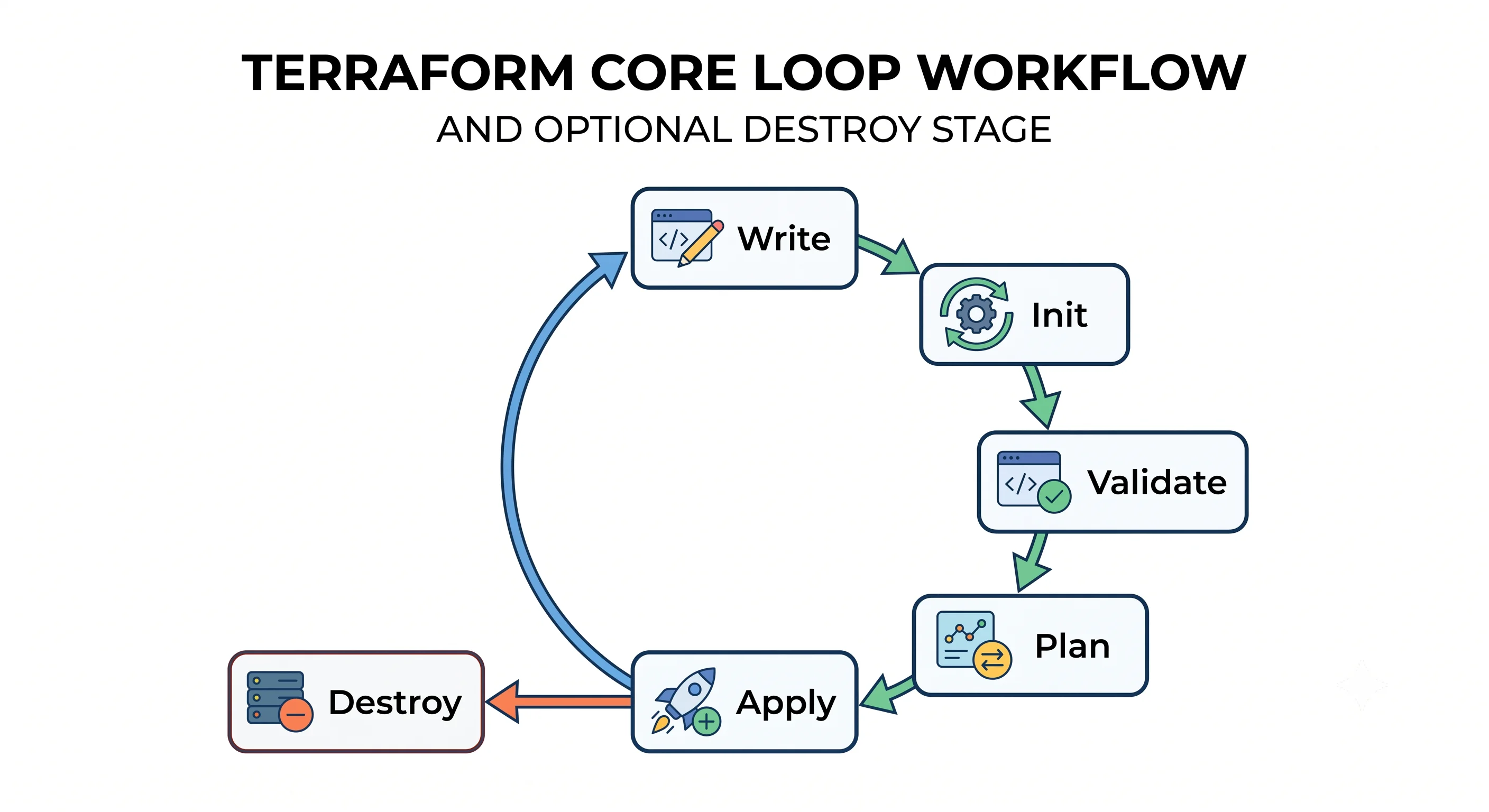
Five commands do almost everything: init, validate, plan, apply, destroy. This page is what
each one reads, what it writes, which are safe to run without a human watching, and how they compose
into the loop you'll spend the rest of your Terraform career inside. It ends with a real resource in a
real account.
Prerequisites: Why IaC Exists
What & Why
The core workflow is the fixed sequence Terraform imposes on every change: initialise a working directory, compute a proposed change, review it, then execute it.
The bad practice it replaces
Deployment scripts that do the thing and tell you afterwards. The deploy.sh in every legacy
repository is a single verb — it runs, it changes production, and the only way to find out what it
was going to do was to read the source and simulate it in your head. When it half-failed, you read
the log to work out where it stopped.
Terraform's contribution isn't apply. Any tool can have an apply. It's that plan is a separate,
first-class, reviewable artefact, so the question "what is about to happen to production?" has an
answer before it happens rather than after. Everything else on this page follows from taking that
seriously.
Where it sits
These commands are the outer loop. Inside plan there's a pipeline — parse, resolve, refresh, build
the graph, diff, render — that determines why the proposed change is what it is. That's
The Plan/Apply Lifecycle, and it's the part that makes
the difference between running Terraform and understanding it. Here we stay outside.
Three things it's confused with
plan and apply are not "test" and "deploy". A plan isn't a test run against a copy — it's a
prediction about your real infrastructure, computed by talking to your real cloud account. It's
read-only, but it's not a rehearsal in a safe place.
init is not a one-off setup command. It isn't git init. It runs whenever the directory's
requirements change — new provider, new module, changed version constraint, changed backend — and
you'll run it hundreds of times.
destroy is not "undo". It removes everything the current configuration manages, which is a
different set from "the things you changed in the last apply". There is no command that reverses one
apply.
When NOT to use it
The workflow itself is non-negotiable — you can't apply without a plan being computed, even if you don't look at it. What's optional is how you drive it, and two habits are worth rejecting outright:
terraform apply -auto-approvefrom a laptop against production. It skips the review that is the entire point. In an automated pipeline where a human already approved a saved plan file,-auto-approveis correct and necessary; typed at a terminal by a person who is in a hurry, it's the single most common cause of a bad day.terraform apply -target=...as a normal way of working. It applies a subset of the graph, and the result is state that's consistent with no version of your configuration. It exists for recovering from a broken state, it says so in its own warning output, and a team that reaches for it weekly has a problem it's routing around rather than fixing.
Core Concepts
Working directory — the folder you run Terraform in. Terraform reads every .tf file in this
one directory as a single configuration. It does not recurse into subdirectories; a subdirectory is
either a module you explicitly call or invisible.
Root module — the configuration in your working directory. The entry point. Every other module is a child, called from here. Grammar in Modules.
Initialisation — making a directory ready to run. terraform init downloads the providers and
modules the configuration declares, records exact versions in the lock file, and configures where
state lives.
Plan — the proposed change, as a reviewable artefact. A computed set of actions — create,
update, replace, destroy, read — derived from comparing configuration, state and reality. Rendered
for a human by default; saved to a file with -out.
Saved plan file — a plan frozen for later execution. A binary file produced by
terraform plan -out=tfplan and consumed by terraform apply tfplan. Applying a saved plan does
exactly what the plan said or fails, which is why pipelines use it. Not human-readable directly — use
terraform show.
Apply — doing it. Executes the actions in a plan, in dependency order, writing the results to state as it goes.
Refresh — asking the cloud what's really there. Reading the current attributes of every managed
resource from the provider's API before computing the diff. Runs as part of plan and apply by
default. Historically a standalone command, now deprecated as such — ⚠️ verify current status.
Auto-approve — skipping the confirmation prompt. -auto-approve. Correct when a saved plan was
already reviewed; dangerous otherwise.
Exit code — what the command tells a script. 0 success, 1 error. With
plan -detailed-exitcode, 0 means no changes and 2 means changes are pending — which is how a
pipeline decides whether to bother asking for approval, and how drift detection jobs work.
Idempotence — running it twice changes nothing the second time. Defined in
Why IaC Exists; this is the property that makes apply safe to re-run
after a failure.
How It Works
Each command has a precise contract about what it reads and what it touches. Memorising this table is worth more than memorising any set of flags, because it answers "is this safe to run right now?" for every situation you'll meet.
| Command | Reads | Writes | Needs cloud credentials | Changes infrastructure |
|---|---|---|---|---|
init |
.tf files, lock file |
.terraform/, .terraform.lock.hcl |
Only to reach the backend | No |
fmt |
.tf files |
.tf files (rewrites formatting) |
No | No |
validate |
.tf files, .terraform/ |
Nothing | No | No |
plan |
.tf files, state, cloud API |
State (refresh results), optionally a plan file | Yes | No |
apply |
.tf files or plan file, state, cloud API |
State, cloud infrastructure | Yes | Yes |
destroy |
.tf files, state, cloud API |
State, cloud infrastructure | Yes | Yes |
show |
State or a plan file | Nothing | No | No |
output |
State | Nothing | No | No |
Three things in that table surprise people.
plan writes. It's called read-only, and it is — with respect to your infrastructure. But by
default it refreshes, and the refreshed attributes are persisted to state. So a plan can modify the
state file without modifying a single cloud resource. This matters the first time two people run
plan simultaneously against shared state and one of them gets a locking error.
validate doesn't need credentials but does need init. It checks syntax, types and internal
consistency — that a referenced resource exists, that an argument is the right type. It cannot check
that a value is acceptable to the provider, because it never calls the provider's API. An instance
type that doesn't exist passes validate and fails at apply. Catching that class of error is what
tflint is for; see Testing & Validation.
apply re-plans unless you give it a plan file. terraform apply with no arguments computes a
fresh plan and shows it to you — so the plan you approved in your terminal is the plan that runs. But
terraform plan followed later by terraform apply are two different plans, computed at different
times against possibly different realities. When the gap matters — and in a pipeline it always does —
save the plan with -out and apply that file.
What happens when it fails
Terraform applies resources in dependency order, with parallelism. A failure partway through does not roll back — there's nothing to roll back to. What you get is:
- Resources created before the failure: created, and recorded in state.
- The resource that failed: possibly created but not fully configured. Terraform records what it can.
- Resources that depended on the failure: not attempted.
The state file is therefore accurate about a partially-built world, and the correct response is
almost always to fix the configuration and run apply again — it will create only what's missing.
That's idempotence earning its keep. The cases where this isn't enough — a resource created in the
cloud but not recorded in state, a lock left behind by a killed process — are
Failure & Recovery.
Getting Started
One bucket, one directory, local state, five minutes. Azure needs a resource group to contain the storage account; AWS and GCP have no equivalent, so its tab has one extra resource.
Create an empty directory and one file. Change the suffix — bucket names are globally unique.
```hcl
# main.tf
terraform {
  required_version = ">= 1.5"
  required_providers {
    aws = {
      source  = "hashicorp/aws"
      version = "~> 5.0"
    }
  }
}

provider "aws" {
  region = "eu-west-1"
}

resource "aws_s3_bucket" "demo" {
  bucket = "tf-workflow-demo-0725"
}

output "bucket_name" {
  value = aws_s3_bucket.demo.bucket
}
```
```hcl
# main.tf
terraform {
required_version = ">= 1.5"
required_providers {
azurerm = {
source = "hashicorp/azurerm"
version = "~> 3.0"
}
}
}
provider "azurerm" {
features {}
}
resource "azurerm_resource_group" "demo" {
name = "tf-workflow-demo"
location = "westeurope"
}
resource "azurerm_storage_account" "demo" {
name = "tfworkflowdemo0725" # 3–24 chars, lowercase alphanumeric
resource_group_name = azurerm_resource_group.demo.name
location = azurerm_resource_group.demo.location
account_tier = "Standard"
account_replication_type = "LRS"
}
output "bucket_name" {
value = azurerm_storage_account.demo.name
}
``````hcl
# main.tf
terraform {
required_version = ">= 1.5"
required_providers {
google = {
source = "hashicorp/google"
version = "~> 5.0"
}
}
}
provider "google" {
project = "your-project-id"
region = "europe-west1"
}
resource "google_storage_bucket" "demo" {
name = "tf-workflow-demo-0725"
location = "EUROPE-WEST1"
}
output "bucket_name" {
value = google_storage_bucket.demo.name
}
```1. Initialise
terraform init# UNVERIFIED — confirm against a real run
Initializing the backend...
Initializing provider plugins...
- Finding hashicorp/aws versions matching "~> 5.0"...
- Installing hashicorp/aws v5.x.x...
- Installed hashicorp/aws v5.x.x (signed by HashiCorp)
Terraform has created a lock file .terraform.lock.hcl to record the provider
selections it made above.
Terraform has been successfully initialized!A .terraform/ directory and a .terraform.lock.hcl file now exist. Both are dissected in
Anatomy of a Project.
2. Validate
terraform fmt       # rewrites files to canonical formatting
terraform validate
# UNVERIFIED — confirm against a real run
Success! The configuration is valid.Neither command talked to your cloud account. Both are fast enough to run on every save.
3. Plan
terraform plan# UNVERIFIED — confirm against a real run
Terraform used the selected providers to generate the following execution plan.
Resource actions are indicated with the following symbols:
+ create
Terraform will perform the following actions:
# aws_s3_bucket.demo will be created
+ resource "aws_s3_bucket" "demo" {
+ arn = (known after apply)
+ bucket = "tf-workflow-demo-0725"
+ bucket_domain_name = (known after apply)
+ id = (known after apply)
+ region = (known after apply)
+ tags_all = (known after apply)
...
}
Plan: 1 to add, 0 to change, 0 to destroy.
Changes to Outputs:
+ bucket_name = "tf-workflow-demo-0725"Read the last line first, always. 1 to add, 0 to change, 0 to destroy is the summary that
should match your intention before you look at anything else. If the destroy count isn't what you
expected, stop.
The (known after apply) values are the second thing to notice: Terraform doesn't know the bucket's
ARN because the bucket doesn't exist yet. That propagation of unknown values is a large part of why
plans sometimes show more churn than you expect, and it's covered in
The Plan/Apply Lifecycle.
4. Apply
terraform applyIt shows the same plan again and asks:
# UNVERIFIED — confirm against a real run
Do you want to perform these actions?
  Terraform will perform the actions described above.
  Only 'yes' will be accepted to approve.

  Enter a value: yes

aws_s3_bucket.demo: Creating...
aws_s3_bucket.demo: Creation complete after 2s [id=tf-workflow-demo-0725]

Apply complete! Resources: 1 added, 0 changed, 0 destroyed.

Outputs:

bucket_name = "tf-workflow-demo-0725"
The bucket exists. A terraform.tfstate file now exists too.
5. Run it again
terraform plan# UNVERIFIED — confirm against a real run
No changes. Your infrastructure matches the configuration.6. Destroy
terraform destroyIt shows the plan in reverse — 1 to destroy — and asks for the same confirmation.
# UNVERIFIED — confirm against a real run
Destroy complete! Resources: 1 destroyed.
Do this now. An orphaned bucket is exactly the problem this article opened with.
In Practice
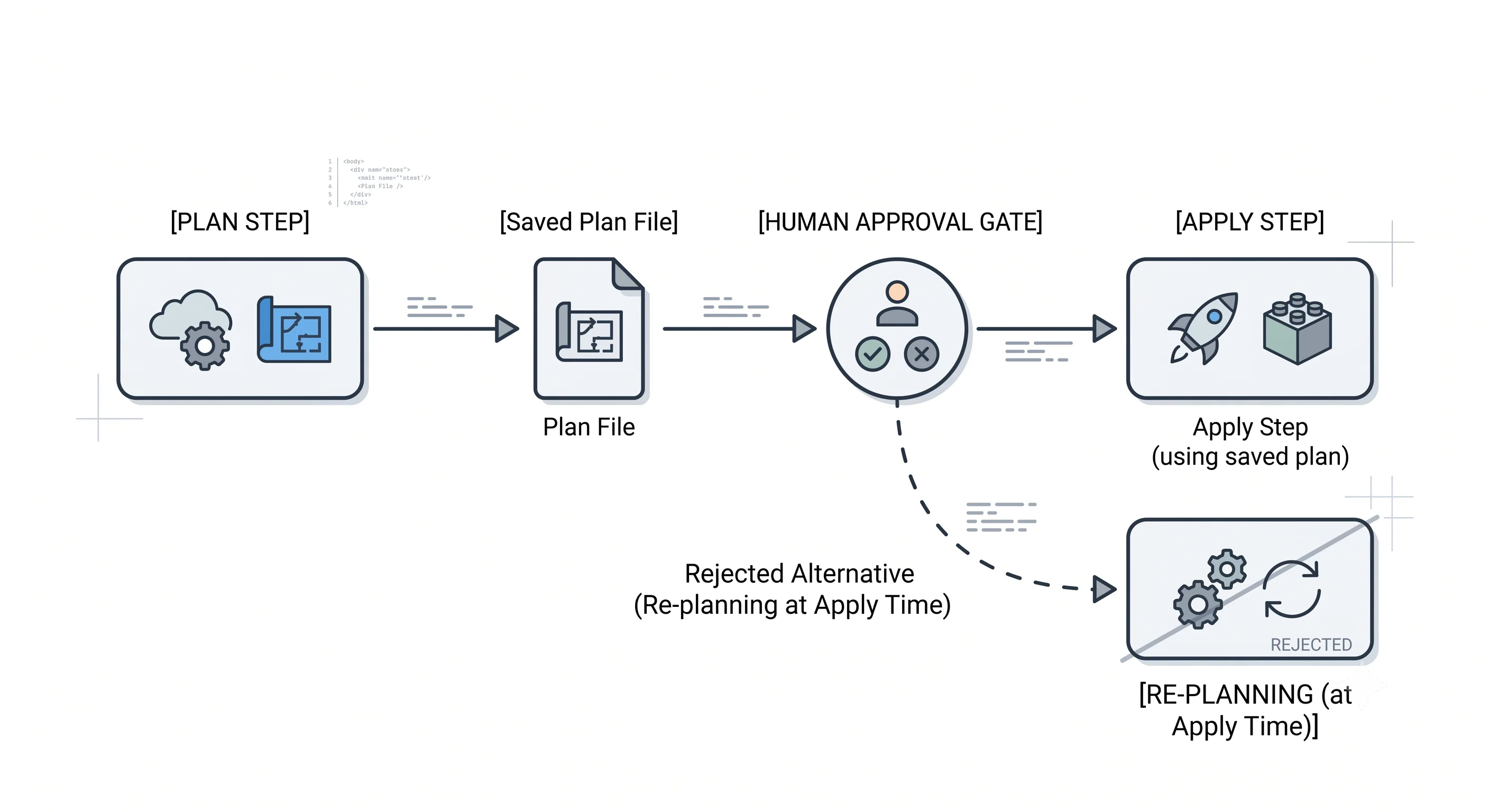
The saved plan file is the difference between a workflow and a habit. In a pipeline the sequence
is plan -out=tfplan, publish the rendered plan for a human to read, gate on approval, then
apply tfplan. What this buys you is that the approved artefact and the executed artefact are the
same object. Without it, the plan a colleague approved at 14:00 and the plan that runs at 14:40 after
someone else merged are different plans, and nobody will notice until one of them destroys something.
Plan files are also not secret-free — they contain resource attributes including sensitive values,
in plaintext. Treat a tfplan artefact with the same care as a state file: short retention, restricted
access, never a public CI artefact. See
Secrets & Sensitive Data.
Render a saved plan for humans and for machines:
terraform plan -out=tfplan            # produce
terraform show tfplan                 # human-readable, for the PR comment
terraform show -json tfplan > plan.json   # machine-readable, for policy checks and cost estimation
That JSON output is the integration point for everything in Governance & Policy as Code — Conftest, OPA, Infracost and Sentinel all consume it rather than parsing terminal output.
Pin the Terraform version, not just the providers. required_version = ">= 1.5" prevents someone
on 1.2 from failing confusingly, but a newer Terraform will upgrade the state file format, and once
upgraded, colleagues on older versions cannot read it. That's a genuinely disruptive afternoon. Teams
that care use a version manager (tenv, or tfenv) with a .terraform-version file committed, and
pin a range with an upper bound in CI.
What a reviewer should look for in a pull request touching Terraform:
- The plan output is in the PR. No plan, no approval. This is the whole discipline in one rule.
- The summary line matches the PR description. "Adds a bucket" and
3 to destroyis a conversation. - Every destroy and every replace (
-/+) is explained. Replacement is where data dies. - No
-targetin the proposed command, and no-auto-approveoutside a saved-plan pipeline. terraform fmthas been run — otherwise the diff is polluted with whitespace and nobody reads the real change.
Blast radius and rollback. The workflow's protection is entirely in the review step; once apply
starts, Terraform will do what the plan said as fast as it can. Reverting the commit and re-applying
restores the described state, but not data — a destroyed bucket comes back empty. The commands that
limit damage are prevent_destroy on things that must not die
(Meta-Arguments) and splitting state so no single apply can
reach everything (Repo & Environment Structure).
Ecosystem
Version managers — tenv (or the older tfenv). Install and switch Terraform versions per
directory from a .terraform-version file. The glue: commit that file, and everyone including CI runs
the same binary. ⚠️ verify current maintenance status of tfenv; tenv is the more actively developed
successor.
pre-commit with the terraform hooks. Runs fmt, validate, tflint and terraform-docs on
commit, so the formatting argument never reaches review. The glue: a .pre-commit-config.yaml in the
repo root and one pre-commit install per clone.
TF_LOG and terraform console. TF_LOG=DEBUG terraform plan prints provider API calls, which is
how you find out which call is failing rather than guessing; TF_LOG_PATH sends it to a file
because it's enormous. terraform console is an interactive expression evaluator against your current
state — invaluable for working out what a for expression actually returns before putting it in a
resource.
Atlantis. Runs the workflow from pull request comments: atlantis plan posts the plan as a
comment, atlantis apply runs it after approval. The glue is a webhook and a atlantis.yaml. It's
the self-hosted alternative to HCP Terraform, and the model matters more than the tool — see
CI/CD & Automation.
HCP Terraform (formerly Terraform Cloud). Hosted state, remote runs, approval gates, policy
enforcement. The glue is a cloud {} block replacing your backend configuration. Worth knowing as the
default answer to "where does state live and who approves applies" for teams who don't want to build
it. ⚠️ verify current naming and free-tier limits.
Provider behaviour across the three clouds is identical here. init, plan and apply do the
same things regardless of provider; what varies is authentication — which credentials the provider
finds and in what order — and that's Providers & the Registry.
Production
Security
The workflow's credentials are the most privileged in your organisation: whatever can apply can
delete production. Two rules follow. First, plan and apply should not use the same
permissions where you can manage it — a plan needs read access plus the ability to write state,
which is a much smaller grant than create-and-destroy. Second, long-lived access keys in CI are the
thing to eliminate first; OIDC federation gives the pipeline a short-lived credential scoped to a
specific repository and branch. Locally, the risk is a developer with production credentials in
~/.aws/credentials and muscle memory for -auto-approve.
Blast radius
destroy is the obvious hazard, and it's not the dangerous one, because it announces itself. The
dangerous one is replacement — a plan that shows -/+ on a database because an immutable
attribute changed. It reads as a change; it is a delete and a create. Watch for -/+ and
must be replaced in every plan you approve. The other under-appreciated hazard is an apply run
against the wrong directory or the wrong credentials, which is an argument for the environment
separation in Repo & Environment Structure.
Scale
The workflow's cost is dominated by refresh: plan makes at least one API call per managed resource,
so plan time grows linearly with state size and is bounded by provider rate limits. At a few thousand
resources this becomes minutes, and the temptations are -refresh=false (fast, and lies to you about
drift) and -parallelism=N (helps until the provider starts throttling). Both are tuning; the real
answer is usually to split the state, which is
Scale & Performance.
Team workflow
Shared state means concurrent runs contend for a lock, and the correct experience of that is a clear
"state is locked by
Reliability
apply is safely re-runnable after failure — that's the load-bearing property of this whole design.
What isn't automatic: a killed process can leave a lock behind (force-unlock, carefully), and a
resource created just before a crash can exist in the cloud without being recorded in state. Both are
Failure & Recovery. The habit to build now is to always
let an apply finish rather than pressing Ctrl-C — Terraform handles one interrupt gracefully and
finishes in-flight work, but a second interrupt kills it mid-operation.
Interview Questions
Conceptual
Walk me through the Terraform workflow from a blank directory to a running resource.
Write the configuration; terraform init to install providers and set up the backend; terraform fmt
and terraform validate for formatting and internal consistency; terraform plan to compute and
review the proposed change; terraform apply to execute it after confirmation; terraform destroy
when it's no longer needed. A strong answer adds why the review step is separate — the plan is a
reviewable artefact, which is the thing deployment scripts never had.
What does `terraform init` actually do, and when do you need to re-run it?
It prepares a working directory: downloads the providers named in required_providers, downloads any
modules, records the exact provider versions and checksums in .terraform.lock.hcl, and configures
the backend where state lives. Re-run it whenever those inputs change — a new provider or module, a
changed version constraint, a changed backend configuration, or a fresh clone of the repository. It's
safe to re-run at any time; it's not a one-off.
Which commands are safe to run without a human watching?
fmt, validate, show and output are safe unconditionally — no infrastructure changes, and
validate doesn't even need credentials. init is safe. plan is safe with respect to
infrastructure, but it does hit the cloud API, acquire a state lock and persist refresh results, so
"read-only" needs that qualification. apply and destroy change infrastructure and should only run
unattended against a plan file that a human already approved.
Is `terraform plan` read-only?
With respect to your infrastructure, yes — it never creates, modifies or deletes cloud resources. But it isn't side-effect-free: it acquires a lock on state, refreshes by calling the provider's API, and persists the refreshed attributes to state. So a plan can change the state file. The distinction matters the first time two people plan simultaneously and one gets a lock error.
What's the difference between `terraform apply` and `terraform apply tfplan`?
Bare apply computes a fresh plan, shows it and asks for confirmation. apply tfplan executes a
previously saved plan without prompting and without recomputing — if reality has moved on such that
the plan is no longer valid, it fails rather than adapting. The second form is what pipelines use,
because it guarantees the thing that was approved is the thing that runs.
Technical depth
What's the difference between `validate` and a linter like `tflint`?
validate checks syntax, type correctness and internal consistency — references resolve, argument
types match the provider's schema, required arguments are present. It never calls the provider's API,
so it cannot know whether a value is acceptable: a non-existent instance type or an invalid region
passes validate and fails at apply. tflint has provider-specific rule sets that catch exactly
that class, plus stylistic and deprecation rules. They're complementary, and validate requires
init first because it needs the provider schemas.
What happens if `apply` fails halfway through?
Nothing rolls back — there's no transaction. Resources created before the failure exist and are
recorded in state; the failing resource may or may not have been created, and Terraform records what
it can determine; resources downstream of the failure aren't attempted. The state file therefore
describes a real, partially-built world, and the normal fix is to correct the configuration and run
apply again, which creates only what's missing. The nasty case is a resource created in the cloud
but not recorded — the API call succeeded and the response was lost — which needs import.
What is `-detailed-exitcode` and what would you use it for?
terraform plan -detailed-exitcode returns 0 for no changes, 1 for error and 2 for changes
present. Two uses: a pipeline can skip the approval stage entirely when a plan is empty, and a
scheduled job can run plan against production and alert when the exit code is 2 — which is drift
detection built out of one flag. Without it, a plan that finds changes and a plan that finds none both
exit 0, so a script can't tell them apart without parsing text.
Why would you use `-out` rather than just running `plan` then `apply`?
Because they're two different plans computed at two different moments. Between them, someone can merge
a change or modify a resource in the console, and the apply will silently do something other than what
was reviewed. -out freezes the decision into a file, and apply tfplan either executes exactly that
or fails. It also gives you a machine-readable artefact via terraform show -json for policy and cost
tooling. The catch: plan files contain sensitive values in plaintext, so they need the same handling as
state.
When is `-target` legitimate, and why is it discouraged otherwise?
It restricts the operation to a resource and its dependencies. Legitimate for recovering from a broken
state — unblocking a resource that's failing and preventing everything else from applying — and
Terraform prints a warning saying exactly that. It's discouraged as a routine practice because the
resulting state is consistent with no complete version of your configuration: you've applied part of a
graph, so subsequent plans show changes that look inexplicable. Regular use of -target usually means
the state is too large and should be split.
How does this differ across AWS, Azure and GCP?
The commands and their semantics don't differ at all — that's the point of the tool, and saying so confidently is part of a good answer. Three practical differences sit around the workflow.
Authentication, which is what init, plan and apply need before doing anything: AWS resolves
a credential chain (environment variables, shared config, instance profile, or an assumed role via
OIDC); Azure uses the CLI login, a service principal, managed identity or workload identity
federation, and the provider additionally requires a features {} block and, in recent major
versions, an explicit subscription; GCP uses application default credentials, a service account key,
or workload identity federation, with project set on the provider.
Where state naturally lives, which init configures: S3 for AWS, an Azure Storage container for
Azure, a GCS bucket for GCP.
Apply duration, which isn't a Terraform property but shapes the experience — some resources take tens of minutes on any cloud, and the workflow doesn't have a "background" mode.
The canonical comparison table is in Providers & the Registry.
Scenario and design
A plan you're reviewing shows `-/+ must be replaced` on your production database. What do you do?
Don't apply it. Find which attribute forced it: the plan marks the offending line with
# forces replacement. Then decide whether replacement is genuinely required — some attributes are
immutable in the cloud API and any change means a new resource — or whether it's an accident, such as
a renamed resource address, an unintended change to an identifier, or a provider upgrade changing a
default. If it's a rename, moved is the fix and it produces no infrastructure change at all
(Import & Refactoring). If replacement is genuinely needed,
it's a data migration with a runbook, not a Terraform change — and prevent_destroy should have
stopped you getting this far.
Your CI pipeline runs `terraform apply -auto-approve` on every merge to main. Critique it.
The -auto-approve isn't the problem in itself — a pipeline can't answer a prompt. The problem is
that it's applying a freshly computed plan that no human has seen, so the review happened on a diff
of .tf files rather than on the actual proposed change, and those aren't the same thing: a provider
version bump can produce replacements that the code diff doesn't hint at.
The fix: plan -out=tfplan on the pull request, post terraform show tfplan as a comment, and on
merge run apply tfplan against the saved artefact. Add an environment protection rule for
production, and a policy check on show -json that fails the build on unexpected destroys. Also
worth raising: what credentials it uses, and whether the plan artefact is stored somewhere that
exposes secrets.
Two engineers run `terraform apply` at the same time against the same state. What happens?
With a backend that supports locking, the second acquires nothing and fails fast with a message naming who holds the lock and since when — that's the intended behaviour, and it's an argument on its own for remote state. Without locking — local state on a shared drive, or a backend with locking disabled — both proceed, both write state, and the last writer wins, silently discarding the other's record. The resources the loser created are now real and unmanaged.
The mitigation isn't just enabling locking: it's applying from one place, so this contention is architecturally rare rather than merely detected. See State & Backends.
Someone pressed Ctrl-C during an apply against production. Walk me through what you check.
First, what state the interrupt left things in — one interrupt makes Terraform stop starting new work and finish what's in flight, so a single Ctrl-C is comparatively graceful; a second one kills it, and that's where a resource can exist without being recorded. So: was it one or two?
Then, is the state lock still held? A killed process doesn't release it, and force-unlock with the
lock ID is the fix — after confirming no apply is genuinely still running, because unlocking a live
run is how state gets corrupted.
Then run plan and read it very carefully. Creates for things you believe were made are the signal
for an orphaned resource that needs importing. Once it's clean, re-run apply — it's idempotent and
will complete what's missing. Full treatment in
Failure & Recovery.
Commands & Gotchas
terraform init                          # install providers/modules, write lock file, configure backend
terraform init -upgrade                 # re-resolve version constraints and update the lock file
terraform fmt -recursive                # canonical formatting, including subdirectories
terraform validate                      # syntax, types, internal consistency — no credentials needed
terraform plan                          # compute and render the proposed change
terraform plan -out=tfplan              # ...and freeze it into a file
terraform plan -detailed-exitcode       # exit 0 = no changes, 1 = error, 2 = changes pending
terraform apply tfplan                  # execute exactly that plan, no prompt, no recompute
terraform show -json tfplan             # machine-readable plan, for policy and cost tooling
terraform output -raw bucket_name       # a single output value, unquoted, for shell scripts
terraform destroy # remove everything this configuration manages| Behaviour | Why it matters |
|---|---|
plan needs credentials; validate doesn't |
validate runs in CI with no cloud access at all — put it in the fast pre-check job |
plan writes refresh results to state and takes a lock |
"Read-only" is about infrastructure, not about state |
apply with no plan file re-plans from scratch |
The plan you looked at ten minutes ago is not the plan that runs |
apply tfplan fails rather than adapting if reality moved |
That's the feature — it's what makes approval meaningful |
-/+ means destroy-then-create |
Read every replacement. Look for # forces replacement in the plan body |
| Failed applies don't roll back | State is accurate about a half-built world; re-running apply finishes the job |
| One Ctrl-C is graceful, two is not | The second interrupt is how resources end up existing but unmanaged |
-target and -auto-approve are recovery tools, not workflow |
Regular use of either is a signal about state size or review discipline |
| Plan files contain secrets in plaintext | Treat a tfplan artefact exactly as carefully as a state file |
← Back to Orientation · Next: Anatomy of a Project →
⚠️ Verification checklist (delete before publishing)
Command output — every block marked UNVERIFIED needs a real capture
-
terraform initoutput wording and the exact lock-file sentence. -
terraform validatesuccess message. - Full
planoutput for the AWS bucket — in particular which attributes appear as(known after apply). The list shown is plausible but reconstructed, andregionmay not appear as a bucket attribute at all in aws v5+. - The
applyconfirmation prompt wording and theCreation complete after Ns [id=...]format. - The
No changes.wording on the second plan. -
destroysummary line. - Capture Azure and GCP equivalents of at least the plan summary line — currently only AWS output is shown, which slightly undercuts the multi-cloud promise. Decide whether to add a tab set for plan output or state explicitly that it's materially identical.
Behavioural claims
- Ctrl-C behaviour: that one interrupt lets in-flight work finish and a second kills it. ⚠️ verify — this is asserted twice on the page and used in an interview answer.
- That
planpersists refresh results to state by default in current Terraform versions. This changed historically and is central to the "plan isn't read-only" claim. ⚠️ verify. - Status of the standalone
terraform refreshcommand — deprecated, hidden, or removed? ⚠️ verify before describing it as deprecated. -
-detailed-exitcodeexit code meanings (0/1/2). - That
terraform validaterequiresinitto have run. - That
apply tfplanfails rather than re-planning when state has moved on — and what the error says. - That
-targetprints a warning describing itself as for exceptional recovery use, and the current wording. - That plan files contain sensitive values in plaintext. ⚠️ verify how they're encoded and whether
show -jsonexposes them differently from the binary file. - The claim that a newer Terraform upgrades the state format and older versions then can't read it. ⚠️ verify which minor versions actually do this.
Versions and syntax
- All three provider version constraints (
~> 5.0aws,~> 3.0azurerm,~> 5.0google) are probably stale — same issue as the previous page. azurerm 4.x requiressubscription_id. -
required_version = ">= 1.5"— confirm nothing on this page needs a higher floor. -
terraform output -rawflag name and behaviour. -
terraform fmt -recursiveflag exists. - HCP Terraform naming, the
cloud {}block syntax, and current free-tier limits. ⚠️ verify. -
tfenvmaintenance status and whethertenvis the correct successor to recommend.
Rendering
- The single
<Tabs>block renders; the many<details>blocks render. - All relative links resolve once targets exist.