
Resources and References
The resource block is the only block that creates anything, and one reference from one resource to
another is the mechanism behind ordering, dependency and most of Terraform's apparent intelligence. This
page is the anatomy of that block, the difference between what you set and what you read, the address
format every error message speaks in, and data sources — including the cases where reaching for one is
the wrong instinct.
Prerequisites: HCL & the Type System, Providers & the Registry
What & Why
A resource is one object Terraform manages: it creates it, records it in state, updates it when the configuration changes, and destroys it when you remove the block. A reference is one resource using another's value, which is simultaneously how you avoid repeating yourself and how you tell Terraform what order to work in.
The bad practice it replaces
Hardcoded identifiers, copied between places. In a pre-IaC world — and in a surprising amount of Terraform written today — the bucket's ARN appears as a string literal in the policy, the subnet ID appears as a string literal in the instance, and each of those literals is a fact about the world that someone has to keep true by hand. When the bucket is recreated, the literal is stale, and nothing tells you.
A reference replaces the literal with a relationship. It's always correct, because it's read from the thing itself, and it carries ordering information for free. The single most common quality problem in real Terraform is a hardcoded value that should have been a reference — and the reason it matters goes beyond tidiness, because a hardcoded value also deletes a dependency edge (The Dependency Graph).
Where it sits
This is the page where configuration starts creating things. It covers the resource block, references,
addresses, and data sources. It stops short of the five arguments that work on every resource —
count, for_each, depends_on, lifecycle, provider — which are
Meta-Arguments, and of what happens to a reference during
planning, which is The Plan/Apply Lifecycle.
Three things they're confused with
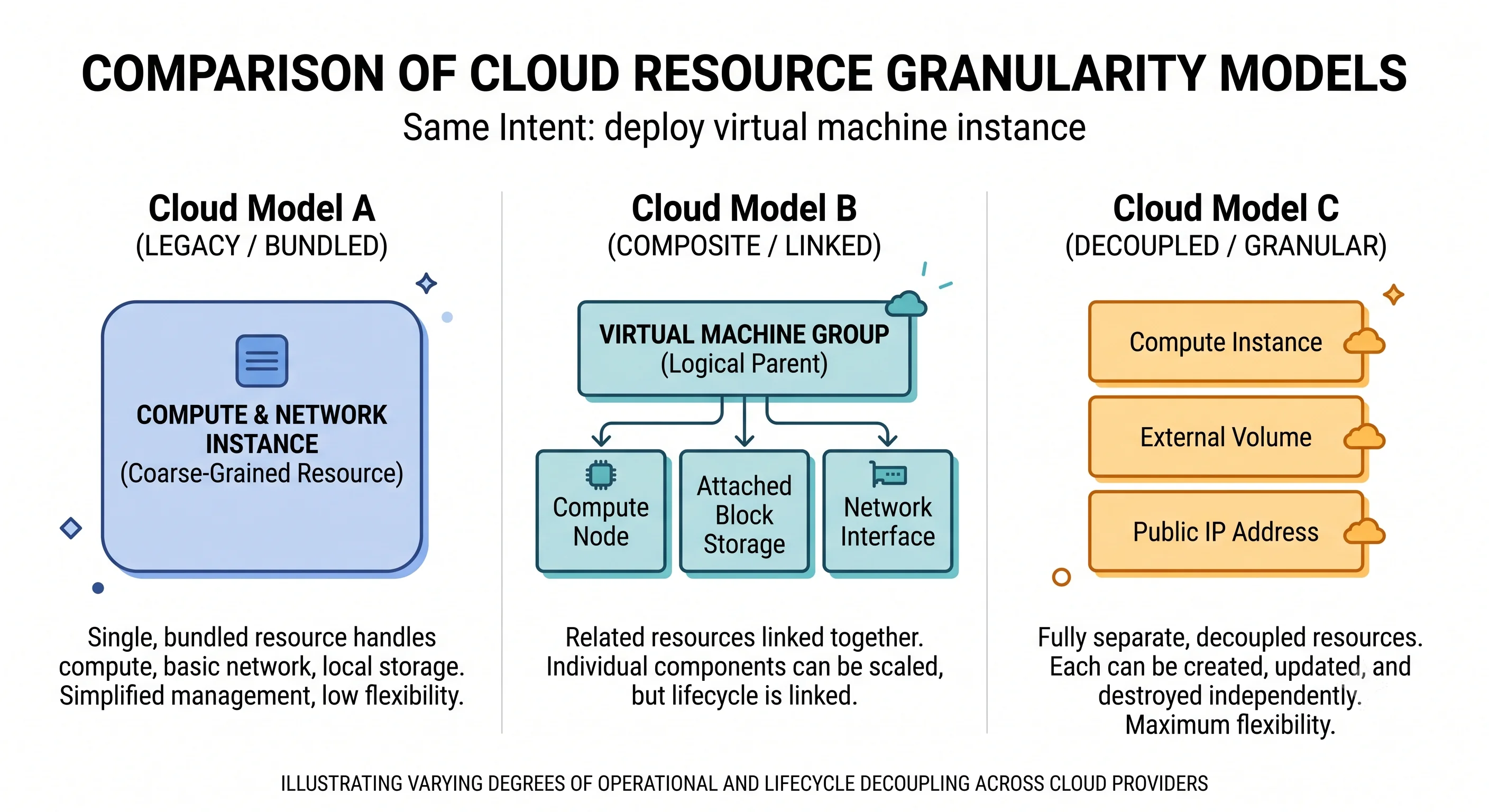
A resource is not a cloud service. It's one object in one API. "Set up object storage properly" is one resource on GCP and five on AWS, because the providers made different decisions about granularity.
A data source is not a resource. It reads; it never creates, changes or destroys. It appears in state as a cached read, and removing it destroys nothing.
An attribute is not an argument. They're often spelled the same and they're different directions: you set arguments, you read attributes. Some attributes can only ever be read, because the provider computes them.
When NOT to use them
- Don't use a data source to find something you also create. If the same configuration manages the bucket, reference the resource directly. A data source looking up your own resource is slower, can produce a cycle, and silently returns stale information.
- Don't use a data source where a variable would do. Looking up the current region or account to build a name makes your plan depend on ambient context; an explicit input is clearer and reproducible. Some lookups are worth it; make it a decision.
- Don't use
terraform_dataornull_resourceto run commands. They exist, and the combination of either with aprovisioneris the standard way people smuggle imperative scripting into a declarative tool. The result runs only at creation, is invisible toplan, and never re-runs when the script changes. - Don't name a resource after its type.
aws_s3_bucket.s3_bucketreads asaws_s3_bucket.s3_bucket.ideverywhere forever. Name it for its role, orthisif there's only one. - Don't rename a resource casually. The name is part of the address, and the address is the identity
in state. Renaming without a
movedblock destroys and recreates.
Core Concepts
Resource — one managed object. Declared with a resource block; created, tracked in state, and
destroyed when removed from configuration.
Resource type — what kind of thing. aws_s3_bucket. The prefix before the first underscore
identifies the provider's local name, which is how Terraform knows which plugin to ask.
Resource name — your label for this instance. The second string in the block header. Local to the configuration, arbitrary, and must be unique within its type. Never appears in the cloud.
Argument — a value you set. bucket = "example". Required or optional; optional ones fall back to
a provider default when omitted or set to null.
Attribute — a value you can read. aws_s3_bucket.demo.arn. Some attributes correspond to
arguments you set; others are computed — produced by the provider and readable only.
Computed attribute — a value the provider decides. An ARN, a generated ID, an endpoint, a
timestamp. Unknown until the object exists, which is why it renders as (known after apply) in a plan
for a resource being created.
id — every resource has one. A provider-defined identifier, always a string. What it contains
varies wildly: an S3 bucket's id is its name, an Azure resource's id is a full path. Treated
specially by import, and not always the thing you want to reference.
Reference — reading one object's attribute from another. type.name.attribute for resources,
data.type.name.attribute for data sources. Creates a dependency edge.
Resource address — the canonical identifier.
[module.NAME.]TYPE.NAME[["key"]|[index]] — for example aws_s3_bucket.demo, or
module.storage.aws_s3_bucket.demo["logs"]. This is the language every error message, plan line,
state entry and CLI argument speaks. Learning to read it is the fastest way to make Terraform errors
legible.
Data source — a read-only lookup. Declared with a data block. Queries the provider for
information about something Terraform doesn't manage — or manages elsewhere — and exposes it as
attributes.
depends_on for data sources — deferral. A data source whose arguments are all known is read
during planning; one that depends on a not-yet-created resource is deferred to apply and renders as
<=.
Managed versus data mode — the distinction state records. State marks each entry managed or
data. Only managed resources are created, updated or destroyed.
Provider-computed default — what happens when you omit an optional argument. The provider applies its own default, and that default can change between provider versions — which is one reason a provider upgrade can produce a plan.
terraform_data — a resource that does nothing. Terraform's built-in placeholder, replacing the
older null_resource, mostly used to attach provisioner blocks or to force replacement via
replace_triggered_by. Its legitimate uses are narrow. ⚠️ verify minimum version.
How It Works
Anatomy of a resource block
resource "aws_s3_bucket" "app_data" {
  #        └── type          └── name
  bucket        = "tf-resources-demo-0725"   # argument you set
  force_destroy = false                       # optional argument, provider default is false

  tags = {
    Environment = "dev"
  }
}
The header's two strings do different jobs. The type tells Terraform which provider to route to —
aws_ maps to the provider with local name aws — and which schema to type-check against. The name
is yours, exists only in the configuration and in state, and never appears in the cloud. bucket is the
argument that determines the real-world name; the two are unrelated and can differ, which confuses
people once.
Arguments versus attributes
The distinction is direction, and it's easiest to see in a single resource:
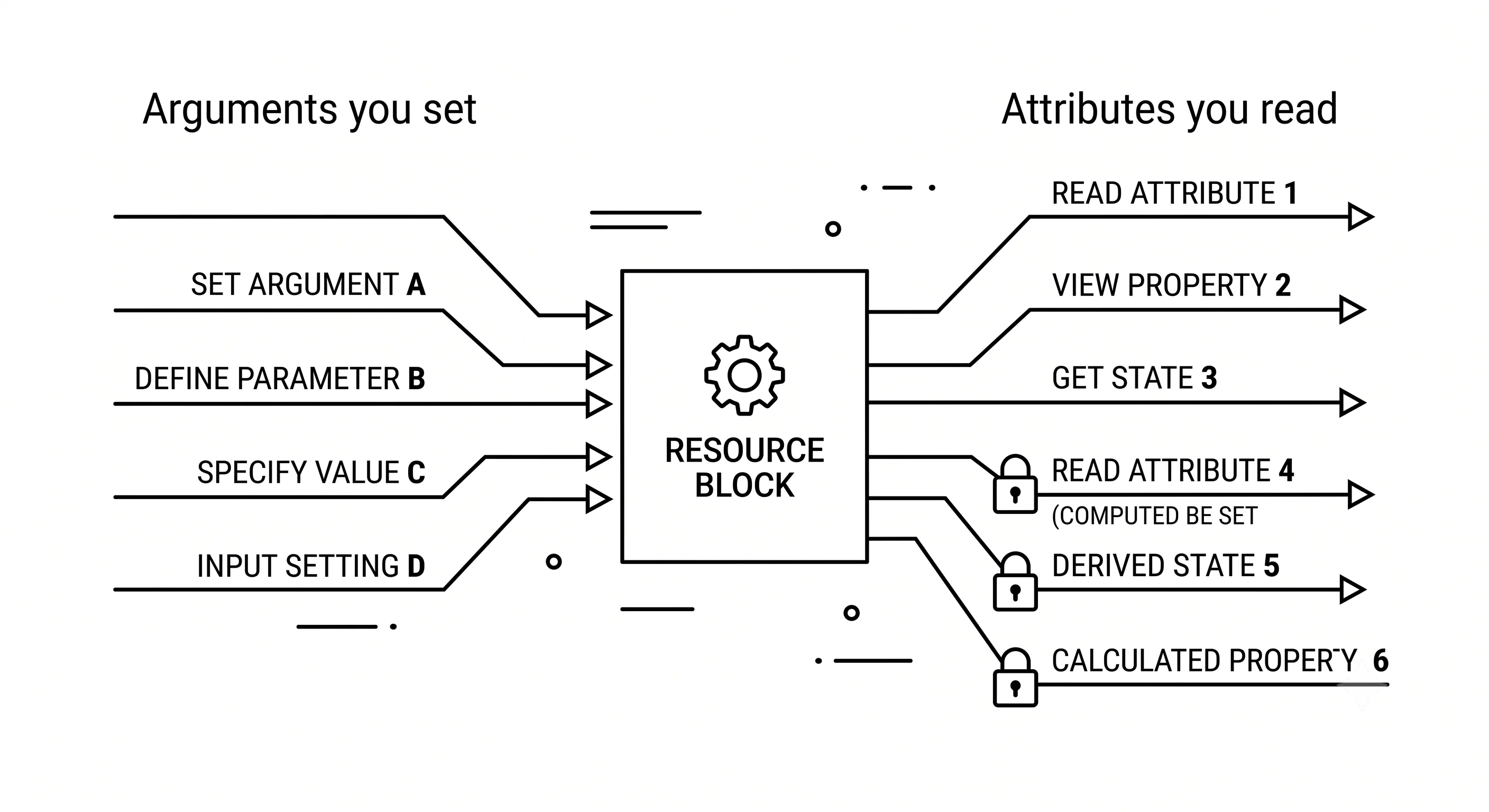
| Set it? | Read it? | Example | |
|---|---|---|---|
| Required argument | Yes, must | Yes | bucket |
| Optional argument | Yes, may | Yes | force_destroy, tags |
| Computed attribute | No | Yes | arn, bucket_domain_name |
id |
No | Yes | id |
Attempting to set a computed attribute is an error:
# UNVERIFIED — confirm against a real run
Error: Value for unconfigurable attribute

  Can't configure a value for "arn": its value will be decided automatically
  based on the result of applying this configuration.
The provider's schema is the authority on which is which, and the registry documentation splits them into an "Argument Reference" and an "Attribute Reference" for exactly this reason. When something isn't working, checking which list a name is in resolves it faster than guessing.
References, and the two things they do
resource "aws_s3_bucket" "logs" {
  bucket = "tf-resources-demo-logs-0725"
}

resource "aws_s3_bucket_policy" "logs" {
  bucket = aws_s3_bucket.logs.id      # reference
  policy = jsonencode({
    Version = "2012-10-17"
    Statement = [{
      Effect    = "Deny"
      Principal = "*"
      Action    = "s3:*"
      Resource  = "${aws_s3_bucket.logs.arn}/*"   # reference, inside a string
      Condition = {
        Bool = { "aws:SecureTransport" = "false" }
      }
    }]
  })
}
That reference does two things at once, and the second is easy to miss:
- It supplies a correct value, read from the object itself rather than duplicated by hand.
- It creates a dependency edge, so the bucket is created before the policy.
Replace aws_s3_bucket.logs.id with the literal "tf-resources-demo-logs-0725" and the configuration
still applies — most of the time. You've silently removed the edge, and the failure appears on a fresh
apply into a new environment. Detail in The Dependency Graph;
the point here is that a reference is not just a tidier literal.
References work anywhere an expression does — inside strings, inside jsonencode, in nested blocks, in
other resources' arguments. There is no special syntax and no need to interpolate a bare reference:
bucket = aws_s3_bucket.logs.id, not bucket = "${aws_s3_bucket.logs.id}".
(known after apply)
A computed attribute of a resource that doesn't exist yet has no value:
# UNVERIFIED — confirm against a real run
  # aws_s3_bucket_policy.logs will be created
  + resource "aws_s3_bucket_policy" "logs" {
      + bucket = (known after apply)
      + id     = (known after apply)
      + policy = (known after apply)
    }
Note that policy is unknown too, even though you wrote it — because it contains the bucket's ARN, and
an expression containing an unknown value is itself unknown. That propagation rule, and the trouble it
causes, is The Plan/Apply Lifecycle. Here it's enough to
recognise the marker and know it means "the object doesn't exist yet".
The resource address, and why it's worth learning
aws_s3_bucket.demo                              a resource
aws_s3_bucket.demo["logs"]                      one instance of it, keyed
aws_s3_bucket.demo[0]                           one instance, indexed
module.storage.aws_s3_bucket.demo               inside a module
module.storage["eu"].aws_s3_bucket.demo         inside a keyed module instance
data.aws_caller_identity.current                a data source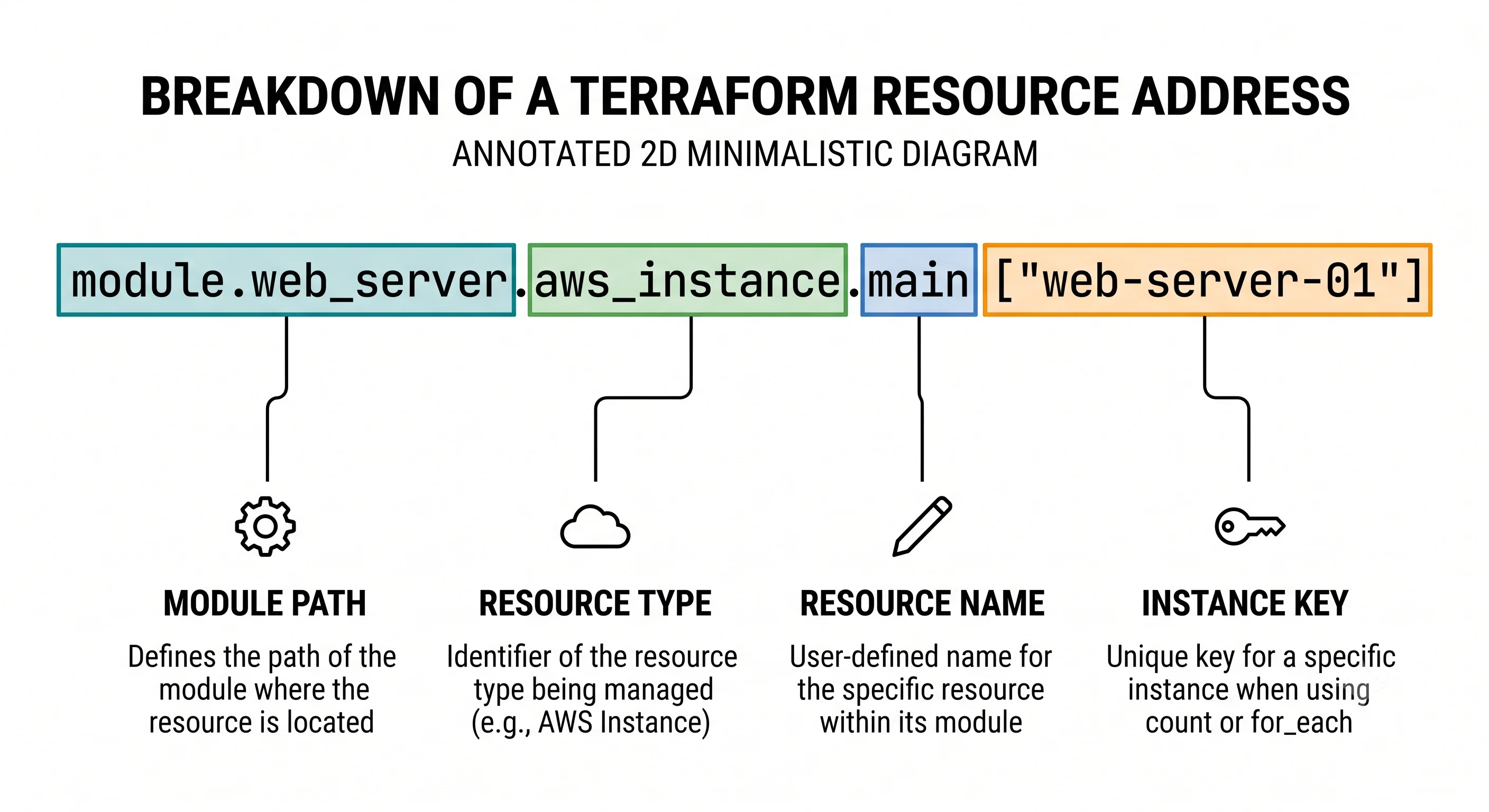
Every one of these appears in plan output, in state list, in error messages, and as an argument to
state mv, import, taint's replacement -replace=, and -target. So a single error line like this
is fully legible once you can parse the address:
# UNVERIFIED — confirm against a real run
Error: creating S3 bucket: BucketAlreadyExists

  with module.storage["eu"].aws_s3_bucket.demo["logs"],
  on ../../modules/storage/main.tf line 12, in resource "aws_s3_bucket" "demo":
  12: resource "aws_s3_bucket" "demo" {
That tells you: the eu instance of the storage module, the logs instance of the bucket, and the
file and line. Nothing else needs looking up.
The address is also the identity in state, which is why renaming the resource — or changing its
module path, or its instance key — reads to Terraform as one resource destroyed and a different one
created. Doing that deliberately without destroying anything is what moved blocks are for; see
Import & Refactoring.
The object storage resource shape — a real divergence
Providers disagree about granularity, and object storage is the clearest example. The same intent — "a bucket with versioning and public access blocked" — is a different number of resources on each cloud. Azure additionally needs its resource group and a separate container.
```hcl
resource "aws_s3_bucket" "demo" {
  bucket = "tf-resources-demo-0725"
}

# Features are separate resources, each referencing the bucket.
resource "aws_s3_bucket_versioning" "demo" {
  bucket = aws_s3_bucket.demo.id

  versioning_configuration {
    status = "Enabled"
  }
}

resource "aws_s3_bucket_public_access_block" "demo" {
  bucket = aws_s3_bucket.demo.id

  block_public_acls       = true
  block_public_policy     = true
  ignore_public_acls      = true
  restrict_public_buckets = true
}
```
Three resources for one bucket. The AWS provider deliberately split bucket
features out of the `aws_s3_bucket` resource, which means more blocks, more
references, and a wide fan-out in the graph — but also that each feature can be
managed and reviewed independently.
```hcl
resource "azurerm_resource_group" "demo" {
name = "tf-resources-demo"
location = "westeurope"
}
resource "azurerm_storage_account" "demo" {
name = "tfresourcesdemo0725"
resource_group_name = azurerm_resource_group.demo.name
location = azurerm_resource_group.demo.location
account_tier = "Standard"
account_replication_type = "LRS"
# Features are nested blocks on the account.
blob_properties {
versioning_enabled = true
}
}
# A container is a separate object, not a feature.
resource "azurerm_storage_container" "demo" {
name = "data"
storage_account_name = azurerm_storage_account.demo.name
container_access_type = "private"
}
```
Three resources too, but for a different reason: the resource group and the
container are genuinely separate *objects* rather than features of one. The
closest equivalent to "a bucket" is the storage account plus a container, which
is the mapping to keep in mind when reading the rest of this article.```hcl
resource "google_storage_bucket" "demo" {
name = "tf-resources-demo-0725"
location = "EUROPE-WEST1"
# Features are nested blocks on the bucket.
versioning {
enabled = true
}
public_access_prevention = "enforced"
}
```
One resource. GCP's provider keeps features as nested blocks and arguments, so
the configuration is shortest and the graph flattest — at the cost of a single
resource whose diff covers everything, so any change touches one node.The consequence worth carrying forward: "how many resources is a bucket" has three different answers, and it changes the shape of your configuration, your graph and your review diffs. It's also why the AWS examples in this article have more blocks than the GCP ones without doing more. Canonical comparison in Providers & the Registry.
Data sources
# Read something this configuration does not manage.
data "aws_caller_identity" "current" {}

data "aws_s3_bucket" "existing_logs" {
  bucket = "central-logging-bucket-created-by-another-team"
}

resource "aws_s3_bucket_policy" "app" {
  bucket = aws_s3_bucket.app.id
  policy = jsonencode({
    Version = "2012-10-17"
    Statement = [{
      Effect    = "Allow"
      Principal = { AWS = data.aws_caller_identity.current.account_id }
      Action    = "s3:PutObject"
      Resource  = "${data.aws_s3_bucket.existing_logs.arn}/*"
    }]
  })
}
Data sources are read during planning, when their arguments are known — which is what makes their values usable to compute other things. A data source whose arguments depend on a resource that doesn't exist yet can't be read then, so it's deferred to apply and its values are unknown during planning.
Two failure modes are worth knowing before you rely on one. A data source that finds nothing is an
error, at plan time, so a missing lookup target blocks every operation including destroy — which is
an unpleasant surprise when tearing down an environment whose dependency has already gone. And data
sources make plans depend on the outside world, so a plan is only as reproducible as the things it
reads.
Looking up existing infrastructure
```hcl
data "aws_caller_identity" "current" {}
data "aws_region" "current" {}

data "aws_s3_bucket" "existing" {
  bucket = var.existing_bucket_name    # by globally unique name
}
```
Lookups are by name or by tag filter, scoped to the provider's account and
region. `aws_caller_identity` and `aws_region` are the two most-used data
sources in existence and are worth knowing by heart.
```hcl
data "azurerm_client_config" "current" {}
data "azurerm_storage_account" "existing" {
name = var.existing_account_name
resource_group_name = var.existing_resource_group # ← extra argument
}
```
Azure lookups almost always need the resource group as well as the name,
because the name alone doesn't identify the object within a subscription. That
extra required argument is the most common reason an Azure data source fails
where the AWS equivalent worked.```hcl
data "google_client_config" "current" {}
data "google_storage_bucket" "existing" {
name = var.existing_bucket_name # by globally unique name
}
```
Bucket names are global, so a name suffices — but many other GCP data sources
need `project` explicitly when it differs from the provider's default, which is
the GCP equivalent of Azure's resource-group requirement.Getting Started
Two resources, one reference, one data source — and the plan output is the lesson.
# main.tf
terraform {
  required_version = ">= 1.5"
  required_providers {
    aws = { source = "hashicorp/aws", version = "~> 5.0" }
  }
}

provider "aws" {
  region = "eu-west-1"
}

data "aws_caller_identity" "current" {}

resource "aws_s3_bucket" "demo" {
  bucket = "tf-resources-demo-0725"
}

resource "aws_s3_bucket_versioning" "demo" {
  bucket = aws_s3_bucket.demo.id

  versioning_configuration {
    status = "Enabled"
  }
}

output "bucket_arn" {
  value = aws_s3_bucket.demo.arn
}

output "account_id" {
  value = data.aws_caller_identity.current.account_id
}
1 · Plan, and read the unknowns
terraform init && terraform plan# UNVERIFIED — confirm against a real run
data.aws_caller_identity.current: Reading...
data.aws_caller_identity.current: Read complete after 0s [id=123456789012]
Terraform will perform the following actions:
# aws_s3_bucket.demo will be created
+ resource "aws_s3_bucket" "demo" {
+ arn = (known after apply)
+ bucket = "tf-resources-demo-0725"
+ id = (known after apply)
}
# aws_s3_bucket_versioning.demo will be created
+ resource "aws_s3_bucket_versioning" "demo" {
+ bucket = (known after apply)
+ id = (known after apply)
+ versioning_configuration {
+ status = "Enabled"
}
}
Plan: 2 to add, 0 to change, 0 to destroy.
Changes to Outputs:
+ account_id = "123456789012"
+ bucket_arn = (known after apply)Three things to notice. The data source was read during planning, before anything was created, and
its value is concrete — so account_id shows a real value while bucket_arn doesn't. The versioning
resource's bucket is (known after apply) because it references a bucket that doesn't exist yet. And
status = "Enabled" is known, because you wrote it.
2 · Apply, then inspect by address
terraform apply
terraform state list
# UNVERIFIED — confirm against a real run
data.aws_caller_identity.current
aws_s3_bucket.demo
aws_s3_bucket_versioning.demoThe data source is in state — as a cached read, not as something Terraform owns.
terraform state show aws_s3_bucket.demoEvery attribute the provider returned, including the many you didn't set. This is the fastest way to discover what's available to reference.
3 · Provoke the errors worth recognising
Try setting a computed attribute — add arn = "anything" to the bucket:
# UNVERIFIED — confirm against a real run
Error: Value for unconfigurable attribute
  Can't configure a value for "arn".
Try referencing an attribute that doesn't exist — aws_s3_bucket.demo.nonexistent:
# UNVERIFIED — confirm against a real run
Error: Unsupported attribute

  This object has no argument, nested block, or exported attribute named
  "nonexistent".
Try a data source that finds nothing:
data "aws_s3_bucket" "missing" {
  bucket = "this-bucket-definitely-does-not-exist-0725"
}
# UNVERIFIED — confirm against a real run
Error: Failed getting S3 bucket
NotFound: Not FoundNo plan is produced at all. That's the failure mode to remember: a broken data source blocks every operation, not just the resource that uses it.
4 · Rename, and watch the address matter
Change resource "aws_s3_bucket" "demo" to "app_data" — and update the reference — then plan:
# UNVERIFIED — confirm against a real run
Plan: 2 to add, 0 to change, 2 to destroy.
You changed a name that exists only in your configuration, and Terraform proposes to destroy and
recreate real infrastructure, because the address is the identity. Revert it rather than applying;
the tool for doing this deliberately is a moved block
(Import & Refactoring).
terraform destroyIn Practice
Reference, never duplicate. The rule the whole page builds to. If a value exists as an attribute of something in the same configuration, reference it — for correctness, and for the dependency edge. If it exists in another configuration, read it through a data source. Only genuinely external constants belong as literals, and those belong in variables anyway.
Name resources for their role, not their type. The type is already in the address:
resource "aws_s3_bucket" "app_data" { }   # good: aws_s3_bucket.app_data
resource "aws_s3_bucket" "this" { }       # good in a module with one bucket
resource "aws_s3_bucket" "s3_bucket" { }  # bad: aws_s3_bucket.s3_bucket.id
this is the established convention for the single principal resource in a module, and it reads well at
the call site because callers see the module name instead.
Prefer explicit references over data-source lookups within your own estate. A data source that looks up a resource you manage — even in another state — is weaker than it looks: it can return stale values, it fails at plan time if the target is missing, and it hides the relationship from anyone reading the configuration. Where the dependency crosses a state boundary, the options and their trade-offs are Repo & Environment Structure.
Set the arguments that matter, even when the default is right. Provider defaults change between versions, and an omitted argument is an argument you haven't decided. For anything security-relevant — public access, encryption, versioning — write it explicitly, so the configuration states the intent and a provider upgrade can't quietly change it.
Avoid terraform_data and null_resource with provisioners. The pattern looks like a pragmatic
escape hatch and it has three specific defects: it runs only at creation, so it never re-runs when the
script changes; it's invisible to plan, so reviewers can't see what it will do; and a failure taints
the resource so the next apply replaces it. If something must happen imperatively, run it outside
Terraform — in the pipeline, before or after the apply — where it can be logged, retried and reviewed.
What a reviewer should look for in a diff touching this topic:
- A hardcoded ARN, ID, name or endpoint that names something in the same configuration. The single highest-value comment. Ask for the reference.
- A reference that was replaced by a literal. Silently removes a dependency edge, and no tooling flags it. Easy to miss and the most damaging item on this list.
- A renamed resource without a
movedblock. Check the plan for destroys. - A new data source. What happens to
plananddestroyif the target doesn't exist? Should this be a variable, or a reference to a resource you already manage? - Omitted security-relevant arguments — public access, encryption, versioning left to provider defaults.
terraform_dataornull_resource, especially with aprovisioner. Ask what it's for and whether the pipeline should do it.- Resource names repeating the type, and names that are numbered rather than meaningful.
Blast radius and rollback. The dangerous edit on this page is renaming — a change to something that
exists only in your configuration, which proposes to destroy real infrastructure. Removing a resource
block is equally consequential and at least looks like it: it means destroy. Data sources are safe to
add and remove, since they own nothing, with the one exception that adding one whose target may not exist
can block destroy later.
Ecosystem
The provider registry documentation. Per resource type: the argument reference, the attribute reference, and an import section. This is where you find out whether something is settable or computed, and whether changing it forces replacement — questions the language can't answer for you.
terraform state show ADDRESS. Prints every recorded attribute of one resource, which is the fastest
way to discover what's available to reference. Faster than the documentation when you already have the
thing applied.
terraform console. Evaluate a reference against real state before committing to it — terraform console then aws_s3_bucket.demo.arn. Removes an entire class of guesswork.
terraform providers schema -json. The complete machine-readable schema, including which attributes
are computed and which force replacement. Overkill for daily use, and the right tool when you need to
answer that question programmatically or in bulk. ⚠️ verify subcommand name.
terraform-docs. Generates input/output documentation from configuration, which matters most for
modules but keeps any repository's README honest about what it exposes.
Modules.
Provider-specific note. Resource granularity is the divergence that shows up on every page of this article: AWS splits object storage features into separate resources, Azure separates the account from the container and requires a resource group, GCP nests features into one resource. Data source lookups diverge too — Azure lookups generally need a resource group, GCP lookups often need a project, AWS lookups are scoped by the provider's account and region.
Production
Security
Two things on this page are security controls. Explicit arguments over provider defaults for
public access, encryption and versioning — because a default is a decision made by someone else that can
change in a minor version, and the plan that reveals it will be attached to an unrelated change.
References over hardcoded identifiers for policy documents, because a stale hardcoded ARN in a policy
either fails closed (an outage) or, worse, matches something else. The jsonencode-over-references
pattern earlier on this page is the safe form of both.
Blast radius
Renaming is the trap: an edit to a purely local label proposes destroying real objects, and it looks
harmless in a diff. Removing a block is the other, and it at least reads as what it is. The mitigations
are procedural — read the plan's destroy count, use moved blocks for renames — plus structural, in that
prevent_destroy on data-bearing resources turns the mistake into an error
(Meta-Arguments).
Scale
Resource granularity drives state size, and the provider chooses it: a bucket configured "properly" is one state entry on GCP and three or four on AWS, so an equivalent AWS estate has a larger state and a slower refresh for identical infrastructure. Data sources add plan-time cost too — each is at least one API call on every plan, and a configuration with many lookups spends real time before the refresh phase even starts. Scale & Performance.
Team workflow
The convention worth writing down is the naming one — role-based names, this for a module's principal
resource, no type names in resource names — because it's invisible to tooling and permanent once a
repository has grown. The review habit worth building is looking for literals that should be references,
which is the defect that no linter catches and that surfaces months later in an unrelated environment.
Reliability
References are a reliability feature: they cannot be stale, and they carry ordering. Hardcoded
identifiers are the opposite, and they fail intermittently rather than immediately, which is the worst
available failure mode. Data sources are a reliability liability in one specific way — a missing target
is a plan-time error, so a dependency that disappears blocks even destroy, and the resulting
environment can't be torn down without editing the configuration. Worth knowing before you meet it at the
end of a project.
Interview Questions
Conceptual
What's the difference between an argument and an attribute?
Direction. An argument is a value you set in the configuration; an attribute is a value you can read
from the object. Many are both — you set bucket and can read it back. Some are computed only: an ARN,
a generated ID, an endpoint. Trying to set one is an error, because the provider decides it.
The practical use of the distinction: the registry documentation splits every resource into an argument reference and an attribute reference, so "can I set this?" is answered by which list it's in.
What's the difference between a resource and a data source?
A resource is managed — Terraform creates it, records it in state, updates it and destroys it when the
block is removed. A data source only reads: it queries the provider for information about something
Terraform doesn't manage and exposes it as attributes. State marks entries managed or data, and
removing a data source destroys nothing.
The operational difference worth mentioning: data sources are read during planning, which is what makes
their values usable to compute other things — and also means a data source that finds nothing is a
plan-time error that blocks every operation, including destroy.
What does a resource name do, and where does it appear?
Nothing in the cloud. It's the second string in the block header, it's local to the configuration, it
must be unique within its type, and it exists so you can reference the resource and so state can
identify it. The real-world name comes from an argument — bucket, name — and the two are unrelated
and can differ.
Because the name is part of the resource address, and the address is the identity in state, renaming
reads to Terraform as destroying one resource and creating a different one. That's why renames need
moved blocks.
What creates a dependency between two resources?
A reference. Writing aws_s3_bucket.logs.id inside another resource both supplies the value and creates
an edge, so the bucket is created first. Nothing else about the configuration — file order, adjacency,
being in the same module — creates ordering.
The corollary is the important part: replacing that reference with a hardcoded string still applies correctly most of the time, having silently deleted the edge. The failure then appears on a fresh apply into a new environment. Detail in The Dependency Graph.
Why is `aws_s3_bucket.s3_bucket` a bad name?
Because the type is already in the address, so every reference reads aws_s3_bucket.s3_bucket.id — the
same word twice, conveying nothing. Names should describe the resource's role: app_data, logs,
artefacts. The convention for a module's single principal resource is this, which reads well at the
call site because callers see the module name instead.
It's a small thing that's expensive to fix later, because the name is part of the address and renaming
means either a moved block or destroying infrastructure.
Technical depth
Explain the resource address format.
[module.NAME[["key"]].]TYPE.NAME[["key"]|[index]], with data. prefixed for data sources. So
aws_s3_bucket.demo, aws_s3_bucket.demo["logs"],
module.storage["eu"].aws_s3_bucket.demo, data.aws_caller_identity.current.
It's worth learning because it's the only language Terraform speaks about resources: plan output, state
entries, error messages, and the arguments to state mv, import, -replace= and -target. An error
naming a module-nested keyed instance is fully legible once you can parse it, and opaque otherwise.
It's also the identity in state, which is why any change to it — name, module path, or instance key —
means destroy-and-create unless a moved block says otherwise.
Why is a value `(known after apply)` even though I wrote it in the configuration?
Because what you wrote contains a reference to something that doesn't exist yet. An expression containing an unknown value is itself unknown, so a policy document you fully specified renders as unknown if it interpolates a not-yet-created bucket's ARN.
Ordinarily this is cosmetic. It matters when an unknown lands on an attribute that forces replacement, because Terraform can't prove the value won't change and must plan for replacement — which can propose destroying a healthy resource. The mitigation is to derive names and identifiers from variables and locals, which are known at plan time, rather than from other resources' computed attributes. See The Plan/Apply Lifecycle.
When is a data source the wrong tool?
Four cases. When it looks up something the same configuration manages — reference the resource directly;
the data source is slower, can create a cycle, and can return stale values. When a variable would be
clearer, such as looking up the current region to build a name, which makes the plan depend on ambient
context. When the target may not exist, because a failed lookup is a plan-time error that blocks
everything including destroy. And when it's being used to couple two states loosely, where the
coupling deserves an explicit decision rather than an incidental lookup.
Data sources are right for genuinely external things: another team's resources, provider metadata like account identity, or AMI and image lookups.
What happens if a data source's arguments depend on a resource that doesn't exist yet?
It can't be read during planning, so it's deferred to apply and its attributes are unknown at plan time
— rendered <= in plan output. Everything derived from it becomes unknown too, which is how one
deferred data source can make a large part of a plan vague.
This is a signal worth heeding rather than working around: it usually means the configuration is trying to do two sequential things in one apply, and splitting it — or referencing the resource directly instead of looking it up — is the better answer.
Why avoid `null_resource` / `terraform_data` with provisioners?
Three concrete defects. It runs only at creation, so it never re-runs when the script changes — the
configuration it applies can't converge. It's invisible to plan, so a reviewer can't see what will
happen. And a failed provisioner taints the resource, so the next apply replaces the whole thing.
Net effect: you've added an imperative step that Terraform can neither predict, verify nor reconcile, inside a tool whose entire value is predicting, verifying and reconciling. Alternatives: pre-baked images, cloud-init/user-data, or a pipeline step before or after the apply where it can be logged and retried.
How does this differ across AWS, Azure and GCP?
The resource block, references and addresses are Terraform's and identical. What differs is
granularity — how many resources one logical thing takes.
AWS splits object storage features into separate resources: the bucket, then aws_s3_bucket_versioning,
aws_s3_bucket_public_access_block, and so on, each referencing the bucket. So three or four blocks for
one bucket, a wide graph, and each feature independently reviewable.
Azure separates genuinely different objects: a resource group, a storage account, and a container. The closest thing to "a bucket" is an account plus a container, and every resource needs the group.
GCP keeps features as nested blocks on one resource, so it's one block, one state entry, one node — and one diff covering everything.
Data source lookups diverge in the same spirit: Azure lookups generally need resource_group_name as
well as the name because the name alone doesn't identify the object; GCP lookups often need project
when it differs from the provider default; AWS lookups are scoped by the provider's account and region.
Canonical comparison in Providers & the Registry.
Scenario and design
A colleague's PR replaces `aws_s3_bucket.logs.arn` with the literal ARN string. What do you say?
Ask for the reference back, and explain that the problem isn't style. Two things break. The value can go stale — if the bucket is ever recreated, or the account or region differs, the literal is silently wrong. And more importantly the dependency edge disappears: Terraform no longer knows the bucket must exist first, so the two resources are created concurrently and the apply fails intermittently, typically on a fresh apply into a new environment rather than here.
That second failure is the one to emphasise, because it passes review and passes in dev, then fails during a disaster-recovery test or a new region rollout, months later, looking unrelated.
If the reference genuinely can't be used because the bucket lives in another state, the answer is a data source or a remote state lookup — not a literal.
Design the configuration for "a bucket with versioning, encryption and no public access" in a way that reviews well.
Explicit arguments for every security-relevant setting rather than relying on provider defaults, so the
configuration states the intent and a provider upgrade can't quietly change it. Name the resource for
its role. Reference the bucket from each feature resource rather than repeating its name. Build any
policy document with jsonencode over an object rather than a heredoc.
On AWS that's three or four resources — bucket, versioning, public access block, encryption — and the
review benefit is that each is a separate, legible diff. On GCP it's one resource with nested blocks and
a public_access_prevention argument. On Azure it's a resource group, a storage account with
blob_properties, and a container.
The cross-cloud point worth raising in a review: because the three providers differ in granularity, a "one module per cloud" abstraction is usually more honest than one module pretending they're the same shape.
Your `terraform destroy` fails with a data source error. What's happening and how do you get out?
A data source's target has already been deleted, so the lookup fails at plan time — and because no plan
can be produced, destroy can't run either. Common when tearing down an environment whose shared
dependency was removed first, or when environments are destroyed in the wrong order.
Ways out, roughly in order of preference: recreate or restore the missing target temporarily so the
lookup succeeds, then destroy properly. Or remove the data source and whatever references it from the
configuration, then destroy. Or, as a last resort, state rm the affected resources and clean up
manually, accepting that you're now doing it by hand.
The design lesson is to prefer explicit inputs over lookups for cross-environment dependencies, since a variable can't fail to resolve — and to make from-empty create and destroy a routine exercise, because that's what surfaces this before it matters.
You've inherited a configuration where every resource is named `main`, `main2`, `main3`. Worth fixing?
Yes, and not in one pull request, because every rename changes an address and therefore state.
The mechanism is moved blocks: add one per rename mapping the old address to the new, plan, and confirm
it reports no infrastructure changes — that result is the proof the mapping is right, since any
mistake shows as a destroy. Apply, then delete the blocks in a later commit.
Sequencing: do it in small batches by domain rather than all at once, so a surprising plan is easy to attribute, and do it when nothing else is in flight, since the diffs touch every reference. Start with the least-critical resources to build confidence in the process.
Worth being honest that this is cosmetic work with real risk, so it's justified by how long the repository will live and how many people read it — on something being decommissioned next quarter, leave it alone.
Commands & Gotchas
terraform state list                              # every address in state
terraform state show aws_s3_bucket.demo           # all recorded attributes — what you can reference
terraform console                                 # then: aws_s3_bucket.demo.arn
terraform providers schema -json | jq .            # which attributes are computed, machine-readable
terraform plan -target=aws_s3_bucket.demo         # recovery only — addresses are the argument
terraform apply -replace=aws_s3_bucket.demo       # replace one resource deliberately
terraform state mv aws_s3_bucket.old aws_s3_bucket.new   # imperative rename; prefer moved blocks
terraform output -raw bucket_arn # one output, unquoted| Behaviour | Why it matters |
|---|---|
| The resource name exists only in configuration and state | Never appears in the cloud. The real name comes from an argument |
| The address is the identity in state | Renaming proposes destroy-and-create. Use moved blocks |
| A reference supplies a value and creates an edge | Replacing one with a literal silently removes the dependency |
| Computed attributes can't be set | arn, id, endpoints. The error is "unconfigurable attribute" |
(known after apply) spreads |
Anything derived from an unknown is unknown, including values you wrote fully |
| Data sources are read at plan time when arguments are known | Which is why their values can compute other things |
| A data source that finds nothing is a plan-time error | It blocks everything, including destroy |
| A data source depending on a new resource is deferred | Rendered <=, and its values are unknown during planning |
Removing a resource block means destroy |
Removing a data block means nothing |
| Omitted optional arguments use provider defaults | Which can change between provider versions. Set security-relevant ones explicitly |
| Resource granularity is a provider decision | One bucket is 1 resource on GCP, 3–4 on AWS, and account-plus-container on Azure |
id contents vary wildly by provider |
A name on S3, a full path on Azure. Don't assume it's what you want |
← Back to The Language · Next: Variables, Locals & Outputs →
⚠️ Verification checklist (delete before publishing)
Command and error output
- The full
planoutput in Getting Started, especially: that the data source Read lines appear before the plan, thataccount_idshows a concrete value whilebucket_arnshows(known after apply), and which bucket attributes appear as unknown. -
Value for unconfigurable attributeerror text. -
Unsupported attributeerror text. - The data-source-not-found error text, and confirm it genuinely blocks
planentirely — this claim carries an interview answer and a Production paragraph. - Confirm a failed data source also blocks
destroy. The scenario question depends on it entirely. Ifdestroyactually succeeds, that answer must be rewritten. - The rename plan showing
2 to add … 2 to destroy, and that the count is right for this config. - The module-nested error example's exact layout — the
with module.storage["eu"]…line format. -
terraform providers schema -jsonsubcommand name (flagged inline; same item as the providers page).
Resource and attribute claims
- That
aws_s3_bucketexposesbucket_domain_nameand thatforce_destroydefaults tofalse. - That
aws_s3_bucket'sidis the bucket name and Azure resourceidvalues are full paths. -
aws_s3_bucket_public_access_blockargument names, all four. - GCP
public_access_prevention = "enforced"— valid value and argument name. - Azure
blob_properties { versioning_enabled }nesting onazurerm_storage_account. -
azurerm_storage_container'sstorage_account_name— ⚠️ may bestorage_account_idin azurerm 4.x. Same item as the dependency-graph page; fix both together. -
data "azurerm_storage_account"requiringresource_group_name— the tab set makes a general claim about Azure lookups from this one example. Verify it generalises. -
data "google_client_config"anddata "azurerm_client_config"names. -
terraform_dataminimum version and that it supersedesnull_resource(flagged inline). - That a failed provisioner taints the resource — same item as
00-orientation/01-why-iac-exists.md.
Versions
-
~> 5.0aws — ninth page. The sweep should now be one task across the wholedocs/tree.
Structure
- Two
<Tabs>blocks on this page, where every other page has one: resource granularity, and data source lookups. Both are genuine divergences and both are on-topic, but confirm two doesn't feel heavy — if it does, the data source set is the one to compress into prose plus a single AWS block. - Length: check rendered length. This page has two tab sets and fifteen
<details>, so raw source overstates it more than usual. - All relative links resolve.