
Anatomy of a Project
After one init and one apply, a directory that contained a single file contains six things. This
page is what each of them is, which of them you wrote, which Terraform wrote, which belong in git and
which must never go near it — plus the first serious look at the state file, the object that explains
most of Terraform's behaviour and all of its dangers.
Prerequisites: The Core Workflow
What & Why
A Terraform project is a directory containing configuration files, plus the artefacts Terraform generates while working in it. Understanding which is which is the difference between a repository a colleague can clone and one that leaks credentials.
The bad practice it replaces
Two, actually. The first is the repository where terraform.tfstate is committed — enormously common,
entirely understandable (it looked like a project file), and it means your database passwords are in
git history forever and two people applying on different branches produce a merge conflict in a file
no human can merge.
The second is subtler: the repository where nobody knows why there are four .tf files. Someone
copied a layout from a blog post, and the team now believes Terraform requires main.tf,
variables.tf and outputs.tf, and gets stuck the first time they need a fifth file. The split is
convention. Terraform doesn't care.
Where it sits
This page inventories the working directory and introduces state as an idea — the mapping between
configuration and reality, and why it must exist. It stops short of the mechanics. Where state should
live for a team, how locking works, how to repair it, and the state subcommands are all
State & Backends, which is where they'll make sense —
after you can read a plan.
Three things it's confused with
A workspace is not a directory. Terraform's workspace feature creates multiple named states
within one configuration, which is a different idea from having multiple directories, and a
contentious one. Repo & Environment Structure.
A project is not a module boundary — until it is. Your working directory is the root module. The distinction only becomes interesting once you call child modules; see Modules.
.terraform/ is not a build output you should keep. It's a local cache. Deleting it costs one
init and nothing else. The lock file sitting next to it is the opposite: precious, and committed.
When NOT to worry about it
The conventional file split — main.tf, variables.tf, outputs.tf, versions.tf — is worth
following because it's what reviewers expect, but it earns nothing on a five-resource configuration
and it isn't a design decision. Don't spend time on file organisation before you have enough
resources for it to matter; do spend the two minutes on .gitignore, immediately, before the first
commit.
Core Concepts
Working directory (root module) — the folder you run Terraform in. Terraform loads every
.tf file in it as one configuration, concatenated. It does not recurse into subdirectories.
.tf file — a configuration file. Contains blocks in HCL. The filename is meaningless to
Terraform; splitting by purpose is a convention for humans. Grammar in
HCL & the Type System.
.tf.json — the JSON equivalent. Same schema, machine-friendly, unpleasant to read. Exists so
tools can generate configuration. You will rarely write it.
terraform block — settings for Terraform itself. Holds required_version,
required_providers and the backend or cloud configuration. Conventionally in versions.tf.
Unlike everything else, its contents can't use variables — it's resolved before variables exist.
.terraform/ — the local cache. Downloaded provider binaries, downloaded modules, and a record
of the configured backend. Created by init, machine-specific, often hundreds of megabytes.
Never committed. Safe to delete.
.terraform.lock.hcl — the dependency lock file. Records the exact provider versions selected
and their checksums, so that everyone — including CI — resolves to the identical binary rather than
whatever the version constraint allows today. Always committed. The direct analogue of
package-lock.json or Gemfile.lock.
State — Terraform's record of what it created. A JSON document mapping each resource address in your configuration to the real object it manages, along with a cached copy of that object's attributes. The thing that makes the create/update/destroy decision possible at all.
terraform.tfstate — the local state file. The default location when no backend is configured.
Plaintext JSON, containing every attribute of every managed resource — including secrets.
Never committed.
terraform.tfstate.backup — the previous state. Written automatically before state is
overwritten. A one-generation safety net, and better than nothing when someone runs the wrong
state rm.
Backend — where state lives and how it's locked. Configuration declaring that state should be stored remotely — S3, Azure Storage, GCS — rather than on the local disk. Introduced here as a name; covered in State & Backends.
.tfvars file — values for input variables. terraform.tfvars is loaded automatically;
-var-file loads others. Whether they're committed depends entirely on what's in them — see
In Practice.
Resource address — the unique name of a resource inside Terraform. aws_s3_bucket.demo, or
module.storage.aws_s3_bucket.demo inside a module. This string is the key in state, the thing plan
output prints, and the thing every error message speaks in.
Provider binary — the plugin that talks to a platform. A separate executable, downloaded by
init into .terraform/, versioned independently of Terraform itself.
How It Works
Here is the directory after one init and one apply:
.
├── main.tf                        # you wrote this
├── .terraform/                    # init wrote this — cache, never commit
│   ├── providers/
│   │   └── registry.terraform.io/hashicorp/aws/5.x.x/linux_amd64/terraform-provider-aws
│   └── modules/
├── .terraform.lock.hcl            # init wrote this — commit it
├── terraform.tfstate              # apply wrote this — never commit
└── terraform.tfstate.backup       # apply wrote this — never commit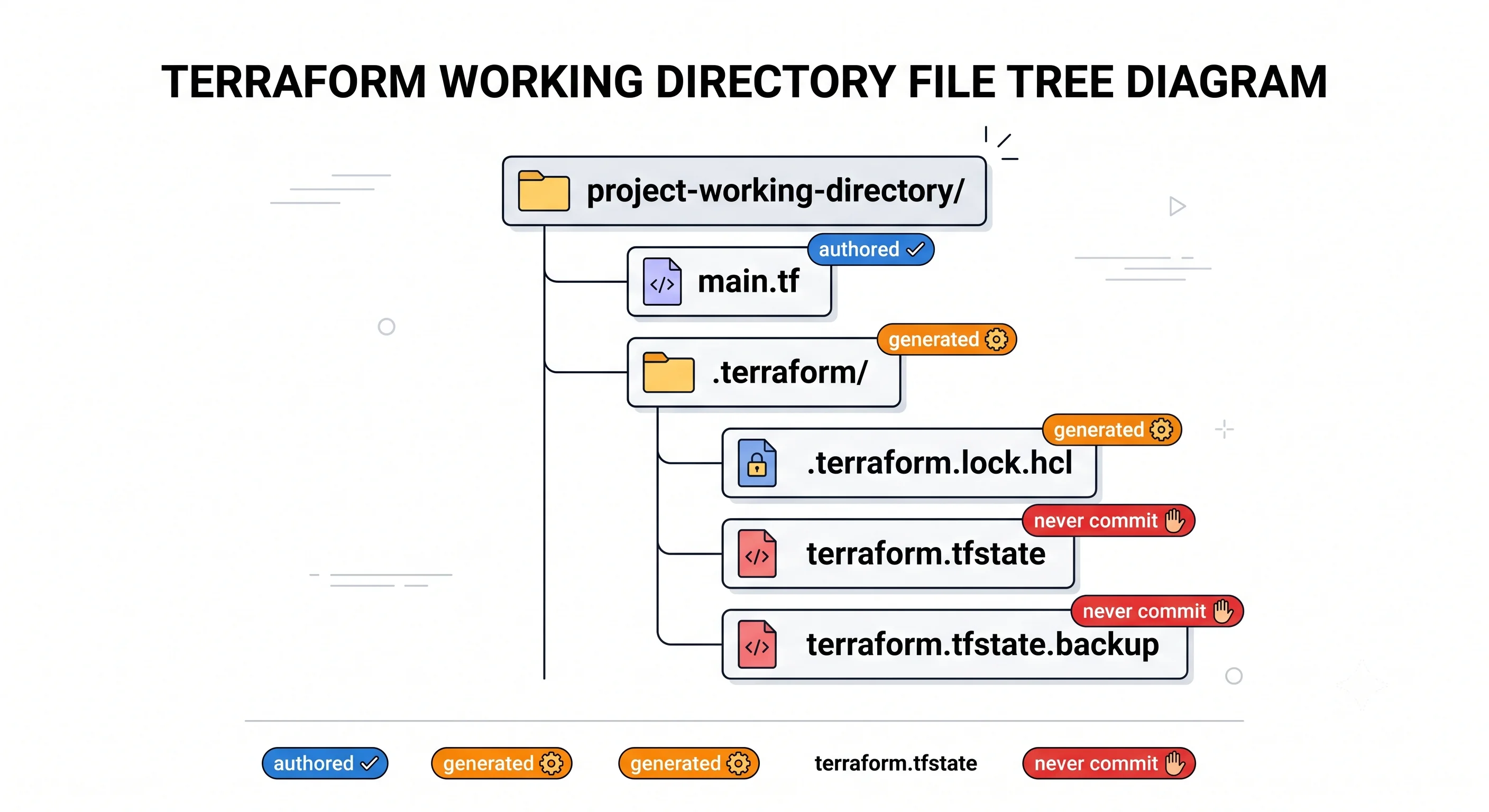
The single rule that organises all of it: you commit what you wrote, plus the lock file. Nothing else.
| File | Who wrote it | In git? | If you lose it |
|---|---|---|---|
*.tf |
You | Yes | You've lost your infrastructure's definition |
.terraform.lock.hcl |
init |
Yes | Version drift between machines; regenerate with init |
.terraform/ |
init |
No | Run init again. Costs seconds |
terraform.tfstate |
apply |
Never | Terraform forgets what it owns and proposes to create everything again |
terraform.tfstate.backup |
apply |
Never | One less safety net |
*.tfvars |
You | It depends — see below | Depends what was in it |
tfplan (saved plans) |
plan -out |
Never | Nothing; regenerate |
The .tf split is convention
Terraform concatenates every .tf file in the directory and evaluates the result. Ordering between
files is irrelevant, and so is ordering within a file — a resource can reference one declared fifty
lines below it. You could put everything in one file and Terraform would not object.
What the convention buys is reviewability. The usual layout:
versions.tf     terraform block: required_version, required_providers, backend
providers.tf    provider blocks: region, features, aliases
variables.tf    variable blocks — the module's inputs
main.tf         the resources
outputs.tf      output blocks — what this configuration exposes
locals.tf       locals, when there are enough to justify a file
Once main.tf passes a few hundred lines, split it by domain — network.tf, storage.tf,
iam.tf — rather than by resource type. A reviewer looking for the bucket policy should have an
obvious file to open.
What init puts in .terraform/
providers/ holds the actual provider executables, in a directory tree keyed by registry, namespace,
type, version and platform. They're large — the AWS provider is on the order of hundreds of megabytes
⚠️ verify — which is the practical reason .gitignore matters and the reason CI pipelines cache this
directory. modules/ holds any modules fetched from git or the registry, plus a manifest mapping
module calls to their locations.
There's also a record of the configured backend, which is why changing a backend block requires
terraform init again — and why Terraform then asks whether you want to migrate existing state.
What the lock file is for
Your configuration says version = "~> 5.0", which means "any 5.x". That's deliberately loose so you
can pick up patches. The lock file records that today you resolved to 5.31.0, with these checksums:
# .terraform.lock.hcl — generated, but committed
provider "registry.terraform.io/hashicorp/aws" {
  version     = "5.31.0"
  constraints = "~> 5.0"
  hashes = [
    "h1:...",
    "zh:...",
  ]
}
Everyone who runs init afterwards gets 5.31.0 exactly, including CI, until someone deliberately runs
terraform init -upgrade and commits the result as a reviewable change. Without it, a colleague
cloning next month silently gets 5.40.0, and the plan they see differs from yours for reasons neither
of you can explain.
Two practical notes. The h1: and zh: hashes are platform-specific, so a lock file generated on
macOS can fail for a colleague on Linux or for CI; terraform providers lock -platform=linux_amd64 -platform=darwin_arm64 records hashes for multiple platforms at once. And a provider upgrade is a
real change with real consequences — treat -upgrade as a pull request, not a housekeeping command.
State, and why it has to exist
State is the thing people try to design away, and it can't be done. The argument is short.
Your configuration says resource "aws_s3_bucket" "demo". The cloud contains a bucket called
tf-workflow-demo-0725. Nothing in the cloud records that this bucket is that declaration. You
could match on name, but names aren't always set by you, aren't always unique, and change. So
Terraform keeps its own record of the mapping — and the moment it has that record, it can also answer
"what did I create that's no longer in the configuration?", which is the only way deletion can ever
work. It also caches attributes, which is what makes a plan possible without re-reading the entire
world.
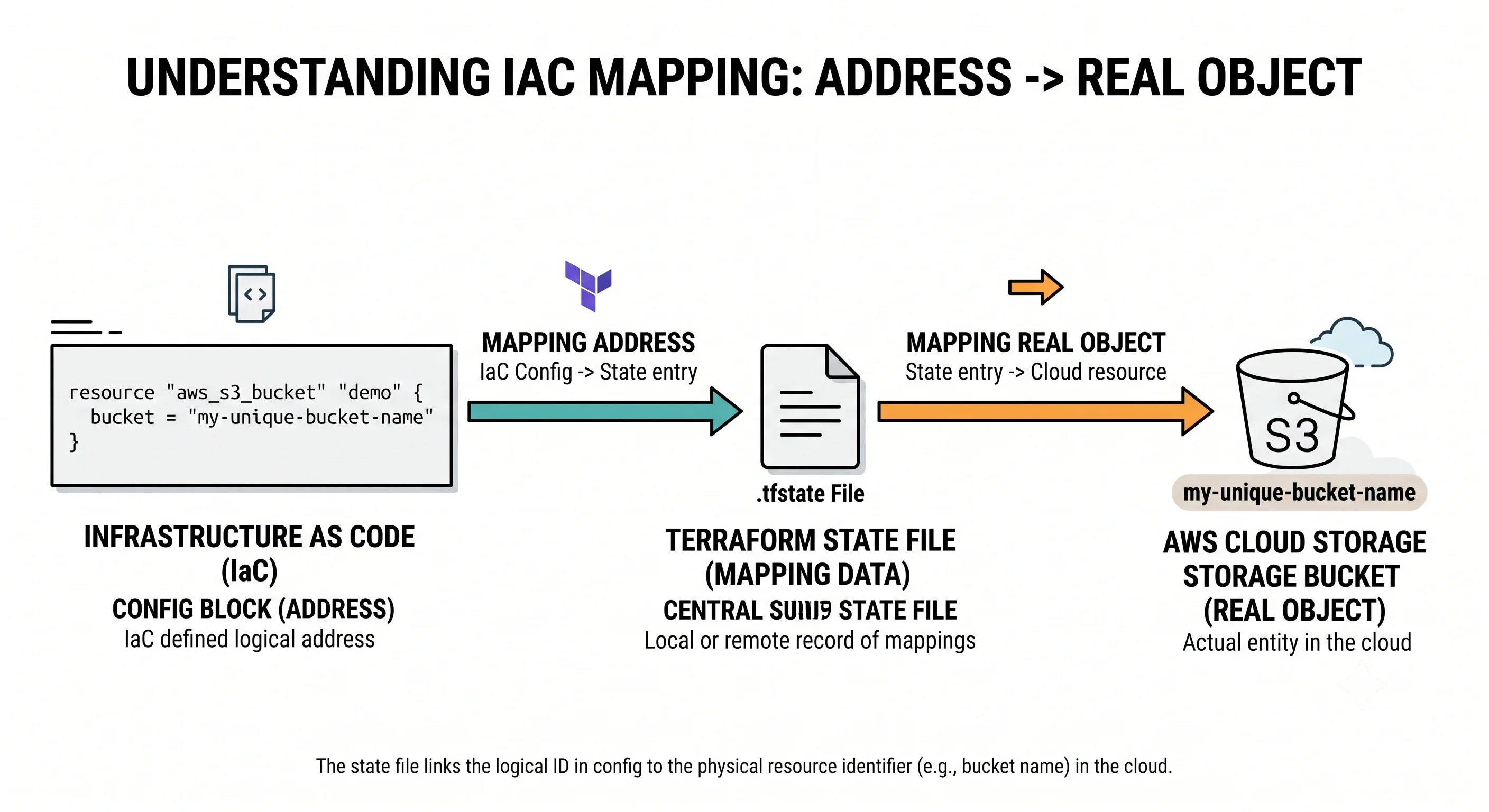
Here's a trimmed real one:
{
  "version": 4,
  "terraform_version": "1.x.x",
  "serial": 3,
  "lineage": "a1b2c3d4-...",
  "resources": [
    {
      "mode": "managed",
      "type": "aws_s3_bucket",
      "name": "demo",
      "provider": "provider[\"registry.terraform.io/hashicorp/aws\"]",
      "instances": [
        {
          "schema_version": 0,
          "attributes": {
            "id": "tf-workflow-demo-0725",
            "arn": "arn:aws:s3:::tf-workflow-demo-0725",
            "bucket": "tf-workflow-demo-0725",
            "tags": {}
          }
        }
      ]
    }
  ]
}
The fields worth recognising now: serial increments on every write and is how a backend detects
that two clients have diverged; lineage is a unique ID for this state's history, and a mismatch
means you're pointing at a completely different state file — a genuinely alarming error worth taking
at face value; mode distinguishes managed resources from data sources; and instances is a
list because of count and for_each, which is where the addressing story gets interesting in
Meta-Arguments.
Three consequences arrive with it, and they're the reason state gets a whole page later:
It contains secrets, in plaintext. Every attribute of every resource, including database
passwords, generated keys and connection strings. sensitive = true hides values from plan output
and does nothing whatsoever to state. Anyone who can read the state file can read your secrets, which
makes "who has access to the state bucket" a real security question — see
Secrets & Sensitive Data.
It cannot be shared through git. It's rewritten on every apply, it's not mergeable, and two branches applying concurrently produce a conflict with no correct resolution. This is the argument for a remote backend, and it applies from the second person onwards.
It must not be hand-edited. It's tempting — it's just JSON — and it goes wrong quietly, because
serial and lineage and checksums exist. Everything you'd want to do by hand has a terraform state subcommand that does it correctly.
Getting Started
Start from the configuration you applied in The Core Workflow, or write any single-resource config. Then look at what's actually there.
ls -la# UNVERIFIED — confirm against a real run
.terraform/
.terraform.lock.hcl
main.tf
terraform.tfstate
terraform.tfstate.backupInspect state through the CLI rather than by opening the file — the habit matters more than the convenience:
terraform state list# UNVERIFIED — confirm against a real run
aws_s3_bucket.demoterraform state show aws_s3_bucket.demo# UNVERIFIED — confirm against a real run
# aws_s3_bucket.demo:
resource "aws_s3_bucket" "demo" {
arn = "arn:aws:s3:::tf-workflow-demo-0725"
bucket = "tf-workflow-demo-0725"
bucket_domain_name = "tf-workflow-demo-0725.s3.amazonaws.com"
id = "tf-workflow-demo-0725"
tags = {}
...
}That output is a resource block that Terraform reconstructed from state, not from your file. The difference is the point: your file has three lines; state knows every attribute the provider returned.
Now demonstrate why state is load-bearing. Move it aside and plan:
mv terraform.tfstate terraform.tfstate.hidden
terraform plan
# UNVERIFIED — confirm against a real run
Plan: 1 to add, 0 to change, 0 to destroy.Terraform has forgotten the bucket exists and proposes to create it — which would fail, because the name is taken. This is exactly what losing state looks like, and it's why the next few pages care about where state is kept. Put it back:
mv terraform.tfstate.hidden terraform.tfstate
terraform plan   # No changes.
Then split the configuration and prove that filenames mean nothing:
# move the terraform{} block into versions.tf and the output into outputs.tf
terraform plan   # No changes. Terraform doesn't care which file anything was in.
Finally, clean up:
terraform destroyIn Practice
Write .gitignore before the first commit. This is the highest-value paragraph on the page. The
canonical version, which works for all three clouds:
# Local cache — regenerate with `terraform init`
.terraform/

# State: contains secrets in plaintext, and cannot be merged
*.tfstate
*.tfstate.*

# Saved plans: also contain secrets
*.tfplan
tfplan

# Variable files that may hold secrets or environment-specific values.
# Note the negations below — decide deliberately which of yours are safe to commit.
*.auto.tfvars
*.tfvars
!example.tfvars
!envs/*.tfvars

# Crash logs
crash.log
crash.*.log

# Editor and OS noise
.terraform.tfstate.lock.info
Do commit .terraform.lock.hcl. It's in the same directory as .terraform/ and the name looks
similar enough that people gitignore both. Reproducibility depends on it.
The .tfvars question deserves a decision, not a default. Two coherent positions. Either
.tfvars files hold only non-secret, environment-shaping values — region, instance size, name prefix
— in which case commit them, because they're part of how the environment is defined and belong under
review. Or they hold anything sensitive, in which case they must be ignored and the values come from
a secret manager or TF_VAR_ environment variables instead. What doesn't work is the middle position
where nobody's sure, because that's how a password reaches git. The blanket *.tfvars ignore above
with explicit negations forces the decision. See
Variables, Locals & Outputs.
Local state is a single-person, single-machine, throwaway-only arrangement. It's the default because it needs no setup, and it's correct for exactly the demonstration above. The moment a second person is involved, or the moment the infrastructure matters, state moves to a remote backend with locking and versioning. This is the first architectural decision of any real Terraform repository, and State & Backends is where to make it.
The production-shaped directory, which the rest of the article builds on:
.
├── versions.tf        # required_version, required_providers, backend
├── providers.tf       # provider blocks and aliases
├── variables.tf       # typed inputs with descriptions and validation
├── main.tf            # or network.tf / storage.tf / iam.tf once it grows
├── outputs.tf
├── terraform.tfvars   # committed only if it holds nothing sensitive
├── .terraform.lock.hcl
├── .gitignore
└── README.md          # what this configuration owns, and what it deliberately doesn't
That README line is not decoration. The boundary — what this state file owns and what is out of scope — is the single most useful sentence in a Terraform repository, and it's the one nobody writes.
What a reviewer should look for in a diff touching project structure:
- Is
.gitignorepresent and does it cover*.tfstateand.terraform/and plan files? - Is
.terraform.lock.hclcommitted, and is the diff to it explained? A lock file change means a provider version change, which is an infrastructure change in disguise. - Has a
.tfvarsfile appeared, and does anyone know whether it contains secrets? - If a
backendblock changed, has state migration been discussed? That's not a code review comment, that's a conversation. - If state ever was committed: rotate every credential in it. Removing it in a later commit doesn't remove it from history.
Blast radius of getting this wrong is asymmetric and worth internalising. A committed .terraform/
is embarrassing and bloats the repo. A committed .tfstate is a credential leak plus a permanent
history rewrite problem. A missing lock file is a slow, confusing bug that surfaces weeks later in
someone else's plan.
Ecosystem
terraform-docs — generates a markdown table of a configuration's inputs, outputs and providers
from the source, so the README doesn't rot. The glue: a .terraform-docs.yml and either a pre-commit
hook or a CI check that fails when the generated section is stale. Near-mandatory once you write
modules (Modules).
.gitignore templates — GitHub's Terraform.gitignore is the usual starting point, and it's
close to the block above. Read it rather than copying blindly; its .tfvars handling is a decision it
makes for you.
git-secrets, gitleaks, or GitHub secret scanning — catch the credential that reaches a commit
anyway. Given that state files and plan files both contain secrets in plaintext, a pre-push scan is
cheap insurance rather than paranoia.
tfenv / tenv and .terraform-version — pin the Terraform binary itself per directory, so the
version that upgrades your state format is a choice rather than an accident. ⚠️ verify current
maintenance status of each.
Provider-specific note. The directory layout is identical across all three clouds — nothing about
.terraform/, the lock file or state differs. What differs is only where remote state naturally
lives: an S3 bucket for AWS, a Storage Account container for Azure, a GCS bucket for GCP, each with
its own locking story. That comparison belongs to
State & Backends.
Production
Security
State is the sensitive artefact, and the threat model is simple: read access to state is read
access to your secrets. That means the backend bucket needs encryption at rest, tightly scoped IAM,
and access logging — and it means sensitive = true is not a mitigation, because it only affects
what's printed. Saved plan files carry the same exposure and are more likely to be handled carelessly,
because they look like build artefacts. If state has ever been committed to git, treat every
credential in it as compromised and rotate it; deleting the file in a subsequent commit changes
nothing.
Blast radius
A lost state file doesn't destroy anything by itself — but the recovery is painful, because Terraform
now believes it owns nothing and will propose to create resources that already exist. The mitigations
are versioning on the state backend (so you can restore yesterday's) and, in the worst case, re-import.
Meanwhile, terraform.tfstate.backup gives you exactly one generation locally, which is enough to
survive a mistaken state rm and nothing more.
Scale
The state file grows with the number of managed resources and gets read and written in full on every
operation, so a very large state means slow plans, larger lock windows and more contention. The
project-level answer isn't a bigger file — it's more, smaller state files, with seams placed where
change frequency and blast radius differ. The file split inside a single directory (network.tf,
storage.tf) is cosmetic by comparison: those files share one state and one plan.
Scale & Performance.
Team workflow
Three habits are worth establishing before the second person joins: state lives remotely, the lock
file is committed and its changes are reviewed, and the repository README states the ownership
boundary. The failure mode without them is the repository where everyone has a slightly different
.terraform/, a slightly different provider version, and their own local state — a configuration that
technically exists in git and describes nobody's infrastructure.
Reliability
Everything in the directory except .tf files and the lock file is reconstructible: .terraform/
from init, state from the backend's version history, plans from plan. The corollary is that your
recovery position is entirely determined by two things — is the configuration in git, and is the state
backend versioned. Both are one-time setup decisions. Test the second one by restoring a previous
state version deliberately, once, before you need to: see
Failure & Recovery.
Interview Questions
Conceptual
What files does a Terraform project contain after `init` and `apply`, and which go in git?
Your .tf files and .terraform.lock.hcl go in git. .terraform/ (the local provider and module
cache), terraform.tfstate and terraform.tfstate.backup, and any saved plan files do not. The rule
is "commit what you wrote, plus the lock file". The two mistakes that matter are committing state — a
plaintext credential leak — and not committing the lock file, which loses version reproducibility.
Why is the split into `main.tf`, `variables.tf` and `outputs.tf` a convention rather than a requirement?
Terraform loads every .tf file in the working directory and evaluates them as a single
configuration. Filenames carry no meaning, ordering between or within files is irrelevant, and one
file would work identically. The convention exists for humans and reviewers. Knowing this matters
because it tells you the correct answer to "where do I put this?" is "wherever a reviewer would look
for it", and that once the configuration grows you split by domain — network.tf, storage.tf —
rather than inventing more type-based files.
What is the state file and why does Terraform need one?
A JSON document mapping each configuration address to the real object it manages, with a cached copy of that object's attributes. It's needed for identity (nothing in the cloud says which declaration owns which bucket), for deletion detection (a resource removed from configuration is otherwise indistinguishable from one never written), and for performance (rediscovering everything on every run is impractical). The follow-ups this invites: it contains secrets in plaintext, it can't be shared through git, and it must never be hand-edited.
What's the difference between `.terraform/` and `.terraform.lock.hcl`?
.terraform/ is a local cache — downloaded provider binaries and modules, machine- and
platform-specific, often very large, regenerated by init, gitignored. .terraform.lock.hcl is a
small text file recording the exact provider versions and checksums that were selected, committed to
git so that everyone resolves identically. Similar names, opposite treatment. Confusing them is a
common and consequential mistake.
Should `.tfvars` files be committed?
It depends on what's in them, and the team needs an explicit rule rather than a default. If they hold
only environment-shaping, non-secret values — region, sizing, naming prefix — commit them, because
they define the environment and should be reviewed. If they hold anything sensitive, ignore them and
source those values from a secret manager or TF_VAR_ environment variables. The dangerous position
is ambiguity, so the usual pattern is to gitignore *.tfvars broadly and add explicit negations for
the files that are known-safe.
Technical depth
What's in the lock file, and what breaks without it?
For each provider: the exact resolved version, the constraint that produced it, and a set of
checksums. It's the equivalent of package-lock.json. Without it, everyone resolves the version
constraint independently at init time, so a colleague or a CI run next month silently gets a newer
provider — and provider upgrades change defaults, deprecate arguments and occasionally force resource
replacement. The symptom is a plan that differs between machines for no visible reason.
The platform subtlety worth mentioning: the hashes are platform-specific, so a lock file generated
only on macOS can fail on Linux CI. terraform providers lock -platform=... records several
platforms at once.
Walk me through the fields in a state file.
version is the state format version; terraform_version records the binary that last wrote it —
relevant because a newer Terraform can upgrade the format and older ones then can't read it. serial
increments on every write and lets a backend detect divergence between clients. lineage is a unique
identifier for this state's history; a lineage mismatch means you're pointed at an entirely different
state, and it's an error to take seriously rather than force past. resources holds each managed
resource with its mode (managed versus data), type, name, provider, and an instances list —
a list rather than a single object because of count and for_each.
Is it ever acceptable to hand-edit state?
Practically never, and the reasons are concrete: serial must increment, lineage must be
preserved, checksums exist, and a remote backend may reject or silently overwrite what you wrote. Every
legitimate operation has a subcommand — state mv to rename, state rm to forget, import to adopt,
state pull/push for the genuine last resort. If you find yourself wanting to edit JSON, the
question to ask is which of those you actually need. See
State & Backends.
Someone committed `terraform.tfstate` to a public repository. What now?
Treat it as a credential compromise, in that order of urgency: rotate every secret the state
contains — database passwords, generated keys, access tokens — because deleting the file in a later
commit leaves it in history and it has already been cloned and indexed. Then purge it from history
(git filter-repo or BFG) and force-push, accepting the disruption. Then fix the cause: .gitignore,
a remote backend so local state stops existing, and secret scanning on push. Then audit what else the
state exposed — resource IDs and network topology are reconnaissance even when there are no passwords.
You delete `.terraform/` and `terraform.tfstate` by accident. What's recoverable?
.terraform/ is trivial — run init. State is the real question, and the answer depends entirely on
prior decisions. With a versioned remote backend, restore the previous version. With local state, you
have terraform.tfstate.backup, which is exactly one generation and covers only the most recent
write. With neither, the infrastructure still exists but Terraform no longer knows about it, and
recovery means re-importing every resource. This asymmetry — configuration is safe in git, state is
only as safe as your backend — is the argument for remote state with versioning on day one.
How does this differ across AWS, Azure and GCP?
The working directory doesn't differ at all: same .tf loading rules, same .terraform/, same lock
file, same state format. Saying that plainly is the right start, because the question is partly
testing whether you know what's Terraform and what's provider.
What differs sits just outside the directory. Where remote state lives — an S3 bucket, an Azure Storage container, or a GCS bucket — and how locking is achieved, which is the genuine divergence: GCS and Azure Blob provide locking natively through object-level mechanisms, while the S3 backend historically required a separate DynamoDB table and more recently supports native S3 locking. ⚠️ verify current S3 locking guidance. Provider binary size also differs enough to matter for CI cache configuration.
There's also a configuration-shape difference that shows up in every Azure project: the resource
group. Azure resources need a containing resource group, so an Azure root module has a resource with
no AWS or GCP counterpart, which tends to make main.tf structured slightly differently. The
canonical table is in Providers & the Registry.
Scenario and design
A new starter clones the repo and runs `terraform plan`. It proposes to create everything. What went wrong?
Terraform can't see the state. The likely causes, in order of probability: there's no backend
configured, so state was local on someone else's machine and never shared — the classic
single-person-project-meets-second-person failure. Or a backend is configured but they haven't run
init, so it isn't wired up. Or they've authenticated to the wrong account or subscription, so the
backend they reached is empty. Or they're in the wrong directory, or the wrong workspace.
Check terraform init output and terraform state list first — an empty list confirms it's a state
visibility problem rather than a configuration one. The fix in the common case is to migrate the
existing local state into a shared backend, and the lesson is that remote state isn't an optimisation.
You're setting up a new Terraform repository. What do you do before the first commit?
.gitignore covering .terraform/, *.tfstate*, plan files and .tfvars — before anything is
committed, because the alternative is a history rewrite. Then: a versions.tf pinning
required_version and provider constraints, a remote backend with encryption and versioning enabled,
and a README stating what this configuration owns and what it deliberately doesn't. If it's a team
repo, add pre-commit with fmt and validate so formatting never reaches review, and decide the
.tfvars policy explicitly rather than discovering it later.
Your repository has grown to a 1,200-line `main.tf`. How do you break it up, and what does that actually change?
Split by domain rather than by resource type — network.tf, storage.tf, iam.tf — so a reviewer
has an obvious file to open. But be clear about what this does and doesn't buy: it's purely
readability. All those files remain one configuration, one state file, one plan, one lock, one blast
radius. Splitting files changes nothing about behaviour or safety.
If the real problem is that plans are slow, or that a change to one thing risks another, the answer is a different kind of split — separate configurations with separate state (Repo & Environment Structure) — possibly with the shared parts extracted into modules (Modules). Distinguishing "this file is hard to read" from "this state is too big" is the substance of the question.
How would you structure a repository for three environments, at this stage of your knowledge?
The honest answer is that this is a real decision with a real trade-off and it deserves its own discussion — but the defensible default is one directory per environment, each with its own state and its own backend configuration, calling shared modules. That gives per-environment blast radius, per-environment permissions, and the ability to let staging and production genuinely differ.
The alternative you should name and reject is Terraform workspaces for environment separation: they share one configuration and one backend, so it's easy to apply to the wrong one, and they encourage pretending environments are identical when in practice they never are. Full argument in Repo & Environment Structure.
Commands & Gotchas
terraform init                                    # populate .terraform/, write the lock file
terraform init -upgrade                           # re-resolve constraints, update the lock file
terraform init -migrate-state                     # move existing state after changing the backend
terraform providers                               # which providers this configuration requires, and where
terraform providers lock -platform=linux_amd64 \
                        -platform=darwin_arm64    # record lock hashes for several platforms
terraform state list                              # every resource address in state
terraform state show aws_s3_bucket.demo           # full recorded attributes of one resource
terraform show                                    # human-readable dump of current state
terraform show -json | jq .                       # machine-readable state, for tooling
terraform output                                  # values this configuration exposes
rm -rf .terraform && terraform init # the safe "turn it off and on again"| Behaviour | Why it matters |
|---|---|
Every .tf file in the directory is one configuration |
Filenames and ordering mean nothing to Terraform; subdirectories are not loaded |
.terraform/ is disposable, .terraform.lock.hcl is not |
Similar names, opposite git treatment. This is the most common mix-up |
| State holds every attribute in plaintext | Including secrets. sensitive = true only affects what's printed |
| State is not mergeable | Two branches, two applies, one unresolvable conflict — the case for remote state |
terraform.tfstate.backup is exactly one generation |
Enough to survive a wrong state rm, not enough to be a backup strategy |
| A lock file diff is an infrastructure change | Provider upgrades change defaults and can force replacement. Review it |
| Lock hashes are platform-specific | A macOS-only lock file can break Linux CI. Use providers lock -platform |
lineage mismatch means a different state entirely |
Not a warning to force past — stop and work out which state you're pointed at |
Splitting .tf files changes nothing but readability |
One directory is one state and one blast radius, however many files it has |
← Back to Orientation · Next: HCL & the Type System →
⚠️ Verification checklist (delete before publishing)
Command output — every block marked UNVERIFIED needs a real capture
-
ls -lalisting after a realinit+apply. -
terraform state listandterraform state showoutput, including the exact leading# aws_s3_bucket.demo:comment format. - The "move state aside and plan" demonstration — confirm it really reports
1 to addand doesn't error first. Also confirm this is safe advice to give a reader against a real bucket. - Confirm splitting the config across files genuinely produces
No changes.with noinitrequired.
File and format claims
- The
.terraform/providers/registry.terraform.io/...path structure shown in the tree. - The state JSON excerpt — field names, nesting and
version: 4. ⚠️ verify the current state format version number; this is asserted as fact. - The lock file excerpt structure (
version,constraints,hasheswithh1:/zh:prefixes). - Provider binary size claim ("hundreds of megabytes" for AWS) — flagged inline, needs a real number or removal. Never publish a plausible figure here.
- That
terraform.tfstate.backupis written on every state write and holds exactly one generation. ⚠️ verify. - That
lineagemismatch produces a hard error, and capture the actual message. -
terraform providers lock -platform=flag syntax and the correct platform strings. -
terraform init -migrate-stateflag name. -
.terraform.tfstate.lock.info— confirm this is the local lock file name and that gitignoring it is meaningful.
Cross-provider
- The locking claim in the interview answer: that GCS and Azure Blob lock natively while S3 historically needed DynamoDB and now supports native locking. ⚠️ verify current guidance — this changed recently and is the most likely thing on this page to be out of date.
Structural
- Decide whether this page needs a
<Tabs>block at all. It currently has none, on the grounds that directory layout is genuinely identical across the three clouds — which is defensible and consistent with the "don't use tabs when all three are identical" rule, but it's the only Stage 0 page without one. Confirm that's the intended call. - The
.gitignoreblock's*.tfvarshandling — confirm the negation syntax works as written. - All relative links resolve, including the forward link to
../01-language/01-hcl-and-types.mdin the footer.