
Plan Apply Lifecycle
A plan is not a list of the things you changed. It's the output of a computation over three inputs — your configuration, Terraform's record of what it made, and what the provider says is really there — and once you know the six phases of that computation, every surprising plan becomes explicable. This page is those phases, the symbols they produce, and the two ideas that account for most confusing plan output: unknown values, and replacement.
Prerequisites: Resources & References, Anatomy of a Project
What & Why
The plan/apply lifecycle is the pipeline Terraform runs to turn a configuration into a set of proposed actions, and then to execute them: parse the configuration, resolve its values, refresh state against reality, build a dependency graph, diff each resource, render the result — and on apply, walk the graph performing the actions.
The bad practice it replaces
Applying and finding out. Not because engineers are reckless, but because in most tooling there was nothing else to do: a deployment script's behaviour was knowable only by reading its source and simulating it, and the simulation was in your head and therefore wrong.
The more specific bad practice this page attacks is one Terraform users fall into: reading only the
summary line. Plan: 3 to add, 1 to change, 0 to destroy is genuinely useful and it is not enough,
because it cannot tell you that the one change is a replacement of a database, or that the three adds
include a resource you thought already existed. The plan body is where that lives, and skimming it is
the habit that makes an incident out of a routine change.
Where it sits
This page is the what happens, in order. It deliberately stops at two edges. The graph phase gets a
sentence here and a page of its own in The Dependency Graph, because
"what creates an edge" is a big enough question to deserve one. And the ways you deliberately
intervene in the diff — lifecycle, create_before_destroy, ignore_changes — are
Meta-Arguments.
Three things it's confused with
A plan is not a transaction. Nothing is reserved, locked or staged in your cloud account. It's a prediction, and the world can move between the prediction and the execution.
A plan is not a diff of your .tf files. This is the most consequential confusion on the page.
Git shows you what you changed. A plan shows the difference between your configuration and
reality, which includes changes nobody made in code: drift, provider upgrades changing defaults,
and resources deleted out of band. A plan with no code change is not necessarily an empty plan.
plan and apply are not "compile" and "run". Both do the same first five phases. apply
without a saved plan file re-does all of them from scratch — so an apply is a plan plus execution,
not a continuation of the plan you looked at earlier.
When NOT to trust it
Three cases where a plan is telling you less than it appears to:
- When you ran it with
-refresh=false. Fast, and it computes the diff against recorded state rather than reality — so it cannot see drift, and will happily report "no changes" about infrastructure someone deleted yesterday. Legitimate for a quick iteration loop on a large state; never the basis for a production approval. - When the plan is old. A saved plan file is a decision frozen at a moment. Applying one from this morning is applying this morning's understanding of reality.
- When the interesting values are unknown. A plan that shows
(known after apply)where you needed a real answer hasn't lied to you, but it hasn't told you what you wanted either — and unknowns propagate, so one unknown value upstream can hide the actual shape of a change several resources downstream.
Core Concepts
Plan — the proposed change. A computed set of actions, one per resource instance, derived from comparing configuration, prior state and refreshed reality. Also the noun for the rendered output.
Prior state — what Terraform recorded last time. The contents of the state file at the start of the run, before any refresh.
Refreshed state — what the provider says is there now. Prior state updated with the current attributes read from the provider's API. The diff is computed against this, not against prior state.
Refresh — re-reading reality. One provider API read per managed resource instance. On by
default for plan and apply; disabled with -refresh=false; performed alone, with the diff
suppressed, by plan -refresh-only.
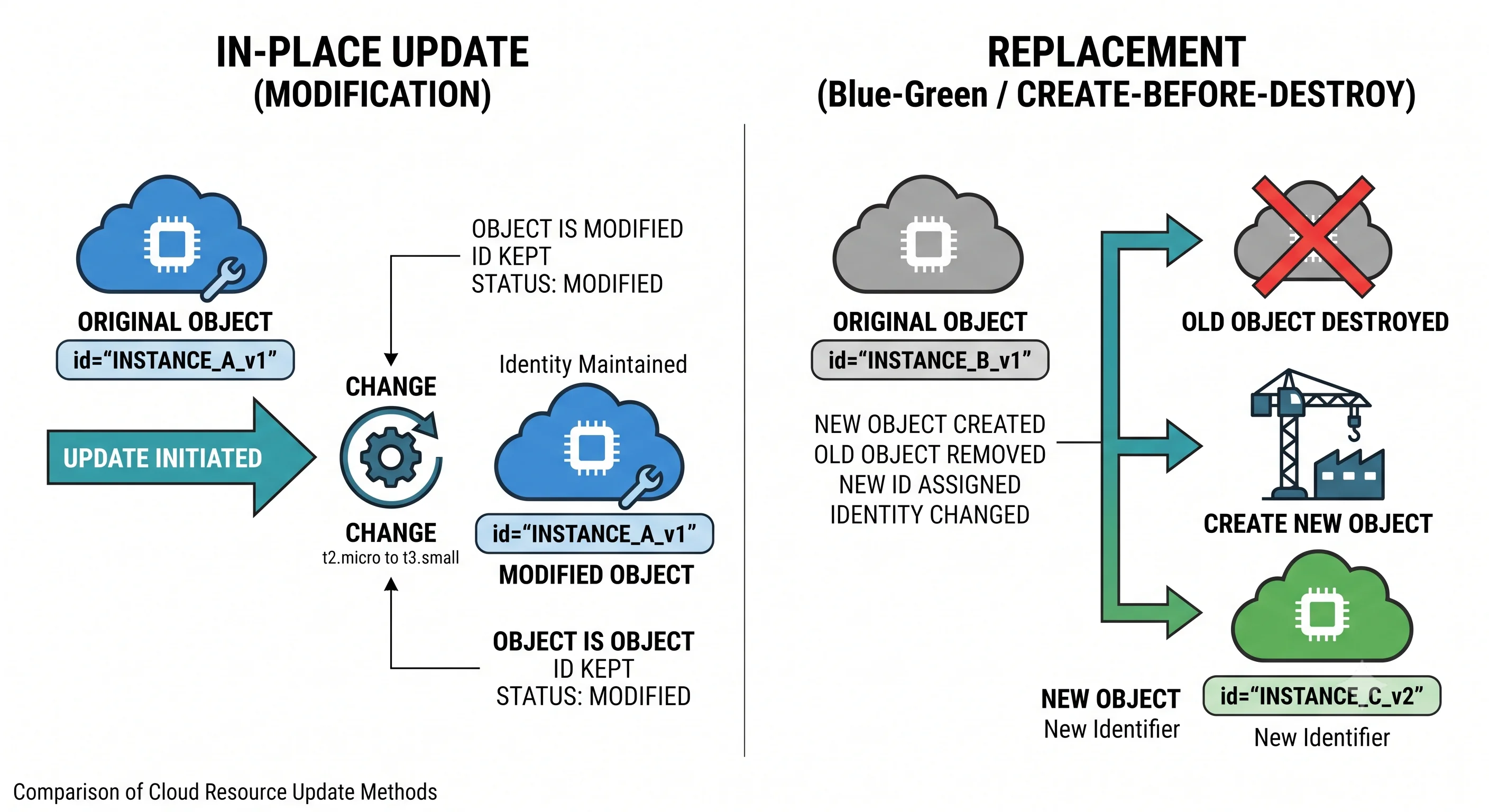
Action — what Terraform intends to do to one resource instance. One of: create, read, update in place, replace (destroy-then-create or create-then-destroy), destroy, or no-op.
Replacement — destroy and create, because the change can't be made in place. Triggered when a changed attribute is marked in the provider's schema as requiring a new resource. The single most dangerous thing a plan can propose, because for data-bearing resources it is data loss wearing the costume of an update.
In-place update — modify the existing object. The provider issues an update call; the object keeps its identity and its data.
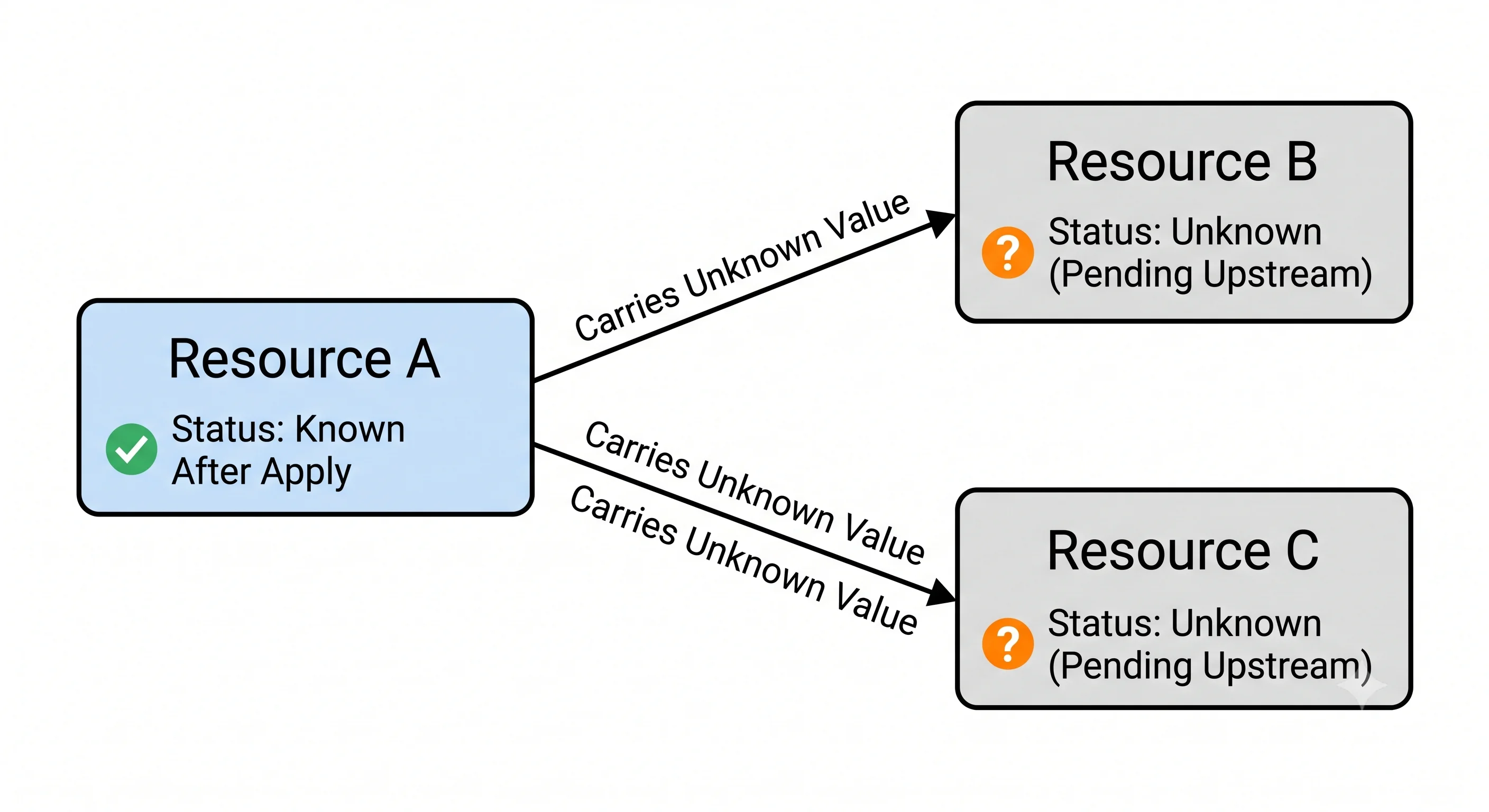
Unknown value — a value that cannot be computed until apply. Rendered (known after apply).
Any attribute whose value is produced by the provider — an ARN, a generated ID, an IP address — is
unknown at plan time for a resource that doesn't exist yet.
Unknown propagation — unknowns are contagious. An expression containing an unknown value is itself unknown, so an unknown attribute on one resource makes every attribute derived from it unknown too, however far downstream.
Plan-time versus apply-time evaluation — when a value gets decided. Expressions over variables, locals, data sources and already-known state attributes are resolved at plan time. Expressions over not-yet-created resources' computed attributes are resolved during apply.
Saved plan file — a plan frozen for execution. Produced by plan -out=FILE, consumed by
apply FILE, inspected by show FILE or show -json FILE. Binary, and it contains sensitive values
in plaintext.
Stale plan — a saved plan whose assumptions no longer hold. apply on one fails rather than
adapting, because silently doing something other than what was approved is worse than an error.
Resource address — the identifier the whole lifecycle speaks in. aws_s3_bucket.demo, or with
an instance key, aws_s3_bucket.demo["logs"]. Every plan line, every state entry and every error
message uses it.
How It Works
Six phases. plan runs one to six; apply runs one to six and then seven.
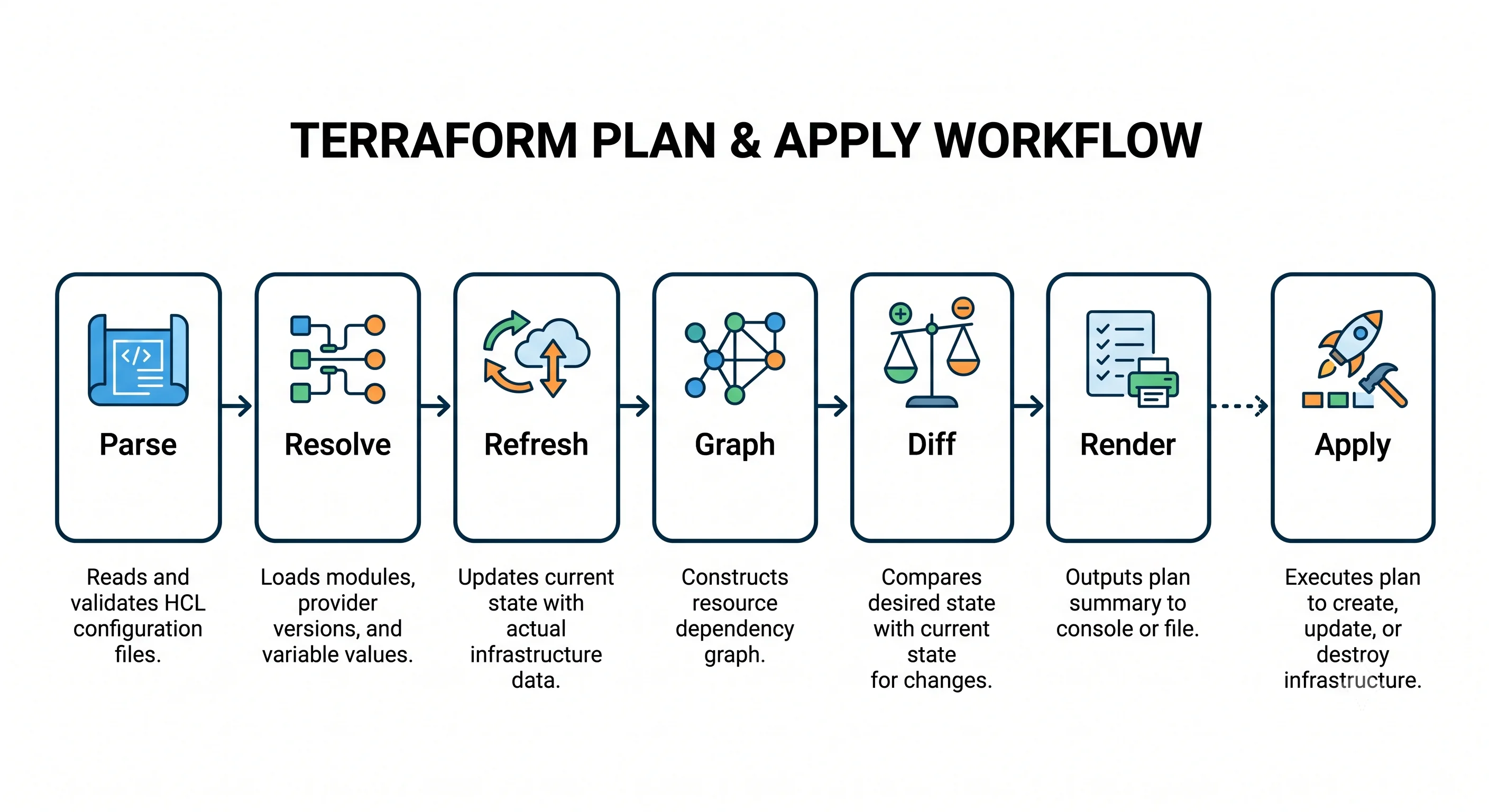
1 · Parse and validate
Every .tf file in the working directory is read and parsed into a syntax tree, then checked for
internal consistency: do referenced resources exist, are argument types correct against the provider
schema, are required arguments present. This is the phase terraform validate runs on its own, and
the reason it needs no credentials — nothing has talked to a cloud yet.
Note what parsing doesn't do: it doesn't execute anything in order. A .tf file is evaluated, not
run, so a resource can reference one declared below it and file ordering is irrelevant.
2 · Resolve values
Variables are resolved from their sources in precedence order, locals are evaluated, and provider
configurations are built. Data sources whose arguments are fully known are read now — which is why a
data source can be used to compute something the rest of the plan depends on.
Data sources whose arguments depend on a resource that doesn't exist yet can't be read now. They
become unknown, are deferred to apply, and are rendered <= — read — in the plan.
3 · Refresh
For every managed resource instance in state, Terraform asks the provider for its current attributes. This is where drift is discovered, and it costs at least one API call per resource instance, which is why plan time scales with state size and why very large states hit provider rate limits (Scale & Performance).
Three outcomes matter:
- The object exists and matches state → state is updated with any newly-returned attributes.
- The object exists and differs → the plan will show the difference, and modern Terraform reports it separately under a heading noting that objects have changed outside of Terraform. ⚠️ verify exact wording.
- The object is gone → Terraform marks it as needing creation. Deleted out of band.
Refresh results are persisted to state, which is why plan — read-only with respect to
infrastructure — still writes.
4 · Build the graph
Terraform builds a directed acyclic graph whose nodes are resource instances, data sources, providers,
variables, locals and outputs, with edges expressing "this must happen before that". Edges come from
references, depends_on, module boundaries and provider relationships. That's the whole of
The Dependency Graph and it's the next page for a reason: ordering
surprises are graph questions, not plan questions.
5 · Diff
Walking the graph, Terraform compares desired configuration against refreshed state for each resource instance and selects an action. The decision procedure, in effect:
| Situation | Action |
|---|---|
| In configuration, not in state | create |
| In state, not in configuration | destroy |
| In both, no attribute differs | no-op |
| In both, differing attributes are all updatable | update in place |
| In both, and any differing attribute requires a new resource | replace |
| Data source, arguments known | read now |
| Data source, arguments unknown | read deferred to apply |
The fifth row is the one to internalise. Replacement is decided per attribute, not per resource, and one attribute is enough. Which attributes force it is a property of the provider's schema — each attribute is flagged as updatable or as requiring replacement, reflecting what the underlying cloud API can actually change on a live object. You cannot infer it from HCL; you read it in the provider documentation, or you see it in the plan.
6 · Render
The diff is turned into the output you read. The symbols:
| Symbol | Meaning | What to think |
|---|---|---|
+ |
create | New resource. Check it's one you meant to add |
- |
destroy | Something goes away. Every one needs an explanation |
~ |
update in place | Usually safe. The object keeps its identity |
-/+ |
replace: destroy then create | Data loss risk. Look for # forces replacement |
+/- |
replace: create then destroy | Same replacement, safer ordering — create_before_destroy is set |
<= |
read (data source) | Deferred until apply, because its arguments are unknown |
(known after apply) |
unknown value | Terraform can't compute this yet |
Two annotations in the body matter as much as the symbols. # forces replacement appears against the
specific attribute that escalated an update into a replacement — that's the line that tells you
why, and it's the first thing to look for on any -/+. And # (5 unchanged attributes hidden)
means the output was truncated for readability; -concise and its inverse control this, ⚠️ verify
current flag names.
7 · Apply
apply re-runs phases one to six unless given a saved plan file, then walks the graph executing
actions. Independent resources proceed concurrently — ten at a time by default, ⚠️ verify — and
state is written incrementally as each resource completes, not in one commit at the end. That is
precisely why a failed apply leaves accurate state describing a half-built world, and why re-running
apply finishes the job.
Applying a saved plan skips one to six and executes exactly what's recorded. If reality has moved such that the plan's assumptions are false, it errors rather than adapting.
Unknown values, and why plans get vague
This is the mechanism behind most "why is my plan showing that?" questions.
resource "aws_s3_bucket" "logs" {
  bucket = "my-logs-bucket"
}

resource "aws_s3_bucket" "app" {
  bucket = "my-app-bucket"

  tags = {
    # depends on an attribute of a resource that doesn't exist yet
    log_target = aws_s3_bucket.logs.arn
  }
}
At plan time the logs bucket doesn't exist, so its ARN is unknown, so the tag value is unknown, so:
# UNVERIFIED — confirm against a real run
  # aws_s3_bucket.app will be created
  + resource "aws_s3_bucket" "app" {
      + bucket = "my-app-bucket"
      + tags   = {
          + "log_target" = (known after apply)
        }
    }
Harmless here. It stops being harmless when an unknown feeds an attribute that forces replacement, because Terraform must then assume the attribute might change and propose replacing an existing resource on that basis. The general shape of the fix: don't derive identity-bearing or replacement-forcing attributes from other resources' computed attributes. Derive them from variables, locals and data sources — things knowable at plan time.
Identical in azurerm and google; the propagation rule is Terraform's, not a provider's.
What forces replacement — this is where providers genuinely differ
The rule is Terraform's; the answers are the cloud's. Renaming an object storage bucket forces replacement everywhere, because in all three clouds the name is the object's identity. But the surrounding attributes diverge, and the divergence is worth knowing before you propose a change.
```hcl
resource "aws_s3_bucket" "demo" {
  bucket = "tf-lifecycle-demo-0725" # change → forces replacement
  tags   = { Environment = "dev" }  # change → in-place update
}
```
Region is set on the provider, not the resource — so moving a bucket between regions
is not an in-place change and not a replacement either; it's a different provider
configuration, and Terraform will not migrate the data.
```hcl
resource "azurerm_storage_account" "demo" {
name = "tflifecycledemo0725" # change → forces replacement
resource_group_name = "tf-demo" # change → forces replacement
location = "westeurope" # change → forces replacement
account_tier = "Standard" # ⚠️ verify: tier changes may force replacement
account_replication_type = "LRS" # in-place update for some transitions only
tags = { Environment = "dev" } # in-place update
}
```
Azure has the largest replacement surface of the three, because the resource group
and location are part of the resource's identity rather than provider-level settings.
Moving a storage account between resource groups is a replacement.```hcl
resource "google_storage_bucket" "demo" {
name = "tf-lifecycle-demo-0725" # change → forces replacement
location = "EUROPE-WEST1" # change → forces replacement
storage_class = "STANDARD" # in-place update
labels = { environment = "dev" } # in-place update — labels, not tags
}
```
Location is a resource attribute here, not a provider setting, so a region change
is a visible replacement in the plan rather than something that quietly does nothing.The pattern generalises: whatever the cloud treats as part of an object's identity or physical placement forces replacement. Azure's hierarchy means more of that is expressed on the resource, so Azure plans show replacements where AWS plans show nothing at all — which is arguably safer, because a silent no-op is worse than a visible danger. The canonical comparison of scoping and metadata across the three is in Providers & the Registry.
Getting Started
The goal is to produce each symbol deliberately and watch the output. One bucket, local state. Shown
in AWS; identical in azurerm and google apart from the naming constraints noted above.
# main.tf
terraform {
  required_version = ">= 1.5"
  required_providers {
    aws = { source = "hashicorp/aws", version = "~> 5.0" }
  }
}

provider "aws" {
  region = "eu-west-1"
}

variable "environment" {
  type    = string
  default = "dev"
}

resource "aws_s3_bucket" "demo" {
  bucket = "tf-lifecycle-demo-0725"

  tags = {
    Environment = var.environment
  }
}
+ — create
terraform init && terraform apply~ — update in place
Change the variable, not the bucket name:
terraform plan -var environment=staging# UNVERIFIED — confirm against a real run
# aws_s3_bucket.demo will be updated in-place
~ resource "aws_s3_bucket" "demo" {
id = "tf-lifecycle-demo-0725"
~ tags = {
~ "Environment" = "dev" -> "staging"
}
# (9 unchanged attributes hidden)
}
Plan: 0 to add, 1 to change, 0 to destroy.The id line has no symbol — unchanged, shown for context. Apply it.
-/+ — replacement
Now change the bucket name in main.tf to tf-lifecycle-demo-0725-renamed:
terraform plan# UNVERIFIED — confirm against a real run
# aws_s3_bucket.demo must be replaced
-/+ resource "aws_s3_bucket" "demo" {
~ arn = "arn:aws:s3:::tf-lifecycle-demo-0725" -> (known after apply)
~ bucket = "tf-lifecycle-demo-0725" -> "tf-lifecycle-demo-0725-renamed" # forces replacement
~ id = "tf-lifecycle-demo-0725" -> (known after apply)
tags = { "Environment" = "staging" }
}
Plan: 1 to add, 0 to change, 1 to destroy.Read this output properly, because it's the whole page in eight lines. must be replaced and
-/+. The # forces replacement comment naming the exact culprit. arn and id becoming
(known after apply), because the new object doesn't exist yet and its identifiers can't be known.
And a summary line reading 1 to add ... 1 to destroy for what looked like a rename.
Do not apply this. Revert the name instead — the point was the plan.
- — destroy, and reading a saved plan
terraform plan -out=tfplan
terraform show tfplan          # the same plan, rendered from the file
terraform show -json tfplan | jq '.resource_changes[].change.actions'
# UNVERIFIED — confirm against a real run
[
"delete",
"create"
]That JSON is what policy tools consume — a machine can assert "no delete actions on resources
tagged production" far more reliably than it can parse terminal output.
-refresh-only — see drift without a diff
Add a tag to the bucket by hand in the console, then:
terraform plan -refresh-only# UNVERIFIED — confirm against a real run
Note: Objects have changed outside of Terraform
Terraform detected the following changes made outside of Terraform since the
last "terraform apply" which may have affected this plan:
# aws_s3_bucket.demo has been changed
~ resource "aws_s3_bucket" "demo" {
~ tags = {
+ "ManualChange" = "true"
}
}This is drift detection in one command, and the basis of the scheduled jobs in Drift & Reconciliation.
terraform destroyIn Practice
Save the plan, review the saved plan, apply the saved plan. The production form of this lifecycle is three steps that guarantee the approved artefact and the executed artefact are the same object:
terraform plan -out=tfplan -input=false -lock-timeout=5m
terraform show tfplan                            # into the pull request comment
terraform show -json tfplan > plan.json          # into policy and cost checks
terraform apply -input=false tfplan              # after approval
-input=false makes Terraform fail rather than hang waiting for a prompt, which is what you want in
CI. -lock-timeout waits for a contended lock instead of failing instantly.
Gate on the JSON, not on human attention. terraform show -json gives every proposed change as
structured data, and the check worth writing first is fail the build on any unexpected delete.
Humans skim; a policy check doesn't. This is the integration point for Conftest, OPA, Sentinel and
Infracost — see Governance & Policy as Code.
Treat plan artefacts as secrets. A saved plan contains resource attributes in plaintext, including sensitive ones. Short retention, restricted access, never a public CI artefact. Secrets & Sensitive Data.
Write configuration that produces legible plans. This is a real design consideration and it's
rarely stated. Deriving replacement-forcing attributes — names, identifiers, placement — from other
resources' computed attributes produces plans full of (known after apply) where you needed
certainty. Derive them from variables and locals instead:
locals {
  name_prefix = "${var.project}-${var.environment}"   # known at plan time
}

resource "aws_s3_bucket" "app" {
  bucket = "${local.name_prefix}-app"                 # so the plan shows the real name
}
What a reviewer should look for in a diff touching this topic — and in the plan attached to it:
- The summary line matches the PR description. "Adds a tag" and
1 to destroyis a conversation. - Every
-and every-/+is explained in the PR body. Not in a comment thread. In the body. - Each
-/+has been traced to its# forces replacementline, and the author says which attribute it was. If they can't, they haven't read the plan. - A replacement on anything data-bearing is a stop. Database, bucket with objects, disk. The correct next step is a migration runbook, not an apply.
(known after apply)on something that ought to be knowable — usually a naming expression that should have come from a local rather than another resource.- Was
-refresh=falseused? Then the plan cannot see drift and isn't an approval basis. - Is the plan attached at all, and is it the plan that will run? A
planfrom a laptop and anapplyin CI are two different plans.
Rollback and blast radius. The lifecycle's protection is entirely the review step; after that,
Terraform executes as fast as the graph allows. Reverting the commit and re-applying restores the
described state but not data — a replaced database comes back empty. The mechanisms that actually
limit damage sit outside this page: prevent_destroy on things that must not die
(Meta-Arguments), and splitting state so no single apply can reach
everything (Repo & Environment Structure).
Ecosystem
terraform show -json and the plan JSON schema. The documented, versioned representation of a
plan. Everything below consumes it, and knowing it exists changes how you automate: you never parse
terminal output. The glue is plan -out followed by show -json.
Conftest / OPA and Sentinel. Policy engines that assert rules over the plan JSON — no public buckets, no untagged resources, no deletes outside a change window. The glue: a CI step between plan and approval that exits non-zero. Governance & Policy as Code.
Infracost. Reads plan JSON and estimates the cost delta of the change, posted as a PR comment next to the plan. The glue is the same JSON file. It turns "this adds a NAT gateway" into a number, which changes review conversations more than you'd expect.
Atlantis and HCP Terraform. Both exist largely to enforce the discipline this page argues for: plan on pull request, plan output visible where the review happens, apply gated on approval, applying the saved plan rather than a fresh one. CI/CD & Automation.
TF_LOG=DEBUG / TF_LOG=TRACE. When a plan proposes something inexplicable, the debug log shows
the provider API calls made during refresh and the values returned — which is how you find out that a
provider is normalising an attribute and reporting a permanent difference. Enormous output; use
TF_LOG_PATH.
Provider behaviour, across the three clouds. The lifecycle is identical. What varies is refresh cost (a function of API latency and rate limits, so plan times differ for identical resource counts) and replacement surface, per the tab set above — Azure's resource-group and location attributes put more of the object's identity on the resource, so Azure plans show replacements where AWS shows nothing.
Production
Security
The plan pipeline reads everything it manages, so the credentials it uses can read every attribute of every resource — and both the plan file and the refreshed state contain those attributes in plaintext. Two practical consequences: plan artefacts need the same handling as state files, and plan permissions can be smaller than apply permissions — read plus state write, rather than create-and-destroy — which is worth separating in CI where you can. The subtler risk is a plan rendered into a public pull request on an open-source repository, exposing account IDs, network topology and occasionally a secret.
Blast radius
Replacement is the hazard, not destroy. destroy announces itself; -/+ reads like a change and is a
delete plus a create. The habits that catch it: read the summary line first, then search the plan body
for forces replacement before anything else, and never approve a replacement on a data-bearing
resource without a migration plan. The structural mitigations are prevent_destroy and smaller state
files. One more: -target produces a plan over part of the graph, so its output is not evidence
about the whole configuration — a targeted plan that looks clean tells you nothing about what a full
apply would do.
Scale
Refresh dominates. At least one API call per resource instance, so plan time grows roughly linearly
with state size, bounded by provider rate limits — and at a few thousand resources this is minutes,
not seconds. The two tuning options both have a cost: -refresh=false is fast and blind to drift;
-parallelism=N helps until the provider begins throttling, at which point it makes things worse.
The real answer at that scale is fewer resources per state file, which is
Scale & Performance.
Team workflow
Concurrent runs contend for the state lock, and with a locking backend the second run fails clearly
rather than corrupting anything — use -lock-timeout in CI so a queued job waits instead of failing.
The workflow rule that matters: the plan a human approved is the plan that runs, which means
-out and apply FILE, every time. Without it, review is theatre — a colleague approved a diff of
.tf files, and a provider upgrade in the same merge can produce replacements the code diff never
hinted at.
Reliability
apply writes state incrementally and is idempotent, so the normal recovery from a failed apply is to
fix the cause and run it again; it creates only what's missing. The failure modes that need more than
that are narrow but real: a resource created in the cloud whose API response was lost, so it exists
unrecorded and the next plan proposes creating a duplicate; and a lock left behind by a killed process.
Both are Failure & Recovery.
Interview Questions
Conceptual
Walk me through what happens when you run `terraform plan`.
Parse and validate the configuration into a syntax tree, checking internal consistency and types against provider schemas. Resolve values — variables in precedence order, locals, provider configurations, and any data sources whose arguments are already known. Refresh: read the current attributes of every managed resource from the provider's API, discovering drift. Build the dependency graph. Diff each resource instance, choosing create, read, update, replace, destroy or no-op. Render the result.
apply runs the same six phases and then walks the graph executing actions, writing state
incrementally — unless it's given a saved plan file, in which case it skips straight to execution.
Why can a plan show changes when nobody changed any code?
Because a plan diffs configuration against reality, not against the previous commit. Four common
causes: drift, where someone changed a resource by hand or another system did; a provider version
upgrade changing defaults or adding attributes; a resource deleted out of band, which appears as a
create; and unstable expressions in the configuration itself — a timestamp() call or a value the
provider normalises differently to how you wrote it, producing a permanent diff. That last category
is a configuration bug, and the others aren't.
What do `+`, `-`, `~`, `-/+`, `+/-` and `<=` mean?
+ create, - destroy, ~ update in place, -/+ replace by destroying then creating, +/-
replace by creating then destroying — that ordering means create_before_destroy is set — and <=
read a data source, deferred to apply because its arguments aren't known yet. (known after apply)
isn't an action; it's an unknown value.
The distinction that matters is ~ versus -/+: one keeps the object and its data, the other
destroys it.
Is a plan a guarantee of what apply will do?
No. It's a prediction computed from state and reality at a moment in time, and nothing is reserved or
locked in the cloud account. Between plan and apply, someone can change a resource by hand, another
pipeline can apply, or a quota can be exhausted. A bare apply mitigates this by re-planning and
showing you the fresh plan; a saved plan file mitigates it differently, by failing if its assumptions
no longer hold rather than adapting silently.
What does `(known after apply)` mean, and when should it worry you?
The value is computed by the provider and can't be known before the object exists — an ARN, a generated ID, an IP address. Ordinarily it's just how plans look. It should worry you in two cases: when it appears against an attribute that forces replacement, because Terraform must then assume replacement might be necessary and can propose destroying a live resource on that basis; and when it appears where you needed certainty to approve the change — an unknown bucket name means you can't verify the plan does what the PR claims.
Technical depth
What decides whether a change is an in-place update or a replacement?
The provider's schema. Each attribute is marked according to whether the underlying API can change it
on a live object; changing an attribute flagged as requiring a new resource escalates the whole
resource to replacement. It's decided per attribute, and one is enough — the rest of the diff
being updatable makes no difference. You can't infer it from HCL; you read the provider documentation
or you look at the plan, where the specific attribute is annotated # forces replacement.
Generally, whatever the cloud treats as an object's identity or physical placement is immutable: names, regions, and on Azure the resource group.
Explain unknown value propagation and why it causes surprising plans.
Any expression containing an unknown value is itself unknown, transitively. So one computed attribute of a not-yet-created resource makes every downstream value derived from it unknown, however far away. This is normally cosmetic, but it becomes serious when an unknown lands on a replacement-forcing attribute: Terraform can't prove the value won't change, so it must plan for replacement, and you get a proposed destroy of a healthy resource caused by an unrelated new one.
The mitigation is a configuration style choice — derive names, identifiers and placement from variables, locals and data sources, all resolvable at plan time, rather than from other resources' computed attributes.
What's the difference between `-refresh=false` and `-refresh-only`?
Nearly opposites. -refresh=false skips the refresh phase and diffs configuration against recorded
state — fast, useful when iterating on a large configuration, and structurally blind to drift, so it
must never be the basis of a production approval. -refresh-only does only the refresh and reports
what changed outside Terraform without proposing any configuration-driven changes; it's the drift
detection command, and it can update state to match reality without touching infrastructure.
Why does `terraform plan` write to state?
Because refresh is part of planning, and the attributes it reads are persisted so subsequent
operations don't re-read them unnecessarily. So "plan is read-only" is a claim about infrastructure,
not about state — a plan also acquires the state lock, which is why two people planning concurrently
against a shared backend can see a lock error. -refresh=false avoids the writes, at the cost of
being unable to see drift.
What is a stale plan, and why does applying one fail rather than adapting?
A saved plan file records the actions to take and enough about the state it was computed from to know whether that state still holds. If state has moved on — someone else applied, or drift changed a resource — the assumptions are false, and Terraform errors rather than recomputing. That's the intended behaviour: the entire value of a saved plan is that the approved artefact and the executed artefact are identical, and silently doing something different would destroy it. The correct response is to re-plan, re-review and re-approve.
How does this differ across AWS, Azure and GCP?
The pipeline itself doesn't differ at all — six phases, same symbols, same diff rules, because it's Terraform's logic and not the provider's. Saying that first is part of a good answer.
Three real differences. Replacement surface: Azure puts more of a resource's identity on the
resource itself — resource_group_name and location are attributes, and changing either forces
replacement — whereas on AWS the region lives on the provider, so a region change isn't visible in the
plan as a replacement at all. GCP sits in between, with location on the bucket. Azure therefore
shows replacements where AWS shows nothing, which is arguably safer.
Refresh cost: identical resource counts produce different plan times, because API latency and rate limits differ, and that determines when you start splitting state.
Attribute normalisation: providers differ in how aggressively they rewrite what you wrote — JSON policy documents on AWS being the classic source of permanent diffs — so the "plan shows a change every time and applying it changes nothing" problem is more common on some providers than others.
Scenario and design
A plan proposes replacing a production database you only meant to re-tag. Diagnose it.
Find the # forces replacement annotation in the plan body — that names the attribute, and everything
follows from it. The likely causes: the resource address was renamed, so Terraform sees a destroy and a
create of two different resources rather than one rename; an identity attribute changed, perhaps
through a modified naming expression; a provider upgrade changed a default or started tracking an
attribute it previously ignored; or an unknown value from another resource has landed on a
replacement-forcing attribute.
The fixes differ completely. A rename is a moved block, and produces no infrastructure change at all
(Import & Refactoring). A provider-upgrade artefact may
need ignore_changes or a corrected configuration. A genuine required replacement is a data migration
with a runbook, not a Terraform change — and prevent_destroy should have stopped this reaching a
plan review.
Design the plan/apply stage of a CI pipeline for production infrastructure.
On pull request: init with a backend the pipeline authenticates to via OIDC rather than long-lived
keys, then validate, fmt -check and tflint, then plan -out=tfplan -input=false -lock-timeout=5m. Publish show tfplan as a PR comment so the review happens next to the proposed
change, and show -json tfplan into policy checks — failing the build on unexpected deletes,
untagged resources, or a cost delta over a threshold. Store the plan file as a restricted artefact,
because it contains secrets.
On merge: apply -input=false tfplan against that artefact, behind an environment protection rule
requiring a named approver. Not a fresh plan — the point is that the reviewed and executed artefacts
are the same.
Also: a scheduled plan -detailed-exitcode against production to alert on drift, and concurrency
control so two applies can't race for the lock. See
CI/CD & Automation.
Every plan shows the same change, and applying it never makes it go away. What's happening?
A permanent diff, and there are four usual causes. The provider normalises the value — reordering JSON
keys, lowercasing, adding a default — so what it reads back never equals what you wrote; the fix is to
write it in the provider's canonical form, often via a helper data source. Another system is modifying
the resource between applies, so it's genuine drift on a loop. The configuration contains a value that
changes every evaluation, such as timestamp(). Or there's a provider bug where an attribute is
written but not read back correctly.
Diagnosis: TF_LOG=DEBUG to see what the API actually returned during refresh, compared with what
you wrote. Resolution in order of preference: fix the configuration to match canonical form; find who
else is writing to the resource; and only as a last resort ignore_changes on that attribute, which
is a deliberate concession that something else owns it and not a way to silence noise
(Drift & Reconciliation).
Your plans take twenty minutes. What do you investigate, and in what order?
First establish that it's refresh, which it almost always is — compare plan against
plan -refresh=false. If the gap is the whole twenty minutes, the cost is API calls, and it's
proportional to resource count and provider latency.
Then, in order: how many resource instances are in this state, and are any of them large for_each
expansions of resources that could be one resource; is the provider rate-limiting, visible in debug
logs as retries; would -parallelism above the default help, or is throttling already the constraint;
and are there data sources being re-read expensively on every plan.
But the honest answer is that tuning flags buys a little and splitting state buys a lot. Twenty-minute plans mean one state file owns too much, and the fix is seams placed where change frequency and blast radius differ — foundational networking apart from fast-moving application resources, environments always separate. See Scale & Performance.
Commands & Gotchas
terraform plan                                # the six phases, rendered
terraform plan -out=tfplan                    # ...frozen into a file
terraform plan -refresh-only                  # drift only: what changed outside Terraform
terraform plan -refresh=false                 # skip refresh — fast, and blind to drift
terraform plan -detailed-exitcode             # 0 no changes, 1 error, 2 changes pending
terraform plan -var environment=staging       # override a variable for this run
terraform show tfplan                         # render a saved plan for a human
terraform show -json tfplan                   # ...for a policy engine or cost tool
terraform apply tfplan                        # execute exactly that plan, or fail
terraform apply -input=false -lock-timeout=5m # CI form: never prompt, wait for the lock
terraform apply -replace=aws_s3_bucket.demo   # force replacement of one resource deliberately
TF_LOG=DEBUG TF_LOG_PATH=tf.log terraform plan # what the provider actually returned| Behaviour | Why it matters |
|---|---|
| A plan diffs config against reality, not against your last commit | An empty code diff can still produce a large plan |
| Refresh is one API call per resource instance | Plan time scales with state size; this is the number that forces state splits |
plan writes state and takes the lock |
"Read-only" refers to infrastructure only |
| Replacement is decided per attribute | One immutable attribute escalates the whole resource. Search for forces replacement |
-/+ destroys first; +/- creates first |
The second means create_before_destroy is set |
| Unknown values propagate transitively | An unknown on a replacement-forcing attribute can propose destroying a healthy resource |
| Values from variables/locals/data sources are known at plan time | Derive names from those, never from another resource's computed attributes |
apply writes state incrementally, not atomically |
So a failed apply leaves accurate state, and re-running finishes the job |
apply FILE fails rather than adapting when state moved |
That failure is the feature that makes approval meaningful |
-refresh=false cannot see drift |
Never an approval basis for production |
A -targeted plan is evidence about part of the graph only |
A clean targeted plan says nothing about a full apply |
| Plan files contain sensitive values in plaintext | Same handling as a state file |
← Back to The Machinery · Next: The Dependency Graph →
⚠️ Verification checklist (delete before publishing)
Plan output — every UNVERIFIED block needs a real capture, and these are the most load-bearing outputs in the article
-
~in-place tag update: exact rendering, including whether unchanged attributes appear without a symbol and the# (N unchanged attributes hidden)wording and count. -
-/+replacement on a bucket rename: confirm the header readsmust be replaced, the symbol placement, the position of# forces replacement, and which attributes become(known after apply). The whole page rests on this block being accurate. - The unknown-propagation example — confirm a tag derived from another bucket's ARN really renders
as
(known after apply)nested inside the tags map as shown. -
plan -refresh-onlyoutput, especially the exact heading. I wrote "Objects have changed outside of Terraform" and flagged it inline; get the real string. -
show -json | jq '.resource_changes[].change.actions'output for a replacement — confirm it's["delete","create"]and not["create","delete"]or a singlereplaceaction. - Confirm
+/-(create-then-destroy) renders as I've described whencreate_before_destroyis set. Not demonstrated on the page — either capture it or soften the claim.
Behavioural claims — several are asserted confidently and used in interview answers
- Default parallelism is 10. Flagged inline. ⚠️ verify.
- That state is written incrementally during apply rather than once at the end. This claim appears three times and underpins the failure-recovery argument.
- That
planpersists refresh results to state by default in current versions — same item as00-orientation/02-core-workflow.md, verify once and fix both pages. - That data sources with known arguments are read during plan, and those with unknown arguments
are deferred and rendered
<=. ⚠️ verify the symbol is still<=. -
-conciseflag name and its inverse for controlling hidden attributes. Flagged inline — ⚠️ verify this flag exists at all; I may be misremembering it. - That
apply -replace=ADDRis the current spelling (it replacedterraform taint). - That a stale saved plan produces an error rather than a re-plan, and capture the error text.
- Whether
validategenuinely type-checks against provider schemas, or only checks syntax and references. Asserted in phase 1 and in an interview answer.
Provider-specific claims in the replacement tab set — this block is the most likely on the page to be wrong
- AWS:
bucketforces replacement;tagsin-place. Confirm. - AWS: the claim that changing the provider
regiondoes not produce a replacement and does not migrate data. ⚠️ verify — this is a strong claim about a silent behaviour. - Azure: that
name,resource_group_nameandlocationall force replacement onazurerm_storage_account. - Azure:
account_tier— flagged inline as uncertain. Either verify or delete the line rather than shipping a hedge. - Azure:
account_replication_type— "in-place for some transitions only" is vague. Get the real rule or cut the comment. - GCP: that
nameandlocationforce replacement andstorage_classis in-place. - The generalisation that Azure has "the largest replacement surface of the three" — defensible, but confirm it survives contact with the real schemas.
Versions and syntax
- Provider version constraint
~> 5.0for aws — stale, same as the Stage 0 pages. Fix all four pages in one pass. -
required_version = ">= 1.5"— confirm nothing here needs higher. -
-input=false,-lock-timeout,-detailed-exitcode,-parallelismflag names.
Rendering and structure
- The single
<Tabs>block renders. Note this page deliberately uses one tab set, for the replacement-surface comparison only, with*Identical in azurerm and google*notes elsewhere — confirm that reads as intended and doesn't look like an omission. - Length check: this is the longest page so far. If it exceeds the 500-line target when rendered, the candidate for extraction is the unknown-values material, which could become its own topic within this stage. Don't let it grow further without splitting.
- All relative links resolve; note that
../01-language/*targets don't exist yet.