
vLLM & LLM Inference Serving
A model that generates ten tokens per second in a notebook and a model that serves two hundred concurrent users are the same weights running on the same GPU. The difference is entirely in what happens between the request arriving and the token coming back — how memory is allocated, when requests are batched, what the GPU does while it waits. That layer has a name now: the inference server. This article is about the one most people end up running.
The uncontroversial sentence is that vLLM is a fast, open-source inference and serving engine for
large language models. The interesting part is everything it hides: why your GPU sits at 40%
utilisation while requests queue, why raising max_model_len by a little causes an out-of-memory
error on startup, what "PagedAttention" is actually doing to your memory, and why the batch size
that made your benchmark look good is the reason your p99 latency is terrible.
Who it's for
A working engineer who wants to run and operate an inference server, not just recite the vocabulary. You will have to pick a GPU, choose flags you can defend, explain a throughput regression, and get paged when the server starts returning 500s under load.
Assumed: you're comfortable with Python and a terminal, and you've probably called an LLM API before.
Not assumed: CUDA or GPU systems knowledge, any distributed-systems background, or familiarity with attention internals beyond a vague sense that a transformer has layers and pays attention to things. Every term is defined where it first appears.
If you already run vLLM in production, the pages likely worth your time are The Scheduler & Block Manager, Memory & Capacity Tuning, Autoscaling GPU Inference and Cost per Token.
The promise
Plain-English intuition first, then the precise mechanics, then the trade-offs nobody advertises.
Most vLLM material picks one. Blog posts give you pip install vllm and a working snippet and stop.
The paper and the source give you mechanics with no reason to care. Almost nobody writes down the
third thing — that continuous batching does nothing for a single-user chatbot, that prefix caching
can be pure overhead on a workload with no shared prefixes, that FP8 quantisation is a no-op on the
T4 you were planning to use, and that for a 3B model on one laptop llama.cpp is simply the better
answer.
Two more commitments:
- Every term is defined the first time it appears. KV cache, prefill, decode, TTFT, throughput versus latency, tensor parallelism, quantisation, block table, preemption. None of them mean what a newcomer guesses, and several of them are used inconsistently across the ecosystem.
- Every runnable example runs on a free Google Colab T4. The default model throughout is
Qwen2.5-0.5B-Instruct— small enough to load in seconds, real enough to behave like a language model. Where an example genuinely needs more than a 16 GB T4 (FP8 quantisation, tensor parallelism, a 70B model), the page says so at the top of the snippet, tells you what hardware it does need, and gives you something to run instead. CPU-only limitations are flagged honestly rather than papered over.
⚠️ On the T4 specifically: it's compute capability 7.5, which rules out FP8 and bfloat16 fast paths. Examples that need Ampere or newer are marked. This is exactly the kind of hardware constraint the article teaches you to read for yourself.
Read it in order
vLLM is not a catalogue of features you can dip into. It is a small number of ideas that build on each other in one specific direction, and the ordering here follows the dependency rather than the marketing.
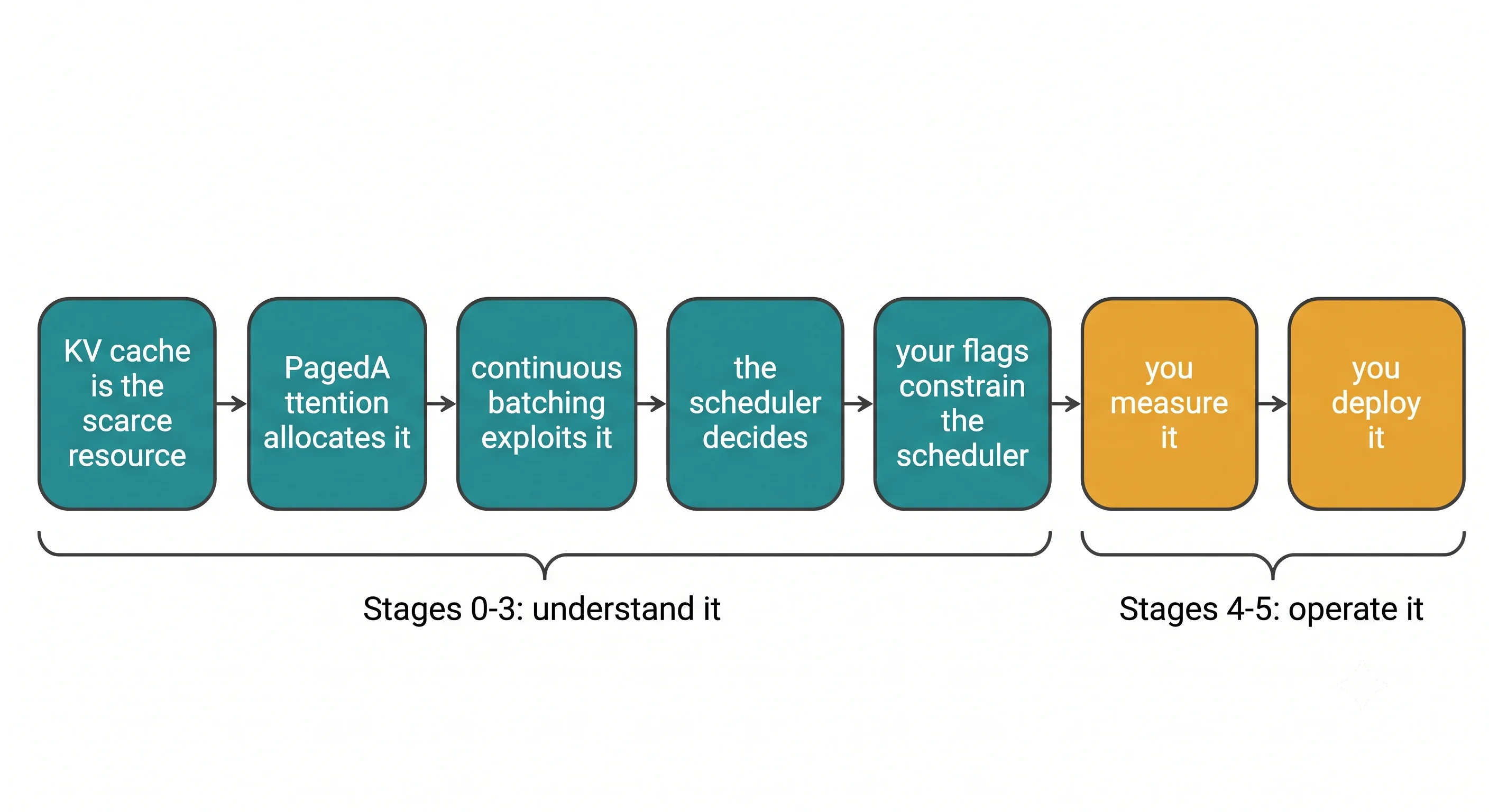
The chain is: the KV cache is the scarce resource → PagedAttention is how it's allocated → continuous batching is what that allocation makes possible → the scheduler is the thing making the decisions → every tuning flag you will ever set is a constraint on that scheduler. Read the flags first and they're a list of magic numbers from someone's blog post. Read them last and each one is obvious.
Three places this article deliberately disagrees with how vLLM is usually taught:
- Sampling parameters are a Stage 1 topic, not an afterthought.
temperatureandtop_pare taught as opaque API fields you copy from an example. They're in Core Concepts here because they change what the engine does — greedy decoding,n > 1, and longmax_tokensall have different memory and scheduling consequences, and you can't reason about a batch until you know that. - Benchmarking comes before production, not after. You cannot tell whether a deployment is healthy if you never established what "healthy" looks like on your hardware with your traffic shape. Stage 4 makes you measure before Stage 5 makes you deploy.
- Autoscaling gets its own page and leads with why the obvious approach fails. CPU-based horizontal autoscaling — the default in every Kubernetes tutorial — is close to the worst possible signal for a GPU inference server. That's a teachable failure, not a footnote.
If you're impatient: Stages 0–3 get you to a running server you understand. Stages 4–5 are the difference between running vLLM and operating it.
The shape of every page
Terraform and infrastructure articles are built around review before you apply. Inference serving isn't like that. The whole point is that you turn one knob and watch a number move — tokens per second, time to first token, KV cache utilisation, or an OOM. So every page here is built around that experimental loop instead.
Same sections, same order, every page. Small or purely conceptual topics drop sections rather than padding them; surviving sections never reorder.
| Section | The question it answers |
|---|---|
| The Problem | What concretely breaks or degrades without this? Leads with a symptom you'd actually hit — an OOM, a queue, a terrible tokens/sec — before naming the fix |
| The Idea | The plain-English mental model. An analogy first, no jargon yet |
| Under the Hood | The real mechanics once the analogy has done its job — the data structures and steps actually involved, with a diagram |
| Try It | A runnable experiment, not a demo. Run this, change one parameter, run it again, and here's the metric, error or log line you should see move |
| Dial It In | The knobs that matter: flag name, what it trades off, a sane starting value, and a rule of thumb for when to move it |
| Where It Bites You | Failure modes and misconceptions — the config that silently tanks throughput, the setting people copy without understanding, when this is the wrong tool |
| In Production | What changes once it isn't just you running a script: deployment config, the monitoring signal to watch, what happens at 10× traffic |
| Check Yourself | 8–12 questions in three tiers — recall the idea, explain the mechanics, reason about a trade-off — with answers |
Each page closes with a Cheat Sheet: the handful of flags, parameters and commands worth memorising for that topic, plus the one or two numbers worth committing to memory.
One exception. Stage 7 — Case Studies is narrative rather than experimental: a whole system arrives broken and gets reasoned into shape. Those pages use their own skeleton — The Brief → Architecture → First Attempt → What Broke → The Diagnosis → The Fix → The Numbers → What Changes at 10× → Lessons → Cheat Sheet.
Contents
Legend: ✅ Available · 🚧 In progress · 📋 Planned
Stage 0 — Orientation
You can explain what an inference server does that a model.generate() loop doesn't, and say out
loud why you're choosing vLLM. · ~2 days
| # | Topic | What it covers | Status |
|---|---|---|---|
| 1 | Why Inference Servers Exist | The naive serving loop and its five failures; static batching; KV cache waste; the throughput-versus-latency trade-off stated precisely for the first time | 🚧 |
| 2 | Where vLLM Sits | vLLM against TGI, TensorRT-LLM, SGLang, llama.cpp and Ollama; what vLLM optimises for; the three situations where it's the wrong choice | 🚧 |
| 3 | Anatomy of a vLLM Setup | Engine versus server; what pip install vllm actually pulls in; where model weights live; the GPU, driver and CUDA prerequisites, honestly stated |
🚧 |
Stage 1 — Core Concepts
You can look at a model card and a GPU spec and estimate whether it will fit, and how many concurrent requests you'll get. · ~1 week
| # | Topic | What it covers | Status |
|---|---|---|---|
| 1 | The KV Cache | Why generation re-reads the whole prompt without it; the memory formula and how to compute it for a real model; why it, not the weights, is the constraint | 🚧 |
| 2 | Prefill vs Decode | The two phases and why they behave nothing alike; compute-bound versus memory-bandwidth-bound; TTFT, ITL and TPOT defined | 🚧 |
| 3 | PagedAttention | The OS virtual-memory analogy, then the real thing: blocks, block tables, internal versus external fragmentation, copy-on-write for shared prefixes | 🚧 |
| 4 | Continuous Batching | Static batching and its convoy problem; iteration-level scheduling; the chef who never lets the pass go empty; the workloads where it changes nothing | 🚧 |
| 5 | Sampling Parameters | temperature, top_p, top_k, max_tokens, stop, seed, n — what each does to the distribution, and what each costs the scheduler |
🚧 |
Stage 2 — The Engine
You can trace one request from HTTP POST to streamed token and name the component responsible at every step. · ~1 week
| # | Topic | What it covers | Status |
|---|---|---|---|
| 1 | The Scheduler & Block Manager | Waiting, running and preempted queues; the token budget per step; preemption by recompute versus swap; what a preemption warning in your logs means | 🚧 |
| 2 | Lifecycle of a Request | HTTP → tokenise → admit → prefill → N decode steps → detokenise → stream; where queuing time actually accumulates | 🚧 |
| 3 | Prefix Caching | Hash-based block reuse; the workloads it transforms (shared system prompts, RAG, agents, multi-turn chat) and the ones where it's pure overhead | 🚧 |
| 4 | Quantisation | AWQ, GPTQ, FP8 and INT8 explained without the linear algebra; what each needs from your hardware; the accuracy cost nobody benchmarks | 🚧 |
| 5 | Speculative Decoding | Draft-then-verify; n-gram and draft-model variants; acceptance rate as the number that decides everything; when it makes your server slower | 🚧 |
Stage 3 — Running It Locally
You have a server running, you've called it three different ways, and you can read its startup log. · ~3 days
| # | Topic | What it covers | Status |
|---|---|---|---|
| 1 | Installing vLLM | pip and uv; matching CUDA and driver versions; the Docker route; the five install errors everyone hits; getting a Colab T4 ready | 🚧 |
| 2 | Offline Batch Inference | The LLM class end to end; SamplingParams; why batch mode is the honest way to measure throughput |
🚧 |
| 3 | The OpenAI-Compatible Server | vllm serve; /v1/completions versus /v1/chat/completions; chat templates and how they silently change your output; curl and the openai client |
🚧 |
| 4 | Streaming & Client Patterns | Server-sent events; streaming with the openai client; timeouts, cancellation, and what happens to a request the client abandoned |
🚧 |
| 5 | The Getting-Started Notebook | One Colab-runnable artifact tying Stages 0–3 together: load, generate, serve, stream, measure | 🚧 |
Stage 4 — Scaling & Performance
You can take an underperforming server, find the bottleneck from its own metrics, and fix it with a flag you can justify. · ~1 week
| # | Topic | What it covers | Status |
|---|---|---|---|
| 1 | Memory & Capacity Tuning | gpu_memory_utilization, max_model_len, max_num_seqs, max_num_batched_tokens — the four-way trade-off, and which OOM each one causes |
📋 |
| 2 | Tensor & Pipeline Parallelism | What actually gets split; TP within a node versus PP across nodes; why interconnect decides which one you want; when one GPU is still the answer | 📋 |
| 3 | Benchmarking | vLLM's own benchmark scripts; throughput versus latency runs; picking a load shape that resembles your traffic; the benchmark that lies to you | 📋 |
| 4 | Reading Logs & Metrics | The throughput log line decoded field by field; KV cache usage %; preemption counts; a diagnosis flowchart for "it's slow" | 📋 |
| 5 | Long Context & Chunked Prefill | Why one 100k-token prompt stalls every other user; chunked prefill; the scheduling knobs and what they cost | 📋 |
Stage 5 — Production Deployment
You can be on call for this. · ~2 weeks
Every page here follows the same pattern: the general production concept first, Kubernetes as the one consistent worked example, then a short note where ECS, Docker Compose or Databricks Model Serving would meaningfully differ.
| # | Topic | What it covers | Status |
|---|---|---|---|
| 1 | Containerising vLLM | The official image; why baking weights in is usually wrong and sometimes right; model cache volumes; entrypoint flags; health and readiness endpoints | 📋 |
| 2 | Kubernetes Deployment | A minimal Deployment and Service; nvidia.com/gpu resources and the device plugin; node selectors and taints; why your readiness probe times out on boot |
📋 |
| 3 | Autoscaling GPU Inference | Why CPU-based HPA is the wrong signal; queue depth and in-flight requests as the right ones; HPA on custom metrics and KEDA; the cold-start problem | 📋 |
| 4 | Observability | The Prometheus metrics vLLM exposes; the four that matter; what to alert on and what to merely graph; SLOs for a token stream | 📋 |
| 5 | Multi-Model & Multi-LoRA Serving | LoRA adapters served from one base model; adapter hot-swapping; one-model-per-pod versus a router; where the memory actually goes | 📋 |
| 6 | Security Posture | Never expose the server directly; API keys and what they don't give you; a gateway for auth and rate limiting; per-tenant isolation; abuse-shaped traffic | 📋 |
| 7 | Cost per Token | The arithmetic from GPU-hour to per-million-tokens; utilisation as the dominant term; the break-even against a commercial API, worked | 📋 |
Stage 6 — Ecosystem & Comparisons
You can defend the choice in a design review. · ~2 days
| # | Topic | What it covers | Status |
|---|---|---|---|
| 1 | The Serving Landscape | A decision table across vLLM, TensorRT-LLM, TGI, SGLang, llama.cpp/Ollama, Ray Serve and KServe; what each is genuinely best at | 📋 |
| 2 | Shipping a Model Version | What CI/CD looks like for a served model: evaluation gate, canary, rollback; an In Practice note on GitHub Actions + Databricks + Airflow | 📋 |
Stage 7 — Case Studies
You can take a workload description and produce a defensible architecture, config and cost model — end to end. · ~1 week
Four complete projects rather than four vignettes: architecture diagram, real config, surrounding code, deployment manifests, the numbers, and the first attempt that didn't work. Each ships a no-GPU script that reproduces its capacity and cost model so you can substitute your own hardware and traffic. All figures here are modelled, not measured, and labelled as such.
| # | Topic | What it covers | Status |
|---|---|---|---|
| 1 | RAG Chatbot at Scale | Internal assistant, 200 concurrent users, 4k shared system prompt, sub-800 ms TTFT. Prefix caching, chunked prefill, max_num_seqs, autoscaling on queue depth |
📋 |
| 2 | Offline Batch Summarisation | 2M tickets overnight, no user waiting. The offline LLM class, quantisation, max_num_batched_tokens, spot instances, Airflow — where every latency instinct is wrong |
📋 |
| 3 | Coding Agent on Long Context | 60k-token bursty turns with near-total prefix reuse. Head-of-line blocking, preemption, cache hit rate as the metric that decides everything, speculative decoding | 📋 |
| 4 | Multi-Tenant LoRA on One GPU | Thirty customer fine-tunes, one GPU, uneven traffic. Multi-LoRA, per-tenant rate limiting and isolation, and the shared-versus-dedicated crossover, worked | 📋 |
If you learn better from a finished system than from first principles, read Case Study 1 first, accept that half of it is unexplained, and come back to Stage 0. Each study's Lessons list is a reading path into the rest of the article.
Reference
| Page | What it covers | Status |
|---|---|---|
| Glossary & Cheat Sheet | Every term defined anywhere in the article, alphabetised and linked back; the vllm serve flag surface grouped by purpose; the LLM and SamplingParams API; the consolidated gotchas table |
📋 |
Versions
Written against vLLM 0.26.x (current stable as of August 2026). vLLM moves fast and the flag surface moves with it, so:
- Where a feature has a minimum version, the page says so.
- Where a default has changed between versions, the page gives the current default and names the version it changed in.
vllm --versionandpip show vllmare the first things to check when an example doesn't work.
Two structural notes that shape a lot of the content.
vLLM's engine was rewritten, and the old one is gone. The V1 engine re-architected the
scheduler, KV cache manager, worker, sampler and API server, and V0 is now fully deprecated. This
article describes V1 throughout. That matters more than a version note usually would, because V1
removed things that older tutorials still describe — notably GPU↔CPU KV cache swapping and
best_of. Where a page describes behaviour that changed, it says so.
The V1 design goal worth knowing, because it explains a lot of the defaults: "require zero configs by enabling features/optimizations by default." Chunked prefill, for instance, is now on by default whenever possible rather than conditionally enabled.
And vLLM is Linux-first. Native Windows is not the supported path; WSL2, Docker or a Linux box is. Hardware support is broad — NVIDIA, AMD, Intel GPU, TPU and CPU are all functional — with more platforms available via plugins. Both are stated once here rather than repeated on every page.
Related
The platform articles this one sits alongside: Apache Spark · AWS · Azure · Terraform
Verification status
Every runnable example, what it tests and what still needs a GPU run is tracked in VERIFICATION — including a record of the claims that running things has already corrected.
⚠️ Verification checklist (delete before publishing)
- Confirm the current stable vLLM version at publication time and update the Versions section.
- V1 framing confirmed from vLLM's own V1 guide: V0 is fully deprecated (RFC #18571), V1 re-architected scheduler / KV cache manager / worker / sampler / API server, and the stated design goal is "zero configs by enabling features/optimizations by default".
- Hardware support confirmed: NVIDIA, AMD, Intel GPU, TPU and CPU all 🟢 Functional.
- Confirm the current stable version number at publication time (0.26.x as of writing).
- Confirm
Qwen2.5-0.5B-Instructstill loads cleanly on a Colab T4 with the pinned vLLM version. - Confirm the T4 / compute capability 7.5 claim about FP8 and bfloat16 support.
- Confirm the current Windows support statement before publishing the "Linux-first" line — the V1 guide's hardware table does not mention Windows either way.
- All 30 relative links resolve once the target files exist. Stage 0's three pages now exist; the rest are still dead.
- Reading-path diagram added to "Read it in order".
- Per-stage time estimates are guesses — sanity-check or drop them.