
03 · The OpenAI-Compatible Server
vllm serve is the same engine as the LLM class with an HTTP layer in front. The interesting part
isn't the HTTP — it's which HTTP: vLLM implements OpenAI's API surface, which means every tool,
SDK and framework already built against OpenAI works against your GPU without modification.
This page is the endpoint map, the one endpoint that will refuse to work for some models, and a diagnostic endpoint that finally makes the chat template visible.
The Problem
/v1/chat/completionsreturns an error for your model, while/v1/completionsworks fine. Same model, same server.- Your output is different through the two endpoints and you're not sure which one is "right".
- You set
--api-keyand think the server is secured. It isn't, not in the way you assume. - A
modelfield mismatch gives you a 404 that names a model you're certain is loaded. - You want to serve two models from one server and can't find the flag.
- You enabled a dev flag from a GitHub issue and inadvertently exposed endpoints that can pause your server or execute arbitrary calls into the engine.
Most of these are the same root cause: the server implements a specification, and the specification has behaviours — required templates, ignored fields, endpoint-specific semantics — that aren't obvious from the fact that your client library connects successfully.
The Idea
A standard plug socket.
The valuable thing about a standard socket isn't the electricity. It's that every appliance ever made already fits, without an adapter, without anyone coordinating. The socket's shape is a protocol, and its value is entirely in how many things already speak it.
vLLM implementing OpenAI's API is exactly that. LangChain, LlamaIndex, the openai SDK in six
languages, evaluation harnesses, IDE plugins, internal tools someone wrote against GPT-4 two years
ago — all of them work by changing one line:
client = OpenAI(base_url="http://localhost:8000/v1", api_key="EMPTY")This is the practical reason engine choice is more reversible than it feels (Where vLLM Sits) — the socket is standard, so what's plugged in behind it can change.
The caveat that matters: a compatible socket doesn't mean identical behaviour. Some fields are ignored, some endpoints need model support, and some semantics are vLLM's rather than OpenAI's. The plug fits; check what the appliance actually does.
Under the Hood
The endpoint map
More than most people realise is implemented — including protocols that aren't OpenAI's at all.
| Category | Endpoints | Notes |
|---|---|---|
| Generation | /v1/completions, /v1/chat/completions, /v1/responses |
Text-generation models. suffix unsupported on completions; user ignored on chat |
| Embeddings | /v1/embeddings |
Embedding models only |
| Audio | /v1/audio/transcriptions, /v1/audio/translations |
ASR models |
| Anthropic | /v1/messages |
Anthropic's Messages API, not just OpenAI's |
| Cohere | /v2/embed, /rerank, /v1/rerank, /v2/rerank |
Cohere and Jina-compatible |
| SageMaker | /invocations |
Routes to the same inference as /v1 |
| Pooling | /classify, /score, /pooling |
Classification, scoring, cross-encoders |
| Utility | /tokenize, /detokenize, /health, /ping, /version, /load |
Operationally useful — see below |
| Render | /v1/completions/render, /v1/chat/completions/render |
Renders the request without running it |
Two of these deserve attention beyond a table row.
/tokenize and /detokenize let you ask the server exactly how it will tokenise a string —
useful for cost estimation and for the token-counting problems from
The KV Cache, without loading a tokeniser client-side.
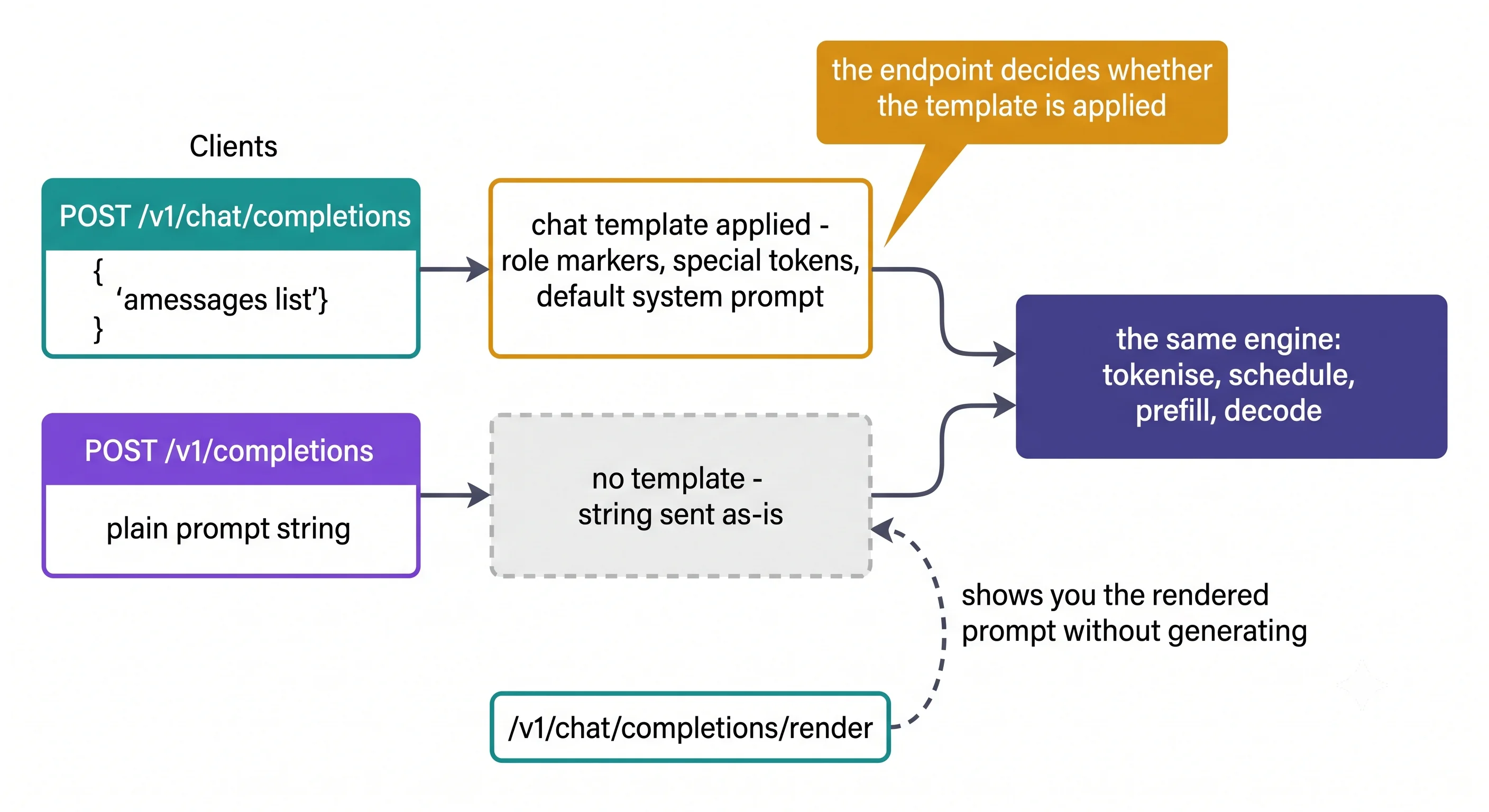
The render endpoints are the diagnostic this article has needed since Lifecycle of a Request. They return what the request renders to — the fully templated prompt — without generating anything. That turns "the chat template silently changed my prompt" from something you infer into something you can print.
The two generation endpoints, and the difference that matters
/v1/completions |
/v1/chat/completions |
|
|---|---|---|
| Input | A prompt string |
A messages list |
| Chat template | Not applied | Applied |
| Requires | Nothing special | The model must have a chat template |
| Right for | Base models, raw completion, controlled evaluation | Instruct models, anything conversational |
This is the same distinction as llm.generate() versus llm.chat() from
Offline Batch Inference, and it's worth stating as a rule:
The endpoint decides whether the chat template is applied.
/v1/completionssends your string to the tokeniser as-is;/v1/chat/completionsrenders your messages through the model's template first. Using an instruct model through/v1/completionswithout templating it yourself gets you the degraded output from the offline page.
When chat completions simply won't work
The chat endpoint needs a chat template — a Jinja2 template in the model's tokeniser configuration describing how roles and messages are encoded. Most instruct models ship one.
Some instruction-tuned models don't. For those, vLLM's documentation is unambiguous: "Without a chat template, the server will not be able to process chat and all chat requests will error."
The fix is to supply one:
vllm serve <model> --chat-template ./path-to-chat-template.jinjavLLM ships templates for popular models in its examples directory. This is a genuine failure mode with a clean fix, and it's the answer to "chat completions errors but completions works."
There's a second, subtler template issue. The OpenAI spec now allows content to be either a plain
string or a list of typed parts:
"content": "Hello world"                                    // string form
"content": [{"type": "text", "text": "Hello world!"}]       // openai form
Most templates expect a string; some newer models expect the structured form. vLLM detects this and
logs "Detected the chat template content format to be...". If detection is wrong, override it with
--chat-template-content-format. Worth knowing because the symptom — a model behaving oddly on
correctly-formed requests — points nowhere near the cause.
--api-key is not authentication
You can require an API key:
vllm serve MODEL --api-key sk-mysecret # or VLLM_API_KEYMultiple keys are accepted, which is what makes rotation possible. But be clear about what this is: a shared secret checked against a header. It gives you no users, no scopes, no rate limits, no audit trail, and no revocation beyond restarting with a different key.
It's a speed bump, appropriate for keeping a colleague from accidentally hitting your dev server. It is not a substitute for a gateway, and treating it as one is the mistake that Security Posture exists to prevent.
Development mode is genuinely dangerous
Setting VLLM_SERVER_DEV_MODE=1 enables a set of endpoints that vLLM's own documentation flags with
a security warning — and reading the list makes clear why:
| Endpoint | What it does |
|---|---|
/reset_prefix_cache, /reset_mm_cache |
Clear caches — can disrupt service |
/sleep, /wake_up |
Put the engine to sleep — causes denial of service |
/pause, /resume |
Pause generation — causes denial of service |
/update_weights |
Change model weights — can alter model behaviour |
/collective_rpc |
Execute arbitrary RPC on the engine — "extremely dangerous" |
/server_info |
Full server configuration |
Any of these reachable from untrusted traffic is a denial-of-service primitive at minimum, and
/collective_rpc is worse. They exist for development and for RLHF weight-transfer workflows.
Never enable this flag on anything network-reachable.
One model per server
The server hosts one model at a time. Serving several means several servers behind a router — or a layer like Ray Serve LLM, which vLLM documents as an integration providing autoscaling, load balancing and back-pressure over the engine. Multi-LoRA is the exception, since adapters share a base model; that's Multi-Model & Multi-LoRA Serving.
Try It
Hardware: Colab T4 or any GPU with compute capability ≥ 7.5.
vllm serve Qwen/Qwen2.5-0.5B-Instruct --max-model-len 4096 --served-model-name chatNote --served-model-name chat: clients now say "model": "chat" rather than the full repo path,
so the checkpoint can change without touching client code.
Experiment 1 — the two endpoints, same question
# Completions — your string goes to the tokeniser as-is
curl -s http://localhost:8000/v1/completions \
  -H "Content-Type: application/json" \
  -d '{"model":"chat","prompt":"In one sentence, what is a KV cache?",
       "max_tokens":80,"temperature":0}' | jq -r '.choices[0].text'

# Chat completions — messages rendered through the chat template first
curl -s http://localhost:8000/v1/chat/completions \
  -H "Content-Type: application/json" \
  -d '{"model":"chat","messages":[{"role":"user","content":"In one sentence, what is a KV cache?"}],
       "max_tokens":80,"temperature":0}' | jq -r '.choices[0].message.content'
What you should observe: the chat response answers; the completions response is more likely to continue or restate. Greedy decoding on both, so the difference is structural rather than sampling.
Now make the invisible visible
This is the experiment the article has been building toward since Stage 2 — and it needs no generation at all:
curl -s http://localhost:8000/v1/chat/completions/render \
  -H "Content-Type: application/json" \
  -d '{"model":"chat","messages":[{"role":"user","content":"Hello."}]}' | jq
What you should observe: the rendered prompt — role markers, special tokens, and the default system message Qwen2.5 inserts when you don't supply one. Your five-character message has become something substantially longer.
| Observation | What it proves |
|---|---|
The rendered text contains <|im_start|> / <|im_end|> markers |
The template is real and it restructured your input |
| A system prompt appears that you never wrote | The model's template supplies a default |
| The rendered length is several times your input | Your token accounting was wrong (The KV Cache) |
Then change one thing: add your own {"role":"system","content":"..."} message and re-render.
The default disappears, replaced by yours. That's how you take control of a prompt you didn't know
you were sending.
Experiment 2 — count tokens without a tokeniser
curl -s http://localhost:8000/tokenize \
  -H "Content-Type: application/json" \
  -d '{"model":"chat","prompt":"The system allocates memory in fixed-size blocks."}' | jq

# and the operational endpoints worth knowing
curl -s http://localhost:8000/health          # liveness
curl -s http://localhost:8000/v1/models | jq  # what is actually loaded, and under what name
curl -s http://localhost:8000/load | jq       # server load metrics
/tokenize gives you exact counts from the server's own tokeniser — the right input to the capacity
arithmetic from Stage 0, and better than
approximating with word counts as several earlier experiments in this article do.
Dial It In
| Flag | What it does | Guidance |
|---|---|---|
--host / --port |
Bind address and port | Default localhost:8000. Think before --host 0.0.0.0 |
--served-model-name |
The name clients use in model |
Always set it. Decouples clients from the checkpoint path |
--api-key / VLLM_API_KEY |
Require a key header; multiple accepted | A speed bump, not auth. Multiple keys enable rotation |
--chat-template |
Supply a template for models without one | Required when chat requests error |
--chat-template-content-format |
string or openai |
Only when auto-detection gets it wrong |
--generation-config vllm |
Ignore the model's generation_config.json |
For reproducibility — see Offline Batch Inference |
--enable-offline-docs |
Serve /docs without internet |
Air-gapped environments |
VLLM_SERVER_DEV_MODE=1 |
Dev endpoints | Never on anything reachable |
Every engine argument from Stages 0–2 also applies here — --max-model-len,
--gpu-memory-utilization, --enable-prefix-caching, quantisation, speculative config. vllm serve
is the engine plus HTTP, so the engine's flags are unchanged.
Where It Bites You
Binding to 0.0.0.0 without a gateway in front. The server has no meaningful authentication, no
rate limiting, and no per-user anything. Exposed directly, one client can consume your entire KV
cache — the noisy-neighbour problem from
The Scheduler, now available to the internet.
Treating --api-key as authentication. It's a shared secret in a header. No identity, no scopes,
no rate limits, no revocation short of a restart.
Leaving VLLM_SERVER_DEV_MODE=1 on. It exposes endpoints that can pause the server, reset
caches, replace weights, and execute arbitrary RPC into the engine. vLLM's docs warn about this
explicitly; the warning is proportionate.
Using an instruct model through /v1/completions. No template is applied, so you get the
degraded output from the offline page. Either use the chat endpoint or template it yourself.
Assuming every OpenAI field is honoured. user is ignored on chat completions; suffix is
unsupported on completions. Compatible does not mean identical, and silently-ignored fields are worse
than errors because nothing tells you.
Hardcoding the repo path as the model name. Then changing checkpoint means changing every client.
--served-model-name exists precisely to prevent this, and retrofitting it is tedious.
Expecting one server to host several models. It hosts one. Multiple models means multiple servers plus routing, or an orchestration layer.
Forgetting parallel_tool_calls defaults to true. The server may return more than one tool call
per request — and whether it does is model-dependent, so behaviour varies by model even with
identical configuration. Set it to false if your client assumes at most one.
In Production
Put a gateway in front, always. Authentication, rate limiting, per-tenant quotas, request size limits and audit logging all belong there, because the server implements none of them. This is the single most important sentence on the page, and it's expanded in Security Posture.
Use /health for liveness and be careful with readiness. From
Installing vLLM, startup takes tens of seconds to minutes — weight loading,
memory profiling, CUDA graph capture. A readiness probe written for a web app will kill the pod
before it ever serves. Use a startup probe with a generous threshold;
Kubernetes Deployment has the manifest.
--served-model-name is a deployment contract. Clients reference a stable alias; you swap the
checkpoint behind it. Without this, a model upgrade is a coordinated change across every consumer.
/load and /v1/models are worth wiring into your tooling. Load metrics for capacity checks,
and the models endpoint for a deployment smoke test that confirms what's actually running under what
name — cheap, and it catches a class of "we deployed the wrong thing" incidents.
What changes at 10× traffic. The HTTP layer becomes a real consideration rather than a
formality: from Lifecycle, the API server process
handles tokenisation and detokenisation on CPU and can saturate before the GPU does. That's when
--api-server-count earns its place, and when a load balancer in front of several replicas stops
being optional.
Check Yourself
Recall the idea
What does "OpenAI-compatible" buy you?
Every tool already built against OpenAI's API works against your server by changing a base URL — SDKs, frameworks, evaluation harnesses, internal tools. It also makes engine choice substantially reversible, since competing engines expose the same surface.
What's the key difference between /v1/completions and /v1/chat/completions?
The chat endpoint applies the model's chat template to your messages; the completions endpoint
sends your prompt string as-is. Same engine, same sampling, different input rendering — and the
difference materially affects instruct-model output quality.
Why might chat completions error while completions works?
The model has no chat template in its tokeniser configuration. Without one the server cannot process
chat requests at all — they error rather than degrade. Supply one with --chat-template.
What do the render endpoints do?
/v1/completions/render and /v1/chat/completions/render return what your request renders to — the
fully templated prompt — without generating. It's the direct way to see what the model will actually
receive.
Explain the mechanics
What does --api-key actually provide, and what doesn't it?
It requires a matching header value, and accepts multiple keys so they can be rotated. It provides no user identity, no scopes, no rate limiting, no per-tenant quotas and no audit trail; revoking a key means restarting with a different one. It's a speed bump for casual access, not an authorisation system.
Why is VLLM_SERVER_DEV_MODE=1 dangerous?
It exposes endpoints that pause generation, reset caches, update weights and execute arbitrary RPC
into the engine. Several are denial-of-service primitives on their own, and /collective_rpc is
described in the docs as extremely dangerous. None of them require authentication beyond whatever
you've put in front of the server.
A client's five-word message becomes forty tokens. Explain, and how would you confirm it?
The chat template wrapped it — role markers around each turn, a generation prompt, and for many
models a default system message inserted when none is supplied. Confirm it directly with
/v1/chat/completions/render, which returns the rendered prompt, or count with /tokenize.
Why does --served-model-name matter more than it looks?
The model field in every client request must match what the server serves, so without an alias the
name is your checkpoint path — and changing model means changing every client in lockstep. With an
alias, the checkpoint is an implementation detail behind a stable contract.
Reason about a trade-off
A colleague wants to expose the server directly to the internet with --api-key. Respond.
The key is a shared secret with no identity, scopes, rate limits or revocation, so a leaked key is unlimited access until you restart. More immediately, there's no per-client resource limit: one caller sending long prompts at high concurrency can consume the whole KV cache and degrade everyone, with no mechanism to stop them. The answer is a gateway handling auth, rate limiting and request size limits, with vLLM bound to localhost or a private network behind it. That's not extra work for a hypothetical threat — it's the only place those controls can exist.
When would you deliberately use /v1/completions with an instruct model?
Controlled evaluation, where you want to supply the exact prompt string including your own templating and be certain nothing was added. Also few-shot prompting with a specific format, or measuring raw completion behaviour. The rule is that it's right when you want control over the exact input and wrong when you want the model's intended conversational behaviour.
How would you serve three models on one machine?
Three vllm serve processes on different ports, each with its own --gpu-memory-utilization so they
don't fight over VRAM, behind a router that maps model names to ports. Or an orchestration layer like
Ray Serve LLM, which vLLM documents as an integration and which adds autoscaling and load balancing.
Check first whether they're LoRA adapters of a common base — if so, multi-LoRA serves them from one
process and is dramatically more efficient.
Your server works from curl on the host but not from another machine. Diagnose.
Most likely it's bound to localhost by default and isn't listening on an external interface —
--host 0.0.0.0 would change that, but only do so behind a gateway or on a private network. Then
check the obvious layers: firewall or security group, and in a container whether the port is
published. If it connects but 404s, the model field probably doesn't match — check /v1/models for
the name actually being served.
Cheat Sheet
Start and call
vllm serve Qwen/Qwen2.5-0.5B-Instruct --served-model-name chat --max-model-len 4096from openai import OpenAI
client = OpenAI(base_url="http://localhost:8000/v1", api_key="EMPTY")
client.chat.completions.create(model="chat", messages=[{"role":"user","content":"Hi"}])Endpoints worth knowing
| Endpoint | Use |
|---|---|
/v1/chat/completions |
Instruct models — template applied |
/v1/completions |
Base models, controlled evaluation — no template |
/v1/chat/completions/render |
See the rendered prompt without generating |
/tokenize, /detokenize |
Exact token counts from the server's tokeniser |
/v1/models |
What's loaded, under what name |
/health, /load |
Liveness, and server load metrics |
Flags
--served-model-name chat        # stable client-facing alias. Always set it
--api-key sk-...                # a speed bump, NOT authentication
--chat-template ./tpl.jinja     # required if the model ships none
--host 0.0.0.0                  # only behind a gateway
--generation-config vllm        # ignore the model's sampling recommendations
Three things to remember
- The endpoint decides whether the chat template is applied. Chat yes, completions no.
--api-keyis not authentication. Put a gateway in front, always.VLLM_SERVER_DEV_MODE=1exposes DoS and arbitrary-RPC endpoints. Never on anything reachable.
Sources
- vLLM, Online Serving — the full endpoint list, chat template requirement and
--chat-template-content-format, dev-mode endpoints and their security warning, Ray Serve LLM — github.com/vllm-project/vllm/blob/main/docs/serving/online_serving/README - vLLM, Quickstart —
vllm serve,--api-key/VLLM_API_KEY, one model at a time,curlandopenaiclient examples — github.com/vllm-project/vllm/blob/main/docs/getting_started/quickstart
← Previous: Offline Batch Inference · Next: Streaming & Client Patterns →
⚠️ Verification checklist (delete before publishing)
Verified against vLLM's online-serving docs this session
- The endpoint list, including
/v1/responses, the Anthropic/v1/messagesAPI, Cohere embed/rerank, SageMaker/invocations, and the utility endpoints. - The render endpoints
/v1/completions/renderand/v1/chat/completions/renderexist and render requests without generating. - Chat completions requires a chat template; without one "all chat requests will error".
--chat-templatesupplies one. -
--chat-template-content-format(string/openai), auto-detection, and the "Detected the chat template content format to be..." log line. -
useris ignored on chat completions;suffixis unsupported on completions. -
parallel_tool_callsdefaults to true, and multi-call behaviour is model-dependent. -
VLLM_SERVER_DEV_MODE=1and the full dev endpoint list, with vLLM's own security warning and the "extremely dangerous" characterisation of/collective_rpc. -
--api-key/VLLM_API_KEY, multiple keys for rotation; one model per server;--enable-offline-docs; Ray Serve LLM as the documented orchestration integration.
Needs verifying
- The exact request/response shape of the render endpoints. The Try It
curlis constructed by analogy with the chat endpoint and has not been run. Confirm the payload and what the response looks like — this is the page's headline experiment. - Confirm
/tokenize's request shape (whether it takesprompt,messages, or both) and whethermodelis required. - Confirm
/load's response shape before recommending it for capacity checks. - Confirm the default bind is
localhostrather than0.0.0.0— the Where It Bites You and Check Yourself answers both depend on it. - Confirm
--served-model-nameaccepts a single alias as used here.
Code
- Run both Experiment 1
curlcommands and paste real output. The claim that completions output is visibly worse for an instruct model is central and currently unshown. - Run the render call and paste the actual rendered prompt — it would let three pages (Lifecycle, Offline, this one) point at one concrete artifact instead of describing it.
- Confirm
jqpaths (.choices[0].textvs.choices[0].message.content) are right for each endpoint.
Rendering
- No diagram yet. A candidate: the two generation endpoints converging on one engine with the chat template on only one path — it would pair with the Lifecycle pipeline image.
- All relative links resolve once target files exist.