
03 · Anatomy of a vLLM Setup
Two pages of theory and you still don't know what you're actually installing, where the model goes,
or whether your machine can run any of it. This page is the inventory: the four things that have to
be true before vllm serve works, what each layer of the stack is for, and the arithmetic that tells
you what will fit — which you can do right now, on a laptop, before spending a penny on a GPU.
That arithmetic is the point of the page. Everyone else's getting-started guide has you install first and discover the constraints as errors. Doing it in the other order means the constraints arrive as numbers you chose.
The Problem
The symptoms, roughly in the order people hit them:
pip install vllmtakes ten minutes, downloads several gigabytes, and breaks your environment. Specifically it replaced thetorchyou had, because vLLM's wheels are compiled against one exact PyTorch and CUDA combination and will not tolerate another.- It installs fine and then fails at import or at startup with something about CUDA, an undefined symbol, or a driver version. The message names a library, not the actual problem.
- The server starts and immediately dies:
ValueError: The model's max seq len (32768) is larger than the maximum number of tokens that can be stored in KV cache. You changed nothing; the default just doesn't fit on your card. - Your disk fills up. Nothing in the vLLM command mentioned a path, but 15 GB appeared in
~/.cache/huggingfaceand nobody told you. 401 Unauthorizedon a model you can see in a browser — it's gated and you never set a token.- It "works" but is impossibly slow, because it quietly fell back to a backend you didn't intend.
Every one of these is the same underlying problem: vLLM looks like one thing you install, and it's actually four things that have to agree with each other — a hardware and driver stack you mostly can't change, a Python package pinned tightly to that stack, model weights that live somewhere else entirely, and a memory budget that has to accommodate all of it.
The Idea
Think of it as a database, not a library.
Nobody is surprised that running Postgres involves distinct pieces: a server process that listens on a port, an engine that does the actual work, and data files on disk that are emphatically not part of the software and don't live in your repository. Nobody puts their database contents in git, and everybody understands that "install Postgres" and "load the data" are different steps with different sizes and different failure modes.
vLLM has exactly that shape, and almost every confusion above comes from expecting it to be a library instead:
| Postgres | vLLM | Lives where |
|---|---|---|
| The server process listening on 5432 | The API server — OpenAI-compatible HTTP | Your process table |
| The engine doing query planning and storage | The engine — scheduler, block manager, model executor | Inside that process (or a sibling one) |
| Data files on disk | Model weights — gigabytes of tensors | ~/.cache/huggingface, a volume, or object storage |
shared_buffers and friends |
KV cache — pre-allocated GPU memory | Your VRAM, claimed at startup |
The last row is where vLLM diverges from the analogy in a way that matters: the cache isn't
overflow space, it's the product. Postgres works with a small shared_buffers and gets slower.
vLLM with a small KV cache doesn't get slower — it gets a lower concurrency ceiling, and past that
ceiling it refuses requests or refuses to start. Sizing it is not an optimisation; it's a
precondition.
Under the Hood
The layer stack
Each layer must be compatible with the one below, and you can only choose some of them.
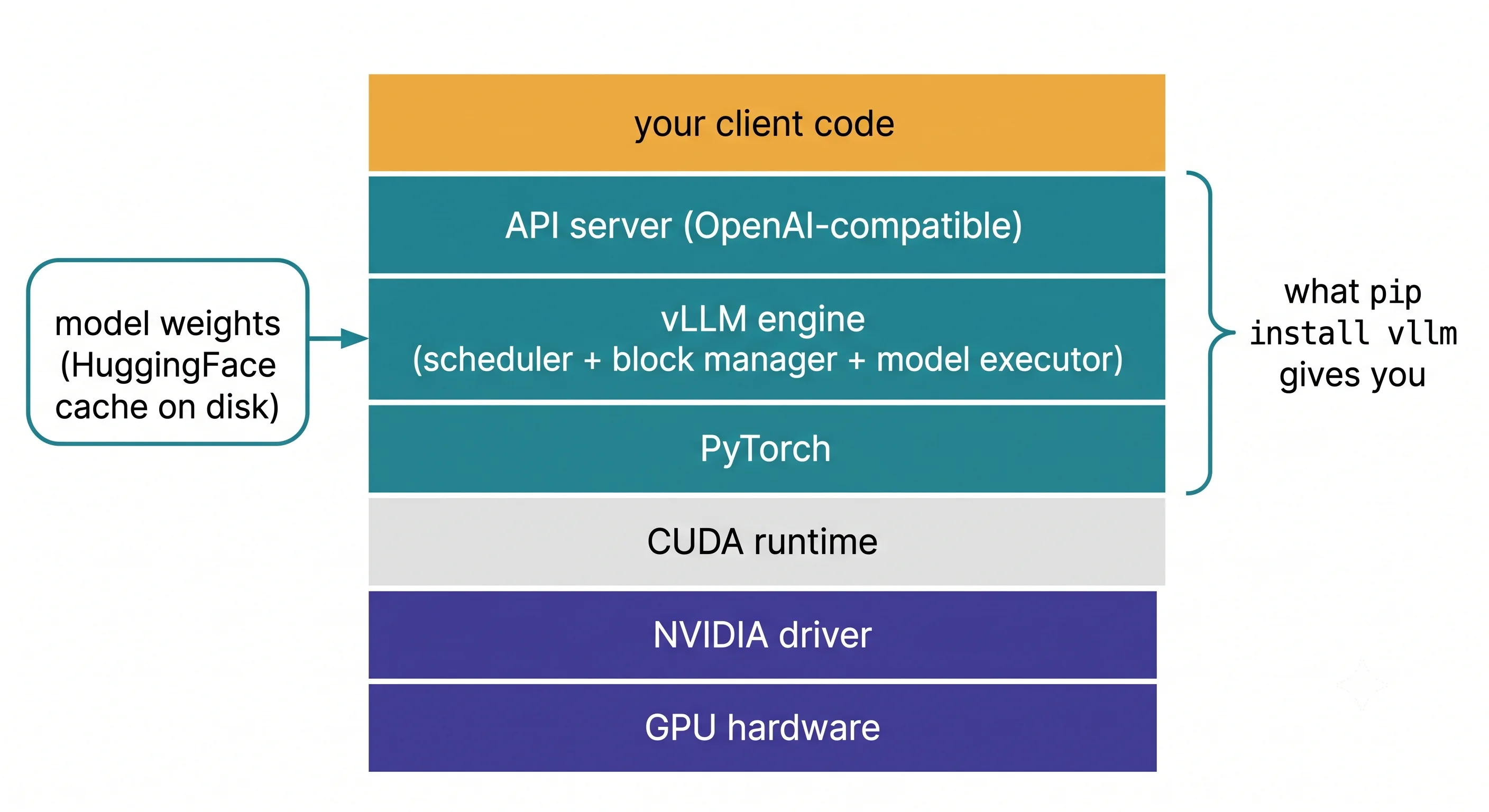
Who owns each layer matters as much as what it does, because it tells you where a given error can actually be fixed:
| Layer | Who controls it | When it's your problem |
|---|---|---|
| Your client code | You | Always |
| API server + engine | The vLLM version you pinned | Flags, config, and choosing the version |
| PyTorch + compiled CUDA kernels | Bundled in the wheel — pinned | Never. Don't fight it; give it its own virtualenv |
| CUDA runtime | Bundled in the wheel | Never directly |
| NVIDIA driver | The host | The usual culprit. pip cannot touch it |
| GPU (compute capability ≥ 7.5) | Procurement | Before you buy, not after |
| Model weights | An artifact you fetch at a pinned revision | Disk, auth, and startup time |
Two things to take from this:
The wheel is a bundle, not a dependency list. pip install vllm brings a specific PyTorch and
compiled CUDA kernels with it. That's why it's large and why it overwrites your torch. Version
skew between the wheel and your environment is not a warning — it's an undefined symbol at import
time. Always install vLLM into its own virtual environment.
The driver is on the host and is the one thing pip cannot fix. The CUDA runtime ships in the wheel; the driver does not. A driver too old for the bundled runtime produces an error that names CUDA and means "update the driver."
Engine versus server: two entry points, one engine
This distinction runs through the whole article, so it's worth fixing now.
| Offline / batch | Online / server | |
|---|---|---|
| Entry point | from vllm import LLM |
vllm serve <model> |
| Shape | A Python object in your script | A long-lived HTTP process |
| Requests | A list you pass in | Arriving continuously over the network |
| Good for | Evaluation, bulk generation, benchmarking, learning | Anything a user or another service talks to |
| Covered in | Offline Batch Inference | The OpenAI-Compatible Server |
Both drive the identical engine. The server is the engine plus an HTTP layer plus request lifecycle management. This is genuinely useful: it means you can learn scheduler and memory behaviour from a Python script with no networking involved, and everything you learn transfers.
Inside the engine, three components you'll meet repeatedly:
- Scheduler — decides each step which requests run. Stage 2.
- Block manager — owns the paged KV cache and hands out blocks. PagedAttention.
- Model executor / workers — run the forward pass, one worker per GPU under parallelism. Stage 4.
vLLM splits this across processes, and the shape is documented: 1 API server process (HTTP, tokenisation, input processing) + 1 engine core process (the scheduler) + one worker process per GPU — so
2 + Nprocesses minimum. This matters when you're reading logs (several sets), debugging (several stack traces), containerising (one container, multiple processes), and especially when sizing CPU: the engine core runs a busy loop and is sensitive to starvation. See The Scheduler & Block Manager.
Where the memory goes
At startup, on one GPU, VRAM is claimed roughly like this:
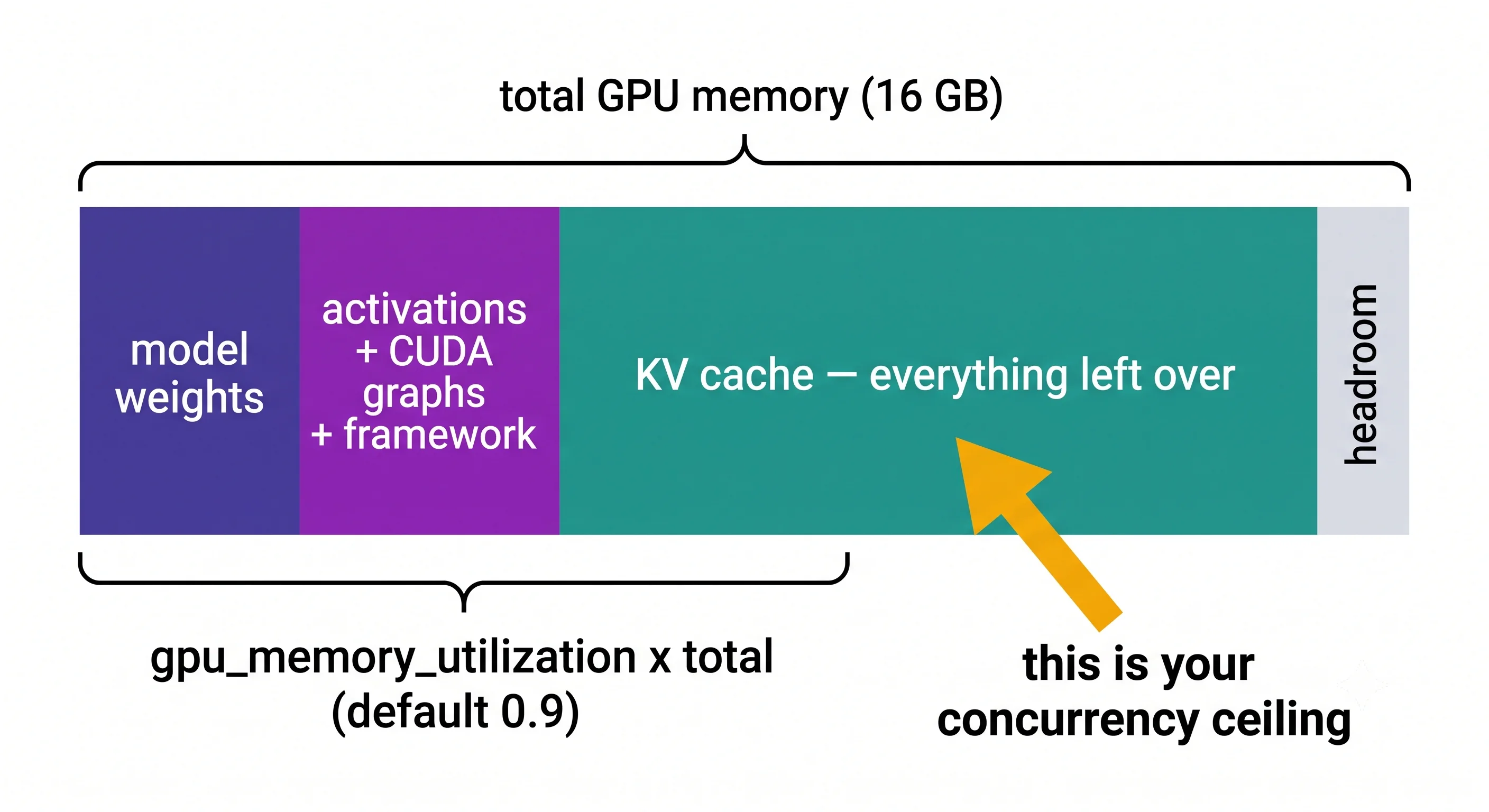
gpu_memory_utilization (default 0.9) is the fraction of the whole card vLLM will use. Weights
and overhead come out of that first; the KV cache is the remainder. Which produces the single
most important consequence in this article:
Your concurrency ceiling is not something you configure. It's what's left after the weights, and you can calculate it before you buy anything.
That calculation is the experiment below, and the flags that move it are Memory & Capacity Tuning.
What a minimal project actually looks like
my-inference-service/
├── pyproject.toml          # or requirements.txt — vllm PINNED to an exact version
├── .env.example            # HF_TOKEN, HF_HOME, model name — never the real .env
├── serve.sh                # the vllm serve command, with every flag, in version control
├── docker-compose.yml      # optional locally; the real thing in Stage 5
├── client.py               # a smoke test that proves the server answers
└── README.md               # which GPU this is sized for, and the arithmetic behind the flags
What is deliberately not in there: the weights. Gigabytes of tensors don't belong in git, and treating them as an artifact you fetch — with a pinned revision — rather than code you commit is the habit that makes Containerising vLLM straightforward later.
What is in there and often shouldn't be missed: serve.sh. The flags you pass to vllm serve
are load-bearing configuration. A team where the production launch command lives in someone's shell
history has an outage waiting for it.
Try It
Hardware: none. No GPU, no vLLM installed, no weights downloaded. This is deliberate — every number below is knowable in advance, and knowing them in advance is the difference between choosing a configuration and discovering one.
Step 1 — inventory what you have
nvidia-smi                              # GPU model, VRAM, driver version. No output = no GPU visible
nvidia-smi --query-gpu=name,memory.total,compute_cap --format=csv
python -c "import sys; print(sys.version)"
df -h ~/.cache                          # weights land here; you want tens of GB free
Three pass/fail gates, and it's worth knowing them before you install anything:
| Requirement | Why |
|---|---|
| Compute capability ≥ 7.5 | vLLM's floor. T4 is exactly 7.5 ✅; V100 is 7.0 ❌ and does not qualify |
| Linux | vLLM is Linux-first. Windows means WSL2, Docker or a remote box |
| Disk for weights | Roughly 2 bytes per parameter for a 16-bit model: ~1 GB for 0.5B, ~16 GB for 8B |
Compute capability also gates features, not just support. A T4 at 7.5 cannot do FP8 and has no fast bfloat16 path — which is why Quantisation will tell you to use AWQ or GPTQ there rather than FP8.
Step 2 — compute what will fit, before installing anything
This downloads a small JSON config file, not weights.
# capacity.py — what fits on a given GPU, computed from published metadata alone.
# pip install transformers huggingface_hub   (no vllm, no CUDA, no GPU required)
from transformers import AutoConfig
from huggingface_hub import HfApi

MODEL       = "Qwen/Qwen2.5-0.5B-Instruct"
GPU_GB      = 16.0      # your card's total VRAM
GPU_UTIL    = 0.90      # vLLM's gpu_memory_utilization default
DTYPE_BYTES = 2         # fp16 / bf16
MAX_LEN     = 4096      # max_model_len you intend to serve

cfg = AutoConfig.from_pretrained(MODEL)

layers   = cfg.num_hidden_layers
kv_heads = getattr(cfg, "num_key_value_heads", cfg.num_attention_heads)  # GQA-aware
head_dim = getattr(cfg, "head_dim", None) or cfg.hidden_size // cfg.num_attention_heads

# KV cache: 2 tensors (K and V) x layers x kv_heads x head_dim, per token
kv_bytes_per_token = 2 * layers * kv_heads * head_dim * DTYPE_BYTES

# Weights: read the real download size from the Hub rather than guessing.
# This fetches metadata only — no weights are downloaded.
def weight_bytes(model_id: str) -> int:
    info = HfApi().model_info(model_id, files_metadata=True)
    wanted = (".safetensors", ".bin")
    total = sum(f.size or 0 for f in info.siblings
                if f.rfilename.endswith(wanted) and "index" not in f.rfilename)
    if total == 0:
        raise RuntimeError(
            f"Could not determine weight size for {model_id}. "
            "Set it manually rather than letting this guess."
        )
    return total

weights_gb = weight_bytes(MODEL) / 1e9

budget_gb   = GPU_GB * GPU_UTIL
overhead_gb = 1.0                          # activations, CUDA graphs, framework. Rough.
kv_gb       = budget_gb - weights_gb - overhead_gb

total_cached_tokens = kv_gb * 1e9 / kv_bytes_per_token
max_concurrent      = total_cached_tokens / MAX_LEN

print(f"{MODEL}")
print(f"  layers/kv_heads/head_dim : {layers} / {kv_heads} / {head_dim}")
print(f"  KV cache per token       : {kv_bytes_per_token/1024:.1f} KB")
print(f"  weights                  : {weights_gb:.2f} GB")
print(f"  budget ({GPU_UTIL:.0%} of {GPU_GB:.0f}GB) : {budget_gb:.2f} GB")
print(f"  left for KV cache        : {kv_gb:.2f} GB")
print(f"  total cacheable tokens   : {total_cached_tokens:,.0f}")
print(f"  concurrent seqs @ {MAX_LEN} : {max_concurrent:,.0f}")
Qwen/Qwen2.5-0.5B-Instruct
layers/kv_heads/head_dim : 24 / 2 / 64
KV cache per token : 12.0 KB
weights : 0.99 GB
budget (90% of 16GB) : 14.40 GB
left for KV cache : 12.41 GB
total cacheable tokens : 1,010,086
concurrent seqs @ 4096 : 247Architecture figures are from the published
config.json; the weight size is the real parameter count (494,032,768 at bf16 = 0.99 GB) from the Hub API. The only estimate here is the 1 GB overhead term.
Now change one thing
Change MAX_LEN only, and record concurrent seqs:
MAX_LEN |
Concurrent sequences | Ratio to the 4,096 baseline |
|---|---|---|
| 2,048 | 493 | 2.00× |
| 4,096 | 247 | 1.00× (baseline) |
| 16,384 | 62 | 0.25× |
| 32,768 | 31 | 0.12× |
What you should observe: concurrency is exactly inversely proportional to max_model_len. Not
approximately — exactly, because you're dividing the same token budget by a larger number.
Why this is the most useful thing in Stage 0. max_model_len looks like a compatibility setting
— "how long a conversation do I want to allow?" — and people set it to the model's maximum because
why not. It is actually a direct division of your concurrency, and setting it to 32k when your
p99 conversation is 3k tokens costs you roughly 90% of your capacity for traffic that will never
arrive. That's the mistake Memory & Capacity Tuning
exists to prevent, and you just derived it with arithmetic instead of an outage.
Two more sweeps worth running:
- Change
MODELtoQwen/Qwen2.5-7B-Instruct, keepingGPU_GB = 16. Its weights are 15.23 GB against a 14.40 GB budget, sokv_gbcomes out at −1.83 GB. That negative number is the OOM-at-startup error from The Problem — predicted, on a laptop, before you rent anything. - Compare a model with GQA (
kv_heads≪num_attention_heads) against an older one where they're equal. The difference in KB-per-token is often 4–8×, and it's why some models serve far more users per GPU than their parameter count suggests.
⚠️ This arithmetic gives you the right shape and roughly the right magnitude. It ignores vLLM's real allocator behaviour, block granularity, CUDA graph memory and framework overhead. Treat it as a planning tool; the authoritative number is the GPU-blocks line in vLLM's own startup log.
Dial It In
The setup-level knobs. Model and scheduling flags come in Stages 3 and 4.
| Knob | What it controls | Sane start | Move it when |
|---|---|---|---|
HF_HOME / HF_HUB_CACHE |
Where weights are cached | A large, persistent volume — not the container root filesystem | Always set this explicitly. The default fills whatever disk $HOME is on |
HF_TOKEN |
Auth for gated/private models | From a secret store, never in the image | Any Llama/Gemma-family or private model |
--download-dir |
Per-invocation override of the cache path | Leave unset; prefer HF_HOME |
You need one model elsewhere |
CUDA_VISIBLE_DEVICES |
Which GPUs the process can see | Unset on a single-GPU box | Sharing a multi-GPU box, or pinning a replica to a card |
VLLM_LOGGING_LEVEL |
Engine log verbosity | INFO |
DEBUG while diagnosing startup or scheduling |
--served-model-name |
The name clients use in the model field |
A stable alias like chat-small |
Always, in production — so you can change the underlying checkpoint without changing clients |
| Model revision pin | Which commit of the repo you fetch | Pin an explicit revision | Always, in production. main moving under you is a silent change |
The two that are non-negotiable in production: HF_HOME on a real volume, and a pinned model
revision. Everything else is tuning; those two are the difference between reproducible and not.
Where It Bites You
Installing vLLM into an environment that already has torch. The wheel bundles its own pinned
PyTorch and CUDA kernels. Installing alongside a different torch gives you either a silent
downgrade of the other project or an undefined-symbol crash at import. Fresh virtualenv, every time.
On Colab, be aware you're installing into a runtime that ships its own torch — expect a restart
prompt, and take it.
Assuming pip install vllm handles the driver. It doesn't and can't. The CUDA runtime is in the
wheel; the driver is host state. A CUDA error at startup on a machine you didn't provision usually
means "ask whoever owns this host to update the driver," not "reinstall vLLM."
Letting the HuggingFace cache default. It goes to ~/.cache/huggingface, which in a container is
the ephemeral root filesystem — so you re-download gigabytes on every pod restart, pay for the
bandwidth, and add minutes to startup. In Kubernetes this shows up as pods that take five minutes to
become ready and occasionally fill a node's disk.
Setting max_model_len to the model's maximum "just in case". You now understand this one as
arithmetic rather than folklore: it divides your concurrency, proportionally, for traffic that
probably doesn't exist.
Treating gpu_memory_utilization as a safety setting. Lowering it to 0.7 "to be safe" doesn't
make anything safer — it hands 20% of your card back and cuts your KV cache, which cuts concurrency.
It's a real knob with real uses (sharing a GPU, leaving room for another process), but "being
careful" isn't one of them.
Not pinning the model revision. Model repositories are mutable. A config or tokeniser change upstream can alter your outputs or break your startup with no change on your side, and it is a genuinely miserable thing to debug.
Expecting Windows to work natively. It isn't the supported path. WSL2, Docker or a Linux host. Discovering this three hours into an install is a common and entirely avoidable afternoon.
Silently landing on a slower backend. Depending on hardware and version, vLLM may fall back to a different attention backend or execution path than you assumed. The startup log says which. Read the startup log — it is the single highest-value thirty seconds in this entire stage.
In Production
Weights are an artifact, not code, and where you put them is an architecture decision. Three options, and the trade-off is startup time against image size and flexibility:
| Approach | Startup | Image size | Flexibility |
|---|---|---|---|
| Baked into the container image | Fastest — no download | Huge (tens of GB) | Changing the model means a rebuild |
| Shared persistent volume (a PVC) | Fast after first pull | Small | Model changes are a config change |
| Downloaded on start from the Hub | Slowest, and depends on an external service | Small | Most flexible, least reliable |
The middle one is the usual production answer, and it's covered in Containerising vLLM.
Pin everything, and write down why. The vLLM version, the model revision, the CUDA/driver
baseline of your node pool, and the flags in serve.sh. A vLLM minor version can change a default
that changes your throughput; a moving model revision can change your outputs. Neither will announce
itself.
Startup is slow and your orchestrator needs to know. Loading weights, profiling memory and capturing CUDA graphs takes tens of seconds to minutes. Kubernetes readiness probes written for a web app will kill the pod repeatedly before it ever serves a request — a startup probe with a generous failure threshold is the fix, and it's the single most common vLLM-on-Kubernetes bug. Kubernetes Deployment.
The signal to watch at this stage. Startup duration and its variance. A creeping cold-start time usually means the model cache isn't being hit, which will become an autoscaling problem the moment you need to add a replica under load — the scale-up arrives minutes after the traffic that needed it.
What changes at 10× traffic. Not much here — you add replicas rather than changing the setup. But two things in this page become load-bearing: the weights cache must be shared and warm, or every new replica pays a full download; and startup time becomes the floor on how fast you can react to traffic. Both are Autoscaling problems that were decided at setup time.
Check Yourself
Recall the idea
Name the four things that have to agree before vllm serve works.
The GPU and its driver (host state, you mostly can't change it); the vLLM wheel with its bundled PyTorch and CUDA kernels (pinned, don't fight it); the model weights (an artifact on disk, fetched separately); and the memory budget that has to fit weights plus overhead plus KV cache.
What's the difference between the LLM class and vllm serve?
Two entry points to the identical engine. LLM is a Python object for offline batch work over a list
of prompts; vllm serve is a long-lived HTTP process adding an OpenAI-compatible API and request
lifecycle management. Anything you learn about scheduling or memory from one applies to the other.
Where does the KV cache come from, in memory terms?
It's the remainder: gpu_memory_utilization × total VRAM, minus weights, minus activation and
framework overhead. It is not sized directly, which is why concurrency is a derived quantity rather
than a configured one.
Why shouldn't model weights live in your git repository?
They're gigabytes of binary data with their own versioning upstream — an artifact you fetch at a pinned revision, like a container base image, not source you author. Treating them that way is also what makes the three deployment options above available to you later.
Explain the mechanics
Why does pip install vllm overwrite your torch, and why is that not a packaging bug?
vLLM ships compiled CUDA kernels built against one exact PyTorch and CUDA version. The ABI is not stable across versions, so a mismatch is an undefined symbol at import rather than a graceful degradation. Bundling the exact PyTorch is the only way to make a binary wheel work reliably — which is precisely why it needs its own virtual environment.
A CUDA error at startup: what's the layer you can actually change?
The driver, on the host. The CUDA runtime is inside the wheel and travels with vLLM, so a runtime mismatch almost always means the host driver is too old for the bundled runtime. It's the one layer in the stack that pip cannot touch.
Derive why halving max_model_len roughly doubles your concurrency.
Total cacheable tokens is fixed: KV bytes available ÷ KV bytes per token. Concurrency is
total cacheable tokens ÷ max_model_len, because a sequence may claim up to its maximum length.
Halving the denominator doubles the quotient. The relationship is exact arithmetic, not an
empirical trend.
Two models have the same parameter count but one serves three times as many concurrent users. Why?
Almost certainly grouped-query attention. KV cache per token scales with num_key_value_heads, not
with num_attention_heads or total parameters. A model with 8 KV heads against 32 attention heads
uses a quarter of the cache per token of one where they're equal — so at identical weights it fits
several times the concurrency.
Reason about a trade-off
Your 8B model won't start on a 16 GB card: max seq len larger than can be stored in KV cache.
List the options and their costs.
Weights are ~16 GB at fp16, so there's nothing left. In rough order of what to try:
lower max_model_len (free if your real p99 is short, breaks long requests if not);
quantise the model to AWQ/GPTQ, roughly halving or quartering weight memory at some accuracy cost
(Quantisation); raise gpu_memory_utilization toward 0.95,
which buys a little and risks OOM under load; use a smaller model, usually the best answer nobody
wants; or more/bigger GPUs, which works and costs money
(Tensor Parallelism). What doesn't work is
lowering max_num_seqs — that caps concurrency but doesn't reduce the per-sequence maximum the
engine must be able to accommodate.
Someone proposes baking weights into the container image for faster startup. Evaluate.
It genuinely does give the fastest, most reliable startup with no runtime dependency on the Hub, and for a single stable model in an air-gapped environment it's defensible. The costs: a tens-of-gigabyte image slows every registry push and pull and every node's first pod; changing the model becomes a rebuild and redeploy rather than a config change; and you now have model versioning entangled with image versioning. The usual better answer is a shared persistent volume — near-baked startup speed after the first pull, small images, model as configuration. Baking wins when the model genuinely never changes and network access genuinely can't be relied on.
Why compute capacity arithmetic before installing, when vLLM will just tell you at startup?
Because at startup it tells you whether it fits, not what to change, and by then you've committed
to a GPU. Doing it first turns a class of runtime errors into a design decision: you arrive at
max_model_len and gpu_memory_utilization with a derivation instead of copying values from a blog
post. It's also the only way to answer "which GPU should we buy?" — a question the startup log
answers only after you've bought the wrong one.
Your Kubernetes pods restart repeatedly and never serve traffic, though the same command works on a VM. First hypothesis?
The readiness or liveness probe is killing the container during model loading. vLLM's startup — weight loading, memory profiling, CUDA graph capture — takes tens of seconds to minutes, far beyond the defaults a web-app-shaped probe assumes, so the pod is killed and restarted before it can ever become ready. The fix is a startup probe with a generous failure threshold. Second hypothesis, same symptom: the model cache isn't persistent, so every restart re-downloads the weights and the loop never converges.
Cheat Sheet
The arithmetic worth memorising
KV bytes per token   = 2 × layers × kv_heads × head_dim × dtype_bytes
KV cache available   = (total_VRAM × gpu_memory_utilization) − weights − overhead
total cached tokens  = KV cache available ÷ KV bytes per token
max concurrent seqs  = total cached tokens ÷ max_model_len
Concurrency ∝ 1 /
max_model_len. Exactly. This one line explains more production capacity surprises than any other fact in the article.
Numbers to remember
| Number | What it is |
|---|---|
| 0.9 | Default gpu_memory_utilization — fraction of the whole card |
| 7.5 | Minimum GPU compute capability. T4 = 7.5 (at the floor); V100 = 7.0 (below it) |
| ~2 bytes/param | fp16 weight size. 0.5B ≈ 1 GB, 8B ≈ 16 GB |
| Linux | The supported OS. Windows means WSL2 or Docker |
| KV cache = the remainder | It's what's left after weights, not something you set |
Environment variables that matter
export HF_HOME=/mnt/models              # persistent volume, NOT the container root fs
export HF_TOKEN=...                     # from a secret store; needed for gated models
export CUDA_VISIBLE_DEVICES=0           # pin to a card on a shared box
export VLLM_LOGGING_LEVEL=DEBUG         # when diagnosing startup
Pre-flight checklist
nvidia-smi --query-gpu=name,memory.total,compute_cap --format=csv   # need >= 7.5, and enough VRAM
df -h ~/.cache                                                       # tens of GB free
python -m venv .venv && source .venv/bin/activate                    # ALWAYS a fresh env
The habit worth forming: read the startup log every time. The GPU-blocks line, the chosen
attention backend and the resolved max_model_len are all in there, and all three are things people
otherwise discover as production incidents.
Sources
- vLLM GPU installation requirements — docs.vllm.ai/en/stable/getting_started/installation/gpu/
- vLLM installation source docs — github.com/vllm-project/vllm
← Previous: Where vLLM Sits · Next: Stage 1 — Core Concepts →
⚠️ Verification checklist (delete before publishing)
Requirements — verify against the docs for the pinned version
- Corrected: the requirement is 7.5, not 7.0. vLLM's CUDA installation doc states "GPU: compute capability 7.5 or higher (e.g., T4, RTX20xx, A100, L4, H100, B200)". The original 7.0 claim was wrong and would have told V100 owners their hardware was supported when it isn't. See Installing vLLM.
- Python 3.10–3.13 per the quickstart. Update any looser statement of this on the page.
- Confirm which CUDA version the default wheel is built against, and that alternative CUDA wheels are still published.
- Confirm the current Windows support statement before publishing the "Linux-first" claim.
- Confirm
gpu_memory_utilizationdefault is still 0.9. - Confirm the exact wording of the "max seq len larger than KV cache" startup error.
Architecture claims
- The separate API-server / engine-core process split — confirm for the pinned version, and whether it's the default or opt-in. Flagged inline.
- Confirm the component names used (scheduler, block manager, model executor/worker) match current terminology.
- Confirm the startup log still emits a GPU-blocks line and an attention-backend line; capture current wording for both, since the page tells readers to look for them.
The capacity script — highest-risk code on the page
- Layers/kv_heads/head_dim of 24 / 2 / 64 confirmed against the published
config.json(hidden_size 896 / 14 attention heads → head_dim 64). KV/token = 12,288 B = 12.0 KiB. - Weight size confirmed from the Hub API: 494,032,768 parameters at bf16 = 0.99 GB
(
model.safetensorsis 988,097,824 bytes). The page previously rounded to "1.00 GB". - BUG FIXED.
cfg.num_parametersdoesn't exist on most configs, so the old fallback silently used 0.5e9 for any model. Replaced with aweight_bytes()helper that reads real file sizes from the Hub API and raises rather than guessing. - Confirm
head_dimfallback (hidden_size // num_attention_heads) is correct for the models used as examples. - Validate the predicted concurrency against a real vLLM startup on a T4 and state the size of the discrepancy, so the "planning tool, not authoritative" caveat is quantified.
-
MAX_LENsweep table now carries computed values (493 / 247 / 62 / 31) and exact ratios, not parenthetical approximations. - The 7B counter-example is now a real number: Qwen2.5-7B-Instruct is 7,615,616,512 params = 15.23 GB, giving −1.83 GB of KV budget on a 16 GB card. It genuinely does not fit.
- Confirm the 1.0 GB overhead estimate is a reasonable order of magnitude.
Rendering
- Image placeholders replaced; paths match
image-prompts.md. Two images on this page: the layer stack and the memory budget bar. - The ASCII layer-stack and memory-budget diagrams have been replaced by the generated images. The per-layer ownership annotations that were inline in the ASCII art are preserved in the "who owns each layer" table.
- Confirm the memory-budget image labels the KV cache segment as the remainder — the whole section's argument depends on that reading.
- Check both images render legibly at mobile width.
- All relative links resolve once target files exist.