
5. Semantic Cache
A caching layer that stores previously seen queries and their LLM responses using semantic embeddings — returning cached answers for semantically similar (not just identical) new queries.
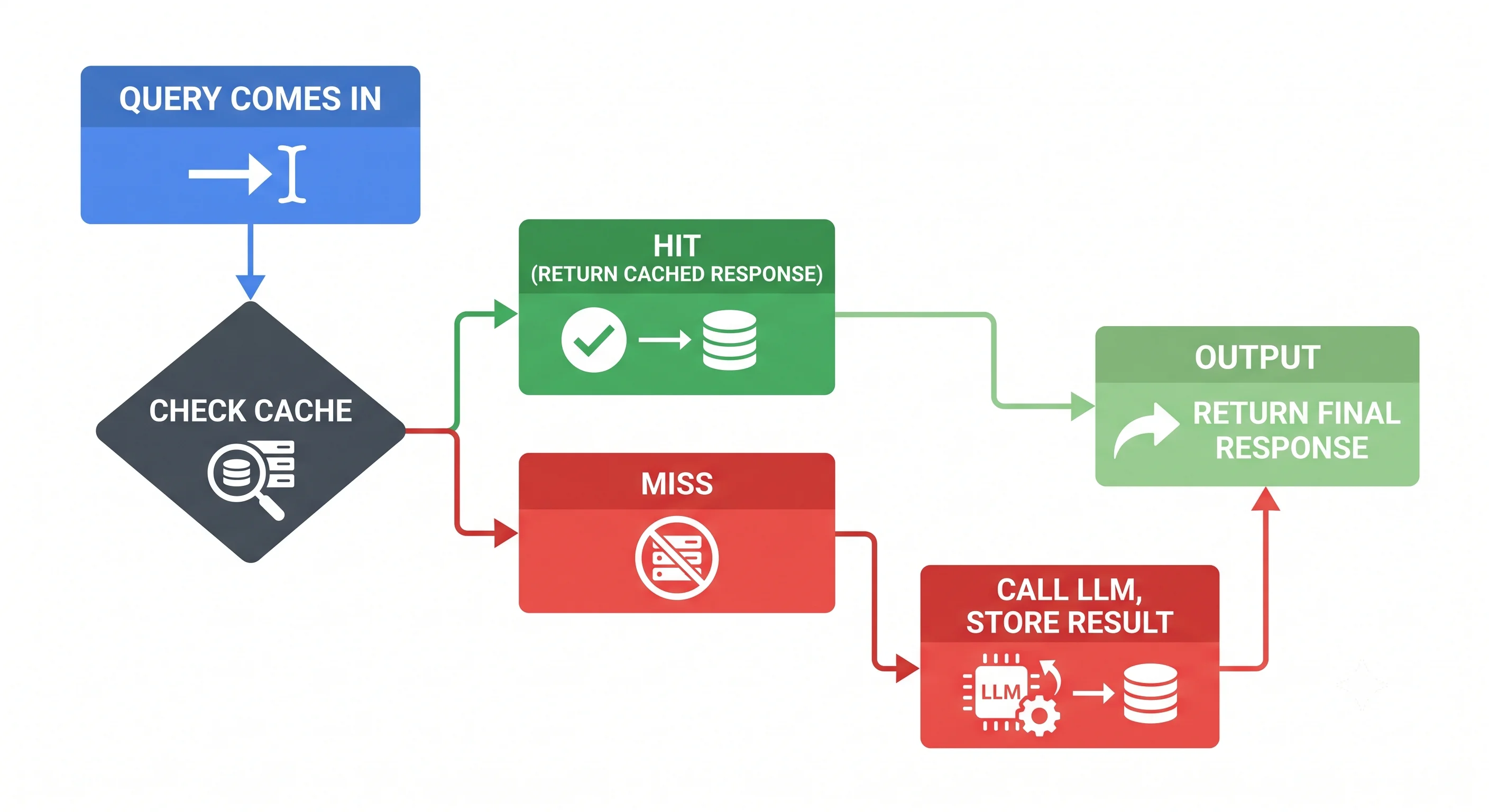
Table of Contents
- What is Semantic Cache?
- How It Works
- Cache Hit vs. Cache Miss
- Similarity Threshold Tuning
- Benefits
- Architecture Patterns
- Implementation Considerations
- Code Example
- Key Takeaway
What is Semantic Cache?
Traditional caches use exact string matching — if the query text is byte-for-byte identical, return the cached result. This is too rigid for natural language, where users phrase the same question differently every time.
Semantic Cache uses vector embeddings to match queries by meaning, not wording:
| Query | Cache Match? |
|---|---|
| "Best laptops for data science?" | ✅ HIT — same as cached "Top laptops for ML work?" |
| "What are good data science laptops?" | ✅ HIT — semantically equivalent |
| "How do I fix a Python import error?" | ❌ MISS — different topic entirely |
This makes the cache dramatically more effective for conversational AI, chatbots, and LLM-powered search.
How It Works
                        ┌─────────────────┐
   User Query  ──────►  │ Embedding Model  │  ──────►  Query Vector
                        └─────────────────┘
                                                             │
                                                             ▼
                                                   ┌─────────────────┐
                                                   │  Semantic Cache  │
                                                   │  (Vector Store)  │
                                                   └─────────────────┘
                                                             │
                              ┌──────────────────────────────┴──────────────────────────────┐
                              │                                                              │
                    Similarity ≥ Threshold                                       Similarity < Threshold
                         (CACHE HIT)                                                  (CACHE MISS)
                              │                                                              │
                              ▼                                                              ▼
                    Return Cached Response                                         Call LLM → Get Response
                    (instant, ~0ms latency)                                                  │
                                                                                             ▼
                                                                                   Store in Semantic Cache
                                                                                   (vector + response)
Step-by-Step
- New query arrives — User submits a natural language question.
- Embed the query — Convert query text into a vector using an embedding model.
- Search the cache — Run a nearest-neighbour search across cached query vectors.
- Evaluate similarity — Compare the best match score against a threshold (e.g., 0.85).
- HIT — If similarity ≥ threshold, return the cached response immediately.
- MISS — If similarity < threshold, forward to the LLM, get response, then store both the query vector and response in the cache.
Cache Hit vs. Cache Miss
Cache HIT Example
Cached query:    "What are the best laptops for machine learning?"
Cached response: "The top laptops for ML include the MacBook Pro M3,
                  Dell XPS 15, and Lenovo ThinkPad X1 Extreme..."

New query:       "Best laptops for data science?"
Similarity:      0.92  ← above threshold of 0.85 ✅

Action: Return cached response instantly
Latency: ~5ms  |  LLM cost: $0
Cache MISS Example
New query:       "How do I optimise a slow PostgreSQL query?"
Similarity:      0.31  ← below threshold of 0.85 ❌

Action: Forward to LLM → get response → store in cache
Latency: ~2000ms  |  LLM cost: normal token cost
Similarity Threshold Tuning
The threshold controls the balance between cache hit rate and response accuracy:
Threshold: 0.95+  →  Very strict, rarely returns cached results (low hit rate, high accuracy)
Threshold: 0.85   →  Good balance for most conversational AI use cases ← Recommended default
Threshold: 0.75   →  More aggressive caching, risk of slightly off answers
Threshold: 0.60   →  Too loose; different questions may get the same cached answer ❌
Tips for tuning:
- Start at 0.85 and monitor cache hit rate
- Analyse mismatches where the cache returned a wrong answer
- Use higher thresholds for factual/sensitive queries (medical, legal, financial)
- Use lower thresholds for general knowledge / FAQ systems
Benefits
| Benefit | Detail |
|---|---|
| 🚀 Reduced latency | Cache hits return in milliseconds vs. seconds for LLM calls |
| 💰 Lower cost | Fewer LLM API calls = lower token spend |
| 📈 Better scalability | Handle 10x more requests without scaling LLM infrastructure |
| 🧠 Semantic awareness | Handles natural language variation — exact match caches can't |
| 🔄 Self-improving | Cache grows richer over time as more queries are stored |
Cost Savings Illustration
Without semantic cache:
  10,000 requests/day × $0.002/request = $20/day = $600/month

With semantic cache (60% hit rate):
  4,000 LLM calls/day × $0.002/request = $8/day = $240/month
  Savings: $360/month (60% reduction)
Architecture Patterns
Pattern 1: Inline Cache (Request Interceptor)
User → [Semantic Cache Layer] → LLM
              ↓ (miss)
           LLM API
              ↓
         Cache + Return
The cache sits in front of the LLM and intercepts all requests. Simple and effective for single-LLM setups.
Pattern 2: Cache-Aside
User → Application Logic → Check Cache → (hit) → Return
                         → (miss) → LLM → Store in Cache → Return
Application code explicitly manages cache reads/writes. More flexible, supports complex business logic around caching.
Pattern 3: Distributed Semantic Cache
For multi-instance, high-availability systems:
Multiple App Instances → Shared Redis / Vector DB Cache → LLMAll application instances share the same semantic cache, maximising hit rates across the fleet.
Implementation Considerations
| Consideration | Recommendation |
|---|---|
| Cache invalidation | Set TTL (time-to-live) per entry; expire stale answers |
| Personalisation | Namespace cache by user or tenant for personalised responses |
| Sensitive data | Never cache PII or sensitive query responses |
| Cache poisoning | Validate responses before caching; rate-limit writes |
| Storage | Use a vector database (Qdrant, Redis VSS) for the cache backend |
| Eviction policy | LRU (Least Recently Used) or LFU (Least Frequently Used) |
Code Example
import numpy as np
from openai import OpenAI
from dataclasses import dataclass, field
from typing import Optional

client = OpenAI(api_key="YOUR_API_KEY")

@dataclass
class CacheEntry:
    query_vector: list[float]
    original_query: str
    response: str

class SemanticCache:
    def __init__(self, threshold: float = 0.85):
        self.threshold = threshold
        self.entries: list[CacheEntry] = []

    def _embed(self, text: str) -> list[float]:
        response = client.embeddings.create(
            input=text,
            model="text-embedding-3-small"
        )
        return response.data[0].embedding

    def _cosine_similarity(self, a: list, b: list) -> float:
        a, b = np.array(a), np.array(b)
        return float(np.dot(a, b) / (np.linalg.norm(a) * np.linalg.norm(b)))

    def get(self, query: str) -> Optional[str]:
        """Return cached response if a similar query exists."""
        query_vector = self._embed(query)
        best_score, best_entry = 0.0, None

        for entry in self.entries:
            score = self._cosine_similarity(query_vector, entry.query_vector)
            if score > best_score:
                best_score, best_entry = score, entry

        if best_score >= self.threshold and best_entry:
            print(f"✅ Cache HIT (similarity: {best_score:.2f})")
            print(f"   Matched: '{best_entry.original_query}'")
            return best_entry.response

        print(f"❌ Cache MISS (best similarity: {best_score:.2f})")
        return None

    def set(self, query: str, response: str):
        """Store a query-response pair in the cache."""
        query_vector = self._embed(query)
        self.entries.append(CacheEntry(query_vector, query, response))
        print(f"💾 Cached: '{query}'")

    def query_llm_with_cache(self, query: str) -> str:
        """Query LLM with semantic cache."""
        cached = self.get(query)
        if cached:
            return cached

        # Call LLM
        response = client.chat.completions.create(
            model="gpt-4o",
            messages=[{"role": "user", "content": query}]
        )
        answer = response.choices[0].message.content
        self.set(query, answer)
        return answer


# Usage
cache = SemanticCache(threshold=0.85)

# First call — cache miss, calls LLM
r1 = cache.query_llm_with_cache("Best laptops for machine learning?")

# Second call — cache hit, returns instantly
r2 = cache.query_llm_with_cache("Top laptops for data science work?")

print(r1 == r2)  # → True (same cached response returned)
Key Takeaway
Semantic Cache saves time and money by reusing answers for semantically similar questions. It makes AI applications faster, cheaper, and more scalable — without sacrificing the flexibility of natural language interaction.