
2. Core Concepts
Goal: define every noun you'll meet in the EC2 console, so nothing later is a mystery. Each concept gets the same treatment — term → one-line analogy → precise technical definition — and where a concept has a trade-off, the trade-off is stated rather than implied.
Read this once end to end, then treat it as a lookup. The condensed version is the glossary.
The resource hierarchy in one breath
An instance runs inside an Availability Zone, which lives in a Region. It is booted from an AMI, shaped by an instance type, placed on a subnet in a VPC through an ENI, firewalled by a security group, given permissions by an instance profile, and backed by one or more EBS volumes and possibly an instance store. A launch template is the recipe for all of that, and an Auto Scaling group is the thing that makes N copies of the recipe.
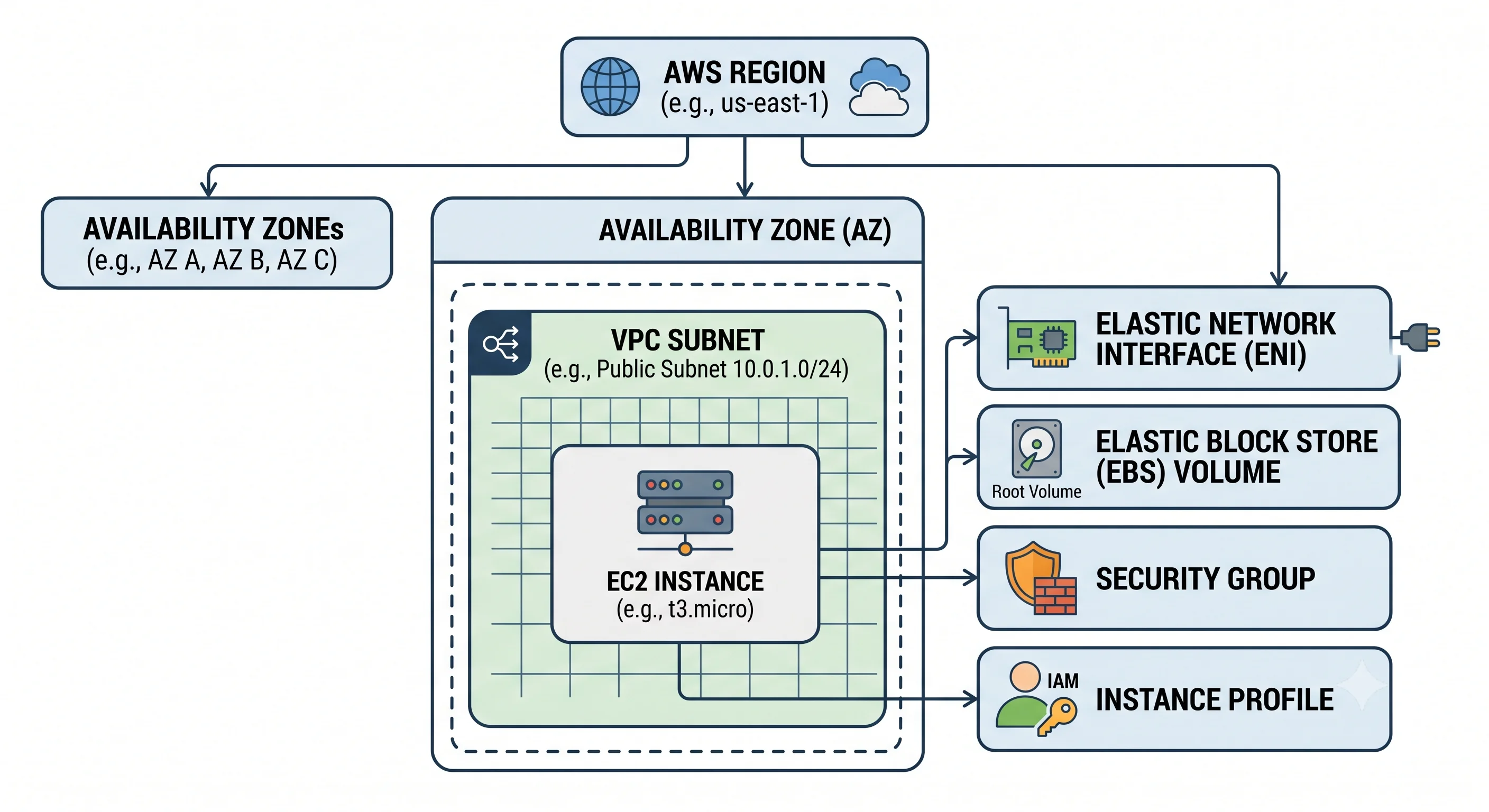
1. The top-level resource: the instance
| Term | Analogy | Technical definition |
|---|---|---|
| Instance | A hotel room you've checked into | A running virtual machine on AWS-managed hardware, identified by an instance ID (i-0abc123…), existing in exactly one Availability Zone, billed while in the running state |
An instance is not a durable resource. It has an ID, a lifecycle, and an end. Anything you want to survive it must live somewhere else — an EBS volume, S3, a database.
Instance lifecycle states
| State | What's happening | Are you billed? |
|---|---|---|
pending |
AWS is placing and booting it | No |
running |
It's up | Yes — compute charges accrue |
stopping → stopped |
Shut down; EBS root volume preserved | No compute charge; you still pay for EBS storage |
shutting-down → terminated |
Being destroyed | No — and the record disappears after a while |
hibernated |
RAM contents written to the encrypted root EBS volume, then stopped | No compute; you pay for the (now larger) EBS storage |
Stop vs. terminate is the distinction that bites people. Stopping is reversible: the root EBS
volume and its data persist, and starting again gives you the same instance ID and same private IP.
Terminating is not: by default the root volume is deleted with it (DeleteOnTermination = true), and
the instance ID is gone forever.
Two more consequences of stopping that surprise people:
- A stopped-then-started instance almost certainly lands on different physical hardware. Anything in the instance store is gone. This is also the standard fix for a degraded host.
- A non-Elastic public IPv4 address is released on stop and a new one assigned on start. If something is pointing at that IP, it breaks. Use an Elastic IP or a DNS name.
2. The image: AMI
| Term | Analogy | Technical definition |
|---|---|---|
| AMI (Amazon Machine Image) | A disk image / the "golden master" a factory stamps copies from | A regional, immutable template containing a root volume snapshot, launch permissions, and a block device mapping, from which instances are booted |
Key properties:
- Region-scoped. An AMI exists in one region; to use it elsewhere you copy it (which creates a new AMI ID). This is a routine source of "why did my Terraform break in eu-west-1" — hard-coded AMI IDs are not portable. Look them up by name/owner instead (see Deployment).
- Immutable. You don't patch an AMI; you build a new one. That's the whole point — it's what makes instances reproducible.
- Sources: AWS-provided (Amazon Linux, Ubuntu, Windows Server), Marketplace (may carry a per-hour software charge on top of the instance charge), community, or your own.
- Backed by: almost always an EBS snapshot. Instance-store-backed AMIs still exist but are a legacy path you can ignore.
The trade-off — baked vs. configured-at-boot. A "golden AMI" with everything pre-installed boots fast, launches deterministically, and is the right answer for auto-scaling under load. But every change needs an image rebuild pipeline (Packer, EC2 Image Builder). Configuring at boot instead — via user data or Ansible — is faster to iterate on and slower and less reliable to launch, because you've made boot depend on the network and on package repositories being up. Most mature setups do both: a thin base AMI with the OS hardened and the agents installed, plus application config at deploy time.
3. The shape: instance types and families
| Term | Analogy | Technical definition |
|---|---|---|
| Instance type | The engine and chassis spec of a rental car | A named combination of vCPU count, memory, network bandwidth, and storage/accelerator characteristics, e.g. m6i.large |
Read the name left to right: m6i.large = family m, generation 6, capability i, size large.
Families — these are ratios, not quality tiers:
| Prefix | Optimised for | Typical use |
|---|---|---|
t |
Burstable, cheap baseline | Dev boxes, low-traffic sites |
m |
General purpose — balanced CPU:memory | App servers, the sensible default |
c |
Compute — more CPU per GB of RAM | Batch processing, encoding, game servers |
r, x, z |
Memory — more RAM per vCPU | Caches, in-memory DBs, big JVM heaps |
i, d |
Storage — large local NVMe/HDD | NoSQL, data warehouses, scratch space |
g, p, inf, trn |
Accelerated — GPUs and custom silicon | Training, inference, graphics |
hpc |
Tightly-coupled HPC networking | Simulation, CFD |
Capability letters (they compose): i = Intel, a = AMD, g = AWS Graviton (ARM64), d = local
NVMe attached, n = extra network bandwidth, e = extra storage or memory, flex = a cheaper variant
that delivers full CPU only part of the time.
Graviton is the cheap win most teams skip. ARM-based
*ginstances typically cost meaningfully less per hour than the Intel/AMD equivalents at similar performance for many workloads. The catch is real but shrinking: your container images and any compiled dependencies must be built for ARM64.⚠️ verify current price/performance deltas against AWS docs— the numbers move every generation.
Sizes scale roughly linearly — large → xlarge → 2xlarge doubles vCPU and memory (and usually
price) each step. metal means no hypervisor: the whole physical machine.
Burstable instances and CPU credits
t-family instances don't give you a full vCPU continuously. They earn CPU credits per hour at a
rate set by the size, spend a credit for each vCPU-minute at 100% utilisation, and throttle to a low
baseline when the balance hits zero.
- Standard mode: when credits run out, performance drops — hard. This is the classic "our dev box got mysteriously slow after a week" incident.
- Unlimited mode: it keeps performing and you're charged for surplus credits. Better behaviour,
unbounded cost. Know which mode you're in; the default varies by family.
⚠️ verify against current AWS docs
Burstable is excellent for spiky, mostly-idle workloads and actively dangerous for steady CPU load — it's the one family where "cheapest per hour" and "cheapest per unit of work" diverge most.
4. Storage: EBS vs. instance store
This is the single most important distinction in EC2, and the source of the most expensive mistakes.
| Term | Analogy | Technical definition |
|---|---|---|
| EBS volume | A network drive you mount | A durable, replicated block device in a single AZ, attached to an instance over the network, existing independently of any instance |
| Instance store | The scratch disk physically inside the machine | Ephemeral block storage on NVMe/SSD physically attached to the host, included in the instance price, wiped whenever the instance stops or the host changes |
| EBS | Instance store | |
|---|---|---|
| Survives reboot | ✅ | ✅ |
| Survives stop/start | ✅ | ❌ data gone |
| Survives terminate | Only if DeleteOnTermination = false |
❌ |
| Survives host failure | ✅ | ❌ |
| Billed | Separately, per GB-month provisioned | Included in the instance hourly price |
| Snapshot-able | ✅ (incremental, to S3) | ❌ |
| Detach and re-attach elsewhere | ✅ (same AZ) | ❌ |
| Latency | Network-attached — low, but not local | Lowest available — it's local hardware |
Rule of thumb: anything you'd be sad to lose goes on EBS. Instance store is for caches, scratch space, temp files, shuffle data, and local replicas of something durable elsewhere.
EBS volume types — the choice is IOPS/throughput vs. cost:
| Type | Media | Use for |
|---|---|---|
gp3 |
SSD | The default. IOPS and throughput are provisioned independently of size — the reason it's usually cheaper than gp2 for the same performance |
gp2 |
SSD | Legacy general purpose; performance scales with volume size, so people over-provisioned capacity to buy IOPS |
io1/io2 |
SSD | High, guaranteed IOPS for demanding databases; io2 Block Express for the extreme end |
st1 |
HDD | Throughput-optimised, sequential — logs, big-file processing |
sc1 |
HDD | Cold, infrequently accessed, cheapest |
Baseline figures (gp3's included IOPS and throughput, per-volume maximums, and the size ranges for each type) change over time —
⚠️ verify against current AWS docsbefore you put a number in a design doc.
| Term | Analogy | Technical definition |
|---|---|---|
| Snapshot | A versioned backup of the drive | An incremental, point-in-time copy of an EBS volume stored in S3 (in AWS's own buckets, not yours), region-scoped and copyable across regions |
Snapshots are incremental — only changed blocks are stored — but independently restorable; deleting an old snapshot doesn't invalidate newer ones. Restoring creates a new volume, and a freshly-restored volume may be slow on first read of each block until it's fully hydrated from S3.
5. Identity and scoping
Regions, Availability Zones, ARNs, and tags are platform-wide concepts covered in Regions & Availability and ARNs, Tagging & Quotas. What matters here is how EC2 sits inside them:
| Term | EC2-specific detail |
|---|---|
| Instance ID | i-0abc123def456 — unique within a region |
| Instance ARN | arn:aws:ec2:us-east-1:123456789012:instance/i-0abc… |
| Zonal placement | An instance lives in exactly one AZ, determined by its subnet. So does its EBS volume — which is why a volume can't follow an instance to another AZ |
| Regional scoping | AMIs, snapshots, security groups, and key pairs are region-scoped. Hard-coded AMI IDs break the moment you expand |
The one that bites EC2 specifically: because an instance's AZ comes from its subnet, "spread across AZs" concretely means "give the Auto Scaling group several subnets". There is no other knob.
6. Networking primitives
| Term | Analogy | Technical definition |
|---|---|---|
| VPC | Your own private office building | A logically isolated virtual network you define, with your own IP range |
| Subnet | A floor of that building, in one AZ | A CIDR sub-range of the VPC bound to exactly one AZ; "public" or "private" depending on whether its route table has a route to an internet gateway |
| ENI (Elastic Network Interface) | The network card | A virtual NIC with a MAC address, one primary and optional secondary private IPs, and its own security groups. Attachable and detachable from instances |
| Security group | A bouncer with a guest list | A stateful, allow-only virtual firewall applied at the ENI. Default: deny all inbound, allow all outbound |
| Network ACL | The building's front-door rules | A stateless allow/deny filter at the subnet boundary. Rarely the right tool; mentioned so you know why your traffic might die even with a permissive SG |
Stateful vs. stateless is the exam question. A security group that allows inbound port 443 automatically allows the response traffic back out — it tracks connections. A NACL doesn't; you must allow the ephemeral return ports explicitly. This is why NACL misconfigurations produce baffling one-directional failures.
Security groups can reference other security groups as a source, not just CIDRs. allow 5432 from sg-app is dramatically better than allow 5432 from 10.0.0.0/16 — it survives re-IPing and expresses
intent.
IP addressing
| Term | Analogy | Technical definition |
|---|---|---|
| Private IP | Your desk extension | An address from the subnet CIDR, assigned at launch, stable for the life of the instance |
| Public IP | A pay phone number you're loaned | An auto-assigned public IPv4 mapped via NAT, released on stop and not visible inside the OS |
| Elastic IP (EIP) | A phone number you own | A static public IPv4 allocated to your account and remappable between instances/ENIs |
Cost note: AWS charges hourly for public IPv4 addresses — both in-use and idle Elastic IPs (the in-use charge began in 2024). At fleet scale this is a real line item, and it's the main financial argument for putting instances in private subnets behind a load balancer or NAT gateway, or moving to IPv6.
⚠️ verify current rates against AWS pricing
Placement groups
| Type | Analogy | Use for |
|---|---|---|
| Cluster | Everyone in one room | Lowest network latency between instances — HPC, tightly-coupled compute. Concentrates failure risk in one place |
| Spread | Deliberately different buildings | Small numbers of critical instances kept on distinct hardware |
| Partition | Separate racks per group | Large distributed systems (HDFS, Cassandra) that are rack-aware |
7. Access and permissions
| Term | Analogy | Technical definition |
|---|---|---|
| Key pair | The physical room key | An SSH keypair; AWS stores the public half and injects it at first boot. The private key is shown once and never again |
| Instance profile | A staff badge the machine wears | A container for a single IAM role that lets code on the instance obtain temporary credentials — no access keys on disk |
| IMDS (Instance Metadata Service) | The badge reader on the wall | A link-local HTTP endpoint at 169.254.169.254 serving instance metadata and the instance profile's temporary credentials |
| User data | The move-in checklist | A script or cloud-init config passed at launch, executed by default only on first boot |
IMDSv2 is not optional in practice. The original IMDSv1 answered any HTTP GET from the instance —
which meant a server-side request forgery bug in your web app could be coerced into fetching your
role's credentials. IMDSv2 requires a PUT to obtain a short-lived session token first and enforces a
hop limit so containers/proxies can't trivially relay the request. Require IMDSv2 and set the hop
limit to 1 unless something in your stack demonstrably needs otherwise.
Key pairs are a smell, not a requirement. Session Manager (Systems Manager) gives you shell access with IAM authorisation, full audit logging in CloudTrail, and no inbound port 22 at all. Production argues this properly; for now, know that "how do I SSH in" often has the answer "don't."
User data runs as root and is visible in the instance metadata — never put a secret in it. Pull secrets at boot from Secrets Manager or Parameter Store using the instance role.
8. Capacity and purchasing
This is where EC2's cost model lives, and it's the most commonly fumbled interview topic. Two independent axes: how you pay and what you're guaranteed.
| Term | Analogy | Technical definition |
|---|---|---|
| On-Demand | Walk-in hotel rate | Pay per second (Linux, 60-second minimum; some OSes and Marketplace AMIs bill per hour — ⚠️ verify) with no commitment |
| Savings Plans | A committed spend contract | Commit to $/hour of compute usage for 1 or 3 years for a discount. Compute Savings Plans are flexible across instance family, region, and even Lambda/Fargate; EC2 Instance Savings Plans are cheaper but lock you to a family and region |
| Reserved Instance (RI) | A pre-booked room block | The older commitment model, tied to instance attributes. Standard RIs discount more; Convertible RIs allow exchange. Largely superseded by Savings Plans for new commitments |
| Spot Instance | Standby airline seat | Spare capacity at a steep discount, reclaimable by AWS with a short interruption notice (two minutes, as of writing) |
| Capacity Reservation | Holding the room, whether or not you sleep in it | Reserves capacity in a specific AZ so a launch won't fail with InsufficientInstanceCapacity. Billed like On-Demand whether used or not. Independent of any discount |
| Dedicated Instance | A private floor | Runs on hardware not shared with other AWS accounts |
| Dedicated Host | Owning the building | A physical server allocated to you, with visibility into sockets and cores — the answer to per-socket/per-core BYOL licensing |
The two things people get wrong:
- Savings Plans and RIs are billing constructs, not capacity guarantees. A Savings Plan does not
reserve you a machine; if the AZ is out of
c6i.4xlarge, your launch still fails. Only a Capacity Reservation (or a Zonal RI) reserves capacity. - Spot isn't "cheap On-Demand", it's a different reliability contract. It's outstanding for stateless, interruptible, horizontally-scalable work — CI runners, batch jobs, big-data workers, and fault-tolerant web tiers behind an ASG with mixed instance policies. It's wrong for anything with local state or a hard deadline that can't absorb a mid-run eviction. Design for the interruption notice: drain, checkpoint, exit.
9. Fleet primitives
| Term | Analogy | Technical definition |
|---|---|---|
| Launch template | The recipe card | A versioned, immutable-per-version definition of everything needed to launch an instance: AMI, type, key pair, SGs, user data, IAM profile, block devices, IMDS settings |
| Auto Scaling group (ASG) | The kitchen that keeps N dishes on the pass | A controller that launches/terminates instances to maintain a desired count across chosen subnets, replaces unhealthy ones, and adjusts capacity on policy |
| Target group | The list of open service windows | The set of registered targets a load balancer routes to, with its own health check |
| Health check | The manager checking each dish | Either EC2-level (is the instance status OK?) or ELB-level (does the app answer on /health?). ELB health checks are what you want — an instance can be perfectly healthy while your process is dead |
Launch templates supersede launch configurations. Launch configurations are the older, unversioned
form; AWS has been phasing them out and they don't support newer features. Use launch templates.
⚠️ verify the current deprecation status against AWS docs
Desired / minimum / maximum capacity is the ASG's whole contract: desired is what it maintains now, min is the floor it won't scale below, max is the ceiling — and the ceiling is your blast-radius control against a runaway scaling policy.
The running mini-table
The one-line version of everything above, for scanning:
| Term | Analogy | Technical definition |
|---|---|---|
| Instance | Hotel room you've checked into | A running VM in one AZ, billed by the second while running |
| AMI | Disk image / golden master | Immutable, region-scoped launch template backed by an EBS snapshot |
| Instance type | Engine and chassis spec | Named vCPU/memory/network/accelerator shape, e.g. m6i.large |
| Instance family | Vehicle category | A CPU:memory:IO ratio — t burstable, m general, c compute, r memory, i storage, g/p accelerated |
| EBS volume | Network drive | Durable, AZ-scoped, independently-lived block storage attached over the network |
| Instance store | Internal scratch disk | Ephemeral local NVMe; lost on stop, terminate, or host change |
| Snapshot | Versioned backup | Incremental point-in-time copy of an EBS volume, stored in S3, region-scoped |
| Region / AZ | City / building in it | Isolated geography / discrete data centre with independent power and networking |
| VPC / Subnet | Office building / floor | Your private network / an AZ-bound CIDR slice of it |
| ENI | Network card | Virtual NIC carrying private IPs, MAC, and security groups |
| Security group | Bouncer with a guest list | Stateful, allow-only firewall at the ENI |
| Network ACL | Front-door rules | Stateless allow/deny filter at the subnet boundary |
| Elastic IP | A number you own | Static public IPv4 remappable between instances |
| Key pair | Room key | SSH keypair; private half shown exactly once |
| Instance profile | Staff badge | Wrapper for an IAM role granting the instance temporary credentials |
| IMDS | Badge reader on the wall | Link-local 169.254.169.254 metadata and credential endpoint; require v2 |
| User data | Move-in checklist | Launch-time script run once at first boot, as root, and world-readable to the instance |
| On-Demand | Walk-in rate | Per-second billing, no commitment |
| Savings Plan | Committed spend contract | 1/3-year $/hour commitment for a discount; not a capacity guarantee |
| Spot | Standby seat | Deep discount on spare capacity, reclaimable on short notice |
| Capacity Reservation | Room held for you | Guarantees capacity in an AZ; billed whether used or not |
| Dedicated Host | Owning the building | Physical server with socket/core visibility, for BYOL licensing |
| Placement group | Seating plan | Cluster (low latency), spread (distinct hardware), partition (rack-aware) |
| Launch template | Recipe card | Versioned definition of everything needed to launch an instance |
| Auto Scaling group | Kitchen keeping N on the pass | Maintains desired capacity, replaces unhealthy instances, scales on policy |
Check yourself
- Which of these survive a stop/start: instance store data, the private IP, an auto-assigned public IP, EBS root volume data?
- Why is
allow 5432 from sg-appbetter thanallow 5432 from 10.0.0.0/16? - Your
c6i.2xlargelaunch fails withInsufficientInstanceCapacity, but you hold a Compute Savings Plan. Why didn't the Savings Plan help, and what would have? - A dev box on a
t3.mediumruns fine for six days then crawls. What happened, and what are your two options? - Give one workload that's ideal for Spot and one that's actively unsafe on it.
Next: Architecture opens the box — the Nitro system, what actually
happens between RunInstances and a login prompt, why EBS being network-attached matters, and how
instances fail.