
Accounts and Organizations
Goal: understand the boundary everything else sits inside. By the end you should be able to say why "one account per environment" is a security control rather than an administrative preference, and what a Service Control Policy can and cannot do.
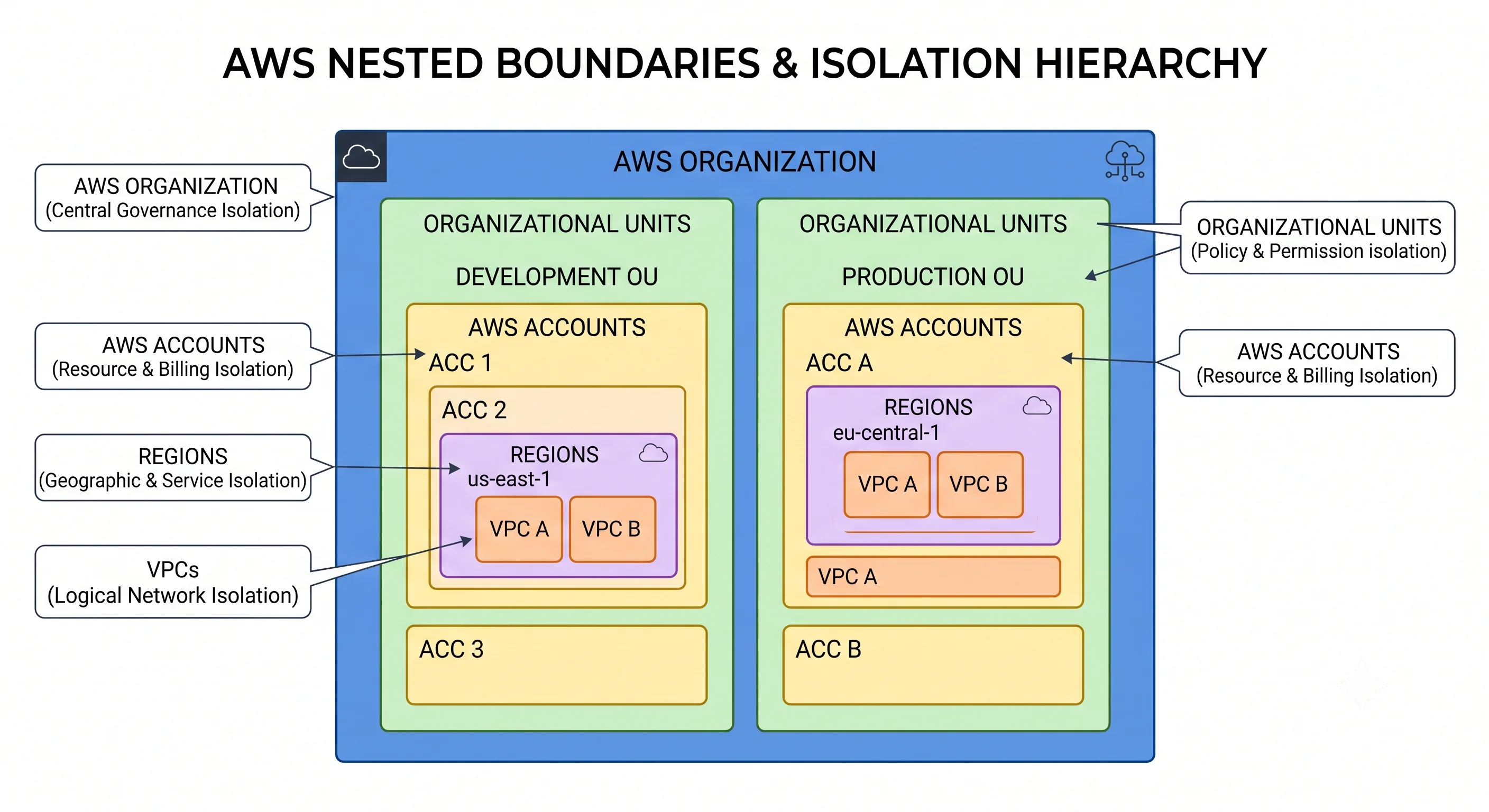
Most people meet AWS through a single account and assume the account is just a login. It isn't. It's the strongest isolation boundary AWS offers, the unit quotas are counted against, and the unit that appears on a bill. Almost every serious AWS estate is shaped by how it uses accounts, and that shape is invisible from inside any one service.
1. What an account actually is
The analogy: an AWS account is a separate company premises, not a separate room. Two rooms in one building share a fire, a power supply, and a front door. Two premises don't.
The technical version: an AWS account is an isolated container for resources, identified by a 12-digit account ID, with its own root user, its own IAM principals, its own resource namespace, and its own quotas. Resources in different accounts cannot see or reach each other unless something explicitly permits it.
Four distinct roles it plays, and they're worth separating because people conflate them:
| Role | What it means |
|---|---|
| Isolation boundary | Nothing crosses account lines by default. A runaway script, a compromised credential, or a badly-scoped Delete* cannot reach another account without an explicit grant |
| Quota boundary | Service Quotas are counted per account (and per region). One team exhausting a limit doesn't have to be your problem — if they're in a different account |
| Billing boundary | Every line of the bill carries an account ID. This is the one attribution that works without anyone remembering to tag |
| Blast-radius boundary | The unit of "how bad can this get" — for outages, for security incidents, and for terraform destroy run in the wrong terminal |
The root user is the identity created with the account, authenticating with the email address it was
opened under. It cannot be restricted by IAM policies or Service Control Policies within its own
account. Treat it accordingly: enable MFA, remove any access keys it has, use it only for the handful
of tasks that genuinely require it (closing the account, changing the support plan, some billing
settings), and never for day-to-day work. AWS has been progressively enforcing root MFA rather than
merely recommending it. ⚠️ verify the current enforcement scope and root-only task list against AWS docs
2. Why one account isn't enough
The single-account estate is the default, and it degrades in four predictable ways.
Blast radius. Dev and prod in one account means a broad IAM policy, a wrong --profile, or an
automation bug can reach production. There is no structural protection — only human care, which fails
eventually.
Quota contention. Quotas are per account. A load test in dev consuming the account's vCPU quota means production can't scale. The two workloads have no logical relationship, yet they compete for the same ceiling.
IAM complexity. With everything in one account, least privilege has to be expressed entirely through conditions and resource ARNs — a policy language problem that gets harder as the estate grows. With separate accounts, "developers cannot touch production" is enforced by not having a path there at all, which is far simpler and far harder to get wrong.
Billing opacity. One account produces one bill. Attributing it requires disciplined tagging that nobody applies retroactively. Separate accounts give you attribution for free.
The trade-off, stated honestly. Multi-account is not free. You need centralised identity (or people juggle a dozen logins), centralised logging, cross-account networking, and a way to create accounts consistently. For a solo project or a single small application, one account plus good tagging is a perfectly defensible choice. The cost curve inverts fast, though — the pain of splitting a mature single-account estate is much greater than the cost of starting with three.
3. AWS Organizations
The analogy: a holding company. Individual businesses (accounts) keep their own operations, but group policy applies from above and the invoices consolidate.
The technical version: Organizations links accounts under a management account, arranges them in a tree of organizational units (OUs), applies policies at any node, and consolidates billing.
| Term | What it is |
|---|---|
| Management account | The account that creates the organisation. Pays the consolidated bill. Not restricted by SCPs — so it must hold as little workload as possible |
| Member account | Every other account. Created by the organisation or invited into it |
| Root (of the organisation) | The top node of the tree — not the root user, confusingly. Policies here apply to everything |
| Organizational unit (OU) | A grouping node. Nests up to a documented depth. Policies attached here apply to all accounts beneath |
| Feature set | Consolidated billing only or all features. SCPs require all features |
Keep the management account nearly empty. It can't be constrained by your own guardrails, it holds the billing relationship, and compromising it compromises the organisation. Put no workloads in it — security tooling and logging belong in dedicated accounts, not there.
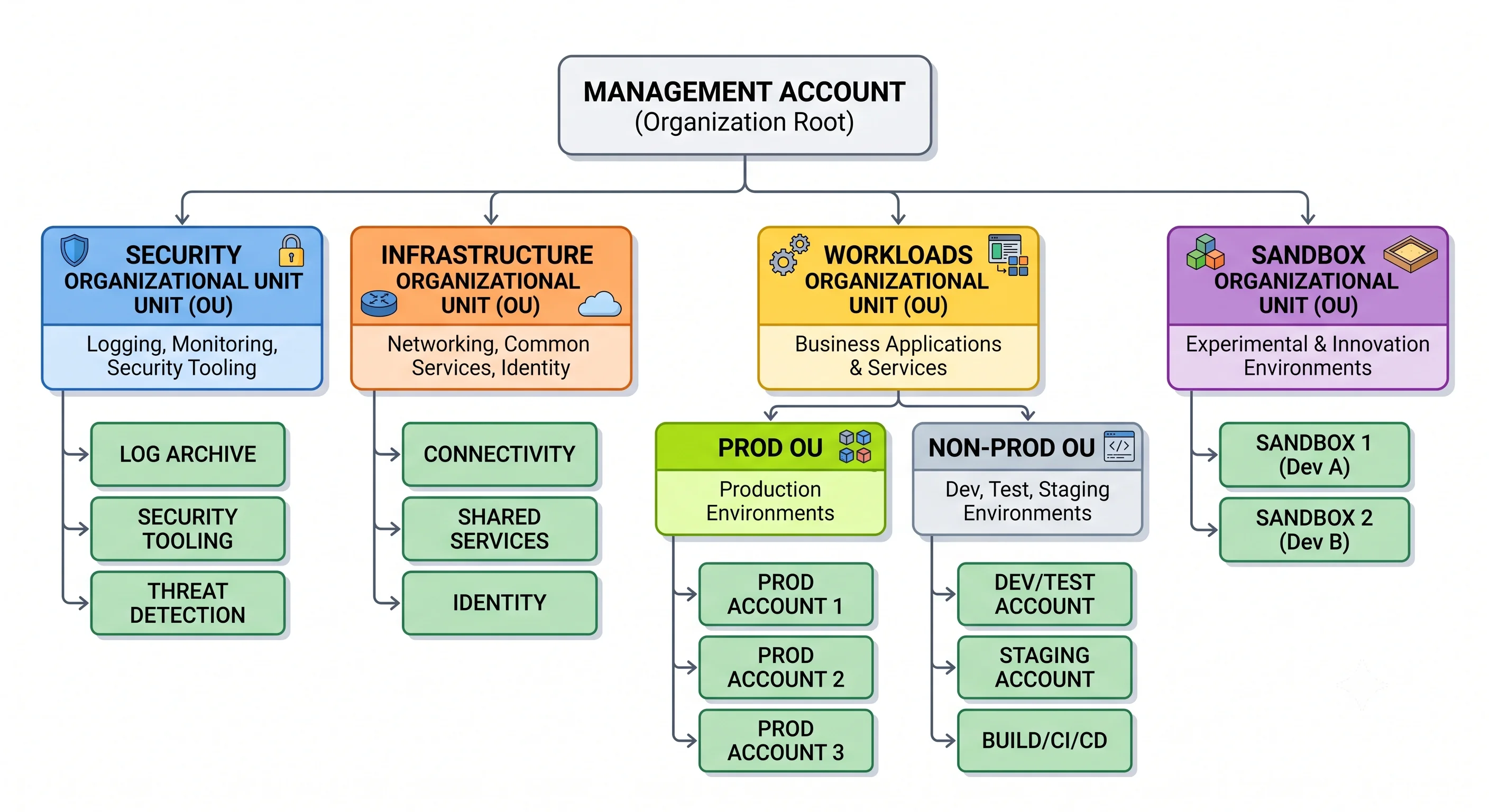
A landing-zone shape that works
The conventional layout, and the reasoning behind each part:
Root
├── Security OU
│   ├── Log Archive account       ← immutable destination for CloudTrail, Config, VPC flow logs
│   └── Security Tooling account  ← GuardDuty, Security Hub, Detective admin
├── Infrastructure OU
│   ├── Network account           ← Transit Gateway, shared VPCs, DNS
│   └── Shared Services account   ← CI/CD, artifact stores, golden AMIs
├── Workloads OU
│   ├── Prod OU
│   │   ├── payments-prod
│   │   └── web-prod
│   └── Non-Prod OU
│       ├── payments-dev
│       └── web-dev
├── Sandbox OU                    ← individual experimentation; tight budget, aggressive cleanup
└── Suspended OU                  ← decommissioned accounts, denied everything
Why OUs by environment rather than by team. Policy tends to follow environment, not org chart: "production requires encryption and denies region X" applies to every prod account regardless of who owns it. Teams reorganise; environments don't. Group by environment first, team second.
Log Archive is separate for a reason. Logs stored in the account that generated them can be deleted by whoever compromises that account. A separate account, with write-only cross-account access and object-lock retention, means an attacker who owns a workload account still can't erase the evidence.
4. Service Control Policies
This is the single most misunderstood mechanism in AWS governance, so be precise about it.
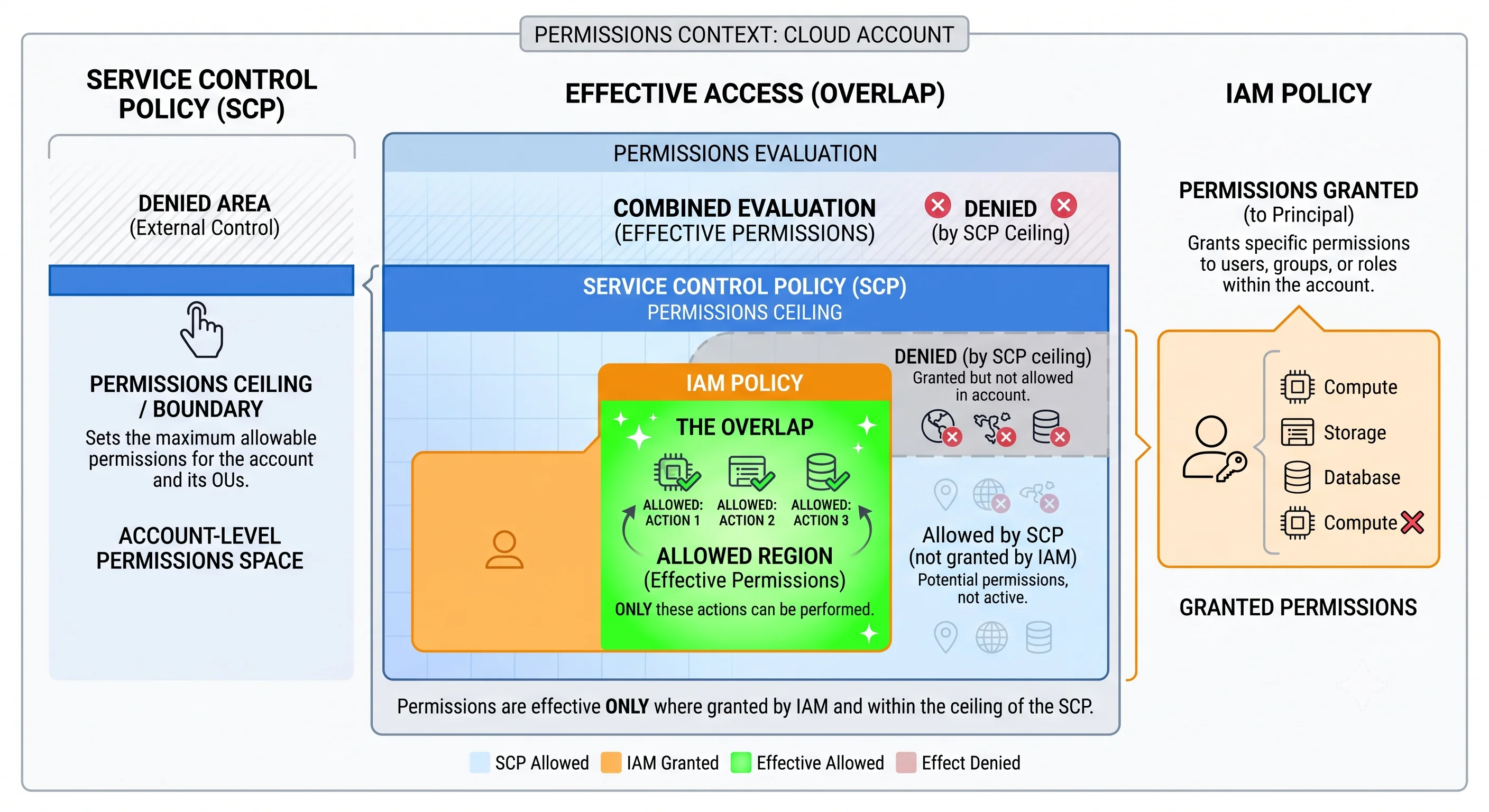
An SCP does not grant anything. It sets the maximum available permissions for principals in the accounts it applies to. An action is only permitted if the SCP allows it and an IAM policy in the account allows it. An SCP that allows everything grants nothing; an SCP that omits an action denies it for the entire account — including the account's own administrator.
The analogy: IAM policy is a key. An SCP is the building's opening hours. Having a key to a door doesn't help at 3 a.m. if the building is closed — and the building being open doesn't get you through a door you have no key for.
| Property | Detail |
|---|---|
| Applies to | IAM users and roles in member accounts |
| Does not apply to | The management account; service-linked roles |
| Effect | A permissions ceiling, never a grant |
| Attachment points | Organisation root, an OU, or an individual account — and they intersect down the tree |
| Requires | Organizations with all features enabled |
Deny-list vs. allow-list
Two strategies, and the choice matters:
| Deny list | Allow list | |
|---|---|---|
| Shape | Start from FullAWSAccess, add explicit Deny statements |
Remove FullAWSAccess, explicitly allow only what's needed |
| Pros | Simple; new services work by default | Genuinely restrictive; strong for regulated environments |
| Cons | Every new risky service needs a new deny | High maintenance; new services break until allowed; easy to lock yourself out |
Start with a deny list. Allow-listing an entire organisation is a large ongoing commitment, and the failure mode — an inexplicable denial nobody can grant their way out of — burns a lot of goodwill.
The SCPs almost everyone should have
{
  "Version": "2012-10-17",
  "Statement": [
    {
      "Sid": "DenyLeavingOrganization",
      "Effect": "Deny",
      "Action": "organizations:LeaveOrganization",
      "Resource": "*"
    },
    {
      "Sid": "DenyDisablingSecurityServices",
      "Effect": "Deny",
      "Action": [
        "cloudtrail:StopLogging",
        "cloudtrail:DeleteTrail",
        "guardduty:DeleteDetector",
        "guardduty:DisassociateFromMasterAccount",
        "config:DeleteConfigurationRecorder",
        "config:StopConfigurationRecorder"
      ],
      "Resource": "*"
    },
    {
      "Sid": "DenyRootUserActions",
      "Effect": "Deny",
      "Action": "*",
      "Resource": "*",
      "Condition": {
        "StringLike": { "aws:PrincipalArn": "arn:aws:iam::*:root" }
      }
    },
    {
      "Sid": "RestrictRegions",
      "Effect": "Deny",
      "NotAction": [
        "iam:*", "organizations:*", "route53:*", "cloudfront:*",
        "support:*", "sts:*", "budgets:*", "waf:*"
      ],
      "Resource": "*",
      "Condition": {
        "StringNotEquals": { "aws:RequestedRegion": ["us-east-1", "eu-west-1"] }
      }
    }
  ]
}
Note the NotAction in the region restriction. Global services have endpoints that live in a
specific region — IAM, Organizations, Route 53, CloudFront, and STS among them. A naive region
restriction breaks them, and the resulting failure looks nothing like a region problem. This is the
most common way teams lock themselves out with their first SCP.
Newer policy types. AWS has added Resource Control Policies (RCPs) — an organisation-wide ceiling on what resource policies can permit, closing the gap where a resource policy could grant access to an external principal — and declarative policies for enforcing service configuration baselines. Both are relatively recent and evolving.
⚠️ verify availability, supported services, and current behaviour against AWS docs
Testing SCPs without breaking production
Attach to a sandbox OU first. Use IAM Access Analyzer policy validation. And remember the debugging
tell: an SCP denial and an IAM denial look almost identical in the error message — an
AccessDenied that the account administrator cannot fix by editing IAM policy is very likely an SCP.
5. Control Tower and account vending
Building a landing zone by hand is possible and tedious. AWS Control Tower automates the common shape: it sets up Organizations, a Log Archive and Audit account, centralised CloudTrail and Config, identity via IAM Identity Center, and a library of controls (formerly "guardrails") that are preventive (SCPs), detective (Config rules), or proactive (CloudFormation hooks).
Account Factory is the vending machine: a new account arrives pre-enrolled, pre-logged, and with the baseline applied. Account Factory for Terraform (AFT) does the same through a Terraform pipeline, which fits better if your estate is already Terraform-managed.
When to use it: greenfield estates, or organisations that want a supported opinionated baseline. When to skip it: if you have strong existing Terraform practice and want full control over every detail — Control Tower is opinionated, and fighting its opinions is unpleasant. Its abstractions can also lag behind raw Organizations features.
A new-account baseline checklist, whether vended or hand-built:
- Root user: MFA enabled, no access keys, contact details set
- Enrolled in the right OU so SCPs apply
- CloudTrail logging to the central Log Archive account
- Config recorder on, delivering centrally
- GuardDuty enabled and reporting to the security account
- IAM Identity Center permission sets assigned; no IAM users created
- Default EBS encryption on; S3 public access blocked at the account level
- Budget and anomaly alert configured
- Tag policy applied; cost allocation tags activated
- Default VPCs deleted in unused regions (they're a quiet source of accidental exposure)
6. Consolidated billing
One payer, one invoice, and a few consequences that are worth money:
- Volume tiers aggregate. Usage across all accounts counts toward tiered pricing, so a large estate reaches cheaper tiers sooner than the sum of its parts would.
- Reserved Instances and Savings Plans share by default across the organisation — an unused commitment in one account covers usage in another. You can disable sharing per account, which you'd do when a team must see its own true unsubsidised cost.
- Attribution is free at the account level. Every charge carries an account ID with no tagging discipline required. This is a genuinely underrated argument for account-per-workload.
- Cost allocation still needs tags for anything finer than per-account — see ARNs, Tagging & Quotas.
Set AWS Budgets per account and enable Cost Anomaly Detection organisation-wide. The management account can see everything; member accounts can be allowed or denied visibility into their own costs.
7. Access across accounts
Humans: IAM Identity Center, not IAM users. One identity source (its own directory, or federated from Entra ID, Okta, Google Workspace), permission sets that materialise as roles in each account, and one portal listing every account a person may enter. Access is short-lived and centrally revocable — remove someone from a group and their access to forty accounts ends at once.
Workloads: role assumption with a trust policy. The target account's role declares who may assume
it; the caller needs sts:AssumeRole permission. Both sides must agree — which is exactly the
property that makes cross-account access safe.
{
  "Version": "2012-10-17",
  "Statement": [{
    "Effect": "Allow",
    "Principal": { "AWS": "arn:aws:iam::111122223333:role/deploy-pipeline" },
    "Action": "sts:AssumeRole",
    "Condition": {
      "StringEquals": { "sts:ExternalId": "a-secret-agreed-value" }
    }
  }]
}
The ExternalId condition matters when the caller is a third party (a SaaS vendor, an auditing
tool). Without it, a vendor holding many customers' role ARNs could be tricked into acting against the
wrong customer's account — the confused deputy problem. For your own accounts it's unnecessary; for
anyone else's, insist on it.
The mechanics of principals, trust policies, and evaluation live in IAM & Identity.
8. In Terraform
resource "aws_organizations_organization" "this" {
  feature_set = "ALL"    # required for SCPs

  aws_service_access_principals = [
    "cloudtrail.amazonaws.com",
    "config.amazonaws.com",
    "guardduty.amazonaws.com",
    "sso.amazonaws.com",
  ]

  enabled_policy_types = ["SERVICE_CONTROL_POLICY", "TAG_POLICY"]
}

resource "aws_organizations_organizational_unit" "workloads" {
  name      = "Workloads"
  parent_id = aws_organizations_organization.this.roots[0].id
}

resource "aws_organizations_organizational_unit" "prod" {
  name      = "Prod"
  parent_id = aws_organizations_organizational_unit.workloads.id
}

resource "aws_organizations_account" "payments_prod" {
  name      = "payments-prod"
  email     = "aws+payments-prod@example.com"    # must be globally unique
  parent_id = aws_organizations_organizational_unit.prod.id

  # The role the management account assumes into the new account
  role_name = "OrganizationAccountAccessRole"

  # Accounts are painful to remove from state — protect them
  lifecycle {
    prevent_destroy = true
  }
}

resource "aws_organizations_policy" "deny_leaving" {
  name    = "deny-leaving-organization"
  type    = "SERVICE_CONTROL_POLICY"
  content = file("${path.module}/policies/deny-leaving.json")
}

resource "aws_organizations_policy_attachment" "deny_leaving_root" {
  policy_id = aws_organizations_policy.deny_leaving.id
  target_id = aws_organizations_organization.this.roots[0].id
}
Two operational realities to plan around. Each account needs a unique email address — use plus-
addressing or a distribution list, never a personal inbox, because it's the root credential recovery
path. And accounts can't simply be deleted: closing one is a deliberate process with a
post-closure window during which it can be reopened, and a closed account still occupies its email
address. ⚠️ verify the current closure process and waiting period against AWS docs Hence
prevent_destroy — you do not want a terraform destroy to attempt this.
9. Anti-patterns
| Anti-pattern | Why it hurts | Instead |
|---|---|---|
| Everything in one account | No isolation, shared quotas, opaque billing | Account per workload per environment |
| Workloads in the management account | It can't be constrained by SCPs; it holds the billing relationship | Keep it nearly empty |
| IAM users per person per account | Unmanageable, long-lived credentials, no central revocation | IAM Identity Center with permission sets |
| Root user for daily work | Unrestrictable by IAM or SCPs, poor audit trail | MFA it, remove its keys, use it for root-only tasks |
| OUs mirroring the org chart | Teams reorganise; policy follows environment | Environment first, team second |
| Allow-list SCPs on day one | Constant breakage, easy lockout | Deny list first; allow-list only where regulation demands |
A region-restriction SCP without NotAction for global services |
IAM, STS, Route 53, CloudFront break in confusing ways | Exempt global services explicitly |
| Logs stored in the account that produced them | An attacker who owns the account owns the evidence | Central Log Archive account with retention locks |
| Hand-created accounts | Inconsistent baselines, missing logging, forgotten guardrails | Account Factory, AFT, or a Terraform module — with a checklist |
Check yourself
- Why is account separation a stronger control than IAM policy separation within one account?
- An account administrator with
AdministratorAccessgetsAccessDeniedand cannot fix it by editing any IAM policy. What's happening? - Why must the management account stay nearly empty?
- What breaks if you write a region-restriction SCP without exempting global services?
- Why does the Log Archive account exist separately, rather than each account keeping its own logs?
- When is a single-account estate genuinely the right answer?
Next: The API & Control Plane — the one signed regional API that the console, the CLI, the SDKs, and Terraform are all clients of.