
IAM and Identity
Goal: be able to answer "why was this denied?" as a procedure rather than a guess. IAM looks like a sprawl of per-service permissions; it isn't. It's five policy types combined by one evaluation algorithm that never changes.
This is the page that repays rereading. Nearly every AWS security incident and a large share of day-to-day frustration traces back to something here.
1. The vocabulary
Every authorisation decision answers one question: may this principal perform this action on this resource under these conditions?
| Term | What it means |
|---|---|
| Principal | Who is asking — an IAM user, a role session, an AWS service, or an anonymous caller |
| Action | The API operation, namespaced by service: s3:GetObject, ec2:RunInstances |
| Resource | What it's being performed on, as an ARN |
| Condition | Extra requirements on the request context — source IP, MFA present, region, tags |
| Request context | Everything AWS knows about the call: principal, action, resource, time, source, MFA state, and more |
IAM is deny-by-default. With no policy anywhere, nothing is permitted. Every allowance is something you granted, directly or through a managed policy.
Users vs. roles
| IAM user | IAM role | |
|---|---|---|
| Credentials | Long-lived password and/or access keys | Temporary, issued on assumption, auto-expiring |
| Attached to | A specific person or application | Assumed by anyone (or anything) the trust policy permits |
| Rotation | Manual, and therefore usually neglected | Automatic — the credentials expire on their own |
| Audit | The user is the actor | The session records who assumed the role |
Use roles. Almost always. Human access should come from IAM Identity Center (which issues role sessions), and workloads should use instance profiles, task roles, IRSA/Pod Identity, or OIDC federation. The remaining legitimate uses for IAM users are narrow — a handful of legacy integrations that genuinely cannot federate — and each one is a long-lived credential someone must rotate and could leak.
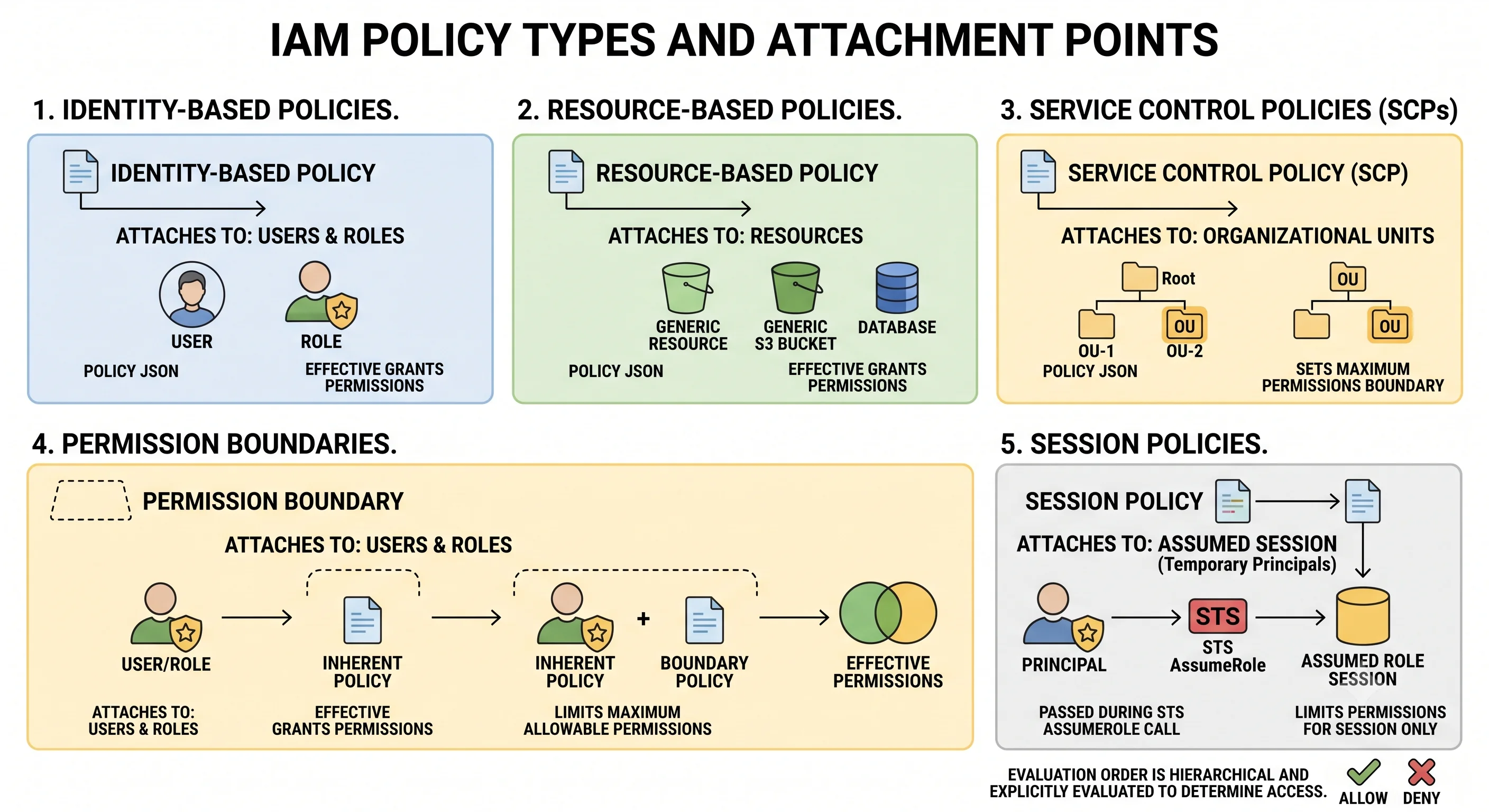
2. The five policy types
This is where the confusion usually starts, because they look similar and do different jobs.
| Type | Attached to | Purpose | Has a Principal element? |
|---|---|---|---|
| Identity-based | User, group, or role | Grants permissions to that identity | No — the identity is implied |
| Resource-based | The resource itself (S3 bucket, KMS key, SQS queue, Lambda function…) | Grants access to the resource, including to principals in other accounts | Yes — it must say who |
| Service Control Policy (SCP) | Organisation root, OU, or account | A ceiling on what any principal in the account may do | No |
| Permission boundary | A user or role | A ceiling on what that identity may do, regardless of its own policies | No |
| Session policy | Passed at AssumeRole or federation time |
A ceiling for that session only | No |
Three of these five only ever restrict. SCPs, permission boundaries, and session policies never grant anything — they cap. Only identity-based and resource-based policies grant.
Resource-based policies are the ones people forget. They're how cross-account access works without the target account handing out credentials, and how a bucket becomes public. If you audit only identity policies, you have audited half the system.
Resource Control Policies (RCPs) are a newer organisation-level ceiling on what resource policies may permit — closing the gap where a resource policy could grant access to an external principal despite your SCPs.
⚠️ verify availability and supported services against current AWS docs
3. The evaluation algorithm
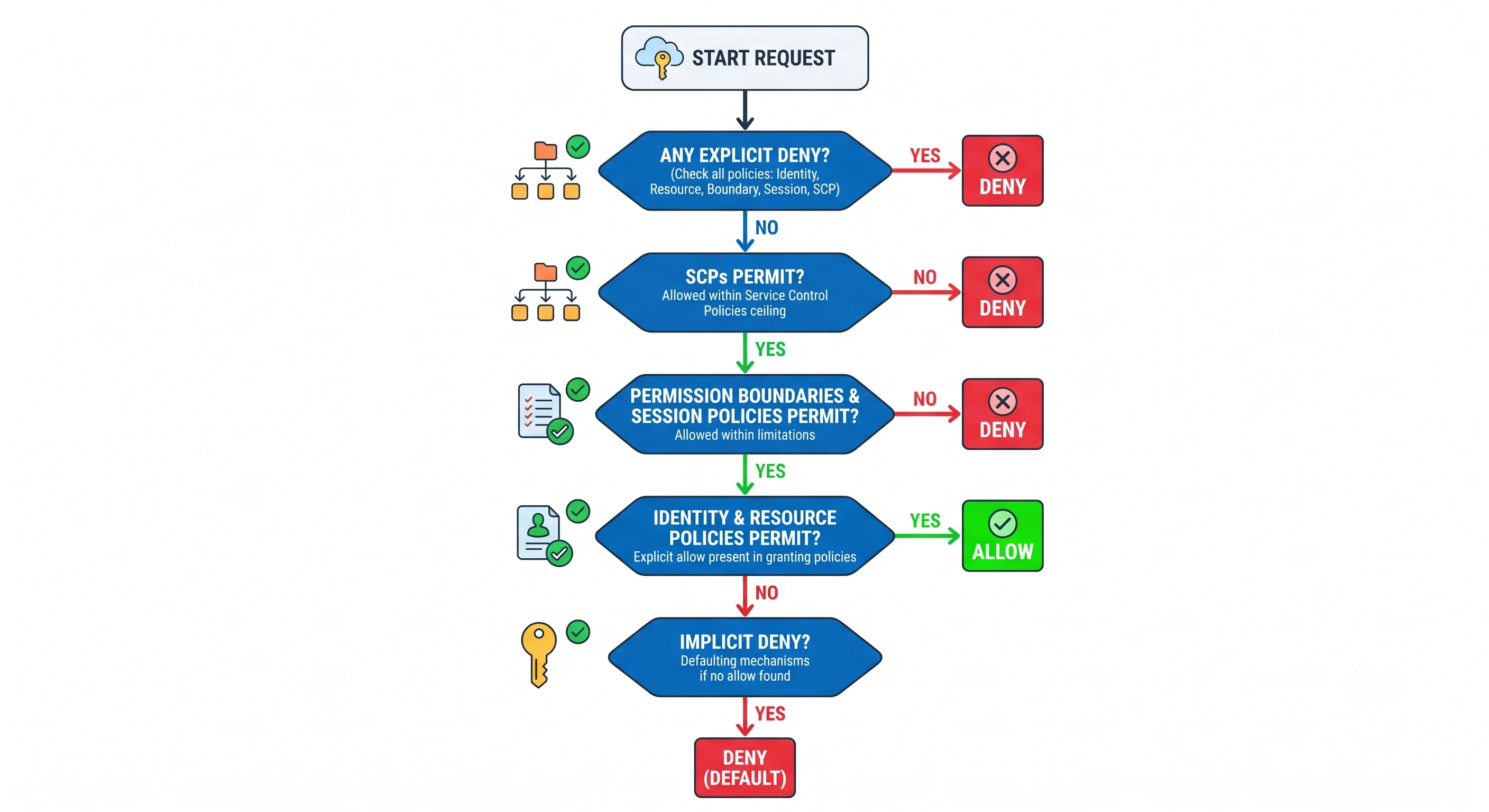
Commit this to memory. It answers nearly every "why is this denied".
                      Request arrives
                            │
              ┌─────────────▼─────────────┐
              │ Explicit DENY anywhere?   │──── yes ──▶ ✗ DENIED
              │ (any policy type at all)  │             final, unappealable
              └─────────────┬─────────────┘
                            │ no
              ┌─────────────▼─────────────┐
              │ SCP allows the action?    │──── no ───▶ ✗ DENIED
              │ (member accounts only)    │             account admin cannot fix
              └─────────────┬─────────────┘
                            │ yes
              ┌─────────────▼─────────────┐
              │ Permission boundary and   │──── no ───▶ ✗ DENIED
              │ session policy allow?     │
              └─────────────┬─────────────┘
                            │ yes
              ┌─────────────▼─────────────┐
              │ Identity-based OR         │──── no ───▶ ✗ DENIED
              │ resource-based policy     │             (implicit deny)
              │ explicitly allows?        │
              └─────────────┬─────────────┘
                            │ yes
                        ✓ ALLOWED
The three rules that fall out of this:
- An explicit
Denyalways wins. No allow anywhere overrides it. This is why a broad deny in an SCP or a boundary is such a blunt instrument — and such an effective one. - Ceilings must all permit. SCP, permission boundary, and session policy each act as an upper bound. Any one of them omitting the action denies it, and no amount of identity policy helps.
- Something must explicitly allow. Absence of an allow is a deny. There is no "not mentioned means fine".
The cross-account rule is cleaner and worth memorising separately: for access across accounts, both sides must allow — an identity policy in the caller's account permitting the action, and a resource policy (or an assumable role) in the target account permitting the caller. Neither side can unilaterally grant access to the other. Within a single account, a resource-based policy that allows the principal can be sufficient on its own.
There are documented subtleties in how resource-based policies interact with permission boundaries and with different principal types. For everyday reasoning the flow above is correct; when the answer genuinely matters (an audit, a cross-account design review), check the current policy-evaluation documentation rather than trusting a remembered diagram — including this one.
⚠️ verify edge-case ordering against current AWS docs
4. Reading a policy
{
  "Version": "2012-10-17",
  "Statement": [
    {
      "Sid": "ReadArtifactsFromOwnPrefix",
      "Effect": "Allow",
      "Action": ["s3:GetObject", "s3:ListBucket"],
      "Resource": [
        "arn:aws:s3:::acme-artifacts",
        "arn:aws:s3:::acme-artifacts/api/*"
      ],
      "Condition": {
        "StringEquals": { "aws:PrincipalTag/Team": "platform" },
        "Bool": { "aws:SecureTransport": "true" }
      }
    }
  ]
}| Element | Notes |
|---|---|
Version |
Always "2012-10-17". It's a policy-language version, not a date you change |
Sid |
A label. Useful in review and in debugging; ignored by evaluation |
Effect |
Allow or Deny |
Action |
Service-namespaced operations. Wildcards allowed (s3:Get*) |
Resource |
ARNs. * means every resource — rarely what you want for data actions |
Principal |
Resource-based policies only — who is being granted access |
Condition |
Key/operator/value tests against the request context |
Two details that cause real bugs:
ListBucketacts on the bucket;GetObjectacts on objects. They need different ARNs — one without a trailing path, one with/*. Getting this wrong produces "I can read files but can't list them", or vice versa, and it's the single most common S3 policy mistake.NotActionandNotResourceare inverted matches, not denies."NotAction": ["iam:*"]with"Effect": "Allow"grants everything except IAM — an enormous grant that reads like a restriction. Use them sparingly and read them twice.
Managed vs. inline
| Managed policy | Inline policy | |
|---|---|---|
| Reusable across identities | ✅ | ❌ — belongs to exactly one |
| Versioned with rollback | ✅ (customer-managed) | ❌ |
| Deleted with the identity | ❌ | ✅ |
| Good for | Anything shared; the default choice | A permission that must never be reused elsewhere |
AWS-managed policies are convenient and usually too broad. AmazonS3FullAccess on a service role
is not least privilege. They're fine for bootstrapping and for a few genuinely well-scoped ones
(AmazonSSMManagedInstanceCore), but production roles should carry customer-managed policies you wrote.
5. Roles and trust
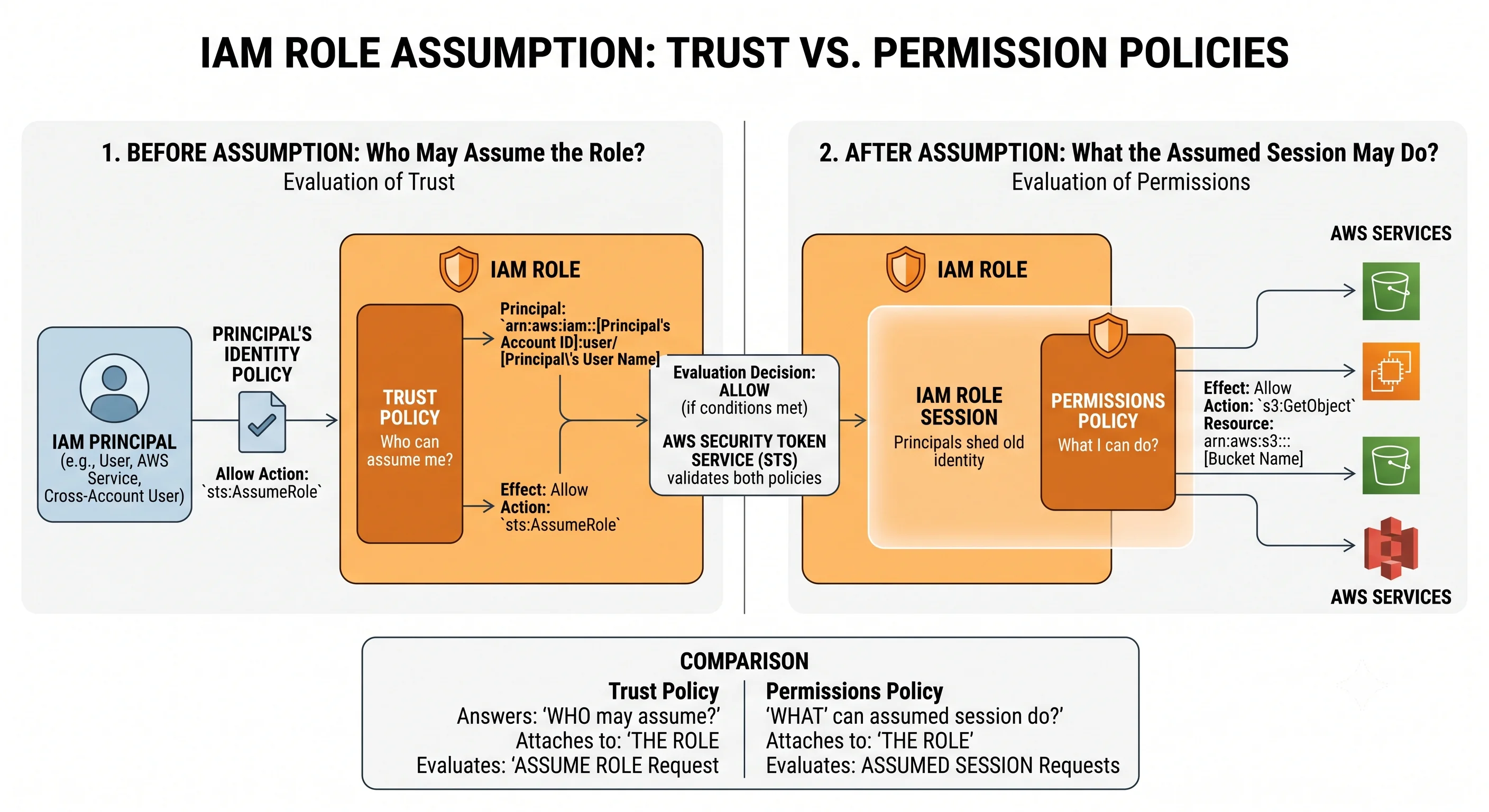
A role has two policies, and conflating them is a common source of confusion:
| Policy | Question it answers |
|---|---|
| Trust policy (a resource-based policy on the role) | Who may assume this role? |
| Permission policy (identity-based) | What may this role do once assumed? |
// Trust policy — an EC2 instance may assume this role
{
  "Version": "2012-10-17",
  "Statement": [{
    "Effect": "Allow",
    "Principal": { "Service": "ec2.amazonaws.com" },
    "Action": "sts:AssumeRole"
  }]
}
// Trust policy — GitHub Actions via OIDC, scoped to one repo and branch
{
"Version": "2012-10-17",
"Statement": [{
"Effect": "Allow",
"Principal": { "Federated": "arn:aws:iam::123456789012:oidc-provider/token.actions.githubusercontent.com" },
"Action": "sts:AssumeRoleWithWebIdentity",
"Condition": {
"StringEquals": {
"token.actions.githubusercontent.com:aud": "sts.amazonaws.com"
},
"StringLike": {
"token.actions.githubusercontent.com:sub": "repo:acme/infra:ref:refs/heads/main"
}
}
}]
}That sub condition is load-bearing. Without it, any GitHub repository in the world could assume
your role — the OIDC provider vouches that the request came from GitHub Actions, not that it came from
your Actions. Scope it to the repository, and ideally to the branch or environment. This is a
frequently-published misconfiguration.
Role chaining — assuming a role from an already-assumed role — works, but the resulting session
carries a shorter maximum duration. Long-running jobs that chain roles fail at the one-hour mark for
reasons that look mysterious. ⚠️ verify current chaining duration limits against AWS docs
iam:PassRole is separate from the permission to create the resource. Launching an instance with a
role attached needs ec2:RunInstances and iam:PassRole on that specific role ARN. It exists to stop
someone who can create compute from attaching an administrator role to a machine they control — scope it
to specific roles, never *.
6. Conditions — where real least privilege lives
Actions and resources alone rarely express intent precisely. Conditions do.
| Condition key | Restricts to |
|---|---|
aws:PrincipalOrgID |
Principals inside your organisation — excellent on resource policies |
aws:SourceVpce |
Requests arriving via a specific VPC endpoint |
aws:SourceIp |
An IP range (careful: not meaningful for calls via VPC endpoints) |
aws:RequestedRegion |
Specific regions |
aws:MultiFactorAuthPresent |
Sessions that used MFA |
aws:SecureTransport |
TLS only |
aws:PrincipalTag/*, aws:ResourceTag/* |
Tag-matching — the basis of ABAC |
aws:SourceArn, aws:SourceAccount |
The specific caller a service is acting on behalf of |
aws:SourceArn and aws:SourceAccount prevent the confused deputy. When an AWS service calls
another service for you — S3 invoking Lambda, SNS publishing to a queue — the service is the principal.
Without these conditions, anyone's bucket could trigger your function. Any resource policy granting
access to a service principal should constrain the source.
{
  "Effect": "Allow",
  "Principal": { "Service": "s3.amazonaws.com" },
  "Action": "lambda:InvokeFunction",
  "Resource": "arn:aws:lambda:eu-west-1:123456789012:function:process-upload",
  "Condition": {
    "StringEquals": { "aws:SourceAccount": "123456789012" },
    "ArnLike": { "aws:SourceArn": "arn:aws:s3:::acme-uploads" }
  }
}
ABAC — permissions from tags
Rather than writing a policy per project, match tags on the principal against tags on the resource:
{
  "Effect": "Allow",
  "Action": ["ec2:StartInstances", "ec2:StopInstances"],
  "Resource": "*",
  "Condition": {
    "StringEquals": {
      "aws:ResourceTag/Team": "${aws:PrincipalTag/Team}"
    }
  }
}
One policy, scaling to any number of teams. The catch is that it's only as good as your tagging — an untagged resource matches nobody, and a mistagged one is exposed to the wrong team. ABAC requires tag enforcement (tag policies, SCPs requiring tags on create) to be trustworthy. See ARNs, Tagging & Quotas.
7. Where credentials come from in practice
| Context | Mechanism | What you avoid |
|---|---|---|
| Humans | IAM Identity Center permission sets | IAM users, per-account logins, orphaned accounts |
| EC2 | Instance profile | Keys on disk |
| ECS / Fargate | Task role | Keys in the image or environment |
| EKS | IRSA or EKS Pod Identity | Node-wide credentials shared by every pod |
| Lambda | Execution role | Anything stored in the function config |
| CI/CD | OIDC federation to a role | Long-lived keys in a secret store |
| Third-party SaaS | Cross-account role with ExternalId |
Handing over an access key |
The pattern is uniform: no long-lived credentials anywhere. Each mechanism produces short-lived, automatically-rotated credentials scoped to one workload. If you find yourself creating an access key, stop and ask which of the above should have applied.
A note on EKS: node-level instance profiles are shared by every pod on the node, so any pod inherits the node role's permissions. IRSA and Pod Identity exist to give each workload its own identity — the difference between "this pod can read one bucket" and "everything on this node can do whatever the node can".
8. Debugging a denial
Work it in this order:
- Read the error message. AWS denial messages have become considerably more informative and often name the policy type responsible — an explicit deny, an SCP, or a missing permission. Read it before theorising.
aws sts get-caller-identity. Confirm which principal is actually making the call. A surprising share of denials are the wrong profile or a stale environment variable.- Can the account administrator grant it? If not, it's an SCP or a permission boundary — escalate to whoever manages the organisation rather than editing IAM in circles.
- Is there an explicit
Deny? Search every applicable policy. OneDenybeats every allow. - Check the resource policy too, not just identity policies — especially for S3, KMS, SQS, SNS, Secrets Manager, and Lambda. Cross-account access needs both sides.
- Check conditions. MFA absent, wrong region, wrong VPC endpoint, a tag that doesn't match — the permission is present but the condition failed.
- Use the tools. The IAM policy simulator evaluates a specific call against current policies. IAM Access Analyzer finds resources exposed outside your account and validates policies as you write them. CloudTrail records the failed call with its error code.
The most useful single heuristic: if an account administrator with AdministratorAccess cannot
fix it by editing IAM, it isn't IAM. It's an SCP, a permission boundary, or a resource policy in
another account.
9. Anti-patterns
| Anti-pattern | Why it hurts | Instead |
|---|---|---|
| IAM users with access keys | Long-lived credentials that leak and nobody rotates | Roles, federation, OIDC |
"Action": "*", "Resource": "*" on workload roles |
Any application bug becomes an account compromise | Scope actions and resource ARNs |
AWS-managed *FullAccess policies in production |
Far broader than the workload needs | Customer-managed policies you wrote |
| One shared role for several applications | Each inherits the others' permissions | One role per workload |
An OIDC trust policy without a sub condition |
Any repository on the internet can assume your role | Scope to repo, branch, environment |
Resource policy for a service principal without aws:SourceArn |
Confused deputy — anyone's resource can trigger yours | Constrain source ARN and account |
iam:PassRole on * |
Lets a compute-creator attach an admin role to a box they control | Scope to specific role ARNs |
| Auditing identity policies only | Resource policies grant access too, including publicly | Audit both; run Access Analyzer |
NotAction used as if it were a deny |
Grants everything except the listed items | Prefer explicit Action lists |
| Permissions accreting forever | Roles only ever grow | Access Analyzer unused-access findings, on a schedule |
Check yourself
- State the evaluation order. Where can an explicit
Denyappear, and what beats it? - Three policy types can only restrict. Which, and why does that matter when debugging?
- What must be true on both sides for cross-account access to work?
- Why does an OIDC trust policy without a
subcondition constitute a serious vulnerability? - Why is
s3:ListBucketonarn:aws:s3:::my-bucket/*wrong? - An admin with
AdministratorAccessgetsAccessDeniedand can't fix it in IAM. Name the two likely causes. - What does
iam:PassRoleprevent, and why is it a separate permission?
Next: Regions & Availability — the geography every design decision sits on.
← Back to the Foundations overview · ← Previous: The API & Control Plane