
5. Deployment
Goal: go from "it worked in the console" to "it ships through a pipeline, in three environments, and someone can roll it back at 2 a.m."
Getting Started launched one instance by hand. That instance is a pet: nobody can rebuild it, nobody reviewed it, and when it dies the service dies. This page builds the thing you'd actually run — a launch template, an Auto Scaling group across three AZs, and a load balancer in front — parameterised, version-controlled, promoted through environments, and reversible.
What we're building
                    ┌─────────────────────────────────┐
   Internet ──────▶ │  Application Load Balancer       │  (public subnets, 3 AZs)
                    └───────────────┬─────────────────┘
                                    │ target group, /health
                    ┌───────────────▼─────────────────┐
                    │  Auto Scaling group              │  min 2 / desired 2 / max 6
                    │  ┌────────┐ ┌────────┐ ┌───────┐│
                    │  │ az-a   │ │ az-b   │ │ az-c  ││  (private subnets)
                    │  └────────┘ └────────┘ └───────┘│
                    └──────────────┬──────────────────┘
                                   │ launch template (versioned)
                          AMI + user data + IAM instance profile
Design decisions baked in, and why:
| Decision | Rationale |
|---|---|
| Instances in private subnets | No public IPs to secure or pay for; the ALB is the only internet-facing surface |
| No SSH key pair at all | Access is via SSM Session Manager — IAM-authorised, CloudTrail-audited, no port 22 |
| Launch template, not launch configuration | Versioned, supports current features, and versions are what make rollback a one-line change |
| Three AZs | An AZ impairment removes a third of capacity, not all of it |
min = 2 even in dev |
One instance is not a service; it's a single point of failure with a URL |
| IMDSv2 required, hop limit 1 | Blunts SSRF-to-credential-theft (see Core Concepts) |
The IaC tool order
This article uses the same ranking everywhere:
| Rank | Tool | Its job here | Where it's the wrong tool |
|---|---|---|---|
| 1. Terraform | Primary | Provisions all the AWS infrastructure — VPC wiring, launch template, ASG, ALB, IAM | You must own and protect the state file; it won't configure what's inside the instance well |
| 2. Ansible | Secondary | Configures instances and runs day-2 operational tasks — package installs, config files, orderly restarts | Weak at long-lived infrastructure state; it can create AWS resources, but it won't reconcile drift the way Terraform does |
| 3. CloudFormation / CDK | Third | The AWS-native equivalent — no external state, StackSets, Service Catalog | Verbose (CFN) or adds a build toolchain (CDK); vendor-locked |
Where the Terraform/Ansible line falls for EC2, concretely: Terraform decides that there are three
instances of this shape in these subnets. Ansible decides what is installed and running on them. If
you find Terraform generating a 200-line user_data shell script, that's the signal to hand the job
to Ansible or to bake an AMI.
Terraform — the primary path
Code layout
infra/
├── modules/
│   └── ec2-service/
│       ├── main.tf
│       ├── variables.tf
│       ├── outputs.tf
│       └── versions.tf
└── envs/
    ├── dev/
    │   ├── main.tf          ← calls ../../modules/ec2-service
    │   ├── backend.tf       ← its own state key
    │   └── terraform.tfvars
    ├── staging/
    └── prod/
Directory-per-environment, not workspaces. Workspaces share one backend configuration and one set
of provider credentials, which makes "prod lives in a different AWS account" awkward and makes it
frighteningly easy to run apply against prod believing you're in dev. Separate directories mean
separate state files, separate backends, separate credentials, and a visible cd before anything
destructive. The cost is some duplicated wiring; the benefit is that the blast radius of a mistake is
one environment.
versions.tf — pin everything
terraform {
  required_version = "~> 1.9"

  required_providers {
    aws = {
      source  = "hashicorp/aws"
      version = "~> 5.60"    # pin the minor; a provider major bump can rewrite your plan
    }
  }
}
variables.tf
variable "name_prefix" {
  description = "Short service name used to prefix all resource names"
  type        = string
}

variable "environment" {
  description = "dev | staging | prod"
  type        = string

  validation {
    condition     = contains(["dev", "staging", "prod"], var.environment)
    error_message = "environment must be one of: dev, staging, prod."
  }
}

variable "vpc_id" {
  type = string
}

variable "private_subnet_ids" {
  description = "Subnets for the instances — one per AZ, at least two"
  type        = list(string)

  validation {
    condition     = length(var.private_subnet_ids) >= 2
    error_message = "Provide at least two subnets in different AZs."
  }
}

variable "public_subnet_ids" {
  description = "Subnets for the load balancer"
  type        = list(string)
}

variable "instance_type" {
  type    = string
  default = "t3.small"
}

variable "min_size" {
  type    = number
  default = 2
}

variable "max_size" {
  type    = number
  default = 6
}

variable "desired_capacity" {
  type    = number
  default = 2
}

variable "root_volume_size" {
  type    = number
  default = 20
}

variable "tags" {
  description = "Additional tags merged into every resource"
  type        = map(string)
  default     = {}
}
Those validation blocks are cheap and they fail at plan time rather than halfway through an
apply — which matters, because a partially-applied Terraform run is the most annoying state to be in.
main.tf
locals {
  name = "${var.name_prefix}-${var.environment}"

  common_tags = merge(var.tags, {
    Environment = var.environment
    Service     = var.name_prefix
    ManagedBy   = "terraform"
  })
}

# ---------------------------------------------------------------------------
# AMI — looked up, never hard-coded. Pin to a specific image in prod by
# setting an explicit AMI ID variable; "latest" is convenient and non-reproducible.
# ---------------------------------------------------------------------------
data "aws_ssm_parameter" "al2023" {
  name = "/aws/service/ami-amazon-linux-latest/al2023-ami-kernel-default-x86_64"
}

# ---------------------------------------------------------------------------
# IAM — the instance profile. SSM access, no SSH keys anywhere.
# ---------------------------------------------------------------------------
data "aws_iam_policy_document" "assume" {
  statement {
    actions = ["sts:AssumeRole"]
    principals {
      type        = "Service"
      identifiers = ["ec2.amazonaws.com"]
    }
  }
}

resource "aws_iam_role" "instance" {
  name               = "${local.name}-instance-role"
  assume_role_policy = data.aws_iam_policy_document.assume.json
  tags               = local.common_tags
}

resource "aws_iam_role_policy_attachment" "ssm" {
  role       = aws_iam_role.instance.name
  policy_arn = "arn:aws:iam::aws:policy/AmazonSSMManagedInstanceCore"
}

resource "aws_iam_instance_profile" "instance" {
  name = "${local.name}-instance-profile"
  role = aws_iam_role.instance.name
}

# ---------------------------------------------------------------------------
# Security groups — the ALB is the only thing that may talk to the instances.
# ---------------------------------------------------------------------------
resource "aws_security_group" "alb" {
  name        = "${local.name}-alb"
  description = "Public ingress to the load balancer"
  vpc_id      = var.vpc_id
  tags        = local.common_tags

  lifecycle {
    create_before_destroy = true
  }
}

resource "aws_vpc_security_group_ingress_rule" "alb_https" {
  security_group_id = aws_security_group.alb.id
  description       = "HTTPS from the internet"
  ip_protocol       = "tcp"
  from_port         = 443
  to_port           = 443
  cidr_ipv4         = "0.0.0.0/0"
}

resource "aws_vpc_security_group_egress_rule" "alb_to_app" {
  security_group_id            = aws_security_group.alb.id
  description                  = "ALB to app instances"
  ip_protocol                  = "tcp"
  from_port                    = 8080
  to_port                      = 8080
  referenced_security_group_id = aws_security_group.app.id
}

resource "aws_security_group" "app" {
  name        = "${local.name}-app"
  description = "Application instances"
  vpc_id      = var.vpc_id
  tags        = local.common_tags

  lifecycle {
    create_before_destroy = true
  }
}

# Reference the ALB's SG, not a CIDR — this survives re-IPing and states intent.
resource "aws_vpc_security_group_ingress_rule" "app_from_alb" {
  security_group_id            = aws_security_group.app.id
  description                  = "App port, from the ALB only"
  ip_protocol                  = "tcp"
  from_port                    = 8080
  to_port                      = 8080
  referenced_security_group_id = aws_security_group.alb.id
}

resource "aws_vpc_security_group_egress_rule" "app_all" {
  security_group_id = aws_security_group.app.id
  description       = "Outbound for package installs and AWS APIs"
  ip_protocol       = "-1"
  cidr_ipv4         = "0.0.0.0/0"
}

# ---------------------------------------------------------------------------
# Launch template — the recipe. Changing it creates a NEW VERSION;
# existing instances are untouched until an instance refresh runs.
# ---------------------------------------------------------------------------
resource "aws_launch_template" "app" {
  name_prefix   = "${local.name}-"
  image_id      = data.aws_ssm_parameter.al2023.value
  instance_type = var.instance_type

  iam_instance_profile {
    arn = aws_iam_instance_profile.instance.arn
  }

  vpc_security_group_ids = [aws_security_group.app.id]

  # IMDSv2 only, and don't let a container hop to the credentials.
  metadata_options {
    http_endpoint               = "enabled"
    http_tokens                 = "required"
    http_put_response_hop_limit = 1
  }

  block_device_mappings {
    device_name = "/dev/xvda"
    ebs {
      volume_size           = var.root_volume_size
      volume_type           = "gp3"
      encrypted             = true
      delete_on_termination = true
    }
  }

  monitoring {
    enabled = true    # 1-minute CloudWatch metrics; costs a little, worth it
  }

  user_data = base64encode(templatefile("${path.module}/user_data.sh.tftpl", {
    environment = var.environment
  }))

  tag_specifications {
    resource_type = "instance"
    tags          = merge(local.common_tags, { Name = local.name })
  }

  tag_specifications {
    resource_type = "volume"
    tags          = local.common_tags
  }

  tags = local.common_tags

  lifecycle {
    create_before_destroy = true
  }
}

# ---------------------------------------------------------------------------
# Load balancer and target group
# ---------------------------------------------------------------------------
resource "aws_lb" "app" {
  name               = "${local.name}-alb"
  load_balancer_type = "application"
  subnets            = var.public_subnet_ids
  security_groups    = [aws_security_group.alb.id]

  enable_deletion_protection = var.environment == "prod"

  tags = local.common_tags
}

resource "aws_lb_target_group" "app" {
  name     = "${local.name}-tg"
  port     = 8080
  protocol = "HTTP"
  vpc_id   = var.vpc_id

  health_check {
    path                = "/health"
    healthy_threshold   = 2
    unhealthy_threshold = 3
    timeout             = 5
    interval            = 15
    matcher             = "200"
  }

  # Let in-flight requests finish before an instance is removed.
  deregistration_delay = 30

  tags = local.common_tags

  lifecycle {
    create_before_destroy = true
  }
}

# ---------------------------------------------------------------------------
# Auto Scaling group
# ---------------------------------------------------------------------------
resource "aws_autoscaling_group" "app" {
  name                = "${local.name}-asg"
  vpc_zone_identifier = var.private_subnet_ids

  min_size         = var.min_size
  max_size         = var.max_size
  desired_capacity = var.desired_capacity

  target_group_arns = [aws_lb_target_group.app.arn]

  # ELB health checks, not just EC2 status checks: an instance can be perfectly
  # healthy while your process is dead.
  health_check_type         = "ELB"
  health_check_grace_period = 180

  launch_template {
    id      = aws_launch_template.app.id
    version = aws_launch_template.app.latest_version
  }

  # Rolling replacement when the launch template changes. This is your deploy.
  instance_refresh {
    strategy = "Rolling"
    preferences {
      min_healthy_percentage = 90
      instance_warmup        = 180
      auto_rollback          = true    # revert on a failed refresh
    }
    triggers = ["launch_template"]
  }

  # Terraform manages desired_capacity on create; scaling policies own it after.
  lifecycle {
    ignore_changes = [desired_capacity]
  }

  dynamic "tag" {
    for_each = local.common_tags
    content {
      key                 = tag.key
      value               = tag.value
      propagate_at_launch = true
    }
  }
}

resource "aws_autoscaling_policy" "cpu" {
  name                   = "${local.name}-target-tracking-cpu"
  autoscaling_group_name = aws_autoscaling_group.app.name
  policy_type            = "TargetTrackingScaling"

  target_tracking_configuration {
    predefined_metric_specification {
      predefined_metric_type = "ASGAverageCPUUtilization"
    }
    target_value = 50
  }
}
outputs.tf
output "alb_dns_name" {
  description = "Point your Route 53 alias record here"
  value       = aws_lb.app.dns_name
}

output "asg_name" {
  value = aws_autoscaling_group.app.name
}

output "app_security_group_id" {
  description = "Reference this from a database SG rather than a CIDR"
  value       = aws_security_group.app.id
}
Three details in there that are load-bearing
ignore_changes = [desired_capacity]. Without it, every terraform apply resets your fleet to the
declared count — so a Sunday-evening apply silently scales you from 12 instances back to 2 while
traffic is live. Terraform declares the bounds; the scaling policy owns the current value.
create_before_destroy on the launch template and security groups. Security groups can't be deleted
while anything references them, and target groups can't be deleted while a listener points at them.
Without this you get dependency-deadlock errors mid-apply on otherwise ordinary changes.
health_check_type = "ELB" plus a grace period. With the EC2 default, the ASG considers an instance
healthy the moment the hypervisor says so — so a deploy that boots fine but fails to start your app
looks perfectly successful while every request 502s.
The apply loop
cd infra/envs/dev
terraform init
terraform plan -out=tfplan       # read it — every time
terraform apply tfplan           # apply the reviewed plan, not a fresh one
Always plan -out then apply <file>. A bare terraform apply re-plans at apply time, so what you
approve and what executes can differ if something changed in between. In CI this isn't a nicety, it's
the whole audit trail.
Remote state and locking
Local state is fine for exactly one person doing exactly one thing. On a team it's a footgun: state holds resource IDs and any secrets that passed through, it isn't shared, and two simultaneous applies will corrupt each other's view of reality.
envs/dev/backend.tf:
terraform {
  backend "s3" {
    bucket       = "acme-tfstate-123456789012"
    key          = "ec2-service/dev/terraform.tfstate"
    region       = "us-east-1"
    encrypt      = true
    use_lockfile = true      # S3-native locking (newer Terraform)
    # dynamodb_table = "terraform-locks"   # the long-standing alternative
  }
}
Terraform gained S3-native state locking via
use_lockfile, superseding the DynamoDB lock table for new setups.⚠️ verify the minimum Terraform version and current guidance against the Terraform docs— plenty of existing estates still usedynamodb_table, and that's fine.
The state bucket itself needs care, because it's the single most sensitive artifact you own:
- Versioning on — your undo button when state is corrupted or a resource is accidentally removed.
- Encryption on (SSE-KMS), public access blocked, and a bucket policy denying non-TLS access.
- Separate state key per environment, as above — never one file for everything.
- Treat state as secret. Anyone who can read it can read database passwords that passed through Terraform. Restrict the bucket, don't ship it to a general-purpose logging pipeline.
Ansible — the secondary path
Terraform put the instances there. Ansible decides what's on them, and handles the day-2 work that declarative infrastructure tooling handles badly: an orderly restart, a config push, an emergency patch across a fleet.
Dynamic inventory
Never maintain a static host list for auto-scaled instances — they change identity constantly. The
amazon.aws.aws_ec2 plugin queries the API and groups hosts by tag.
inventory/aws_ec2.yml:
plugin: amazon.aws.aws_ec2
regions:
  - us-east-1
filters:
  tag:Service: acme-api
  tag:Environment: prod
  instance-state-name: running
keyed_groups:
  - key: tags.Environment
    prefix: env
  - key: tags.Service
    prefix: svc
# Instances are in private subnets with no public IP — connect over SSM.
hostnames:
  - instance-id
compose:
  ansible_host: instance_id
# group_vars/all.yml — no SSH, no bastion, no port 22
ansible_connection: aws_ssm
ansible_aws_ssm_region: us-east-1
ansible_aws_ssm_bucket_name: acme-ansible-ssm-transferThe playbook
playbooks/app.yml:
- name: Configure application instances
  hosts: env_prod
  become: true
  serial: "25%"          # roll through the fleet, never all at once
  max_fail_percentage: 0 # stop the whole run at the first failure

  vars:
    app_version: "{{ lookup('env', 'APP_VERSION') | default('1.4.2', true) }}"

  tasks:
    - name: Install runtime packages
      ansible.builtin.dnf:
        name:
          - nginx
          - python3.11
        state: present

    - name: Render application config
      ansible.builtin.template:
        src: app.conf.j2
        dest: /etc/acme/app.conf
        owner: root
        mode: "0640"
      notify: Restart app        # handler fires only if the file actually changed

    - name: Deploy application artifact
      ansible.builtin.unarchive:
        src: "s3://acme-artifacts/api/{{ app_version }}.tar.gz"
        dest: /opt/acme
        remote_src: true

    - name: Ensure service is enabled and running
      ansible.builtin.systemd:
        name: acme-api
        state: started
        enabled: true

  handlers:
    - name: Restart app
      ansible.builtin.systemd:
        name: acme-api
        state: restarted
ansible-playbook -i inventory/aws_ec2.yml playbooks/app.yml --check # dry run
ansible-playbook -i inventory/aws_ec2.yml playbooks/app.yml
ansible-playbook -i inventory/aws_ec2.yml playbooks/app.yml # ← run it twiceThat third run is the point. A correct playbook reports changed=0 on the second pass — that's
idempotency, and it's what makes Ansible safe to run on a schedule or in a panic. If a task reports
changed every time (the classic offender being a raw shell command with no creates: guard), it
isn't idempotent, and running it during an incident will restart services for no reason.
serial: "25%" is the other thing to notice. Without it, Ansible restarts your application on every
instance simultaneously, which is an outage you performed to yourself.
Ansible can create AWS resources — and mostly shouldn't
# Legal. Not what you want for long-lived infrastructure.
- amazon.aws.ec2_instance:
    name: demo
    instance_type: t3.small
    image_id: ami-0abc123
    state: present
Why not: nothing reconciles drift, there's no plan to review before it acts, and there's no state
file recording what it built — so removing that task from the playbook doesn't remove the instance.
Terraform owns existence; Ansible owns configuration. The one common exception is an ephemeral
resource you build and destroy within a single playbook run.
CloudFormation / CDK — the third path
CloudFormation — the same ASG + launch template, natively
AWSTemplateFormatVersion: "2010-09-09"
Description: EC2 service - launch template + ASG behind an ALB

Parameters:
  Environment:
    Type: String
    AllowedValues: [dev, staging, prod]
  VpcId:
    Type: AWS::EC2::VPC::Id
  PrivateSubnetIds:
    Type: List<AWS::EC2::Subnet::Id>
  LatestAmiId:
    # Native SSM parameter lookup - the CFN equivalent of the Terraform data source
    Type: AWS::SSM::Parameter::Value<AWS::EC2::Image::Id>
    Default: /aws/service/ami-amazon-linux-latest/al2023-ami-kernel-default-x86_64

Resources:
  LaunchTemplate:
    Type: AWS::EC2::LaunchTemplate
    Properties:
      LaunchTemplateData:
        ImageId: !Ref LatestAmiId
        InstanceType: t3.small
        IamInstanceProfile:
          Arn: !GetAtt InstanceProfile.Arn
        MetadataOptions:
          HttpTokens: required
          HttpPutResponseHopLimit: 1
        BlockDeviceMappings:
          - DeviceName: /dev/xvda
            Ebs:
              VolumeSize: 20
              VolumeType: gp3
              Encrypted: true

  AutoScalingGroup:
    Type: AWS::AutoScaling::AutoScalingGroup
    Properties:
      VPCZoneIdentifier: !Ref PrivateSubnetIds
      MinSize: "2"
      MaxSize: "6"
      DesiredCapacity: "2"
      HealthCheckType: ELB
      HealthCheckGracePeriod: 180
      TargetGroupARNs: [!Ref TargetGroup]
      LaunchTemplate:
        LaunchTemplateId: !Ref LaunchTemplate
        Version: !GetAtt LaunchTemplate.LatestVersionNumber
    # CFN's built-in rolling deploy - the instance_refresh equivalent
    UpdatePolicy:
      AutoScalingRollingUpdate:
        MinInstancesInService: 2
        MaxBatchSize: 1
        PauseTime: PT5M
        WaitOnResourceSignals: true
What CFN gives you that Terraform doesn't: no state file to own or protect, automatic rollback on stack-update failure as a first-class feature, drift detection built into the console, and StackSets for multi-account/multi-region rollout.
What it costs you: verbosity, a weaker module ecosystem, sometimes-slow support for brand-new
resource properties, and stacks that can wedge in UPDATE_ROLLBACK_FAILED — a genuinely unpleasant
state to recover from.
CDK (TypeScript) — the same thing, imperatively
import * as cdk from 'aws-cdk-lib';
import * as ec2 from 'aws-cdk-lib/aws-ec2';
import * as autoscaling from 'aws-cdk-lib/aws-autoscaling';
import * as elbv2 from 'aws-cdk-lib/aws-elasticloadbalancingv2';

export class Ec2ServiceStack extends cdk.Stack {
  constructor(scope: cdk.App, id: string, props: cdk.StackProps) {
    super(scope, id, props);

    const vpc = ec2.Vpc.fromLookup(this, 'Vpc', { vpcId: 'vpc-0abc123' });

    const asg = new autoscaling.AutoScalingGroup(this, 'Asg', {
      vpc,
      vpcSubnets: { subnetType: ec2.SubnetType.PRIVATE_WITH_EGRESS },
      instanceType: ec2.InstanceType.of(ec2.InstanceClass.T3, ec2.InstanceSize.SMALL),
      machineImage: ec2.MachineImage.latestAmazonLinux2023(),
      minCapacity: 2,
      maxCapacity: 6,
      requireImdsv2: true,
      updatePolicy: autoscaling.UpdatePolicy.rollingUpdate(),
    });

    const lb = new elbv2.ApplicationLoadBalancer(this, 'Alb', {
      vpc, internetFacing: true,
    });

    lb.addListener('Https', { port: 443 })
      .addTargets('App', {
        port: 8080,
        targets: [asg],
        healthCheck: { path: '/health' },
      });

    asg.scaleOnCpuUtilization('KeepCpuAt50', { targetUtilizationPercent: 50 });
  }
}
CDK synthesises to CloudFormation, so it inherits CFN's rollback behaviour and its failure modes. The
win is real: types, loops, unit-testable constructs, and sane defaults (that addTargets call wires up
the security groups for you). The cost is a build step, a language runtime in your pipeline, and the
fact that cdk diff is a less precise safety net than terraform plan.
CI/CD
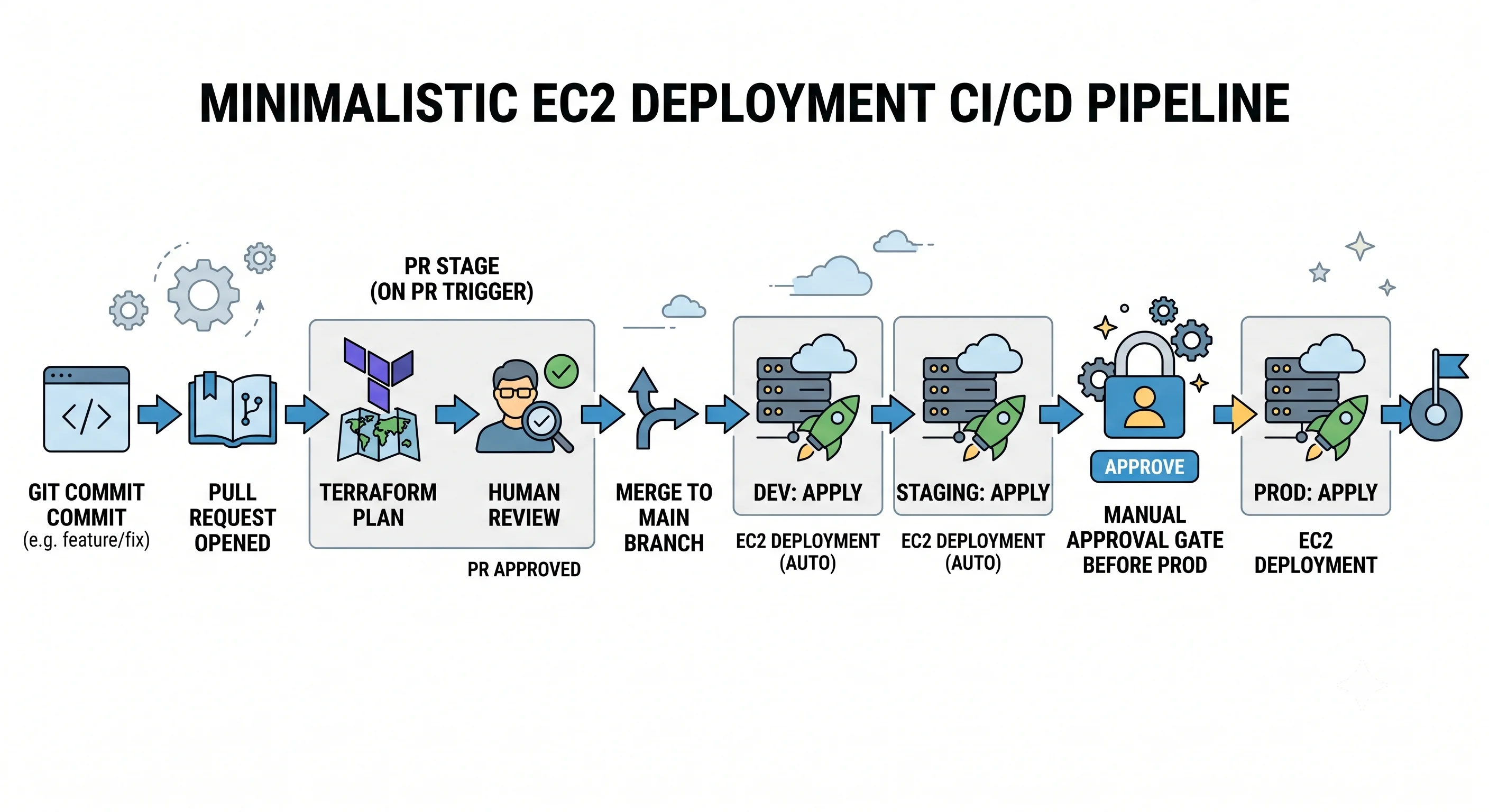
Rule one: no long-lived AWS access keys in CI. Use OIDC — GitHub Actions presents a short-lived signed token, AWS exchanges it for temporary credentials scoped to a role you control. There is no secret to leak, rotate, or find in a git history.
.github/workflows/deploy.yml:
name: deploy

on:
  pull_request:
    paths: ["infra/**"]
  push:
    branches: [main]
    paths: ["infra/**"]

permissions:
  id-token: write      # required to request the OIDC token
  contents: read
  pull-requests: write # to post the plan as a comment

jobs:
  plan:
    runs-on: ubuntu-latest
    strategy:
      matrix:
        env: [dev, staging, prod]
    steps:
      - uses: actions/checkout@v4

      - uses: aws-actions/configure-aws-credentials@v4
        with:
          role-to-assume: arn:aws:iam::123456789012:role/gha-terraform-plan
          aws-region: us-east-1

      - uses: hashicorp/setup-terraform@v3

      - name: Terraform plan
        working-directory: infra/envs/${{ matrix.env }}
        run: |
          terraform init
          terraform plan -out=tfplan -detailed-exitcode
          terraform show -no-color tfplan > plan.txt

      - uses: actions/upload-artifact@v4
        with:
          name: tfplan-${{ matrix.env }}
          path: infra/envs/${{ matrix.env }}/tfplan

  apply-dev:
    needs: plan
    if: github.ref == 'refs/heads/main'
    runs-on: ubuntu-latest
    environment: dev            # no reviewers - deploys automatically
    steps: [ ... terraform apply tfplan ... ]

  apply-prod:
    needs: apply-dev
    if: github.ref == 'refs/heads/main'
    runs-on: ubuntu-latest
    environment: prod           # ← GitHub environment with required reviewers
    steps: [ ... terraform apply tfplan ... ]
The shape that matters, independent of tooling:
| Stage | Trigger | Credentials | Gate |
|---|---|---|---|
plan |
Every PR touching infra/ |
A read-only plan role | Plan posted as a PR comment; humans review the diff |
apply dev |
Merge to main |
Apply role, dev account | None — dev is where you find out |
apply staging |
After dev succeeds | Apply role, staging account | Automated smoke tests |
apply prod |
After staging succeeds | Apply role, prod account | Manual approval, and the reviewed plan artifact |
Two separate IAM roles. The plan role needs only Describe*/Get*/List* plus read access to the
state bucket; the apply role can mutate. Pull-request CI runs code from a branch — if that job holds
apply permissions, an attacker who can open a PR can run arbitrary Terraform.
Apply the stored plan artifact, not a freshly-generated one. Otherwise the human approved a diff that isn't necessarily the diff that runs.
Environments
| Axis | Dev | Staging | Prod |
|---|---|---|---|
| AWS account | Separate | Separate | Separate |
| Instance type | t3.small |
Same as prod | m6i.large |
| Capacity | min 2 / max 4 | min 2 / max 6 | min 3 / max 20 |
| Deletion protection | Off | Off | On |
| Approval to apply | None | None | Required |
Separate AWS accounts, not separate VPCs in one account. An account is the strongest isolation boundary AWS offers — a runaway script, a too-broad IAM policy, or a service-quota exhaustion in dev cannot reach prod. Organizations + Control Tower exist to make this manageable.
Staging should differ from prod only in scale, never in shape. A staging environment with a different instance family, a single AZ, or no load balancer tests a system you don't run.
envs/prod/terraform.tfvars:
name_prefix      = "acme-api"
environment      = "prod"
instance_type    = "m6i.large"
min_size         = 3
max_size         = 20
desired_capacity = 3
root_volume_size = 50
Rollback and blast radius
What "deploy" means here
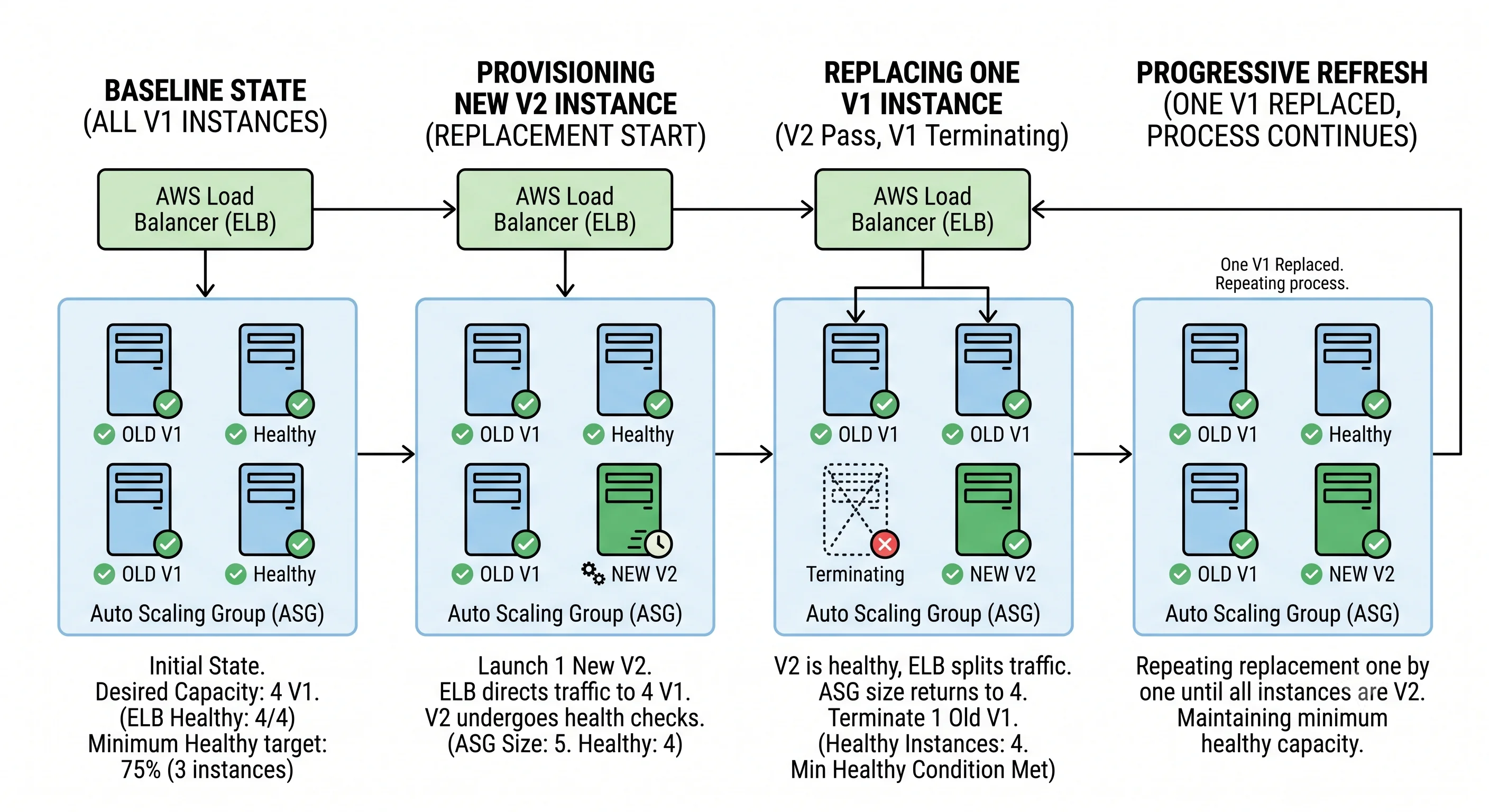
Changing the launch template creates a new version. Existing instances keep running the old one
until an instance refresh rolls through the ASG: launch a replacement, wait for warmup, wait for the
ELB health check, terminate an old one, repeat — respecting min_healthy_percentage throughout.
# Watch a refresh
aws autoscaling describe-instance-refreshes \
  --auto-scaling-group-name acme-api-prod-asg \
  --query 'InstanceRefreshes[0].[Status,PercentageComplete,StatusReason]' --output table

# Stop one in progress (already-replaced instances stay replaced)
aws autoscaling cancel-instance-refresh --auto-scaling-group-name acme-api-prod-asg
Rolling back
| Situation | Rollback |
|---|---|
| Bad config/AMI, refresh still running | auto_rollback = true handles it — or cancel, then rollback-instance-refresh |
| Bad config/AMI, refresh finished | Revert the commit, re-apply (new LT version = old contents), refresh again |
| Bad application artifact | Re-run the Ansible playbook pinned to the previous app_version — far faster than replacing instances |
| Terraform did something structurally wrong | git revert and apply. Check the plan — the reverse of a create is a destroy |
| Total loss of confidence | Blue/green: stand up a second ASG + target group, shift the listener, keep the old one warm until you're sure |
git revert is not universally safe, and this is the thing to internalise. Terraform's reverse
operation for "created a resource" is "destroy that resource." Reverting a commit that added an EBS
volume will delete the volume and its data. Always read the plan on a revert, with the same attention
you'd give a forward change.
Changes that force replacement
The single most important thing to know before any EC2 apply — replacement means a new instance and a new root volume, so anything living on local disk is gone.
| Change | Effect on a standalone aws_instance |
|---|---|
ami |
Forces replacement |
subnet_id, availability_zone |
Forces replacement |
instance_type |
In-place — the provider stops, modifies, and starts it (brief downtime; instance-store data lost) |
user_data |
In-place by default, and it does not re-run — set user_data_replace_on_change = true if you want the change to actually take effect |
Root volume_size |
In-place grow (you must still extend the filesystem inside the OS); shrinking forces replacement |
| Security group membership | In-place |
That user_data row causes real incidents: you change the bootstrap script, terraform apply reports
success, and nothing has changed on any running instance — because user data only executes at first
boot. In the ASG pattern this is a non-issue, since the launch template change triggers a refresh
and every instance is genuinely new. That's one more reason the ASG pattern beats managing
aws_instance resources directly.
Blast radius checklist, before a prod apply
- Read the plan. Count the
destroyandforces replacementlines. Anything unexpected is a stop. enable_deletion_protectionon prod load balancers,prevent_destroyinlifecycleon stateful resources.- Confirm
min_healthy_percentagekeeps enough capacity to serve current traffic during the refresh. - Know your rollback command before you apply, not after.
- Deploy during a window when the people who understand it are awake.
Drift
Drift is the gap between what the code says and what's actually in AWS — someone clicking in the console, an emergency fix nobody committed, a service auto-modifying a resource.
# In CI, on a schedule: exit code 2 means "changes detected"
terraform plan -detailed-exitcode -lock=false
Exit codes: 0 = no changes, 1 = error, 2 = drift. Run this nightly and alert on 2. The value
isn't catching malice; it's catching the emergency console fix from three weeks ago that will be
silently reverted by the next unrelated apply — at the worst possible moment.
Reducing drift at the source beats detecting it: deny console write access in prod via SCP or
permission boundaries, and make the pipeline the only path that can mutate infrastructure. Where a
resource legitimately changes outside Terraform (autoscaled capacity, tags applied by a governance
tool), declare that with ignore_changes rather than fighting it every apply.
CloudFormation has native detect-stack-drift; the concept is identical.
Teardown
cd infra/envs/dev
terraform destroy      # read this plan too — it's all destroys
What destroy will not remove:
- The load balancer, if
enable_deletion_protectionis on — disable it first (this is deliberate). - EBS volumes with
delete_on_termination = false, and any manual snapshots. Snapshots are never touched by Terraform unless Terraform created them. - CloudWatch log groups with retention, if created outside this module.
- The state bucket and lock table — bootstrap infrastructure, intentionally outside the state it stores.
- IAM roles that acquired policy attachments outside Terraform — the role won't delete while they exist.
- Anything created by Ansible inside instances — gone with the instances, but any S3 artifacts or Parameter Store entries it wrote persist.
Verify with the orphan checks from Getting Started — unattached volumes and idle Elastic IPs are the usual survivors.
Check yourself
- Why
ignore_changes = [desired_capacity], and what breaks without it? - Your PR-triggered CI job has permission to run
terraform apply. Explain the attack. - You changed
user_dataand applied successfully, but nothing changed on the running instances. Why, and what are your two fixes? - Why is reverting a Terraform commit not automatically safe?
- Terraform provisioned the fleet and Ansible configures it. Where exactly is the line, and what's the smell that you've drawn it in the wrong place?
- Nightly
terraform planexits 2. Walk through what you do — and why "just apply it" is the wrong reflex.
Next: Integrations — how EC2 wires into the rest of AWS: VPC, EBS, ELB, IAM, CloudWatch, Systems Manager, S3, and where ECS/EKS sit on top of it.