
3. Architecture
Goal: make the invisible machinery visible. Most EC2 tutorials stop at "click launch." This page explains what is actually happening on the other side of that API call — which is what lets you reason about performance ceilings, cost, and, above all, failure.
Four things to take away: EC2 is a control plane and a data plane with different failure profiles; almost all I/O is offloaded to dedicated hardware (Nitro); your "disk" is on the network; and instances fail in specific, named ways you can design around.
1. The two planes, in EC2 terms
The control-plane/data-plane split and the static-stability principle that follows from it are covered in The API & Control Plane. Mapped onto EC2:
| Control plane | Data plane | |
|---|---|---|
| What it does | RunInstances, TerminateInstances, AttachVolume, tagging, describing |
Your packets, your disk reads, your CPU cycles |
| Where it lives | Regional service endpoints (ec2.us-east-1.amazonaws.com) |
The physical host your instance sits on |
| If it degrades | You can't launch or change instances | Running instances stop working |
The EC2-specific consequence: an Auto Scaling launch is a control-plane call. Putting one on the critical path of your failover means depending on the most contended component at the worst possible moment — while simultaneously competing for AZ capacity with everyone else doing the same thing. Pre-provision across AZs instead. The scaling ceilings this runs into are in §6, and the reliability posture it implies is in Production.
2. The Nitro system — where the hypervisor went
The analogy: the old model was one chef doing the cooking and answering the phone and running deliveries — every interruption stole time from the cooking. Nitro hired dedicated staff for the phone and the deliveries, so the chef does nothing but cook.
The technical version: early EC2 ran a Xen hypervisor with a privileged control domain (dom0) that handled networking and storage I/O in software, on the same CPUs your instance was renting. That cost you performance, it cost you predictability (noisy-neighbour I/O contention), and it meant AWS could never hand you the whole machine.
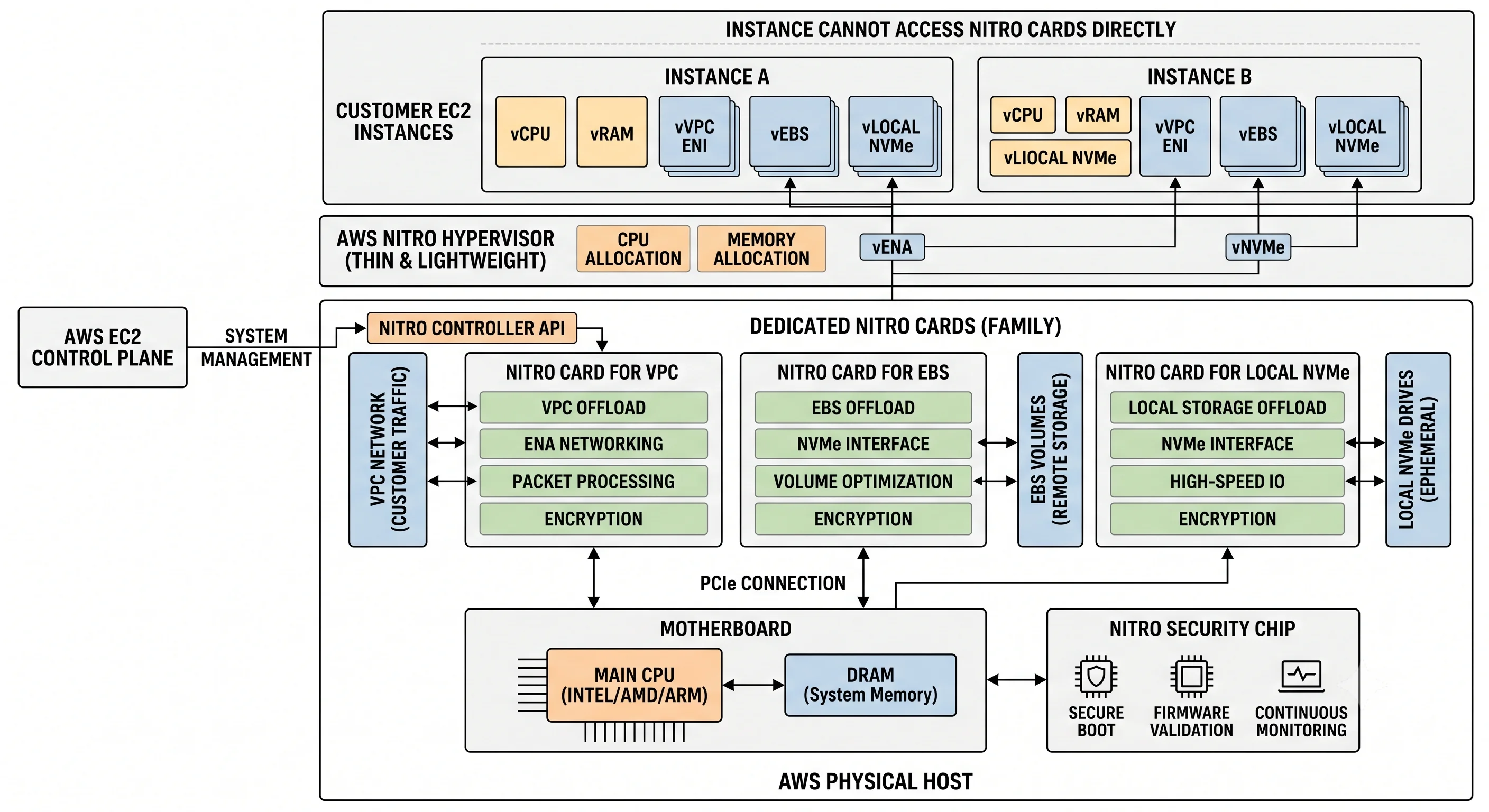
Starting around 2017, AWS moved that work onto purpose-built hardware. The Nitro system has three parts:
| Component | What it is | What it gives you |
|---|---|---|
| Nitro Cards | Dedicated PCIe hardware handling VPC networking, EBS attachment, local NVMe, and host control | I/O no longer steals your vCPUs; consistent, high throughput; hardware-accelerated encryption |
| Nitro Security Chip | Hardware root of trust that integrates into the motherboard and gates access to non-volatile storage/firmware | Verified boot; the host firmware can't be persistently tampered with |
| Nitro Hypervisor | A deliberately minimal KVM-based hypervisor that only allocates CPU and memory | Near-bare-metal performance; a tiny attack surface compared with a full hypervisor + dom0 |
Four consequences you can actually observe:
- Bare metal instance types exist (
*.metal). If the hypervisor isn't doing the I/O, it can be removed entirely — which is how you get nested virtualisation and licence models that demand real hardware. - Encryption is close to free on supported types. EBS volume encryption and, on many instance
types, VPC traffic encryption between instances happen in the Nitro hardware. The old "we skipped
encryption for performance" argument mostly evaporated.
⚠️ verify which instance types support in-transit encryption against current AWS docs - Security groups are enforced in the Nitro card, not in your instance's OS and not by something your instance can bypass. You cannot spoof your way out of a security group from inside the guest.
- Performance is more predictable. Network and EBS bandwidth are enforced per-instance-type ceilings rather than emerging from contention.
3. Tracing one launch, end to end
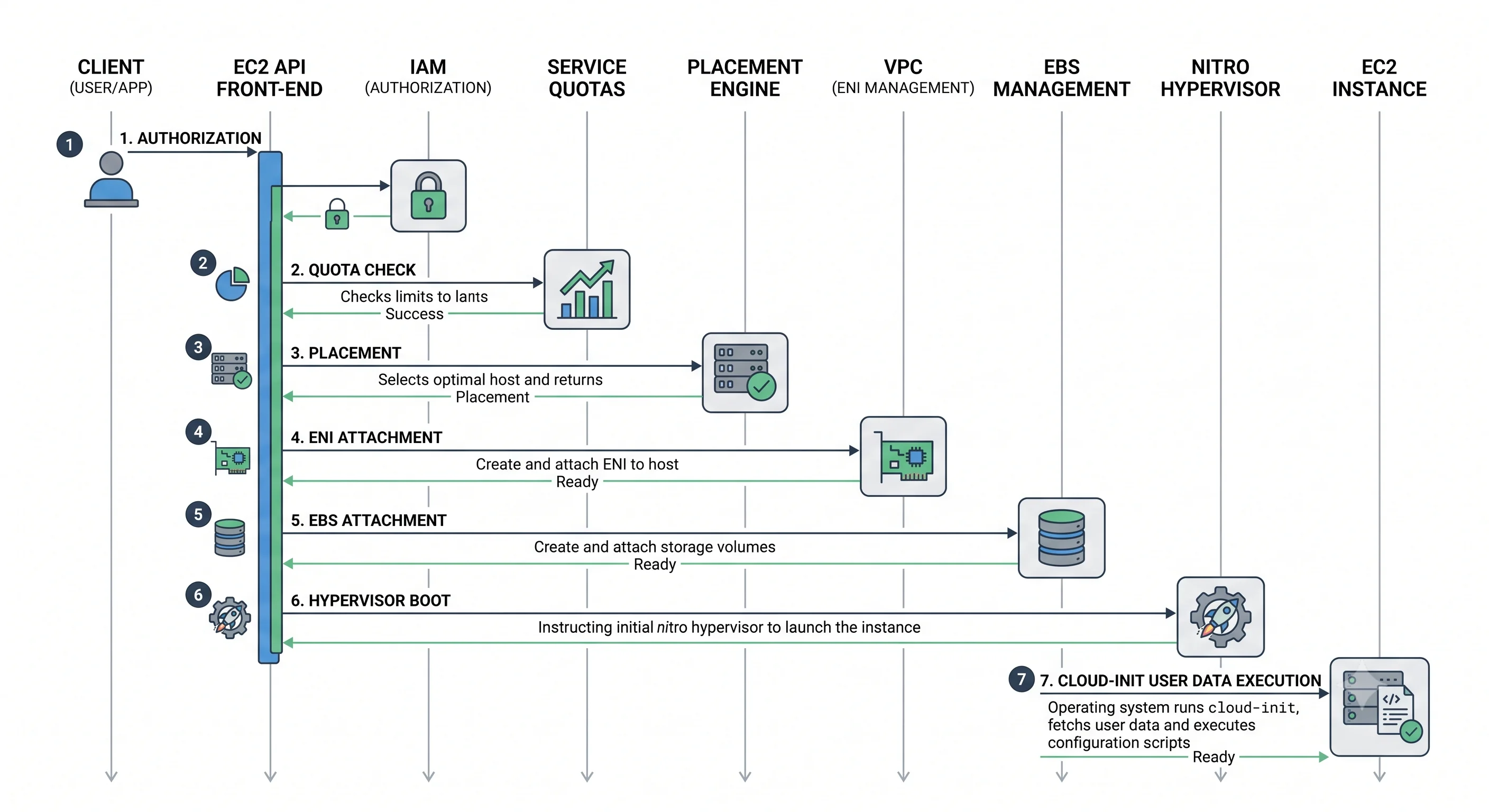
What actually happens between aws ec2 run-instances and an SSH prompt:
Request and authorisation. The call hits the regional EC2 control-plane endpoint. It's authenticated (SigV4) and authorised against IAM — including the often-forgotten
iam:PassRolecheck if you attached an instance profile. Parameters are validated: does the AMI exist in this region, is the instance type offered in this AZ, does the subnet exist?Quota check. Your vCPU-based service quota for that instance family group in that region is evaluated. Exceed it and you get an error immediately — no capacity was ever sought. This is one of the two most common launch failures, and it's a support-ticket fix, not a retry.
Placement. The placement service picks a physical host in the requested AZ with free capacity of the right shape, honouring any placement group, tenancy (shared/dedicated/host), and capacity reservation. If no host has room, you get
InsufficientInstanceCapacity— the other common failure, and a genuinely different problem: AWS has run out of that instance type in that AZ right now. Retrying in a different AZ or with a different instance type usually works, which is exactly why ASGs with multiple subnets and mixed instance types are more resilient than a single hard-coded type.Resource attachment. The Nitro controller on the chosen host provisions the instance's slice: an ENI is created in your subnet and bound to the Nitro networking card (with your security group rules loaded into it), the root EBS volume is created from the AMI's snapshot and attached over the network, and any instance-store NVMe devices are presented.
Boot. The Nitro hypervisor allocates vCPUs and memory; firmware/UEFI hands off to the guest kernel from the root volume.
First-boot configuration.
cloud-initruns inside the guest: it fetches metadata from IMDS at169.254.169.254, injects your public key into~/.ssh/authorized_keys, sets the hostname, grows the root filesystem to the requested volume size, and then executes your user data as root.Health. The instance reaches
runningand the status checks begin reporting. Note the ordering trap:runningdoes not mean "your application is up." It means the VM booted. If your ASG or deploy script treatsrunningas ready, you will route traffic to an instance whose user data is still installing packages — which is what health-check grace periods and ELB health checks exist to prevent.
A lazily-loaded detail worth knowing: a root volume created from an AMI snapshot is hydrated from S3 on demand. The first read of each block may be noticeably slower until the volume is fully warm. For latency-sensitive first-run workloads this shows up as a mysterious slow start; Fast Snapshot Restore exists to address it, at a cost.
4. The storage path — your disk is on the network
The analogy: an EBS volume is not a drive in the machine. It's a drive in another room, reached down a very fast, very reliable corridor, and the Nitro card is the courier who makes it look local to your OS.
The mechanics:
- The guest sees a normal NVMe block device. Reads and writes are intercepted by the Nitro EBS card and sent over the AWS network to the EBS service.
- EBS replicates every write synchronously across multiple servers within a single AZ before acknowledging it. That's the durability story — and also why an EBS volume is AZ-scoped and can't be attached across AZs.
- Two independent bandwidth ceilings apply: the volume's own provisioned IOPS/throughput, and the
instance type's EBS bandwidth limit. Attaching a monster
io2volume to a small instance gets you the small instance's ceiling. This is a routine mis-diagnosis — people blame the volume when the instance is the bottleneck. - Snapshots go to S3 (AWS-owned buckets), incrementally, and are region-scoped — which makes them the standard mechanism for moving a volume across AZs or regions.
Durability and consistency:
| Property | EBS | Instance store |
|---|---|---|
| Write acknowledgement | After replication within the AZ | After the local device accepts it |
| Failure domain | Single AZ | Single physical host |
| Annual failure rate | Low but not zero — varies by volume type, with io2 Block Express designed for materially higher durability than gp3. ⚠️ verify current figures against AWS docs |
N/A — treat as guaranteed to be lost eventually |
The honest framing: EBS is durable, not backed up. Replication protects against device failure. It
does not protect against you running rm -rf, against ransomware, or against an AZ-level event. Only
snapshots (ideally cross-region, ideally via AWS Backup with a retention policy) do that.
5. The network path
- Each instance has one or more ENIs. Traffic leaving an ENI is encapsulated and routed by the VPC's distributed mapping service, which resolves your private IP to the physical host currently holding it. This is why private IPs move seamlessly and why VPC networking is software-defined rather than physically switched.
- Security group rules are evaluated in the Nitro card, statefully. Return traffic for an allowed connection is permitted automatically.
- Enhanced networking (ENA) gives supported types SR-IOV-style direct hardware access rather than a software-emulated NIC — lower latency, higher packets-per-second, less CPU overhead.
- Bandwidth scales with instance size. A
largegets a fraction of what a24xlargegets, and smaller instances often have a burst allowance above their sustained baseline. A workload that benchmarks beautifully for five minutes and degrades after is usually exhausting a network or EBS burst credit.⚠️ verify per-type figures against current AWS docs - Cluster placement groups put instances on the same high-bandwidth, low-latency network segment — worth tens of microseconds for tightly-coupled workloads, at the price of concentrating your instances on correlated hardware.
Cross-AZ traffic costs money and adds latency (single-digit milliseconds). It's a small per-GB charge that becomes a large bill in chatty microservice architectures. Keep hot paths intra-AZ where correctness allows; spread across AZs where availability demands it. That tension is a real design decision, not a solved problem.
6. Scaling model
EC2 itself doesn't scale — you scale, by running more instances. Two directions:
- Vertical (bigger instance). Requires a stop/start, so it's disruptive; ceiling is the largest size in the family. Right answer for a single-writer database. Wrong answer as a growth strategy.
- Horizontal (more instances). The Auto Scaling group's job. Unbounded in principle, bounded in practice by quotas, AZ capacity, and whatever in your architecture is actually single-threaded.
The ASG control loop: compare desired capacity to actual, launch or terminate to close the gap, replace anything failing health checks, and adjust desired capacity according to scaling policies — target tracking ("keep average CPU at 50%") being the one to reach for by default, with step and scheduled scaling for known patterns.
Where the ceiling actually is:
| Ceiling | Nature | How to raise it |
|---|---|---|
| vCPU service quota per family group, per region | Soft | Service Quotas request; not instant, so ask before the launch event |
| AZ capacity for a specific type | Hard, and momentary | Diversify instance types and AZs; Capacity Reservations for guaranteed launches |
| Instance type maximum size | Hard | Go horizontal |
| Warm-up time | Physics | Golden AMIs, warm pools, generous health-check grace periods |
Scaling is not instant, and that's the thing people underestimate. Alarm evaluation, then launch, then boot, then configure, then pass health checks, then register with the target group — realistically minutes, not seconds. If your traffic can double in 90 seconds, reactive scaling will not save you; you need headroom, predictive/scheduled scaling, or a queue to absorb the spike.
7. Failure modes
The specific, named ways EC2 breaks. Knowing them by name is most of what "operating EC2" means.
Status checks
| Check | What it tests | Typical cause | Who fixes it |
|---|---|---|---|
| System status | The underlying host and its network/power | Host hardware or connectivity failure | AWS — or you, by stop/starting to move hosts |
| Instance status | The guest OS and its config | Kernel panic, full disk, broken network config, failed boot | You |
| Attached EBS status | Whether attached volumes are reachable | EBS impairment | AWS, usually |
A failing system check on a modern instance often triggers automatic recovery — the instance is migrated to healthy hardware, keeping its instance ID, private IP, and EBS volumes. A failing instance check will not be fixed by AWS, because the problem is inside your machine.
Scheduled events
AWS emails and posts events for instance retirement (the host is being decommissioned — the instance will stop or terminate on a date), instance reboot, system maintenance, and volume retirement. If your architecture treats each instance as irreplaceable, these are incidents. If it treats instances as disposable, they're calendar noise.
The named launch and runtime failures
| Failure | What it means | Response |
|---|---|---|
InsufficientInstanceCapacity |
No capacity for that type in that AZ right now | Try another AZ or type; diversify the ASG; Capacity Reservations for critical launches |
VcpuLimitExceeded |
Your quota, not AWS's capacity | Quota increase request |
| Spot interruption | AWS is reclaiming the instance | Handle the interruption notice via IMDS/EventBridge: drain, checkpoint, deregister, exit cleanly |
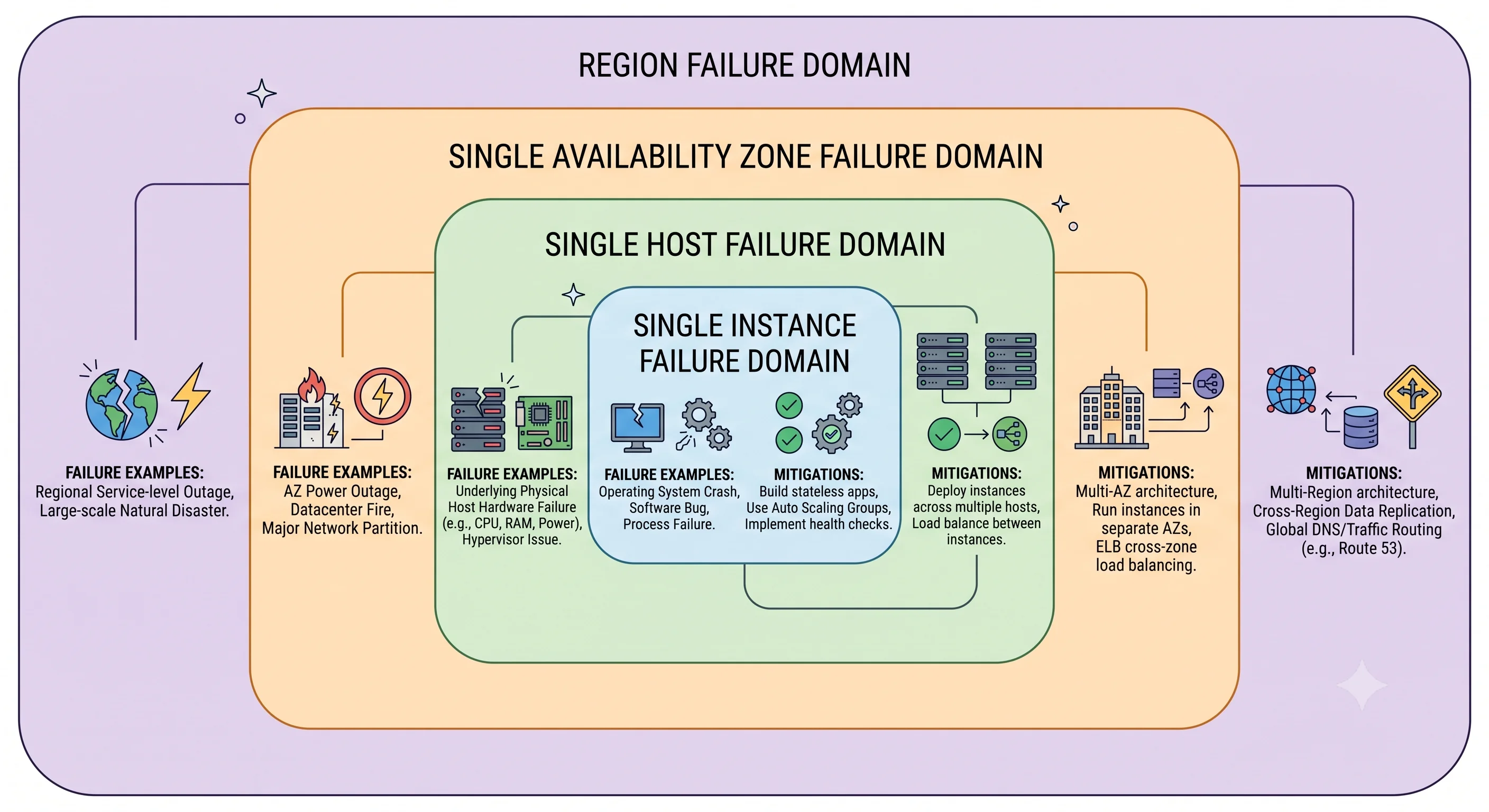
| AZ impairment | An entire zone degrades | Multi-AZ ASG + load balancer, with enough spare capacity in surviving AZs to absorb the load |
| Burst credit exhaustion | CPU (t), EBS, or network burst allowance ran out |
Right-size, switch to a non-burstable family, or enable unlimited mode knowingly |
| Noisy neighbour | Rare on Nitro for I/O, still possible for shared-tenancy CPU | Larger sizes, dedicated tenancy, or *.metal |
The failure you cause yourself
The most common real-world EC2 outage isn't hardware. It's a security group change that removes access,
a full root volume, an expired certificate, a user-data script that silently failed on an unattended
apt prompt, or an AMI update that changed a device name. Production covers the guardrails; Deployment
covers making deployments reversible.
8. Reliability posture, honestly stated
- A single instance is not highly available. Full stop. It has a per-instance SLA far below the region-level one, and it will eventually be retired, rebooted, or degraded.
- Availability comes from the pattern, not the service: two or more instances, in two or more AZs, behind a load balancer, in an Auto Scaling group, with no local state that matters.
- AWS publishes distinct SLA tiers for region-level (multi-AZ) versus individual-instance
availability.
⚠️ verify the current EC2 SLA percentages and credit terms against the AWS Service Level Agreement pagebefore quoting them anywhere that matters. - EBS is single-AZ. Multi-AZ resilience for data requires snapshots, replication at the application layer, or a service that does it for you (RDS Multi-AZ, EFS).
Check yourself
- Why does relying on
RunInstancesduring a regional incident make your system less reliable? - Your database instance shows 3,000 IOPS despite a volume provisioned for 16,000. Name two possible causes and how you'd distinguish them.
- A system status check fails vs. an instance status check fails — who fixes each, and what's your first action?
- Why does an ASG spanning three AZs with three instance types launch more reliably than one pinned to a single AZ and type?
- Your instance is
runningbut returns 502s through the ALB for 90 seconds after every scale-out. What's happening, and which two knobs fix it?
Next: Getting Started puts it into practice: one instance, three ways — Console, CLI, Terraform — plus the teardown.