
4. Getting Started
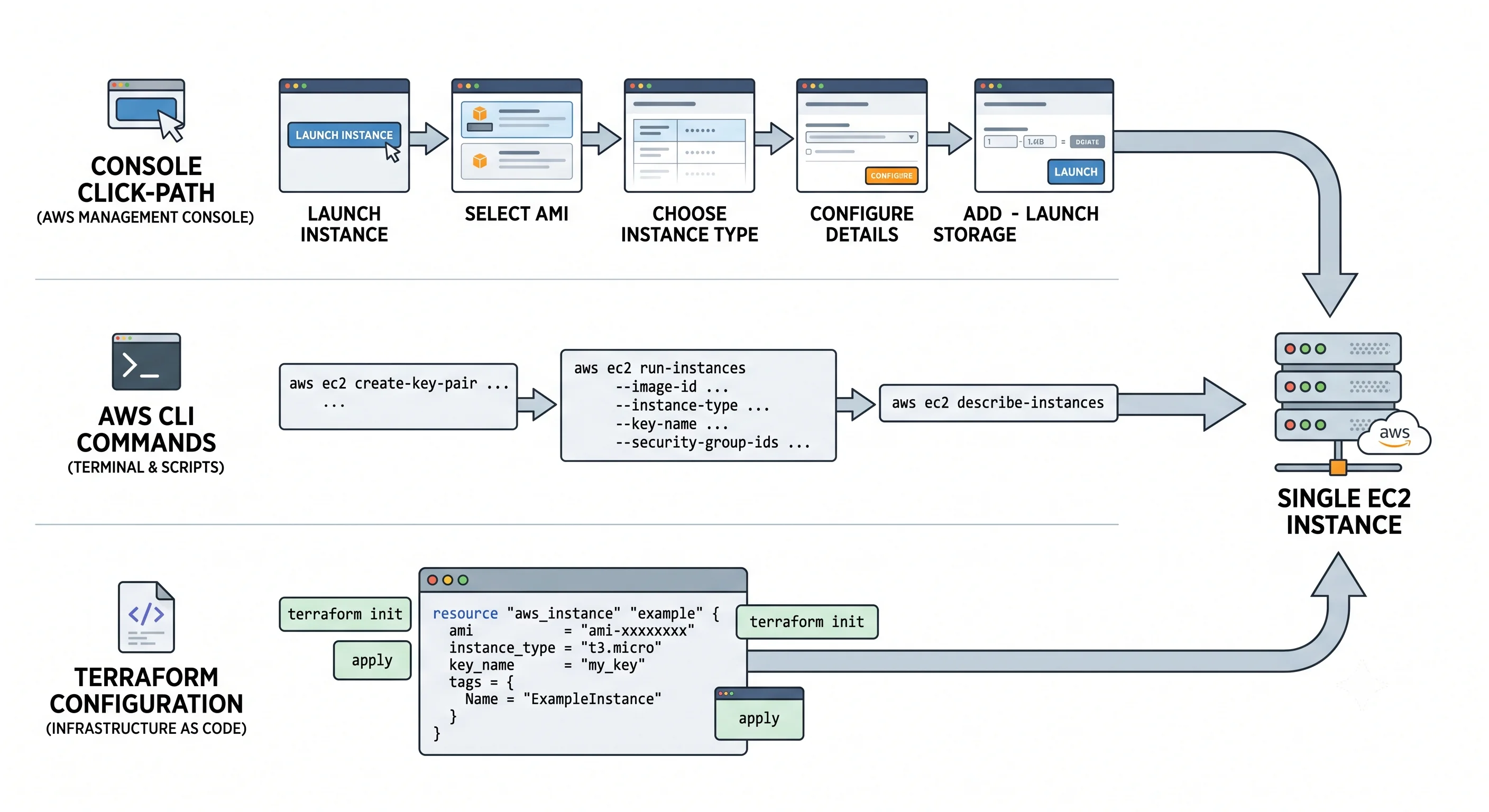
Goal: one running instance you can log into, built three ways, then deleted. Nothing here is production-shaped — that's the job of Deployment. This page is deliberately throwaway: hard-coded names, the default VPC, no variables, no remote state, no pipeline.
The task, identical in all three paths: launch a single Amazon Linux 2023 t3.micro in the default
VPC, connect to it, confirm it's alive, and destroy everything.
Before you start. This costs money — small, but not zero. Free-tier terms have changed and vary by account age and region, so don't assume this is free.
⚠️ verify current free-tier terms against AWS docs. Whatever you do, complete the teardown.
Prerequisites: an AWS account, the AWS CLI v2 installed and configured (aws configure), and for
the third path, Terraform. Everything below uses us-east-1 — substitute your region consistently.
Path 1 — Console (fast to grasp, impossible to repeat)
- EC2 → Instances → Launch instances. Name it
demo-instance. - AMI: pick Amazon Linux 2023 from Quick Start. Instance type:
t3.micro. - Key pair: create a new one called
demo-key, type RSA, format.pem. Your browser downloads the private key once — there is no second chance. (Or select Proceed without a key pair if you intend to connect with EC2 Instance Connect only.) - Network settings → Edit: leave the default VPC and subnet; under the security group choose
Create security group, allow SSH from My IP — never
0.0.0.0/0. - Launch instance, then select it and click Connect → EC2 Instance Connect → Connect for a browser shell with no local key handling.
Verify: the instance shows Running with 2/2 or 3/3 status checks passed, and in the shell
cat /etc/os-release prints Amazon Linux 2023.
The console is the fastest way to understand the launch wizard — every field maps to a concept from Core Concepts. It is also unrepeatable, unreviewable, and undiffable, which is why nothing you care about should be built this way.
Path 2 — AWS CLI (repeatable, scriptable)
Copy-pasteable, in order. Each block exports what the next one needs.
# 0. Region and a name we'll reuse
export AWS_REGION=us-east-1
export NAME=demo

# 1. Find the current Amazon Linux 2023 AMI — never hard-code an AMI ID.
#    AWS publishes the latest image ID in a public SSM parameter, per region.
export AMI_ID=$(aws ssm get-parameters \
  --names /aws/service/ami-amazon-linux-latest/al2023-ami-kernel-default-x86_64 \
  --query 'Parameters[0].Value' --output text)
echo "AMI: $AMI_ID"

# 2. Create a key pair. The private key is returned exactly once — save it now.
aws ec2 create-key-pair --key-name ${NAME}-key \
  --query 'KeyMaterial' --output text > ${NAME}-key.pem
chmod 400 ${NAME}-key.pem

# 3. Create a security group in the default VPC, allowing SSH from your IP only.
export VPC_ID=$(aws ec2 describe-vpcs --filters Name=is-default,Values=true \
  --query 'Vpcs[0].VpcId' --output text)

export SG_ID=$(aws ec2 create-security-group \
  --group-name ${NAME}-sg --description "Demo SG — delete me" \
  --vpc-id $VPC_ID --query 'GroupId' --output text)

export MY_IP=$(curl -s https://checkip.amazonaws.com)
aws ec2 authorize-security-group-ingress --group-id $SG_ID \
  --protocol tcp --port 22 --cidr ${MY_IP}/32
# 4. Launch it.
export INSTANCE_ID=$(aws ec2 run-instances \
--image-id $AMI_ID \
--instance-type t3.micro \
--key-name ${NAME}-key \
--security-group-ids $SG_ID \
--metadata-options "HttpTokens=required,HttpPutResponseHopLimit=1" \
--tag-specifications "ResourceType=instance,Tags=[{Key=Name,Value=${NAME}-instance}]" \
--query 'Instances[0].InstanceId' --output text)
# 5. Wait until it's actually reachable, not merely 'running'.
aws ec2 wait instance-status-ok --instance-ids $INSTANCE_ID
# 6. Connect.
export PUBLIC_IP=$(aws ec2 describe-instances --instance-ids $INSTANCE_ID \
--query 'Reservations[0].Instances[0].PublicIpAddress' --output text)
ssh -i ${NAME}-key.pem ec2-user@${PUBLIC_IP}Two details in that run-instances call are not decoration:
--metadata-options HttpTokens=requiredenforces IMDSv2 from the start. Retrofitting this onto a running fleet is far more annoying than setting it at launch — see Core Concepts.aws ec2 wait instance-status-okwaits for the status checks, not just therunningstate.runningmeans the VM booted; it does not mean sshd is listening. This is the single most common "my automation is flaky" bug in EC2 scripting.
Verify: you get a shell prompt, and cat /etc/os-release shows Amazon Linux 2023.
Path 3 — Terraform (minimal — the real version comes later)
Create main.tf:
terraform {
  required_providers {
    aws = { source = "hashicorp/aws", version = "~> 5.0" }
  }
}

provider "aws" {
  region = "us-east-1"
}

# Look the AMI up rather than pinning an ID — AMI IDs differ per region
# and change every time AWS publishes a new image.
data "aws_ssm_parameter" "al2023" {
  name = "/aws/service/ami-amazon-linux-latest/al2023-ami-kernel-default-x86_64"
}

data "aws_vpc" "default" {
  default = true
}

data "http" "my_ip" {
  url = "https://checkip.amazonaws.com"
}

resource "aws_security_group" "demo" {
  name        = "demo-sg"
  description = "Demo SG - delete me"
  vpc_id      = data.aws_vpc.default.id

  ingress {
    description = "SSH from my IP only"
    from_port   = 22
    to_port     = 22
    protocol    = "tcp"
    cidr_blocks = ["${chomp(data.http.my_ip.response_body)}/32"]
  }

  egress {
    from_port   = 0
    to_port     = 0
    protocol    = "-1"
    cidr_blocks = ["0.0.0.0/0"]
  }
}

resource "aws_instance" "demo" {
  ami                    = data.aws_ssm_parameter.al2023.value
  instance_type          = "t3.micro"
  vpc_security_group_ids = [aws_security_group.demo.id]

  metadata_options {
    http_tokens                 = "required"   # IMDSv2 only
    http_put_response_hop_limit = 1
  }

  tags = {
    Name = "demo-instance"
  }
}

output "public_ip" {
  value = aws_instance.demo.public_ip
}
terraform init # download the AWS provider
terraform plan # read this before every apply — it is the whole point of Terraform
terraform apply # type 'yes'Read the plan. Getting into the habit now — when the plan is six lines — is what makes you able to
read one later when it's four hundred and one of the lines says forces replacement on your database.
Note what's missing on purpose: no variables, no remote state (your state file is sitting in this
directory, unencrypted, unshared), no tags beyond Name, no environment separation, no root volume
configuration. All of that is in Deployment. If you push this as-is, expect review
comments.
When it doesn't work
The first-timer failures, in rough order of frequency:
| Symptom | Cause | Fix |
|---|---|---|
| SSH hangs with no response | Security group doesn't allow 22 from your current IP | Your IP changed (VPN, café wifi, DHCP). Re-check with curl https://checkip.amazonaws.com and update the rule |
Permission denied (publickey) |
Wrong username or wrong key | Amazon Linux is ec2-user; Ubuntu is ubuntu; RHEL is ec2-user; Debian is admin |
WARNING: UNPROTECTED PRIVATE KEY FILE |
.pem permissions too open |
chmod 400 demo-key.pem |
| No public IP assigned | Subnet doesn't auto-assign public IPs, or it's a private subnet | Use a default/public subnet, or launch with --associate-public-ip-address |
InsufficientInstanceCapacity |
AWS has no t3.micro in that AZ right now |
Different AZ or instance type — see Architecture |
VcpuLimitExceeded |
Your account quota, not AWS capacity | Service Quotas increase request |
UnauthorizedOperation |
Your IAM principal lacks ec2:RunInstances (or iam:PassRole) |
Fix the policy; the error names the action |
Instance running but nothing works |
You didn't wait for status checks | aws ec2 wait instance-status-ok |
Teardown — do not skip this
Half of all surprise AWS bills come from forgotten demo resources. An idle instance still bills for compute; a deleted instance's orphaned EBS volume and unattached Elastic IP still bill for storage and address hours.
Terraform:
terraform destroy # removes the instance and the security groupCLI:
aws ec2 terminate-instances --instance-ids $INSTANCE_ID
aws ec2 wait instance-terminated --instance-ids $INSTANCE_ID

# The SG can only be deleted once nothing references it — hence the wait above.
aws ec2 delete-security-group --group-id $SG_ID
aws ec2 delete-key-pair --key-name ${NAME}-key
rm -f ${NAME}-key.pem
Console: Instances → select → Instance state → Terminate instance. Then delete the security group and key pair separately — terminating the instance does not remove them.
Confirm nothing survived
Terminating an instance does not necessarily clean up everything attached to it. Check all four:
# Any instance still alive?
aws ec2 describe-instances \
  --filters "Name=instance-state-name,Values=running,stopped" \
  --query 'Reservations[].Instances[].[InstanceId,InstanceType,State.Name]' --output table

# Orphaned volumes — these bill per GB-month whether attached or not
aws ec2 describe-volumes --filters Name=status,Values=available \
  --query 'Volumes[].[VolumeId,Size,CreateTime]' --output table

# Unassociated Elastic IPs — these bill by the hour while idle
aws ec2 describe-addresses \
  --query 'Addresses[?AssociationId==`null`].[PublicIp,AllocationId]' --output table

# Snapshots you created and forgot
aws ec2 describe-snapshots --owner-ids self \
  --query 'Snapshots[].[SnapshotId,VolumeSize,StartTime]' --output table
DeleteOnTerminationis the setting to know. The root volume defaults totrue(deleted with the instance); additional attached volumes default tofalseand will quietly outlive the instance, billing forever. That's what theavailable-status volume check above is catching.
Check yourself
- Why look the AMI up from SSM rather than hard-coding
ami-0abc123? - What's the difference between the instance reaching
runningand passinginstance-status-ok, and why does it break scripts? - You terminated the instance and your bill didn't go to zero. Name three things that could still be charging.
- What does
HttpTokens=requireddo, and what class of attack does it blunt? - Name three things in the Terraform above that would fail code review on a real project.
Next: Deployment rebuilds this properly: a parameterised Terraform module with a launch template, Auto Scaling group and load balancer, remote state, an Ansible playbook, the CloudFormation/CDK equivalent, CI/CD with OIDC, and rollback.