
7. Production
Goal: the difference between "I made it work" and "I run this at scale, on call, without dreading the bill." Five pillars — security, cost, scaling and limits, observability, reliability.
Every number on this page is either flagged or framed as a concept, because quotas and prices are the fastest-moving facts in AWS. The shapes — what you're billed for, which metric reveals which failure, where the ceilings are — are durable.
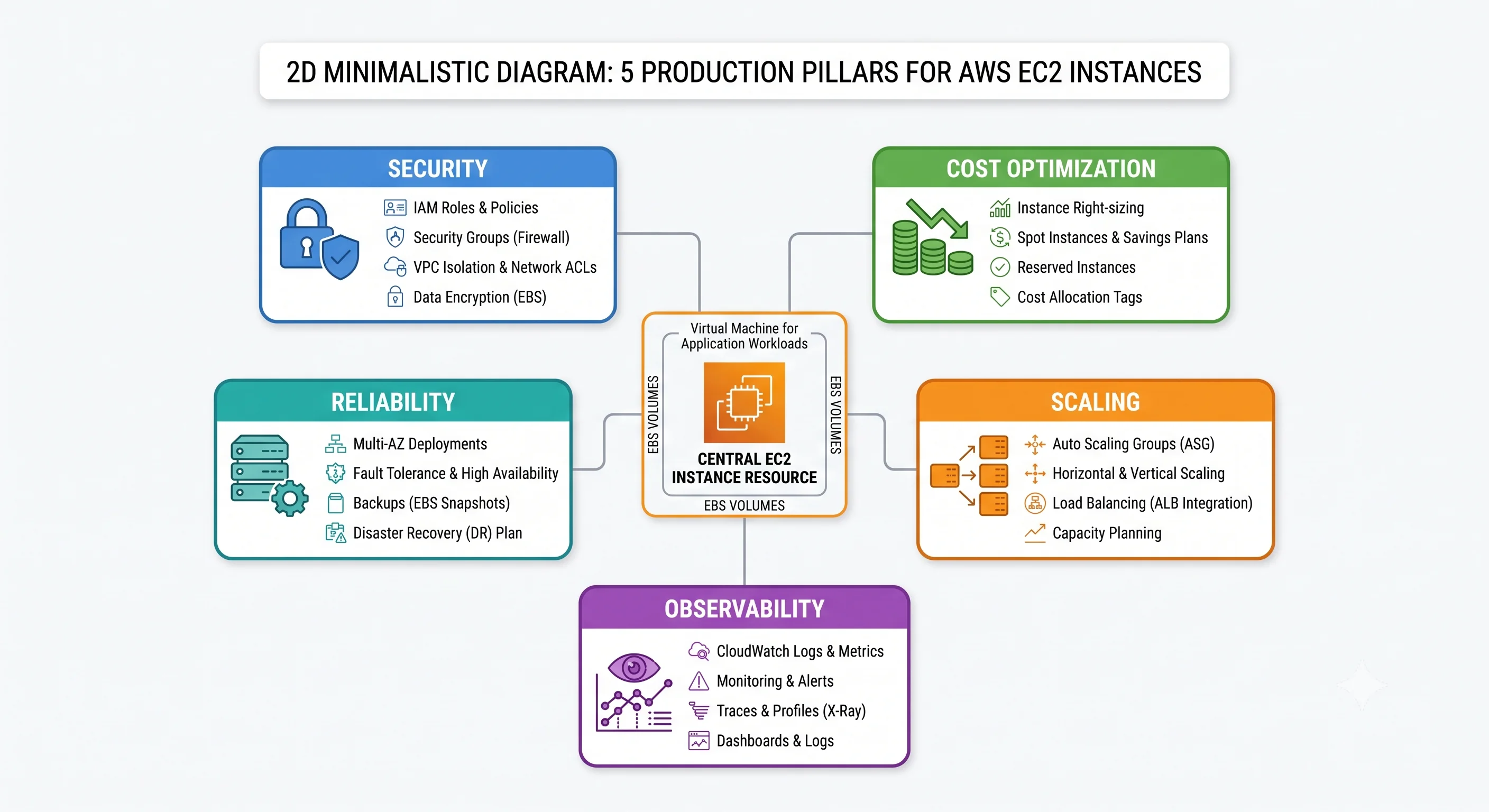
1. Security
The access model: stop using SSH
The single highest-leverage change most teams can make to EC2 security is deleting port 22.
| Old model | Cost of it | Replacement |
|---|---|---|
| SSH from the internet | An exposed port, brute-force traffic, key distribution, no per-session audit | SSM Session Manager |
| SSH via a bastion host | A host to patch and monitor, still keys to rotate | Session Manager (no bastion needed) |
| Shared key pair across a fleet | One leaked key compromises everything, and you can't revoke per-person | IAM-authorised sessions |
aws ssm start-session --target i-0abc123def456What you gain: IAM decides who may connect to which instances (taggable, so "developers may session into dev only" is a policy, not a convention), every session appears in CloudTrail, session contents can be recorded to S3 or CloudWatch Logs, and there is no inbound port and no private key anywhere.
If you must keep SSH — some compliance regimes and some tooling insist — then: no 0.0.0.0/0 on 22,
ever; EC2 Instance Connect to inject ephemeral keys rather than distributing long-lived ones; and an
alarm on any security group change that opens 22 or 3389 to the world.
IAM least privilege, applied to instance roles
The policy types, the evaluation algorithm, and the general least-privilege toolkit are in IAM & Identity. Applied to EC2:
- One role per service, not one role per fleet. Two applications sharing an instance profile means each can use the other's permissions — and an instance role is reachable by anything running on the box, so this is a wider grant than it looks.
- Scope resources, never
"Resource": "*"for data actions.s3:GetObjectonarn:aws:s3:::acme-artifacts/api/*, not on every bucket in the account. ec2:ResourceTag/Environmentmakes "developers may session into dev instances only" a policy rather than a convention — which is what makes tag-based access worth the tagging discipline.- Audit for unused permissions on a schedule. Instance roles accrete permissions during incidents and nothing ever removes them.
IMDSv2, non-negotiable
Require it in the launch template (http_tokens = "required", hop_limit = 1). The threat is concrete:
an SSRF bug in your application — "fetch this URL for me" — is otherwise a path to your role's
credentials at 169.254.169.254, and from there to whatever that role can do. This has caused real,
well-publicised breaches.
Audit existing fleets for stragglers:
aws ec2 describe-instances \
  --filters "Name=metadata-options.http-tokens,Values=optional" \
  --query 'Reservations[].Instances[].[InstanceId,Tags[?Key==`Name`].Value|[0]]' --output table
Encryption
- Turn on EBS encryption by default per account per region. Then nobody can forget, and it applies
to every new volume and snapshot.
⚠️ verify the setting name/behaviour against current AWS docs - In transit: TLS terminating at the ALB with an ACM certificate. Many Nitro instance types also encrypt inter-instance VPC traffic in hardware — useful for compliance answers, but don't rely on it as your only in-transit control.
- Customer-managed KMS keys where you need key rotation policy, cross-account grant control, or an audit trail of key use. AWS-managed keys are fine for lower-sensitivity data and involve less work.
Patching
Two philosophies. Pick one deliberately; drifting between them is the failure mode.
| Immutable (preferred) | In-place | |
|---|---|---|
| How | Rebuild the AMI (Image Builder/Packer), roll the ASG via instance refresh | SSM Patch Manager patch baselines on running instances |
| Pros | Reproducible, testable in staging, no config drift, rollback = previous AMI | Fast, no capacity churn, works for long-lived stateful hosts |
| Cons | Needs an AMI pipeline; slower to ship an urgent CVE fix | Drift accumulates; "works on this box" divergence |
Use Amazon Inspector for continuous CVE scanning of instances and AMIs — it removes the "we didn't know" excuse. Use Patch Manager with maintenance windows even in an immutable shop, as the break-glass path for a zero-day you can't wait to bake.
Public-exposure gotchas
The ways EC2 leaks, in order of how often they actually happen:
- A security group open to
0.0.0.0/0on 22, 3389, a database port, or an admin UI. - A publicly-shared EBS snapshot or AMI. Snapshots can be marked public — and they contain entire filesystems, credentials included. Audit regularly; this is a recurring source of real breaches.
- An instance in a public subnet that didn't need to be there. Default to private.
- Secrets in user data, readable from IMDS by anything running on the instance.
- An over-permissive instance role, turning any application vulnerability into an account incident.
Guardrails that catch these automatically: AWS Config rules (restricted-ssh,
ec2-imdsv2-check, encrypted-volumes), Security Hub standards for aggregate scoring, GuardDuty for
behavioural detection (crypto-mining, contacting known-bad IPs, credential exfiltration patterns), and
SCPs to make the worst actions impossible rather than merely detected.
2. Cost
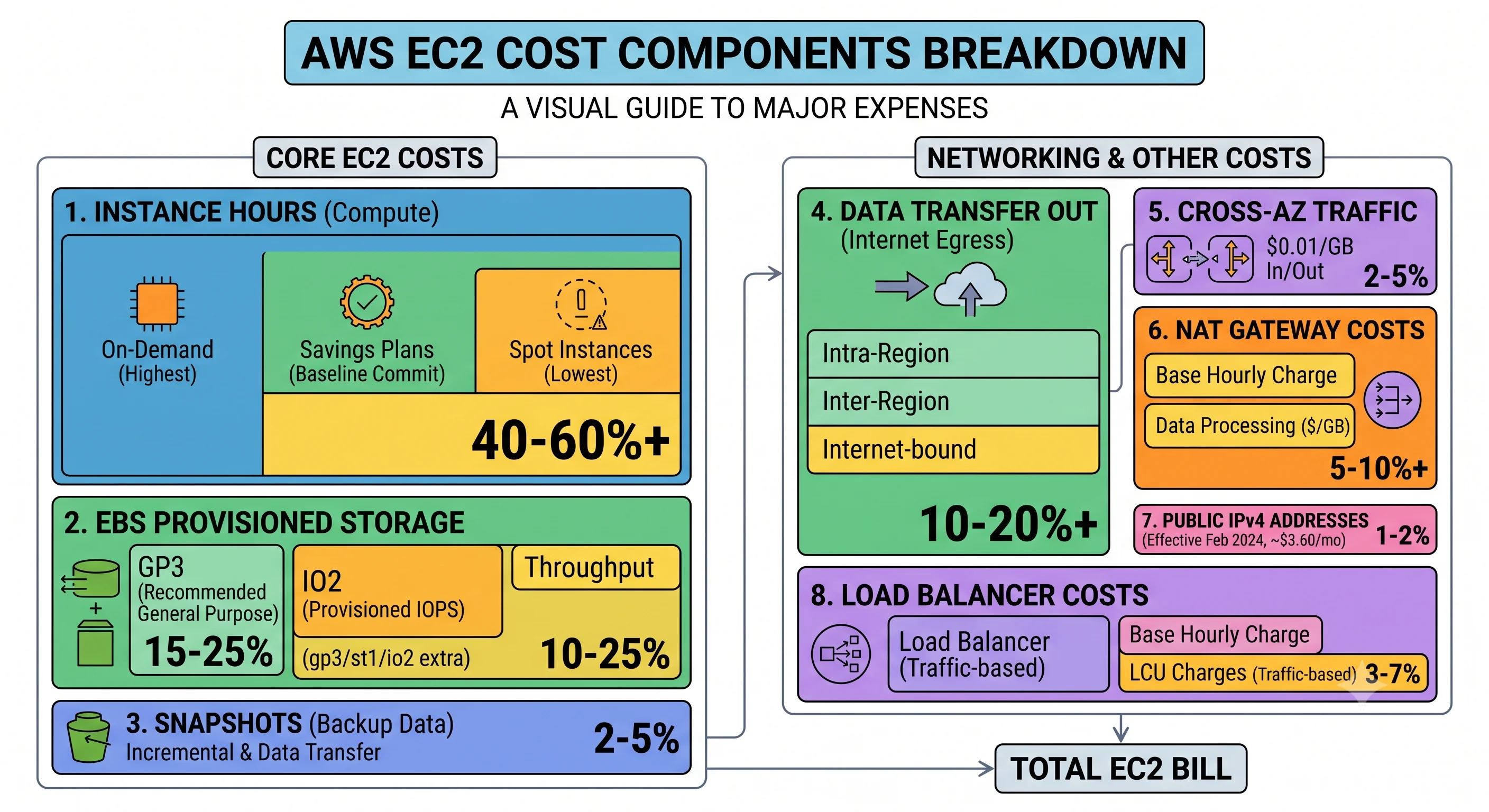
What you actually pay for
| Charge | Shape | Notes |
|---|---|---|
| Instance hours | Per second while running (60s minimum on Linux; some OSes/Marketplace AMIs bill per hour) |
stopped instances cost no compute |
| EBS volumes | Per GB-month provisioned, not used | A 500 GB volume 3% full bills 500 GB. Charged while the instance is stopped |
| EBS IOPS/throughput | Per provisioned unit above the included baseline (gp3), or all of it (io1/io2) | Easy to over-provision and forget |
| Snapshots | Per GB-month of changed blocks stored | Accumulate silently forever without a lifecycle policy |
| Data transfer out to internet | Per GB, tiered | Usually the largest transfer line |
| Cross-AZ traffic | Per GB, both directions | The invisible microservices tax |
| Public IPv4 addresses | Per address-hour, in use and idle | Fleet-wide, this adds up |
| NAT gateway | Per hour plus per GB processed | Frequently the biggest surprise on the bill |
| Load balancer | Per hour plus LCU/capacity units | |
| Detailed monitoring | Per instance per month | Worth it for anything auto-scaling |
| Data transfer in | Free | |
| Intra-AZ traffic via private IPs | Free | Another reason to prefer private addressing |
The biggest cost traps
- Idle and forgotten instances. Dev boxes running all weekend; instances from a demo three months ago. This is the number-one line item on most wasteful bills.
- Over-provisioned instances. A fleet at 8% CPU on
m6i.4xlarge. Nobody gets fired for over-provisioning, which is exactly why it persists. - Orphaned EBS volumes and snapshots.
DeleteOnTermination = falsevolumes surviving their instances, plus years of snapshots with no expiry. - NAT gateway data processing. Every artifact pull, every
dnf update, every S3 read from a private subnet without a gateway endpoint. - Cross-AZ chatter. A chatty service mesh spread across three AZs pays per GB for every internal hop.
t-family unlimited-mode surplus credits. Silent, unbounded overage on instances chosen because they were cheap.- Idle Elastic IPs and public IPv4 addresses on instances that don't need them.
Concrete optimisations, roughly by effort/return
| Move | Effort | Typical return |
|---|---|---|
| Stop non-prod outside business hours (Instance Scheduler / EventBridge) | Low | Large — a dev fleet running 40% of the week |
| Migrate gp2 → gp3 | Low | Meaningful, immediate; usually cheaper at equal performance |
| Delete orphaned volumes; lifecycle old snapshots | Low | Recurring |
| Add an S3 gateway endpoint | Low | Kills NAT charges for S3 traffic |
| Right-size from Compute Optimizer recommendations | Medium | Often the single biggest win |
Move to Graviton (*g) instance types |
Medium (rebuild for ARM64) | Substantial per-hour saving at similar performance for many workloads |
| Spot for stateless/interruptible tiers | Medium (needs interruption handling) | Very large discount vs On-Demand |
| Savings Plans on your steady baseline | Low (a commitment decision) | Large, guaranteed |
| Consolidate cross-AZ hot paths | High | Depends entirely on traffic shape |
Discount percentages, Graviton price/performance deltas, and gp3-vs-gp2 economics all shift with each generation and pricing update.
⚠️ verify current figures against the AWS pricing pages and Cost Explorer for your own usagebefore putting numbers in a business case.
The Savings Plan strategy that survives contact with reality: commit to your floor, not your average. Cover the baseline you are certain to run for the full term with Compute Savings Plans (flexible across family, size, region, and even Fargate/Lambda), serve the predictable middle with On-Demand, and put the spiky top on Spot. Over-committing is worse than under-committing — unused commitment is pure waste, whereas uncovered usage merely costs full price.
Make cost visible or it won't improve: enforced tagging (Environment, Service, Owner,
CostCenter), cost allocation tags activated in Billing, AWS Budgets with alerts per team, and Cost
Anomaly Detection for the step-changes nobody announced.
3. Scaling and limits
The quotas that actually bite
| Quota | Type | Notes |
|---|---|---|
| Running On-Demand vCPUs per instance-family group, per region | Soft | Counted in vCPUs, not instances. Separate quotas for standard (A/C/D/H/I/M/R/T/Z), and for G, P, Inf, Trn, X, DL, HPC families |
| Running Spot vCPUs per family group | Soft | A completely separate quota from On-Demand — a common surprise |
| EBS storage per volume type, per region | Soft | TiB-denominated; large fleets hit this |
| Snapshots per region | Soft | |
| Elastic IPs per region | Soft, and low by default | The classic early-account wall |
| Instances per Auto Scaling group / ASGs per region | Soft | |
| Launch template versions | Soft | Matters for long-lived, frequently-deployed services |
| Instance type availability per AZ | Hard and momentary | Not a quota — this is InsufficientInstanceCapacity |
Every default number here changes. ⚠️ verify against Service Quotas in your own account
How quotas work in general — soft vs. hard, per account and per region, requesting increases, alarming on utilisation before you hit the ceiling — is covered in ARNs, Tagging & Quotas.
What's distinctive about EC2's:
- They're counted in vCPUs, not instances. Twenty
largeinstances and five4xlargemay consume identical quota. Capacity planning in "number of instances" will mislead you. - Family groups, not individual types. All standard families share one quota; accelerated
families each have their own. Switching from
m6itoc6idoesn't need a new quota; switching top4ddoes. - On-Demand and Spot are separate quotas — which is how a mixed instances policy gets blocked by a limit nobody knew existed.
aws service-quotas get-service-quota \
  --service-code ec2 --quota-code L-1216C47A   # Running On-Demand Standard instances (vCPUs)
Where scaling actually stalls
| Bottleneck | Symptom | Fix |
|---|---|---|
| vCPU quota | VcpuLimitExceeded |
Quota increase (ahead of time) |
| AZ capacity | InsufficientInstanceCapacity |
Diversify types and AZs; ASG mixed instances policy; Capacity Reservations for critical workloads |
| Warm-up time | Traffic spikes faster than instances boot | Golden AMIs, warm pools, predictive/scheduled scaling, headroom |
| Metric lag | Scaling reacts minutes late | Detailed (1-minute) monitoring; target tracking on a leading indicator (e.g. request count per target, not CPU) |
| A single-threaded dependency | Adding instances doesn't help | The database, the lock, the queue consumer — fix the actual constraint |
| Max size | ASG stops at the ceiling | Raise max_size deliberately; it's also your runaway-cost guardrail |
Scale on the right metric. CPU is a lagging, indirect signal for a web tier. ALBRequestCountPerTarget
is directly proportional to the load you're trying to distribute and reacts sooner. For queue workers,
scale on queue depth (or better, queue depth per instance) rather than CPU.
4. Observability
Metrics that matter
Free from EC2:
| Metric | Alarm-worthy when | Reveals |
|---|---|---|
StatusCheckFailed_System |
≥1 for 2 datapoints | Host/infrastructure failure — often auto-recovers |
StatusCheckFailed_Instance |
≥1 for 2 datapoints | Your OS problem: panic, full disk, broken network |
CPUUtilization |
Sustained high/low | Load, and right-sizing evidence |
CPUCreditBalance |
Trending to 0 on t instances |
Imminent throttling or unlimited-mode overage |
NetworkIn / NetworkOut |
Deviation from baseline | Traffic shifts, exfiltration, runaway retries |
EBSIOBalance% / EBSByteBalance% |
< 20% | Burst credits depleting on smaller instances |
Only with the CloudWatch agent — and this is the gap that matters:
mem_used_percent— memory is invisible to EC2 by default. The resource most likely to OOM-kill your application is the one you don't get for free.disk_used_percent— a full/is one of the most common "instance status check failed" causes.- Per-process metrics, and your application logs.
ENA driver allowance metrics are the expert-level ones, and they explain otherwise-baffling
plateaus: bw_in_allowance_exceeded, bw_out_allowance_exceeded, pps_allowance_exceeded,
conntrack_allowance_exceeded. When throughput flatlines below the documented instance maximum and CPU
is idle, one of these is non-zero. conntrack_allowance_exceeded in particular catches
connection-tracking exhaustion on instances handling huge numbers of short-lived connections — a failure
that looks like random packet loss.
From the ALB and ASG (usually your best service-health signals):
| Metric | Why |
|---|---|
TargetResponseTime (p90/p99, not average) |
Real user latency. Averages hide the tail that people notice |
HTTPCode_Target_5XX_Count |
Your application failing |
HTTPCode_ELB_5XX_Count |
The LB failing to reach targets — a different problem, different fix |
UnHealthyHostCount |
Capacity quietly disappearing |
RejectedConnectionCount |
You've hit a limit |
GroupInServiceInstances vs GroupDesiredCapacity |
The ASG can't reach desired — capacity or quota problem |
What to alarm on
Alarm on the aggregate, not the instance. An alarm on one instance in a fleet designed for disposability is noise — the ASG replacing it is the system working. Alarm on:
- Service level: p99 latency, 5XX rate,
UnHealthyHostCount> 0, healthy host count below your minimum-viable capacity. - Fleet level:
GroupInServiceInstances< desired for more than N minutes; ASG atmax_size. - Instance level, but only for things nothing else fixes:
StatusCheckFailed_Instance,disk_used_percent> 85%,CPUCreditBalanceapproaching zero. - Cost: Budget threshold breached, Cost Anomaly Detection finding.
- Security: GuardDuty finding, security group opened to
0.0.0.0/0, IMDSv1 instance launched.
Use composite alarms to suppress the cascade — one page saying "the service is degraded" beats forty saying "an instance is unhealthy."
Logs and traces
- Ship logs off the instance immediately. An instance is disposable; its logs must outlive it. CloudWatch agent → CloudWatch Logs, or an agent to your own stack.
- Set log group retention. The default is never expire, which is a slow, permanent cost leak. Pick 7/30/90 days per log group deliberately.
- Structure your logs (JSON) so CloudWatch Logs Insights can query them. Grepping unstructured text at 3 a.m. is a choice you make in advance.
- X-Ray or an OpenTelemetry pipeline for request tracing once more than two services are involved. "Which hop is slow" is unanswerable from per-service metrics alone.
5. Reliability
Posture
| Level | What it survives | What it costs |
|---|---|---|
| One instance | Nothing. It will be retired, rebooted, or degraded eventually | Cheapest, not a service |
| ASG, single AZ | Instance and host failure | Cheap; an AZ event is a full outage |
| ASG, 3 AZs, behind an ALB | Instance, host, and AZ failure | The standard. Cross-AZ traffic charges |
| Multi-region active/passive | Regional failure | Significant — duplicated infrastructure, data replication, DNS failover |
| Multi-region active/active | Regional failure with no failover step | Highest — and hardest, because of data consistency |
Static stability, restated because it's the design principle people skip: provision enough capacity
across AZs to absorb the loss of one without needing to launch anything. If losing an AZ requires
RunInstances to succeed, your recovery depends on the control plane at the moment it's most stressed —
and on capacity being available in the surviving AZs, where everyone else is also scrambling. Three AZs
each at ~50% utilisation survive an AZ loss with no new launches. That headroom is the price of
reliability, and it's cheaper than the outage.
Backup and restore
- Replication is not backup. EBS replicates within an AZ, which protects against device failure and
nothing else — not
rm -rf, not ransomware, not a bad migration. - AWS Backup with tag-based selection, a retention lifecycle, and cross-region copies for anything whose loss would be existential.
- Test restores on a schedule. An untested backup is a hypothesis. Time the restore and write the number down — that number is your RTO, whatever the plan claims.
- Know your RPO and RTO per workload, and make sure the snapshot frequency actually matches the RPO you promised.
The failure drill
Rehearse these before they happen, in staging first:
| Drill | What you're testing |
|---|---|
| Terminate a random instance in prod | Does the ASG replace it? Does anyone notice? Any state lost? |
| Fail the health check on one instance | Is it drained cleanly, or are requests dropped? |
| Simulate AZ loss (set one subnet's desired capacity to 0) | Do the remaining AZs absorb the load without new launches? |
| Restore a volume from a snapshot into a new AZ | Do you know the commands? How long did it take? |
Force a spot interruption (send-spot-instance-interruptions) |
Does your handler drain and checkpoint correctly? |
| Roll back a deployment | Is your documented rollback still accurate? |
| Revoke the instance role's key permission | Do you get a clear failure or a silent one? |
The value isn't proving it works. It's finding the runbook step that references a tool you decommissioned last year — while everyone is awake and nothing is on fire.
Handling AWS-initiated events
Subscribe to AWS Health events via EventBridge and automate the response. Instance retirement, scheduled reboots, and volume retirement are routine if instances are disposable and incidents if they're pets. Automation: on a retirement notice, detach the instance from the ASG (which triggers a replacement) and terminate it during business hours — rather than letting AWS do it at 4 a.m. on the scheduled date.
Production readiness checklist
Copy this into your PR template.
Security
- No
0.0.0.0/0ingress except on the load balancer's public ports - No SSH key pairs; Session Manager access, IAM-scoped
- IMDSv2 required, hop limit 1
- EBS encryption by default enabled; volumes encrypted
- Instance role scoped to specific resources; no
"Resource": "*"on data actions - No secrets in user data or the AMI
- Instances in private subnets; ALB in public
- GuardDuty, Inspector, and Config rules enabled and someone owns the findings
Cost
- Tagged:
Environment,Service,Owner,CostCenter - Right-sized against Compute Optimizer, not guessed
- Savings Plan or Spot strategy decided for this workload
- Non-prod on a stop schedule
- gp3, not gp2; snapshot lifecycle policy in place
- S3 gateway endpoint present if instances read S3
- Budget alert covering this service
Scaling
- vCPU quota headroom verified for peak plus a replacement AZ
- ASG spans ≥ 3 AZs;
min_size≥ 2 - Scaling on a leading metric (request count per target), not just CPU
- Detailed monitoring on
-
max_sizeset deliberately as a cost guardrail
Observability
- CloudWatch agent installed: memory, disk, logs
- Log groups have retention set (not "never expire")
- Alarms on service aggregates, not individual instances
- Composite alarm for "service degraded" to suppress cascades
- Dashboard someone actually looks at
- Runbook linked from every alarm description
Reliability
-
health_check_type = "ELB"with a real/healthendpoint - Grace period and
deregistration_delaytuned - Enough headroom to lose an AZ without launching (static stability)
- Backups via AWS Backup, cross-region for critical data
- Restore tested, duration recorded
- AWS Health events routed to EventBridge and handled
- Spot interruption handler, if using Spot
- Rollback procedure documented and rehearsed
Check yourself
- Give the full argument for replacing SSH with Session Manager — including what you give up.
- Your bill jumped 30% with no traffic change and no new instances. Name four candidate causes and how you'd distinguish them.
- Why is On-Demand vCPU quota separate from Spot vCPU quota, and how does that bite an ASG with a mixed instances policy?
- Throughput plateaus well below the instance type's documented maximum, CPU is idle, EBS looks fine. What do you check?
- Why is alarming on an individual instance's CPU in a 20-instance ASG usually wrong? What's the right alarm?
- Explain static stability to someone who says "we'll just auto-scale into the surviving AZs." What's wrong with their plan?
- Your RTO is 15 minutes. What must you have actually measured to make that claim honestly?
Next: Interview Questions — three tiers, with answer keys.