
APIs and the Control Plane
Goal: understand the one mechanism underneath every AWS interaction. By the end you should be able to explain why a freshly-created role sometimes can't be assumed, why your script is "flaky" at scale but fine on your laptop, and why a system that must call an AWS API to recover is less reliable than one that doesn't.
This is the highest-leverage page in Foundations. Services differ enormously; the request model underneath them does not. Learn it once and a large class of confusing behaviour becomes predictable.
1. Every tool is a client of the same API
The analogy: the console, the CLI, and Terraform are three different phone handsets. There is one switchboard, and it doesn't care which handset you picked up.
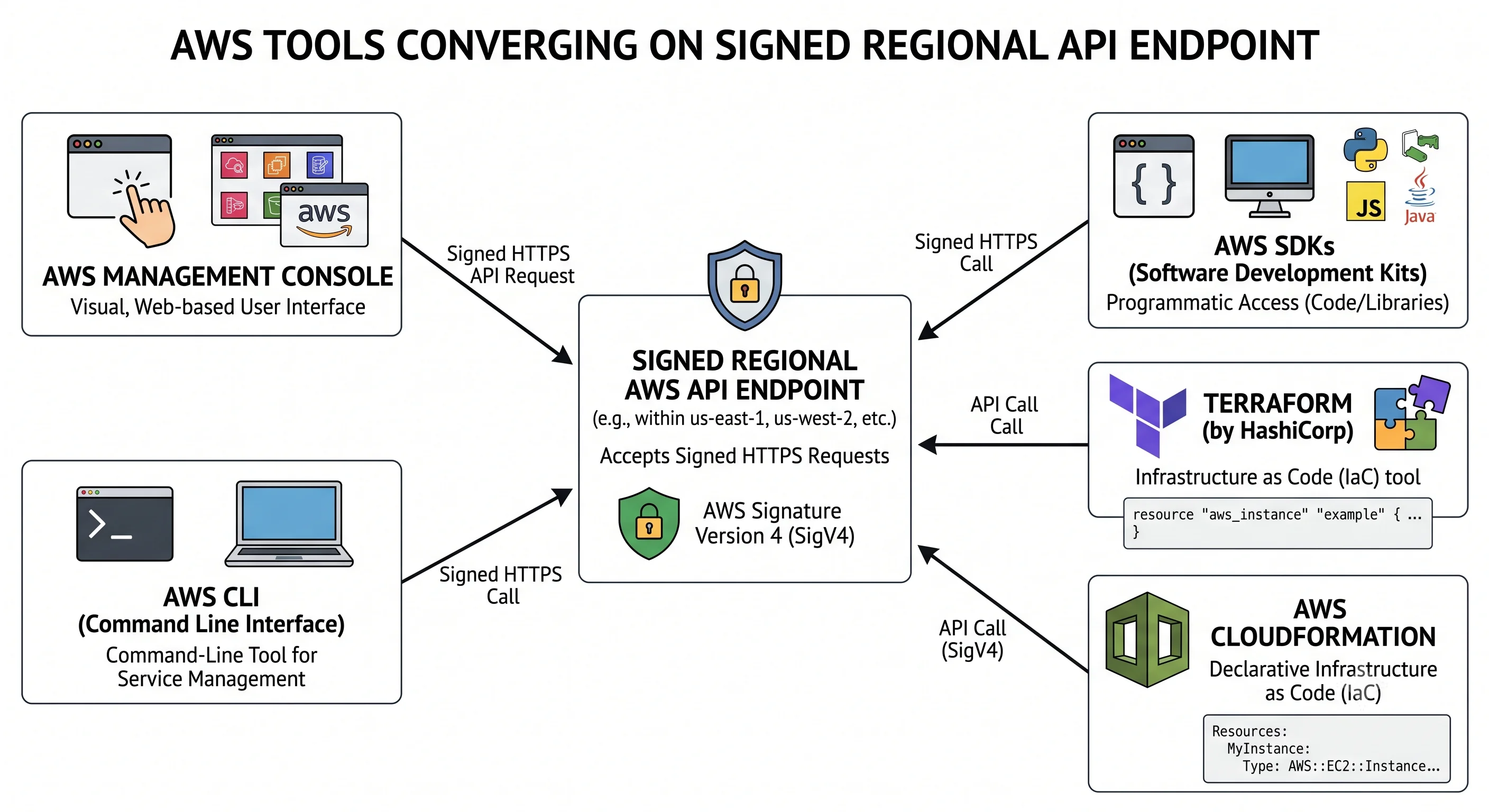
The technical version: AWS is a collection of HTTPS APIs. The console is a web application that calls them. The CLI and every SDK call them. Terraform, CloudFormation, CDK, and Pulumi call them. There is no privileged back channel — the console cannot do anything the API can't.
Console   AWS CLI   SDKs   Terraform   CloudFormation / CDK
    │        │        │        │              │
    └────────┴────────┴────────┴──────────────┘
                       │
              signed HTTPS request
                       │
        ec2.eu-west-1.amazonaws.com  ← regional service endpoint
Three consequences worth holding onto:
- Anything clickable is automatable. If the console can do it, an API call can. When a tool "doesn't support" something, the API almost always does — check the CLI before concluding otherwise.
- CloudTrail sees everything. Every one of those calls is recorded with the principal, source IP, parameters, and result. Console clicks are just API calls with a browser in front.
- The console occasionally does more than one thing. A single button may fire several API calls and create supporting resources — a service-linked role, a default security group — which is exactly why console-built infrastructure is hard to reproduce in Terraform. When a resource exists that nobody declared, this is usually why.
Endpoints are regional — with named exceptions
Most endpoints follow <service>.<region>.amazonaws.com. The region in the endpoint is the region
your resource lands in; there is no separate "region" field being interpreted.
A few services are global, and their endpoints live in a single region — typically us-east-1:
IAM, Organizations, Route 53, CloudFront, WAF (classic), and Support among them. This has two practical
effects: their control-plane operations are recorded in us-east-1 CloudTrail, and a naive
region-restriction policy breaks them (covered in
Accounts & Organizations).
STS deserves its own note. It has both a global endpoint (sts.amazonaws.com) and regional
endpoints. Prefer regional endpoints: lower latency, and the global endpoint is a single dependency
you don't want on your credential path. Some older accounts had session tokens that weren't valid in
opt-in regions. ⚠️ verify current STS endpoint defaults and token compatibility against AWS docs
Endpoints can also be overridden — VPC interface endpoints (PrivateLink) resolve the same service name to a private address, and FIPS and dual-stack variants exist for compliance and IPv6.
2. How a request is authenticated
The analogy: you don't hand over a password. You sign a document with a key derived from your password, plus today's date and the address of the office you're sending it to — so the signature is useless anywhere else, tomorrow.
The technical version: SigV4. The client builds a canonical form of the request (method, path, sorted query string, selected headers, hash of the body), derives a signing key from the secret access key scoped to date, region, and service, and attaches an HMAC signature. AWS recomputes it and compares.
Why this matters in practice:
- The secret key never crosses the wire. Only the signature does.
- Signatures are scoped. A signature for
ec2ineu-west-1on the 3rd is worthless fors3, in another region, or on the 4th. - Clock skew breaks it. The timestamp is part of the signature, and AWS rejects requests outside a
tolerance window. A container or VM with a drifting clock produces
SignatureDoesNotMatchorRequestTimeTooSkewed— an error that looks like a credentials problem and isn't. If everything suddenly fails to authenticate on one machine, check the clock first.⚠️ verify the current tolerance window against AWS docs
Where credentials come from
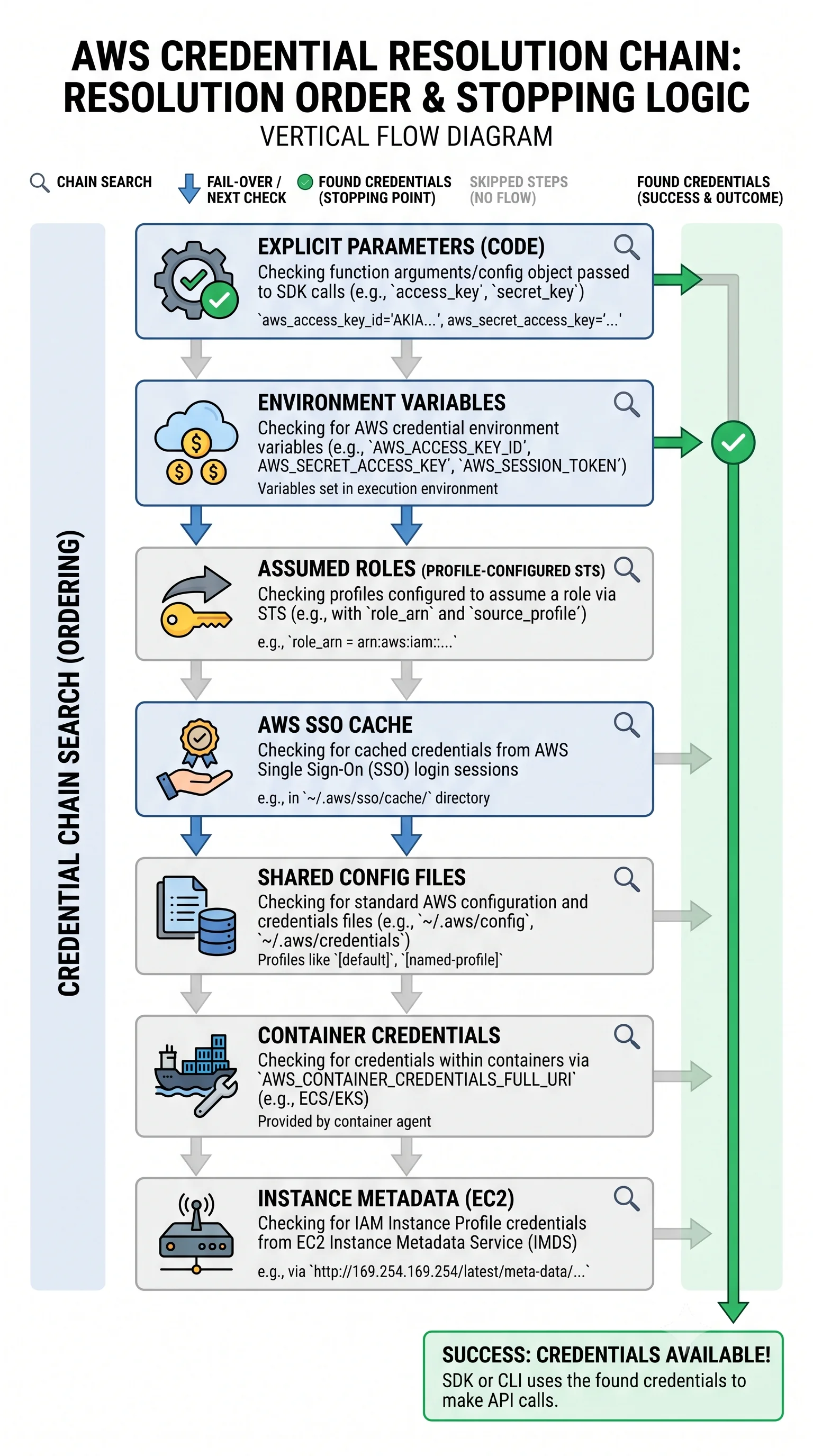
Every SDK and the CLI walk a credential chain, taking the first source that yields credentials. The order varies slightly between SDKs, but the shape is consistent:
| Order | Source | Typical use |
|---|---|---|
| 1 | Explicit parameters / command-line options | Tests, one-offs |
| 2 | Environment variables (AWS_ACCESS_KEY_ID, AWS_SESSION_TOKEN…) |
CI systems, containers |
| 3 | Assumed role or web identity from config (role_arn, OIDC token file) |
Cross-account, GitHub Actions, IRSA on EKS |
| 4 | IAM Identity Center / SSO cache | Human workstations |
| 5 | Shared credentials and config files (~/.aws/credentials, ~/.aws/config) |
Local development |
| 6 | Container credentials endpoint | ECS tasks, Fargate |
| 7 | Instance Metadata Service (IMDS) | EC2 instance profiles |
The debugging value of knowing this order is enormous. "It works locally but not in CI" and "it's
using the wrong account" are nearly always chain-resolution problems — a stale environment variable
shadowing a profile, or a forgotten AWS_PROFILE. Ask the question directly:
aws sts get-caller-identity          # who am I, actually?
aws configure list                   # which source won, per setting
aws sts get-caller-identity --debug  # the full resolution trace
Prefer credentials nobody has to hold. Instance profiles on EC2, task roles on ECS, IRSA or Pod Identity on EKS, and OIDC federation in CI all produce short-lived credentials that rotate automatically. A long-lived access key in a CI secret store is the thing that leaks. This is developed in IAM & Identity.
3. Control plane vs. data plane
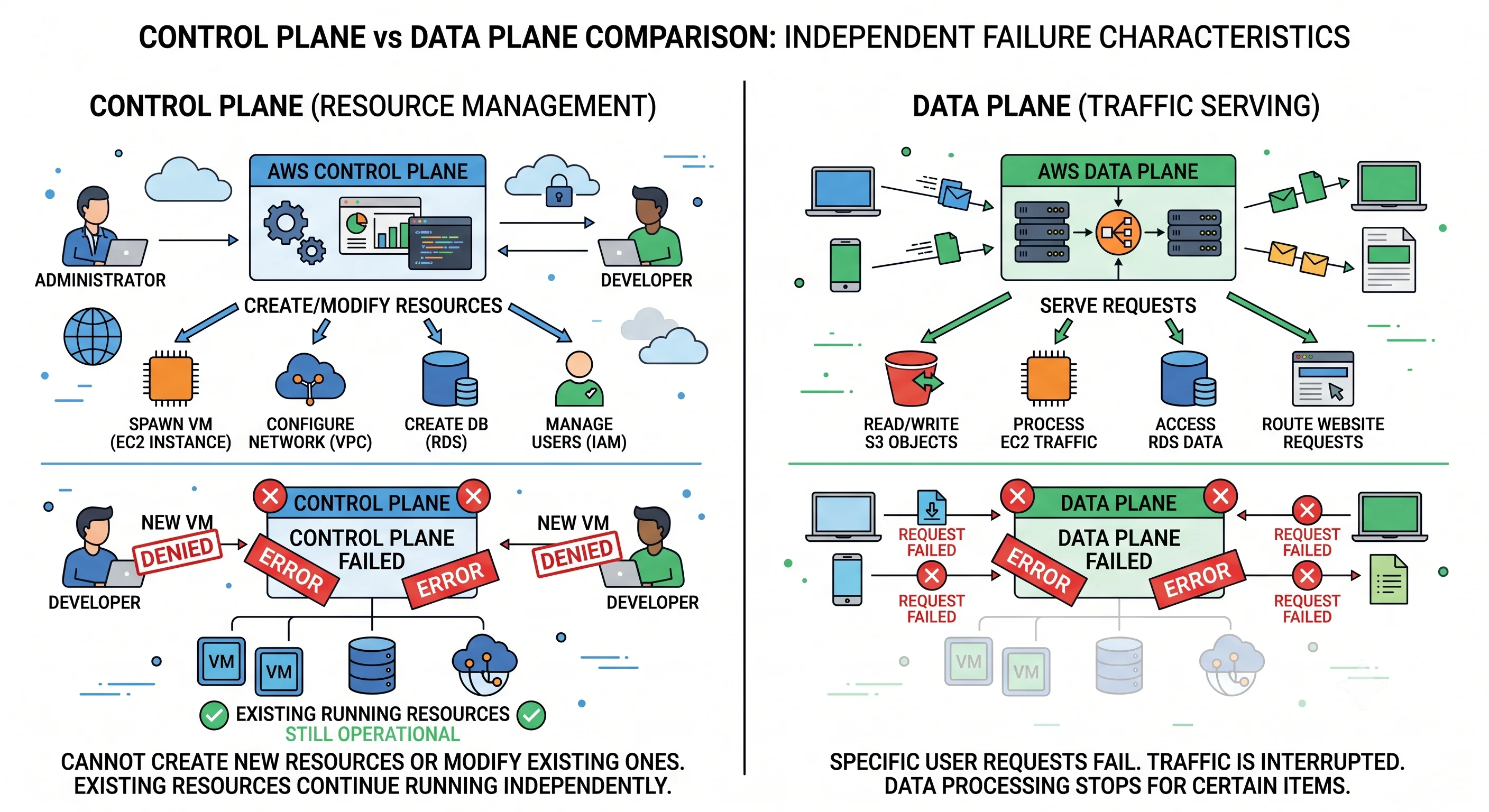
The distinction that makes reliability design tractable.
| Control plane | Data plane | |
|---|---|---|
| What it does | Creates, modifies, describes, deletes resources | Serves the actual work |
| Examples | RunInstances, CreateBucket, CreateTable, UpdateFunctionCode |
Packets to your instance, GetObject, GetItem, invoking the function |
| Request rate | Low — deploys and scale events | High — continuous |
| Complexity | High: validation, placement, orchestration | Deliberately simple |
| Typical availability | Lower | Higher |
| If it degrades | You can't change anything | Things stop working |
AWS engineers the data plane to be simpler and more available than the control plane, and designs it so the data plane keeps working when the control plane is impaired. That asymmetry is not an accident, and you should design with it rather than against it.
The rule this produces — static stability. A system that must make a control-plane call to survive a failure has taken a dependency on the least-available component at the worst possible moment, when everyone else is calling it too. Concretely:
| Fragile | Statically stable |
|---|---|
| Scale into the surviving AZs when one fails | Already run enough capacity across AZs to absorb the loss |
Call RunInstances during failover |
Standby capacity already running |
| Fetch a secret from the API on every request | Cache it, refresh in the background |
| Update DNS via API to fail over | Health-check-based failover already configured |
This is the single most-cited AWS design principle in senior interviews, and it comes straight from the two-plane split.
4. Eventual consistency
The control plane is eventually consistent. A successful create does not guarantee that the next call sees the thing you created — the response means "accepted and durably recorded", not "visible everywhere".
Where this bites, in rough order of how often it does:
| Situation | What happens |
|---|---|
Create an IAM role, immediately AssumeRole |
AccessDenied or NoSuchEntity for a few seconds. IAM is global and propagates |
| Attach a policy, immediately use the permission | The old permission set applies briefly |
Create a resource, immediately Describe it |
Occasionally NotFound |
| Create a resource, immediately tag or reference it | Intermittent failure — the classic "works when I re-run it" Terraform error |
| Delete something, immediately recreate with the same name | Name still considered in use |
S3 is the exception worth knowing: object reads have been strongly read-after-write consistent since 2020 — the old "wait for your PUT to appear" advice is obsolete. Bucket-level configuration (policies, ACLs, replication settings) is still eventually consistent.
How to handle it properly:
- Use waiters. Every SDK and the CLI provide them; they poll with sensible backoff.
aws ec2 wait instance-running --instance-ids i-0abc123 aws ec2 wait instance-status-ok --instance-ids i-0abc123 - Retry with exponential backoff and jitter rather than a fixed
sleep. A fixed sleep is both too slow on a good day and too short on a bad one. - Let Terraform's dependency graph do the ordering rather than hand-sequencing — and where a
provider has a known propagation gap, that's what
depends_onand the occasional explicit wait exist for. - Never treat a successful create as "ready". For EC2 specifically,
runningmeans the VM booted, not that your application is up.
5. Throttling and retries
Every AWS API has request-rate limits, applied per account, per region, per API — commonly modelled as a token bucket that refills at a steady rate and permits short bursts. Exceed it and the API refuses work rather than degrading for everyone.
| Error | Meaning |
|---|---|
ThrottlingException, TooManyRequestsException, RequestLimitExceeded |
Slow down — the general case |
ProvisionedThroughputExceededException |
DynamoDB capacity, a different mechanism |
SlowDown |
S3's request-rate signal |
Throttling is a rate limit, not a quota. Quotas (covered in ARNs, Tagging & Quotas) cap how many things you can have; throttling caps how fast you can ask. A quota increase does not fix throttling and vice versa — confusing the two produces support tickets that go nowhere.
Retry properly:
export AWS_RETRY_MODE=adaptive    # legacy | standard | adaptive
export AWS_MAX_ATTEMPTS=5standard— consistent exponential backoff with jitter across SDKs. A good default.adaptive— additionally rate-limits the client based on observed throttling. Better under sustained load, but it slows itself down deliberately, which can surprise you.
Jitter is not optional. Without randomisation, every client that got throttled retries at the same instant, producing a synchronised thundering herd that guarantees another round of throttling. Backoff without jitter is a well-known way to turn a small problem into a sustained one.
Reduce call volume before tuning retries. Most throttling comes from a loop calling Describe* per
resource. Batch it — one describe-instances returning 200 instances instead of 200 calls — cache what
doesn't change, and question anything polling in a tight loop.
6. Idempotency
If a request times out, you don't know whether it succeeded. Retrying blindly can create a second resource — the classic "we launched 200 instances instead of 20" incident.
Idempotency tokens solve this. You supply a unique client token; AWS returns the original result for a repeat with the same token instead of acting twice.
aws ec2 run-instances \
  --image-id ami-0abc123 --instance-type t3.micro \
--client-token "deploy-2026-07-25-batch-01" # retry-safe- Many creating APIs accept a client token —
ClientToken,ClientRequestToken,RequestTokendepending on the service. Tokens are honoured for a limited window.⚠️ verify per-service token parameter names and validity windows against AWS docs - SDKs generate tokens automatically for some operations, which is why some retries are safe by default and others aren't. Don't assume — check the specific API.
- Read operations are naturally idempotent. Deletes usually are too (deleting a deleted thing succeeds or returns a benign error). Creates are the dangerous ones.
Terraform sidesteps much of this by recording state and reconciling, but the underlying hazard remains:
an apply interrupted mid-create can leave a resource that exists in AWS and not in state — which is
what terraform import is for.
7. Pagination
List and describe operations return bounded pages with a NextToken (or Marker). Missing this
produces a nastier bug than it sounds: your script works in dev with 12 resources and silently reports
partial results in production with 400.
# The CLI paginates automatically — this returns everything
aws ec2 describe-instances --query 'Reservations[].Instances[].InstanceId'

# ...unless you disable it. --no-paginate returns ONE page.
aws ec2 describe-instances --no-paginate    # partial results, no warning

# Server-side filtering beats client-side: fewer calls, less throttling
aws ec2 describe-instances \
  --filters Name=instance-state-name,Values=running \
  --query 'Reservations[].Instances[].InstanceId'
--filters and --query are not the same thing. --filters is applied server-side — the API
returns less. --query is applied client-side by the CLI after everything has been transferred.
For large result sets, filter server-side; use --query only to shape what you already fetched.
In SDKs, use the paginator abstraction rather than looping on tokens by hand.
8. Practical configuration
# ~/.aws/config

[profile dev]
sso_session = company
sso_account_id = 111122223333
sso_role_name = Developer
region = eu-west-1

[profile prod-deploy]
role_arn = arn:aws:iam::444455556666:role/deploy
source_profile = dev
region = eu-west-1
duration_seconds = 3600

[sso-session company]
sso_start_url = https://company.awsapps.com/start
sso_region = eu-west-1
sso_registration_scopes = sso:account:access
aws sso login --sso-session company
aws --profile prod-deploy sts get-caller-identityRegion resolution order, which trips people up as often as credentials do: explicit --region →
AWS_REGION → AWS_DEFAULT_REGION → the profile's region → (on EC2) the instance's region. A
missing region produces You must specify a region, but a wrong region produces something worse —
resources quietly created somewhere you aren't looking. That's a recurring source of "phantom" bills.
Reading what actually happened: CloudTrail is the record — principal, source IP, parameters,
response, and request ID for every call. When AWS support asks for a request ID, that's where it comes
from. For local debugging, --debug prints endpoint resolution, the canonical request, and the retry
sequence.
9. Anti-patterns
| Anti-pattern | Why it hurts | Instead |
|---|---|---|
| Long-lived access keys in CI | The thing that leaks; nothing rotates them | OIDC federation to a role |
sleep 30 after creating a resource |
Too slow on good days, too short on bad ones | Waiters, or backoff with jitter |
| Retrying creates without an idempotency token | Duplicate resources on timeout | Client tokens |
| Retrying without jitter | Synchronised thundering herd | AWS_RETRY_MODE=standard or adaptive |
A Describe* call per resource in a loop |
Throttling at scale | Batch, filter server-side, cache |
--no-paginate, or ignoring NextToken |
Silent partial results in production | Let the CLI paginate; use SDK paginators |
--query where --filters would do |
Transfers everything, then discards it | Filter server-side |
| Calling an AWS API on the failover path | Depends on the control plane when it's most stressed | Static stability — pre-provision |
| Assuming a successful create means "ready" | Eventual consistency, and "created" ≠ "serving" | Waiters, then a real health check |
| Ignoring clock drift | Auth failures that look like credential problems | NTP, and check the clock first |
Check yourself
- Why can a role you just created sometimes not be assumed for a few seconds?
- Your script works locally and hits the wrong account in CI. What's the first thing you check?
- Distinguish throttling from a service quota. Which does a quota increase fix?
- Why is calling
RunInstancesduring an AZ failure a worse recovery plan than running spare capacity? - Why does retrying without jitter make throttling worse rather than better?
- A colleague reports every AWS call from one server failing with
SignatureDoesNotMatch, but the credentials are correct. What do you suspect? - What's the difference between
--filtersand--query, and when does it matter?
Next: IAM & Identity — the one evaluation algorithm behind every authorisation decision in AWS.
← Back to the Foundations overview · ← Previous: Accounts & Organizations