
ARNs, Tagging, and Quotas
Goal: the connective tissue. ARNs are the identifier every policy and tool consumes, tags are what make cost attributable and automation targetable, and quotas are the limits that bite on launch day. None of the three is glamorous; all three cause outages and unattributable bills when neglected.
1. ARNs
The analogy: a full postal address. Country, city, street, house number — enough to identify one thing unambiguously anywhere in the world.
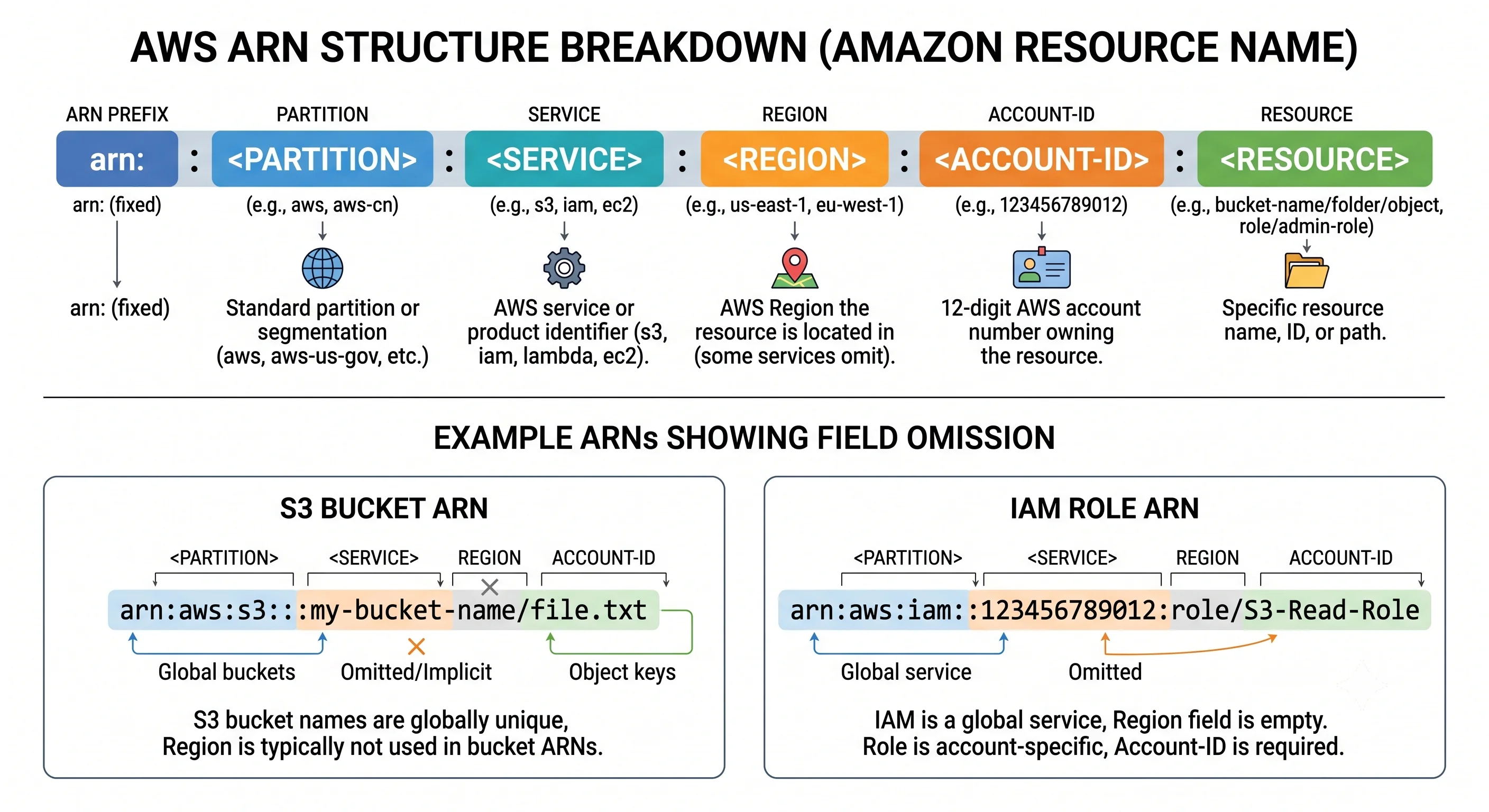
The technical version: an Amazon Resource Name identifies a resource globally:
arn:partition:service:region:account-id:resource
     │         │        │        │         │
     │         │        │        │         └─ resource type and/or identifier
     │         │        │        └─ 12-digit account ID
     │         │        └─ region (empty for global services)
     │         └─ service namespace: ec2, s3, iam, lambda
     └─ aws | aws-cn | aws-us-gov
Worked examples, including the irregular ones:
arn:aws:ec2:eu-west-1:123456789012:instance/i-0abc123def456
arn:aws:iam::123456789012:role/deploy-pipeline           ← no region: IAM is global
arn:aws:s3:::acme-artifacts                              ← no region, no account
arn:aws:s3:::acme-artifacts/api/v2/app.tar.gz            ← the object, not the bucket
arn:aws:lambda:eu-west-1:123456789012:function:process-upload
arn:aws:dynamodb:eu-west-1:123456789012:table/orders
Why S3 bucket ARNs have no account or region: bucket names are globally unique, so the name alone
identifies the bucket. It's a historical quirk with a practical consequence — you can't tell from a
bucket ARN which account owns it, which is exactly why aws:ResourceAccount and
aws:PrincipalOrgID conditions exist.
Separators are inconsistent — some services use type/id, others type:id, some just id. Don't
construct ARNs by string concatenation and hope. Get them from the API or from Terraform outputs.
In policies, ARNs take wildcards — and this is where least privilege is actually expressed:
| Pattern | Matches |
|---|---|
arn:aws:s3:::acme-artifacts |
The bucket itself — for ListBucket |
arn:aws:s3:::acme-artifacts/* |
Every object in it — for GetObject |
arn:aws:s3:::acme-artifacts/api/* |
Objects under one prefix |
arn:aws:ec2:eu-west-1:123456789012:instance/* |
Every instance in one region and account |
* |
Everything. Rarely correct for data actions |
2. Naming
ARNs are assigned; names are yours to choose, and a convention pays for itself the first time someone has to find something at 3 a.m.
A workable pattern:
<org>-<service>-<environment>-<region-short>-<detail>

acme-payments-prod-euw1-alb
acme-payments-prod-euw1-artifacts
acme-shared-dev-use1-terraform-state| Rule | Why |
|---|---|
| Environment in the name | The single most useful thing to see in a console list |
| Lowercase and hyphenated | Some services reject uppercase or underscores; consistency avoids memorising which |
| Avoid dates and ticket numbers | They rot; a resource outlives its ticket |
| Never encode secrets or personal data | Names appear in logs, metrics, URLs, and support cases |
| Leave room for a suffix | Many resources need -2 during a blue/green replacement |
Some names are globally unique and unchangeable. S3 bucket names are shared across every AWS customer — hence the organisation prefix, which is about collision avoidance as much as tidiness. Many resources also cannot be renamed at all; changing the name in Terraform means destroy and recreate, which for a bucket or a database is a data-loss event rather than a cosmetic change. Choose deliberately the first time.
3. Tagging
The analogy: luggage labels. The bag travels fine without one — right up until it's in a pile with four hundred others and someone needs to know whose it is and where it's going.
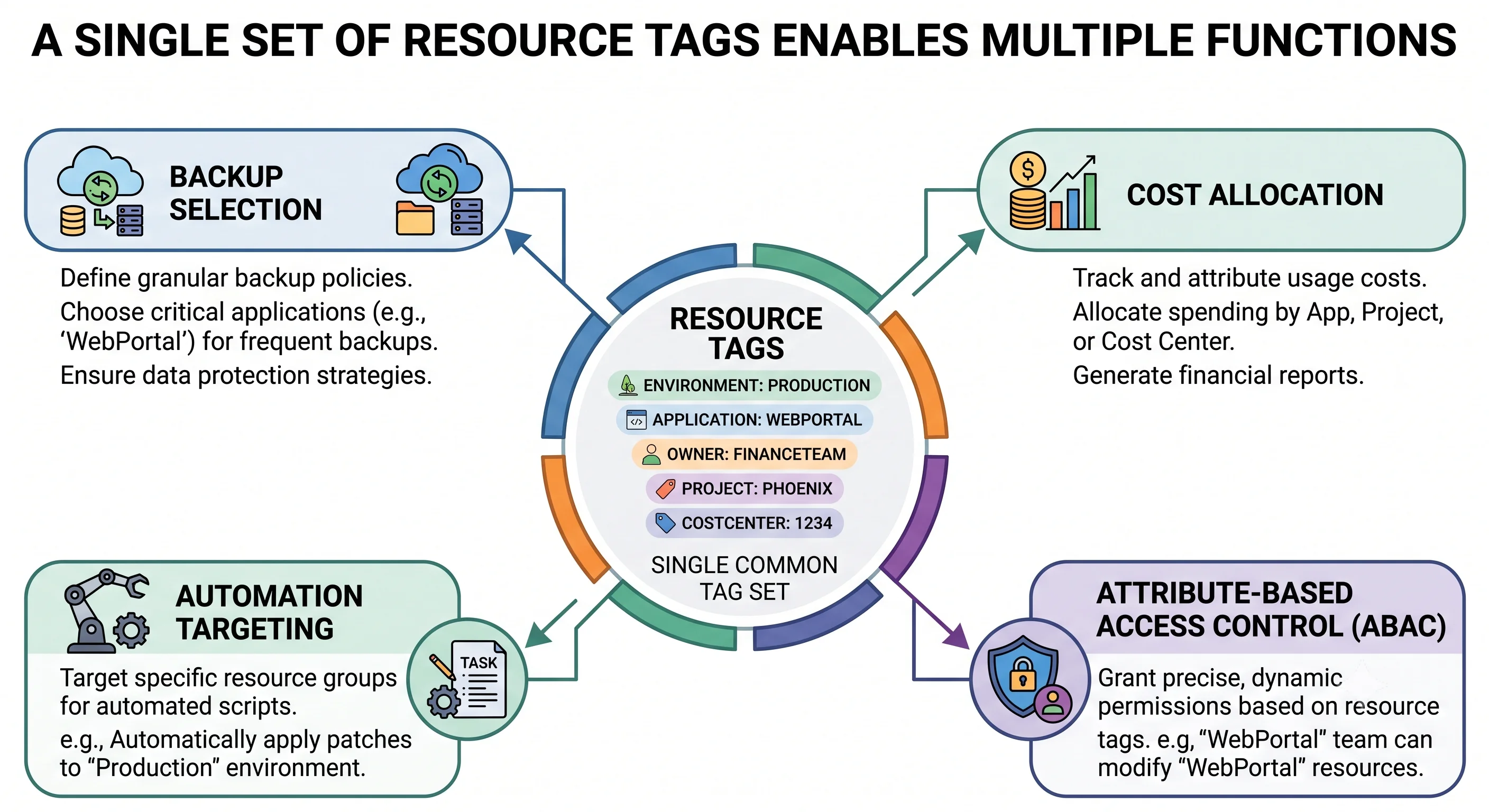
Tags are key/value pairs on resources. They look optional. They are the basis of:
| Capability | How tags enable it |
|---|---|
| Cost allocation | The only way to attribute spend below the account level |
| Access control (ABAC) | aws:ResourceTag conditions — see IAM & Identity |
| Automation targeting | SSM Run Command, Ansible dynamic inventory, start/stop schedulers |
| Backup selection | AWS Backup plans select by tag, so new resources are protected automatically |
| Compliance reporting | Config rules that check for required tags |
| Incident response | "Who owns this?" answered in seconds instead of by asking around |
A schema that survives
Four tags carry most of the value. Adding twenty is how tagging initiatives die.
| Tag | Example | Why |
|---|---|---|
Environment |
prod | staging | dev |
Policy, cost, and blast-radius decisions all key off it |
Service |
payments-api |
The unit people actually think in |
Owner |
platform-team |
Who to contact — a team, never an individual who may leave |
CostCenter |
CC-4471 |
What finance needs |
Optional additions where they earn their place: ManagedBy (terraform), DataClassification,
Compliance, ExpiryDate for sandbox cleanup automation.
The rules people learn the hard way
- Tag keys are case-sensitive.
Environment,environment, andENVIRONMENTare three different tags, and your cost report will show three columns. Fix the case in the schema, then enforce it. aws:is a reserved prefix. You can't create tags starting with it.- Cost allocation tags must be activated in the Billing console before they appear in cost reports — and activation is not retroactive. Tagging diligently for six months and only then activating gives you six months of unattributed history you cannot recover. Activate the schema on day one.
- Not every resource supports tags, and some support them only at creation.
- There's a per-resource tag limit (commonly 50 user tags).
⚠️ verify current limits against AWS docs - Tags don't propagate automatically. An Auto Scaling group tags its instances only if
propagate_at_launchis set; an EBS volume gets the instance's tags only if the launch template says so. Untagged child resources are the most common gap in an otherwise disciplined estate.
Enforcement, because voluntary tagging doesn't work
Three layers, and you want at least two:
// SCP: refuse to create an instance without an Environment tag
{
  "Effect": "Deny",
  "Action": ["ec2:RunInstances"],
  "Resource": "arn:aws:ec2:*:*:instance/*",
  "Condition": {
    "Null": { "aws:RequestTag/Environment": "true" }
  }
}| Layer | What it does | Limitation |
|---|---|---|
| Organizations tag policies | Define allowed keys and values, and report non-compliance | On their own they report; they don't block creation |
SCPs with aws:RequestTag/aws:TagKeys |
Actually refuse untagged creates | Must be written per resource type; can be blunt |
Terraform default_tags |
Applies tags automatically to everything a provider creates | Only covers what Terraform creates |
provider "aws" {
  region = "eu-west-1"

  default_tags {
    tags = {
      Environment = var.environment
      Service     = var.service_name
      Owner       = var.owning_team
      CostCenter  = var.cost_centre
      ManagedBy   = "terraform"
    }
  }
}
default_tags is the cheapest large win available — one block, and everything Terraform creates is
tagged. It doesn't cover console-created or console-modified resources, which is one more argument for
the pipeline being the only mutation path.
Retrofitting is possible with Resource Groups and the Tag Editor for bulk edits, but it's manual, partial, and — for cost history — too late. Start with the schema.
4. Service Quotas
The analogy: a credit limit rather than a speed limit. It caps how much you can have, not how fast you can ask — that's throttling, covered in The API & Control Plane. Confusing the two produces support tickets that go nowhere.
Quotas are per account, per region. Both halves matter:
- Per account — one team's consumption doesn't have to be another's problem, if they're separated. One more argument for the multi-account model in Accounts & Organizations.
- Per region — and this is the one that causes outages. A new region starts you at defaults, no matter how much headroom you negotiated elsewhere. Expansion day, launch day, and DR failover day are all moments when a team discovers a limit they thought they'd raised eighteen months ago.
| Kind | Meaning | What to do |
|---|---|---|
| Soft | The default; raisable on request | Request an increase — days ahead, not during the incident |
| Hard | Architectural; not raisable | Design around it |
| Not a quota at all | InsufficientInstanceCapacity — AWS is momentarily out of that shape in that AZ |
Diversify types and AZs; Capacity Reservations for critical launches |
# What can I actually have?
aws service-quotas list-service-quotas --service-code ec2 \
  --query 'Quotas[].[QuotaCode,QuotaName,Value]' --output table

# One specific quota
aws service-quotas get-service-quota \
  --service-code ec2 --quota-code L-1216C47A

# Ask for more
aws service-quotas request-service-quota-increase \
  --service-code ec2 --quota-code L-1216C47A --desired-value 512

# Track the request
aws service-quotas list-requested-service-quota-change-history \
  --service-code ec2 --query 'RequestedQuotas[].[QuotaName,DesiredValue,Status]' --output table
Not every limit appears in Service Quotas. Some still require a support case, and some aren't
documented as quotas at all until you hit them. ⚠️ verify coverage for the specific service you need
Monitor quotas, don't discover them
AWS publishes usage metrics for many quotas in the AWS/Usage CloudWatch namespace, so you can alarm
at a percentage of the limit rather than finding out at 100%:
aws cloudwatch put-metric-alarm \
  --alarm-name ec2-vcpu-quota-80pct \
  --namespace AWS/Usage \
  --metric-name ResourceCount \
  --dimensions Name=Service,Value=EC2 Name=Type,Value=Resource Name=Resource,Value=vCPU Name=Class,Value=Standard/OnDemand \
  --statistic Maximum --period 300 --evaluation-periods 1 \
  --threshold 0.8 --comparison-operator GreaterThanThreshold
Quota increases take time — hours to days, longer for large GPU or specialised requests, and they go through a human for anything substantial. Build the request into your launch checklist alongside capacity planning, and re-run it for every new region.
A quota template in Organizations can apply requested increases automatically to newly created accounts, which removes the "we forgot this account existed" failure mode.
5. Practical audit
# Untagged resources, via the Resource Groups Tagging API
aws resourcegroupstaggingapi get-resources \
  --query 'ResourceTagMappingList[?length(Tags)==`0`].ResourceARN' --output text

# Resources missing a specific required tag
aws resourcegroupstaggingapi get-resources \
  --query "ResourceTagMappingList[?!(Tags[?Key=='Environment'])].ResourceARN" --output text

# Which tag keys are actually in use — reveals the case-sensitivity mess
aws resourcegroupstaggingapi get-tag-keys --output text

# Quota utilisation snapshot for a service
aws service-quotas list-service-quotas --service-code ec2 \
  --query 'Quotas[?Adjustable==`true`].[QuotaName,Value]' --output table
Run the first two on a schedule and alert on growth. Untagged resources accumulate quietly, and every one is spend nobody can attribute.
6. Anti-patterns
| Anti-pattern | Why it hurts | Instead |
|---|---|---|
| Constructing ARNs by string concatenation | Separator formats differ per service | Take them from the API or Terraform outputs |
"Resource": "*" on data actions |
Any bug becomes an account-wide incident | Scope to specific ARNs and prefixes |
| Tagging as an afterthought | Cost history can't be reconstructed | Schema and activation on day one |
| Inconsistent tag key case | Three columns for one concept in every report | Enforce with tag policies |
| Twenty required tags | Nobody complies; the schema is abandoned | Four required, more optional |
Owner set to a person |
They leave; the tag rots | Team or distribution list |
| Relying on tag policies alone to block | They report, they don't prevent | Pair with SCPs using aws:RequestTag |
Forgetting propagate_at_launch |
Auto-scaled instances arrive untagged | Set it; tag volumes in the launch template too |
| Assuming quota headroom carries to a new region | Quotas are per region | Request before launch; use quota templates |
| Discovering quotas at 100% | An outage instead of a ticket | AWS/Usage alarms at 80% |
| Confusing a quota with throttling | The wrong fix, applied slowly | Quota = how much; throttling = how fast |
Check yourself
- Why does an S3 bucket ARN have no region or account, and what problem does that create?
- Name four distinct things that stop working properly without tags.
- Why must cost allocation tags be activated on day one rather than when you first need a report?
- A tag policy is in place but untagged resources keep appearing. Why, and what do you add?
- What's the difference between a quota and throttling? Which does a Service Quotas request fix?
- Your DR failover to a second region fails to launch enough capacity. What did nobody check?
- Why is renaming an S3 bucket in Terraform a data-loss event rather than a cosmetic change?
That's Foundations
You now have the five things that are true of every AWS service: the account as the real boundary, one signed regional API behind every tool, one IAM evaluation algorithm, the region/AZ geography, and the ARN/tag/quota connective tissue.
Every service topic assumes this and links back to it rather than repeating it. Start with EC2, or pick whatever you need from the full contents.
← Back to the Foundations overview · ← Previous: Regions & Availability