
6. Integrations
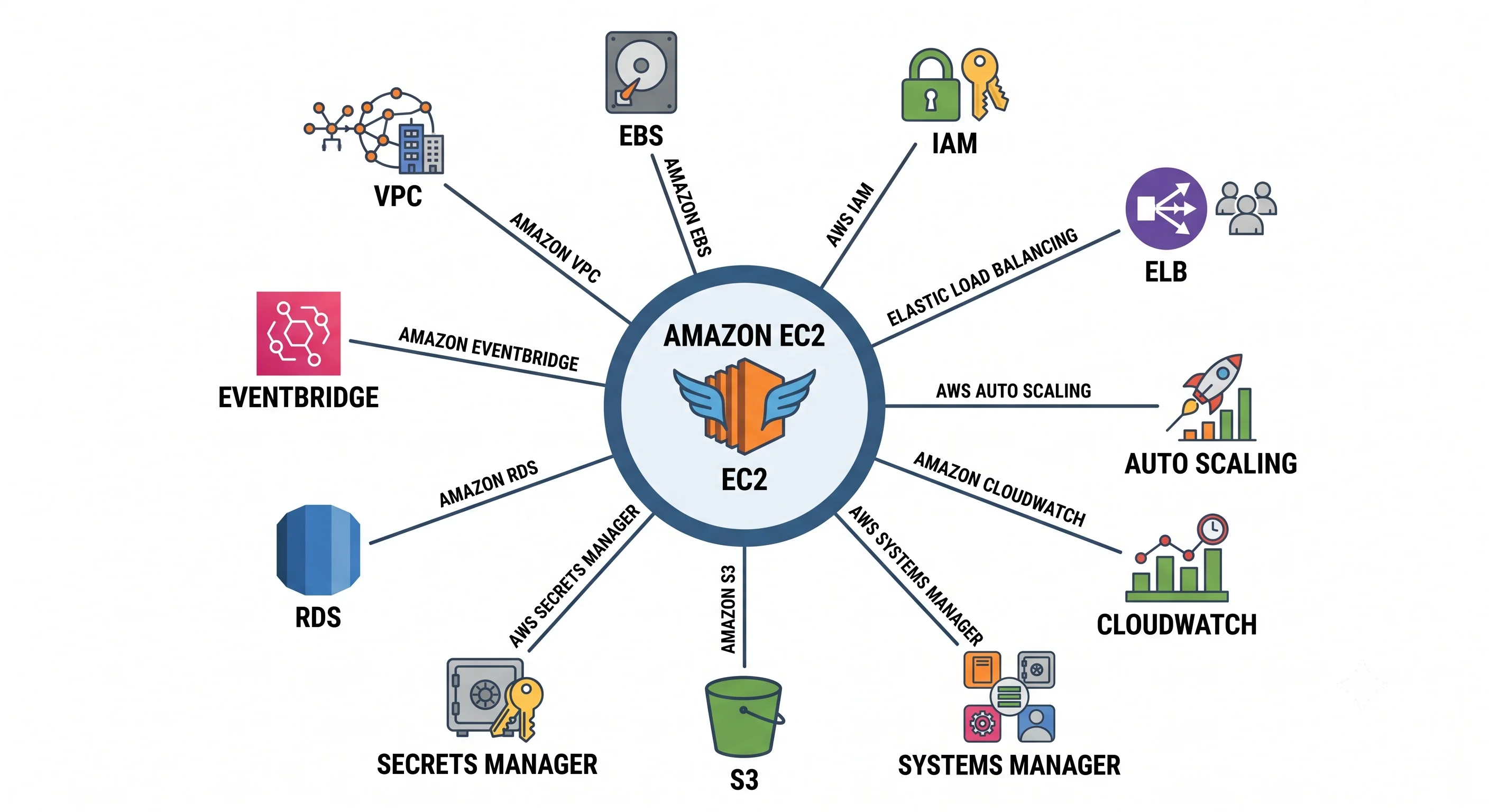
Goal: no AWS service is an island, and EC2 is the least island-like of all — it's the substrate a large part of the catalogue is built on. This page covers what EC2 is almost always wired to, why, and the specific mechanism that does the wiring.
Three categories, because they behave differently:
- Mandatory — EC2 does not function without them (VPC, EBS, IAM).
- The standard fleet pattern — what turns instances into a service (ELB, Auto Scaling, Route 53, ACM).
- Operational and data-plane companions — what you add to run it well (CloudWatch, SSM, S3, Secrets Manager, RDS, EFS, KMS, EventBridge, Backup).
Plus a fourth worth naming explicitly: the services that are EC2 underneath (ECS, EKS, EMR, Batch).
The map
| Pairs with | Why | The glue |
|---|---|---|
| VPC | Every instance needs a network | ENI in a subnet + security group + route table |
| EBS | Durable disk | Volume attached over the network; block device mapping in the launch template |
| IAM | Permissions without stored credentials | Instance profile → role → temporary creds via IMDS |
| Elastic Load Balancing | One URL in front of many instances | Target group registration + health checks |
| Auto Scaling | Keep N healthy instances, scale on demand | Launch template + ASG + scaling policies |
| Route 53 | A name people can type | Alias A-record → ALB DNS name |
| ACM | TLS without managing certificates | Certificate attached to the ALB HTTPS listener |
| CloudWatch | Metrics, logs, alarms | Built-in metrics + CloudWatch agent for memory/disk/logs |
| Systems Manager | Shell access, patching, config | SSM Agent + instance profile; Session Manager, Patch Manager, Parameter Store |
| S3 | Artifacts, backups, static assets | Instance role + gateway VPC endpoint (no NAT charges) |
| Secrets Manager / Parameter Store | Credentials at boot, not in AMIs | SDK call authorised by the instance role |
| RDS / ElastiCache | The data tier | Security-group-to-security-group rule, IAM auth optional |
| EFS | A filesystem shared by every instance | NFS mount over an ENI in each AZ |
| KMS | Encryption at rest | EBS volume encryption; grants tied to the instance role |
| EventBridge | React to what EC2 does | Instance state-change, spot interruption, and scheduled-event rules |
| AWS Backup | Snapshots with a retention policy | Backup plan targeting instances/volumes by tag |
| EC2 Image Builder / Packer | Reproducible AMIs | Pipeline producing a versioned AMI consumed by the launch template |
| CloudTrail | Who launched/terminated what | Management-event logging, on by default; the forensic record |
| ECS / EKS / EMR / Batch | Higher-level compute | These run on EC2 — your instances are their capacity |
1. Mandatory
VPC — the network EC2 lives in
Every instance gets an ENI in exactly one subnet, and the subnet's AZ determines the instance's AZ. The consequences worth holding onto:
- Public vs. private is a routing property, not a checkbox. A subnet is "public" because its route
table sends
0.0.0.0/0to an internet gateway. Private subnets reach the internet outbound through a NAT gateway — which is billed per hour and per GB processed, and is one of the top surprise line items in AWS bills. - VPC endpoints let private instances reach AWS services without a NAT gateway. Two flavours, and the difference is financial:
| Endpoint type | Services | Cost shape |
|---|---|---|
| Gateway | S3 and DynamoDB only | No hourly charge — a route-table entry. Effectively free |
| Interface (PrivateLink) | Almost everything else — SSM, Secrets Manager, ECR, CloudWatch… | Hourly charge per endpoint per AZ, plus per-GB. Cheaper than NAT at volume, not free |
The concrete pattern for the architecture in Deployment: instances in private subnets need SSM to work,
which means three interface endpoints — ssm, ssmmessages, ec2messages — or a NAT gateway. Add the
S3 gateway endpoint regardless; it's free and it removes a large slice of NAT traffic.
resource "aws_vpc_endpoint" "s3" {
  vpc_id            = var.vpc_id
  service_name      = "com.amazonaws.${var.region}.s3"
  vpc_endpoint_type = "Gateway"
  route_table_ids   = var.private_route_table_ids
}

resource "aws_vpc_endpoint" "ssm" {
  for_each            = toset(["ssm", "ssmmessages", "ec2messages"])
  vpc_id              = var.vpc_id
  service_name        = "com.amazonaws.${var.region}.${each.key}"
  vpc_endpoint_type   = "Interface"
  subnet_ids          = var.private_subnet_ids
  security_group_ids  = [aws_security_group.endpoints.id]
  private_dns_enabled = true
}
EBS — covered in depth elsewhere
The integration mechanics are in Core Concepts and the network-storage path in Architecture. The one integration point worth repeating here: EBS is AZ-scoped, so a volume cannot follow an instance to another AZ. Snapshots (or EFS, or the application layer) are how data crosses that boundary.
IAM — the instance profile
The glue: an instance profile wraps exactly one role; the instance obtains temporary credentials for it from IMDS; every AWS SDK finds them automatically through the default credential chain. No keys on disk, no keys in user data, no keys in the AMI.
data "aws_iam_policy_document" "app" {
  statement {
    sid       = "ReadArtifacts"
    actions   = ["s3:GetObject"]
    resources = ["arn:aws:s3:::acme-artifacts/api/*"]   # not "*"
  }

  statement {
    sid       = "ReadOwnSecrets"
    actions   = ["secretsmanager:GetSecretValue"]
    resources = [aws_secretsmanager_secret.db.arn]
  }
}
Two things that catch people specifically with EC2:
iam:PassRoleis why your deploy pipeline fails. A principal that canRunInstancesstill getsUnauthorizedOperationuntil it also holdsiam:PassRoleon the specific role ARN being attached. Why it's a separate permission is explained in IAM & Identity.- Role changes take effect without a restart, but the credentials already cached on the instance live out their remaining lifetime — so a policy fix can take several minutes to appear to work. Don't conclude the policy is wrong and start changing more things.
2. The fleet pattern
Elastic Load Balancing + Auto Scaling
These two are functionally one integration: the ASG registers instances into a target group, and the load balancer only sends traffic to targets passing the target group's health check.
| Load balancer | Layer | Reach for it when |
|---|---|---|
| ALB | 7 (HTTP/HTTPS) | Web apps — path/host routing, TLS termination, WAF integration, OIDC auth |
| NLB | 4 (TCP/UDP/TLS) | Extreme throughput, static IPs, non-HTTP protocols, or you need the client IP preserved without headers |
| GWLB | 3 | Inserting third-party firewall/inspection appliances |
The health-check chain is where deploys go wrong, and it has three independent links:
- EC2 status checks — is the VM alive? (see Architecture)
- Target group health check — does
/healthreturn 200? - ASG health check type — which of the above the ASG acts on.
Set health_check_type = "ELB". With the default (EC2), the ASG happily keeps an instance whose
application has been dead for an hour, because the hypervisor says it's fine.
Two knobs that prevent self-inflicted outages:
health_check_grace_period— how long after launch before health checks count. Too short and the ASG kills instances mid-boot, then launches replacements that also get killed: an infinite, expensive replacement loop.deregistration_delay(connection draining) — how long the LB lets in-flight requests finish before cutting an instance off. Too short and every scale-in event drops live requests.
Lifecycle hooks pause an instance in Pending:Wait or Terminating:Wait so you can act — register
with a service mesh on the way in, flush logs or checkpoint on the way out. This is also the correct
place to handle a spot interruption gracefully.
Route 53 + ACM
resource "aws_route53_record" "app" {
  zone_id = data.aws_route53_zone.main.zone_id
  name    = "api.example.com"
  type    = "A"

  alias {
    name                   = aws_lb.app.dns_name
    zone_id                = aws_lb.app.zone_id
    evaluate_target_health = true
  }
}
Use an alias record, not a CNAME. Alias records resolve at the zone apex (a CNAME cannot), cost nothing to query, and let Route 53 health-evaluate the target. Never point DNS at an instance IP — it defeats the entire point of the ASG.
ACM certificates attach to the ALB listener and renew automatically as long as DNS validation records stay in place. The failure mode is silent: someone deletes the validation CNAME, and eleven months later the renewal fails.
3. Operational companions
CloudWatch
What you get free, and what you don't:
| Available by default | Requires the CloudWatch agent |
|---|---|
| CPU utilisation, network in/out, disk device I/O, status checks | Memory utilisation, disk space used, per-process metrics, application logs |
Memory is not a default EC2 metric. This surprises people constantly. The hypervisor can see CPU and network; it cannot see inside your OS's memory accounting. Install the CloudWatch agent (via SSM Distributor or the AMI) or you're operating blind on the resource most likely to kill your application.
Metric resolution: basic monitoring is 5-minute; detailed monitoring is 1-minute and costs extra. For anything auto-scaling, pay for detailed — a 5-minute metric means a 5-minute-late scaling decision.
Systems Manager — the one most teams under-use
SSM is the operations layer for EC2, and it needs only the SSM Agent (pre-installed on Amazon Linux and
recent Ubuntu/Windows AMIs) plus AmazonSSMManagedInstanceCore on the instance role.
| Capability | What it replaces |
|---|---|
| Session Manager | SSH, bastion hosts, port 22, key pair management |
| Run Command | Ad-hoc ssh host "command" across a fleet |
| Patch Manager | Hand-rolled cron yum update scripts |
| Parameter Store | Config files baked into AMIs |
| Inventory / Compliance | "What's actually installed on these 200 boxes?" |
| Automation runbooks | Wiki pages describing manual procedures |
aws ssm start-session --target i-0abc123def456Why Session Manager beats SSH, concretely: no inbound port at all (the agent dials out), IAM controls who may connect to which instances, every session is logged to CloudTrail and optionally recorded to S3/CloudWatch Logs, and there is no private key to distribute, rotate, or leak. The cost is a dependency on the agent and on SSM reachability — hence the interface endpoints above.
S3
The three standard uses: artifacts (the tarball Ansible fetches), backups, and static assets you'd rather not serve from an instance at all.
The integration detail worth knowing: with the S3 gateway endpoint, that traffic never traverses the NAT gateway, so it's free of both NAT hourly and NAT data-processing charges. On a fleet pulling artifacts on every scale-out, this is real money for a five-line resource.
Secrets Manager / Parameter Store
The anti-pattern: credentials in user data (visible in IMDS to anything on the box), in the AMI (baked into every launch, undeletable from snapshots), or in environment variables committed to git.
The pattern: the instance role grants secretsmanager:GetSecretValue on one specific secret ARN;
the app fetches at startup. Rotation then becomes a Secrets Manager concern, not a redeploy.
| Secrets Manager | Parameter Store (SecureString) | |
|---|---|---|
| Automatic rotation | ✅ built-in, with Lambda rotation functions | ❌ roll your own |
| Cost | Per secret per month + API calls | Standard tier free; advanced tier charged |
| Use for | Database credentials, API keys needing rotation | Config values, feature flags, non-rotating secrets |
RDS / ElastiCache — the data tier
The glue is a security-group reference, not a CIDR:
resource "aws_vpc_security_group_ingress_rule" "db_from_app" {
  security_group_id            = aws_security_group.db.id
  referenced_security_group_id = aws_security_group.app.id   # ← not 10.0.0.0/16
  ip_protocol                  = "tcp"
  from_port                    = 5432
  to_port                      = 5432
}
This survives re-IPing, expresses intent readably, and means new instances are authorised automatically by virtue of being in the app SG. RDS also supports IAM database authentication, which lets the instance role generate a short-lived token instead of holding a password at all — excellent where your database engine and driver support it.
EFS — when instances need shared state
EBS attaches to one instance in one AZ. EFS is an NFS filesystem mountable by every instance across every AZ simultaneously — the answer for shared uploads, shared config, or a legacy app that assumes a common filesystem.
The honest trade-off: it's network-attached NFS. Latency per operation is much higher than local EBS,
metadata-heavy workloads (millions of small files, heavy stat traffic) perform poorly, and cost per GB
is higher. It's a compatibility and sharing tool, not a performance tool. If shared state is only
needed because instances aren't stateless, fixing the statelessness is usually the better move.
EventBridge — reacting to EC2
EC2 emits events you should be acting on:
| Event | Why you care |
|---|---|
| EC2 Instance State-change Notification | Audit and automation on launch/terminate |
| EC2 Spot Instance Interruption Warning | Your ~2-minute notice to drain and checkpoint |
| EC2 Instance Rebalance Recommendation | Earlier, softer warning that a spot instance is at elevated risk |
| AWS Health events | Scheduled retirement/maintenance on your instances |
| ASG lifecycle events | Instance launching/terminating hooks |
resource "aws_cloudwatch_event_rule" "spot_interruption" {
  name = "spot-interruption-warning"
  event_pattern = jsonencode({
    source      = ["aws.ec2"]
    detail-type = ["EC2 Spot Instance Interruption Warning"]
  })
}
If you run spot without handling this event, you are choosing to drop requests. The handler should deregister the instance from its target group, stop accepting work, flush state, and exit — inside the notice window.
AWS Backup + KMS
AWS Backup replaces hand-rolled snapshot cron jobs: a backup plan selects resources by tag, applies a schedule and lifecycle (transition to cold storage, expire after N days), and reports compliance centrally. Tag-based selection means new instances are protected automatically.
KMS encrypts EBS volumes and snapshots. Turn on EBS encryption by default at the account/region level so nobody can forget. Two gotchas: a snapshot encrypted with a customer-managed key can only be shared with accounts you've granted key access, and cross-region copies must be re-encrypted with a key in the destination region.
4. The services that are EC2 underneath
| Service | Relationship |
|---|---|
| ECS on EC2 | Your instances, running the ECS agent, form the cluster capacity. You patch and scale the hosts |
| ECS/EKS on Fargate | Still EC2-class hardware, in an AWS-managed account. You never see an instance |
| EKS managed node groups | EC2 instances in your account, lifecycle-managed by EKS via ASGs |
| EMR | Clusters of EC2 instances; core/task node split maps directly onto on-demand/spot purchasing |
| AWS Batch | Provisions and tears down EC2 (or Fargate) capacity per job queue |
| Elastic Beanstalk | Provisions an ASG + ELB for you and leaves the instances visible |
This is why EC2 is worth learning deeply even if you never launch one directly. Every one of these
inherits EC2's instance types, AMIs, security groups, instance profiles, spot behaviour, and capacity
errors. InsufficientInstanceCapacity looks identical whether you asked for it or your EKS node group did.
A reference architecture
Pulling the common pieces together — the shape most production EC2 services converge on:
Route 53 (alias) ──▶ CloudFront + WAF ──▶ ALB (ACM cert, public subnets)
                                              │
                                    Target group │ /health
                                              ▼
                            Auto Scaling group across 3 AZs
                            (private subnets, launch template,
                             instance profile, IMDSv2, gp3 encrypted)
                                  │        │           │
                    ┌─────────────┘        │           └──────────────┐
                    ▼                      ▼                          ▼
          RDS Multi-AZ (SG-to-SG)   ElastiCache        S3 (gateway endpoint)
                                                        artifacts + backups

  Cross-cutting: CloudWatch (agent: memory, disk, logs) · SSM (Session Manager,
  Patch Manager, Parameter Store) · Secrets Manager · KMS · AWS Backup (tag-based)
  · EventBridge (spot, state change, health) · CloudTrail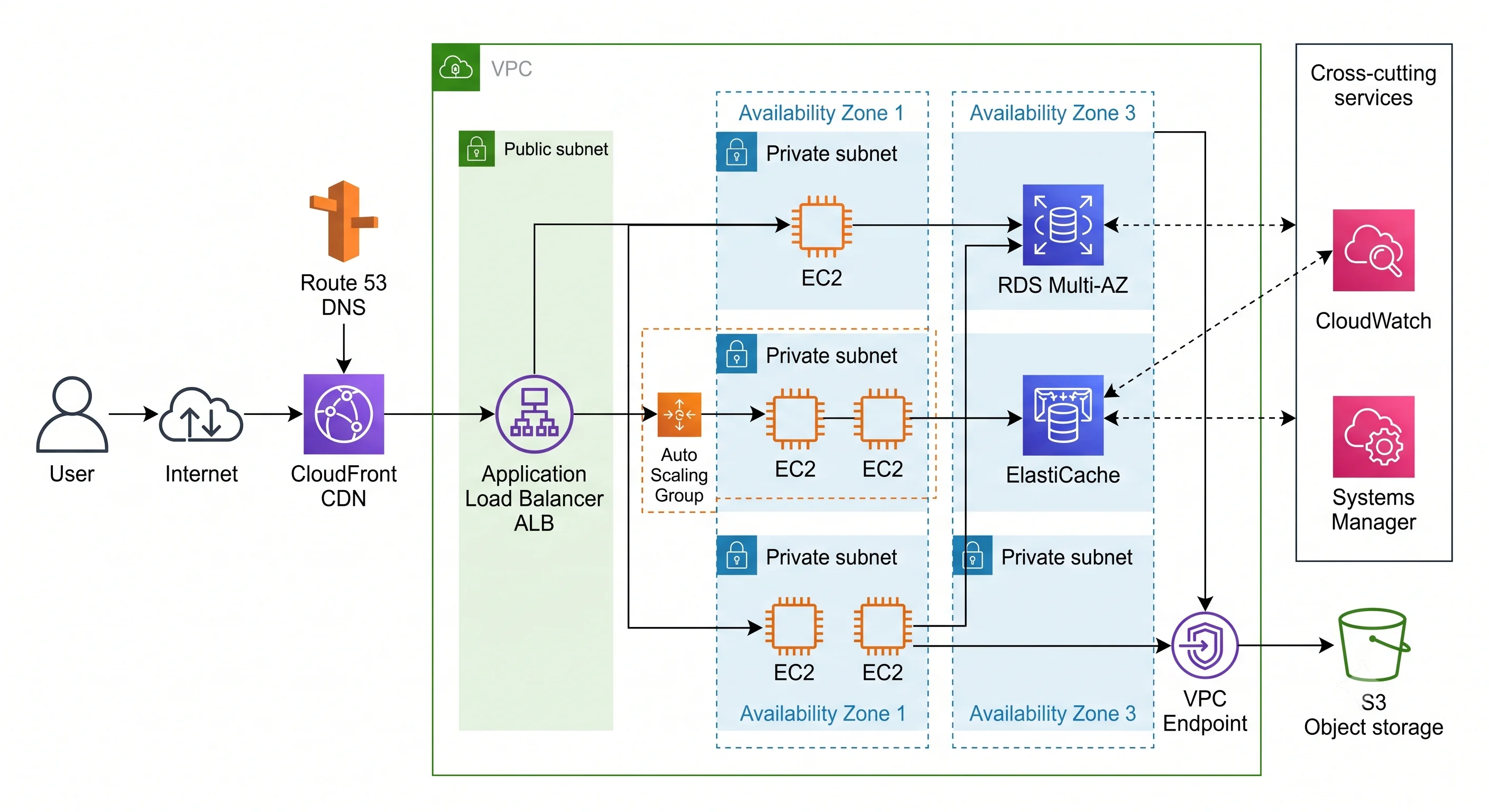
Integration anti-patterns
| Anti-pattern | Why it hurts | Instead |
|---|---|---|
| DNS pointing at an instance IP | Breaks on every replacement; no load distribution | Alias record → ALB |
| SSH from a bastion host as the access model | A host to patch, a port to expose, keys to rotate, no per-session audit | Session Manager |
| Credentials in user data or the AMI | Readable via IMDS; baked into every snapshot | Instance role + Secrets Manager |
| Private subnets reaching S3 through a NAT gateway | Paying per-GB for traffic that could be free | S3 gateway endpoint |
health_check_type = "EC2" in an ASG |
Dead applications on healthy VMs stay in service | "ELB" + a real /health |
| Cross-AZ chatter on the hot path | Per-GB charges and added latency, invisibly | Keep hot paths intra-AZ where correctness allows |
| EFS used to share state between app servers | Slow, expensive, and usually papering over statefulness | Make instances stateless; use S3 or a database |
| Spot instances with no interruption handler | Dropped requests and lost work, by choice | EventBridge rule + lifecycle hook to drain |
| Instance-level CloudWatch alarms on a fleet | Alarms on things designed to be replaced; noise | Alarm on ASG/target-group aggregates |
Check yourself
- Your instances are in private subnets and
aws ssm start-sessionhangs. Name two possible fixes and the cost difference between them. - Why is
iam:PassRolea separate permission fromec2:RunInstances, and what attack does splitting them prevent? - Memory usage isn't in your CloudWatch dashboard. Why not, and what's the fix?
- An ASG launches instances, kills them ~2 minutes later, and repeats forever. Which setting is wrong, and why is this expensive?
- Give the concrete cost argument for adding an S3 gateway endpoint to a fleet that pulls a 200 MB artifact on every scale-out.
- Why should an RDS security group reference the app security group rather than the VPC CIDR?
Next: Production — security, the real cost model, quotas, what to alarm on, and multi-AZ posture.