
What is Spark?
Part I — Foundations · Module 1 of 18 Prerequisites: none. This is the front door. You will learn: what Spark actually is, the specific problem it was invented to solve, what "unified analytics engine" means, the pieces that make up the Spark stack, and where PySpark fits in.
The one-sentence answer
Apache Spark is a unified computing engine and a set of libraries for parallel data processing on computer clusters.
Let's unpack that sentence slowly, because every word in it is doing real work:
- Unified — one engine and one consistent API handles many different jobs: batch data cleaning, SQL analytics, streaming, and machine learning. You don't learn four tools; you learn one.
- Computing engine — Spark does the computation. It deliberately does not store your data permanently. It reads from wherever your data already lives (a data lake, a database, cloud object storage) and writes results back out.
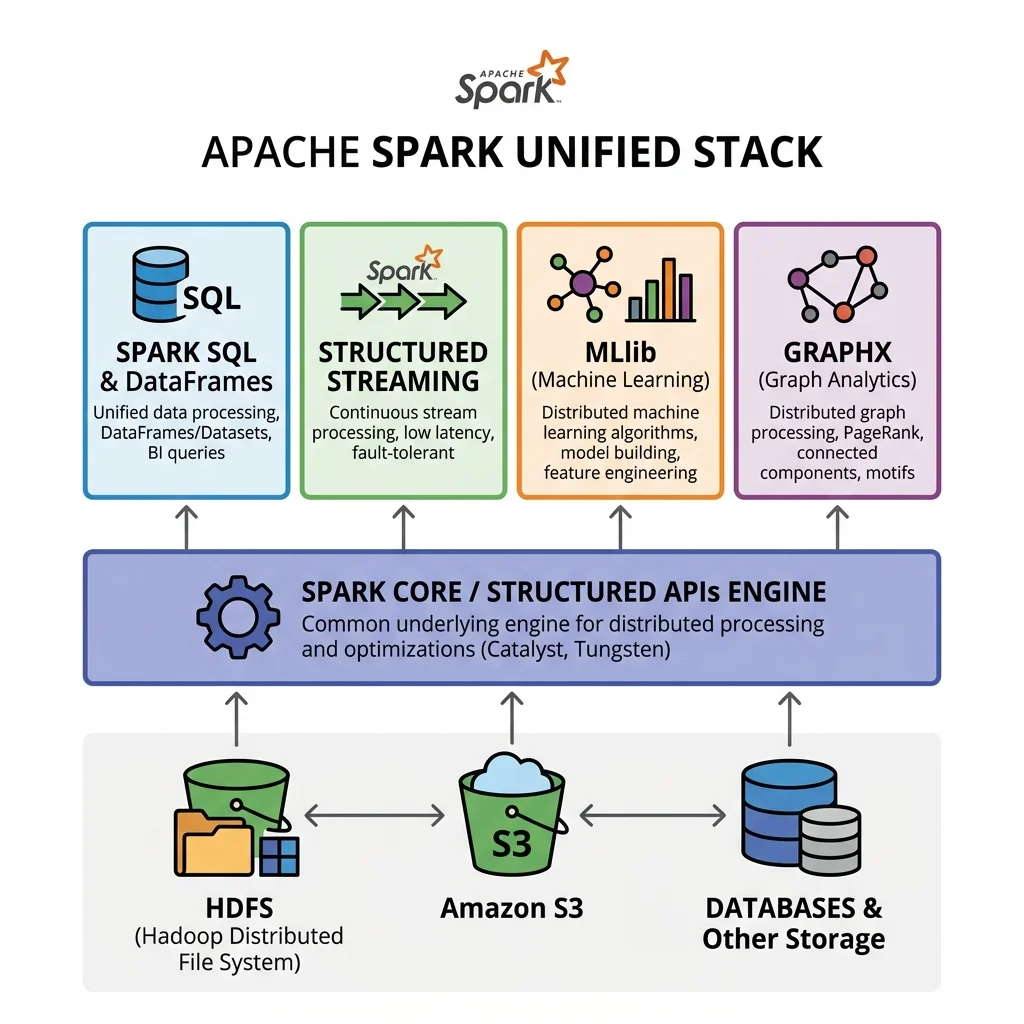
- Libraries — on top of the core engine sit specialized libraries (Spark SQL, Structured Streaming, MLlib, GraphX) that all share the same engine and speak the same language.
- Cluster — Spark's whole reason for existing is to coordinate many computers so they behave like one very large computer.
If you remember nothing else from this module, remember this: Spark is the engine, not the fuel tank. It processes data; it does not own it.
The problem Spark was born to solve
To appreciate why Spark exists, you have to picture the world before it.
For most of computing history, machines got faster every year in a very convenient way: the processor clock sped up, so the same single-threaded program simply ran faster next year without anyone changing a line of code. Around 2005 that free lunch ended. Physics (heat, mostly) capped how fast a single processor core could go. The industry's answer was to stop making cores faster and start adding more cores — and more separate machines wired together.
This was great for hardware manufacturers and terrible for programmers, because a program written to run on one core does not automatically use a thousand cores. Meanwhile, the amount of data the world collected exploded — sensors, clickstreams, transaction logs, images — and storage got cheap enough that companies kept all of it.
So we arrived at a painful mismatch:
- Data was too big to fit or process on one machine.
- The only way to get more compute was to spread work across many machines.
- Writing correct software that coordinates many machines — handling failures, moving data, scheduling work — is genuinely hard.
Apache Spark exists to absorb that hardness for you. It lets you write code that looks almost like it's operating on a single local collection of data, and it quietly handles splitting the work across a cluster, shipping computations to where the data is, recovering when a machine dies, and collecting the answer.
Analogy — one chef vs. a coordinated kitchen. Imagine you must chop 10,000 onions. One chef (a single machine) working alone will take all night. The obvious fix is to hire 100 chefs (a cluster). But 100 chefs in a kitchen is chaos unless someone hands out cutting boards, assigns each chef a crate of onions, and collects the results into one bowl. Spark is that head chef — the coordinator who turns a mob of workers into a smoothly parallel operation. You just say "chop these onions"; Spark figures out who does what.
Where Spark came from (the very short history)
Spark started as a research project at UC Berkeley's AMPLab in 2009 and became an open-source Apache project shortly after. Its motivating insight was a reaction to Hadoop MapReduce, the dominant big-data engine of the era.
MapReduce could process huge datasets across a cluster, but it wrote intermediate results to disk between every step. For a single pass over data that was tolerable; for the iterative algorithms common in machine learning — which sweep over the same data dozens of times — constantly reading and rewriting to disk was punishingly slow.
Spark's key idea was to keep working data in memory across steps whenever possible, and to build a smart plan of the whole computation before running it. For iterative and interactive workloads, this made Spark dramatically faster than MapReduce, and it has since become the de facto standard engine for large-scale data processing. (We will see how it keeps data in memory and plans ahead in Modules 03–08.)
"Unified" is the headline feature
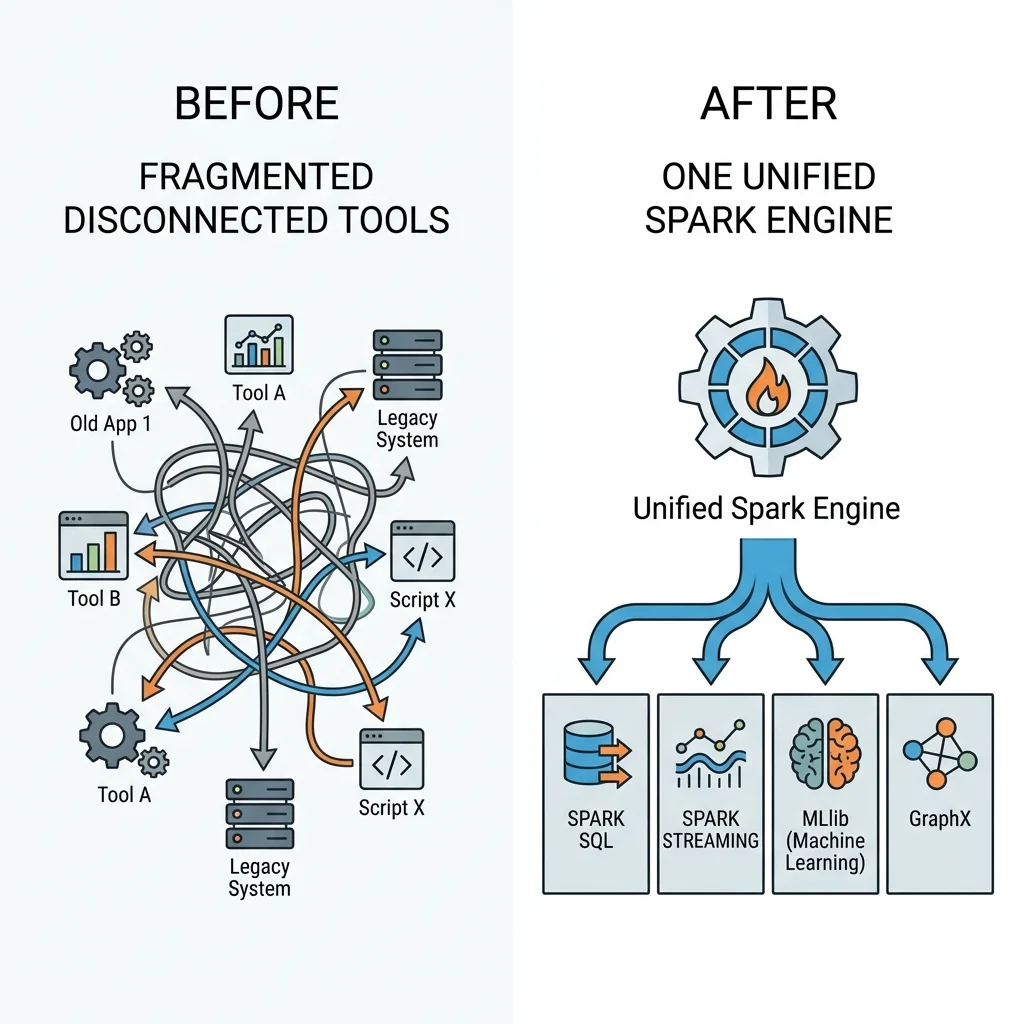
Plenty of tools can process big data. Spark's distinguishing bet is unification: consolidating many kinds of data work under one engine with one consistent set of APIs.
Before unification, a realistic data platform was a patchwork: one system for SQL queries, another for streaming, another for machine learning, another for ETL — each with its own API, its own quirks, its own operational burden, and expensive glue code to shuttle data between them.
Spark collapses that patchwork. The same DataFrame you clean in a batch job can be queried with SQL, fed into an MLlib model, or processed as a live stream — using the same concepts and often nearly identical code. Concretely, the unified stack includes:
- Spark SQL — work with structured data using SQL or the DataFrame API. (Module 11)
- Structured Streaming — apply the exact same DataFrame operations to unbounded, real-time data. (Module 13)
- MLlib — scalable machine learning with a pipeline API. (Module 14)
- GraphX — graph processing and graph-parallel computation.
All four are built on the same Spark Core and the same Structured APIs, so a skill you learn in one carries directly into the others. That consistency — not raw speed alone — is why teams standardize on Spark.
Engine, not storage: why this matters
We said Spark computes but does not permanently store data. This is a deliberate design choice with real consequences you should internalize early.
Spark is storage-agnostic. It happily reads from and writes to:
- Distributed file systems like HDFS
- Cloud object stores like Amazon S3 or Azure Blob Storage
- Relational databases and data warehouses
- Streaming sources like Apache Kafka
- Plain files: CSV, JSON, Parquet, and more
Why refuse to own storage? Because it keeps Spark focused and flexible. Your data can already live wherever makes sense for cost and durability, and Spark plugs into it. The trade-off is that Spark relies on those external systems for persistence and, importantly, tries hard to process data where it already sits to avoid shovelling it across the network. That principle — moving the computation to the data rather than the data to the computation — is called data locality, and it quietly shapes much of Spark's behavior. We'll return to it when we discuss partitions in Module 03.
A first taste of PySpark
Enough concept — here is what actually talking to Spark from Python looks like. PySpark is simply the Python API for Spark. You write Python; Spark translates your intent into optimized work distributed across the cluster.
Every Spark program begins by creating a SparkSession — your single entry point to everything Spark can do. (We devote all of Module 09 to it; this is just a preview.)
from pyspark.sql import SparkSession

# The SparkSession is your handle to the whole engine.
# .getOrCreate() reuses an existing session or builds a new one.
spark = (SparkSession
         .builder
         .appName("MyFirstSparkApp")
         .getOrCreate())

# Create a tiny distributed DataFrame — 1,000 numbers spread across the cluster.
numbers = spark.range(1000).toDF("number")

# Describe a computation (this does NOT run yet — see Module 06 on lazy evaluation).
evens = numbers.where("number % 2 == 0")

# Ask a question that forces Spark to actually compute — this returns 500.
print(evens.count())

spark.stop()
Notice how ordinary that looks. There is no explicit talk of machines, threads, or network sockets. You described what you wanted — the even numbers, then a count — and Spark takes responsibility for how to compute it across however many machines you have. That gap between the what you write and the how Spark executes is the heart of everything in this guide, and the next modules pry it open.
Key takeaways
- Apache Spark is a unified computing engine plus libraries for parallel data processing on clusters.
- It exists because data outgrew single machines and hardware scaled out (more cores/machines) instead of up (faster cores) — and coordinating many machines by hand is hard. Spark does that coordination for you.
- Its historical edge over Hadoop MapReduce came from keeping data in memory across steps and planning the whole computation before running it.
- Unification is the signature feature: SQL, streaming, ML, and graph work share one engine and one consistent API.
- Spark is an engine, not storage — it plugs into external data sources and favors processing data where it already lives (data locality).
- PySpark is the Python front door, and every program starts with a
SparkSession.
Check your understanding
- In your own words, why did the end of single-core speed gains around 2005 make something like Spark necessary?
- Spark is described as an "engine, not storage." Name two places Spark can read data from, and explain why Spark not owning storage is a feature rather than a limitation.
- What does "unified" buy a data team in practice, compared with wiring together four separate specialized tools?
Up next
Spark Architecture — The Spark Architecture. Now that you know what Spark is and why it exists, we open the hood: the driver, the executors, and the cluster manager — the three roles that turn your PySpark script into coordinated work across a cluster.