
UDFs & Pandas UDFs
Part IV — Writing PySpark · Module 12 of 18 Prerequisites:
DataFrame Operations,Catalyst & Tungsten(why leaving the binary format is costly),RDDs, DataFrames, DatasetsYou will learn: how to write a User-Defined Function (UDF) when built-ins aren't enough, the hidden JVM↔Python serialization tax a standard Python UDF pays, why you should prefer built-in functions, and how vectorized Pandas UDFs (powered by Apache Arrow) largely erase that tax.
When the built-ins run out
Spark ships with hundreds of built-in functions in pyspark.sql.functions — arithmetic, string manipulation, dates, conditionals, aggregations. For the vast majority of tasks, a built-in already exists, and you should always look for one first (we'll see exactly why). But occasionally you need custom logic that no built-in expresses — a bespoke scoring formula, a domain-specific parsing rule. For those cases, Spark lets you register your own Python function as a User-Defined Function (UDF).
This module is as much a caution as a how-to. UDFs are powerful and sometimes necessary, but a standard Python UDF carries a real, often-invisible performance cost. Understanding that cost — and the faster alternative — is the whole point.
The hidden problem: two worlds, constant translation
To understand why Python UDFs are slow, recall two facts from earlier modules:
- Spark runs on the JVM, and DataFrame data lives in Tungsten's compact off-heap binary format (Module 08).
- Your Python code runs in a separate Python process, outside the JVM (mentioned for RDDs in Module 04).
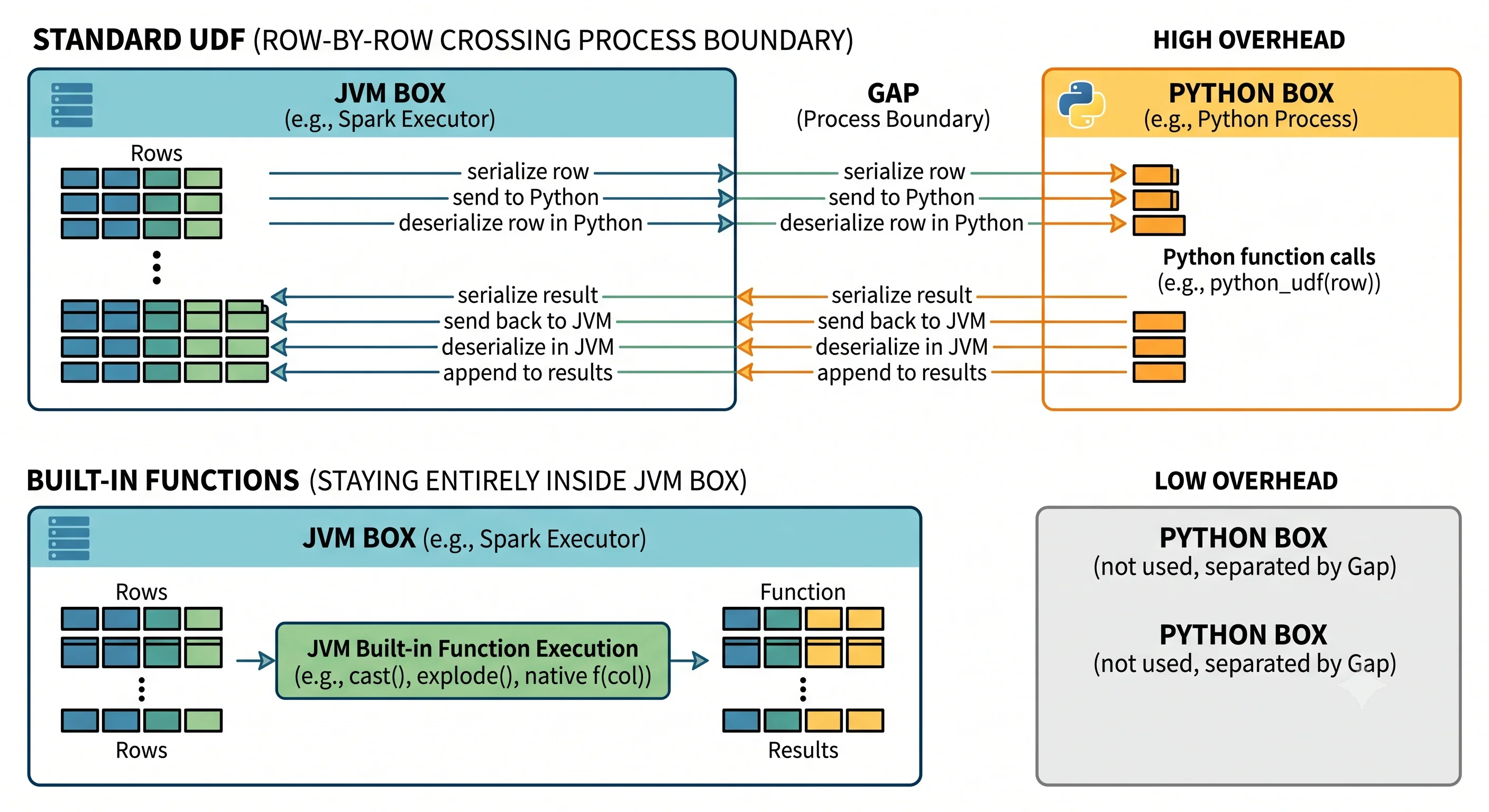
When Spark can do everything with built-in functions, the data never leaves the JVM/Tungsten world — it stays in that optimized binary format the whole time. But a standard Python UDF forces Spark to cross the boundary between these two worlds, row by row:
- Take a row out of Tungsten's binary format in the JVM.
- Serialize it and ship it over to the Python process.
- Run your Python function on it.
- Serialize the result back and ship it to the JVM.
- Deserialize it into Tungsten's format again.
That serialize/ship/deserialize cycle — the SerDe tax — happens for every single row. Across millions of rows, this dominates the runtime. Worse, because your UDF is an opaque black box to Catalyst (exactly like an RDD lambda in Module 04), the optimizer can't see inside it, can't reorder around it, and can't push anything down through it. And Python UDFs run outside Spark's managed memory, so a careless one can even exhaust executor memory.
Analogy — the interpreter passing notes at a summit. Imagine two delegations that don't share a language: the JVM speaks one, Python speaks another. A built-in function is a conversation held entirely within the JVM delegation — fast and fluent. A Python UDF is like routing every sentence through an interpreter who must write it down, walk it across the room, get a reply, and walk it back. One sentence is fine. Doing it for a million sentences, one at a time, brings the summit to a crawl. That walking-back-and-forth is serialization.
Writing a standard UDF (and why to avoid it)
Here's the mechanics, so you know them — paired with the reason to reach for them last:
from pyspark.sql.functions import udf
from pyspark.sql.types import LongType

# A plain Python function
def cubed(n):
    return n * n * n

# Register it as a UDF, declaring its return type
cubed_udf = udf(cubed, LongType())

# Use it like any column function
df = spark.range(1, 6)                       # ids 1..5
df.select("id", cubed_udf("id").alias("id_cubed")).show()
You can also register a UDF for use in SQL:
spark.udf.register("cubed_sql", cubed, LongType())
spark.sql("SELECT id, cubed_sql(id) AS id_cubed FROM range(1, 6)").show()
This works correctly — but every row paid the SerDe tax, and Catalyst couldn't optimize through it. For n * n * n, a built-in expression would be far faster:
from pyspark.sql.functions import col
# Prefer this: pure built-in, stays in Tungsten, fully optimizable — no UDF needed.
df.select("id", (col("id") * col("id") * col("id")).alias("id_cubed")).show()
Rule of thumb: before writing a UDF, search
pyspark.sql.functionsfor a built-in that does the job. A built-in is almost always faster because it stays in the optimized binary format and Catalyst can optimize it. Treat a standard Python UDF as a last resort, not a first reach.
The better tool: vectorized Pandas UDFs
Sometimes you do need custom Python — but you don't have to accept the row-by-row tax. Spark (since 2.3, with modern type-hint syntax in 3.0) offers Pandas UDFs (also called vectorized UDFs), which dramatically reduce the overhead using Apache Arrow.
Two changes make them fast:
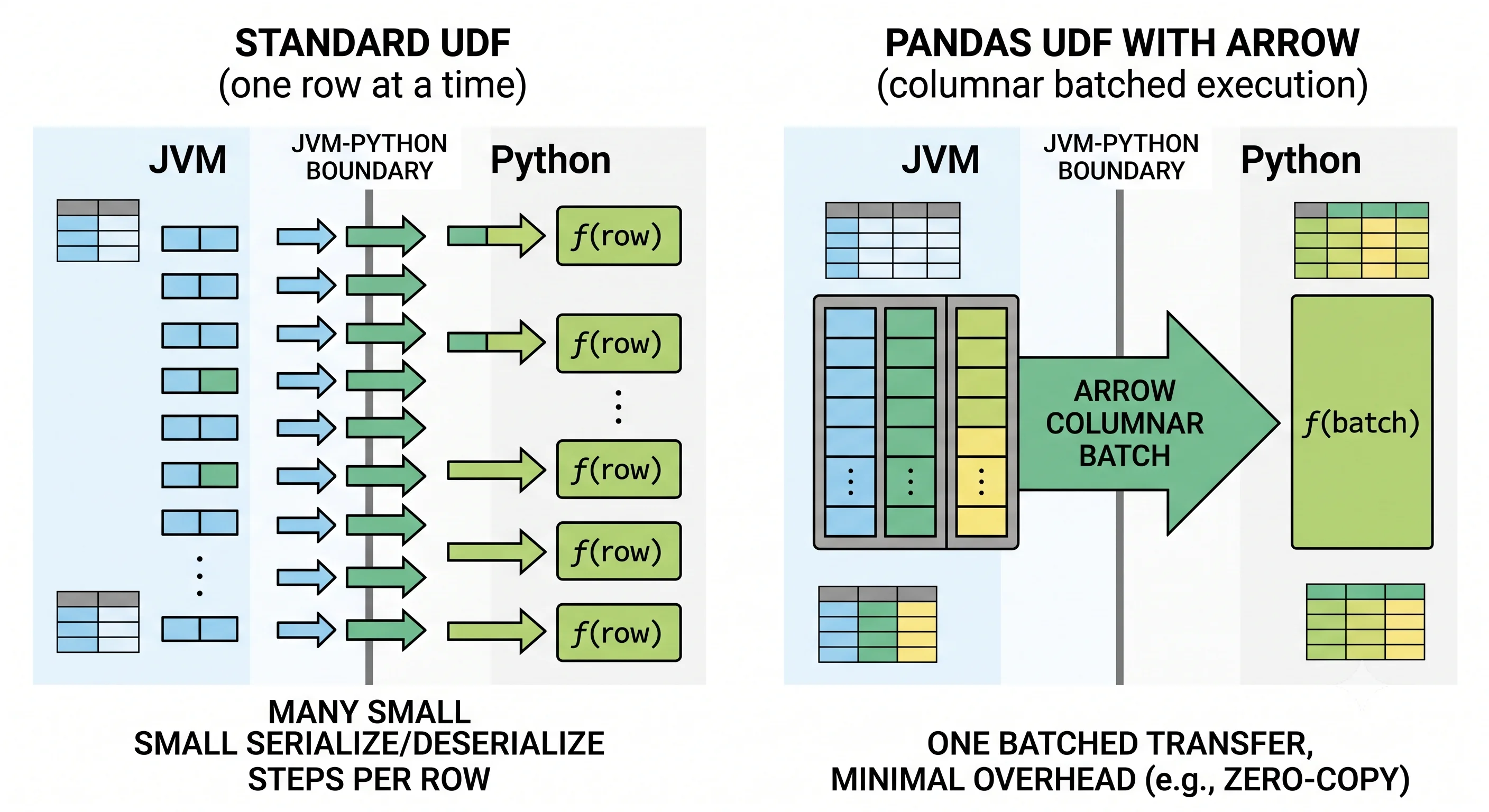
- Apache Arrow is a standardized in-memory columnar format that both the JVM and Python understand without per-row conversion. Data can be handed across the boundary in Arrow's format with minimal serialization cost.
- Batching — instead of shipping one row at a time, Spark ships a whole batch of rows as a Pandas
Series, your function processes the entire batch with fast vectorized Pandas/NumPy operations, and the batch is returned together.
So instead of a million tiny trips across the boundary, you make a handful of big ones, and the operation inside runs at NumPy speed. Here's the same cubing logic as a Pandas UDF:
import pandas as pd
from pyspark.sql.functions import pandas_udf, col
from pyspark.sql.types import LongType

# Spark 3.0 type-hint style: takes a pandas Series, returns a pandas Series.
@pandas_udf(LongType())
def cubed_pandas(a: pd.Series) -> pd.Series:
    return a * a * a          # vectorized — operates on the whole batch at once

df = spark.range(1, 6)
df.select("id", cubed_pandas(col("id")).alias("id_cubed")).show()
The code barely differs from the plain UDF, but the execution model is completely different: Arrow moves data in columnar batches, and your function runs vectorized over each batch rather than scalar over each row. For anything data-heavy, a Pandas UDF can be many times faster than the equivalent standard UDF.
Analogy — one shipping container vs. a thousand envelopes. The standard UDF mails each row in its own envelope — a thousand separate postage-and-handling cycles. The Pandas UDF packs a thousand rows into one shipping container (an Arrow batch), sends it once, and the recipient unpacks and processes the whole container in a single efficient motion. Same cargo, a fraction of the trips.
Choosing the right tool
A simple decision ladder, from best to last resort:
- Use a built-in function from
pyspark.sql.functionswhenever one exists. Fastest, fully optimizable, stays in Tungsten. This handles most needs. - If you truly need custom Python logic, use a vectorized Pandas UDF. You keep Python expressiveness while paying only the (much smaller) batched-Arrow cost.
- Fall back to a standard Python UDF only when a Pandas UDF doesn't fit — for genuinely scalar, non-vectorizable logic on modest data — accepting the row-by-row SerDe tax and the loss of Catalyst optimization.
| Approach | Speed | Optimizable by Catalyst? | Data crossing cost | When to use |
|---|---|---|---|---|
| Built-in function | Fastest | Yes | None (stays in JVM/Tungsten) | Always try first |
| Pandas UDF (vectorized) | Fast | No (but batched) | Low (Arrow, batched) | Custom logic on lots of data |
| Standard Python UDF | Slowest | No (black box) | High (SerDe per row) | Last resort only |
The unifying principle (from Module 08): performance in Spark comes from staying inside the structured, binary, optimizable world. Built-ins never leave it; Pandas UDFs leave it cheaply and in bulk; standard UDFs leave it expensively, one row at a time. That single idea explains the entire ranking.
Key takeaways
- UDFs let you run custom Python logic as a column function, but Spark runs on the JVM while your Python runs in a separate process, so a standard Python UDF serializes every row across that boundary (the SerDe tax) and is an opaque black box Catalyst can't optimize.
- Always prefer built-in functions from
pyspark.sql.functions— they stay in Tungsten's binary format and are fully optimizable. Treat standard UDFs as a last resort. - Vectorized Pandas UDFs (via
@pandas_udf, Spark 3.0 type-hint style) use Apache Arrow to move data across the boundary as columnar batches and process each batch with fast vectorized Pandas operations — far cheaper than row-by-row. - Decision ladder: built-in → Pandas UDF → standard UDF, in that order of preference.
- The through-line: stay inside the structured/binary world; if you must leave it, leave it cheaply and in bulk (Arrow batches), not expensively row by row.
Check your understanding
- Explain the "SerDe tax" a standard Python UDF pays. Why does it get worse as your dataset grows?
- Besides raw speed, what optimization ability do you lose the moment you drop into a standard Python UDF, and why (tie it to Catalyst)?
- A Pandas UDF and a standard UDF contain nearly identical Python. Why is the Pandas version so much faster? Use the "shipping container vs. envelopes" idea.
Up next
Structured Streaming — Structured Streaming. So far every operation has run over a fixed, finite dataset. Next we apply the exact same DataFrame API to unbounded, real-time data — reading a stream, aggregating over event-time windows, and writing results continuously.