
Caching & Persistence
Part V — Running It Well · Module 15 of 18 Prerequisites:
Lazy Evaluation & the DAG(why recomputation happens),Transformations & Actions,Spark Architecture(executor memory) You will learn: why Spark recomputes DataFrames, when caching genuinely helps (and when it hurts), the difference betweencache()andpersist(), the main storage levels, why a cache is lazy and must be materialized, and how to free it withunpersist().
The problem caching solves
Recall the gotcha from Module 06: because a DataFrame is just a recorded lazy plan, every action recomputes it from the beginning. If you run two actions on the same DataFrame, Spark does all the work twice — re-reading the source, re-running every transformation.
For a DataFrame you touch once, that's fine. But two very common situations reuse the same DataFrame repeatedly:
- Iterative algorithms — machine learning training (Module 14) sweeps over the same prepared features dozens of times.
- Multi-stage / interactive analysis — you compute an expensive intermediate result, then run several different queries against it (counts, filters, joins).
In these cases, recomputing from scratch each time is pure waste. Caching tells Spark: "hold on to this result in memory so the next action reads it instead of rebuilding it."
Analogy — mise en place. A cook who needs chopped onions for five different dishes doesn't re-chop from a whole onion each time — they chop once, put the pile in a bowl, and reach for it repeatedly. Caching is that prepped bowl: do the expensive work once, keep the result handy, and reuse it. If you only needed onions for a single dish, prepping a bowl would be pointless overhead — which is exactly when not to cache.
When to cache — and when not to
Caching is not free: it consumes precious executor memory (Module 02). So it's a deliberate trade, not a default. Apply it with judgment.
Cache when:
- A DataFrame is accessed repeatedly across multiple actions or iterations (ML training loops, multi-query analysis).
- The DataFrame is expensive to compute (heavy transformations, a shuffle, a costly read) so recomputing really hurts.
- The result fits comfortably in memory.
Don't cache when:
- The DataFrame is used only once — there's nothing to reuse, so caching just wastes memory.
- It's too large to fit in memory — caching may evict other data or spill, costing more than it saves.
- It represents a cheap transformation that's trivial to recompute — recomputation is cheaper than the memory it would occupy.
The mental test: "Will I use this DataFrame more than once, is it expensive to build, and does it fit in memory?" Three yeses → cache. Otherwise, don't. Over-caching is a real and common mistake; every cached DataFrame is memory taken from computation.
cache() vs. persist()
Two methods request caching; they're closely related:
cache()— the simple one. Caches the DataFrame at the default storage level (in memory). No arguments.persist(storageLevel)— the flexible one. Lets you choose the storage level (memory, disk, serialized, replicated…). In fact,cache()is just shorthand forpersist()at the default level.
# These two are equivalent:
df.cache()

from pyspark import StorageLevel
df.persist(StorageLevel.MEMORY_AND_DISK)   # cache() is persist() at the default level
Use cache() for the common case; reach for persist() when you want explicit control over how the data is stored — the subject of the next section.
Storage levels: how the cache is stored
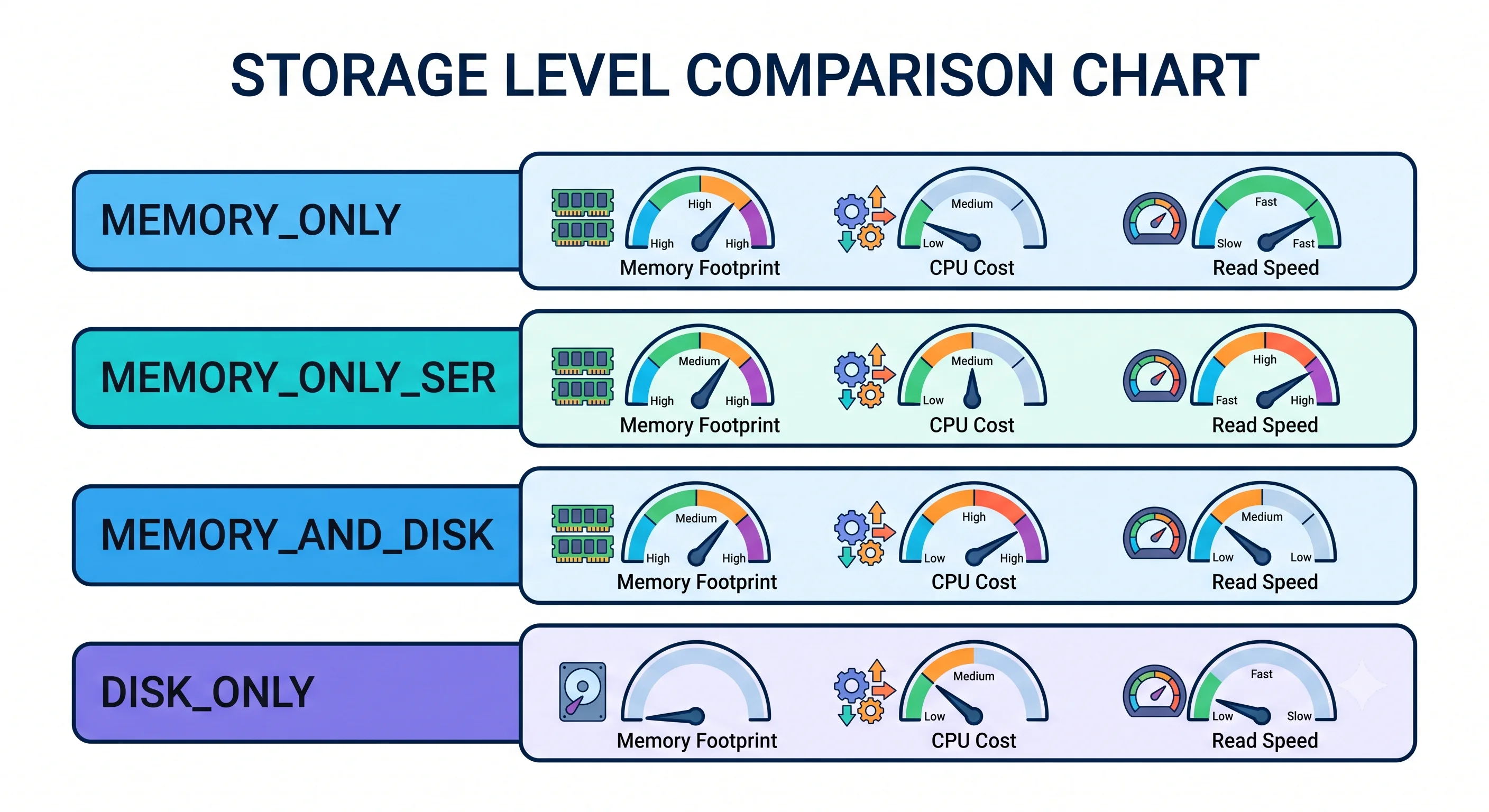
persist() accepts a storage level that controls the trade-off between memory footprint, CPU cost, and resilience. The ones you'll actually reason about:
MEMORY_ONLY— store deserialized objects in memory. Fastest to read (no decoding), but the largest memory footprint. If a partition doesn't fit, it's simply not cached and gets recomputed on demand.MEMORY_ONLY_SER— store a serialized (compact byte-array) form in memory. Uses much less memory and reduces garbage-collection pressure; the cost is a little CPU to deserialize on each read. Often the sweet spot for large cached datasets.MEMORY_AND_DISK— keep partitions in memory, but spill any that don't fit to disk instead of recomputing them. A safe default when the data might not fully fit.DISK_ONLY— store entirely on disk. Slower than memory, but still faster than recomputing a very expensive result from scratch.
There are also replicated variants (e.g., MEMORY_ONLY_2) that keep two copies across nodes for fault tolerance, at double the space.
from pyspark import StorageLevel

# Serialized in-memory: smaller footprint, less GC, minor CPU cost to deserialize.
df.persist(StorageLevel.MEMORY_ONLY_SER)
Rule of thumb: default
cache()(memory, deserialized) is fine for modest data. For large cached datasets, preferMEMORY_ONLY_SERto shrink the footprint and ease garbage collection; useMEMORY_AND_DISKwhen you can't be sure it all fits.
The critical gotcha: caching is lazy
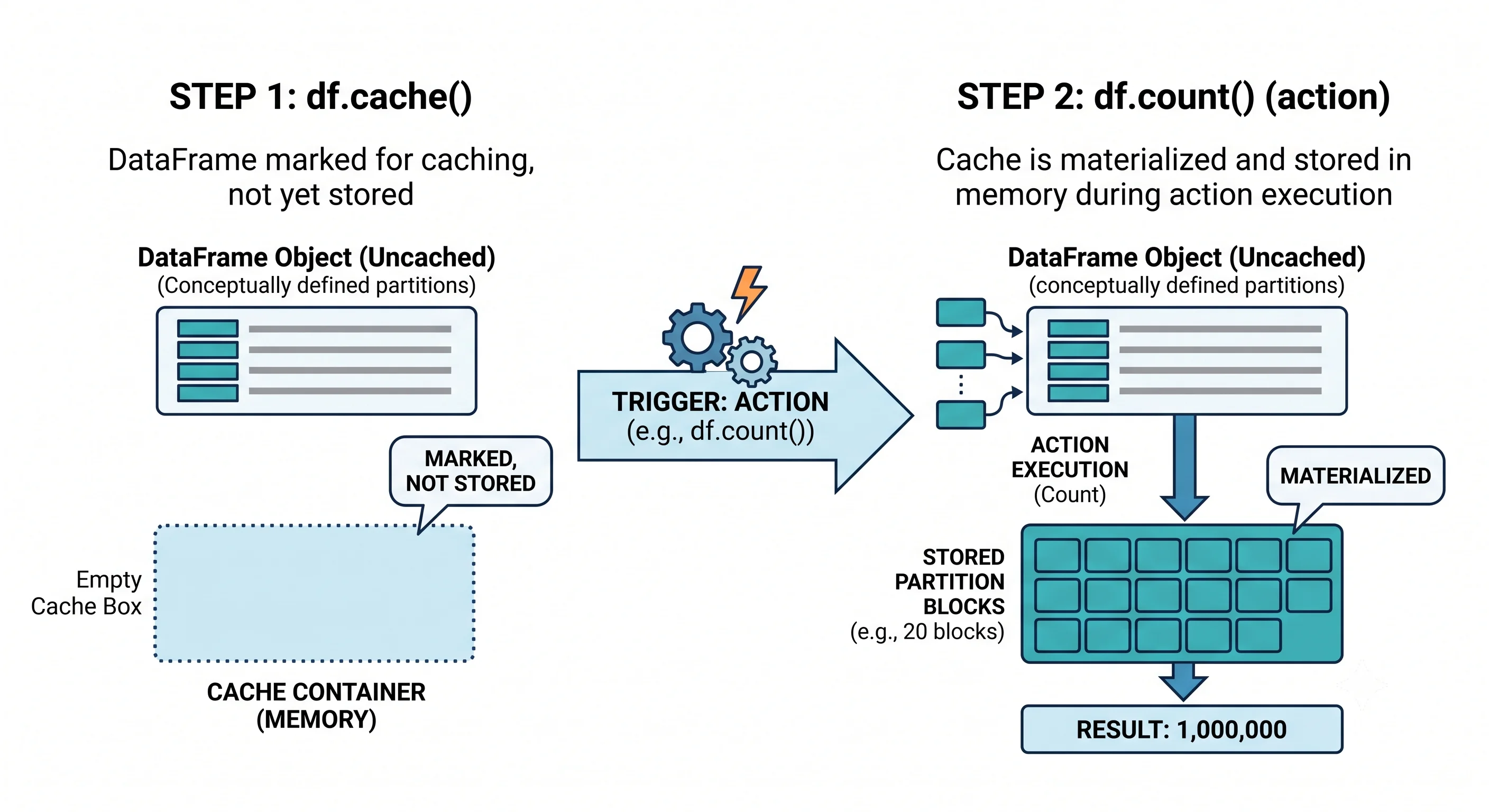
Here's the mistake nearly every beginner makes. Calling cache() or persist() does not actually cache anything yet. Like a transformation (Module 05), it's lazy — it only marks the DataFrame to be cached the next time it's computed. Nothing lands in memory until an action forces the DataFrame to materialize.
So to actually populate the cache, you must immediately trigger an action:
df.cache()          # marks df for caching — but NOTHING is cached yet
df.count()          # ACTION: forces computation, NOW the partitions are cached

# Subsequent actions read from the cache instead of recomputing:
df.filter(...).show()    # fast — reads cached partitions
df.groupBy(...).count()  # fast — reads cached partitions
count() is the usual choice to materialize because it touches every row (so every partition gets cached) and returns something trivial. If you skip this step and assume cache() did the work, your first real action still recomputes everything from scratch — and people are often baffled why "caching didn't help."
Remember:
cache()is a promise, not an action. Materialize it with an action (typicallycount()) to make the cache real.
Freeing the cache: unpersist()
Cached data occupies executor memory until you release it (or Spark evicts it under pressure). When you're done reusing a DataFrame, free its memory explicitly:
df.unpersist() # releases the cached partitions back to the clusterThis matters in long-running jobs and notebooks, where stale cached DataFrames can quietly hog memory and starve later computations. Good hygiene: cache when you start reusing something, unpersist() when you're finished with it.
A worked pattern: caching in an ML loop
Pulling it together with the Module 14 scenario — prepared features reused across training iterations:
# Expensive to build: reads + indexing + encoding + assembly
prepared = pipeline_model.transform(train_df)

prepared.cache()        # mark for caching
prepared.count()        # materialize NOW (one-time cost)

# Every training iteration below reads from memory, not from a full recompute:
for k in [10, 20, 30]:
    model = KMeans().setK(k).setFeaturesCol("features").fit(prepared)
    # ... evaluate model ...

prepared.unpersist()    # release memory when the loop is done
Without the cache, each .fit() would re-run the entire read-index-encode-assemble chain. With it — materialized once — every iteration is dramatically faster. This is caching's home turf: expensive to build, reused many times, fits in memory.
Key takeaways
- Spark recomputes a DataFrame on every action (Module 06); caching stores the result so later actions reuse it instead of rebuilding.
- Cache when a DataFrame is reused across actions/iterations, is expensive to compute, and fits in memory. Don't cache one-time-use, oversized, or trivially-cheap DataFrames — caching costs precious executor memory.
cache()caches at the default (memory) level;persist(level)lets you pick a storage level —MEMORY_ONLY,MEMORY_ONLY_SER(smaller footprint, less GC — good for large data),MEMORY_AND_DISK(spills instead of recomputing),DISK_ONLY.- Caching is lazy —
cache()/persist()only mark the DataFrame. Materialize it with an action (usuallycount()) or the first real action still recomputes from scratch. - Release memory with
unpersist()when done; over-caching starves computation.
Check your understanding
- A colleague calls
df.cache()and is confused that their firstdf.show()is still slow. What did they forget, and what one line fixes it? - Give three conditions that should all hold before you decide to cache a DataFrame.
- When would you choose
MEMORY_ONLY_SERover the defaultMEMORY_ONLY, and what's the trade-off?
Up next
Joins & Broadcast — Joins & Broadcast. Joins are among the most common — and most shuffle-heavy — operations in Spark. Next we compare the shuffle sort-merge join with the broadcast hash join, learn the broadcast threshold, and see how bucketing can eliminate the join shuffle entirely.