
Spark Architecture
Part I — Foundations · Module 2 of 18 Prerequisites:
What is Spark?You will learn: the three roles that run every Spark application — the driver, the executors, and the cluster manager — how they talk to each other, the vocabulary of an application (jobs, stages, tasks), and the three execution modes (cluster, client, local) you'll actually deploy in.
From "what" to "who does what"
In Module 01 we said Spark turns a mob of machines into a coordinated team, like a head chef running a busy kitchen. This module names the members of that team and explains exactly who is responsible for what.
Here is the whole architecture in one breath, and then we'll take it apart slowly:
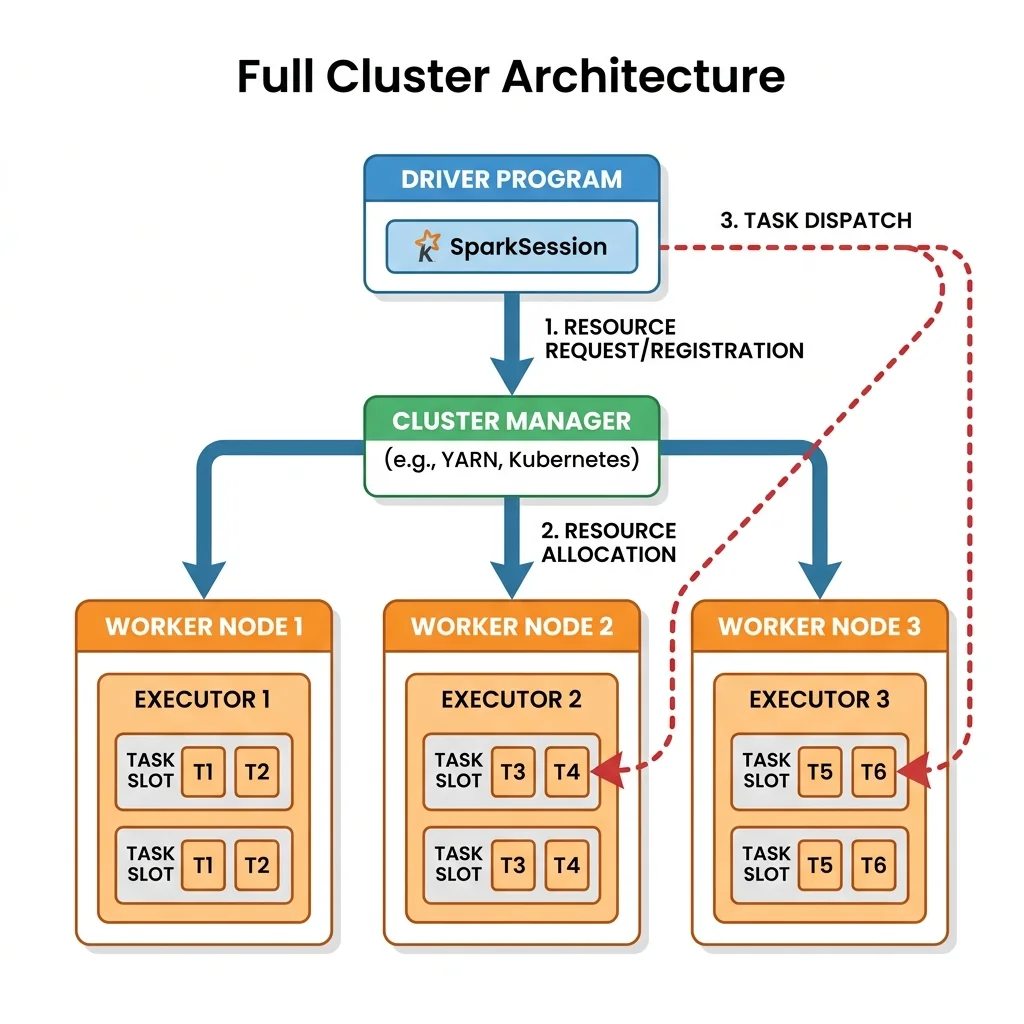
When you run a Spark application, a driver process holds your program and acts as the brain. It asks a cluster manager for resources. The cluster manager launches executor processes on worker machines. The driver breaks your code into small tasks and ships them to the executors, which do the actual number-crunching on their slice of the data and report results back.
Three roles. One brain (driver), one landlord (cluster manager), many hands (executors). Let's meet each one.
The Driver — the brain of the application
The driver is the single process that is the heart of a Spark application. There is exactly one driver per application, and it is where your main() program — your PySpark script — actually lives and runs. It holds the SparkSession.
If Spark is a company delivering a big project, the driver is the project manager. It doesn't lift the heavy boxes itself; its job is to hold the plan in its head and direct everyone else. Specifically, the driver:
- Maintains the application's global state — it knows everything about the running app for its entire lifetime.
- Negotiates for resources — it talks to the cluster manager to request CPU and memory for executors.
- Converts your code into a plan — it transforms your Spark operations into a DAG (Directed Acyclic Graph) of computation. (We'll dig into the DAG in Module 06.)
- Schedules and distributes work — it splits that plan into tasks and assigns each task to an executor.
- Responds to your program — it reacts to inputs and to the results streaming back from executors.
The driver is literally "in the driver's seat." Because it is the central coordinator, it is also a single point of pressure: if you ask it to pull a huge amount of data back to itself (for example, with collect() on a giant DataFrame), the driver can run out of memory and crash the whole application. We'll cover how to avoid that in Module 17 — for now, just register that the brain is powerful but not infinitely large.
The SparkSession: your one conduit
Since Spark 2.0, the driver exposes a single unified entry point called the SparkSession. Before 2.0, you had to juggle several separate context objects — SparkContext, SQLContext, HiveContext, StreamingContext — each a different doorway into a different part of Spark. The SparkSession subsumes all of them into one object.
Through a single SparkSession you can configure the runtime, create DataFrames and Datasets, read from data sources, reach catalog metadata, and run Spark SQL queries. It is, in effect, your steering wheel for the entire engine.
from pyspark.sql import SparkSession

# One object, one doorway to everything Spark can do.
spark = (SparkSession
         .builder
         .appName("ArchitectureDemo")
         .config("spark.sql.shuffle.partitions", 6)   # a runtime setting
         .getOrCreate())

# The SparkSession lets you reach data sources, SQL, the catalog, and more.
print(spark.version)
One driver, one SparkSession, one application. These three map onto each other. When you hear "the application," picture the driver process holding its SparkSession.
The Executors — the hands that do the work
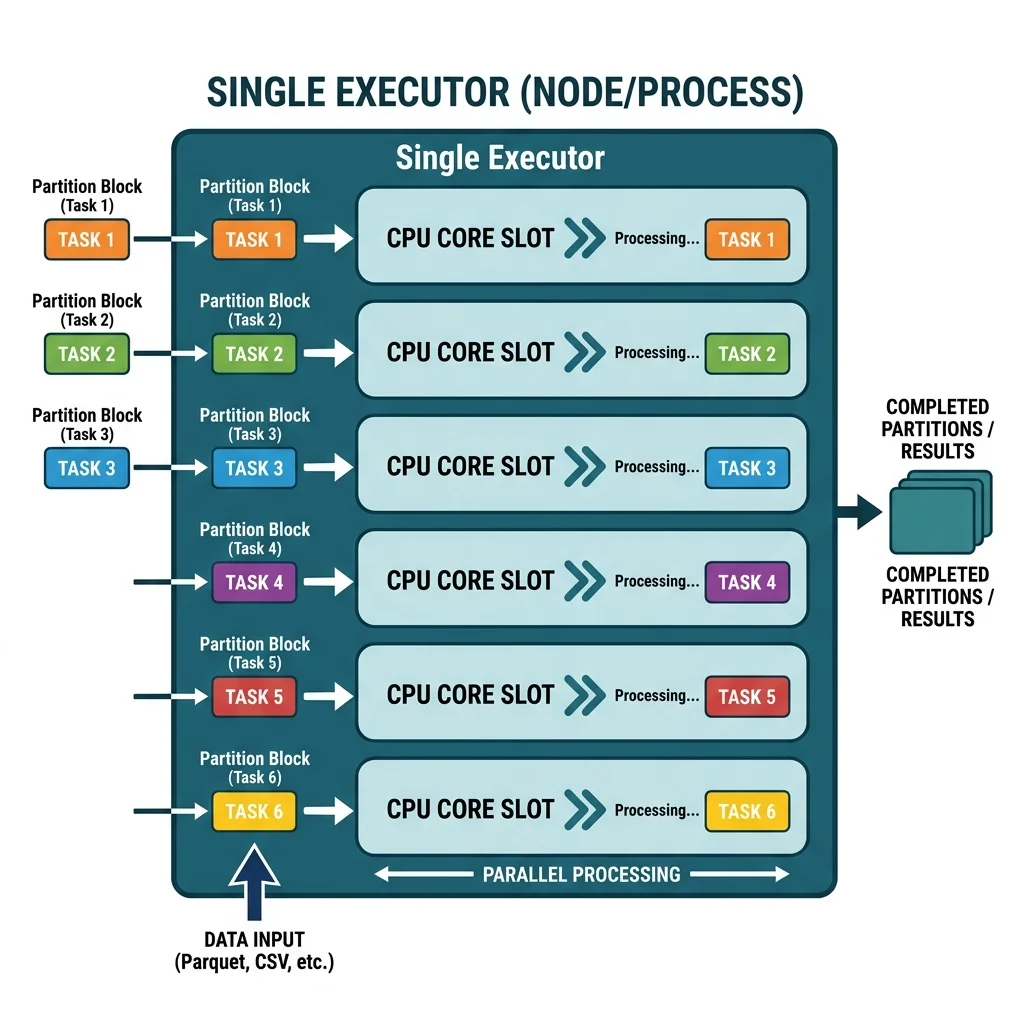
Executors are the worker processes that carry out the actual computation. Each executor is a JVM process running on a worker node in the cluster, and a typical deployment runs one executor per worker node. If the driver is the project manager, the executors are the crew on the warehouse floor — the ones actually moving and processing the boxes.
Each executor has two jobs:
- Execute tasks — run the individual units of work the driver assigns, and report back whether each succeeded or failed, along with results.
- Provide in-memory storage — hold cached data and partitions of DataFrames in memory so repeated work doesn't re-read from disk. (This is the caching we tune in Module 15.)
Cores, tasks, and partitions: the unit of parallelism
Here's the mechanical detail that makes executors concrete. An executor has some number of CPU cores, and each core runs exactly one task at a time, and each task processes exactly one partition of data.
That sentence is the engine of Spark's parallelism, so let's make it tangible:
- A partition is a chunk of your data (much more on this in Module 03).
- A task is the work of applying your computation to one partition.
- A core is a worker that can run one task at a time.
So an executor with 16 cores can process 16 partitions in parallel — 16 tasks running simultaneously. Give it 64 partitions and it will work through them 16 at a time, in four waves. Give it only 1 partition, and 15 of its 16 cores sit idle no matter how powerful the machine is. This is why partitioning matters so much: your parallelism is capped by your partition count, a point we return to constantly.
Analogy — checkout lanes at a supermarket. Each executor core is a checkout lane. Each partition is a shopping cart of groceries. A cashier (core) can ring up one cart (partition) at a time. Sixteen lanes open means sixteen carts checked out at once. But if the whole store's groceries are piled into a single cart, only one lane can work and the other fifteen cashiers stand around — the store is no faster than one lane. Matching carts to lanes is the essence of tuning parallelism.
The Cluster Manager — the landlord who allocates resources
Neither the driver nor the executors conjure machines out of thin air. Some external system has to own the pool of physical machines and hand out CPU and memory. That system is the cluster manager.
The cluster manager is the master process that maintains the cluster's machines and allocates resources to Spark applications. Think of it as the building manager of an office block: it owns all the rooms (machines), and when a new team (a Spark application) shows up needing space, the building manager assigns it offices (executor slots). It has no interest in what the team does inside those rooms — only in fair, orderly allocation of space.
Spark is deliberately pluggable here — it can run on several cluster managers:
- Standalone — Spark's own simple built-in cluster manager.
- Apache Hadoop YARN — the resource manager from the Hadoop ecosystem.
- Apache Mesos — a general-purpose cluster manager.
- Kubernetes — container-orchestrated clusters (widely used in modern deployments).
The important idea for a beginner is the separation of concerns: the cluster manager handles who gets machines, and Spark (driver + executors) handles what computation runs on them. That clean split is why the same Spark code runs unchanged on your laptop, on a YARN cluster, or on Kubernetes.
Putting it together: how an application actually runs
Let's trace the life of a Spark application from launch to result, so the three roles click into a single story:
- You submit your application. You run your PySpark script (often via
spark-submit). - The driver starts and initializes a
SparkSession. - The driver asks the cluster manager for resources — "I need executors with this much CPU and memory."
- The cluster manager launches executors on worker nodes and tells the driver where they are.
- The driver plans the work. It analyzes your transformations, builds a DAG, and divides it into stages, which it further divides into tasks — one task per partition.
- The driver ships tasks to executors. Each executor runs its tasks on its local partitions, ideally the data physically closest to it (data locality).
- Executors report back results and status; the driver assembles the final answer or writes it to a data sink.
- On completion, the driver releases the executors and the application ends.
The vocabulary of execution: job → stage → task
Steps 5 and 6 introduced three words that are easy to blur together. Nail them down now and every later module gets easier:
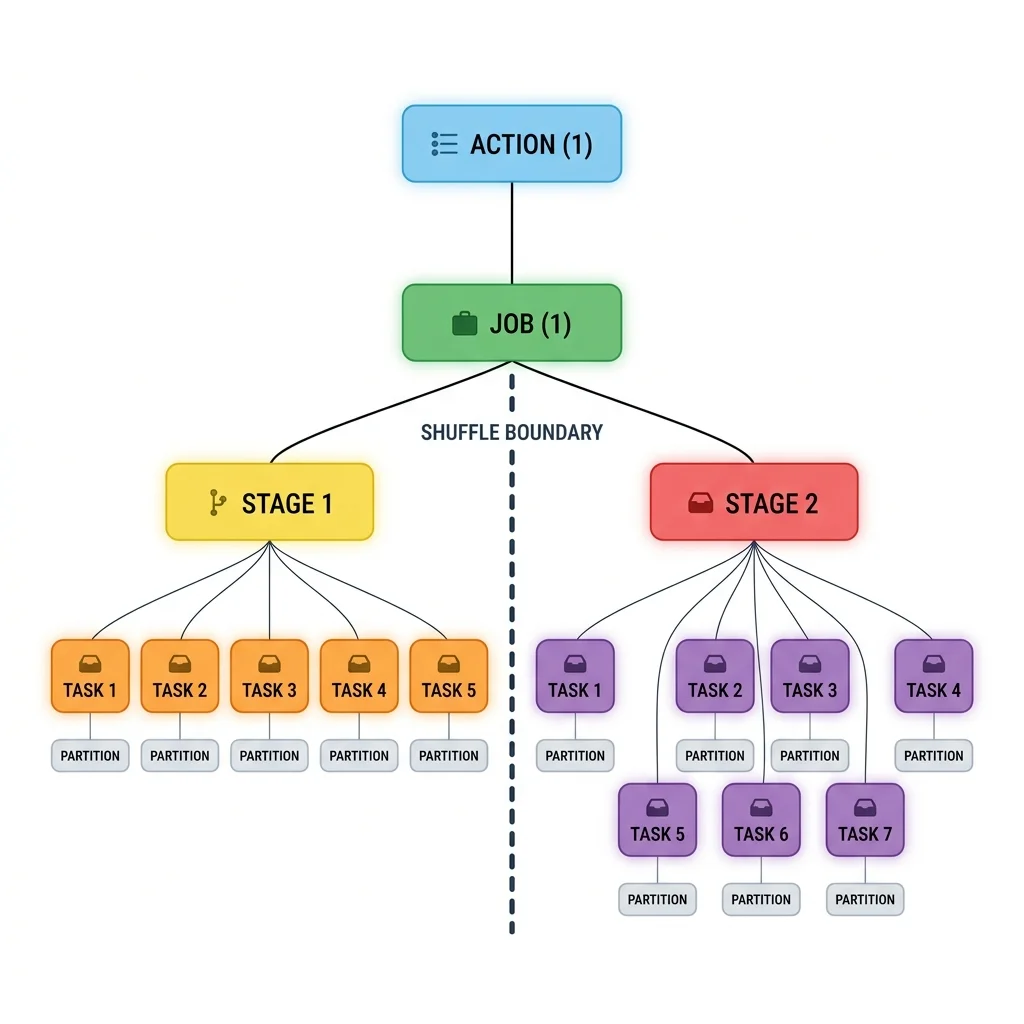
- Job — all the work triggered by a single action (like
count()orsave()). One action → one job. (Actions are covered in Module 05.) - Stage — a group of tasks that can run without needing to move data across the network. A boundary between stages appears wherever a shuffle is required. (Shuffles are Module 07.)
- Task — the smallest unit of execution: one computation applied to one partition on one core. Tasks are what actually get shipped to executors.
So the hierarchy reads top-down: an action launches a job, the job is cut into stages at shuffle boundaries, and each stage is a fan-out of tasks across partitions. Keep this ladder in mind — it's exactly what you'll read off the Spark UI when diagnosing a slow job later.
The three execution modes
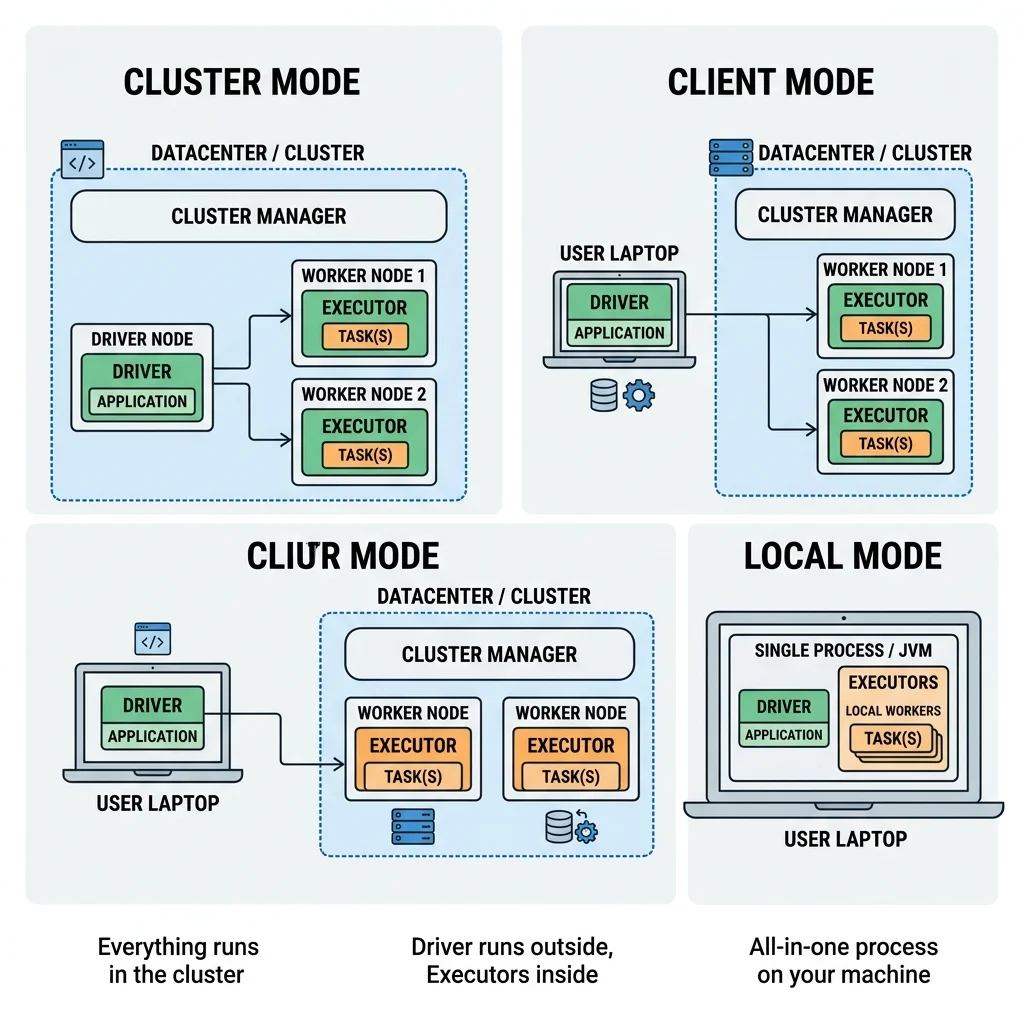
The same architecture can be physically arranged in three ways. The only thing that changes between them is where the driver runs and whether real cluster machines are involved.
Cluster mode
You submit a pre-packaged application (a JAR or Python script) to the cluster manager, and the cluster manager launches both the driver and the executors on worker nodes inside the cluster. Your laptop can disconnect; the whole application lives on the cluster. This is the standard mode for production jobs — robust and self-contained.
Client mode
Almost identical, except the driver stays on the machine that submitted the job (a client/edge/gateway machine outside the cluster), while executors run on the cluster's worker nodes. This is common for interactive work — notebooks and shells — where you want the driver right next to you so you can poke at results live. The catch: if your client machine dies or disconnects, the driver dies with it.
Local mode
The entire application — driver and executors — runs on a single machine, using threads to simulate parallel execution. There is no cluster manager negotiating for real machines. This is perfect for learning, developing, and testing (it's almost certainly how you'll run the examples in this guide), but it is not how you process genuinely large data.
| Mode | Where the driver runs | Executors | Typical use |
|---|---|---|---|
| Cluster | On a worker node in the cluster | On cluster worker nodes | Production jobs |
| Client | On the submitting/client machine | On cluster worker nodes | Interactive notebooks & shells |
| Local | On your one machine (as threads) | Same machine (threads) | Learning, dev, testing |
Key takeaways
- Every Spark application has three roles: one driver (the brain that plans and schedules), a cluster manager (the landlord that allocates machines), and many executors (the hands that compute on data partitions).
- The driver holds your program and its single
SparkSession, builds the execution plan (DAG), and distributes tasks. Pulling too much data back to it (e.g.,collect()) can crash it. - Each executor is a JVM process with cores; one core runs one task on one partition at a time, so your partition count sets your parallelism ceiling.
- The cluster manager (Standalone, YARN, Mesos, or Kubernetes) is cleanly separated from Spark — it manages machines, not computation.
- Execution vocabulary ladders down: an action → a job → stages (split at shuffle boundaries) → tasks (one per partition).
- Three execution modes differ only in where the driver lives: cluster (production), client (interactive), and local (learning/testing).
Check your understanding
- A colleague says "I gave my executor a machine with 32 cores but my job still runs like it's using one core." Given what you now know about cores, tasks, and partitions, what is the most likely cause?
- Explain the difference between the cluster manager and the driver using an analogy of your own.
- You're prototyping in a Jupyter notebook and want the driver right beside you for interactive debugging. Which execution mode are you most likely using, and what's the risk if your laptop disconnects?
Up next
Partitions & Parallelism — Partitions & Parallelism. We kept saying "one task per partition" and "parallelism is capped by partitions." Next we zoom all the way into the partition itself: what it is, how Spark sizes it, data locality, and the notorious "small file problem."