
RDDs, DataFrames, Datasets
Part II — The Data Abstractions · Module 4 of 18 Prerequisites:
What is Spark?,Spark Architecture,Partitions & ParallelismYou will learn: the three ways Spark lets you represent distributed data — RDDs, DataFrames, and Datasets — what each one is good and bad at, why the DataFrame is almost always the right default, and the concept of structure that makes Spark fast.
Three tools, one job
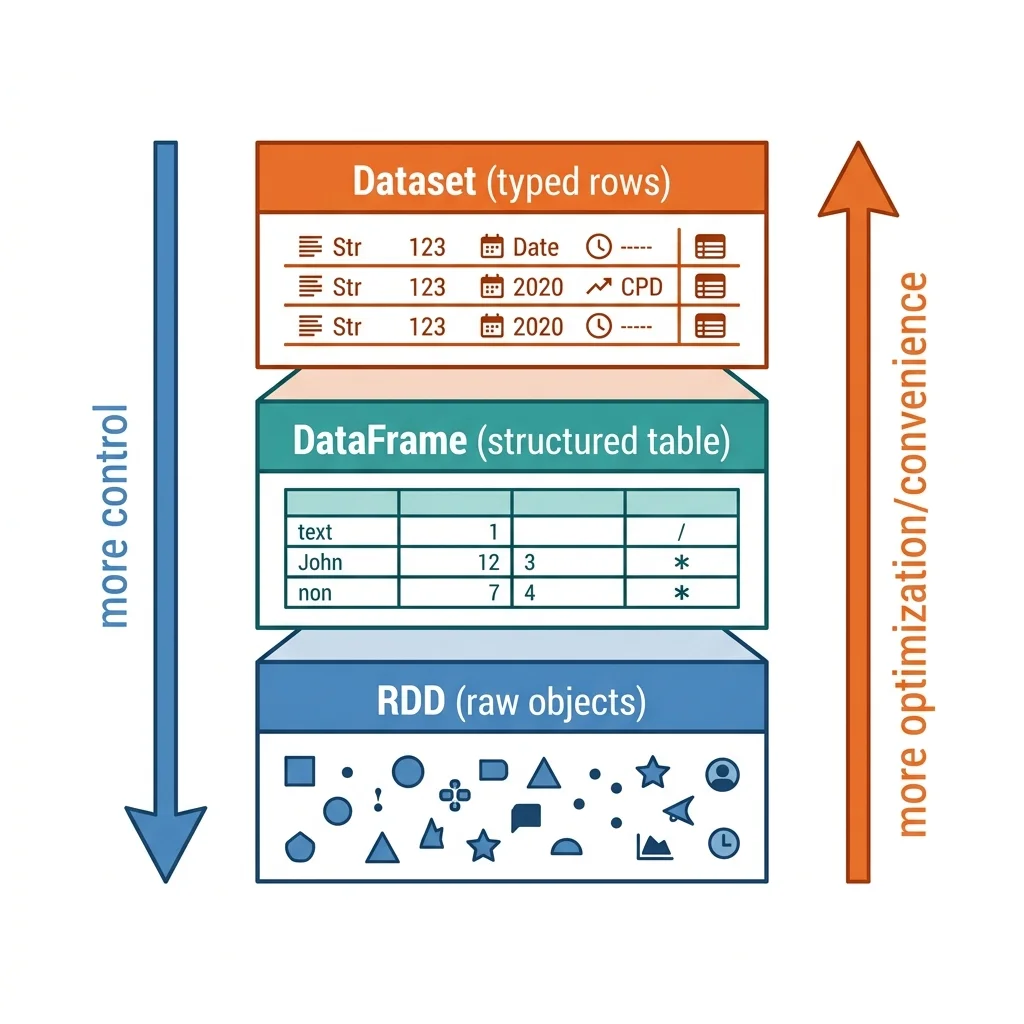
Spark gives you three abstractions for a distributed collection of data. They are not three unrelated things — they're three layers of the same idea, trading control for convenience and speed:
| Abstraction | Think of it as | You get | You give up |
|---|---|---|---|
| RDD | A distributed collection of raw objects | Total low-level control | Automatic optimization |
| DataFrame | A distributed table with named columns | Speed + a simple API | Compile-time type safety |
| Dataset | A typed DataFrame (JVM only) | Speed + type safety | Availability in Python |
The rest of this module explains why those trade-offs exist. The short version — and the single most important sentence in this file — is: for PySpark, use DataFrames by default. But you'll write better code if you understand what's underneath and why.
RDDs — the foundation (and why you rarely touch it)
The Resilient Distributed Dataset (RDD) is Spark's original, lowest-level abstraction: an immutable, partitioned collection of records that can be operated on in parallel. Every higher-level structure in Spark is ultimately built on RDDs. When you run a DataFrame query, Spark compiles it down to RDD operations under the hood — you just don't see it.
Let's unpack the name, because it's a surprisingly complete description:
- Resilient — it can rebuild lost data. If a machine holding a partition dies, Spark reconstructs that partition from its lineage (the recorded recipe of how it was built). Fault tolerance is baked in.
- Distributed — its records are spread across the cluster as partitions (Module 03).
- Dataset — it's a collection of records — raw Java, Scala, or Python objects of your choosing.
The three vital characteristics of an RDD
Every RDD is defined internally by three things, and knowing them demystifies the whole abstraction:
- Dependencies — a list of the parent RDDs it was derived from. This is the lineage that makes it resilient: given the dependencies, Spark can recompute any lost partition from scratch.
- Partitions — the splits of the data that let work happen in parallel.
- A compute function — a function that, given a partition, produces the records in it (an
Iterator[T]).
The opacity problem: why RDDs can't be optimized
Here's the crux. That "compute function" is, from Spark's point of view, a black box. When you write an RDD transformation in Python, you hand Spark an opaque lambda or a generic object. Spark cannot see inside it. It doesn't know whether you're summing a column, filtering on a field, or computing something exotic — it just sees "apply this opaque function to these bytes."
Because Spark can't understand your intent, it cannot optimize an RDD computation. It can't reorder your filters to run earlier, it can't prune columns you don't use, and it can't compress the data intelligently, because it only sees an opaque sequence of bytes. You are responsible for every optimization by hand.
Analogy — a sealed envelope vs. an itemized form. An RDD operation is like handing a courier a sealed envelope marked "process this." The courier can carry it and hand it off, but can't help you optimize what's inside — they can't see it. A DataFrame operation (next section) is like handing over an itemized form with labeled fields. Now anyone in the pipeline can reason about it: "you only need fields 2 and 5, so let's not carry the rest," "this filter can happen at the source." Structure is what lets the system help you.
There's an extra tax specific to Python RDDs: because your Python logic runs in a separate Python process outside the JVM, data must be serialized out of the JVM into Python and back again for every operation — a heavy, repeated cost we'll see again with UDFs in Module 12.
When would you ever use an RDD?
Rarely, but honestly. Reach for RDDs only when you need fine-grained, low-level control over physical data placement or you're manipulating unstructured data that doesn't fit a tabular model, and you're willing to hand-optimize. For the vast majority of PySpark work, higher-level APIs are faster and simpler — a rare case where the easier tool is also the better-performing one.
# You *can* drop to the RDD API, but notice Spark can't optimize this lambda.
rdd = spark.sparkContext.parallelize([1, 2, 3, 4, 5])
evens = rdd.filter(lambda x: x % 2 == 0)   # opaque black box to Spark
print(evens.collect())                      # [2, 4]
DataFrames — the structured default
A DataFrame is a distributed, in-memory table with named columns and a schema — conceptually just like a table in a relational database or a spreadsheet, except its rows are partitioned across potentially thousands of machines (recall the spreadsheet-vs-distributed-table contrast from Module 01).
That word schema — knowing the column names and types — is the whole game. Because the DataFrame API is structured, Spark understands your data and your intent. When you write df.select("name").filter(col("age") > 21), Spark knows you want two specific columns and a comparison on an integer. And when it knows that, its query planner — the Catalyst optimizer (Module 08) — can rewrite your query for you: reorder operations, push filters down to the data source so less data is read, drop columns you never use, and more.
The killer benefit: same speed in every language
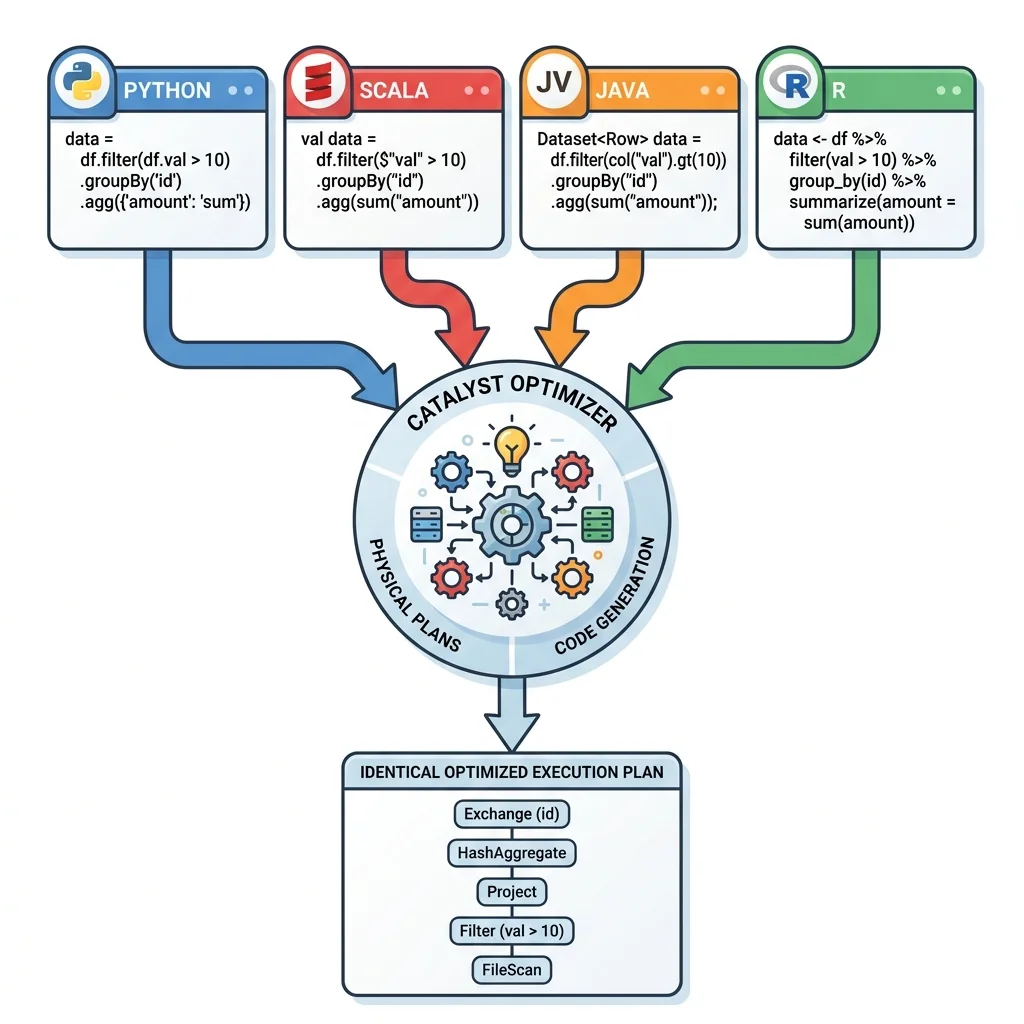
Structure delivers a second, almost magical benefit. Because you express what you want (relationally) rather than how to compute it (with opaque code), Spark compiles your DataFrame query into the same optimized JVM bytecode regardless of the language you wrote it in. A DataFrame query written in Python, Scala, Java, or R all get compiled to the identical, highly optimized execution plan.
This is a genuinely important point for a PySpark user: you are not paying a "Python penalty" when you use the DataFrame API. Your Python DataFrame code runs just as fast as Scala DataFrame code, because neither one actually executes your language's logic row-by-row — both describe a plan that Spark optimizes and runs in the JVM. (Contrast this with RDDs and Python UDFs, where your Python does run per-row and the penalty is real.)
from pyspark.sql.functions import col, count

# Structured, expressive, and fully optimizable by Catalyst.
result = (df
          .select("State", "Color", "Count")
          .groupBy("State", "Color")
          .agg(count("Count").alias("Total"))
          .orderBy(col("Total").desc()))

result.show(10, truncate=False)
Under the hood, a DataFrame is stored in Spark's own efficient binary format (Project Tungsten, Module 08), which sidesteps JVM object overhead and garbage-collection pressure. You get database-like performance with a friendly, pandas-like API. This is why DataFrames are the default.
Datasets — type safety for the JVM
The third abstraction, the Dataset, is a strongly-typed, type-safe structured API — essentially a DataFrame where each row is a known, compile-time type rather than a generic row.
There's one catch that matters enormously for a PySpark reader: Datasets are only available in JVM languages — Scala and Java. They don't exist in Python. (In fact, in Scala a DataFrame is literally just an alias for Dataset[Row] — a Dataset whose row type is the generic Row.) So why cover them at all? Because you'll see them mentioned constantly, and understanding the trade-off sharpens your understanding of DataFrames.
The benefit: catch errors at compile time
With a Dataset, the compiler knows the type of every row, so it catches mistakes — a misspelled field, a type mismatch — at compile time, before the job ever runs. With a DataFrame, that same mistake (e.g., referencing a column that doesn't exist) is only caught at runtime, when Spark analyzes the query. For large, long-running production jobs in Scala, catching errors before launch is valuable.
The cost: serialization overhead
Type safety isn't free. To hand you a strongly-typed JVM object for each row, Spark must deserialize its compact internal binary format (Tungsten) into an actual JVM object — and serialize back afterward. Datasets use "Encoders" to do this mapping. When you operate on a Dataset with native-language lambdas (e.g., Scala's .filter(d => d.usage > 900)), every row pays this serialization/deserialization (SerDe) toll, and it accumulates.
Interestingly, you can often avoid the toll by using relational expressions instead of lambdas even in Scala — .filter(col("usage") > 900) keeps the data in Spark's optimized binary form and skips the object conversion entirely. That's the same structured style DataFrames use, which is another quiet argument for the DataFrame approach.
So which should you use?
Here's the decision distilled:
- PySpark (Python)? Use DataFrames. Datasets aren't available to you, and DataFrames give you full Catalyst optimization with a clean API. Only drop to RDDs for rare low-level needs, accepting that you lose optimization.
- Scala/Java, and you want compile-time type safety on domain objects? Datasets are available — but weigh the SerDe overhead, and prefer relational expressions over lambdas where you can.
- Any language, need raw control over physical layout / unstructured data? RDDs — but treat this as the exception, not the rule.
The golden rule (restated): prefer the highest-level API that does the job. Structure is what lets Spark optimize for you, so DataFrames and Spark SQL should be your default, and RDDs your last resort. Almost every performance best practice in this guide (Modules 15–17) is, at bottom, a variation on "let the structured APIs and Catalyst do the work."
Key takeaways
- Spark offers three data abstractions trading control for optimization/convenience: RDD (low-level raw objects) → DataFrame (structured table) → Dataset (typed rows, JVM only).
- An RDD is a resilient, distributed, partitioned collection defined by dependencies (lineage), partitions, and a compute function. Its compute function is an opaque black box, so Spark cannot optimize it — you hand-tune everything. Python RDDs also pay a JVM↔Python serialization cost.
- A DataFrame is a distributed table with a schema. Because Spark understands its structure, Catalyst optimizes it automatically, and it compiles to the same fast bytecode in Python, Scala, Java, or R — so there's no "Python penalty" with the DataFrame API.
- A Dataset adds compile-time type safety but exists only in Scala/Java and incurs SerDe overhead when using native lambdas (avoidable via relational expressions).
- In PySpark, default to DataFrames (and Spark SQL); use RDDs only for rare low-level control.
Check your understanding
- Why can't Spark automatically optimize an RDD transformation the way it optimizes a DataFrame query? Use the "sealed envelope vs. itemized form" idea in your answer.
- A teammate worries that writing pipelines in PySpark will be slower than writing them in Scala. Under what conditions is that worry justified, and under what conditions is it not?
- You're working entirely in Python and someone suggests using Datasets for type safety. What's the problem with that suggestion, and what would you recommend instead?
Up next
Transformations & Actions — Transformations & Actions. We've now met the data structures. Next we learn how you actually operate on them: the fundamental split between transformations (which describe work) and actions (which trigger it), plus the critical distinction between narrow and wide operations that decides whether Spark has to shuffle.