
High Level Design (HLD)
In a Nutshell
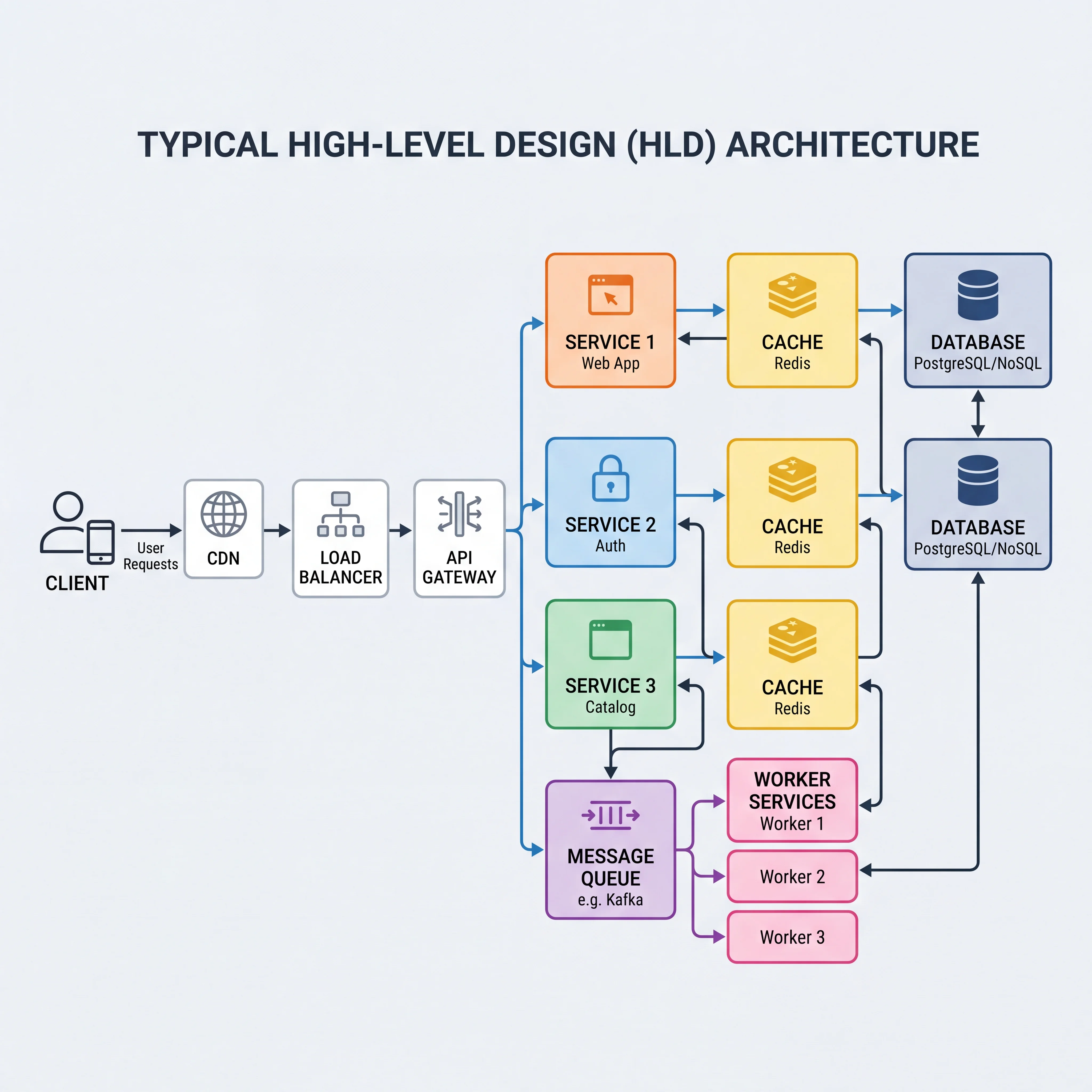
High Level Design is the bird's-eye view of your system. It's the diagram that shows every major component — clients, load balancers, services, caches, databases, queues — and the arrows that connect them. HLD answers the question: "What are the moving parts and how does data flow between them?" It's the first thing you draw after gathering requirements, and it's where you make the big, hard-to-reverse decisions: which components exist, how they communicate, and where state lives.
How It Actually Works
What HLD Includes
A high level design typically contains these components, connected by request paths:
| Component | Role | Example |
|---|---|---|
| Client | Where requests originate | Web browser, mobile app, third-party API consumer |
| CDN | Caches static assets at the edge | CloudFront, Akamai |
| Load Balancer | Distributes traffic across service instances | ALB, Nginx, HAProxy |
| API Gateway | Single entry point — auth, rate limiting, routing | Kong, AWS API Gateway |
| Application Services | Business logic — the "brain" of the system | User Service, Order Service, Feed Service |
| Cache | Fast-access layer for frequently read data | Redis, Memcached |
| Database | Persistent storage — the source of truth | PostgreSQL, DynamoDB, Cassandra |
| Message Queue | Async buffer between producers and consumers | Kafka, SQS, RabbitMQ |
| Workers | Background processors consuming from queues | Thumbnail generator, notification sender |
| Object Storage | Large immutable files — images, videos, backups | S3, GCS |
How to Build an HLD Step by Step
- Start with the user — Draw the client on the left. What does the user do? (read a feed, submit an order, upload a photo)
- Trace the write path — Follow a write request from client to database: client → LB → gateway → service → DB. Add a queue if any work can be deferred.
- Trace the read path — Follow a read request: client → CDN (cache hit?) → LB → gateway → service → cache (hit?) → DB (on miss). Every cache layer you add shortens this path.
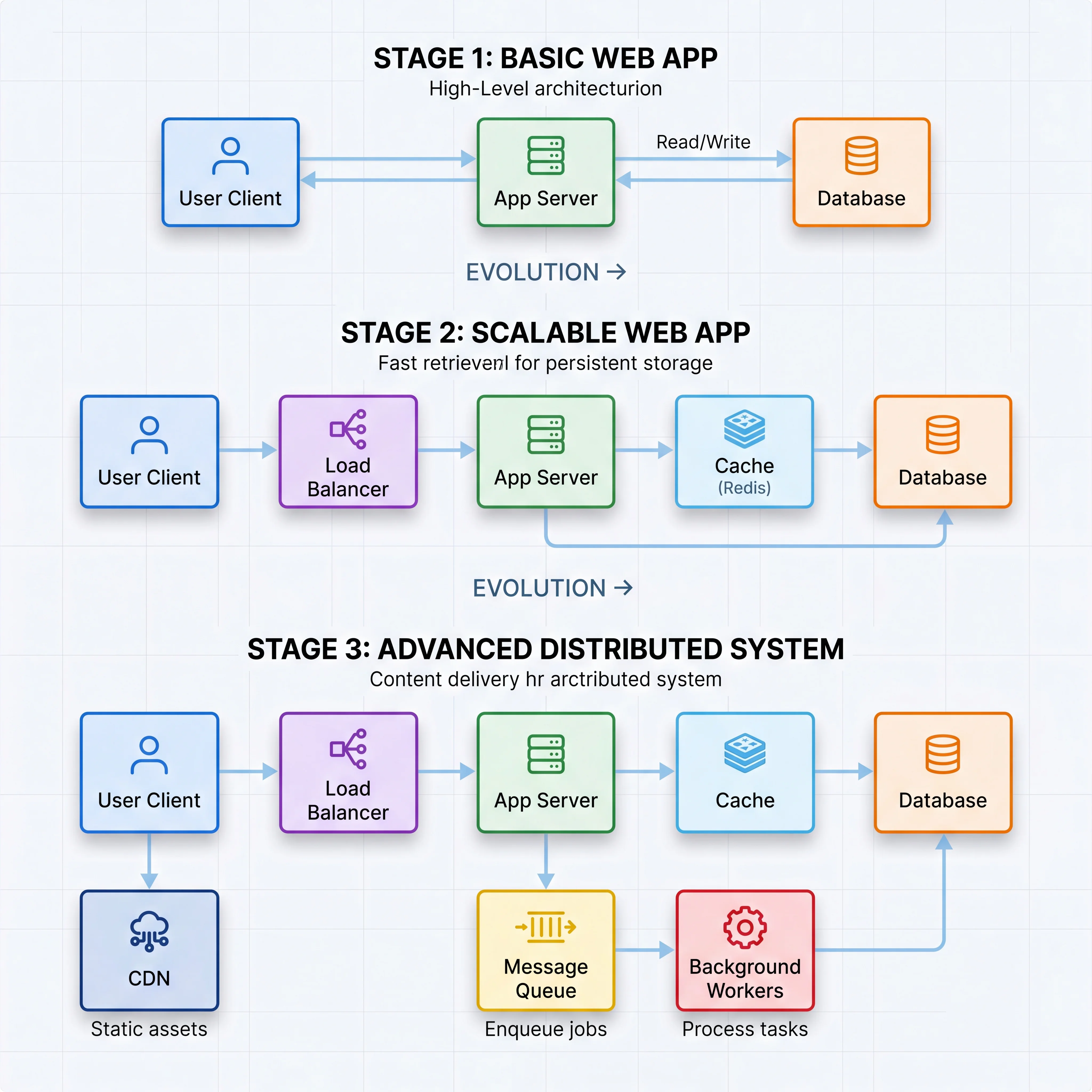
- Add non-functional components — Your requirements drive these: need high availability? Add replicas. Need low latency? Add a cache. Need to handle spikes? Add a queue and workers. Need global reach? Add a CDN.
- Label the arrows — Show protocol (HTTP, gRPC, WebSocket), direction, and what data flows. An arrow without a label is an assumption nobody examined.
What Makes a Good HLD
- Every requirement has a home. If the requirements say "users can upload images," there must be an object storage box and an upload path visible in the diagram.
- Non-functional requirements are visible. If the requirement is 99.99% availability, the diagram should show redundancy (multiple instances, multi-AZ). If latency is critical, a cache should be present.
- It starts simple. A design that starts with 4 boxes and grows to 10 under questioning is far more convincing than one that arrives pre-loaded with 20 boxes and every buzzword.
Common HLD Mistakes
- Drawing boxes without tracing a request — If you can't walk through "user posts a tweet" end-to-end on your diagram, it's decoration, not design.
- Adding components you can't justify — Every box has an operational cost. If you add Kafka but can't explain why synchronous processing isn't sufficient, remove it.
- Ignoring the data model — HLD without a data model is incomplete. At minimum, name the key entities and their relationships.
- Single points of failure — If any single box going down takes the entire system offline, the design doesn't meet any reasonable availability target.
Seeing It in Action
Scenario: HLD for a URL shortener
Requirements: Create short URLs, redirect short→long, track click analytics. 100M new URLs/month, 10B redirects/month. 99.99% availability. Redirects under 50ms.
HLD:
                                    ┌──────────┐
                                    │  Object   │
                                    │ Storage   │  (analytics exports)
                                    └────▲──────┘
                                         │
┌────────┐   ┌─────┐   ┌─────────┐   ┌──┴───────┐   ┌───────────┐
│ Client  │──▶│ CDN │──▶│  Load   │──▶│   URL    │──▶│  Redis    │
│(browser)│   │     │   │Balancer │   │ Service  │   │  Cache    │
└────────┘   └─────┘   └─────────┘   └──┬───────┘   └─────┬─────┘
                                         │                  │ miss
                                         │           ┌──────▼─────┐
                                    ┌────▼──────┐    │ PostgreSQL │
                                    │   Kafka   │    │  (URLs)    │
                                    │  (clicks) │    └────────────┘
                                    └────┬──────┘
                                    ┌────▼──────┐
                                    │ Analytics │
                                    │  Worker   │
                                    └───────────┘
Walk-through:
- Write (create short URL): Client → LB → URL Service generates a short code → writes to PostgreSQL → populates Redis cache → returns short URL
- Read (redirect): Client → CDN (cached redirect?) → LB → URL Service → Redis (cache hit → 302 redirect) → PostgreSQL on miss
- Analytics: Click event published to Kafka → Analytics Worker aggregates → stores in Object Storage for dashboards
Interview Questions
Q: What's the difference between HLD and LLD? When do you transition from one to the other in an interview? Hint: HLD = boxes and arrows showing components, data flow, and infrastructure. LLD = zooming into one box to show classes, schemas, algorithms. Transition when the interviewer says "let's go deeper on X" or when you've covered the end-to-end flow and want to show depth on the hardest component.
Q: How do you decide which components to include in your HLD? Hint: Start from requirements. Each functional requirement needs a service or endpoint. Each non-functional requirement adds infrastructure (cache for latency, queue for async, replicas for availability). If you can't tie a component to a requirement, question whether it belongs.
Q: Your HLD has a single database. The interviewer asks how it handles 100K QPS. What do you do? Hint: First, separate reads and writes. Add read replicas for read-heavy load. Add a caching layer (Redis) to absorb repeated reads. If writes are the bottleneck, discuss sharding strategies. Show that you scale incrementally rather than pre-building for maximum scale.
Q: Why is it important to trace a full request path through your HLD? Hint: It catches gaps — components that exist but aren't connected, data that needs to get somewhere but has no path, and latency that accumulates across too many hops. It also makes the design concrete: "the user clicks Submit, and here's what happens at each hop."
Q: What's the risk of a design that starts too complex (too many boxes) vs too simple (too few)? Hint: Too complex: you can't justify every component, the interviewer drills into something you added but don't understand, and operational cost is ignored. Too simple: you haven't addressed the non-functional requirements. The sweet spot is starting simple and adding complexity in response to specific requirements or bottlenecks.
References
- System Design Interview – An Insider's Guide by Alex Xu — every chapter follows the HLD-first approach
- Designing Data-Intensive Applications by Martin Kleppmann — Chapter 1 on thinking about data systems holistically
- The System Design Primer by Donne Martin — visual HLD examples for common systems
Dive Deeper
- ByteByteGo — System Design Blueprint — visual HLD patterns for 20+ systems
- Software Architecture: The Hard Parts by Ford, Richards, Sadalage & Dehghani — when and how to decompose a monolith into services
- AWS Architecture Center — production-grade reference architectures with HLD diagrams