
File Storage
In a Nutshell
File storage provides a traditional POSIX filesystem interface — directories, files, paths, permissions — accessible over a network. You mount it like a local drive and interact with standard file operations (open, read, write, seek). Network file systems like NFS (Linux) and managed services like AWS EFS and Azure Files provide shared access to the same filesystem from multiple servers. File storage exists because some applications — legacy systems, media processing, shared configuration, ML training pipelines — expect a mounted filesystem path. For new applications, object storage (S3) is almost always the better choice.
How It Actually Works
File Storage vs Object Storage vs Block Storage
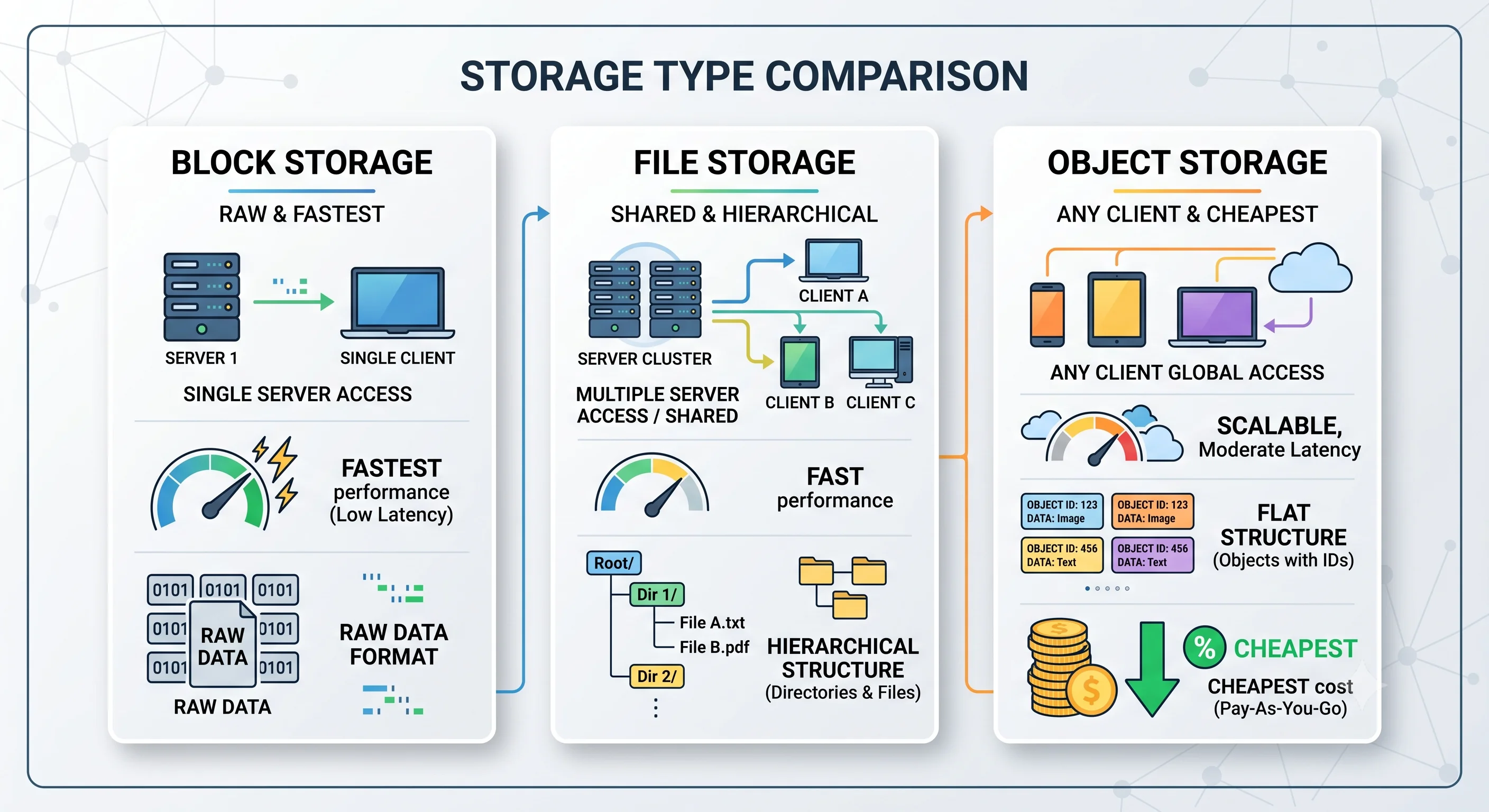
| Feature | File Storage (NFS/EFS) | Object Storage (S3) | Block Storage (EBS) |
|---|---|---|---|
| Interface | POSIX filesystem (mount, read, write, seek) | HTTP REST API (PUT, GET, DELETE) | Raw block device (format with ext4, mount) |
| Structure | Hierarchical (directories + files) | Flat namespace (key → blob) | No structure (raw blocks) |
| Access | Shared (many servers mount the same FS) | Shared (any client with credentials) | Single server (attached to one EC2) |
| Latency | 1–10 ms (network) | 10–100 ms (HTTP) | 0.1–1 ms (local SSD) |
| Max size | Petabytes (EFS) | Unlimited (S3) | 64 TB (EBS) |
| Updates | In-place (modify bytes within a file) | Replace entire object (immutable) | In-place (block-level) |
| Cost | ~$0.30/GB/month (EFS) | ~$0.023/GB/month (S3) | ~$0.10/GB/month (EBS gp3) |
| Best for | Shared config, legacy apps, media processing | Media, backups, data lakes | Databases, OS volumes |
When to Choose File Storage
✅ Use file storage when:
- Multiple servers need to read/write the same files simultaneously
- Application expects a POSIX filesystem (can't be modified to use S3 SDK)
- Workload involves random access within files (
seekto byte offset) - Media processing pipelines that read/write intermediate files
- Shared configuration or code deployment across instances
❌ Don't use file storage when:
- You're storing user-uploaded media (use S3 — cheaper, more scalable)
- Files are write-once, read-many (use S3)
- You need unlimited capacity (EFS scales but costs 10× more than S3)
- Only one server needs the data (use block storage / local disk)
AWS EFS — Managed NFS
| Feature | Description |
|---|---|
| Protocol | NFSv4.1 |
| Scaling | Elastic — grows and shrinks automatically, no pre-provisioning |
| Availability | Multi-AZ by default |
| Performance modes | General Purpose (latency-sensitive), Max I/O (throughput-heavy) |
| Storage classes | Standard, Infrequent Access (IA) — lifecycle policies available |
| Throughput | Bursting (scales with size) or Provisioned (fixed) |
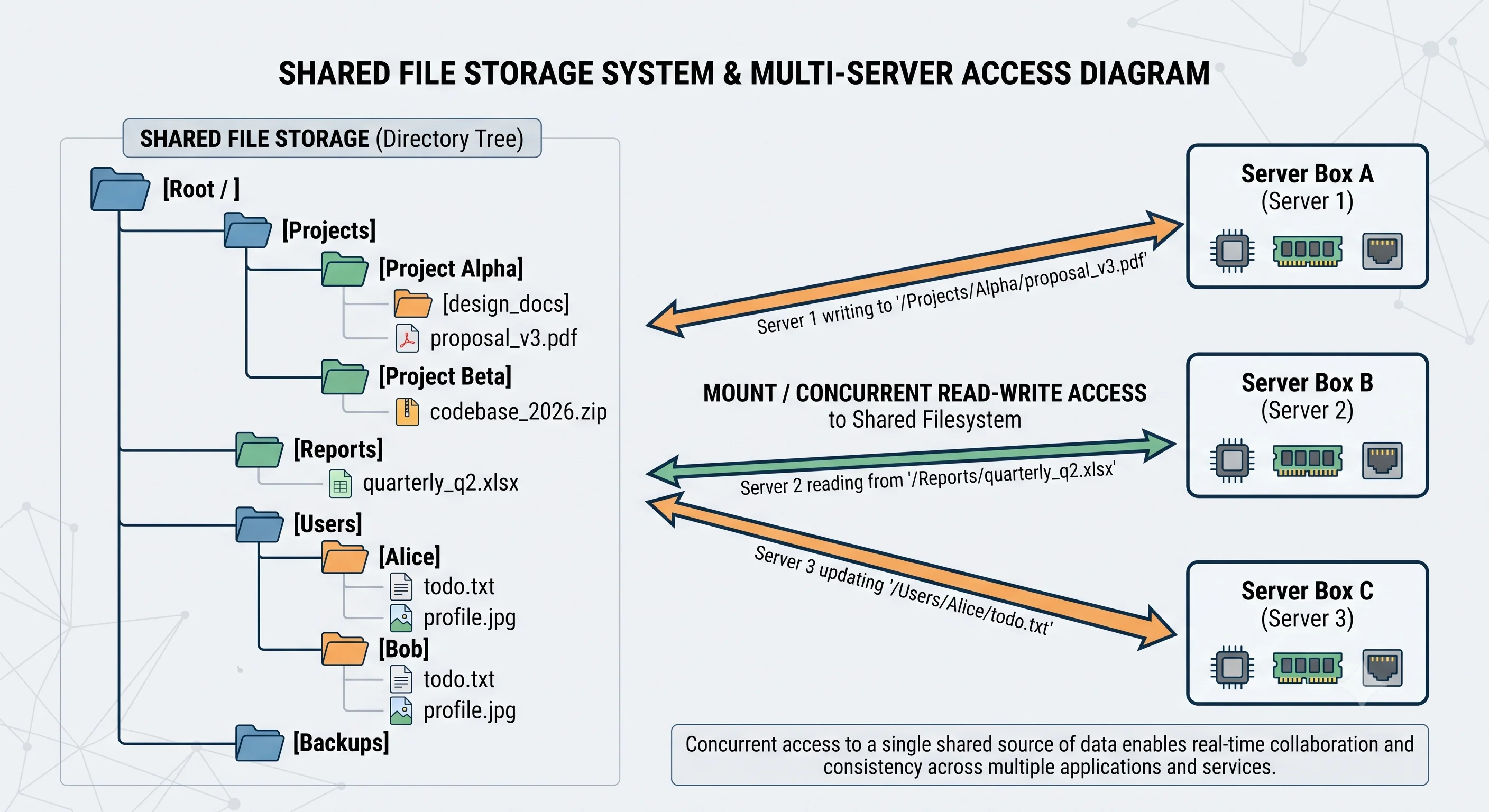
NFS Architecture
┌──────────┐    ┌──────────┐    ┌──────────┐
│ Server A  │    │ Server B  │    │ Server C  │
│           │    │           │    │           │
│ mount     │    │ mount     │    │ mount     │
│ /shared   │    │ /shared   │    │ /shared   │
└─────┬─────┘    └─────┬─────┘    └─────┬─────┘
      │                │                │
      └────────────────┼────────────────┘
                       │ NFS protocol
                  ┌────▼─────┐
                  │   NFS    │
                  │  Server  │
                  │  / EFS   │
                  └──────────┘
All three servers see the same files at /shared. A write from Server A is immediately visible to Server B and C (strong consistency for NFS, close-to-open for some configurations).
Seeing It in Action
Scenario: ML training pipeline with shared dataset
Problem: 50 GPU training nodes need read access to 10TB dataset.
         During training, nodes write checkpoints to shared storage.

Architecture:
┌──────────────────────────────────────────────┐
│            ML Training Cluster               │
│                                              │
│  ┌─────────┐ ┌─────────┐     ┌─────────┐   │
│  │ GPU     │ │ GPU     │ ... │ GPU     │   │
│  │ Node 1  │ │ Node 2  │     │ Node 50 │   │
│  └────┬────┘ └────┬────┘     └────┬────┘   │
│       │           │               │         │
│       └───────────┼───────────────┘         │
│                   │ NFS mount               │
│             ┌─────▼──────┐                  │
│             │    EFS     │                  │
│             │  /dataset  │ (read-only)      │
│             │  /ckpt     │ (read-write)     │
│             └────────────┘                  │
└──────────────────────────────────────────────┘

After training:
  /ckpt/model_v3_epoch_100.bin → copied to S3 for archival
Why file storage is right here:
- POSIX compatibility — Training frameworks (PyTorch, TensorFlow) read data via
open()/read()— they expect a filesystem path - Shared access — All 50 nodes read the same dataset simultaneously
- Checkpoint writes — Nodes write intermediate model checkpoints that other nodes may need to read
- Not S3 because — S3 doesn't support
seek()for random access, and training frameworks don't natively use the S3 SDK for data loading
But consider: For the dataset itself, tools like s3fs-fuse or FSx for Lustre can mount S3 as a filesystem — getting S3 pricing with POSIX compatibility.
Interview Questions
Q: When would you use file storage (EFS/NFS) instead of object storage (S3)? Hint: When the application expects a POSIX filesystem interface, multiple servers need shared read/write access to the same files, or the workload involves random access within files. For most new applications, S3 is better — cheaper, more scalable, and with better tooling.
Q: What are the cost and performance trade-offs between EFS and S3? Hint: EFS: ~$0.30/GB/month, lower latency (1–10ms), POSIX access, shared mount. S3: ~$0.023/GB/month (13× cheaper), higher latency (10–100ms), HTTP API, unlimited capacity. Use EFS for active shared workloads; use S3 for storage, backups, and media serving.
Q: How does NFS handle consistency when multiple servers write to the same file? Hint: NFS typically uses "close-to-open" consistency — changes are visible to other clients when the writing client closes the file. For stricter consistency, NFSv4 supports file locking and delegations. EFS provides read-after-write consistency for new files and close-to-open for updates.
Q: You need to share a 10TB dataset across 100 compute nodes. What are your options? Hint: EFS/NFS (POSIX, easy but expensive at scale). FSx for Lustre (high-performance parallel filesystem, integrates with S3). S3 with s3fs-fuse (cheapest but highest latency). HDFS (if you're in the Hadoop ecosystem). For ML training, FSx for Lustre is often the best balance of cost and performance.
Q: Why is file storage declining in favor of object storage for most use cases? Hint: Object storage is cheaper (10×+), scales infinitely, has built-in durability (99.999999999%), integrates with CDNs, and supports lifecycle policies. File storage's advantage (POSIX, shared mount) matters less as applications adopt cloud-native patterns (S3 SDK, serverless). File storage remains relevant for legacy apps and workloads that genuinely need
seek().
References
- AWS EFS Documentation — managed NFS service docs
- NFS Protocol — RFC 7530 — NFSv4 specification
- AWS FSx for Lustre — high-performance filesystem for compute workloads
Dive Deeper
- AWS Storage Options Comparison — S3 vs EFS vs EBS decision guide
- HDFS Architecture Guide — Hadoop's distributed filesystem design
- CephFS — open-source distributed filesystem alternative to NFS