
Object Storage
In a Nutshell
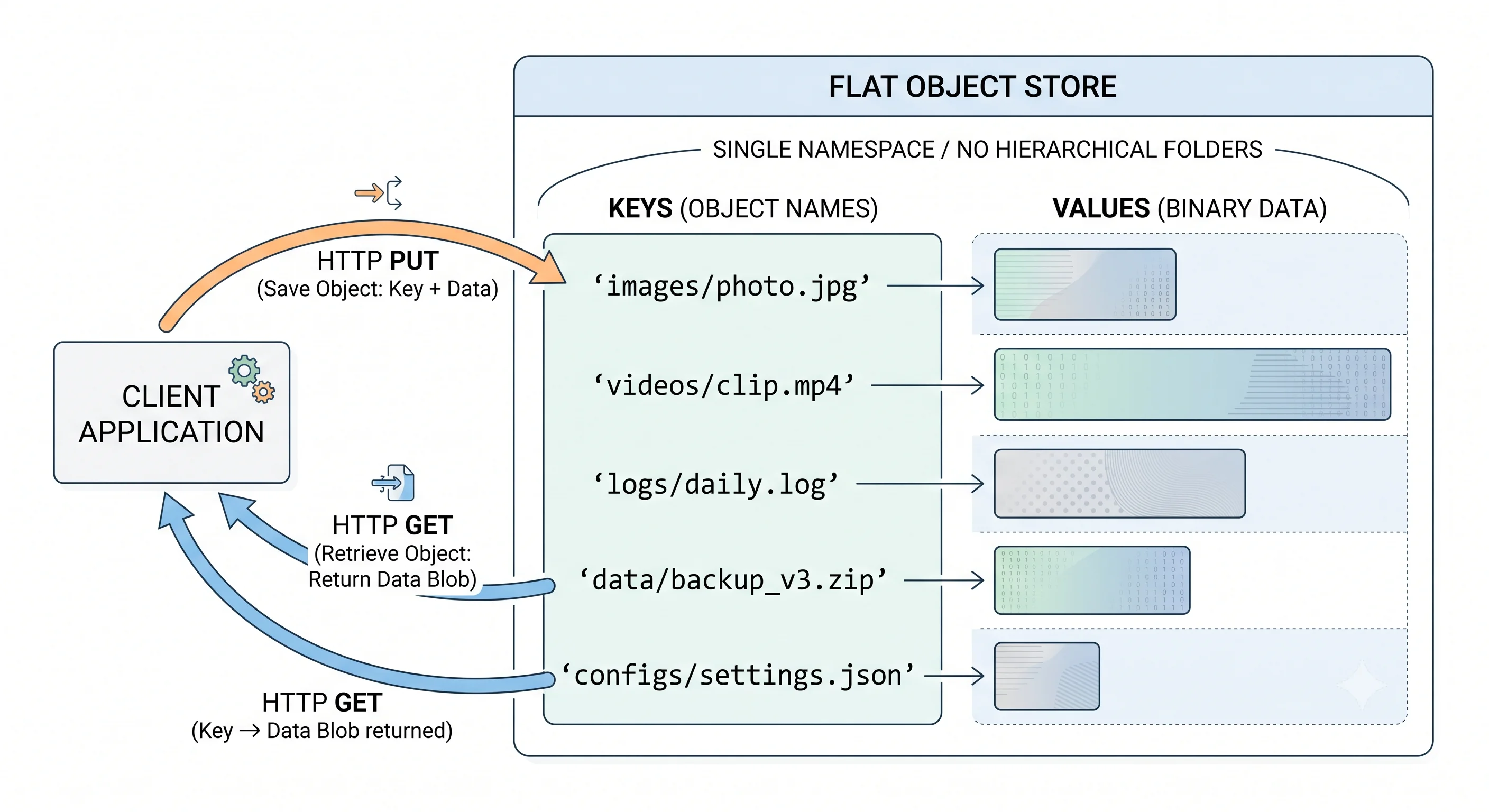
Object storage is designed for large, immutable blobs — images, videos, backups, log archives, ML training data, and any file that's written once and read many times. Unlike a filesystem with directories and paths, object storage uses a flat namespace: each object has a key (a string like media/user123/photo.jpg) and a value (the binary blob). You interact with it over HTTP — PUT to upload, GET to download, DELETE to remove. Amazon S3 is the standard; Google Cloud Storage (GCS) and Azure Blob Storage are the alternatives. At scale, object storage is effectively unlimited capacity at pennies per GB.
How It Actually Works
How S3 / Object Storage Differs from a Database
| Feature | Object Storage (S3) | Database (PostgreSQL) |
|---|---|---|
| Data model | Key → binary blob | Rows and columns |
| Max object size | 5 TB (S3) | ~1 GB per field (practical) |
| Query | By key only (no SQL, no filtering) | Rich SQL queries |
| Consistency | Strong (S3 since 2020) | ACID |
| Cost | ~$0.023/GB/month (S3 Standard) | ~$0.10+/GB/month (RDS) |
| Throughput | Virtually unlimited (no throttle per bucket by default) | Limited by instance |
| Updates | Replace entire object (immutable) | Update individual fields |
| Access | HTTP (REST API, SDKs) | SQL over TCP |
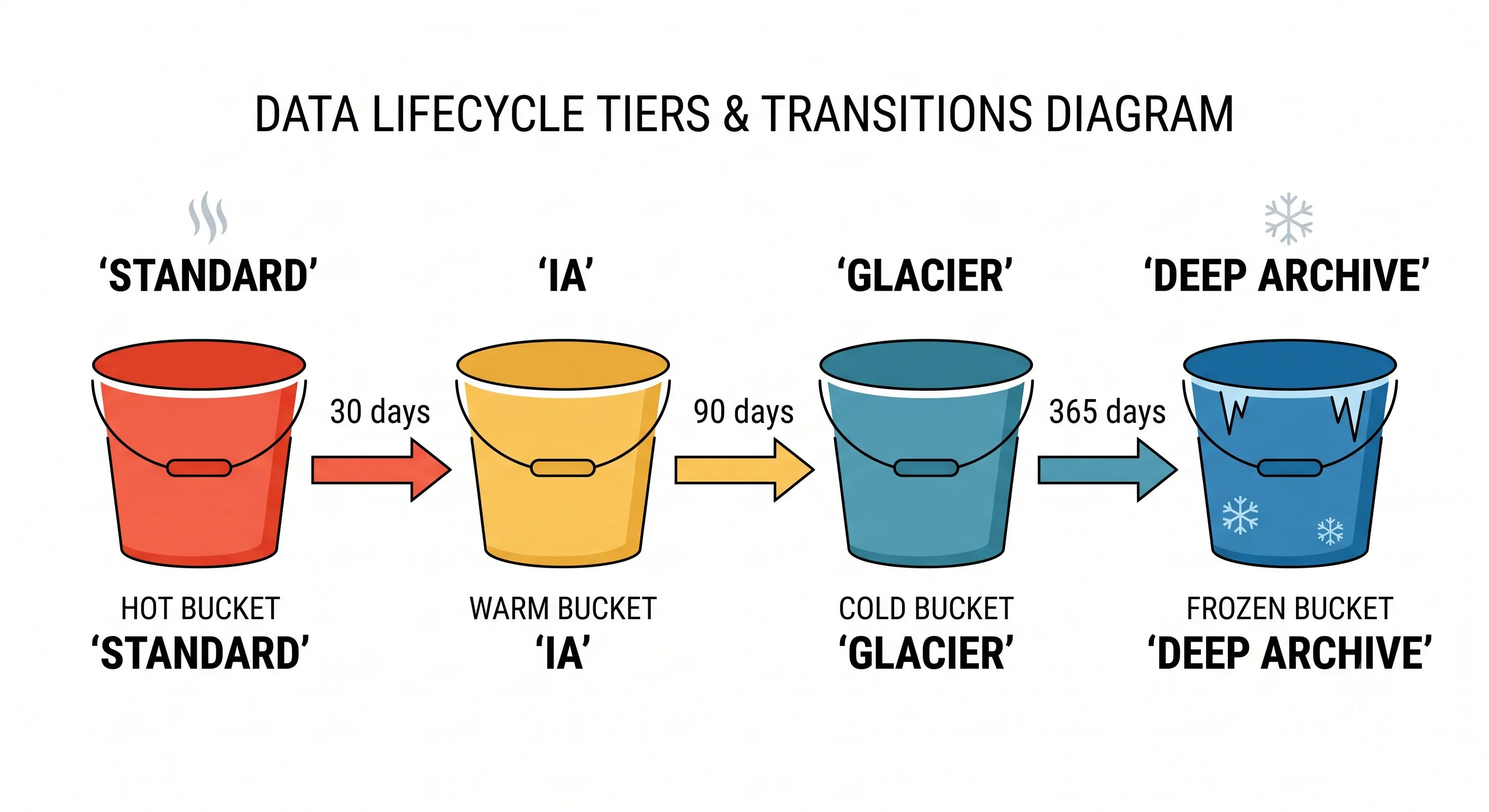
Storage Classes (Cost vs Access Speed)
| Class | Access Time | Cost/GB/Month | Use Case |
|---|---|---|---|
| Standard | Milliseconds | ~$0.023 | Active data, serving to users |
| Infrequent Access (IA) | Milliseconds | ~$0.0125 | Backups accessed monthly |
| Glacier Instant | Milliseconds | ~$0.004 | Archive accessed quarterly |
| Glacier Flexible | Minutes to hours | ~$0.0036 | Compliance archives |
| Glacier Deep Archive | 12–48 hours | ~$0.00099 | Regulatory archives (7-year retention) |
Key Features
- Lifecycle policies — Automatically move objects to cheaper tiers: Standard → IA after 30 days → Glacier after 90 days
- Versioning — Keep all versions of an object; recover from accidental deletes
- Pre-signed URLs — Generate a temporary URL that grants time-limited access without sharing credentials
- Multipart upload — Upload large files in parallel chunks (mandatory for >5 GB)
- Cross-region replication — Automatically copy objects to another region for disaster recovery
- Event notifications — Trigger Lambda/SQS/SNS when objects are created or deleted
Common Architecture Pattern
User uploads image:

┌──────────┐   POST /upload   ┌───────────┐   pre-signed PUT   ┌──────────┐
│  Client   │────────────────▶│ App Server │──────────────────▶│   S3     │
│           │                 │           │                     │          │
│           │ ◀─ signed URL ──│           │                     │          │
│           │                 └───────────┘                     │          │
│           │                                                   │          │
│           │────── PUT (direct to S3) ────────────────────────▶│          │
└──────────┘                                                   └────┬─────┘
                                                                    │
                                                               S3 Event
                                                                    │
                                                               ┌────▼─────┐
                                                               │  Lambda  │
                                                               │(thumbnail│
                                                               │generator)│
                                                               └──────────┘
Why this pattern: The app server never handles the file bytes — it just generates a pre-signed URL. The client uploads directly to S3. This keeps the app server stateless and avoids it becoming a bandwidth bottleneck.
Seeing It in Action
Scenario: Media storage for a social media platform
import boto3
from datetime import datetime

s3 = boto3.client('s3')

# Generate pre-signed URL for client to upload directly
def get_upload_url(user_id, filename, content_type):
    key = f"uploads/{user_id}/{datetime.now().strftime('%Y/%m/%d')}/{filename}"
    url = s3.generate_presigned_url(
        'put_object',
        Params={
            'Bucket': 'my-media-bucket',
            'Key': key,
            'ContentType': content_type,
        },
        ExpiresIn=300  # 5 minutes to upload
    )
    return url, key

# Serve images via CDN (not directly from S3)
# CloudFront distribution points to S3 bucket
# CDN URL: https://cdn.example.com/uploads/user123/2024/01/15/photo.jpg

# Lifecycle policy (set once on the bucket):
# - Move uploads older than 90 days to IA
# - Move uploads older than 365 days to Glacier
# - Delete uploads older than 7 years
Scale math:
- 10M users × 2 photos/day × 2 MB average = 40 TB/day
- 1 year of storage = ~14.6 PB
- Cost at Standard tier: ~$336K/month
- With lifecycle (90% moved to IA after 90 days): ~$180K/month — 46% savings
Interview Questions
Q: Why would you use S3 instead of storing images in a database (BLOB column)? Hint: Databases are optimized for structured, queryable data — not large binary files. Storing blobs in a DB increases backup time, replication lag, and storage cost. S3 is purpose-built for blobs: unlimited capacity, $0.023/GB, CDN integration, lifecycle management. The database stores the S3 key (reference); S3 stores the file.
Q: How would you handle user-uploaded media in a system design (upload, storage, serving)? Hint: Upload: pre-signed URL (client uploads directly to S3, app server never touches the bytes). Storage: S3 with versioning and lifecycle policies. Processing: S3 event triggers Lambda for thumbnail/transcoding. Serving: CloudFront CDN in front of S3 — caches at edge locations for low-latency delivery.
Q: What are pre-signed URLs, and why are they important? Hint: A pre-signed URL grants temporary access to a private S3 object without sharing credentials. Used for uploads (client PUTs directly to S3 with a time-limited URL) and downloads (give users access to private content). Benefits: app server doesn't handle file bytes, S3 credentials stay on the server, and access is time-limited.
Q: How would you design a cost-effective storage strategy for data that's accessed frequently for the first week, then rarely? Hint: Lifecycle policy: Standard for 7 days (fast access), IA after 7 days (same speed, cheaper storage, retrieval fee), Glacier after 90 days (for compliance). This automatically reduces cost as data ages. Monitor access patterns with S3 Analytics to tune the transition days.
Q: You're storing 10 PB of data in S3. How do you keep costs manageable? Hint: 1) Lifecycle policies to move cold data to cheaper tiers. 2) Intelligent Tiering for data with unpredictable access. 3) Compression before upload. 4) Delete unnecessary versions and incomplete multipart uploads. 5) Use S3 Inventory to audit what's stored. 6) Consider Glacier Deep Archive for long-term compliance data (~$1/TB/month).
References
- AWS S3 Documentation — comprehensive official docs
- Google Cloud Storage Documentation — GCS guides
- Designing Data-Intensive Applications by Martin Kleppmann — Chapter 3 on storage engines
Dive Deeper
- AWS S3 Best Practices — performance optimization and request rate guidelines
- MinIO — open-source S3-compatible object storage for self-hosting
- The S3 Paper: Amazon's Building Blocks — Werner Vogels on S3's architecture at scale