
Caching Layers
In a Nutshell
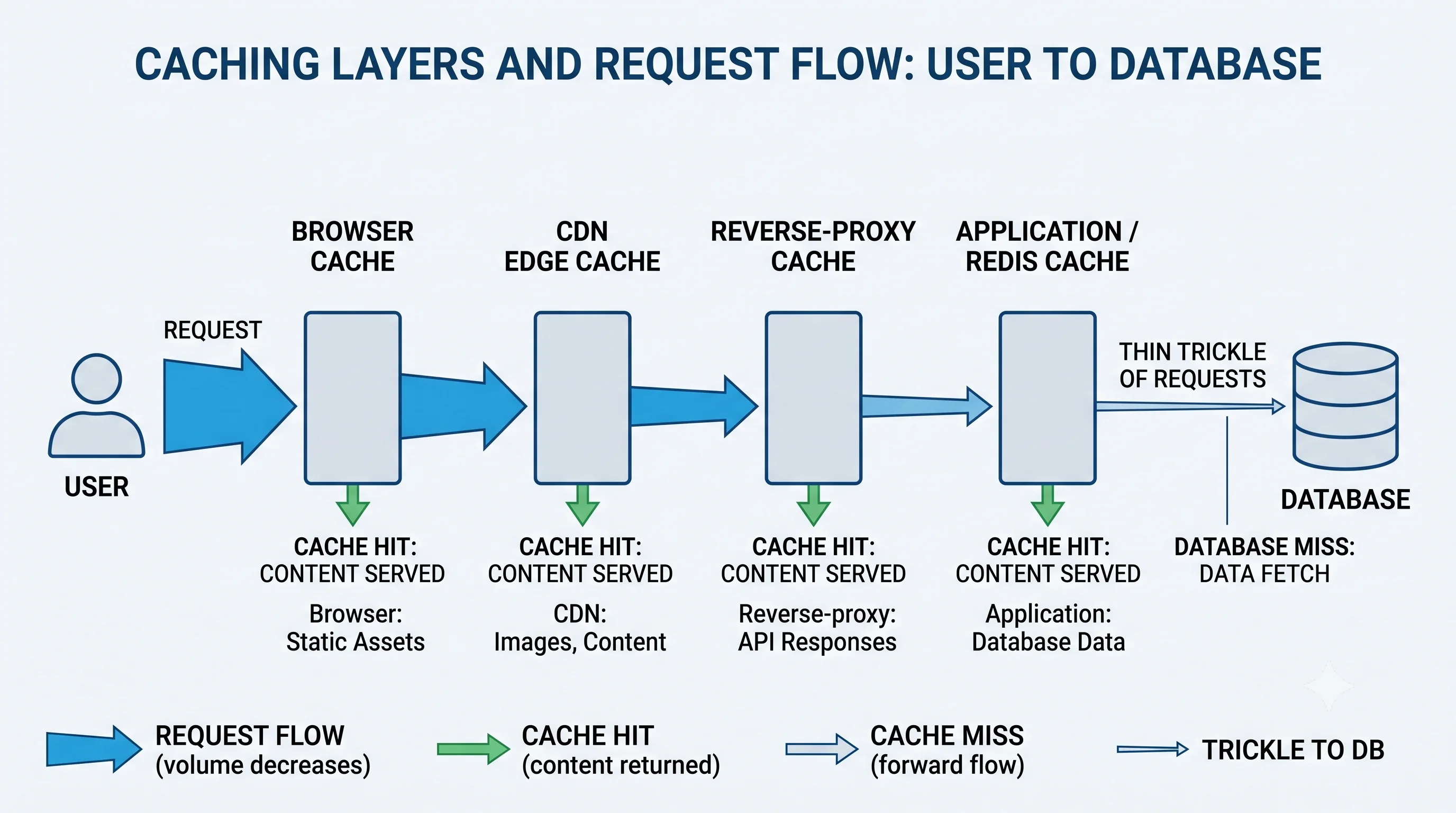
A cache stores a copy of data somewhere faster or closer than its original source, so repeat requests are answered quickly without redoing expensive work. But caching isn't a single thing in one place — it happens at many layers between the user and your database: the browser, the CDN, a reverse proxy, an in-memory application cache, a distributed cache like Redis, and even inside the database itself. Each layer catches requests it can answer, so fewer requests fall through to the slow, expensive origin. Understanding the full stack of caches — and what belongs at each layer — is what turns caching from a bolt-on into an architecture.
How It Actually Works
The Latency Numbers That Justify Caching
Caching exists because the cost of fetching data varies by orders of magnitude depending on where it lives:
| Source | Approx. Latency | Relative |
|---|---|---|
| CPU L1 cache | ~1 ns | 1× |
| Main memory (RAM) | ~100 ns | 100× |
| Redis (same DC, over network) | ~0.5 ms | 500,000× |
| SSD read | ~1 ms | 1,000,000× |
| Database query (indexed) | ~5–50 ms | millions× |
| Cross-continent round trip | ~150 ms | ~100M× |
Every layer of cache you add short-circuits the request before it reaches a slower tier. A browser cache hit is essentially free; a database query is thousands of times more expensive.
The Layers, From Client to Origin
| Layer | Where | Caches | Controlled By |
|---|---|---|---|
| Browser / client | User's device | Static assets, API responses | Cache-Control, ETag |
| CDN / edge | Points of presence worldwide | Static + some dynamic content | CDN rules + HTTP headers |
| Reverse proxy | In front of app servers | Rendered pages, responses | NGINX/Varnish config |
| Application (local) | In-process memory | Hot objects, computed results | App code (e.g., an LRU map) |
| Distributed cache | Shared tier (Redis/Memcached) | Sessions, query results, objects | App code + TTLs |
| Database | Inside the DB | Buffer pool, query plan cache | DB engine |
Client ──▶ CDN ──▶ Reverse Proxy ──▶ App (local cache) ──▶ Redis ──▶ Database
  ▲          ▲           ▲                  ▲                ▲          ▲
browser    edge      page cache       in-process       shared      buffer
cache      cache                         cache          cache        pool
   └── each layer answers what it can; misses fall through to the right ──┘
Local (In-Process) vs Distributed Cache
The two application-level caching choices have a crucial trade-off:
| Local / In-Process | Distributed (Redis/Memcached) | |
|---|---|---|
| Speed | Fastest (no network) | Fast (network hop) |
| Capacity | Limited to one process's RAM | Large, shared pool |
| Consistency across nodes | Each node has its own copy (can diverge) | Single shared source of truth |
| Survives restart | No | Yes |
| Best for | Tiny, very hot, read-mostly data | Shared state, sessions, larger datasets |
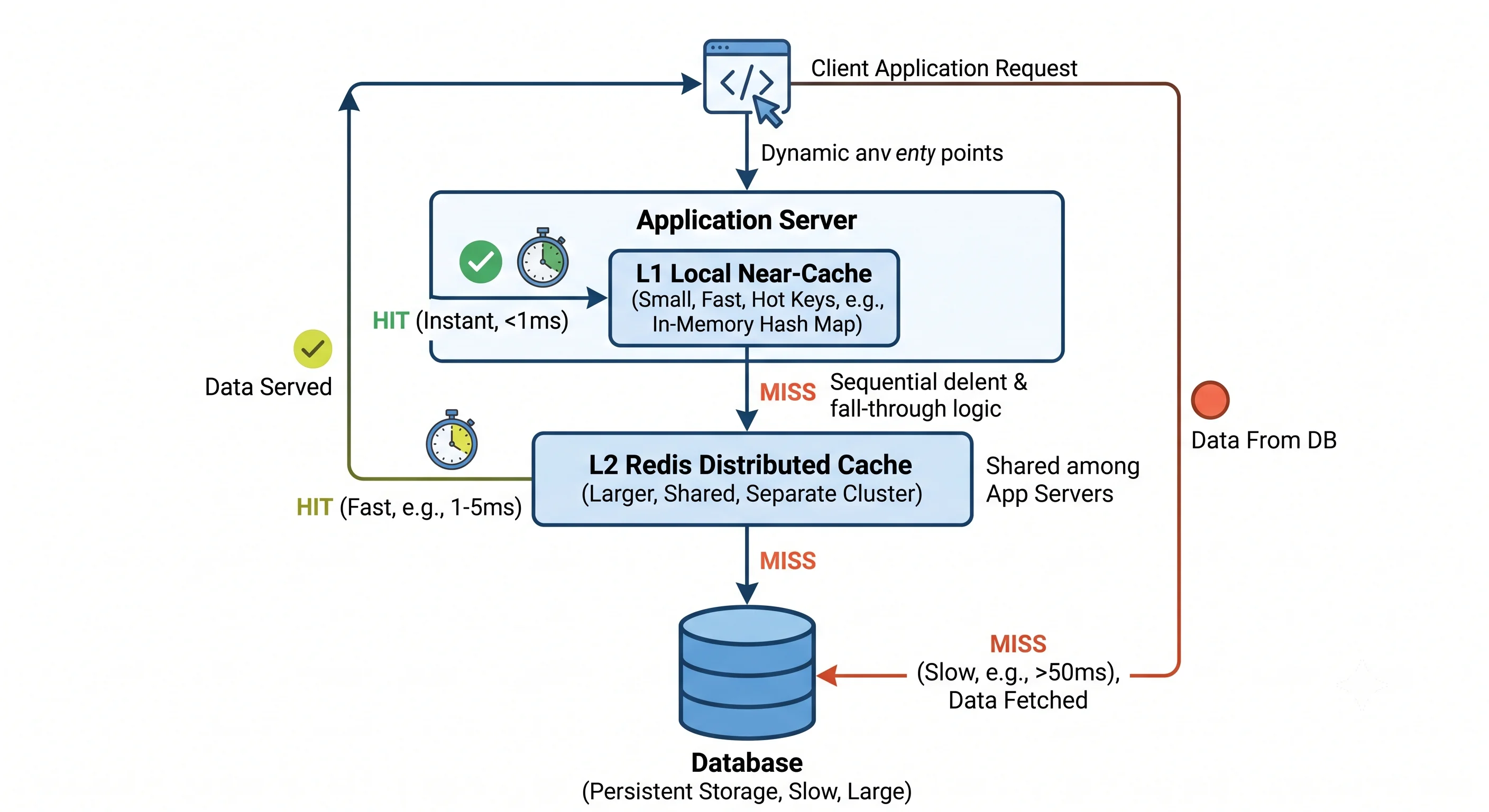
A common pattern is both: a small local cache in front of Redis (a "near cache") to avoid even the network hop for the hottest keys, backed by Redis for the shared, larger dataset.
Cache Hit Ratio: The Metric That Matters
hit ratio = cache hits / (cache hits + cache misses)A 90% hit ratio means only 10% of requests hit the origin. Small improvements compound: going from 90% to 95% halves origin load. Monitor hit ratio per layer — a suddenly falling ratio signals a bug (bad cache keys, too-short TTLs, or a cache stampede).
What to Cache (and What Not To)
- Great candidates: read-heavy, expensive-to-compute, and tolerant of slight staleness — product catalogs, user profiles, rendered pages, aggregations, config.
- Poor candidates: rapidly-changing data where staleness is unacceptable (account balances, inventory during checkout), per-request unique data (no reuse), and sensitive data you don't want copied widely.
Seeing It in Action
Scenario: Layered caching for a product page.
Request: GET /product/123

1. Browser cache
   - Static assets (images, JS) cached long-term via versioned URLs
   - HIT → 0ms, nothing leaves the device

2. CDN edge
   - Product images + the mostly-static HTML shell cached at the edge
   - HIT → ~10ms from nearest POP; origin never touched

3. Reverse proxy / app
   - Personalized bits (price for user's region, stock) not at CDN
   - App checks LOCAL near-cache for the product object
     HIT → instant (in-process)

4. Redis (distributed)
   - Local miss → check Redis for "product:123"
     HIT → ~0.5ms, shared across all app servers

5. Database
   - Redis miss → SELECT ... FROM products WHERE id=123 (~10ms)
   - Result written back to Redis (TTL 5min) and local cache
   - Next request for product 123 is served from cache

Net effect: the DB is queried once per product per 5 minutes per region,
not once per page view. A viral product survives on cache alone.
The compounding insight: each layer absorbs a slice of traffic, so the database sees a tiny fraction of total requests. The layers aren't redundant — they protect different things: the CDN saves cross-continent latency, Redis saves database load, and the local cache saves even the Redis network hop for the hottest items.
Interview Questions
Q: Why cache at multiple layers instead of just one? Hint: Each layer protects a different bottleneck and absorbs a different slice of traffic. The browser/CDN eliminate network latency and origin trips entirely; a distributed cache offloads the database; a local cache avoids even the network hop for the hottest data. Together they mean the slow, expensive origin sees only a small fraction of requests, with each layer optimized for its distance/cost profile.
Q: Compare local (in-process) and distributed caching. When would you use each or both? Hint: Local is fastest (no network) but limited to one process's memory, doesn't survive restarts, and each node's copy can diverge. Distributed (Redis) is a shared source of truth, larger, and survives restarts, at the cost of a network hop. Use local for tiny, very hot, read-mostly data; distributed for shared state/sessions/larger datasets; often both (near-cache in front of Redis).
Q: What is cache hit ratio and why do small changes matter so much? Hint: hits / (hits + misses) — the fraction of requests served from cache. It's nonlinear in impact: going from 90% to 95% halves the miss traffic reaching the origin. A dropping hit ratio signals problems (bad cache keys, short TTLs, stampedes). Monitor it per layer to catch regressions and size caches correctly.
Q: What data is a good candidate for caching, and what should you avoid caching? Hint: Cache read-heavy, expensive-to-compute, staleness-tolerant data (catalogs, profiles, rendered pages, aggregations, config). Avoid caching rapidly-changing data where staleness is unacceptable (balances, checkout inventory), per-request-unique data (no reuse to benefit from), and sensitive data you don't want widely copied. The value of caching comes from reuse and read/write ratio.
Q: Where does caching happen besides your Redis cluster? Hint: Many layers: browser/client cache (HTTP headers), CDN edge caches, reverse-proxy caches (NGINX/Varnish), in-process application caches, the distributed cache tier, and inside the database itself (buffer pool, query-plan cache). Even the OS page cache and CPU caches count. A full caching strategy considers all of them, not just the app-level cache.
References
- Latency Numbers Every Programmer Should Know — the orders-of-magnitude that justify caching
- High Performance Browser Networking — Caching by Ilya Grigorik — browser and HTTP caching
- AWS Caching Overview — layers and use cases
Dive Deeper
- Caching at Netflix (EVCache) — a global multi-tier caching system
- Facebook: Scaling Memcache — the definitive paper on caching at scale
- Designing Data-Intensive Applications by Martin Kleppmann — derived data and caching