
Web Server & App Server
In a Nutshell
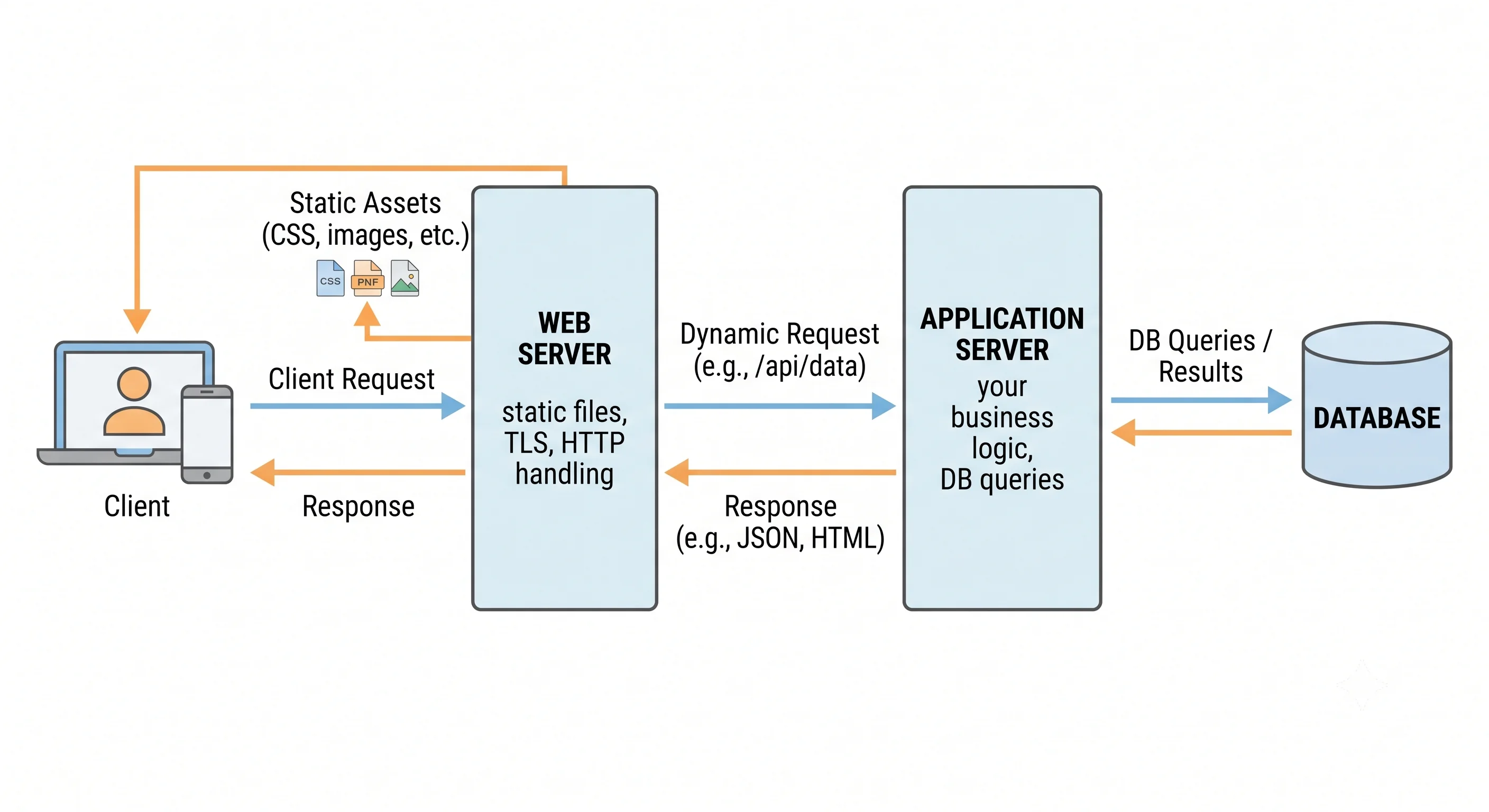
When a request arrives at your system, it usually passes through two distinct kinds of server. A web server (like NGINX or Apache) handles the raw HTTP: it terminates connections, serves static files, manages TLS, and forwards dynamic requests onward. An application server (like a Node.js, Java, or Python process) runs your code — the business logic that queries databases, calls services, and builds responses. The distinction matters because they have different jobs, scale differently, and are optimized for different things: web servers for fast, concurrent I/O and static content; app servers for executing application logic. Understanding the split clarifies where each responsibility lives in your architecture.
How It Actually Works
Two Different Jobs
| Web Server | Application Server | |
|---|---|---|
| Primary job | Serve HTTP; static content; reverse proxy | Run application/business logic |
| Handles | TLS, static files, compression, connection management | Dynamic requests, DB access, computation |
| Examples | NGINX, Apache, Caddy | Node.js, Gunicorn/uWSGI, Tomcat, Puma |
| Optimized for | High-concurrency I/O, static delivery | Executing code, integrating services |
| Language | Config-driven, language-agnostic | Runs your app's language/runtime |
The Typical Request Flow
Client
  │  HTTPS
  ▼
Web Server (NGINX)
  ├─ /static/* , images, CSS, JS  → served DIRECTLY from disk (fast)
  ├─ TLS termination, gzip, caching, rate limiting
  └─ /api/*  → reverse-proxied to ↓
        App Server (Gunicorn running your Python app)
          ├─ runs your route handlers / business logic
          ├─ queries the database, calls other services
          └─ returns a dynamic response ↑ back through NGINX
The web server is the fast, hardened front door; the app server is where your code actually runs. Static content never needs to touch your application at all — NGINX serves it directly, freeing app processes for real work.
Why Separate Them?
- Performance: Web servers are built for massive concurrent connections and efficient static-file serving. Making your app process serve static files wastes its (more expensive) capacity.
- Security: The web server is a hardened buffer — it absorbs malformed requests, slow-client attacks (slowloris), and TLS handling before anything reaches your code.
- Scalability: They scale independently. You might run one NGINX in front of many app-server processes.
- Simplicity: Your app doesn't have to reimplement TLS, compression, connection buffering, or static serving.
The Application Server and Concurrency
An app server runs your code, but how it handles many simultaneous requests varies by model:
| Concurrency Model | How | Examples |
|---|---|---|
| Process-based | Multiple worker processes, each handling one request at a time | Gunicorn (sync), uWSGI |
| Thread-based | Threads within a process handle concurrent requests | Tomcat, Puma |
| Event-loop (async) | Single thread, non-blocking I/O, many concurrent requests | Node.js, asyncio, Netty |
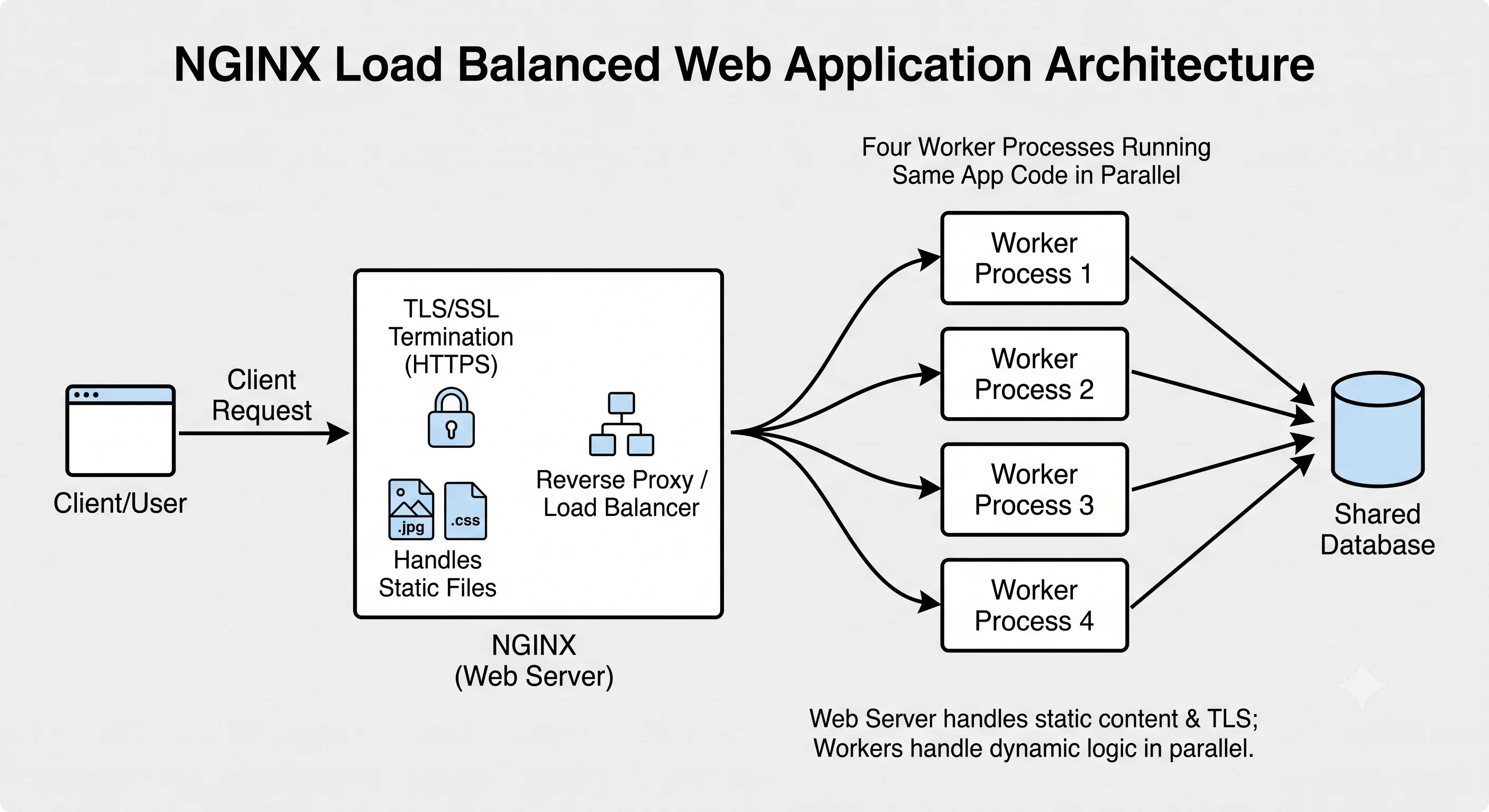
Common pattern: a web server + N app-server workers
  NGINX  →  [ worker 1 ][ worker 2 ][ worker 3 ][ worker 4 ]
            (e.g., Gunicorn with 4 workers = 4 requests in parallel)
  Rule of thumb for sync workers: ~ (2 × CPU cores) + 1
Where Does "Application Server" End and "Framework" Begin?
In practice the app server often bundles with a framework/runtime: Gunicorn runs your Flask/Django app; Node's runtime is the server via Express; a Java servlet container (Tomcat) runs your Spring app. The conceptual split — HTTP handling vs business logic — still holds even when the packaging differs.
Seeing It in Action
Scenario: NGINX + Gunicorn serving a Python web app.
# NGINX: the web server / front door
server {
    listen 443 ssl http2;
    server_name example.com;
    ssl_certificate     /etc/ssl/example.crt;   # TLS handled here
    ssl_certificate_key /etc/ssl/example.key;

    # Static files served directly by NGINX — never touch the app
    location /static/ {
        root /var/www/app;
        expires 30d;                             # long cache for assets
        gzip_static on;
    }

    # Dynamic requests proxied to the app server
    location / {
        proxy_pass http://127.0.0.1:8000;        # Gunicorn
        proxy_set_header X-Forwarded-For $remote_addr;
        proxy_set_header X-Forwarded-Proto https;
    }
}
# Gunicorn: the application server running your Python code
gunicorn myapp.wsgi:application \
--bind 127.0.0.1:8000 \
--workers 5 \ # (2 × 2 cores) + 1 = 5 parallel workers
--timeout 30Why this division of labor works: NGINX handles everything it's great at — TLS, serving /static/ straight from disk with long cache headers, gzip, and buffering slow clients — none of which should burn your application's more expensive worker capacity. Gunicorn runs five worker processes of your actual Python business logic, each handling one request at a time, scaled to the machine's cores. If traffic grows, you add Gunicorn workers (or more app servers behind NGINX) independently of the web-server layer. The web server shields and accelerates; the app server computes. This clean separation is the standard shape of a production web tier.
Interview Questions
Q: What's the difference between a web server and an application server? Hint: A web server (NGINX, Apache) handles HTTP concerns — TLS, static files, compression, connection management, reverse proxying — and is language-agnostic and I/O-optimized. An application server (Gunicorn, Tomcat, Node) runs your business logic — routing, DB queries, computation — in your app's runtime. The web server is the fast hardened front door; the app server executes code.
Q: Why put a web server like NGINX in front of your application server? Hint: Performance (NGINX serves static files and handles massive concurrent connections far more efficiently than app workers), security (a hardened buffer absorbing malformed requests, slow-client attacks, and TLS before reaching your code), independent scalability, and simplicity (your app doesn't reimplement TLS, compression, static serving, buffering). Static content never touches your application, freeing workers for real work.
Q: Describe the main app-server concurrency models. Hint: Process-based (multiple worker processes, each handling one request at a time — Gunicorn sync, uWSGI), thread-based (threads share a process to handle concurrent requests — Tomcat, Puma), and event-loop/async (single thread, non-blocking I/O serving many concurrent requests — Node.js, asyncio). Process/thread models suit CPU-bound or blocking work; async excels at high-concurrency I/O-bound workloads.
Q: How do you decide how many app-server workers to run? Hint: For synchronous (blocking) workers, a common rule of thumb is ~(2 × CPU cores) + 1, balancing CPU utilization against context-switching overhead. It depends on the workload: CPU-bound work is limited by cores; I/O-bound work benefits from more workers or an async model. Measure and tune with real load; too few underutilizes CPU, too many causes contention and memory pressure.
Q: A request for
/static/logo.pngand a request for/api/ordersare handled very differently. Explain. Hint:/static/logo.pngis served directly by the web server (NGINX) from disk with cache headers — it never reaches the application./api/ordersis reverse-proxied to the application server, which runs your route handler, queries the database, applies business logic, and builds a dynamic response. Static delivery is offloaded to the efficient web-server layer; dynamic logic runs in app workers.
References
- NGINX documentation — web server and reverse proxy
- Gunicorn documentation — Python WSGI application server and worker models
- High Performance Browser Networking by Ilya Grigorik — HTTP server concerns
Dive Deeper
- The C10K problem — why concurrency models matter for servers
- NGINX architecture — how an event-driven web server achieves high concurrency
- WSGI/ASGI explained — the interface between web and app servers in Python