
OAuth2 & JWT
In a Nutshell
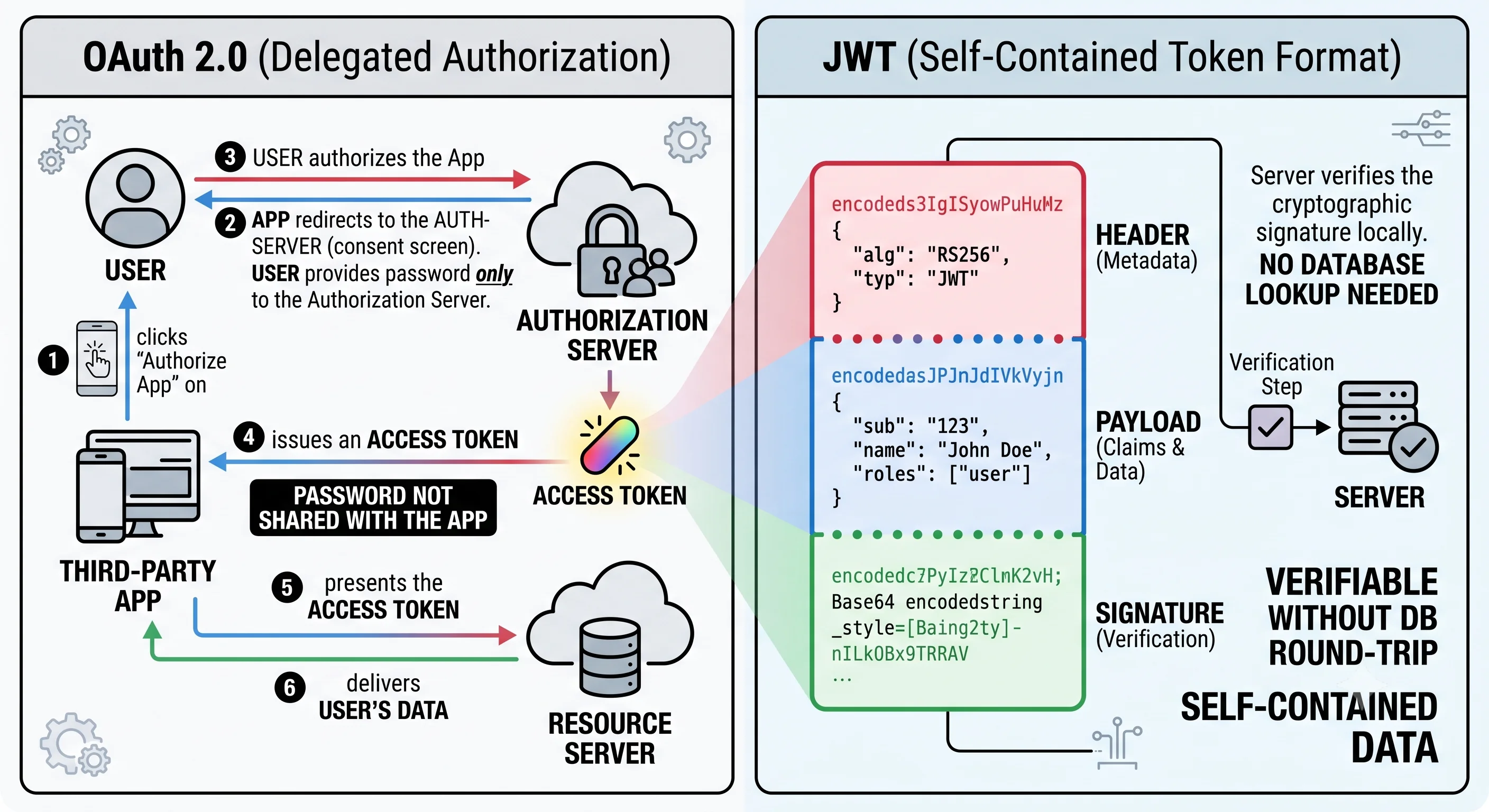
OAuth 2.0 is the industry-standard protocol for delegated authorization — letting a user grant a third-party app limited access to their data on another service without sharing their password. It's what powers "Sign in with Google" and "Connect your calendar." JWT (JSON Web Token) is a compact, self-contained, cryptographically-signed token format often used to carry the identity and permissions that OAuth flows produce. They're frequently mentioned together but solve different problems: OAuth2 is the protocol for granting access; JWT is a token format for representing and verifying claims. Understanding both — and their common pitfalls — is essential for building modern authentication.
How It Actually Works
OAuth 2.0: Delegated Authorization
The problem OAuth solves: an app wants to access your data on another service (your Google Contacts, your GitHub repos) — but you should never give the app your password. OAuth lets you grant scoped access via a token instead.
The four roles:
| Role | Who | Example |
|---|---|---|
| Resource Owner | The user | You |
| Client | The third-party app | A calendar app |
| Authorization Server | Issues tokens | Google's OAuth server |
| Resource Server | Holds the data | Google Calendar API |
The Authorization Code Flow (the standard for web/mobile)
1. App redirects you to the Authorization Server (Google) to log in +
   consent to specific SCOPES ("read your calendar").
2. You authenticate with Google (the app never sees your password).
3. Google redirects back to the app with a short-lived AUTHORIZATION CODE.
4. The app exchanges the code (+ its client secret) for an ACCESS TOKEN
   (and often a REFRESH TOKEN) — this back-channel step protects the token.
5. The app calls the Resource Server with the access token to get data,
   limited to the granted scopes.
Modern public clients (SPAs, mobile) add PKCE (Proof Key for Code Exchange) to secure this flow against code interception.
Access Tokens, Refresh Tokens, and Scopes
- Access token — short-lived (minutes), used to call APIs. Kept short so a leaked token expires fast.
- Refresh token — long-lived, used to get new access tokens without re-prompting the user. Guarded carefully; revocable.
- Scopes — the specific permissions granted (
read:calendar, not full account access). Least privilege for delegated access.
OAuth vs OpenID Connect (Authentication)
Crucially, OAuth 2.0 is authorization, not authentication. It grants access to resources, not proof of who you are. OpenID Connect (OIDC) is a thin identity layer on top of OAuth that adds an ID token (a JWT) proving the user's identity — this is what "Sign in with…" actually uses.
OAuth 2.0  → "this app may access your calendar"   (authorization)
OIDC       → "this app knows you are user X"        (authentication)
JWT: The Self-Contained Token
A JWT has three base64-encoded parts, dot-separated:
header.payload.signature

header:    { "alg": "RS256", "typ": "JWT" }         ← algorithm
payload:   { "sub": "user_42", "role": "editor",    ← claims (identity/perms)
             "exp": 1718000000, "iss": "auth.example" }
signature: sign(base64(header) + "." + base64(payload), key)  ← integrity
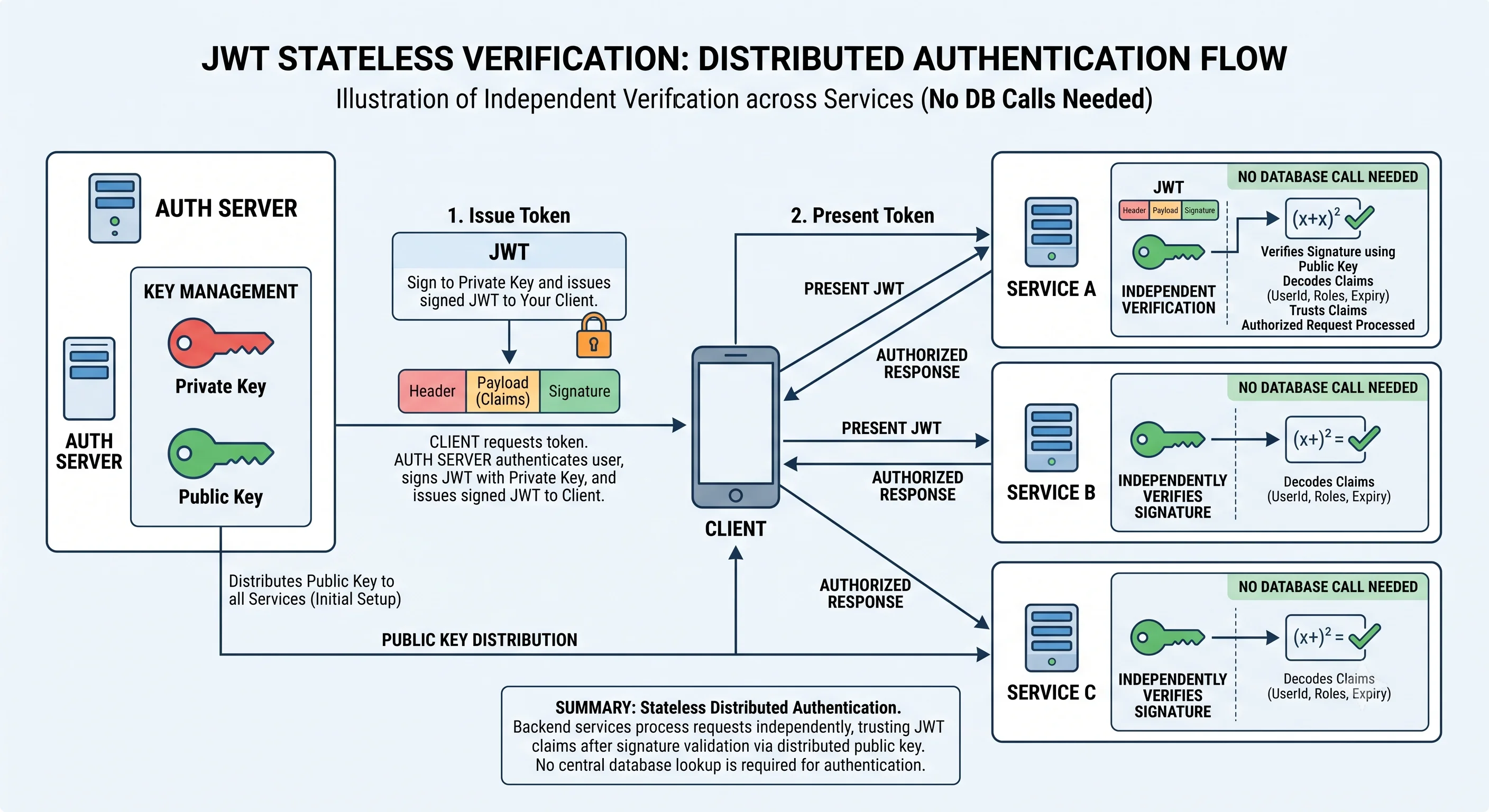
The magic: any server with the verification key can validate the token by checking the signature — no database lookup needed. If the signature is valid and unexpired, the claims are trusted. This makes JWTs ideal for stateless authentication across distributed services (see Authentication & Authorization).
The Dangerous JWT Pitfalls
JWTs are powerful but easy to misuse — several pitfalls have caused real breaches:
| Pitfall | Why It's Dangerous |
|---|---|
alg: none |
Accepting unsigned tokens → anyone forges any claims |
| Algorithm confusion | Tricking a server to verify an RS256 token as HS256 using the public key as the HMAC secret |
| No expiry / long expiry | A leaked token stays valid; JWTs can't be easily revoked |
| Storing secrets in the payload | The payload is encoded, not encrypted — anyone can read it |
| Not validating claims | Failing to check iss, aud, exp → token misuse |
| Weak/leaked signing key | Forge any token |
Key insight: a JWT payload is signed, not encrypted — it's readable by anyone. Never put secrets in it, and never trust a token without verifying its signature and claims.
The Revocation Problem
Because JWTs are self-contained, you can't easily invalidate one before it expires (there's no server-side session to delete). Mitigations: short access-token lifetimes + refresh tokens, a denylist of revoked token IDs (jti), or token versioning tied to the user. This is the classic trade-off: stateless scalability vs easy revocation.
Seeing It in Action
Scenario: "Sign in with Google" plus internal JWT-based service auth.
Part 1 — OAuth/OIDC login ("Sign in with Google"):
  1. User clicks "Sign in with Google" on your app.
  2. Redirect to Google (auth server) with scopes + PKCE challenge.
  3. User authenticates with Google (your app never sees the password).
  4. Google redirects back with an authorization code.
  5. Your backend exchanges code → ID token (JWT, proves identity via OIDC)
     + access token (for Google APIs, if scopes granted).
  6. Your app verifies the ID token → knows WHO the user is → creates a
     session / issues its OWN JWT for use inside your system.

Part 2 — Internal stateless auth with your JWT:
  Your JWT: { "sub": "user_42", "role": "editor",
              "exp": now+15min, "iss": "auth.myapp", "aud": "myapp-api" }
  signed with RS256 (private key at the auth service; public key everywhere).

  Every service call carries: Authorization: Bearer <jwt>
    - Any service verifies the SIGNATURE with the public key (no DB call).
    - Validates exp (not expired), iss/aud (intended for us).
    - Trusts the claims → knows identity + role → authorizes the action.

  Security choices that matter:
    ✅ Short 15-min access token → leaked token expires fast.
    ✅ Refresh token (long-lived, revocable) → seamless renewal.
    ✅ Pin the algorithm (RS256) server-side → reject "alg: none" and
       HS256-confusion attacks.
    ✅ No secrets in the payload (it's readable) — only identity/claims.
    ✅ Revocation: denylist token IDs (jti) for logout / compromise.
Why this two-part design is the modern standard: OAuth/OIDC lets users log in with an identity they already trust (Google) without your app ever handling their password — reducing your security burden and improving user experience. Once identity is established, issuing your own short-lived JWT lets every internal service authenticate requests statelessly by verifying a signature, with no shared session store or database lookup — which is exactly what makes auth scale across many microservices. The catch is that JWTs' self-contained nature makes revocation hard and their misuse (accepting alg: none, trusting unverified claims, leaking the signing key) catastrophic, so the security discipline — short lifetimes, pinned algorithms, validated claims, guarded keys, and a revocation strategy — is not optional. Done right, OAuth2 + JWT gives you delegated login and scalable stateless authorization; done carelessly, it's a breach waiting to happen.
Interview Questions
Q: What problem does OAuth 2.0 solve, and what are its four roles? Hint: It enables delegated authorization — a user grants a third-party app scoped access to their data on another service without sharing their password. Roles: resource owner (the user), client (the third-party app), authorization server (issues tokens after consent), and resource server (holds the data/API). The app gets a scoped access token, never the user's credentials.
Q: Is OAuth 2.0 authentication or authorization? How does OpenID Connect fit? Hint: OAuth 2.0 is authorization (granting access to resources), not authentication (proving identity). OpenID Connect (OIDC) is a thin identity layer on top of OAuth that adds an ID token (a JWT) proving who the user is — that's what "Sign in with…" actually uses. Using raw OAuth access tokens as proof of identity is a common, insecure mistake.
Q: How does a JWT let servers authenticate requests without a database lookup? Hint: A JWT is self-contained: header, payload (claims like sub/role/exp), and a signature. Any service with the verification key can check the signature and, if valid and unexpired, trust the claims — no session store or DB call needed. This stateless verification is what makes JWTs ideal for auth across distributed microservices.
Q: Why is it dangerous to put sensitive data in a JWT payload? Hint: The JWT payload is base64-encoded and signed, not encrypted — anyone who has the token can decode and read every claim. Signing guarantees integrity (it can't be altered undetected) but not confidentiality. So never store secrets/PII in the payload; put only non-sensitive identity/permission claims, and use HTTPS/encryption if the data must be protected in transit.
Q: JWTs are hard to revoke. Why, and how do you handle it? Hint: They're stateless and self-contained — there's no server-side session to delete, so a valid token remains valid until it expires. Mitigate with short access-token lifetimes (limit the leaked-token window) plus long-lived revocable refresh tokens, a denylist of revoked token IDs (
jti), or token/version claims tied to the user that invalidate all tokens on change. It's the stateless-scalability vs easy-revocation trade-off.
References
- OAuth 2.0 (oauth.net) — the protocol and flows
- JWT.io Introduction — JWT structure and usage
- OpenID Connect — the identity layer on OAuth
Dive Deeper
- OAuth 2.0 Security Best Current Practice (RFC 9700) — PKCE, pitfalls, hardening
- Critical JWT vulnerabilities (alg confusion) — real attack techniques
- OAuth 2.0 Simplified by Aaron Parecki — thorough, approachable guide