
Containers & Orchestration
In a Nutshell
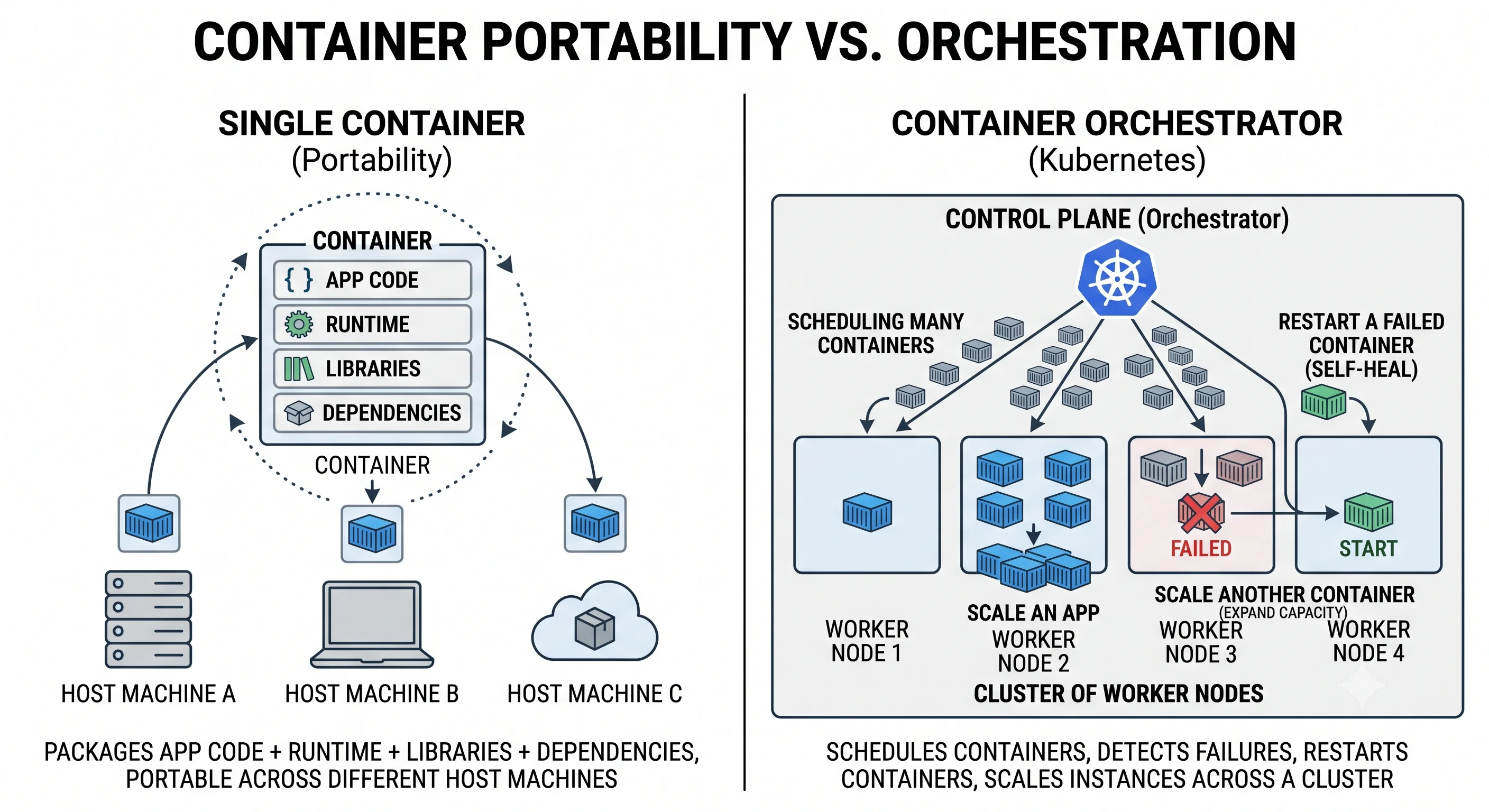
A container packages your application together with everything it needs to run — code, runtime, libraries, dependencies — into a single, portable, isolated unit that runs identically on any machine. This solves the age-old "works on my machine" problem: the container is the environment. Orchestration is what you need once you have many containers across many machines — a system (overwhelmingly Kubernetes) that schedules containers onto servers, restarts failed ones, scales them up and down, handles networking between them, and rolls out updates without downtime. Together, containers and orchestration are the foundation of modern cloud-native deployment.
How It Actually Works
Containers vs Virtual Machines
Containers are often confused with VMs — the difference is what they virtualize:
| Virtual Machine | Container | |
|---|---|---|
| Virtualizes | Hardware (full OS per VM) | OS (shares the host kernel) |
| Size | GBs (includes an OS) | MBs (just the app + deps) |
| Startup | Minutes (boot an OS) | Seconds/less (start a process) |
| Isolation | Strong (separate kernels) | Process-level (shared kernel) |
| Density | Few per host | Many per host |
| Overhead | High | Low |
VM:         [App][Bins][Guest OS] ×N  →  Hypervisor  →  Host OS  →  Hardware
Container:  [App][Bins] ×N  →  Container runtime  →  Host OS (shared)  →  Hardware
            (no guest OS per app → lighter, faster, denser)
Containers share the host kernel, making them dramatically lighter and faster than VMs — you can pack many on one machine.
The Image → Container Lifecycle
- Image — an immutable, versioned template (built from a
Dockerfile) containing your app and its dependencies. - Container — a running instance of an image.
- Registry — where images are stored and pulled from (Docker Hub, ECR, GCR).
Dockerfile → docker build → Image → push to Registry
                                       │
             Any machine → docker pull → run → Container (identical everywhere)
Immutability is the superpower: the exact image you tested is the exact image that runs in production — no environment drift.
Why You Need Orchestration
Running one container is easy. Running hundreds across a fleet, keeping them healthy, scaled, and connected, is not. Orchestration automates:
| Job | What the Orchestrator Does |
|---|---|
| Scheduling | Place containers on nodes with capacity |
| Self-healing | Restart crashed containers; replace dead nodes |
| Scaling | Add/remove replicas based on load (autoscaling) |
| Service discovery & networking | Let containers find and talk to each other |
| Load balancing | Distribute traffic across replicas |
| Rolling updates/rollbacks | Deploy new versions with zero downtime; revert on failure |
| Config & secrets | Inject configuration and credentials |
| Storage | Attach persistent volumes to stateful containers |
Kubernetes: The Core Concepts
Kubernetes (K8s) is the de facto standard. Its key objects:
| Object | What It Is |
|---|---|
| Pod | The smallest unit — one or more tightly-coupled containers sharing network/storage |
| Deployment | Declares the desired state (e.g., "run 5 replicas of this image") |
| Service | A stable network endpoint + load balancing across a set of pods |
| Node | A worker machine running pods |
| Ingress | HTTP routing from outside the cluster to services |
| ConfigMap / Secret | Configuration and sensitive data |
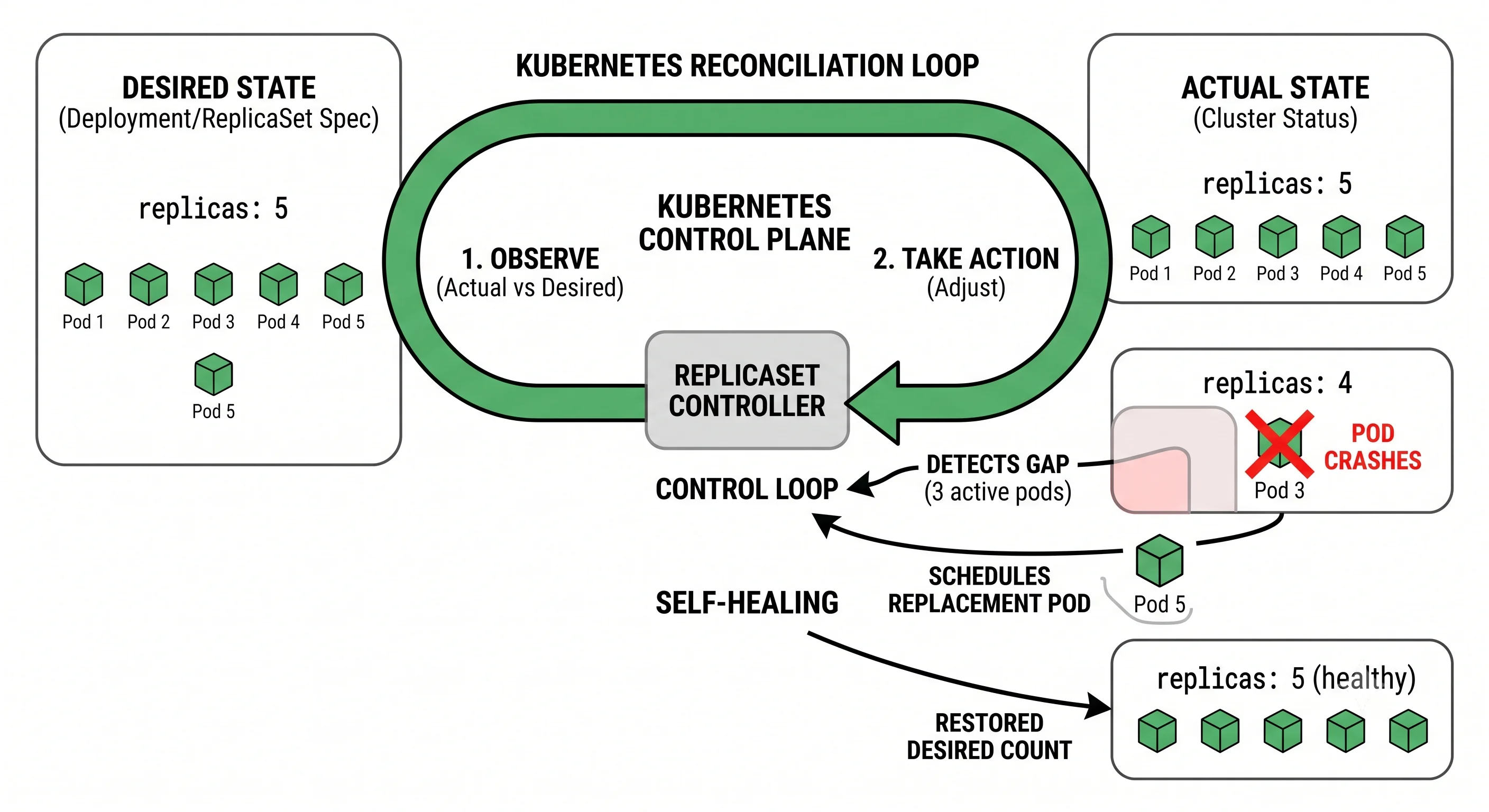
The heart of K8s is declarative desired state + reconciliation:
You declare: "I want 5 replicas of app v2 running."
K8s control loop continuously reconciles:
  actual = 3 replicas → K8s starts 2 more
  a pod crashes → actual = 4 → K8s starts 1 more
  a node dies → K8s reschedules its pods elsewhere
→ The system constantly drives ACTUAL state toward DESIRED state.
You describe what you want, not how to achieve it; the orchestrator makes it so and keeps it that way.
Seeing It in Action
Scenario: Deploying a web service on Kubernetes.
apiVersion: apps/v1
kind: Deployment
metadata:
  name: web
spec:
  replicas: 5                         # desired state: 5 pods
  selector: { matchLabels: { app: web } }
  template:
    metadata: { labels: { app: web } }
    spec:
      containers:
      - name: web
        image: myapp/web:v2.3.1       # immutable, versioned image
        ports: [{ containerPort: 8080 }]
        resources:
          requests: { cpu: "250m", memory: "256Mi" }   # scheduler uses these
          limits:   { cpu: "500m", memory: "512Mi" }
        readinessProbe:               # only send traffic when ready
          httpGet: { path: /healthz, port: 8080 }
        livenessProbe:                # restart if unhealthy
          httpGet: { path: /healthz, port: 8080 }
---
apiVersion: v1
kind: Service                          # stable endpoint + load balancing
metadata: { name: web }
spec:
  selector: { app: web }
  ports: [{ port: 80, targetPort: 8080 }]
kubectl apply -f web.yaml # declare desired state
kubectl set image deploy/web web=myapp/web:v2.3.2 # rolling update, zero downtime
kubectl rollout undo deploy/web # instant rollback if it breaksWhat Kubernetes handles automatically here: it schedules the 5 pods onto nodes with capacity (using the resource requests), sends traffic only to pods passing their readiness probe, restarts any pod failing its liveness probe, and reschedules pods if a node dies — always driving toward "5 healthy replicas." The Service gives a stable endpoint and load-balances across the pods even as they come and go. A new version rolls out pod-by-pod (old ones drained as new ones become ready) so users see no downtime, and a bad deploy is one command to roll back. You declared what you want; K8s continuously makes reality match — that's the essence of orchestration.
Interview Questions
Q: What's the difference between a container and a virtual machine? Hint: A VM virtualizes hardware and runs a full guest OS per instance (GBs, minutes to boot, strong isolation). A container virtualizes the OS — it shares the host kernel and packages just the app + dependencies (MBs, starts in seconds, process-level isolation, high density). Containers are far lighter and faster, so you can pack many per host; VMs give stronger isolation.
Q: What problem do containers solve, and why is image immutability important? Hint: Containers package the app with its exact runtime, libraries, and dependencies into a portable unit that runs identically everywhere — solving "works on my machine" / environment drift. Immutability means the exact versioned image you built and tested is what runs in production, byte-for-byte, eliminating configuration drift between environments and making deployments reproducible and rollbacks reliable.
Q: Why do you need orchestration once you have many containers? Hint: Running many containers across a fleet requires automating scheduling (placement), self-healing (restart crashed containers, reschedule off dead nodes), scaling, service discovery and networking, load balancing, rolling updates/rollbacks, and config/secret injection. Doing this manually at scale is infeasible; orchestrators (Kubernetes) handle it declaratively and continuously.
Q: Explain Kubernetes' declarative model and reconciliation. Hint: You declare desired state (e.g., "5 replicas of image v2") rather than imperative steps. A control loop continuously compares actual vs desired state and takes action to close the gap — starting pods if too few, replacing crashed pods, rescheduling off failed nodes. This self-healing "drive actual toward desired" behavior is the core of Kubernetes; you specify what, not how.
Q: What are readiness and liveness probes, and why do both matter? Hint: A liveness probe checks if a container is still healthy — failing it triggers a restart (recovers hung processes). A readiness probe checks if a container can serve traffic right now — failing it removes the pod from the load-balancing pool without killing it (useful during startup, warmup, or temporary overload). Together they ensure traffic goes only to healthy, ready pods and unhealthy ones are recovered.
References
- Docker documentation — containers, images, Dockerfiles
- Kubernetes documentation — core concepts and objects
- Kubernetes: The Docs "Concepts" overview — the declarative model
Dive Deeper
- Borg, Omega, and Kubernetes (Google paper) — the lineage of modern orchestration
- Kubernetes Up & Running by Burns, Beda, Hightower — the definitive K8s book
- The Twelve-Factor App — principles for container-friendly apps