
Pagination
In a Nutshell
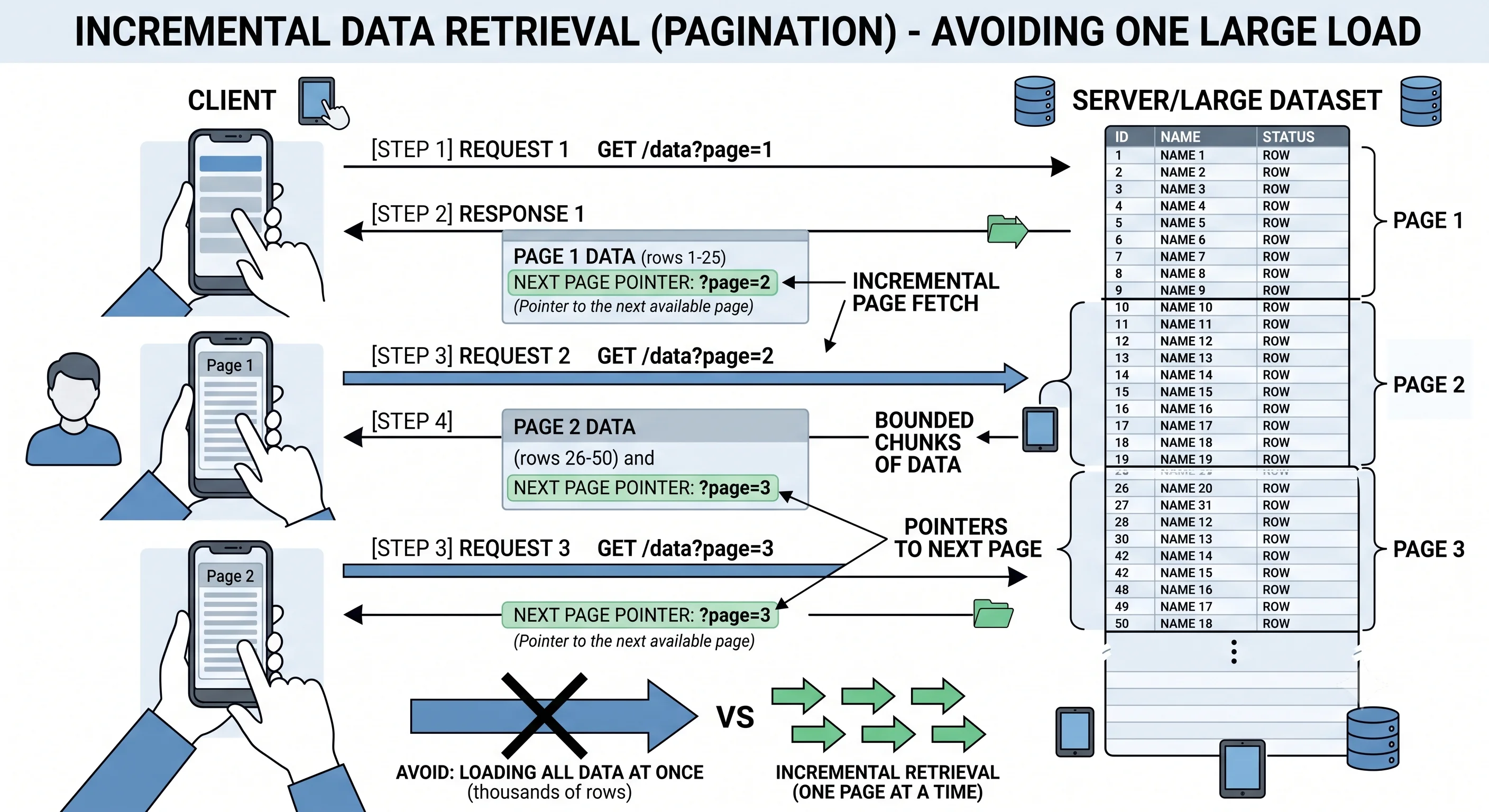
When an API endpoint could return thousands or millions of records, you can't send them all in one response — it would be slow, memory-hungry, and often useless to the client. Pagination breaks a large result set into manageable "pages" that the client fetches incrementally. The two dominant approaches are offset-based (page 2, 20 per page → skip 20, take 20) and cursor-based (give me the 20 items after this marker). They differ dramatically in performance and correctness at scale: offset is intuitive but degrades and can skip/duplicate items on changing data, while cursor-based is stable and fast but less flexible. Choosing correctly is a surprisingly consequential API-design decision.
How It Actually Works
Offset / Page-Based Pagination
The intuitive approach: skip N rows, return the next M.
SELECT * FROM orders ORDER BY created_at DESC
LIMIT 20 OFFSET 40;          -- page 3, 20 per page (skip 40)
GET /orders?page=3&limit=20 or GET /orders?offset=40&limit=20| Pros | Cons |
|---|---|
| Simple, intuitive | Slow at deep offsets — DB must scan+skip all prior rows |
| Jump to any page (page 500) | Instability — inserts/deletes shift rows → skipped/duplicated items |
| Total count + page numbers easy | Poor fit for large or fast-changing datasets |
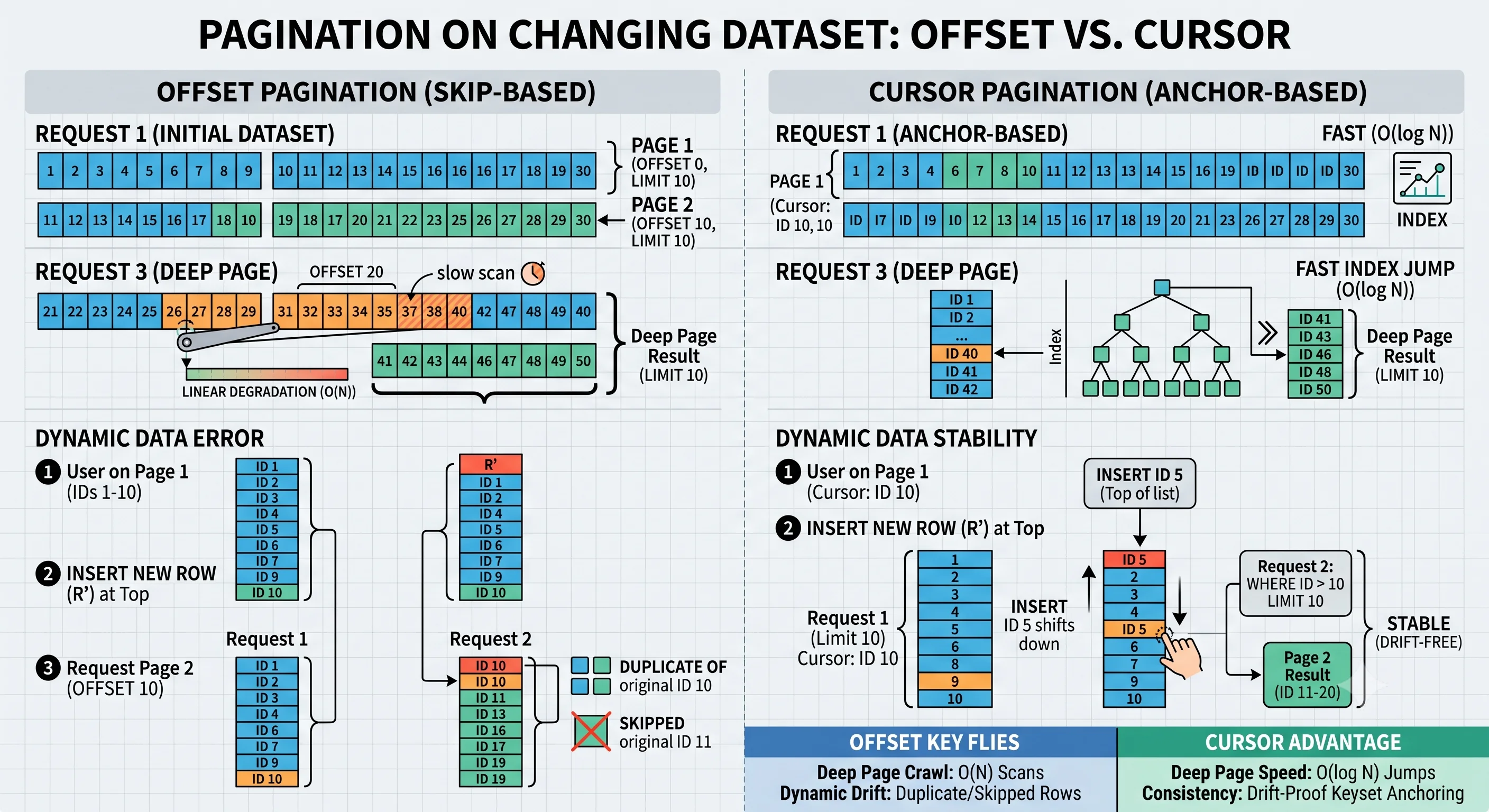
The deep-offset problem: OFFSET 1000000 forces the database to read and discard a million rows before returning 20 — O(offset) work that gets slower the deeper you page.
The instability problem:
Page 1 shows items 1–20. Between requests, a new item is inserted at top.
Page 2 (OFFSET 20) now re-shows what was item 20 (shifted to 21). 💥
User sees a duplicate; another item gets skipped.
Cursor / Keyset Pagination
Instead of "skip N," say "give me items after this specific point," using an indexed column as a cursor:
SELECT * FROM orders
WHERE created_at < '2024-06-01T10:00:00Z'   -- the cursor from last page
ORDER BY created_at DESC
LIMIT 20;                                    -- no OFFSET → uses the index
GET /orders?limit=20
→ { "data": [...], "next_cursor": "eyJjcmVhdGVkX2F0IjoiMjAyNC0wNi0wMS..." }
GET /orders?limit=20&cursor=eyJjcmVhdGVkX2F0... ← fetch the next page| Pros | Cons |
|---|---|
| Fast at any depth — index seek, no scanning skipped rows | Can't jump to arbitrary page N |
| Stable — inserts/deletes don't shift the window | No easy total count / page numbers |
| Ideal for infinite scroll, large/live datasets | Cursor must encode a stable, unique sort key |
The cursor encodes the last item's sort position (often base64-encoded). Because it's a WHERE on an indexed column rather than an OFFSET, performance stays constant regardless of how deep you page.
Choosing Between Them
| Use Offset When | Use Cursor When |
|---|---|
| Small, bounded datasets | Large or unbounded datasets |
| Users need to jump to specific pages | Infinite scroll / "load more" |
| Data changes slowly | Data changes frequently |
| A total count / page numbers are required | Performance and stability are critical |
Modern high-scale APIs (Twitter, Stripe, Slack, GraphQL Relay) overwhelmingly use cursor-based pagination for its performance and correctness.
Practical Requirements
- Stable sort key: cursor pagination needs a unique, ordered key. If sorting by a non-unique column (e.g.,
created_at), add a tiebreaker (created_at, id) so the cursor is unambiguous. - Consistent ordering: always sort by the same key; the cursor is meaningless without a deterministic order.
- Bounded page size: cap
limit(e.g., max 100) so a client can't request a million rows in one page. - Return next/prev pointers: include
next_cursor(and links) so clients don't construct cursors themselves.
Seeing It in Action
Scenario: Paginating an activity feed — why the team switches from offset to cursor.
V1 — offset pagination (started simple):
  GET /feed?page=1&limit=20   → OFFSET 0
  GET /feed?page=2&limit=20   → OFFSET 20
  ...
  Problems appeared as the feed grew and updated constantly:
    ✗ Deep pages got slow: page 5000 → OFFSET 100000 → DB scans 100k rows.
    ✗ New posts arrive between page loads → users saw DUPLICATE posts on
      page 2 and MISSED others (the window shifted under them).

V2 — cursor pagination (the fix):
  GET /feed?limit=20
  → { "data": [...20 posts...],
      "next_cursor": "<encodes (created_at, id) of the last post>" }
  GET /feed?limit=20&cursor=<that>
  → WHERE (created_at, id) < (cursor_created_at, cursor_id)
    ORDER BY created_at DESC, id DESC LIMIT 20     ← index seek, O(1) depth

  Results:
    ✅ Page 5000 is as fast as page 1 (index seek, no skipping).
    ✅ New posts inserted at the top don't shift the cursor window →
       no duplicates, no skipped posts. The user's scroll is stable.
    ✅ Perfect for infinite scroll ("load more" appends the next page).

  Tiebreaker note: sorting by created_at ALONE is unsafe (two posts can
  share a timestamp). The compound cursor (created_at, id) guarantees a
  unique, deterministic order so no row is ever ambiguous.
Why cursor pagination wins for feeds: an activity feed is exactly the worst case for offset pagination — it's large, constantly changing (new items at the top), and consumed via infinite scroll where users never jump to "page 500." Offset pagination degrades in performance the deeper users scroll and produces visibly wrong results (duplicates/skips) as the underlying data shifts. Cursor pagination fixes both: constant performance at any depth because it's an indexed seek, and a stable window because "everything after this exact item" doesn't move when items are inserted elsewhere. The trade-off — you can't jump to an arbitrary page and don't get a total count — is irrelevant for a feed, which is why virtually every large-scale timeline uses cursors.
Interview Questions
Q: What are the two main pagination approaches and how do they differ? Hint: Offset/page-based (skip N rows, take M —
LIMIT 20 OFFSET 40): intuitive, allows jumping to any page and total counts, but slow at deep offsets (scans+skips prior rows) and unstable on changing data (shifts cause duplicates/skips). Cursor/keyset (return items after a marker via aWHEREon an indexed sort key): fast at any depth and stable, but can't jump to arbitrary pages or easily give totals.Q: Why does offset pagination get slow at deep pages? Hint:
OFFSET Nrequires the database to read and discard N rows before returning the requested page — O(N) work that grows with depth.OFFSET 1000000scans a million rows to return 20. Cursor pagination avoids this by using an indexedWHERE key < cursorseek, which jumps directly to the position in roughly constant time regardless of depth.Q: Explain the instability problem with offset pagination. Hint: When rows are inserted or deleted between page requests, the offset window shifts relative to the data. E.g., a new item inserted at the top pushes everything down, so page 2 (
OFFSET 20) re-shows an item from page 1 (duplicate) and skips another. Cursor pagination is stable because "items after this specific marker" doesn't move when unrelated rows change.Q: What does a cursor encode, and why do you often need a tiebreaker? Hint: A cursor encodes the sort position of the last returned item (e.g., its
created_at, often base64-encoded) so the next query can fetch items after it. If the sort column isn't unique (two rows share acreated_at), the cursor is ambiguous — rows could be skipped or repeated. Add a unique tiebreaker likeidand sort/filter by the compound key(created_at, id).Q: When would you still choose offset pagination? Hint: For small, bounded, slowly-changing datasets where users need to jump to specific page numbers or you must show total counts / page X of Y (e.g., an admin table of a few hundred rows). Its simplicity is fine there. For large, fast-changing, infinite-scroll datasets (feeds, search results, event logs), cursor pagination's performance and stability make it the right choice.
References
- Stripe API: Pagination — cursor pagination in a real API
- Use the Index, Luke: Keyset pagination — why offset is slow, with SQL
- GraphQL Cursor Connections spec — the Relay cursor pagination standard
Dive Deeper
- Slack: Evolving API pagination at Slack — a real migration to cursors
- Shopify: Pagination best practices — REST cursor pagination at scale
- The SQL behind keyset pagination — index-driven paging