
In-Memory Databases
In a Nutshell
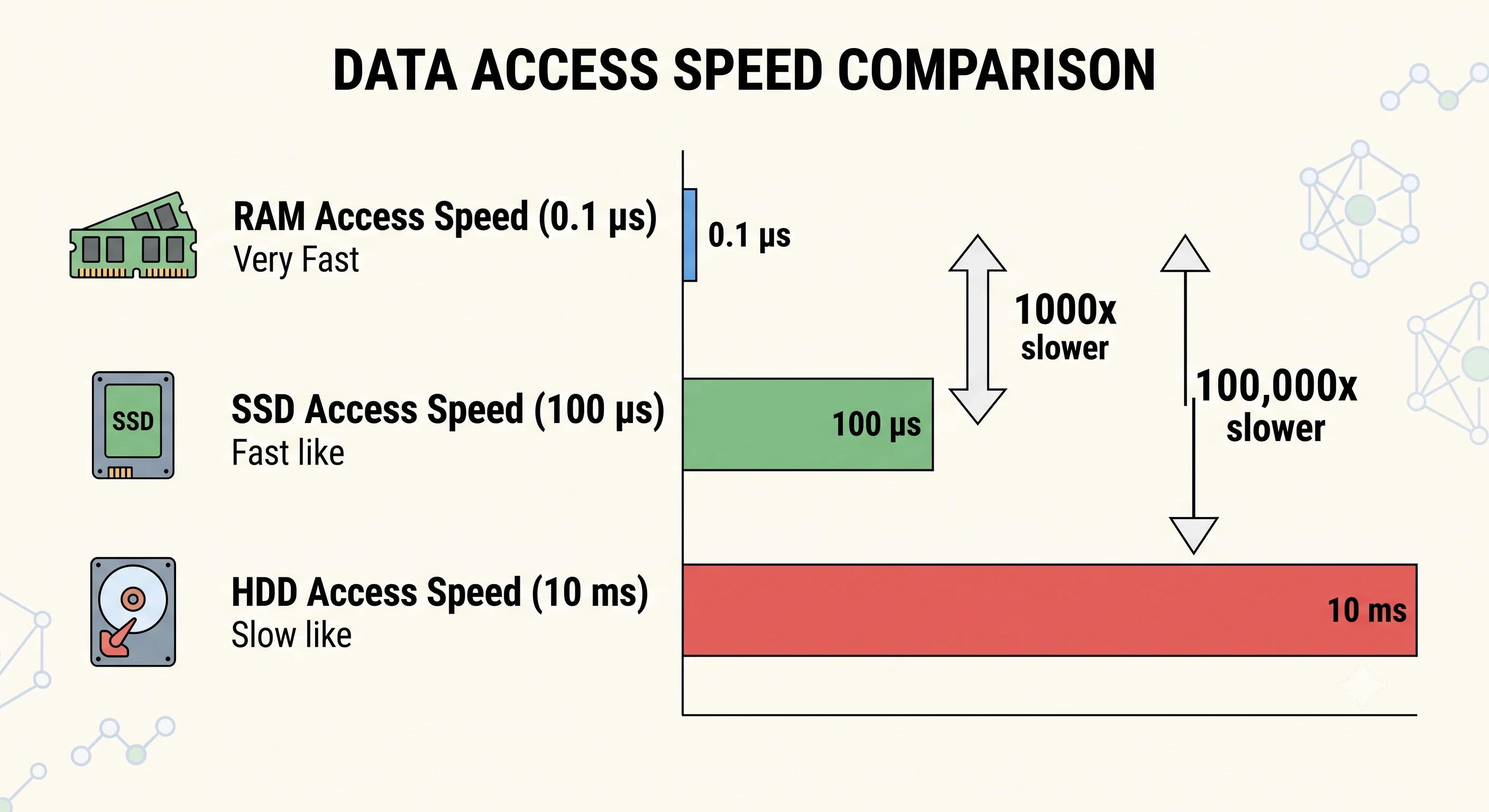
An in-memory database keeps the entire working dataset in RAM, delivering microsecond-level latency — 100–1000× faster than disk-based databases. The trade-off is obvious: RAM is expensive and volatile. In-memory databases are used as caching layers, session stores, real-time leaderboards, and anywhere the speed difference between RAM and SSD (0.1μs vs 100μs) translates directly to user experience or system throughput. Redis and Memcached are the two dominant choices — Redis for its rich data structures, Memcached for pure simplicity.
How It Actually Works
Why In-Memory Is Faster
| Operation | Disk (SSD) | RAM | Speedup |
|---|---|---|---|
| Random read | ~100 μs | ~0.1 μs | 1,000× |
| Sequential read (1 MB) | ~1 ms | ~0.25 ms | 4× |
| Round-trip to remote cache | ~0.5 ms | N/A (local) | — |
The latency difference is not incremental — it's orders of magnitude. For operations on hot data (frequently accessed), this transforms system performance.
Redis vs Memcached
| Feature | Redis | Memcached |
|---|---|---|
| Data types | Strings, hashes, lists, sets, sorted sets, streams, geospatial, bitmaps | Strings only |
| Persistence | Optional (RDB snapshots + AOF log) | None |
| Replication | Primary-replica with automatic failover | No built-in replication |
| Clustering | Redis Cluster (hash slot sharding) | Client-side consistent hashing |
| Pub/Sub | Built-in | Not supported |
| Scripting | Lua scripting for atomic multi-step operations | Not supported |
| Memory efficiency | Less efficient per key (overhead for data structures) | More efficient for simple string caching |
| Threading | Single-threaded event loop (v7 adds I/O threads) | Multi-threaded |
| Best for | Feature-rich caching, sessions, real-time features, rate limiting | Simple key-value caching at scale |
General guidance: Redis is the default choice unless you need pure string caching at maximum memory efficiency with the simplest possible operations — then Memcached.
Persistence in Redis
| Mode | How It Works | Data Loss Window |
|---|---|---|
| None | Pure cache — all data lost on restart | Everything |
| RDB | Periodic snapshots (e.g., every 5 minutes) | Up to snapshot interval |
| AOF | Append-only log of every write | ~1 second (with appendfsync everysec) |
| RDB + AOF | Both — AOF for crash recovery, RDB for backups | Minimal |
Common Patterns
| Pattern | How | Use Case |
|---|---|---|
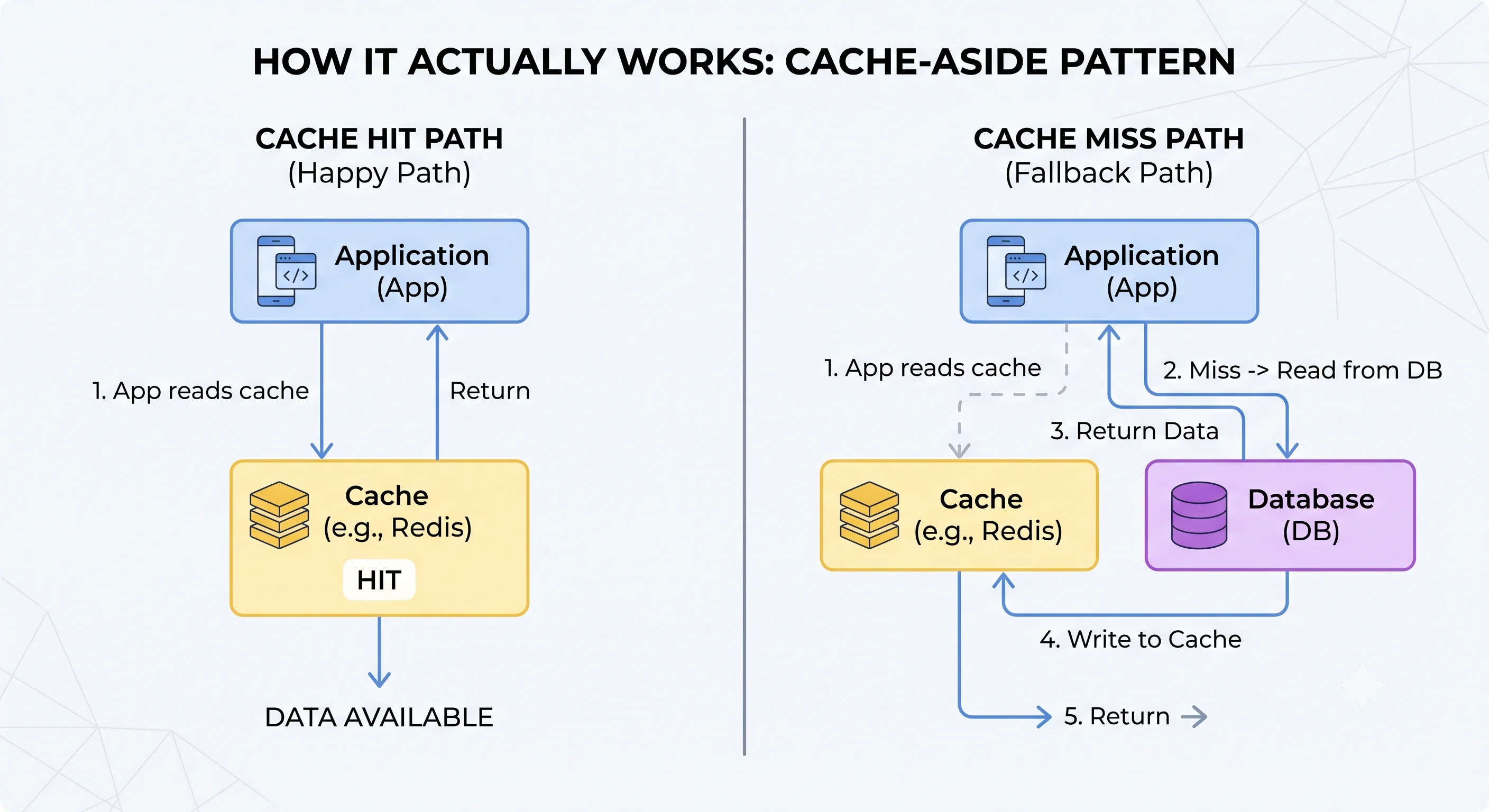
| Cache-Aside | App checks cache → miss → read DB → populate cache | General read caching |
| Write-Through | App writes to cache and DB simultaneously | Ensuring cache freshness |
| Write-Behind | App writes to cache; async worker writes to DB | High write throughput |
| Session Store | SET session:{id} {data} EX 3600 |
Web session management |
| Distributed Lock | SET lock:{resource} {owner} NX EX 30 |
Preventing concurrent access |
| Rate Limiter | INCR rate:{key}:{window} + TTL |
API throttling |
| Pub/Sub | PUBLISH channel msg / SUBSCRIBE channel |
Real-time notifications |
Seeing It in Action
Scenario: Real-time leaderboard for a gaming platform
import redis

r = redis.Redis()

# Add/update a player's score (atomic)
r.zadd("leaderboard:daily", {"player_alice": 2500})
r.zadd("leaderboard:daily", {"player_bob": 3100})
r.zadd("leaderboard:daily", {"player_charlie": 1800})

# Get top 10 players with scores
top_10 = r.zrevrange("leaderboard:daily", 0, 9, withscores=True)
# [("player_bob", 3100), ("player_alice", 2500), ("player_charlie", 1800)]

# Get a specific player's rank (0-indexed)
rank = r.zrevrank("leaderboard:daily", "player_alice")
# 1 (second place)

# Get player's score
score = r.zscore("leaderboard:daily", "player_alice")
# 2500.0

# Increment score atomically (player earned 150 points)
r.zincrby("leaderboard:daily", 150, "player_alice")
Why in-memory is right here:
- Sorted set — O(log n) insert, O(log n) rank lookup, O(k + log n) top-K query
- Sub-millisecond — Leaderboard refreshes instantly after every game action
- Atomic operations —
ZINCRBYhandles concurrent score updates without locks - TTL — Set a TTL on the daily leaderboard key to auto-reset at midnight
The SQL alternative would be:
SELECT player_id, score, RANK() OVER (ORDER BY score DESC) as rank
FROM scores WHERE period = 'daily'
ORDER BY score DESC LIMIT 10;
This works at small scale but requires an index scan on every request. At 10K concurrent players updating scores, the database becomes a bottleneck. Redis handles this with zero effort.
Interview Questions
Q: When would you use Redis vs Memcached? Hint: Redis: when you need data structures beyond strings (sorted sets, lists, hashes), persistence, replication, pub/sub, or Lua scripting. Memcached: when you need simple string caching with maximum memory efficiency and multi-threaded performance. Most teams choose Redis because the additional features cost nothing if unused.
Q: What happens when Redis runs out of memory? Hint: Depends on the eviction policy:
noeviction(return errors on writes),allkeys-lru(evict least recently used keys),volatile-lru(evict LRU keys with TTL only),allkeys-random(evict random keys). For caches,allkeys-lruis the standard. For session stores,volatile-lruensures non-expiring keys aren't evicted.Q: How would you design a distributed session store with Redis? Hint: Store session data as a Redis hash:
HSET session:{id} user_id 123 role admin last_active {timestamp}. Set TTL for session expiry:EXPIRE session:{id} 3600. Use Redis Cluster or Sentinel for high availability. On every request, refresh the TTL. If the session key doesn't exist, redirect to login.Q: Explain the cache-aside pattern. What problems can it have? Hint: App checks cache on read (hit → return; miss → read DB → populate cache). Problems: 1) Cache stampede (many concurrent misses for the same key → all hit the DB). 2) Stale data (DB updated but cache still has old value). 3) Cold start (empty cache after restart → all requests hit DB). Solutions: lock on miss, write-through on updates, cache warming on startup.
Q: Is Redis single-threaded? How does it handle 100K+ operations per second? Hint: Redis processes commands on a single thread (event loop), avoiding lock contention. Since most operations are O(1) and data is in RAM, each command completes in microseconds. At 1μs per command, a single core can handle ~1M ops/sec theoretically. Redis 7 adds I/O threads for network handling while keeping single-threaded command execution.
References
- Redis Documentation — comprehensive official docs
- Redis in Action by Josiah Carlson — practical Redis patterns
- Memcached Wiki — Memcached internals and tuning
Dive Deeper
- Redis University — free courses on Redis internals and patterns
- Antirez (Redis Creator) Blog — design philosophy and implementation insights
- DragonflyDB — modern multi-threaded Redis alternative claiming 25× throughput