
Authentication & Authorization
In a Nutshell
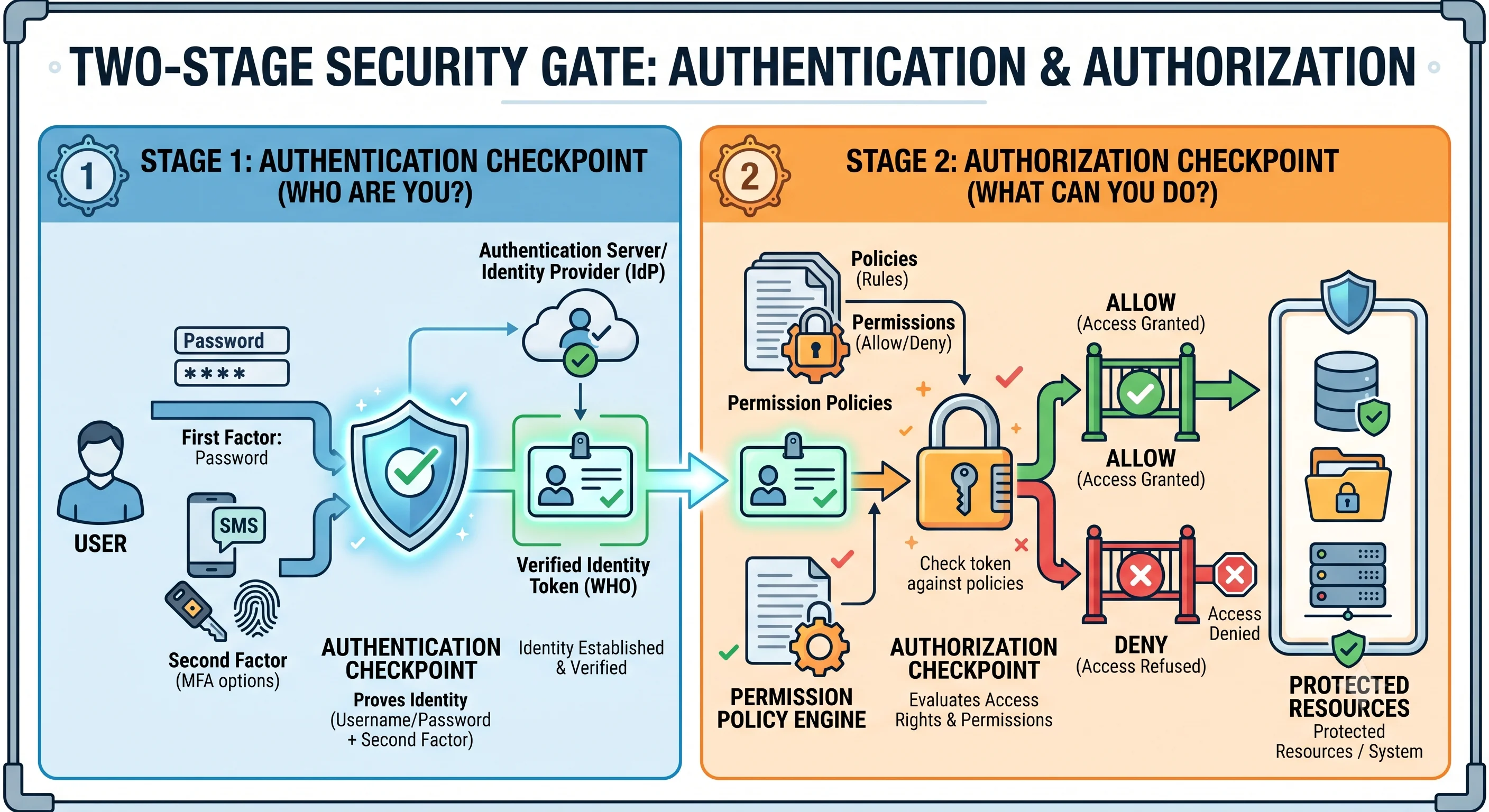
Authentication proves who a user is; authorization decides what they're allowed to do. This topic goes deeper than the API-design view (Topic 11) into the security internals: how identity is actually verified (passwords, multi-factor, sessions vs tokens), how permission systems are modeled and enforced, and the ways both go wrong. These are the two most fundamental controls in any secure system — get authentication wrong and impostors get in; get authorization wrong and legitimate users access things they shouldn't. Nearly every major breach traces back to a failure in one of these two.
How It Actually Works
The Factors of Authentication
Authentication relies on proving one or more factors:
| Factor | "Something you…" | Examples |
|---|---|---|
| Knowledge | know | Password, PIN, security question |
| Possession | have | Phone (TOTP/SMS), hardware key, passkey |
| Inherence | are | Fingerprint, face, biometrics |
Multi-factor authentication (MFA) combines two or more different factors, so a stolen password alone isn't enough. Requiring two of the same type (two passwords) isn't MFA.
Storing Passwords: Never in Plaintext
The cardinal rule of authentication. Passwords must be hashed with a slow, salted, adaptive algorithm — never stored plaintext, never encrypted (reversible), never with fast hashes (MD5/SHA-256 alone):
❌ store: password                       → catastrophic on breach
❌ store: sha256(password)               → fast → brute-forced in hours
✅ store: bcrypt(password + unique salt) → slow + salted → infeasible

Why:
  • Salt (unique per user) → identical passwords hash differently,
    defeats rainbow tables and reveals nothing across users.
  • Slow/adaptive (bcrypt, scrypt, Argon2) → deliberately expensive,
    so brute-forcing billions of guesses is impractical, and the cost
    can be raised as hardware improves.
Sessions vs Tokens
Once authenticated, how does the server remember the user across requests? Two models:
| Session-Based (stateful) | Token-Based (stateless) | |
|---|---|---|
| Server stores | A session record (server/Redis) | Nothing — the token is self-contained |
| Client holds | A session ID (cookie) | A signed token (JWT) |
| Validation | Look up the session store | Verify the signature |
| Revocation | Easy (delete the session) | Hard (token valid until expiry) |
| Scaling | Needs shared session store | Scales freely (no lookup) |
Sessions are easy to revoke but need shared state; tokens (see OAuth2 & JWT) scale statelessly but are hard to revoke before expiry — mitigated with short lifetimes + refresh tokens.
Authorization Models
| Model | Access Decided By | Example |
|---|---|---|
| RBAC | The user's role(s) | admin deletes; viewer reads |
| ABAC | Attributes (user/resource/context) | "Same dept, business hours" |
| ReBAC | Relationships | "You can edit docs shared with you" |
| ACL | Explicit per-resource lists | File permissions (user X: read) |
The Principle of Least Privilege
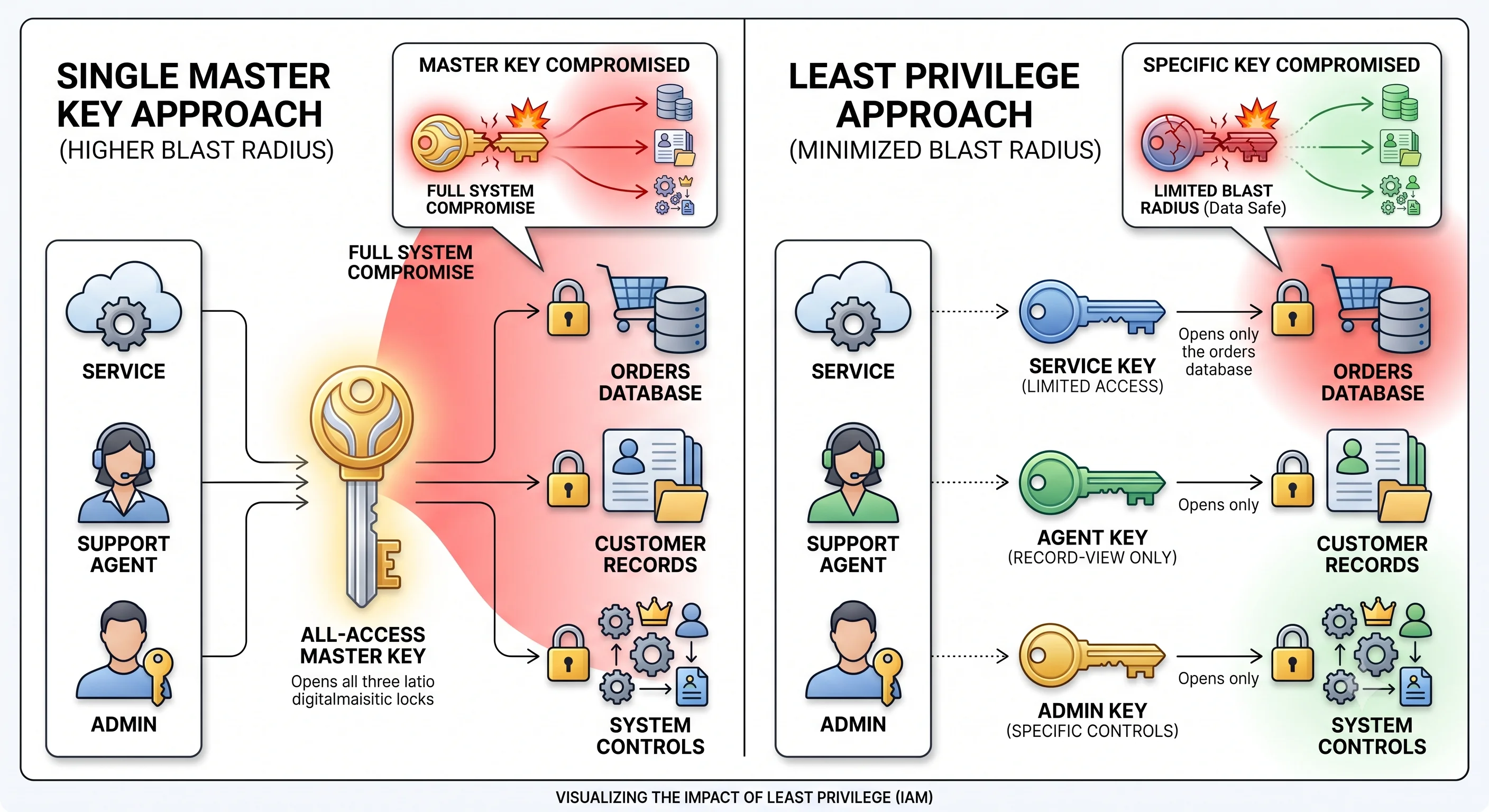
The foundational authorization rule: grant the minimum access needed, nothing more. A service that only reads a table gets read-only credentials; a support agent sees only their queue, not the whole database. Least privilege shrinks the blast radius of any compromised account or bug — if an attacker takes over a low-privilege account, they can't reach much.
How These Fail (and Cause Breaches)
| Failure | Consequence |
|---|---|
| Weak password storage | Breach dump → credentials cracked → account takeover |
| No MFA | A single phished password grants full access |
| Broken object-level auth (IDOR/BOLA) | Changing an ID in a URL reveals others' data |
| Privilege escalation | A user gains permissions they shouldn't have |
| Missing server-side checks | Authorization enforced only in the UI |
| Overly broad permissions | A compromised account can reach everything |
Broken object-level authorization (OWASP's #1 API risk) is the most common: the server fails to verify that the authenticated user actually owns the resource they're requesting.
Seeing It in Action
Scenario: Secure authentication and authorization for a healthcare app (high stakes).
Authentication:
  1. Password: stored as Argon2id(password + per-user salt), never plaintext.
     Enforce strong-password policy; check against known-breached lists.
  2. MFA required: password (knowledge) + TOTP app or passkey (possession).
     A stolen password alone can't log in.
  3. Session: short-lived signed token (15 min) + refresh token; tokens
     revocable via a server-side denylist for logout / suspected compromise.

Authorization (least privilege + object-level checks):
  Roles: patient, nurse, doctor, admin (RBAC baseline)
  BUT healthcare needs relationship/context (ABAC/ReBAC):
    - A doctor can read a patient's record ONLY if assigned to that patient
      (relationship), not any patient (role alone is too broad).
    - Access during a care episode; audited; break-glass for emergencies.

  Every record access is checked:
    GET /patients/1234/records
      ✓ authenticated (valid token)
      ✓ authorized: is THIS doctor assigned to patient 1234?  ← object-level
        → yes: 200 (and log the access for audit)
        → no:  403 (and alert — attempted unauthorized access)

The critical bug to prevent (IDOR/BOLA):
  doctor_A, treating patient 1234, changes the URL to /patients/5678/records.
  Role check alone ("is a doctor?") would WRONGLY allow it.
  The object-level check ("assigned to 5678?") correctly denies it.
Why the depth matters here: healthcare data raises the cost of every failure, so each control is hardened. Passwords use a slow salted hash so a database breach doesn't yield usable credentials. MFA ensures a phished password isn't enough. Authorization goes beyond coarse roles to relationship-based checks, because "is a doctor" is far too broad — the real question is "is this doctor caring for this patient." And every single resource access verifies object-level ownership, defeating the IDOR/BOLA attack that role checks alone miss. Layering these — strong identity proof, minimal privilege, and per-object authorization with auditing — is what separates a system that merely looks secure from one that actually protects sensitive data.
Interview Questions
Q: How should passwords be stored, and why? Hint: Hashed with a slow, salted, adaptive algorithm (bcrypt, scrypt, Argon2) — never plaintext, never reversibly encrypted, never with fast hashes (MD5/SHA-256 alone). The unique per-user salt defeats rainbow tables and hides identical passwords; the deliberately slow/adaptive function makes brute-forcing billions of guesses impractical and lets you raise cost over time. This limits damage even if the database is breached.
Q: What is MFA and why is it effective? Hint: Multi-factor authentication requires two or more different factors — knowledge (password), possession (phone/hardware key/passkey), inherence (biometric). It's effective because compromising one factor (e.g., a phished or breached password) isn't enough; the attacker also needs the second, independent factor. Two of the same type (two passwords) isn't MFA.
Q: Compare session-based and token-based authentication. Hint: Session-based (stateful): server stores a session record, client holds a session ID cookie; easy to revoke (delete the session) but needs shared session storage to scale. Token-based (stateless, JWT): the signed token is self-contained, validated by signature with no server lookup; scales freely but is hard to revoke before expiry — mitigated with short lifetimes + refresh tokens and denylists.
Q: What is the principle of least privilege and why does it matter? Hint: Grant every user/service the minimum access needed and nothing more (read-only creds for a read-only service, scoped access for support agents). It shrinks the blast radius of a compromise or bug: if a low-privilege account is taken over, the attacker can reach very little. Overly broad permissions turn a single compromised account into a full breach.
Q: What is broken object-level authorization (IDOR/BOLA) and how do you prevent it? Hint: When the server checks that a user is authenticated (and maybe has the right role) but fails to verify they actually own the specific resource requested — so changing an ID in the URL exposes others' data. It's OWASP's #1 API risk. Prevent by checking, on every resource access, that the resource belongs to (or is shared with) the authenticated identity — never rely on role alone or client-supplied IDs.
References
- OWASP Authentication Cheat Sheet — password storage, MFA, sessions
- OWASP API Security Top 10 — BOLA and broken auth
- NIST Digital Identity Guidelines (SP 800-63) — authoritative authentication guidance
Dive Deeper
- Password hashing: bcrypt vs scrypt vs Argon2 — choosing an algorithm
- Google Zanzibar — relationship-based authorization at scale
- Passkeys / WebAuthn — phishing-resistant passwordless authentication