
Dead-Letter Queue
In a Nutshell
A dead-letter queue (DLQ) is a special queue where messages go when they can't be processed successfully. Instead of retrying a broken message forever (blocking the queue) or silently dropping it (losing data), the messaging system moves it aside after a set number of failed attempts. The DLQ is a safety net and a diagnostic tool: it isolates poison messages so healthy traffic keeps flowing, preserves the failed messages for inspection and reprocessing, and gives you a clear signal (DLQ depth > 0) that something needs attention. Any production message-driven system needs one.
How It Actually Works
The Problem: Poison Messages
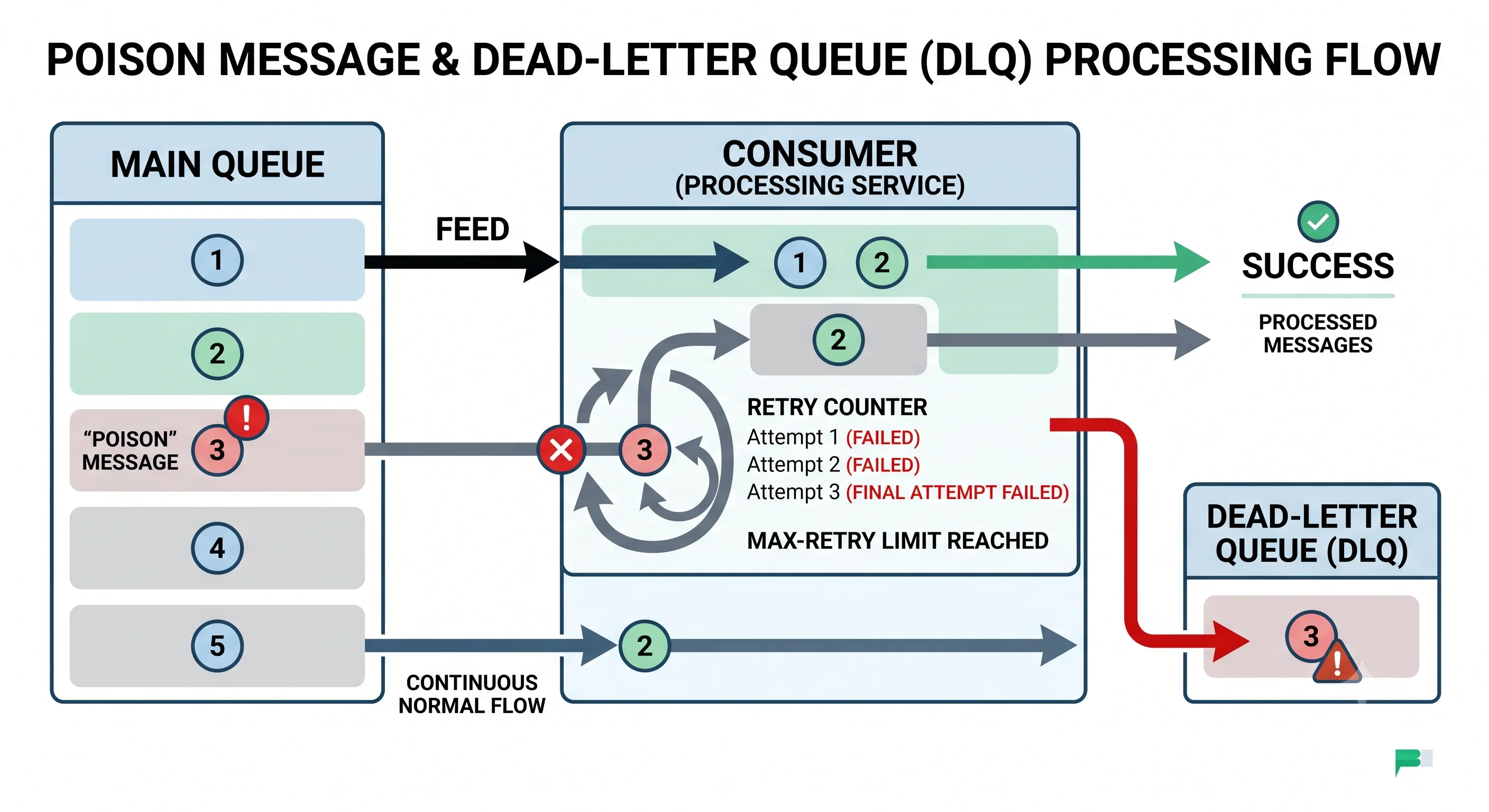
A poison message is one that fails every time it's processed — because it's malformed, references deleted data, hits a bug, or is simply too large. Without a DLQ, a poison message creates a dilemma:
At-least-once queue + a message that ALWAYS fails:

  Process → fail → redeliver → fail → redeliver → fail → ... forever
     │
     └─ It never gets acked, so it keeps coming back, potentially
        BLOCKING the queue (head-of-line) and burning resources.

Or, if you drop it on failure → you silently LOSE data.

Neither is acceptable. The DLQ is the third option.
How Messages Get Dead-Lettered
A message is moved to the DLQ when it meets a failure condition, typically:
| Trigger | Description |
|---|---|
| Max receive count | Delivered/retried N times without a successful ack |
| TTL expiry | Message sat in the queue longer than its time-to-live |
| Explicit rejection | Consumer deliberately rejects it as unprocessable |
| Queue overflow | Message dropped due to a length limit |
Main queue:  receiveCount tracked per message
  attempt 1 → fail
  attempt 2 → fail
  attempt 3 → fail   (maxReceiveCount = 3 reached)
  → message MOVED to the DLQ, main queue moves on to the next message
Retry Strategy Before the DLQ
The DLQ is the last resort — you retry first, because many failures are transient (a brief downstream blip). The retry policy matters:
- Exponential backoff — wait longer between each retry (1s, 2s, 4s...) so you don't hammer a struggling dependency.
- Jitter — randomize backoff so retries don't synchronize into a thundering herd.
- Bounded attempts — cap retries (e.g., 3–5) so a truly-broken message reaches the DLQ promptly instead of looping.
transient failure  → retry with backoff → succeeds → done (never hits DLQ)
permanent failure  → retry with backoff → still fails after N → DLQ
This separates the two failure types: transient failures self-heal via retries; permanent failures land in the DLQ for human/automated attention.
What to Do With the DLQ
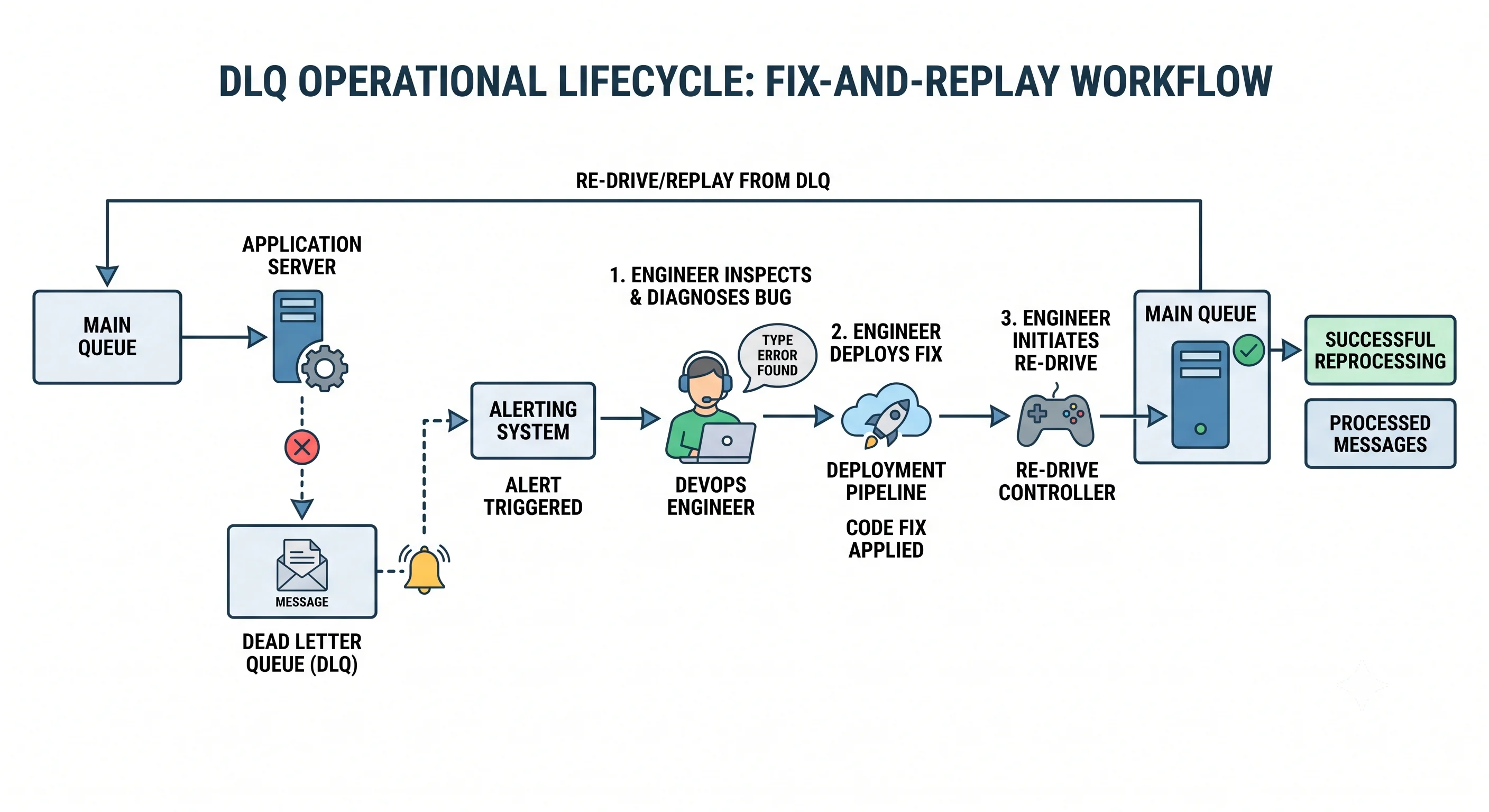
A DLQ is only useful if you act on it:
| Action | When |
|---|---|
| Alert | DLQ depth > 0 should page/notify — it means messages are failing |
| Inspect | Examine failed messages to find the root cause (bad data? bug?) |
| Fix & replay | After fixing the bug, re-drive messages back to the main queue |
| Discard | Some messages are genuinely unprocessable (bad data) → drop deliberately |
The replay capability is why DLQs beat dropping messages: you can fix the bug, then reprocess everything that failed, with zero data loss.
DLQ as an Observability Signal
DLQ depth is one of the most valuable health metrics in an event-driven system. A rising DLQ is an early warning of a deploy that broke a consumer, a schema change, a poisoned upstream, or a failing dependency — often before users notice.
Seeing It in Action
Scenario: DLQ configuration and handling in an order-processing pipeline (SQS-style).
Setup:
  main-queue "orders"
    maxReceiveCount: 5          → after 5 failed attempts → DLQ
    visibilityTimeout: 30s
    redrivePolicy → deadLetterTargetArn: "orders-dlq"

  orders-dlq
    retentionPeriod: 14 days    → keep failed messages long enough to fix
    CloudWatch alarm: DLQ depth > 0 → page on-call

Consumer logic:
  process(msg):
      try:
          fulfill_order(msg)          # may hit transient DB blips
          ack(msg)
      except TransientError:
          raise                       # don't ack → redelivered w/ backoff
      except PermanentError as e:
          log("unprocessable", msg, e)
          raise                       # will exhaust retries → DLQ

What happens:
  • Transient DB hiccup → message retried with backoff → succeeds by
    attempt 2. Never reaches the DLQ. Self-healed.

  • A deploy introduces a bug parsing a new order field → those orders
    fail all 5 attempts → land in orders-dlq → alarm fires → on-call
    sees the DLQ filling within minutes (early warning!).

  • Engineer finds the parsing bug, deploys a fix, then RE-DRIVES the
    DLQ back into "orders" → all previously-failed orders reprocess
    successfully. Zero lost orders.
Why the DLQ is indispensable: without it, that buggy deploy would have either blocked the queue (poison messages looping forever, halting all order processing) or silently dropped every affected order (lost revenue, angry customers, no record). With the DLQ, the blast radius is contained (healthy orders keep flowing), the failure is visible within minutes (alarm on DLQ depth), and recovery is complete (fix + replay = no data loss). It turns a potential incident into a manageable, observable, recoverable event.
Interview Questions
Q: What is a dead-letter queue and what problem does it solve? Hint: A DLQ is a queue where messages go after failing to be processed a set number of times. It solves the poison-message dilemma: without it, a message that always fails either loops forever (blocking the queue and wasting resources under at-least-once delivery) or is silently dropped (data loss). The DLQ isolates failures so healthy traffic flows, preserves messages for inspection/replay, and signals that something's wrong.
Q: What is a poison message, and how does a DLQ handle it? Hint: A poison message fails every processing attempt (malformed, references deleted data, triggers a bug, too large). After the max receive count / retry limit is reached, the messaging system moves it to the DLQ instead of endlessly redelivering it. This unblocks the main queue and preserves the message for diagnosis, rather than looping forever or losing it.
Q: What retry strategy should precede sending a message to the DLQ, and why? Hint: Bounded retries with exponential backoff and jitter. Backoff avoids hammering a struggling dependency; jitter prevents synchronized retry storms; bounding attempts (e.g., 3–5) ensures truly-broken messages reach the DLQ promptly. This separates transient failures (self-heal via retries) from permanent ones (land in the DLQ for attention).
Q: What should happen operationally when messages land in the DLQ? Hint: Alert (DLQ depth > 0 should notify/page — it means processing is failing), inspect the messages to find the root cause, fix the bug, then re-drive/replay the messages back to the main queue for reprocessing (zero data loss). Genuinely unprocessable messages (bad data) can be deliberately discarded. A DLQ is only valuable if you act on it.
Q: Why is DLQ depth a valuable observability metric? Hint: A rising DLQ is an early warning that a consumer is failing — often from a bad deploy, a schema/contract change, a poisoned upstream, or a failing dependency — frequently before users notice. Alerting on DLQ depth catches these issues quickly and quantifies the blast radius (how many messages failed), making it a key health signal for event-driven systems.
References
- AWS SQS: Dead-letter queues — configuration and redrive
- RabbitMQ: Dead Letter Exchanges — how DLQ works in RabbitMQ
- Enterprise Integration Patterns: Dead Letter Channel — the canonical pattern
Dive Deeper
- Uber: Reliable Reprocessing and Dead Letter Queues with Kafka — DLQ and retry topics at scale
- AWS Builders' Library: Avoiding insurmountable queue backlogs — poison messages and backlogs
- Retry, backoff, and jitter (AWS) — the retry side of the DLQ story