
Document Stores
In a Nutshell
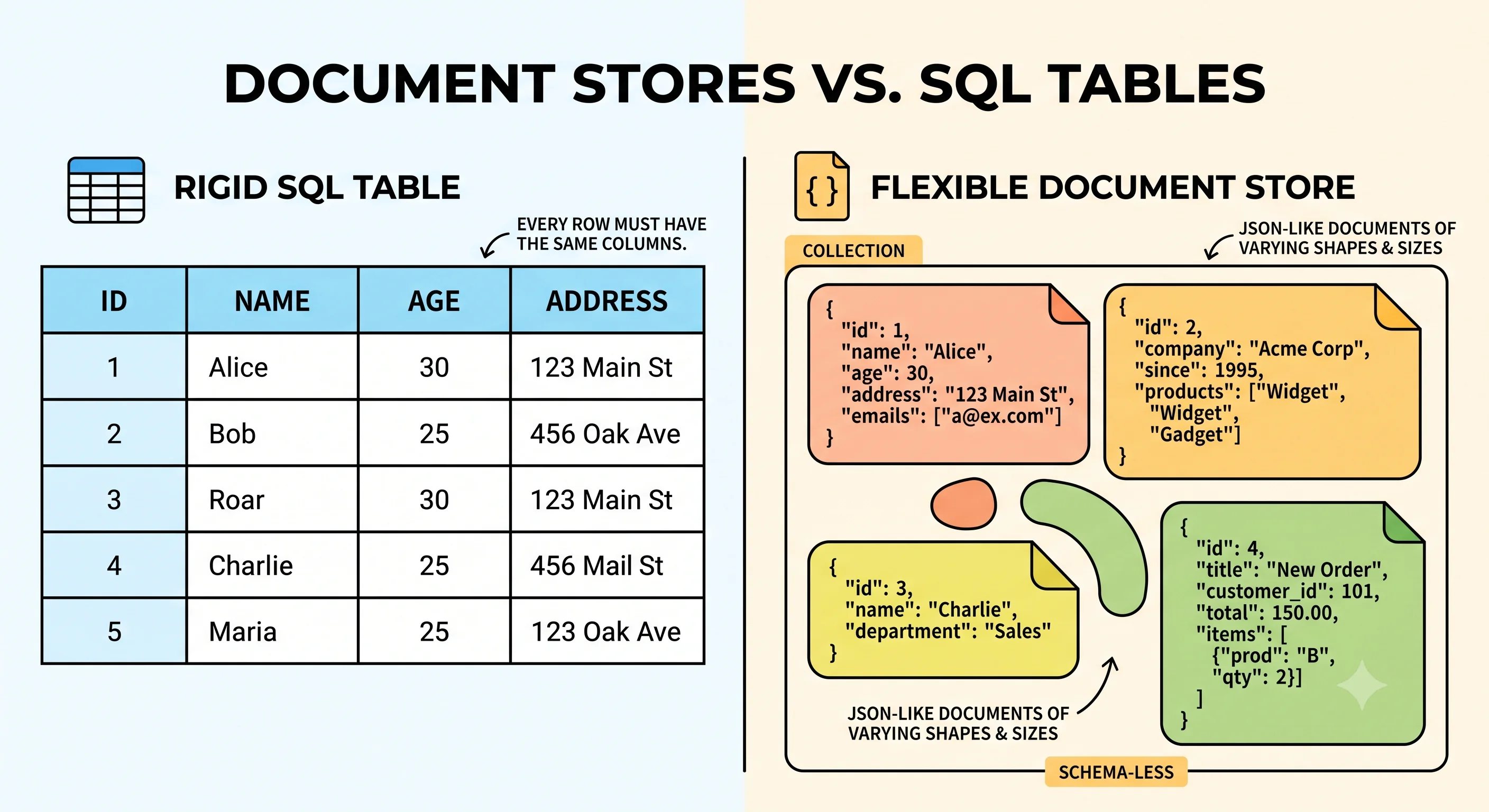
A document store holds semi-structured data as self-contained documents — typically JSON or BSON. Unlike a relational table where every row has the same columns, each document can have a different structure. This makes document stores excellent for content where records are independent and naturally nested: user profiles, product catalogs, blog posts, configuration data. The document is the unit of storage and retrieval — no joins needed because everything related to one entity lives inside one document.
How It Actually Works
What a Document Looks Like
{
  "_id": "user_123",
  "name": "Alice Chen",
  "email": "alice@example.com",
  "address": {
    "street": "123 Main St",
    "city": "San Francisco",
    "state": "CA"
  },
  "orders": [
    { "order_id": "ord_1", "total": 59.99, "status": "delivered" },
    { "order_id": "ord_2", "total": 124.50, "status": "shipped" }
  ],
  "preferences": {
    "newsletter": true,
    "theme": "dark"
  }
}
Notice: address is nested, orders is an embedded array, and preferences has fields another user might not have. This flexibility is the strength.
MongoDB — The Dominant Document Store
| Feature | Description |
|---|---|
| Data format | BSON (binary JSON) — supports types like Date, ObjectId, Decimal128 |
| Query language | Rich — filter, project, sort, aggregate on any field, including nested |
| Indexing | B-tree indexes on any field, compound indexes, text search, geospatial |
| Scaling | Sharding by shard key across replica sets |
| Transactions | Multi-document ACID transactions (since v4.0) |
| Replication | Replica sets with automatic failover |
When to Choose Document Stores
✅ Use when:
- Each record is self-contained (user profile, product listing, blog post)
- Records have variable structure (different users have different fields)
- You mostly query by one entity at a time (get user by ID, get product by slug)
- Rapid prototyping — schema changes are just field additions, no migrations
❌ Don't use when:
- Data has heavy cross-document relationships (use SQL)
- You need complex joins across collections (use SQL)
- Transaction integrity across many documents is critical (SQL is simpler)
- You need strict schema enforcement from the database (SQL constraints are stronger)
Embedding vs Referencing
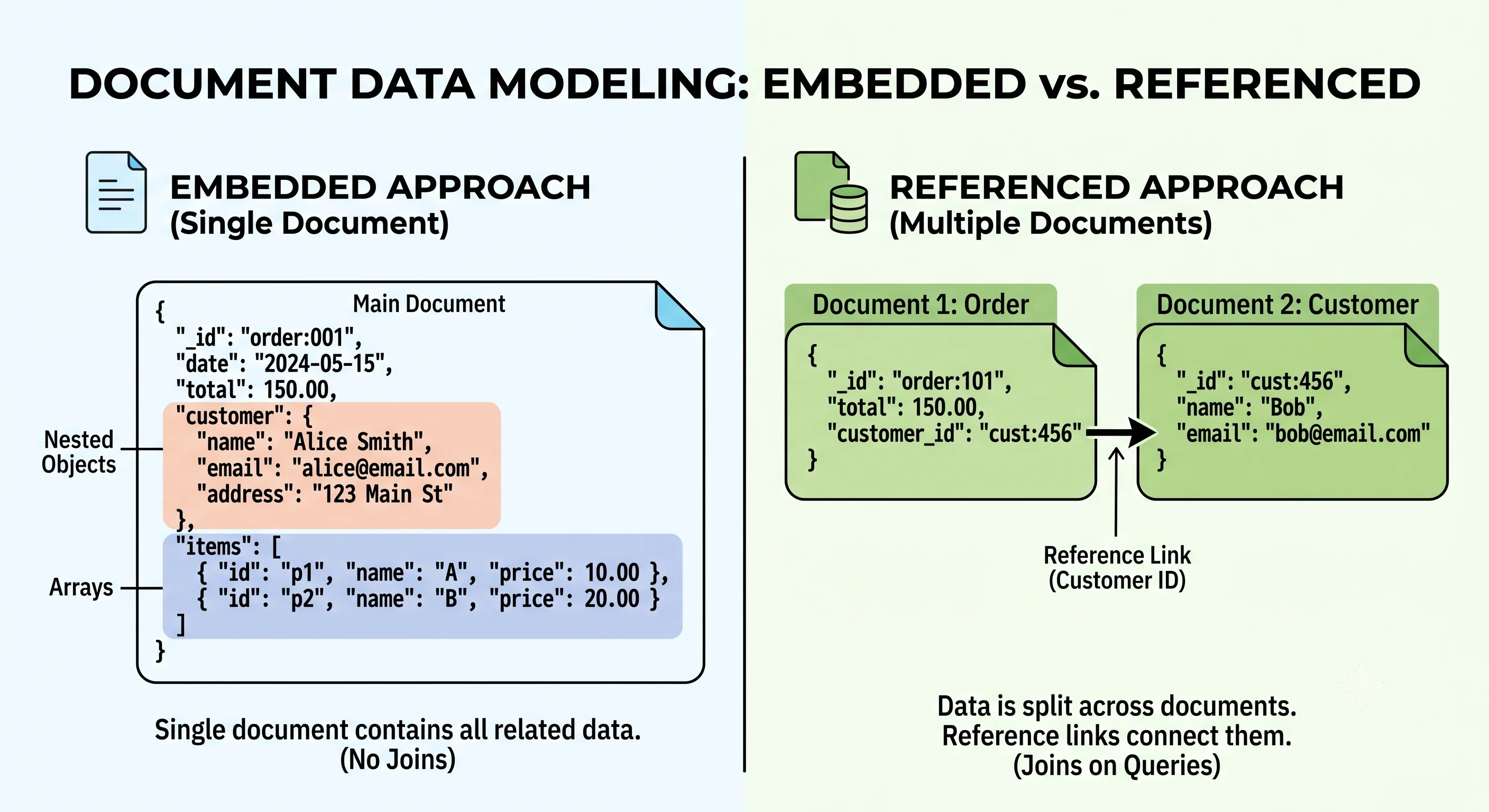
The core data modeling decision in document stores:
| Approach | When to Use | Trade-off |
|---|---|---|
| Embed (nest related data inside the document) | Data is always accessed together, 1:few relationship | Document size grows; updating embedded data means rewriting the whole document |
| Reference (store an ID and look up separately) | Data is accessed independently, 1:many or many:many, or data is large | Requires two reads (application-level join); no referential integrity enforcement |
Rule of thumb: Embed what you read together. Reference what you update independently.
Seeing It in Action
Scenario: Product catalog for an e-commerce platform
// MongoDB document for a product
{
  "_id": ObjectId("prod_abc"),
  "name": "Wireless Noise-Cancelling Headphones",
  "slug": "wireless-nc-headphones",
  "brand": "AudioPro",
  "price": { "amount": 299.99, "currency": "USD" },
  "category": ["Electronics", "Audio", "Headphones"],
  "specs": {
    "battery_life": "30 hours",
    "driver_size": "40mm",
    "connectivity": ["Bluetooth 5.2", "3.5mm jack"],
    "weight": "250g"
  },
  "variants": [
    { "color": "Black", "sku": "AP-NC-BLK", "stock": 142 },
    { "color": "Silver", "sku": "AP-NC-SLV", "stock": 87 }
  ],
  "reviews_summary": {
    "avg_rating": 4.6,
    "count": 1243
  }
}
Why a document store is right here:
- Self-contained — Everything about a product lives in one document (no joins to render the product page)
- Variable structure — Headphones have
battery_life; a book would haveisbnandpages. No schema migration needed. - Nested data — Specs, variants, and reviews summary are naturally nested — fits JSON perfectly
- Read-optimized — One read fetches everything needed to render the product detail page
Common queries:
// Find products by category
db.products.find({ category: "Headphones" })

// Find products under $100 with 4+ stars
db.products.find({
  "price.amount": { $lt: 100 },
  "reviews_summary.avg_rating": { $gte: 4.0 }
})

// Full-text search
db.products.find({ $text: { $search: "wireless headphones" } })
Interview Questions
Q: When would you choose MongoDB over PostgreSQL for a new project? Hint: When each record is self-contained (no cross-document joins needed), schema varies across records, and you prioritize read performance for single-entity access. PostgreSQL's JSONB column actually handles many document-store use cases, so the gap is smaller than it used to be.
Q: Explain the embedding vs referencing trade-off with an example. Hint: Blog posts: embed comments if a post typically has < 50 comments and they're always displayed together. Reference comments if posts can have thousands of comments and you need to paginate them independently. Embedding: one read, larger document, harder to query comments across posts. Referencing: two reads, smaller documents, easier to query.
Q: How does MongoDB handle horizontal scaling? Hint: Sharding by a shard key — each document is assigned to a shard based on its shard key value. Choose a shard key with high cardinality and even distribution (e.g.,
user_id). Bad shard key (e.g.,country) creates hot shards. Each shard is a replica set for durability. Themongosrouter directs queries to the correct shard.Q: MongoDB added multi-document transactions in v4.0. Does this make it equivalent to a SQL database? Hint: Not quite. Transactions exist but are more expensive than in SQL (they cross shard boundaries, hold locks longer). The data model is still document-oriented — you're expected to minimize cross-document transactions by embedding related data. If you need heavy transactional guarantees across many entities, SQL is still a better fit.
Q: How would you migrate from a document store to SQL (or vice versa)? Hint: Document → SQL: flatten nested structures into tables, create FKs for references, handle schema variations (nullable columns or separate tables per type). SQL → Document: denormalize joins into embedded documents, decide what to embed vs reference. Both directions are multi-quarter projects — which is why getting the initial choice right matters.
References
- MongoDB Documentation — comprehensive official docs
- Designing Data-Intensive Applications by Martin Kleppmann — Chapter 2 on document data models
- MongoDB Data Modeling — official guide to embedding vs referencing
Dive Deeper
- MongoDB: The Definitive Guide by Shannon Bradshaw — practical MongoDB operations and data modeling
- When to Use MongoDB vs PostgreSQL — honest comparison from MongoDB
- Fauna and the Future of Document Databases — how newer document stores handle transactions differently