
Backup & Data Durability
In a Nutshell
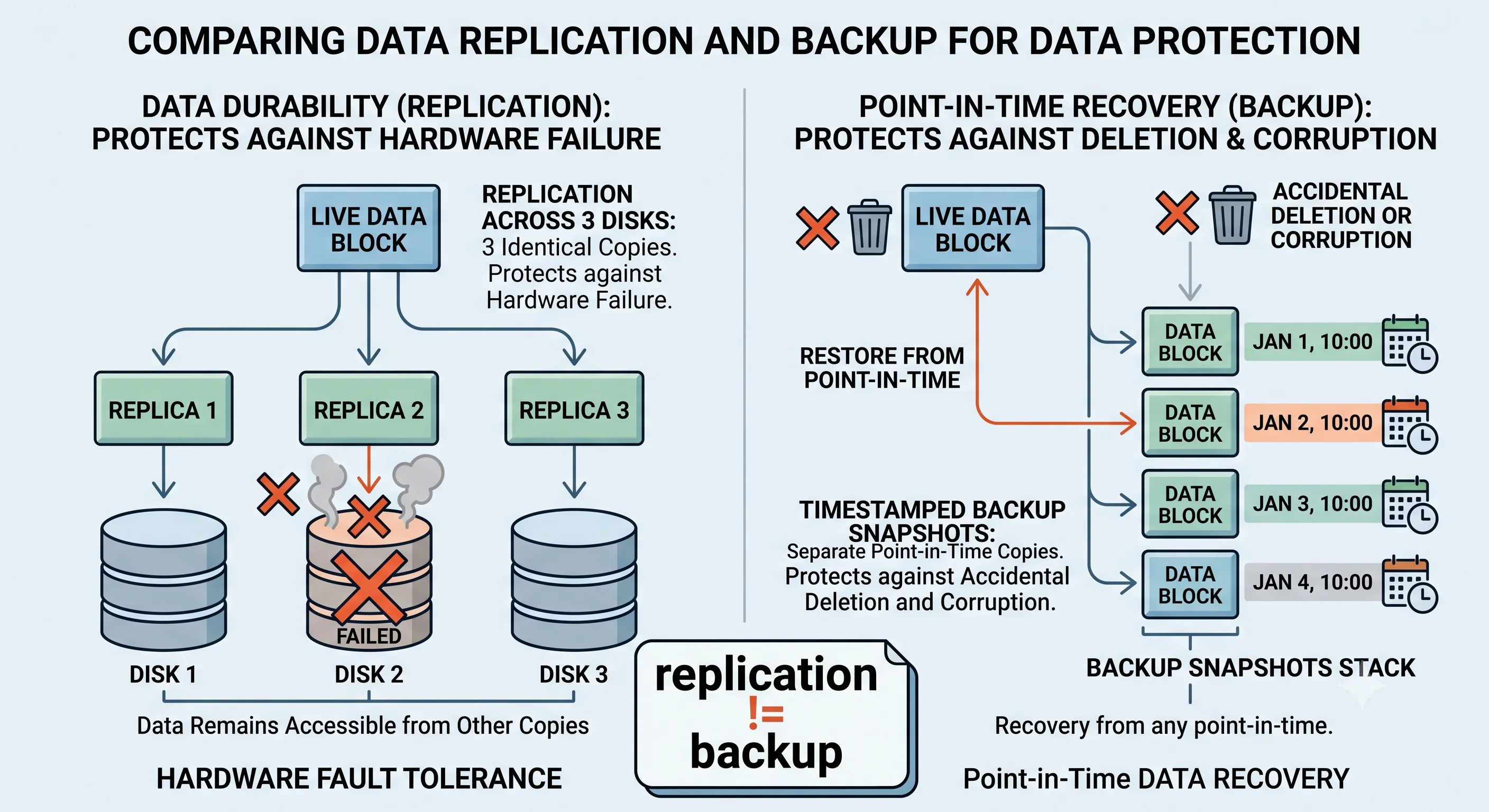
Durability is the guarantee that once data is committed, it survives — through crashes, disk failures, power loss, and even data-center disasters. Backups are point-in-time copies you can restore from when the live data is lost or corrupted. The two are related but distinct: durability (via replication) protects against hardware loss, while backups protect against logical loss — accidental deletes, bad migrations, ransomware, and bugs that corrupt data. Replication alone is not a backup, because it faithfully replicates your mistakes to every copy. You need both.
How It Actually Works
Durability Is Measured in Nines Too
Cloud object stores advertise durability like "eleven nines" (99.999999999%), meaning the expected annual loss is vanishingly small (roughly one object in 100 billion per year). This is achieved by storing multiple redundant copies (or erasure-coded fragments) across independent devices and facilities, and continuously verifying and repairing them.
| Mechanism | How It Provides Durability |
|---|---|
| Replication (N copies) | Store the same data on N independent disks/nodes |
| Erasure coding | Split data into k fragments + m parity; survive m losses with less storage overhead than full replication |
| Write-ahead log (WAL) | Persist the change to a durable log before acking the write |
| fsync / durable commit | Force data to physical storage, not just OS cache, before ack |
| Checksums + scrubbing | Detect and repair silent bit rot |
Why Replication Is Not a Backup
This is the single most important lesson in this topic:
You run: DELETE FROM users;   (forgot the WHERE clause)
         │
   Replicated instantly to every replica.
         │
   ✅ Data is highly "durable"  →  the deletion is durable too.
   ❌ All copies are now empty. Durability didn't save you.

Only a POINT-IN-TIME BACKUP from before the delete can recover it.
Replication protects against physical loss (a disk dies). Backups protect against logical loss (a human/bug destroys valid data). You need both because they defend against different threats.
Types of Backups
| Type | What It Captures | Restore Speed | Storage |
|---|---|---|---|
| Full | Everything | Fast (one file set) | Large |
| Incremental | Changes since last backup (any type) | Slow (chain of increments) | Small |
| Differential | Changes since last full backup | Medium | Medium |
| Snapshot | Copy-on-write image at a point in time | Fast | Efficient (only deltas) |
| Continuous / PITR | Every change (via WAL/binlog) | Restore to any second | Larger |
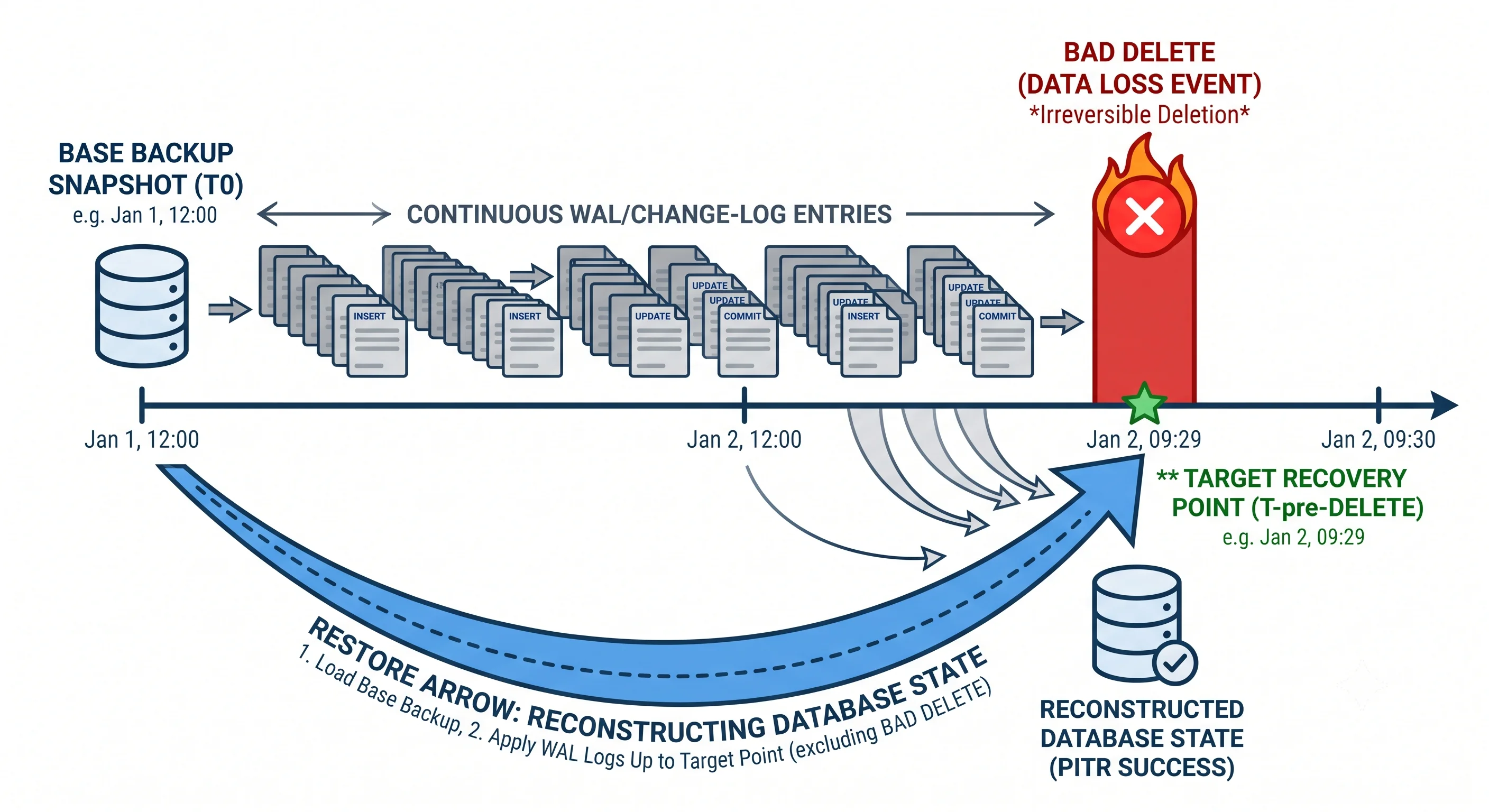
Point-in-time recovery (PITR) is the gold standard: keep a base backup plus the continuous change log, and you can restore to any moment — e.g., "the state one second before the bad DELETE."
The Backup Lifecycle
Create ──▶ Encrypt ──▶ Store (offsite/immutable) ──▶ Verify ──▶ Expire
   │          │              │                          │         │
scheduled  protect at    3-2-1 rule; another        TEST the   retention
snapshot   rest          region; immutable to       restore!   policy /
+ WAL                    resist ransomware                     lifecycle tiers
The most-skipped step is Verify — a backup you've never restored is a guess, not a guarantee.
Durability Knobs in Real Databases
- Synchronous commit /
fsync— trade write latency for a hard durability guarantee. Turningfsyncoff is fast but risks losing recently-acked writes on a crash. - Replication acknowledgment — require ≥1 replica to have the write before acking (semi-sync) to survive a primary disk loss without data loss.
- WAL/redo log — the database writes intent to a sequential log first; on crash recovery it replays the log to reach a consistent state.
Seeing It in Action
Scenario: Durable, recoverable Postgres setup.
Durability (survive hardware loss):
  - synchronous_commit = on         → fsync WAL before ack
  - 1 synchronous replica           → write survives primary disk failure
  - WAL archived continuously to object storage (11 nines durability)

Recoverability (survive logical loss):
  - Nightly base backup (pg_basebackup) → offsite region, immutable bucket
  - Continuous WAL archiving             → enables PITR to any second
  - Retention: 30 days of PITR window; monthly fulls kept 1 year

Recovering from a bad migration at 14:32:07:
  1. Provision a fresh instance
  2. Restore last base backup (e.g., from 02:00)
  3. Replay WAL up to 14:32:06  (recovery_target_time)
  4. Verify data, then cut traffic over
  → Data loss window: 1 second. Migration disaster undone.

Monthly restore drill:
  - Automatically restore latest backup to a scratch instance
  - Run integrity checks; alert if restore fails or is slow
The discipline that matters: the setup above is worthless without the monthly restore drill. Teams discover corrupt backups, missing WAL segments, or ballooning restore times only by actually restoring — never assume a backup works because the backup job reported success.
Interview Questions
Q: Why isn't replication a substitute for backups? Hint: Replication protects against physical/hardware loss by keeping identical copies — but it replicates everything, including accidental deletes, bad migrations, corruption, and ransomware, to all copies instantly. Backups are point-in-time copies that let you recover valid data from before a logical error. Different threats; you need both.
Q: What is point-in-time recovery and how does it work? Hint: PITR lets you restore a database to any exact moment by combining a base backup with the continuous change log (WAL/binlog). Restore the base, then replay log entries up to (but not past) the target time — e.g., one second before a bad delete. It minimizes RPO to near-zero for logical errors.
Q: How do databases guarantee a committed write survives a crash? Hint: Write-ahead logging plus fsync: the change is durably written to a sequential log and forced to physical storage (not just OS cache) before the write is acknowledged. On restart, crash recovery replays the WAL to a consistent state. Optionally, require a replica to also have the write (semi-sync) to survive full disk loss.
Q: Compare full, incremental, and differential backups. Hint: Full = complete copy (fast restore, most storage). Incremental = only changes since the last backup of any type (least storage, slow restore requiring the full chain). Differential = changes since the last full (medium storage, faster restore than incremental since only full + one differential needed).
Q: What does "eleven nines of durability" mean, and how is it achieved? Hint: 99.999999999% annual durability — expected loss on the order of one object in ~100 billion per year. Achieved via multiple redundant copies or erasure-coded fragments spread across independent devices and facilities, plus continuous checksumming/scrubbing to detect and repair silent bit rot.
References
- Amazon S3 Durability — how eleven nines is achieved
- PostgreSQL Continuous Archiving & PITR — WAL archiving and point-in-time recovery
- Designing Data-Intensive Applications by Martin Kleppmann — durability, WAL, and replication
Dive Deeper
- Google SRE Book — Data Integrity: What You Read Is What You Wrote — the definitive treatment of backups vs durability
- Backblaze: erasure coding explained — how parity gives durability with less overhead than full replication
- Turning the database inside-out (Kleppmann) — logs as the source of durability