
API Management
API Management (APIM) is a managed API gateway plus an API governance layer: one front door that accepts every HTTP call for your organisation's APIs, authenticates it, rate-limits it, transforms it, logs it, and forwards it to whichever backend actually implements it — while a separate management surface decides who is allowed to call what, and a developer portal tells them how.
Names: the service has always been Azure API Management, and the resource type has always
been Microsoft.ApiManagement/service. The naming trap is inside the product, not around it. The
original tiers — Developer, Basic, Standard, Premium — are now referred to as the classic
tiers, and they sit alongside a newer generation of v2 tiers (Basic v2, Standard v2, and
Premium v2) built on different infrastructure with different networking and much faster
provisioning ⚠️ verify current GA/preview status of each v2 tier against Azure docs. There is also
a Consumption tier, which is serverless and per-call and shares almost nothing with the others
operationally. "APIM" in a conversation means a specific tier far more often than the speaker
realises; ask which one. Two adjacent products get confused with it and are not it: Azure API
Center (an inventory and catalogue of APIs, no traffic) and Azure Front Door / Application
Gateway (network-layer routing and WAF, no API semantics).
What it is and where it fits
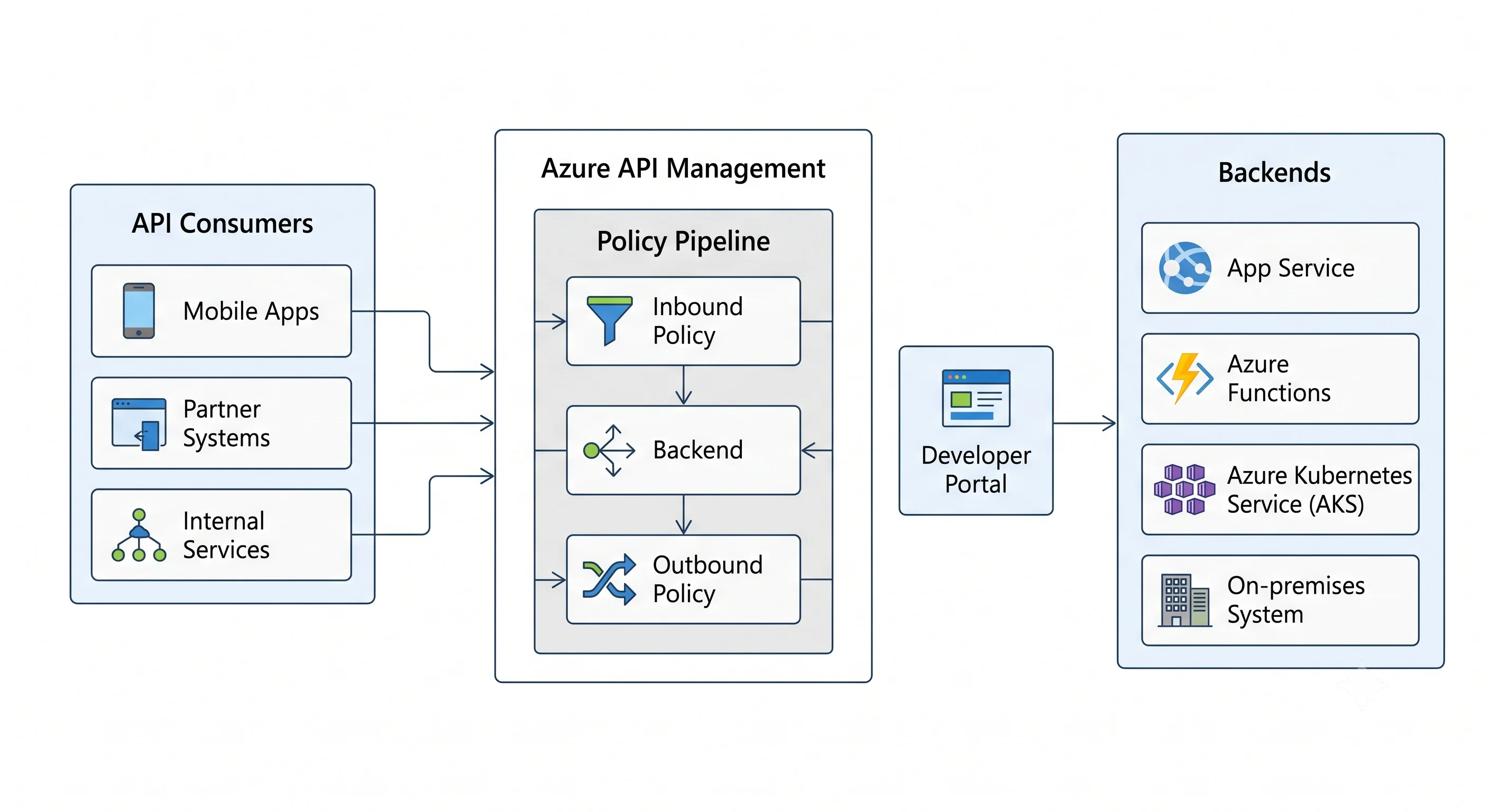
An API gateway is a reverse proxy that understands APIs rather than hosts. A plain reverse proxy knows about paths and upstreams. A gateway knows about operations, keys, tokens, quotas, schemas, versions, and consumers — and it applies rules per operation, not per site. APIM's job is to run that gateway for you, in Azure, with an Entra-backed identity model and an ARM-backed control plane, and then to add the two things that make it a governance product rather than a proxy: products and subscriptions (who may call which set of APIs, with what key and what quota) and the developer portal (a generated, brandable site where those consumers discover and self-serve).
The problem it kills is the fan-out of cross-cutting concerns. Without a gateway, every backend team implements its own auth check, its own rate limiter, its own request logging, its own CORS headers, its own API-key issuance, and its own version strategy — and they all implement them slightly differently, so a security fix means twelve pull requests across five languages. APIM moves those concerns to one place where they're expressed as policies: a declarative XML pipeline attached at the global, product, API, or operation scope. Fixing a policy fixes it everywhere at once.
Where it sits in the catalogue: APIM is in the integration category, but architecturally it lives at the boundary. It sits in front of compute (App Service, Functions, Container Apps, AKS, Logic Apps, or anything with an HTTP endpoint, in Azure or not) and behind a global entry point (Front Door or Application Gateway, when you want WAF and global anycast). More recently it has a second life as an AI gateway in front of Azure OpenAI deployments, where token-based rate limiting, backend load balancing, and token metrics are genuinely difficult problems that a gateway is the right place to solve.
The neighbours worth separating, one line each:
- Azure Front Door — global, anycast, CDN, WAF, and layer-7 routing across regions. It routes to origins; it does not know what an "operation" is, cannot issue subscription keys, and cannot validate a JWT's claims per route. Front Door in front of APIM is a normal, recommended topology, not an alternative to it.
- Application Gateway — regional layer-7 load balancer with WAF. Same story as Front Door, one region down. Its common job in an APIM architecture is to be the public, WAF-protected front for an APIM instance deployed in internal VNet mode.
- Azure API Center — a catalogue. It records that an API exists, its versions, owners, and compliance state, across gateways and clouds. No traffic passes through it. It complements APIM; it does not replace it.
- Azure Functions with an HTTP trigger — a backend, not a gateway. Functions has function keys and basic CORS, which is enough for one app and nowhere near enough for a portfolio of APIs.
- AKS ingress controllers / Istio / Envoy — a genuine alternative inside a cluster. They handle north-south routing and mTLS well; they don't give you products, subscriptions, a developer portal, or a non-Kubernetes control plane. APIM's self-hosted gateway exists precisely to run APIM's data plane inside that cluster while keeping the control plane in Azure.
- Logic Apps / Service Bus — integration in the workflow and messaging sense. Different axis entirely; APIM is synchronous request/response.
If you're coming from AWS: the analogue is Amazon API Gateway, and the mental model transfers for the obvious parts — a managed front door, per-operation configuration, API keys with usage plans, throttling, request/response transformation, custom domains. Where it breaks, and it breaks hard:
- APIM (classic and v2) is a provisioned, always-on regional resource billed per hour, sized in units, not a per-request serverless service. Only the Consumption tier bills per call. Coming from API Gateway's pay-per-request model, this is the single biggest surprise on the invoice.
- One APIM instance hosts your whole API portfolio. In API Gateway, one REST API is one resource with its own ARN and its own IAM policy. In APIM, the service is the ARM resource and APIs, products, and policies are child entities inside it — so Azure RBAC's natural grain is the whole instance. Per-API delegation needs workspaces (Premium) rather than resource policies.
- The policy engine is far more powerful and is XML. API Gateway's mapping templates are
VTL snippets bolted on the side; APIM's policies are a first-class ordered pipeline
(
inbound → backend → outbound → on-error) with control flow, C# expressions, caching, JWT validation, and outbound rewriting. This is APIM's real differentiator and its real learning curve. - No stages. API Gateway's
dev/prodstages have no APIM equivalent. APIM's revisions and versions solve adjacent but different problems, and the usual Azure answer to environments is a separate APIM instance per environment, which is expensive in a way stages are not. - The developer portal is included. API Gateway has no equivalent; you'd have built one.
- WAF is not included. API Gateway pairs with AWS WAF directly; APIM needs Front Door or Application Gateway in front for WAF.
Key facts at a glance
| Category | Integration — managed API gateway and API governance platform |
| Resource provider | Microsoft.ApiManagement/service (child types include .../apis, .../products, .../subscriptions, .../namedValues, .../backends, .../policies, .../loggers, .../gateways, .../workspaces) |
| Scope | A regional resource with a globally unique name — the default gateway hostname <name>.azure-api.net is DNS in a shared namespace, so the name is taken across all of Azure. Premium (classic) adds additional regional deployments behind one hostname; Premium and v2 tiers add zone redundancy ⚠️ verify per-tier zone support |
| The SKU axis — tier | Consumption (serverless, per-call, heavily feature-reduced) · Developer (full features, no SLA, single unit, non-production only) · Basic / Standard / Premium (classic) · Basic v2 / Standard v2 / Premium v2 (newer platform, faster provisioning, different networking model). The tier decides which features exist at all, not merely how much throughput you get |
| What the top tier unlocks | Classic Premium is the only classic tier with multi-region deployment, VNet injection in internal mode, self-hosted gateways, workspaces, and the highest unit ceiling. Everything about a serious enterprise APIM design assumes Premium — or, increasingly, a v2 tier that offers a subset at lower cost ⚠️ verify the current v2 feature matrix, it is moving |
| The trap tiers | Two of them. Developer is the classic trap: it is cheap, has every feature, and has no SLA — teams prototype on it and then discover production can't stay there. Consumption is the subtler trap: no VNet support, no developer portal, no built-in cache, no multi-region, request-size limits, and a cold-start on idle. Both are fine choices if chosen deliberately |
| Unit of billing | Per unit-hour for every tier except Consumption, which bills per call (with a monthly free grant) ⚠️ verify current pricing and grants. A "unit" is a fixed slice of gateway capacity; you scale by adding units, and each additional region in Premium multiplies units |
| The billing trap | The gateway bills whether or not a single request arrives. A Premium instance idling in three regions over a weekend costs exactly what a busy one does. Second trap: Application Insights sampling left at 100% on a high-traffic gateway can cost more than the gateway |
| Provisioning time | Classic tiers take tens of minutes to create, and some operations (VNet changes, region additions, tier changes) take similarly long ⚠️ verify current figures. v2 tiers were built largely to fix this and provision in minutes. This single fact shapes CI/CD design more than anything else about the service |
| Control plane / data plane | ARM governs the Microsoft.ApiManagement/service resource and, unusually, also governs its child entities (APIs, policies, products) — so terraform apply genuinely manages API configuration. The gateway endpoint (*.azure-api.net) is the data plane and is governed by subscription keys, JWTs, and client certificates, not by Azure RBAC. There is also a direct management REST API on <name>.management.azure-api.net, a legacy surface authenticated by its own access token, which should normally be disabled |
| Auth model for callers | Subscription key in Ocp-Apim-Subscription-Key (or a query parameter), and/or OAuth 2.0 / OpenID Connect JWTs validated by the validate-jwt policy, and/or client certificates (mTLS). These compose; they are not alternatives |
| Auth model to backends | Managed identity + role assignment (the default answer), client certificate, a named value holding a secret pulled from Key Vault, or nothing at all if the backend is network-isolated |
| SLA posture | An availability SLA per tier, higher with multiple units and higher again with multi-region and zone redundancy; Developer tier has no SLA at all ⚠️ verify current percentages |
| Usual companions | App Service / Functions / Container Apps / AKS as backends · Microsoft Entra ID for token issuance · Key Vault for certificates and secrets via named values · Application Insights and Log Analytics for telemetry · Front Door or Application Gateway for WAF · Azure OpenAI when used as an AI gateway · Private Link and Private DNS |
| Primary alternative | Front Door alone (if you only need routing and WAF), an in-cluster ingress or service mesh (if everything is Kubernetes and you don't need governance), or a third-party gateway such as Kong or Apigee |
| AWS rough analogue | Amazon API Gateway — see the caveats above; the always-on provisioned model and the XML policy engine are the two places the analogy misleads most |
When to use API Management
- You have more than one API and more than one consumer. That's the threshold. One API with one client does not need a gateway; five APIs with a partner, a mobile app, and an internal caller need one badly.
- Cross-cutting concerns keep getting reimplemented. Auth, throttling, CORS, logging, correlation IDs, response caching, and header hygiene belong in one pipeline, and a policy at global scope applies to everything at once.
- You need to expose something you cannot change. APIM's transformation policies let you put a
clean, modern, documented interface in front of a SOAP service, a legacy on-premises system, or a
backend whose team has a six-month queue.
set-body,xml-to-json, andrewrite-uriexist for exactly this, and the SOAP-to-REST facade is one of APIM's most-used real-world jobs. - You need to give external parties measured, self-service access. Products, subscriptions, quotas, approval workflows, and the developer portal are the whole point, and there's no reasonable way to assemble them yourself.
- You need an auditable boundary between the internet and your VNet. Internal-mode VNet deployment behind an Application Gateway is the standard enterprise topology, and the standard answer to "how does a public client reach a private backend safely."
- You're fronting Azure OpenAI or other LLM endpoints. Token-per-minute limits, load balancing across multiple deployments with circuit breaking, semantic caching, and per-consumer token metering are all things the gateway can do and the application shouldn't.
- You're consolidating after an acquisition or a microservice sprawl. One hostname, many backends, versioned migration paths.
When not to use API Management
- For a single low-traffic API. The always-on cost of even a Basic instance dwarfs a small App Service, and a Function's built-in keys plus CORS may be the whole requirement. Consumption tier softens this, but then read its limitations first.
- As a WAF. APIM validates schemas, sizes, headers, and tokens. It does not do OWASP rule sets, bot management, or IP reputation. Put Front Door or Application Gateway in front and let each layer do its job.
- As a CDN or static-content host. It is a gateway, billed per unit of gateway capacity. Serving images through it is a way to buy capacity units you didn't need.
- For high-throughput internal east-west traffic. A service mesh sidecar adds microseconds; a shared regional gateway adds a network hop and a policy pipeline, and becomes a single point of failure and a shared throttling ceiling. Use APIM at the boundary, not between every microservice.
- For streaming, long-lived, or very large payloads. WebSocket and gRPC support exists but is constrained by tier and configuration, and request/response size limits apply — especially in Consumption ⚠️ verify current limits. Large file transfer belongs on a SAS URL to Blob Storage, not through the gateway.
- When the real problem is that you have no API design discipline. A gateway makes bad APIs reachable and consistent; it does not make them good. Policies that rewrite a broken contract into a working one are technical debt with an XML syntax.
- As a substitute for backend authorisation. The gateway is not the only door. Anything that can reach the backend directly bypasses every policy you wrote — which is why network isolation and backend-side token validation matter even when the gateway validates too.
What this topic covers
| Sub-topic | What it covers |
|---|---|
| What & Why | The problem a gateway solves, where APIM sits among Front Door, App Gateway, API Center and ingress controllers, the API Gateway analogue and where it breaks, and the honest anti-patterns |
| Core Concepts | Service, API, operation, product, subscription, policy, named value, backend, revision, version, gateway, workspace, and the SKU axis in detail |
| Architecture | The policy pipeline traced end to end, control plane vs. data plane, the units-and-capacity scaling model, caching, multi-region and self-hosted gateways, and the failure modes |
| Getting Started | One gateway in front of one backend, three ways — portal, az CLI, minimal Terraform — call it with a subscription key, then delete the resource group |
| Deployment | A parameterised Terraform module, remote state, the APIOps pattern, an Ansible playbook, the Bicep equivalent, OIDC CI/CD, environment strategy, rollback by revision, and drift |
| Integrations | Backends, Entra ID, Key Vault, Application Insights, Front Door and Application Gateway, Event Hubs, Azure OpenAI as an AI gateway, and the managed-identity and private-endpoint glue |
| Production | Security, cost, scaling and capacity, observability, and reliability — plus the certificate, quota, and sampling discipline that keeps a gateway healthy |
| Interview Questions | Three tiers with answer keys, from "what is a product" to "the gateway is at 90% capacity and the backend is idle" |
| Glossary & Cheatsheet | Every term in one line, the az apim commands you'll actually type, the resource ID shape, and the limits worth knowing |
Four ideas worth carrying into every other page
The policy pipeline is the product. Nearly every APIM question — "how do I authenticate?", "how
do I rate limit?", "how do I hide that header?", "how do I cache?", "how do I call two backends?" —
resolves to "write a policy at the right scope." Learn the four sections
(inbound, backend, outbound, on-error), learn that <base /> is where the parent scope's
policy runs, and learn that scopes nest global → workspace → product → API → operation. Everything
else is vocabulary.
A subscription key is not authentication. It identifies a consumer and meters them. It is a
bearer secret sitting in a header, frequently in a mobile app, frequently in a git repository. Real
authentication is a JWT validated by validate-jwt against Entra ID or another OIDC issuer, or a
client certificate. Use subscription keys for metering and quota; use tokens for identity. Conflating
the two is the most common security finding in an APIM review.
Provisioning time is an architectural constraint, not an inconvenience. When creating or
reconfiguring a classic instance takes tens of minutes, "spin up an ephemeral APIM per pull request"
stops being a design option, terraform apply timeouts become a real pipeline problem, and the
sensible pattern becomes long-lived instances per environment with configuration deployed into
them — which is exactly what the APIOps pattern formalises. And because APIM has soft delete,
a destroyed instance still holds its globally unique name until it's purged, which will break the
next re-create.
Configuration is infrastructure here, and that's unusual. In most services, IaC provisions the resource and the application configures itself. In APIM, the APIs, operations, policies, products, and named values are all ARM child resources — so your Terraform or Bicep is genuinely managing day-to-day API configuration. That's powerful, and it means portal edits are drift in the most literal sense: someone fixing a policy in the portal at 2 a.m. will have it reverted by the next pipeline run unless the change goes back into source.
Reading paths
New to API gateways — What & Why → Core Concepts → Getting Started. Get one call through the gateway, then read Architecture to understand what happened to it on the way.
Coming from Amazon API Gateway — skim What & Why for the analogue breakdown, then go straight to Core Concepts for products, subscriptions, revisions, and the tier axis — the four things with no clean AWS mapping — and to the capacity section of Architecture for the provisioned-units model.
Writing policies — Core Concepts for the scope hierarchy, then the pipeline trace in Architecture, then the policy examples in Integrations.
Need to ship this quarter — Deployment, then Production. Getting Started is deliberately throwaway; do not let its portal-created API become production.
Chasing a cost surprise — the cost section of Production. An oversized tier, a forgotten second region, Developer instances left running per-developer, and Application Insights sampled at 100% are, in that order, the usual culprits.
Fronting Azure OpenAI — Integrations for the AI-gateway policies, then the scaling section of Production for what token-based limits do to capacity.
Interview or certification prep — Core Concepts, Architecture, and Interview Questions. The "products vs. subscriptions vs. keys" question and the "revision vs. version" question are close to guaranteed.
Next: What & Why →