
7. Production
The difference between "it works in the portal" and "I run this for fifty APIs and someone pages me when it doesn't." Five pillars: security, cost, scaling and limits, observability, reliability.
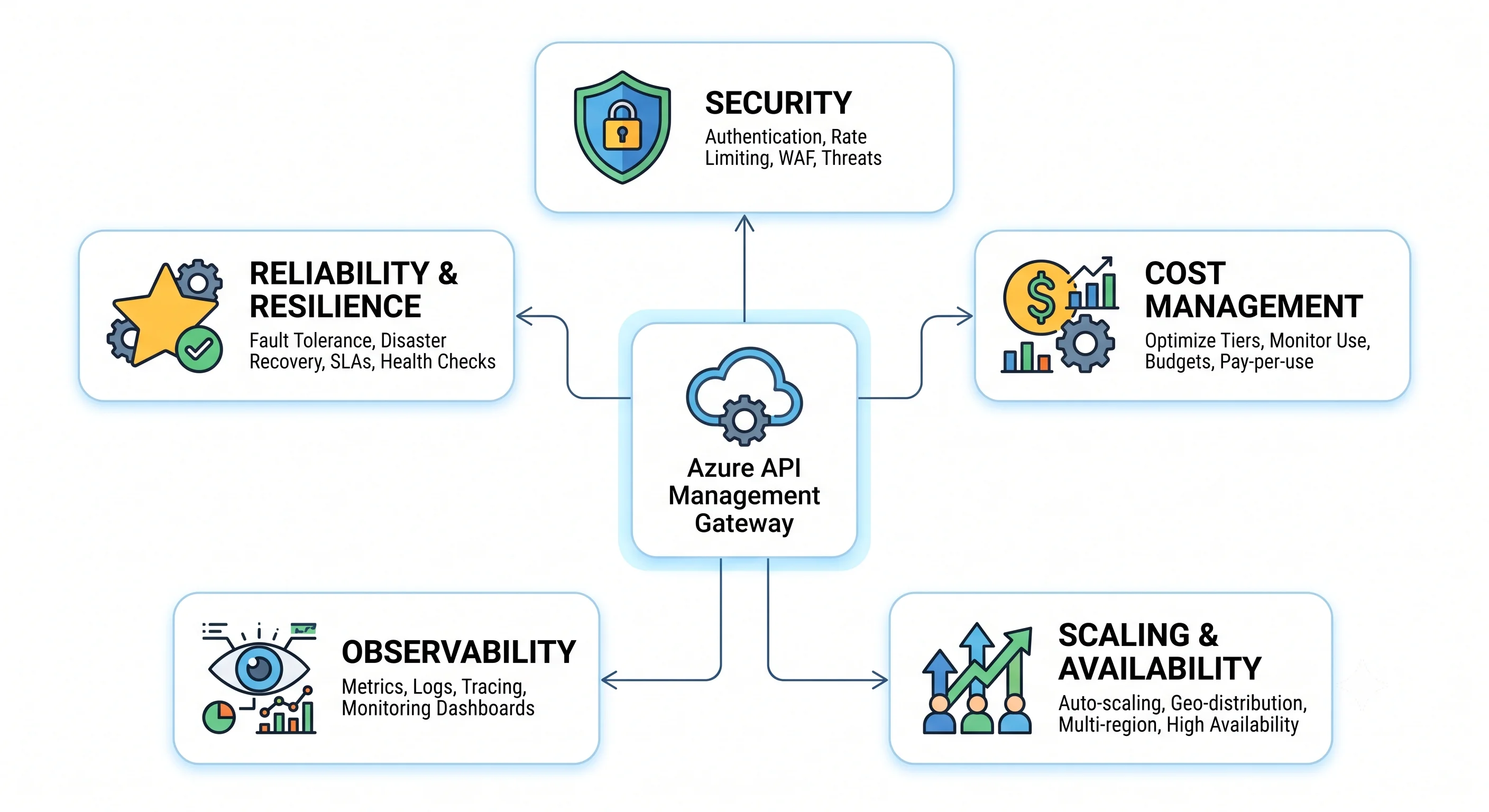
Security
APIM is a security control, which means a misconfigured APIM is worse than no APIM: it creates the belief that something is protected.
Authentication — get the layering right.
- Subscription keys are identity-and-metering, not authentication. They are bearer secrets that end up in mobile apps and git repositories. Use them to identify and meter a consumer; never let them be the only thing between the internet and your data.
validate-jwtis the actual control. Validate the signature, the issuer, the audience and the claims. A token that is merely valid proves the caller exists in your tenant, not that they may call this operation.- Client certificates (mTLS) where the caller is a system rather than a person and you control
both ends. Note that certificate validation requires the API to be configured to negotiate the
client certificate, and the check itself is a policy —
validate-client-certificate— not automatic. - Keep authorisation in the backend too. Anything with network reach to the backend bypasses every policy. The gateway is a checkpoint, not a wall.
Azure RBAC — least privilege on the control plane.
- Built-in roles: API Management Service Contributor (full management of the service and its APIs), API Management Service Reader Role, API Management Service Operator Role (manage the service, not its APIs), plus developer-portal content roles ⚠️ verify the current built-in list.
- The problem: the natural grain is the whole instance, so
Service Contributoron a shared gateway is edit rights over everyone's APIs and policies. Three honest answers, in order of preference: Premium workspaces (per-team RBAC inside one instance), separate instances per boundary, or a pipeline-only model where no human has write access and every change is a pull request. The third is the cheapest and works well. - The custom role you'd actually write: read on the service, write only on
Microsoft.ApiManagement/service/apis/*and.../policies/*for a specific API — useful, and fiddly enough that workspaces exist for a reason.
Secrets and certificates.
- Named values as Key Vault references, always, for anything sensitive. A
secret = truenamed value with a literal in Terraform puts the secret in your state file. - Gateway certificates as versionless Key Vault references, so renewal is automatic. Alert on expiry regardless — see observability below.
- Disable the legacy direct management endpoint (
<name>.management.azure-api.net), which authenticates outside Entra ID with its own token ⚠️ verify the current default and property name. - Rotate subscription keys using the primary/secondary pair: issue the secondary to the consumer, wait for them to switch, regenerate the primary. Two keys exist precisely so rotation needn't be an outage.
Network isolation.
- Production pattern: internal-mode VNet injection (no public gateway endpoint at all) with Application Gateway (WAF v2) or Front Door Premium in front for public exposure.
- Backends reached over private endpoints, not the public internet.
- If the gateway must stay public, at minimum restrict
publicNetworkAccess, applyip-filterpolicies for known-partner APIs, and put a WAF in front. - APIM is not a WAF. No OWASP rule set, no bot management, no IP reputation. Do not let a security review conclude otherwise.
The exposure gotchas specific to this service.
- The developer portal is publicly reachable by default once published, and it advertises your API surface. Decide deliberately whether it should be public, restricted to signed-in Entra users, or disabled entirely.
<base />omission silently disables inherited security policies. Lint for it in CI.- Cache
vary-bymisconfiguration can serve one tenant's response to another. Anycache-storeon a response that varies by caller must vary by the caller. on-errordefault output returns APIM's diagnostic detail to the client. Override it.- Direct backend reachability — the most common finding in a real review, and the one nobody writes a ticket for.
Cost
What you pay for: a per-unit-hour charge for every tier except Consumption, which bills per call after a monthly grant ⚠️ verify all current pricing. The charge accrues whether or not a single request arrives. Multi-region multiplies it by region; self-hosted gateways add a per-gateway charge ⚠️ verify current model.
What keeps billing when nothing is happening: the gateway itself, every additional region, every self-hosted gateway, the attached Azure Cache for Redis, the Log Analytics workspace ingestion and retention, and Application Insights ingestion. That last one is the surprise.
The five cost traps, in the order they're encountered:
- Developer instances left running. One per engineer, created "to try something," running for months. Tag everything and run a scheduled audit; a Developer instance is cheap per hour and not cheap per year.
- Application Insights sampling at 100%. On a high-traffic gateway, telemetry ingestion can exceed the gateway's own cost. Set the APIM logger's sampling percentage low (single digits) and raise it temporarily for an investigation. This is the single most common APIM bill surprise.
- Over-provisioned tier. Premium bought for one feature — often "we need VNet" — when a v2 tier now offers a network-integrated option at lower cost ⚠️ verify current v2 pricing and feature coverage. Re-examine this decision annually; it has changed.
- A forgotten second region. Added for a launch, never removed, billing a full regional unit count indefinitely.
- Log Analytics retention on
GatewayLogs. Every request produces a row. Two years of retention on a busy gateway is a meaningful line item; use a shorter interactive retention with archive, or route bulk telemetry to Event Hubs and storage instead.
One concrete optimisation: put a response cache in front of read-heavy, slow backends. It
reduces backend cost, reduces gateway concurrency (which is what capacity actually measures), and
often defers a unit purchase. cache-lookup with a correct vary-by on a catalogue API is
frequently the highest-return change available.
Reserved capacity exists for APIM ⚠️ verify current availability and terms — worth checking for a long-lived Premium instance, since the workload is by definition always-on.
Scaling and limits
The model, restated: you scale by units, per region, within tier-bound maxima. A unit is a fixed capacity slice; you cannot choose its size.
Autoscale on the Capacity metric, not CPU and not request count. Capacity is a composite
utilisation percentage published by the instance, and it's the only signal that reflects what
policies and slow backends do to the gateway. Available on Standard and Premium classic tiers
⚠️ verify current tier support and v2 behaviour.
Scale early. Adding a unit takes minutes on classic tiers, so an autoscale rule that triggers at 90% is a rule that triggers after the incident. Common guidance is to scale out around 60–70% sustained capacity and to scale in far more conservatively than you scale out ⚠️ verify current recommendations.
The counter-intuitive part, and the thing to understand: capacity is consumed by concurrent in-flight requests, not requests per second. A backend that degrades from 50 ms to 5 s multiplies concurrency by a hundred at unchanged traffic, and the gateway saturates while its CPU looks fine. The correct response is a backend timeout and a circuit breaker, not more units. Adding units to absorb a slow backend is buying capacity to hold connections open.
Limits worth knowing — and the scope each is counted at. Azure quotas vary by region and subscription type more than AWS's do, so treat every number below as a shape, not a value.
| Limit | Scope it's counted at | Notes |
|---|---|---|
| APIM instances | per subscription per region | Low enough to constrain "one instance per team" designs ⚠️ verify |
| Units | per instance per region, bounded by tier | Premium's ceiling is far above the others ⚠️ verify |
| APIs, products, subscriptions, named values, certificates, backends | per service instance | Generous but finite; large federated portfolios hit them ⚠️ verify each |
| Additional regions | per instance (Premium only) | Each multiplies cost ⚠️ verify |
| Self-hosted gateways | per instance | Per-gateway billing ⚠️ verify |
| Request/response body size for policy operations (validation, transformation, caching) | per request | The reason a 50 MB upload can't be schema-validated ⚠️ verify current values |
| Backend request timeout | per request | Has a default and a maximum; long-running work needs an async pattern ⚠️ verify |
| Cache size (internal) | per instance, tier-dependent | Small. Use an external Redis cache for anything real ⚠️ verify |
| ARM control-plane request rate | per subscription | Bulk configuration deployment can hit it ⚠️ verify |
Raising a quota is a portal quota request or a support ticket; some are hard limits that no ticket will move, and knowing which is which before you design is worth the ten minutes of reading.
Rate limits are approximate. Counters are maintained per gateway node and are not perfectly
synchronised across units or regions ⚠️ verify current behaviour per tier. A rate-limit of 100/min
on a multi-unit multi-region instance is a guardrail, not a contract. If a limit must be exact —
because it's a billing entitlement — enforce it in a backend against a shared store, and use APIM's
limit as the cheap first line of defence.
Observability
Nothing is on by default. A new APIM instance emits platform metrics and nothing else useful. Three things to switch on, day one:
- Diagnostic settings → Log Analytics for
GatewayLogs(andWebSocketConnectionLogsif you use them). This is the per-request record: status, latency, backend latency, subscription, API, operation, and the policy error if there was one ⚠️ verify current category list. - An Application Insights logger with a low sampling percentage, for distributed tracing into backends.
- Alerts on the metrics below.
The metrics worth alerting on:
| Metric | Alert when | Because |
|---|---|---|
| Capacity | sustained above ~65% ⚠️ verify | Scaling takes minutes; this is your early warning |
Failed requests / 4xx, 5xx rate |
above baseline | Distinguish gateway-generated from backend-forwarded — the logs tell you which |
| Backend duration | p95 climbing | The leading indicator of a capacity incident |
| Unauthorized request rate | spike | Either a credential expired or someone is probing |
| Certificate expiry | 30 days out | The most common APIM outage, and entirely preventable |
| Gateway requests | anomalous drop | A drop to zero is an outage nobody reported |
The KQL query you'll run most — where is the latency, gateway or backend:
ApiManagementGatewayLogs
| where TimeGenerated > ago(1h)
| summarize
    calls        = count(),
    p50_total    = percentile(TotalTime, 50),
    p95_total    = percentile(TotalTime, 95),
    p95_backend  = percentile(BackendTime, 95),
    errors       = countif(ResponseCode >= 500)
  by ApiId, OperationId
| extend p95_gateway_overhead = p95_total - p95_backend
| order by p95_total desc
TotalTime - BackendTime is the gateway's own overhead — your policies. If that number is large,
something in the pipeline is expensive: a send-request, an unsampled trace, a large-body
transformation, or a validate-content against a big schema. ⚠️ Verify the current column names for
your table schema; APIM's log schema has changed across versions.
Two more queries worth saving: top consumers by subscription (for cost attribution and for
spotting the client that started retrying in a tight loop), and policy errors by API
(LastErrorReason grouped by ApiId), which surfaces the policy bug you deployed an hour ago.
Where the activity log fits: it records control-plane operations — who changed the tier, who edited a policy through the portal, who added a region. It is your drift and audit trail, and it is the first place to look when the gateway's behaviour changed and nobody deployed anything.
Reliability
Availability zones. Zone redundancy spreads an instance's units across zones within a region, protecting against a datacentre failure. Premium classic supports it; v2 tier support varies ⚠️ verify current per-tier zone support. It costs nothing extra beyond the units you already run and should be the default in any region that offers it.
Multi-region (Premium classic). Additional regional deployments behind one hostname, with Traffic Manager routing. Two honest caveats:
- Failover is DNS-based, so it takes as long as TTLs and client resolvers take — tens of seconds at best, longer for clients that cache aggressively. It is not instant.
- The control plane lives in the primary region. If the primary fails, secondaries keep serving traffic but configuration changes stop working ⚠️ verify current behaviour. Plan for a read-only window.
Self-hosted gateways add a different kind of resilience: they cache their configuration locally and keep serving during a control-plane interruption ⚠️ verify the current offline window. For on-premises or multi-cloud backends they also remove a round trip to Azure from the request path.
Backup and restore. az apim backup writes the instance's configuration to a storage account;
az apim restore puts it back — into an instance of the same tier, with constraints ⚠️ verify
current requirements and coverage. Two things to be honest about: it is a configuration backup,
not a point-in-time snapshot of everything (developer-portal content coverage in particular varies
⚠️ verify), and git is your real backup. Run backups anyway, on a schedule, to a storage account
in a different region.
Soft delete is a reliability feature, not just an annoyance. An accidentally deleted instance can be restored within its retention window rather than rebuilt ⚠️ verify the current window. That is a much better recovery than re-creating from Terraform, because re-creation takes tens of minutes and changes the outbound public IPs. Put "restore, don't rebuild" in the runbook, and do not purge reflexively.
The failure drill worth running twice a year:
- Break a backend deliberately (return
503, or add latency). Confirm the circuit breaker trips, the alert fires, and capacity does not spiral. - Make the previous revision current on a live API. Confirm it takes seconds and that you know where the button is.
- Fail over: stop traffic to the primary region and time how long clients take to follow.
- Restore a backup into a scratch instance and confirm it contains what you think it does.
- Let a certificate approach expiry in a non-production instance and confirm the alert fires before the outage would.
What a healthy production APIM looks like, as a checklist: internal-mode or Private Link
networking with a WAF in front · certificates as versionless Key Vault references · secrets as Key
Vault named values · validate-jwt with claim checks at the right scopes · <base /> linted in CI
· diagnostic settings to Log Analytics and a low-sampled App Insights logger · autoscale on capacity
with a conservative threshold · backend timeouts and circuit breakers · zone redundancy · a
CanNotDelete lock on the resource group · scheduled terraform plan drift detection · and no
human with standing write access to production configuration.
Next: Interview Questions →
← Back to the Azure API Management overview · ← Previous: Integrations