
6. Integrations
Almost nothing useful is built from Foundry alone. A chat feature needs retrieval, retrieval needs a search index, the index needs a data source, the agent needs somewhere to keep threads, and the whole thing needs a gateway in front and a monitoring workspace behind. This page is the map of what Foundry is usually wired to, and what the wire is made of.
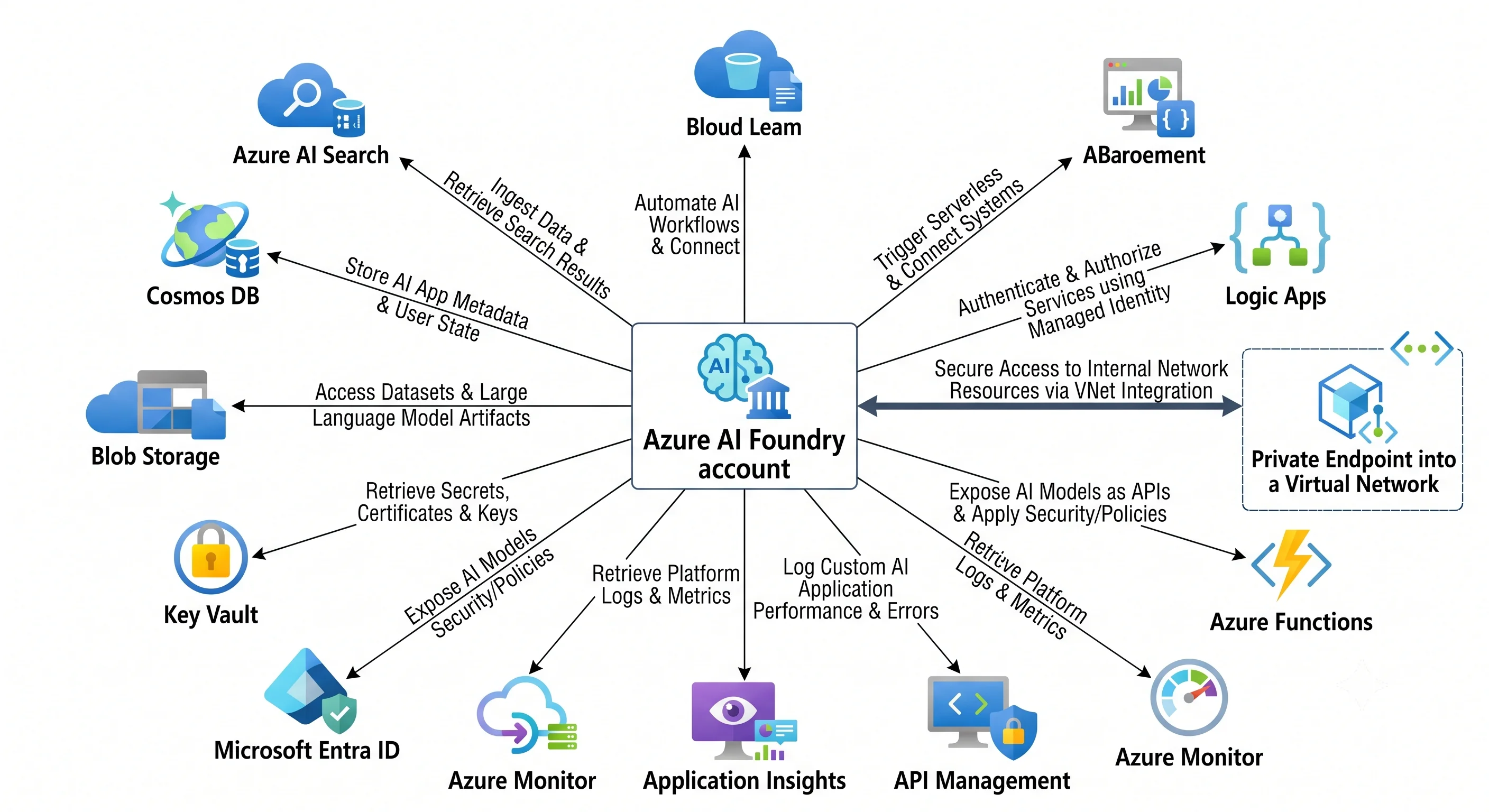
The two glue mechanisms, first
Nearly every question of the form "how does Foundry talk to X" has one of two answers.
Managed identity + a role assignment. The Foundry account (and each project, and each agent) can have a system-assigned or user-assigned identity. Give that identity a role on the target resource and Foundry authenticates with no secret anywhere. This is how Foundry reads a search index, writes to a storage container, or persists threads to Cosmos DB — and how your application authenticates to Foundry in the other direction. The specific gotcha here: the portal auto-assigns some of these roles when a human clicks through, and the SDK and CLI do not. If it works for you and not for the pipeline, this is the first thing to check.
Private endpoint + Private DNS zone. The Foundry account's private-link sub-resource is account.
Create the private endpoint in your VNet, link the privatelink.services.ai.azure.com (and, for the
OpenAI-compatible surface, privatelink.openai.azure.com and privatelink.cognitiveservices.azure.com)
Private DNS zones to that VNet, and set publicNetworkAccess to disabled. Miss the DNS zone link and
the name resolves publicly, the traffic leaves the VNet, and the firewall refuses it — a 403 that
looks like an identity problem and is not.
⚠️ Verify the current private-link sub-resource names and DNS zone names against current Azure docs;
the consolidation of endpoints under services.ai.azure.com has changed this.
The pairings
| Pairs with | Why | The glue |
|---|---|---|
| Azure AI Search | The retrieval half of RAG, and the vector store for agent file search | A connection on the project, identity-based; the Foundry identity needs Search Index Data Reader (and Search Index Data Contributor if it writes). Integrated vectorisation calls an embedding deployment back in Foundry |
| Azure Blob Storage / ADLS Gen2 | Source documents, evaluation datasets, agent file uploads, batch job input and output | A connection plus Storage Blob Data Contributor for the Foundry or project identity. For a standard agent setup, a dedicated container holds agent files |
| Azure Cosmos DB | Thread and message state for agents in the standard setup, and a vector store option in its own right | A connection plus a Cosmos data-plane role for the project identity, bound through the project's capability host. Note this is a real, billed, throughput-provisioned database that your agent quietly depends on |
| Microsoft Entra ID | Who may call the model, and who may manage it | Data-plane role assignments (Cognitive Services OpenAI User, Foundry User) on the account or project — not the control-plane Contributor role |
| Azure Key Vault | Secrets for any connection that genuinely cannot be identity-based; customer-managed keys for encryption at rest | Key Vault reference in the connection, resolved via managed identity; CMK configured on the account with the vault requiring purge protection |
| API Management | The AI gateway: token-based rate limiting per consumer, load-balancing across regional Foundry accounts, semantic caching, and a single audited front door | APIM policies (azure-openai-token-limit, azure-openai-emit-token-metric, backend pools with circuit breakers) in front of two or more Foundry endpoints; APIM's managed identity holds the data-plane role |
| Azure Monitor + Application Insights | Metrics, request/response logs, and end-to-end agent traces | A diagnostic setting on the account (off by default) to a Log Analytics workspace; OpenTelemetry tracing from the SDK to Application Insights |
| Azure Functions / Logic Apps | Agent tools — the actions an agent can take in your systems | Registered as a tool on the agent (OpenAPI-described function, or a Logic App workflow); auth via managed identity, and the function should authorise the caller, not trust the agent |
| Azure Content Safety (part of Foundry Tools) | Filtering beyond the default: prompt shields, groundedness detection, protected-material checks, custom blocklists | A content filter configuration attached per model deployment, plus optional direct API calls for content you filter yourself |
| Azure Virtual Network | Keeping inference and agent traffic off the public internet | Private endpoint as above; for standard agent setups, subnet delegation for network-injected agents ⚠️ verify current network-injection support |
| Azure Databricks / Microsoft Fabric | Where the data that becomes the index actually lives and is prepared | Pipelines write curated content to Storage or directly to an AI Search index; Foundry consumes the index, not the lakehouse |
| Azure Machine Learning | Custom or fine-tuned models, and the classic MLOps surface | Hub-based projects share the AML workspace lineage; otherwise the boundary is clean — AML trains, Foundry serves and orchestrates |
The three patterns you will actually build
RAG. Documents land in Blob Storage. An AI Search indexer (or your own pipeline) chunks and vectorises them, calling an embedding deployment in Foundry. At query time, the application — or the agent's built-in search tool — retrieves the top chunks and passes them to a chat deployment with instructions to answer only from the provided context. Every hop is identity-based; nothing holds a key. The failure mode is almost never the model: it is stale, badly chunked, or over-permissioned retrieval, and retrieval respecting the user's permissions is the hardest part of the whole design. Security trimming belongs in the index, not in the prompt.
Agent with tools. An agent in a project, a chat deployment behind it, connections to a search index and a storage container, and two or three tools — a Logic App to raise a ticket, a Function to look up an order. Threads and files persist to your Cosmos DB and storage in the standard setup. Each tool authorises independently; the agent's identity is not a licence to bypass your API's authorisation.
The AI gateway. API Management in front of two or three Foundry accounts in different regions, with
matching deployment names. Per-consumer token quotas stop one team exhausting the shared TPM pool,
backend pools with circuit breakers turn a regional 429 into a retry elsewhere, and emitted token
metrics give you per-consumer chargeback. This is the pattern almost every organisation converges on
once more than one team is calling the models, and building the seam early is much cheaper than
retrofitting it into every caller.
Two integration mistakes worth naming
Giving the agent's identity broad rights "so it works". An agent that can call a tool inherits nothing about who asked. If the tool trusts the agent's identity rather than authorising the end user, you have built a confused deputy: any user who can talk to the agent can reach any data the agent can reach. Pass user context to the tool and authorise there.
Treating the connection as the security boundary. A connection is a stored credential with a label. Key-based connections are still keys — they rotate, they leak, and they do not appear in an access review. Prefer identity-based connections everywhere they exist, and audit the ones that remain.
Next: Production →
← Back to the Azure AI Foundry overview · ← Previous: Deployment