
2. Core Concepts
Every noun you'll see in the Virtual Networks blade, defined once. The pattern is the same throughout: term → analogy → what it technically is. Scoping, subscriptions, resource groups and RBAC inheritance are covered once in the scope hierarchy — this page assumes them.
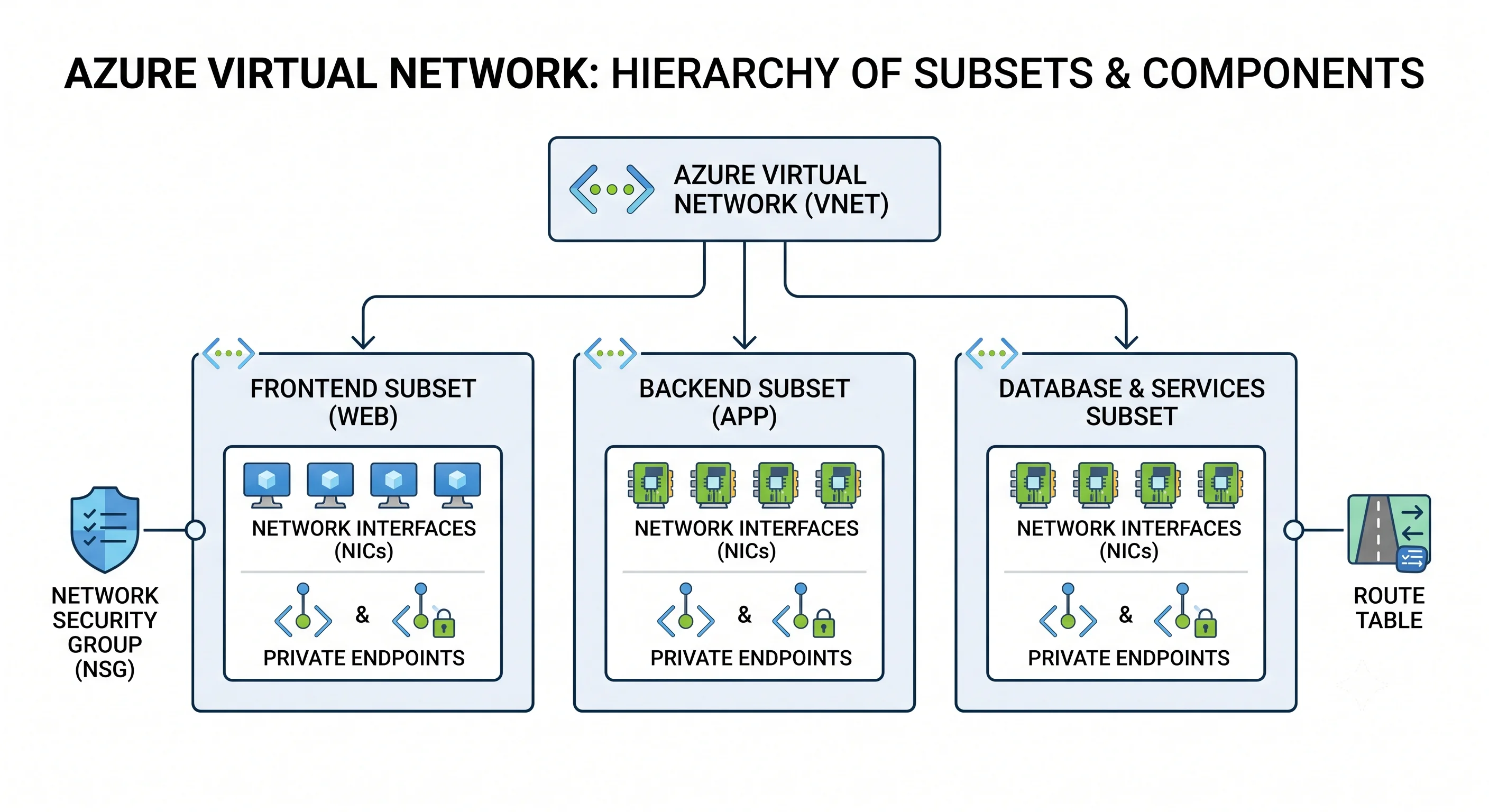
The address space
Analogy: the postcode block the whole building draws its door numbers from.
Technically: one or more CIDR ranges assigned to the VNet at creation, from which every subnet must be carved. You can add ranges later, and Azure now supports removing an unused one, but two constraints make this the highest-stakes decision in the topic:
- Subnets must fit entirely inside a declared range and must not overlap each other.
- Two VNets with overlapping ranges can never be peered. Not with effort, not with NAT, not ever. This is the reason organisations run a central address-plan spreadsheet, and the reason "we'll use 10.0.0.0/16 for now" causes a migration two years later when every team did the same.
Use RFC 1918 space (10.0.0.0/8, 172.16.0.0/12, 192.168.0.0/16). Public IP ranges are
technically permitted in a VNet address space but will break your ability to reach the real internet
hosts in that range, so don't. Azure reserves 168.63.129.16 (see Architecture)
and treats 224.0.0.0/4 (multicast), 255.255.255.255/32 (broadcast), 127.0.0.0/8 (loopback) and
169.254.0.0/16 (link-local) as unusable. The shared-CGNAT block 100.64.0.0/10 is usable but is
what AKS and some Azure features grab by default, so avoid it in your own plan.
Practical sizing rule: give each region-plus-environment a /16, and each VNet inside it a
/20 or /22, leaving contiguous free space after each VNet so it can grow without fragmenting.
If AKS with Azure CNI is anywhere in your future, quadruple your estimate — in that mode every pod
consumes a VNet IP, not just every node.
Subnet
Analogy: a floor of the building, with its own access rules and its own door policy.
Technically: a child resource (Microsoft.Network/virtualNetworks/subnets) holding a CIDR block
inside the VNet's address space, and the attachment point for an NSG, a route table, a NAT Gateway,
service endpoints, and delegation. Two things about Azure subnets surprise people:
Azure reserves five addresses in every subnet. For 10.0.1.0/24:
| Address | Purpose |
|---|---|
10.0.1.0 |
Network address |
10.0.1.1 |
Reserved by Azure for the default gateway |
10.0.1.2 |
Reserved by Azure — maps the platform DNS service into the subnet |
10.0.1.3 |
Reserved by Azure — same, second address |
10.0.1.255 |
Broadcast address |
So a /24 gives you 251 usable addresses, not 254, and a /29 — the smallest subnet Azure
permits — gives you three ⚠️ verify the current minimum prefix against current Azure docs. This is
a favourite interview question precisely because it's five, not AWS's five-with-different-meanings.
Subnets are not zonal. A subnet spans every availability zone in the region. Zone placement is a property of the VM, the scale set, the load balancer, or the NAT Gateway — never of the subnet. See What & Why for why this trips up people arriving from AWS.
The reserved subnet names
Several Azure services demand a dedicated subnet with an exact, case-sensitive name and a minimum size. Get these wrong and deployment fails with an unhelpful message:
| Name | For | Minimum size |
|---|---|---|
GatewaySubnet |
VPN Gateway and ExpressRoute Gateway | /27 recommended (/29 is technically allowed and will strand you) |
AzureFirewallSubnet |
Azure Firewall | /26 |
AzureFirewallManagementSubnet |
Azure Firewall forced-tunnelling mode | /26 |
AzureBastionSubnet |
Azure Bastion | /26 |
RouteServerSubnet |
Azure Route Server | /27 |
⚠️ Verify current minimum sizes against current Azure docs — several have been increased over time. The durable lesson: leave room in your address plan for subnets you haven't decided to build yet, because these have hard minimums and cannot be resized once populated.
Delegation
Analogy: handing a floor over to a tenant who is allowed to rearrange the furniture.
Technically: marking a subnet as delegated to a specific service (Microsoft.Web/serverFarms,
Microsoft.ContainerInstance/containerGroups, Microsoft.DBforPostgreSQL/flexibleServers, and so
on) so that service can inject its own managed resources and apply its own policies. A delegated
subnet usually cannot hold anything else, and undelegating requires emptying it first. This is how
App Service VNet integration, Container Apps, and PostgreSQL Flexible Server private access work.
Network interface (NIC) and IP configuration
Analogy: the network card and the addresses printed on it.
Technically: a NIC (Microsoft.Network/networkInterfaces) is a first-class ARM resource with
its own lifecycle, separate from the VM. It lives in exactly one subnet and carries one or more
IP configurations, each of which has a private IP (dynamic or static) and optionally an
associated public IP. A NIC can also carry an NSG and belong to application security groups.
This separation is one of the real structural differences from AWS: deleting a VM can leave the NIC behind, a NIC can be detached and reattached, and the NSG on the NIC is a different object from the NSG on the subnet. See Virtual Machines — Core Concepts for the full resource constellation.
Dynamic vs. static private IP: "dynamic" means Azure assigns it from the subnet at allocation time and it is retained while the resource exists but may change if the VM is deallocated and started again. "Static" pins it. Set it statically for anything another system points at by IP — domain controllers, NVAs, on-premises firewall rules.
Public IP address
Analogy: a street address the outside world can post to.
Technically: a separate ARM resource (Microsoft.Network/publicIPAddresses) that you associate
with a NIC, a load balancer front end, a NAT Gateway, a gateway, or Bastion. Two properties matter:
- SKU — Standard is now the only choice for new deployments; the Basic SKU has been retired ⚠️ verify current status against current Azure docs. Standard IPs are always static, are zone-redundant or zonal by choice, and — importantly — are secure by default: a Standard public IP denies all inbound traffic unless an NSG explicitly allows it. Basic used to be open by default, which is exactly why it went away.
- Allocation — Standard is always static. You are billed hourly for the address whether or not anything is attached to it, which is the single most common source of "what is this line on my bill".
Network Security Group (NSG)
Analogy: a bouncer with a numbered clipboard, working top to bottom and stopping at the first line that matches.
Technically: a stateful, ordered packet filter (Microsoft.Network/networkSecurityGroups)
attached to a subnet, a NIC, or both. Each rule has a priority (100–4096), a direction, a
protocol, source and destination (IP prefix, service tag, or ASG), port ranges, and Allow or Deny.
Rules are evaluated in ascending priority order and evaluation stops at the first match.
Stateful means you only write the rule for the initiating direction; the return flow is permitted automatically. This is the security-group behaviour, not the NACL behaviour, despite the numbering looking like a NACL.
Every NSG has three default inbound and three default outbound rules at priorities 65000–65500, which cannot be deleted but can be overridden by a lower-numbered rule:
| Direction | Priority | Rule | Effect |
|---|---|---|---|
| Inbound | 65000 | AllowVnetInBound |
Anything from the VirtualNetwork tag to the VirtualNetwork tag is allowed |
| Inbound | 65001 | AllowAzureLoadBalancerInBound |
Health probes from the platform load balancer are allowed |
| Inbound | 65500 | DenyAllInBound |
Everything else inbound is dropped |
| Outbound | 65000 | AllowVnetOutBound |
Anything to the VNet is allowed |
| Outbound | 65001 | AllowInternetOutBound |
Outbound to the internet is allowed |
| Outbound | 65500 | DenyAllOutBound |
Everything else outbound is dropped |
Read that table twice. It says the default posture inside a VNet is completely flat, and outbound to the whole internet is open. Segmentation and egress control are things you build, not things you inherit.
Where the NSGs compose: for inbound traffic to a VM, the subnet NSG is evaluated first, then the NIC NSG; for outbound, the NIC NSG first, then the subnet NSG. Both must allow. Debugging a connectivity failure without knowing which of the two dropped it is why Network Watcher's NSG diagnostics exists.
Application Security Group (ASG)
Analogy: a name badge that says "web server", so rules can be written about roles instead of addresses.
Technically: a logical grouping (Microsoft.Network/applicationSecurityGroups) you attach to
NIC IP configurations, usable as a source or destination in NSG rules. Allow 1433 from asg-web to asg-db survives every IP change, scale event, and subnet reshuffle. ASGs must be in the same region
as the NICs, and a rule referencing ASGs on both sides requires them to be in the same VNet.
Use them. IP-based NSG rules are the main reason NSGs rot.
Service tag
Analogy: a shorthand for "all of Azure's addresses for X", maintained by Microsoft so you don't have to.
Technically: a named, Microsoft-managed set of IP prefixes usable as source or destination in
NSG rules, UDRs, and Azure Firewall rules. Common ones: VirtualNetwork, Internet,
AzureLoadBalancer, AzureCloud, Storage, Sql, AzureKeyVault, AzureMonitor,
AzureActiveDirectory, AzureFrontDoor.Backend. Many are regionalisable — Storage.uksouth
narrows the tag to one region and is what you should almost always use.
The tag content changes weekly as Azure adds capacity. That's the entire point: an NSG rule pinned to a hard-coded Azure IP range is a future outage.
Route table and user-defined routes (UDRs)
Analogy: hand-written signposts that overrule the ones the platform put up.
Technically: a route table (Microsoft.Network/routeTables) attached to a subnet, holding
routes with an address prefix and a nextHopType:
nextHopType |
Means |
|---|---|
VirtualNetworkGateway |
Send it to the VPN or ExpressRoute gateway |
VirtualNetwork |
Keep it inside the VNet |
Internet |
Send it out via Azure's internet edge |
VirtualAppliance |
Send it to a specific private IP — a firewall or NVA |
None |
Black-hole it |
Azure creates system routes automatically for the VNet's own prefixes, for 0.0.0.0/0 to the
internet, and for peered address spaces. UDRs override them. The classic use is forcing all egress
through a firewall with 0.0.0.0/0 → VirtualAppliance → 10.0.0.4, which is also the classic way to
black-hole your own management traffic if you don't think about return paths. Route selection
order — longest prefix first, then UDR over BGP over system — is covered in
Architecture.
One flag worth knowing on the NIC, not the route table: IP forwarding. A VM acting as an NVA
must have enableIPForwarding set on its NIC, or Azure will drop packets whose destination isn't
the NIC's own address. A firewall VM that mysteriously passes nothing usually has this switched off.
VNet peering
Analogy: knocking a doorway between two buildings — not a corridor through to a third.
Technically: a pair of resources (Microsoft.Network/virtualNetworks/virtualNetworkPeerings),
one on each side, that merges the two VNets into a single routing domain over Microsoft's backbone.
Same-region peering and cross-region ("global") peering behave the same way from a configuration
standpoint. Key properties:
- Non-transitive. A↔H and B↔H does not give A↔B. Making that work needs a routing device in H plus UDRs in A and B.
- Both sides must exist. A peering configured on one side only shows
Initiated, notConnected, and passes no traffic. allowForwardedTraffic— permits traffic that didn't originate in the peer VNet to arrive from it. Required for any hub-and-spoke where the hub forwards.allowGatewayTransit/useRemoteGateways— the pair that lets spokes use the hub's VPN or ExpressRoute gateway. Set transit on the hub side, use-remote on the spoke side. A spoke can only use one remote gateway, and can't have its own at the same time.- Address spaces must not overlap, and if you change a VNet's address space after peering, the
peering must be re-synced (
az network vnet peering sync) or the new range won't be routable.
Service endpoint vs. private endpoint
These get conflated constantly and are genuinely different mechanisms.
| Service endpoint | Private endpoint | |
|---|---|---|
| What it does | Adds a system route so traffic to a PaaS service leaves via Azure's backbone, and presents the VM's private IP as the source to the service's firewall | Creates a NIC with a private IP in your subnet that maps to one specific PaaS resource |
| Destination IP | Still the service's public IP | A private IP in your address space |
| Granularity | Whole service, whole subnet (Microsoft.Storage for the subnet) |
One resource, and one sub-resource (blob, table, vault, sqlServer) per endpoint |
| On-premises reach | No — a VPN/ExpressRoute client can't use it | Yes — the private IP is routable over the gateway |
| DNS | Unchanged | Requires a Private DNS zone (privatelink.blob.core.windows.net) or the name still resolves to the public IP |
| Cost | Free | Hourly per endpoint plus per-GB data |
| Exfiltration risk | Higher — the subnet can reach any account in that service | Lower — the endpoint reaches exactly one resource |
The rule: private endpoints for anything that matters; service endpoints when you need something free and coarse and have no on-premises requirement. And the near-universal failure mode with private endpoints is DNS — the endpoint is created, the firewall is right, and the name still resolves publicly because nobody linked the Private DNS zone to the VNet. See Integrations.
NAT Gateway
Analogy: the building's single shared return address for all outgoing post.
Technically: a zonal resource (Microsoft.Network/natGateways) attached to one or more subnets,
providing outbound SNAT through one or more Standard public IPs or a public IP prefix. It is now
the recommended way to give a subnet outbound internet access, and it exists mainly to solve SNAT
port exhaustion — it provides far more ports per IP than load-balancer outbound rules and
allocates them on demand rather than pre-allocating a fixed block per instance.
It is zonal, not zone-redundant: a NAT Gateway lives in one availability zone. A truly zone-resilient design uses one per zone with zone-pinned subnets, or accepts the zone as a failure domain. ⚠️ verify current zonal behaviour against current Azure docs.
The SKU axis — and why this topic doesn't have one
Every other topic in this article has a SKU that drives features, limits, and cost. The Virtual Network resource has no SKU at all — it is free and featureless in itself. The tiering lives entirely in what you attach:
| Attached resource | Tiers | What the tier unlocks | The trap |
|---|---|---|---|
| Public IP | Standard only (Basic retired) | Zone redundancy, static allocation, secure-by-default inbound | Billed hourly even when unattached |
| Load Balancer | Standard, Gateway | Standard adds zones, HA ports, outbound rules; Basic retired | Basic LB configs in old templates now fail to deploy |
| Azure Firewall | Basic, Standard, Premium | Standard adds threat intel and FQDN filtering; Premium adds TLS inspection, IDPS, URL filtering | Premium is expensive and always-on. Most teams need Standard, and many need only NSGs plus NAT |
| VPN Gateway | VpnGw1–VpnGw5, each with an AZ variant |
Throughput, tunnel count, and zone redundancy | The non-AZ SKUs are not zone-redundant, and changing SKU family means recreating the gateway and losing the public IP |
| DDoS Protection | IP Protection, Network Protection | Network Protection covers all public IPs in the tenant plus cost protection and rapid response | Network Protection is a large flat monthly commitment — appropriate for an enterprise, wildly wrong for a dev subscription |
| Bastion | Developer, Basic, Standard, Premium | Native client, IP-based connection, scaling, session recording | Developer/Basic lack native-client and scaling; upgrading tiers may require redeploy |
⚠️ Verify current SKU names, retirement dates and capabilities against current Azure docs — this is the fastest-moving table on the page.
The running vocabulary table
| Term | Analogy | Technical definition |
|---|---|---|
| VNet | Your own private building | A regional ARM resource holding one or more CIDR address ranges and providing default isolation |
| Address space | The postcode block | One or more CIDR ranges the VNet owns; must not overlap any VNet you intend to peer with |
| Subnet | A floor | A CIDR block inside the address space; the attachment point for NSGs, route tables, NAT, delegation. Spans all zones. Five addresses reserved |
| NIC | The network card | A standalone ARM resource in one subnet, holding IP configurations, optionally an NSG and ASG memberships |
| Private IP | Internal extension number | An address from the subnet, dynamic or static, reachable only inside the VNet and its connected networks |
| Public IP | Street address | A separate billable ARM resource; Standard SKU, static, secure by default |
| NSG | Bouncer with a numbered list | Stateful ordered filter on a subnet and/or NIC; first match wins; six undeletable default rules |
| ASG | A name badge | A logical group of NIC IP configurations usable as an NSG source/destination instead of an IP range |
| Service tag | Shorthand for "all of Azure's X" | A Microsoft-maintained, auto-updating set of prefixes usable in NSG, UDR and firewall rules |
| Route table / UDR | Hand-written signpost | A subnet-attached set of routes that override Azure's system routes, with a next-hop type |
| System route | The signs Azure put up | Automatic routes for the VNet's own prefixes, the internet, and peered spaces |
| Peering | A doorway between buildings | A bidirectional, non-transitive link merging two VNets into one routing domain |
| Service endpoint | A shortcut to the shop's front door | A route optimisation to a PaaS service's public IP, presenting the private source IP |
| Private endpoint | The shop opens a counter inside your building | A NIC in your subnet mapped to one PaaS sub-resource, requiring a Private DNS zone |
| Private DNS zone | The building's internal phone book | A zone (privatelink.*) linked to VNets so PaaS names resolve to private endpoint IPs |
| NAT Gateway | The shared return address | Subnet-attached outbound SNAT via Standard public IPs; zonal |
| Delegation | Handing a floor to a tenant | Marking a subnet for a specific service to inject managed resources into |
| IP forwarding | Permission to relay someone else's post | A NIC flag allowing a VM to receive packets not addressed to it — required for NVAs |
| Virtual WAN | A managed corridor system | Microsoft-managed transitive hub connecting VNets, branches, and ExpressRoute circuits |
Next: Architecture →
← Back to the Virtual Network overview · ← Previous: What & Why