
3. Architecture
The portal makes Foundry look like a website. It is a thin client over three quite different machines: a control plane that manages resources, an inference plane that runs models against a capacity allocation you were granted, and an agent runtime that holds state and executes tool loops on your behalf. Almost every confusing failure on this service comes from mistaking one for another.
The request path — a single chat completion
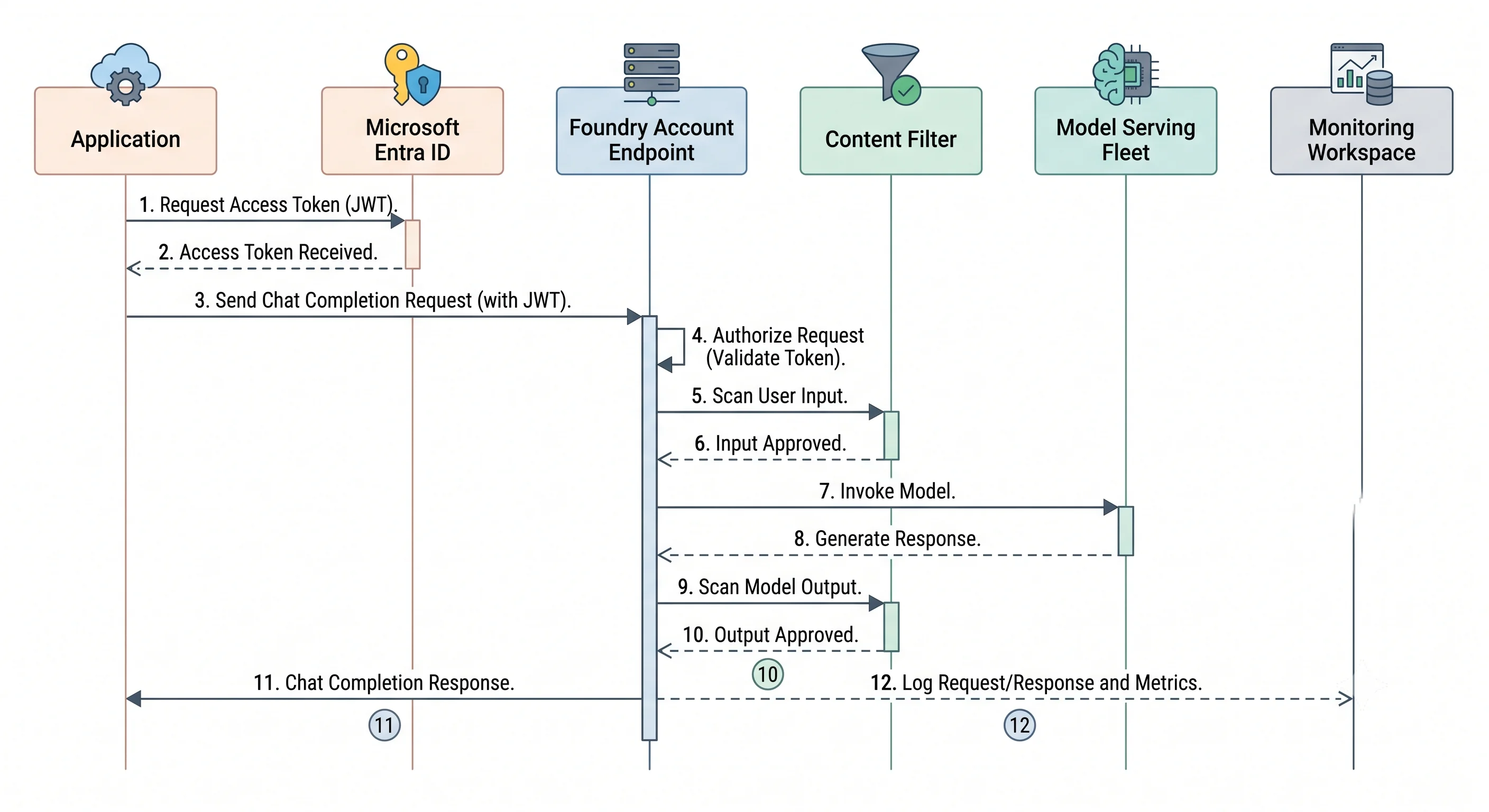
- Your code acquires a token. With
DefaultAzureCredential(or an explicit managed identity), the SDK obtains an Entra ID access token scoped to Cognitive Services. If local auth is still enabled and you passed an API key instead, this step is skipped — and so is every audit trail that names a principal rather than a key. - DNS resolves the account subdomain.
<account>.services.ai.azure.comresolves to a public IP by default, or — if you have a private endpoint and the matching Private DNS zone — to a private IP in your VNet. A misconfigured DNS zone here is the single most common private-endpoint failure: the request leaves the VNet, hits the public endpoint, and is refused by the firewall, producing a403that looks like an RBAC problem. - The service authorises the call against the data plane. It checks for a data-plane role
assignment —
Cognitive Services OpenAI Userfor inference,Foundry User(formerlyAzure AI User) for project data-plane operations — at the account or project scope. Control-plane roles likeOwnerandContributordo not grant this. - The network rules are evaluated. If
publicNetworkAccessis disabled and the request did not arrive via private endpoint, it stops here regardless of identity. - The input passes the content filter. Prompt-level categories and any prompt-shield protections
are evaluated before the model sees the text. A block produces a specific error code with the
triggering category — not a generic
400. - The request is routed to capacity. For a standard deployment, into the shared pool for that
model and deployment type in that region — or, for
GlobalStandard, wherever in the fleet has capacity. For a provisioned deployment, onto your reserved PTU capacity. Your accumulated token usage in the current window is measured against your allocation, and if you are over it the service returns429with aRetry-Afterheader. - The model generates. Tokens stream back if you asked for streaming; otherwise the response is buffered until complete. Time-to-first-token is dominated by prompt length and queueing; total duration by output length. Cached prompt prefixes, where supported, cut both cost and latency for repeated system prompts — which is an argument for keeping the system prompt byte-stable.
- The output passes the content filter, in streaming mode in chunks, which is why a stream can be cut off mid-sentence with a filter reason.
- Telemetry is emitted — but only to the destinations you configured. Metrics are always collected; request/response logging and tracing require a diagnostic setting and, for prompt content, explicit opt-in.
What is not in that path: any autoscaling decision. There is no scale-out event, no warm-up, no instance count. Capacity was decided when the deployment was created and when your quota was granted. This is the deepest structural difference between Foundry and every compute service in this article.
The agent run path
An agent run is the above, in a loop, with state.
- Your code creates or reuses a thread and posts a message to it.
- You start a run of an agent against that thread. The service assembles the context: system instructions, thread history (truncated by its own strategy), and tool definitions.
- The model is called. It may respond with content, or with a request to call one or more tools.
- Tool execution splits by tool type. Service-side tools — file search, code interpreter, Bing grounding, a connected AI Search index — are executed by the Foundry runtime using the project's connections and the agent's identity. Client-side tools (functions you declared) are returned to your code, which executes them and submits the outputs back. The run sits in a "requires action" state while it waits for you, and it can time out there.
- The loop repeats until the model produces a final answer, the run hits a limit, or it fails.
- State is persisted — to Microsoft-managed storage in the basic setup, or to your Cosmos DB, AI Search, and Storage in the standard setup.
Two consequences to design for. First, one run is many model calls: token cost and latency are multiples of a single completion, and a badly specified tool can loop. Set run limits and treat tool-call count as a metric. Second, the standard setup makes agent state your operational problem — your Cosmos DB throughput, your Search tier, your backup policy, your bill.
Control plane vs. data plane — the three doors
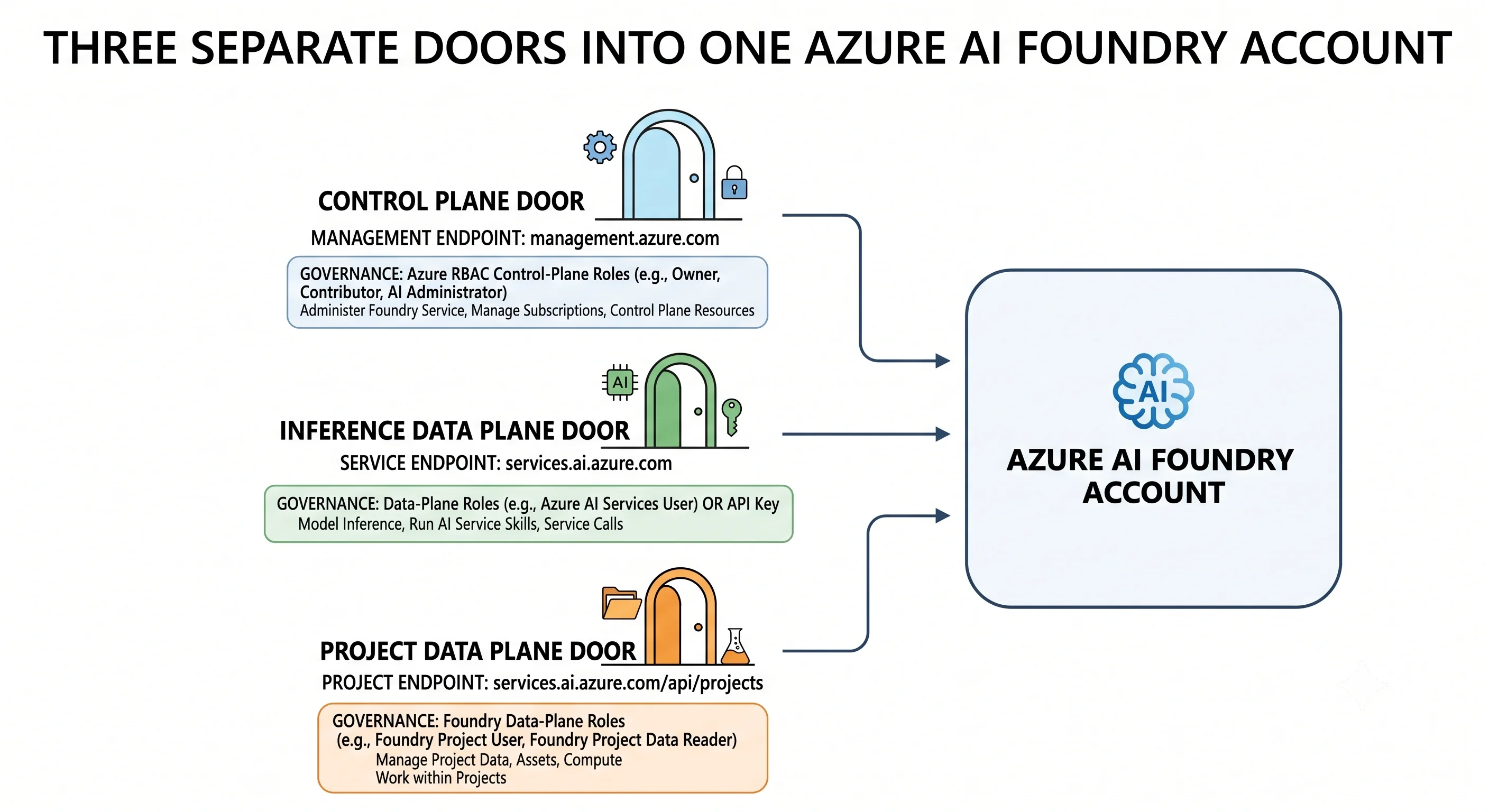
Azure's split is sharper than AWS's, and Foundry has an unusually clear example of it.
| Control plane | Inference data plane | Project data plane | |
|---|---|---|---|
| Endpoint | management.azure.com |
<account>.services.ai.azure.com (and .openai.azure.com) |
<account>.services.ai.azure.com/api/projects/<project> |
| Operations | Create/update/delete accounts, projects, deployments; set quota allocation, network rules, CMK | Chat completions, embeddings, images, task APIs | Agents, threads, runs, connections, evaluations |
| Typical roles | Cognitive Services Contributor, Foundry Account Owner (formerly Azure AI Account Owner), Owner |
Cognitive Services OpenAI User (call), Cognitive Services OpenAI Contributor (call + manage some data-plane objects) |
Foundry User (formerly Azure AI User), Foundry Project Manager |
| Also accepts | Nothing but Entra ID | An API key, if local auth is enabled | Entra ID |
The classic mistake, stated plainly: you are Owner on the subscription, you can create the
deployment, and your application returns 401 or 403 when it calls the model. Owner is a
control-plane role. Inference needs a data-plane role assignment on the account or project. Grant
Cognitive Services OpenAI User to the app's managed identity and the problem disappears.
The second mistake: the portal auto-assigns some data-plane roles when a human creates a project or an agent. The SDK and CLI paths do not. So the thing works when you click it and fails when the pipeline does it, and nobody can see a difference in the ARM template — because the difference is a role assignment that was never in the template.
The third: Cognitive Services Contributor lets you read the account keys. If keys are enabled,
that role is effectively a data-plane grant too. Disabling local auth (disableLocalAuth) closes that
back door and is the single highest-value security setting on this resource.
Capacity, quota, and throttling
There is no autoscale. There is arithmetic.
- Quota is granted per subscription, per region, per model, per deployment type.
gpt-4.1GlobalStandardquota in Sweden Central is a different pool fromgpt-4.1Standardquota in Sweden Central, which is a different pool from the same thing in East US. - You allocate that pool across deployments when you create them. The sum of your deployments' capacity cannot exceed the pool. This is why a colleague's experiment can block your production deployment from being created at all.
- Over-consumption returns
429withRetry-After. Both TPM and RPM can bind; on many short calls RPM binds first even though you are nowhere near the token limit. - Provisioned deployments do not throttle the same way — they queue or reject based on your reserved capacity, and spillover to a standard deployment can be configured so bursts degrade in price rather than in availability. ⚠️ Verify current spillover behaviour and availability against current Azure docs.
- Raising quota is a request, through the portal's quota page or a support ticket, and it can be refused or partially granted in a hot region. Treat capacity as a lead-time item on the project plan, not a runtime concern.
Design implication. Because capacity is regional and finite, the standard production pattern is not
"one big deployment" but several deployments across regions behind a router — API Management with a
load-balancing policy, or Azure Front Door, distributing across two or three regional Foundry accounts
and failing over on 429. Build that seam early even if you start with one region; retrofitting it
means changing every caller.
Consistency, durability, and where your data lives
- Model calls are stateless. Nothing is remembered between requests unless you send it or an agent thread holds it. There is no consistency model to reason about on the inference path.
- Agent state is as durable as its store. Microsoft-managed in the basic setup; in the standard setup it inherits Cosmos DB's replication and your backup policy — which means it is genuinely yours to protect.
- Prompts and completions are not used to train Microsoft's or OpenAI's models. Abuse-monitoring may retain data for a limited period unless you have been approved for a modified abuse-monitoring configuration. ⚠️ Verify the current data-handling and abuse-monitoring terms against current Azure docs before making a compliance claim.
- Deployment type sets the processing boundary.
Standardstays in the region;DataZoneStandardstays in the data zone (US, EU, APAC);GlobalStandardmay process anywhere in the fleet. Data at rest stays where your resources are; this is about where the inference runs. If your obligation is country-level, note that "EU" is a zone of many countries.
Reliability posture
A Foundry account is regional. There is no built-in cross-region failover for a model deployment, and no zone-redundancy setting you toggle. What you get instead:
GlobalStandardhides fleet-level capacity problems by routing around them — availability insurance at the cost of residency control.- Provisioned capacity removes noisy-neighbour variance but is pinned to what you reserved.
- Multi-region, active-active — two or more accounts, matching deployment names, a router in front — is the pattern that actually survives a regional problem. Matching deployment names across regions is what makes the router trivial, and is a good reason to name deployments by job.
- Model deprecation is a reliability event. A retiring version is an outage with a calendar invite. Track retirement dates for every deployed model and decide the upgrade policy deliberately.
Failure modes worth recognising on sight
| Symptom | Usual cause |
|---|---|
401 / 403 from the app, but the portal playground works |
Missing data-plane role assignment on the app's identity; Owner is not enough |
403 with a private endpoint configured |
Private DNS zone missing or not linked to the VNet, so the name resolves publicly and the firewall refuses it |
429 with Retry-After |
TPM or RPM allocation exceeded. Honour the header, back off, and check whether RPM bound first |
| Cannot create a deployment: insufficient quota | The subscription/region/model/type pool is fully allocated — often by a forgotten dev deployment |
| Cannot create an account: name already taken, but you deleted it | Soft delete. Purge it (az cognitiveservices account purge) or pick a new name |
| Model responses changed overnight, no deploy | Auto version upgrade on the deployment, or a model default change |
| Content-filter error on a legitimate prompt | Filter severity thresholds, or a prompt-shield/protected-material trigger. Handle this error distinctly from a failure |
| Agent run stuck in "requires action" | Your client-side tool never submitted its output; the run will eventually time out |
| Latency fine at low load, terrible at peak | Shared standard capacity contention — the reason provisioned throughput exists |
| Works when a human clicks it, fails from the pipeline | Portal-only auto role assignment; the automation never granted the data-plane role |
The theme: on this service the interesting failures are about identity, capacity, and names, not about the model. Recognising which of the three you are in front of is most of the debugging.
Next: Getting Started →
← Back to the Azure AI Foundry overview · ← Previous: Core Concepts