
5. Deployment
Getting Started proved the store exists. This page makes it repeatable, reviewable, and reversible — a parameterised module, remote state, a pipeline that authenticates without secrets, three environments, and an answer to "it's 2 a.m. and the last change broke prod".
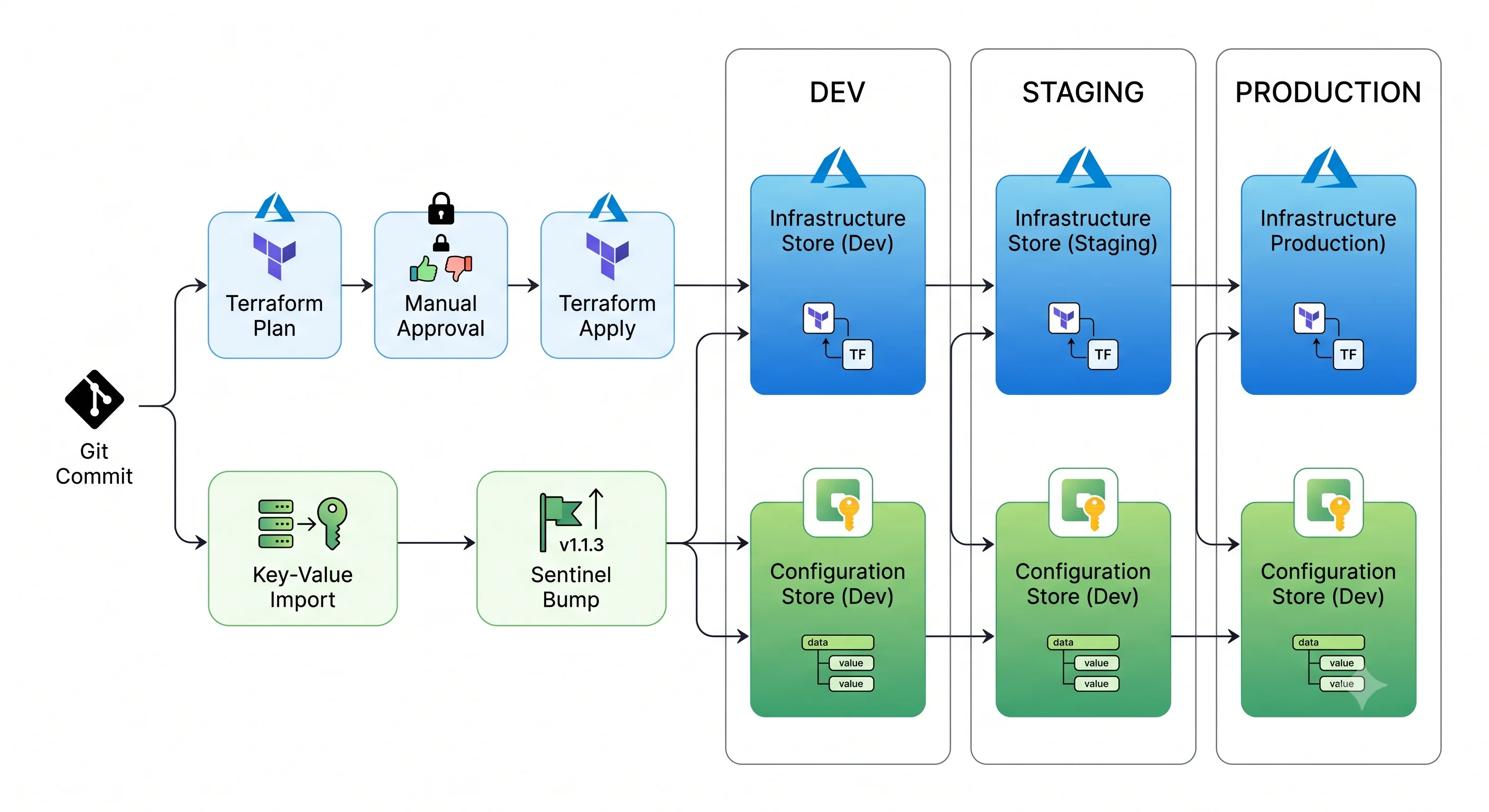
App Configuration has one deployment characteristic that makes it unlike almost every other Azure resource, and it shapes this whole page: the thing you deploy most often is not the resource, it's the contents. The store is created once and forgotten. The key-values change weekly. So there are really two pipelines here — infrastructure, and configuration-as-data — and conflating them is the most common mistake. The section on the two-pipeline split is the part to read if you read nothing else.
Tool order
The same everywhere in this article:
| Rank | Tool | What it's for here | When it's the wrong choice |
|---|---|---|---|
| 1. Primary | Terraform (azurerm, azapi for gaps) |
The store, its replicas, network, identity, encryption, and the stable key-values. Full worked example below | Volatile key-values. Putting operational dials in state means every 2 a.m. tweak is a terraform apply or a drift alert |
| 2. Secondary | Ansible (azure.azcollection) |
Honest answer: there is no dedicated App Configuration module in the collection ⚠️ verify against the current collection. Ansible's role here is generic ARM via azure_rm_resource plus data-plane work via az/uri — genuinely useful for day-2 seeding and promotion |
Anything you want state reconciliation for. It won't remove a key that's no longer in the playbook |
| 3. Third | Bicep / ARM | The Azure-native path, with keyValues as first-class child resources and same-day support for new features. What Microsoft's docs and exams assume |
Azure-only, and the complete deployment mode footgun is sharper here than usual — see below |
Terraform — the module
Three files, parameterised on environment. The shape assumes one store per environment, for the reason in the environments section.
# variables.tf
variable "name_prefix" {
  type        = string
  description = "Short org/app prefix, lowercase alphanumeric — becomes part of a globally unique name."
}

variable "environment" {
  type = string
  validation {
    condition     = contains(["dev", "staging", "prod"], var.environment)
    error_message = "environment must be dev, staging or prod."
  }
}

variable "location" {
  type    = string
  default = "uksouth"
}

variable "replica_locations" {
  type        = list(string)
  default     = []
  description = "Regions to geo-replicate to. Each replica is billed as an additional store."
}

variable "key_vault_id" {
  type        = string
  default     = null
  description = "Vault holding the secrets referenced by Key Vault reference key-values."
}

variable "reader_principal_ids" {
  type        = list(string)
  default     = []
  description = "Object IDs of consuming workload identities that need data-plane read access."
}
# main.tf
terraform {
required_version = ">= 1.6"
required_providers {
azurerm = { source = "hashicorp/azurerm", version = "~> 4.0" }
azapi = { source = "Azure/azapi", version = "~> 2.0" }
}
}
provider "azurerm" {
features {
# THE block that matters for this service. Without it, a destroy leaves a
# soft-deleted store still holding its globally unique name, and the next
# apply fails with "name unavailable" — which looks like a flaky pipeline.
app_configuration {
purge_soft_delete_on_destroy = true
recover_soft_deleted = true
}
}
}
locals {
is_prod = var.environment == "prod"
tags = {
Environment = var.environment
ManagedBy = "terraform"
Component = "configuration"
}
}
resource "azurerm_resource_group" "this" {
name = "rg-${var.name_prefix}-config-${var.environment}"
location = var.location
tags = local.tags
}
resource "azurerm_app_configuration" "this" {
name = "appcs-${var.name_prefix}-${var.environment}"
resource_group_name = azurerm_resource_group.this.name
location = azurerm_resource_group.this.location
# The tier is the design decision. Free has a hard daily request cap, no SLA,
# no private endpoints and no replication — fine for a sandbox, not for a team.
# ⚠️ verify current tier names and inclusions against current Azure docs.
sku = local.is_prod ? "premium" : "standard"
# Entra-only. Disables the HMAC access keys, which is what makes the
# control-plane/data-plane split an actual boundary rather than a suggestion.
local_auth_enabled = false
# Private endpoints only in prod; dev keeps public access so laptops and
# hosted CI runners can reach it. Be deliberate about this trade.
public_network_access = local.is_prod ? "Disabled" : "Enabled"
soft_delete_retention_days = local.is_prod ? 7 : 1
purge_protection_enabled = local.is_prod
identity {
type = "SystemAssigned"
}
dynamic "replica" {
for_each = var.replica_locations
content {
name = replace(replica.value, "-", "")
location = replica.value
}
}
tags = local.tags
}Notes on the resource that are easy to get wrong:
purge_protection_enabledon prod is a one-way door. Once enabled it generally cannot be disabled, and aterraform destroywill then leave the store soft-deleted and unpurgeable until the retention window expires — blocking recreation with the same name. That's the intended safety property. Just know that you have chosen it.soft_delete_retention_daysand the Free tier disagree. Free-tier stores don't support a retention window; setting one on afreeSKU fails. The conditional above avoids it by never using Free for a managed environment.public_network_access = "Disabled"locks out your pipeline too. If the same pipeline that creates the store then writes key-values through the data plane, it needs network access. The standard resolutions are a self-hosted runner on the VNet, or the two-pipeline split below with the data pipeline running from inside the network.replicablocks are cheap to write and not cheap to run. Each replica bills as its own store. Default the list to empty and add regions consciously.
Consuming identities: data-plane role assignments
The single most common App Configuration deployment bug is granting the control plane and expecting the data plane to follow. Assign explicitly:
# rbac.tf
resource "azurerm_role_assignment" "consumers" {
  for_each             = toset(var.reader_principal_ids)
  scope                = azurerm_app_configuration.this.id
  role_definition_name = "App Configuration Data Reader"
  principal_id         = each.value
}

# The store's own identity needs to read nothing from Key Vault — Key Vault
# references are resolved by the CLIENT, not by the store. It is the CONSUMING
# workload's identity that needs this. Naming it here because half of all
# Key Vault reference failures come from getting this backwards.
resource "azurerm_role_assignment" "consumers_kv" {
  for_each             = var.key_vault_id == null ? toset([]) : toset(var.reader_principal_ids)
  scope                = var.key_vault_id
  role_definition_name = "Key Vault Secrets User"
  principal_id         = each.value
}
Key-values in Terraform — and where the seam is
# keyvalues.tf — the STABLE settings only. See the two-pipeline split below.
resource "azurerm_app_configuration_key" "settings" {
  for_each = {
    "Api:BaseUrl"          = "https://api-${var.environment}.example.com"
    "Logging:LogLevel:Default" = local.is_prod ? "Warning" : "Debug"
  }

  configuration_store_id = azurerm_app_configuration.this.id
  key                    = each.key
  label                  = var.environment
  value                  = each.value
  content_type           = "text/plain"

  depends_on = [azurerm_role_assignment.pipeline_data_owner]
}

# A Key Vault reference: the store holds a pointer, never the secret.
# Note the deliberately UNVERSIONED URI — pinning a version means rotation
# never reaches the application.
resource "azurerm_app_configuration_key" "db_password_ref" {
  count = var.key_vault_id == null ? 0 : 1

  configuration_store_id = azurerm_app_configuration.this.id
  key                    = "Database:Password"
  label                  = var.environment
  type                   = "vault"
  vault_key_reference    = "${var.key_vault_id}/secrets/db-password"

  depends_on = [azurerm_role_assignment.pipeline_data_owner]
}

resource "azurerm_app_configuration_feature" "flags" {
  for_each = {
    Beta          = false
    NewCheckout   = false
  }

  configuration_store_id = azurerm_app_configuration.this.id
  name                   = each.key
  label                  = var.environment
  enabled                = each.value

  # Terraform declares the flag's EXISTENCE and its initial state. It should
  # not own the live state — a flag flipped by an on-call engineer at 3 a.m.
  # would otherwise show up as drift and be reverted by the next apply.
  lifecycle {
    ignore_changes = [enabled, percentage_filter_value, targeting_filter]
  }

  depends_on = [azurerm_role_assignment.pipeline_data_owner]
}
Two hard-won points here:
depends_on is mandatory, not stylistic. azurerm_app_configuration_key writes through the
azconfig.io data plane. The pipeline identity's App Configuration Data Owner assignment is a
separate resource that the key resource doesn't reference, so Terraform has no reason to order them.
Without the edge you get 403 on first apply, success on second — a "flaky pipeline" whose cause is a
missing dependency. And even with the edge, Entra role assignments propagate eventually, so budget
for a retry:
resource "azurerm_role_assignment" "pipeline_data_owner" {
  scope                = azurerm_app_configuration.this.id
  role_definition_name = "App Configuration Data Owner"
  principal_id         = data.azurerm_client_config.current.object_id
}

resource "time_sleep" "rbac_propagation" {
  depends_on      = [azurerm_role_assignment.pipeline_data_owner]
  create_duration = "30s"
}
The sturdier alternative — and what most mature setups do — is to grant the pipeline identity
App Configuration Data Owner once, at the resource-group or subscription scope, out of band, so
it is never part of the plan that depends on it.
ignore_changes on flag state is a deliberate ownership decision. Terraform should own whether a
flag exists and its default; humans and incident response own whether it's on right now. Skip
this and the first on-call kill-switch flip becomes drift, and the next apply silently re-enables the
thing that broke production.
# outputs.tf
output "endpoint" {
  value = azurerm_app_configuration.this.endpoint
}

output "store_id" {
  value = azurerm_app_configuration.this.id
}

output "principal_id" {
  value = azurerm_app_configuration.this.identity[0].principal_id
}

output "replica_endpoints" {
  value = [for r in azurerm_app_configuration.this.replica : r.endpoint]
}
terraform init -backend-config=backends/prod.tfbackend
terraform plan -var-file=env/prod.tfvars -out=tfplan
terraform apply tfplanWhere azapi earns its place
azurerm lags new Azure features by weeks to months. On this service the gaps you're most likely to
hit are snapshots and newer tier-specific properties. If azurerm has no resource for what you
need, drop to the raw ARM API rather than clicking it in:
# Snapshots — an immutable, named composition of key-values, used to pin a
# release. ⚠️ Check whether azurerm has gained a native resource before using
# this; azapi is the bridge, not the destination.
resource "azapi_resource" "release_snapshot" {
  type      = "Microsoft.AppConfiguration/configurationStores/snapshots@2023-03-01"
  name      = "release-${var.release_version}"
  parent_id = azurerm_app_configuration.this.id

  body = {
    properties = {
      filters = [
        { key = "*", label = var.environment }
      ]
      retentionPeriod = 2592000 # seconds ⚠️ verify allowed range
    }
  }
}
⚠️ API versions move; check the current one for the resource type rather than copying the string above.
Remote state and locking
Local state is a footgun the moment a second person or a pipeline touches the configuration. Use the
azurerm backend:
# backends/prod.tfbackend
resource_group_name  = "rg-tfstate"
storage_account_name = "sttfstateexample"
container_name       = "tfstate"
key                  = "app-configuration/prod.tfstate"
use_azuread_auth     = true
Two Azure-specific points worth carrying:
- Locking is native. The backend takes a blob lease on the state file. There is no separate lock table to create and no second resource to pay for — a real simplification compared with DynamoDB-based locking in AWS.
use_azuread_auth = truemeans the backend authenticates with your identity or the pipeline's federated identity rather than a storage account key. Combined with disabling shared-key access on the state storage account, it removes the last long-lived secret from the loop.
Workspaces vs. directory-per-environment — the two honest options. Workspaces keep one code copy
and switch state by name; they're neat and they make it easy to run the wrong apply against prod
because the difference is invisible in the shell prompt. Directory-per-environment (or, better, one
root module per environment calling a shared child module) is more files and much harder to get wrong.
For anything touching prod configuration, take the explicit directories. Configuration changes are
frequent and often urgent, which is exactly when a subtle context switch bites.
The two-pipeline split
This is the App Configuration-specific structural decision, and getting it right removes most of the friction people complain about.
| Infrastructure pipeline | Configuration pipeline | |
|---|---|---|
| Owns | The store, tier, network, identity, encryption, replicas, RBAC, and the flags' existence | Key-value contents: operational dials, endpoints, feature-flag state |
| Tool | Terraform | az appconfig kv import from a file in git, or a snapshot creation |
| Cadence | Rarely — weeks to months | Often — daily to hourly |
| Trigger | PR to infra/ |
PR to config/<env>.yaml |
| State | Terraform state | Git is the source of truth; the store is a projection |
| Rollback | Re-apply previous commit | Re-import the previous file, or re-point to the previous snapshot |
The configuration pipeline is delightfully simple and is where az appconfig kv import shines:
# config/prod.yaml is the reviewed source of truth in git
az appconfig kv import \
  --name "$STORE" --auth-mode login \
  --source file --format yaml --path config/prod.yaml \
  --label prod \
  --strict \
  --yes

# Bump the sentinel LAST so clients pick the batch up atomically.
az appconfig kv set \
  --name "$STORE" --auth-mode login --yes \
  --key Sentinel --label prod --value "$GITHUB_SHA"

# Optionally pin this state as an immutable release artifact.
az appconfig snapshot create \
  --name "$STORE" --snapshot-name "release-$GITHUB_SHA" \
  --filters '[{"key":"*","label":"prod"}]' --auth-mode login
--strict is the flag that makes this a real deployment. Without it, import is additive: keys you
deleted from the file stay in the store forever. With it, the store is made to match the file, deleting
anything not present. That's the behaviour you want from a declarative pipeline — and it is also a
foot-cannon, because it will delete key-values written by anything other than this file. If two
teams write to the same label, --strict will have them deleting each other's settings on alternate
deploys. One label, one owning file, one pipeline. ⚠️ Verify current --strict semantics before
relying on them in prod; test against a scratch label first.
You can preview it, and you should, on the pull request:
# --dry-run shows what import WOULD change, including strict deletions
az appconfig kv import --name "$STORE" --auth-mode login \
  --source file --format yaml --path config/prod.yaml \
  --label prod --strict --dry-run
⚠️ --dry-run support varies by CLI version; verify it exists in the version your runner has pinned.
Ansible — the honest version
The template says write all three tools unless one genuinely doesn't apply, and says so explicitly
rather than dropping it silently. So: azure.azcollection has no dedicated App Configuration
module ⚠️ verify against the current collection version — there is no azure_rm_appconfiguration
the way there is azure_rm_storageaccount. That leaves two real patterns, and both are genuinely
useful for day-2 work.
Pattern 1 — generic ARM for the control plane. azure_rm_resource speaks raw ARM, so it can create
the store even without a purpose-built module:
- name: Ensure the App Configuration store exists
  hosts: localhost
  connection: local
  gather_facts: false

  vars:
    resource_group: "rg-example-config-dev"
    store_name: "appcs-example-dev"
    location: "uksouth"

  tasks:
    - name: Create or update the configuration store
      azure.azcollection.azure_rm_resource:
        api_version: "2023-03-01"   # ⚠️ verify current API version
        resource_group: "{{ resource_group }}"
        provider: AppConfiguration
        resource_type: configurationStores
        resource_name: "{{ store_name }}"
        body:
          location: "{{ location }}"
          sku:
            name: standard
          identity:
            type: SystemAssigned
          properties:
            disableLocalAuth: true
            publicNetworkAccess: Enabled
        state: present
      register: store

    - name: Show the data-plane endpoint
      ansible.builtin.debug:
        msg: "Endpoint is {{ store.response.properties.endpoint }}"
Pattern 2 — day-2 configuration operations, which is where Ansible actually adds value. Seeding a new environment, promoting a reviewed set of values from staging to prod, or flipping a flag as part of a wider runbook (drain traffic → flip flag → restart workers → verify) is imperative, ordered work. That is Ansible's shape, not Terraform's:
- name: Promote configuration from staging to prod
  hosts: localhost
  connection: local
  gather_facts: false

  vars:
    source_store: "appcs-example-staging"
    target_store: "appcs-example-prod"

  tasks:
    - name: Export the reviewed staging values to a file
      ansible.builtin.command:
        argv:
          - az
          - appconfig
          - kv
          - export
          - --name={{ source_store }}
          - --auth-mode=login
          - --label=staging
          - --destination=file
          - --format=yaml
          - --path=/tmp/promote.yaml
          - --yes
      changed_when: false

    - name: Import into prod under the prod label
      ansible.builtin.command:
        argv:
          - az
          - appconfig
          - kv
          - import
          - --name={{ target_store }}
          - --auth-mode=login
          - --label=prod
          - --source=file
          - --format=yaml
          - --path=/tmp/promote.yaml
          - --strict
          - --yes
      register: import_result
      changed_when: "'No changes' not in import_result.stdout"

    - name: Bump the sentinel so clients reload the batch atomically
      ansible.builtin.command:
        argv:
          - az
          - appconfig
          - kv
          - set
          - --name={{ target_store }}
          - --auth-mode=login
          - --key=Sentinel
          - --label=prod
          - --value={{ ansible_date_time.iso8601 | default(lookup('pipe','date -u +%FT%TZ')) }}
          - --yes
      changed_when: true
Idempotency, demonstrated. Run the playbook twice. azure_rm_resource with an unchanged body
reports ok rather than changed on the second run. The import task is idempotent in effect —
importing the same file twice produces the same store — and the changed_when above makes Ansible
report that honestly instead of claiming a change every run. The sentinel task is deliberately
changed_when: true, because bumping it is the point; if you'd rather it were idempotent, guard it on
the import task's result:
when: import_result is changedThe gap to be honest about: Ansible will not reconcile drift. A key-value someone added by hand
that isn't in the playbook stays there forever, unless you're leaning on az appconfig kv import --strict to do the reconciling — in which case the reconciliation is the CLI's, not Ansible's.
Bicep / ARM equivalent
The Azure-native path, with keyValues as first-class child resources — which is genuinely nicer than
Terraform's data-plane dance, because ARM writes key-values through the control plane and therefore
needs no separate data-plane role assignment.
Bicep module, what-if preview, and the deployment-mode warning
// main.bicep
@description('Short prefix; becomes part of a globally unique name.')
param namePrefix string

@allowed(['dev', 'staging', 'prod'])
param environment string

param location string = resourceGroup().location

@allowed(['free', 'developer', 'standard', 'premium'])
param sku string = 'standard'

var isProd = environment == 'prod'

resource store 'Microsoft.AppConfiguration/configurationStores@2023-03-01' = {
  name: 'appcs-${namePrefix}-${environment}'
  location: location
  sku: {
    name: sku
  }
  identity: {
    type: 'SystemAssigned'
  }
  properties: {
    disableLocalAuth: true
    publicNetworkAccess: isProd ? 'Disabled' : 'Enabled'
    softDeleteRetentionInDays: isProd ? 7 : 1
    enablePurgeProtection: isProd
  }
  tags: {
    Environment: environment
    ManagedBy: 'bicep'
  }
}

// Child key-values, written through ARM — note the escaped label separator:
// the resource name is '<key>$<label>' and the $ must be escaped in Bicep.
resource baseUrl 'Microsoft.AppConfiguration/configurationStores/keyValues@2023-03-01' = {
  parent: store
  name: 'Api:BaseUrl$${environment}'
  properties: {
    value: 'https://api-${environment}.example.com'
    contentType: 'text/plain'
  }
}

resource beta 'Microsoft.AppConfiguration/configurationStores/keyValues@2023-03-01' = {
  parent: store
  name: '.appconfig.featureflag~2FBeta$${environment}'
  properties: {
    contentType: 'application/vnd.microsoft.appconfig.ff+json;charset=utf-8'
    value: string({
      id: 'Beta'
      enabled: false
      conditions: {
        client_filters: []
      }
    })
  }
}

output endpoint string = store.properties.endpoint
output principalId string = store.identity.principalId
⚠️ The keyValues child-resource naming rules — the $ label separator and the URL-encoded / in
the feature-flag prefix (~2F) — are fiddly and have tripped up every API version. Verify against
current Azure docs and test on a scratch resource group.
Preview before you deploy. what-if is Bicep's answer to terraform plan:
az deployment group what-if \
  --resource-group rg-example-config-prod \
  --template-file main.bicep \
  --parameters namePrefix=example environment=prod sku=premium
⚠️ Deployment mode — the footgun. ARM deployments default to incremental mode: resources in the template are created or updated, and resources in the resource group that are not in the template are left alone. Complete mode does the other thing — it deletes every resource in the resource group that the template does not declare.
# This will DELETE resources in the resource group that main.bicep does not declare.
az deployment group create --mode Complete ...
For App Configuration this has a specific and nasty edge: if your template declares the store but not
the keyValues children, a complete-mode deployment can remove key-values that were written by
your configuration pipeline. Complete mode plus the two-pipeline split is an active contradiction.
Either keep the mode incremental (the default, and the right answer here) or move to deployment
stacks, which give you explicit, managed deletion semantics without complete mode's bluntness.
Where Bicep is genuinely the better choice for this service: brand-new tier features and snapshot
properties land in ARM on day one and in azurerm weeks later; a shop living in Azure DevOps with
template specs and deployment stacks already has the tooling; and the keyValues-through-ARM path
sidesteps the data-plane RBAC ordering problem entirely, which for a small config-only deployment is a
real simplification.
CI/CD wiring
Workload identity federation (OIDC), never a client secret. Register a Microsoft Entra application,
add a federated credential scoped to your repository and environment, and give it role assignments —
Contributor on the resource group for the infrastructure pipeline, App Configuration Data Owner for
the configuration pipeline. No secret is ever stored; GitHub mints a short-lived token that Entra
exchanges. The same applies to Azure Pipelines with a workload-identity-federation service connection.
# .github/workflows/config.yml
name: App Configuration

on:
  pull_request:
    paths: ['infra/**', 'config/**']
  push:
    branches: [main]
    paths: ['infra/**', 'config/**']

permissions:
  id-token: write      # required for OIDC — without it, login fails
  contents: read
  pull-requests: write

jobs:
  infra:
    runs-on: ubuntu-latest
    environment: ${{ github.ref == 'refs/heads/main' && 'prod' || 'dev' }}
    defaults:
      run:
        working-directory: infra
    steps:
      - uses: actions/checkout@v4

      - uses: azure/login@v2
        with:
          client-id: ${{ vars.AZURE_CLIENT_ID }}
          tenant-id: ${{ vars.AZURE_TENANT_ID }}
          subscription-id: ${{ vars.AZURE_SUBSCRIPTION_ID }}

      - uses: hashicorp/setup-terraform@v3

      - name: Init
        run: terraform init -backend-config=backends/${{ vars.ENV_NAME }}.tfbackend
        env:
          ARM_USE_OIDC: true
          ARM_USE_AZUREAD: true

      - name: Plan
        run: terraform plan -var-file=env/${{ vars.ENV_NAME }}.tfvars -out=tfplan
        env:
          ARM_USE_OIDC: true

      - name: Apply
        if: github.ref == 'refs/heads/main'
        run: terraform apply -auto-approve tfplan
        env:
          ARM_USE_OIDC: true

  config:
    needs: infra
    runs-on: ubuntu-latest
    environment: ${{ github.ref == 'refs/heads/main' && 'prod' || 'dev' }}
    steps:
      - uses: actions/checkout@v4

      - uses: azure/login@v2
        with:
          client-id: ${{ vars.AZURE_CLIENT_ID }}
          tenant-id: ${{ vars.AZURE_TENANT_ID }}
          subscription-id: ${{ vars.AZURE_SUBSCRIPTION_ID }}

      - name: Preview config changes (PR only)
        if: github.event_name == 'pull_request'
        run: |
          az appconfig kv import \
            --name "${{ vars.APPCONFIG_STORE }}" --auth-mode login \
            --source file --format yaml --path config/${{ vars.ENV_NAME }}.yaml \
            --label ${{ vars.ENV_NAME }} --strict --dry-run

      - name: Apply config changes
        if: github.ref == 'refs/heads/main'
        run: |
          az appconfig kv import \
            --name "${{ vars.APPCONFIG_STORE }}" --auth-mode login \
            --source file --format yaml --path config/${{ vars.ENV_NAME }}.yaml \
            --label ${{ vars.ENV_NAME }} --strict --yes
          az appconfig kv set \
            --name "${{ vars.APPCONFIG_STORE }}" --auth-mode login --yes \
            --key Sentinel --label ${{ vars.ENV_NAME }} --value "${{ github.sha }}"
The manual approval gate is the GitHub environment: key — configure prod with required
reviewers, and the job pauses before the apply. In Azure DevOps this is approvals and checks on the
environment. For configuration in particular, consider a lighter gate than for infrastructure: an
approval requirement that makes an urgent timeout change take twenty minutes has recreated the exact
problem App Configuration was adopted to solve. A reasonable split is reviewers required for
infrastructure and for prod secrets, self-approval for prod operational dials, with an audit trail.
The network problem, again. With public_network_access = "Disabled" on prod, a GitHub-hosted
runner cannot reach the data plane and the config job above will time out. Options, in ascending
order of effort: keep the store public and rely on Entra-only auth plus IP restrictions; use a
self-hosted runner or an Azure Container Apps job on the VNet; or have the pipeline write to a
public-facing staging store and use an internal promotion job. Pick one deliberately — this is
discovered at the worst possible moment otherwise.
Environments
One store per environment, not one store with labels per environment. Labels are the right tool within an environment (release versions, per-region overrides, feature variants) and the wrong tool between environments, for a reason that is not aesthetic:
Labels are not an access-control boundary. Built-in data-plane roles scope to the store. You cannot
grant a team read access to dev-labelled key-values without also granting prod. ⚠️ Verify what
key/label-scoped permissions the current built-in and custom roles support — this has been improving —
but the safe assumption for design purposes is store-level. One store also means one blast radius:
one --strict import against the wrong --label, one network rule change, one throttling incident,
and all three environments feel it.
| Boundary | What it buys you | When to reach for it |
|---|---|---|
| Label within one store | Free, simple, one endpoint | Release versions, regional overrides, variants — inside one environment |
| Store per environment, same resource group | Separate endpoints, separate RBAC, separate quotas | Small teams, non-regulated workloads. The sensible default |
| Store per environment, separate resource group | Independent lifecycle, independent locks, cleaner tagging and cost attribution | The recommended shape, and what the module above builds |
| Store per environment, separate subscription | Hard quota and policy boundary, distinct billing, real blast-radius separation | Regulated workloads, or when the rest of your platform already works this way |
In Azure the subscription is the natural blast-radius and quota boundary, so "one subscription per environment" is the answer far more often than "one account per environment" is in AWS. If your platform already does that, App Configuration should follow it rather than invent its own topology.
Where Azure Policy enforces the difference rather than convention. Convention is what you have until someone is in a hurry. Policies worth assigning at the management-group or subscription scope:
- Deny stores with
disableLocalAuth: false— this is the one that closes the control-plane escalation path described in Architecture. It matters more than any of the others. - Deny
sku: freein production subscriptions. Prevents the "temporary" Free store that three services grow to depend on. - Require
publicNetworkAccess: Disabledin production subscriptions (audit-only in dev). - Require a diagnostic setting routing to the environment's Log Analytics workspace —
deployIfNotExistswill remediate existing stores. Diagnostic settings are not on by default and nobody remembers to add them. - Require the
Environmenttag, so cost attribution works without a spreadsheet.
Rollback and blast radius
"Undo" means four different things on this service, and knowing which one you need at 2 a.m. is the whole skill.
| What broke | The undo | Time to recover |
|---|---|---|
| A feature flag | Flip it off in the portal or with az appconfig feature disable |
Seconds, plus one client refresh interval |
| A key-value's contents | Re-import the previous file from git, or restore the key-value from a revision | A minute, plus one refresh interval |
| A whole batch of key-values | az appconfig kv restore --datetime <before> — point-in-time restore across the label |
Minutes |
| The store's configuration (tier, network, RBAC) | terraform apply of the previous commit |
Minutes, and possibly not in place — see below |
# Point-in-time restore of every key-value under a label, as of a timestamp.
# The most useful single command on this page.
az appconfig kv restore \
  --name "$STORE" --auth-mode login \
  --label prod \
  --datetime "2026-07-30T09:00:00Z" \
  --yes

# What a value used to be, and when it changed
az appconfig revision list \
  --name "$STORE" --auth-mode login \
  --key "Api:Timeout" --label prod -o table
Then bump the sentinel, or clients will keep serving the value you just rolled back — the restore changed the store, not the caches.
Replace vs. in-place. Most App Configuration properties update in place. The ones that force replacement — and therefore a new endpoint, a new identity principal ID, and lost key-values:
- The store's
name. Obviously, but worth stating: it's the DNS label. A rename is a migration. - The store's
location. There is no move; it's a destroy-and-recreate. - The
resource_group_name. Same. - Some tier transitions. Moving up a tier is generally an in-place update; moving down can fail outright if you exceed the lower tier's limits, and transitions involving Free are the least forgiving. ⚠️ Verify the current supported tier-change matrix before planning one.
Any of those in a terraform plan shows as # forces replacement — and for this service that means
every key-value in the store is destroyed with it, because they are child resources of the store,
not of your state file. If your key-values are all in git and applied by the configuration pipeline,
that's an inconvenience. If they were typed into the portal, that's data loss. Read the plan.
Azure's two extra traps, both live on this service:
Soft delete and purge protection. A destroyed store is recoverable, which means it still holds its globally unique name.
terraform applyto recreate it fails with a name-unavailable error that looks nothing like the actual cause. Thefeatures { app_configuration { … } }block at the top of this page is the fix for the ordinary case; where purge protection is enabled you cannot purge early at all, and recreating with the same name is blocked until retention expires. That is the safety property working as designed — just don't discover it during an incident.az appconfig list-deleted -o table az appconfig recover -n "$STORE" --yes # bring it back az appconfig purge -n "$STORE" --yes # free the name (blocked by purge protection)Resource locks. A
CanNotDeleteorReadOnlylock on the store or its resource group makesterraform applyfail with an authorisation error that reads exactly like a missing role assignment. Before debugging RBAC, check:az lock list --resource-group "$RG" -o tableA
ReadOnlylock on a config store is a defensible production choice for the infrastructure — and it also blocks the control-plane path that writes key-values, which is another argument for the two-pipeline split, since the data plane is unaffected by resource locks.
Blast radius, honestly assessed. A broken App Configuration store does not take down a running application — the values are cached in memory. It takes down every process that tries to start. So the failure profile is: nothing happens, and then your next deployment, your next autoscale event, or your next pod restart fails, possibly hours later and apparently unrelated. That delayed coupling is the thing to hold in your head. It is also why the store's availability posture should match the availability posture of the most critical thing that reads it, not the average.
Drift detection
Configuration drifts more than most resources, because changing it by hand is the entire point of the service. So the goal is not zero drift — it's knowing which surfaces should never drift and watching those.
| Surface | Should it drift? | How you detect it |
|---|---|---|
| Store tier, network, RBAC, encryption | Never | Scheduled terraform plan -detailed-exitcode in CI; non-zero exit opens an issue |
| Flag existence and default | Never | Same plan |
| Flag live state | Yes, by design | ignore_changes; audit via revisions and diagnostic logs, not via plan |
| Key-value contents under a pipeline-owned label | Never | az appconfig kv import --strict --dry-run on a schedule; any output is drift |
| Key-value contents under a human-owned label | Yes | Revision history and the Audit log category |
# .github/workflows/drift.yml
on:
  schedule: [{ cron: '0 7 * * 1-5' }]

jobs:
  drift:
    runs-on: ubuntu-latest
    permissions: { id-token: write, contents: read, issues: write }
    steps:
      - uses: actions/checkout@v4
      - uses: azure/login@v2
        with:
          client-id: ${{ vars.AZURE_CLIENT_ID }}
          tenant-id: ${{ vars.AZURE_TENANT_ID }}
          subscription-id: ${{ vars.AZURE_SUBSCRIPTION_ID }}

      - name: Infrastructure drift
        run: |
          terraform init -backend-config=backends/prod.tfbackend
          terraform plan -var-file=env/prod.tfvars -detailed-exitcode
        # exit 2 == drift. Fail the job and let the notification do its work.
        working-directory: infra
        env: { ARM_USE_OIDC: true }

      - name: Configuration drift
        run: |
          az appconfig kv import --name "${{ vars.APPCONFIG_STORE }}" \
            --auth-mode login --source file --format yaml \
            --path config/prod.yaml --label prod --strict --dry-run
The other three detection surfaces worth knowing:
az deployment group what-ifif you're on the Bicep path — same idea, ARM's own diff.- Azure Policy compliance state, which tells you about stores that have drifted out of standard — local auth re-enabled, diagnostic setting removed, tag missing — including stores nobody told you about.
- The activity log and the
Auditdiagnostic log category, which is how you answer "who changed this". Revisions tell you what the value was; the logs tell you which identity wrote it. You need both, and the diagnostic setting must have existed before the change — there is no retroactive fix.
Teardown
terraform destroy -var-file=env/dev.tfvarsCleanup note:
terraform destroywill not remove:
- The soft-deleted store, unless
purge_soft_delete_on_destroy = trueis set in the providerfeatures {}block. It keeps the globally unique name until purged or until retention expires.- A store with purge protection enabled — it cannot be purged early at all. The name is held for the full retention window.
- Resources behind a
CanNotDeleteorReadOnlylock; the destroy fails on them with what looks like a permissions error.- Role assignments scoped above the store — anything you granted at the resource group or subscription scope, including the pipeline's out-of-band
App Configuration Data Owner.- Diagnostic settings, private DNS zone records, and private endpoint entries created outside this state file. Private DNS records for a deleted private endpoint are a classic orphan.
- The Key Vault secrets your Key Vault references pointed at — a different resource with its own soft delete and purge protection.
- The Terraform state backend itself, and the snapshots inside the store, which are child resources removed with the store but retained in the soft-deleted copy.
# Confirm you actually got the name back before trying to reuse it
az appconfig list-deleted -o table
Next: Integrations →
← Back to the Azure App Configuration overview · ← Previous: Getting Started