
5. Deployment
Getting Started proved the service exists. This page makes it repeatable, reviewable, and reversible: a parameterised module, remote state, a pipeline that authenticates without secrets, three environments, and a rollback you could perform at 2 a.m.
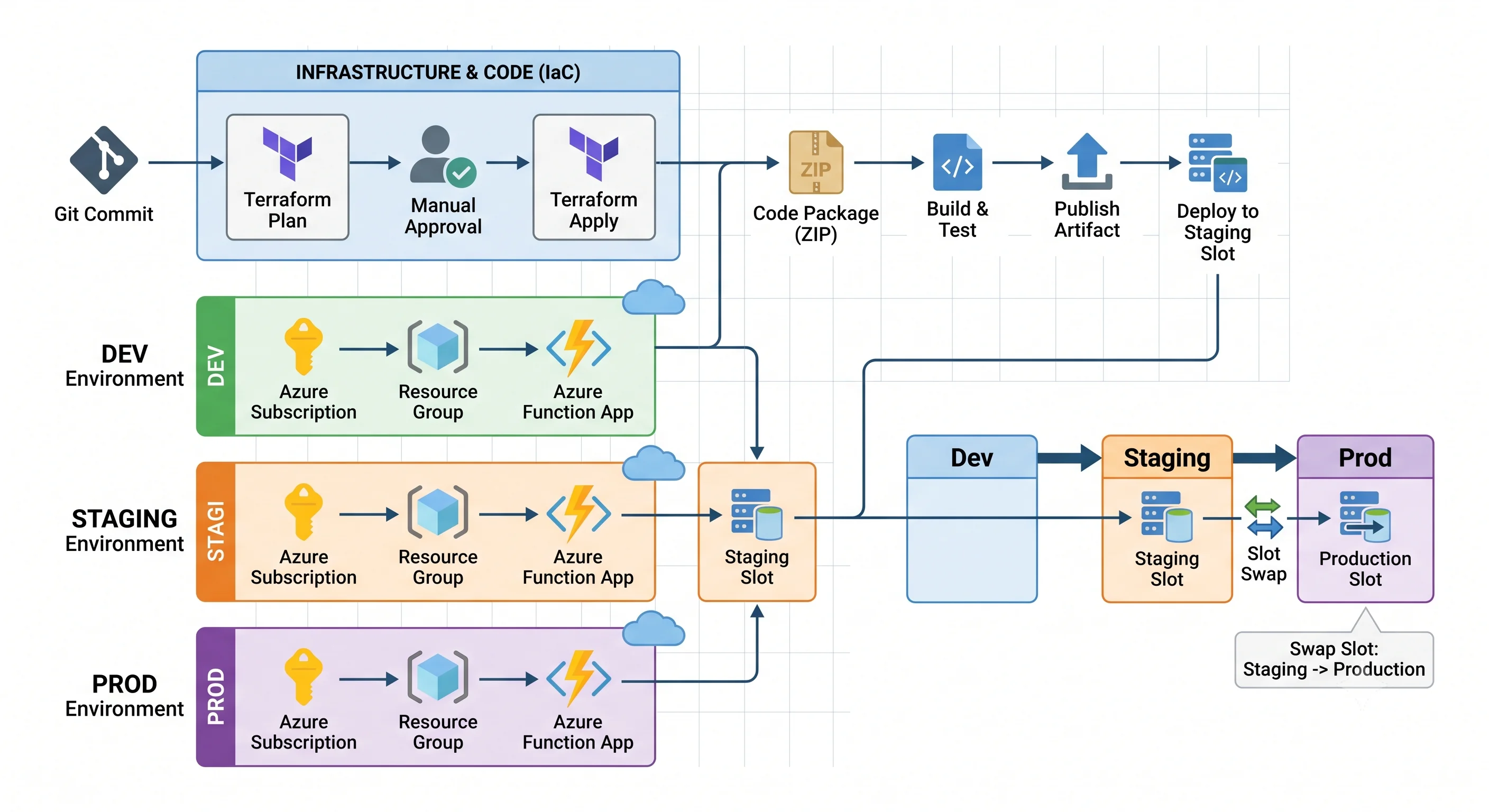
Functions has one deployment concern no other compute service in this article shares: there are two things to deploy. The infrastructure (app, plan, storage, identity, settings) and the code package. They have different lifecycles, different pipelines, and different rollback mechanisms, and conflating them is the most common structural mistake. Terraform owns the infrastructure; your build pipeline owns the package. Do not make Terraform deploy your code.
Tool order
The same everywhere in this article: Terraform primary, Ansible secondary, Bicep/ARM third.
| Rank | Tool | What it's for here | When it's the wrong choice |
|---|---|---|---|
| 1. Primary | Terraform (azurerm, plus azapi for preview features) |
The function app, plan, storage, identity, role assignments, diagnostic settings, and app settings | State is yours to protect, and the storage access key lands in it unless you use identity-based connections. azurerm lags new Functions features — Flex Consumption support arrived well after the feature did |
| 2. Secondary | Ansible (azure.azcollection) |
Day-2 operations: rotating settings, restarting apps, swapping slots, orchestrating a multi-app release | The Azure Functions modules in azure.azcollection are thinner than the Terraform provider and lag further behind. Do not use it as your provisioning source of truth here |
| 3. Third | Bicep / ARM | Day-one support for brand-new Functions features, deployment stacks, and any shop already living in Azure DevOps | Azure-only; no plan as rich as Terraform's, though what-if is close |
Terraform — the production-shaped module
Three files. The difference from Getting Started is parameterisation, identity instead of keys, explicit settings, and outputs other modules can consume.
variables.tf
variable "name_prefix" {
  type        = string
  description = "Short project identifier, used in every resource name"
}

variable "environment" {
  type        = string
  description = "dev | staging | prod"
  validation {
    condition     = contains(["dev", "staging", "prod"], var.environment)
    error_message = "environment must be dev, staging or prod."
  }
}

variable "location" {
  type    = string
  default = "uksouth"
}

variable "plan_sku" {
  type        = string
  description = "Y1 = Consumption, EP1-EP3 = Premium, P1v3 = Dedicated"
  default     = "Y1"
}

variable "app_settings" {
  type        = map(string)
  description = "Extra application settings merged into the app"
  default     = {}
}
main.tf
terraform {
  required_version = ">= 1.6"
  required_providers {
    azurerm = {
      source  = "hashicorp/azurerm"
      version = "~> 4.0"
    }
  }
}

provider "azurerm" {
  features {
    # The features block controls destructive behaviour. Two matter here:
    key_vault {
      # If this module references a Key Vault, purge protection changes what destroy can do
      purge_soft_delete_on_destroy = false
    }
    resource_group {
      # Refuse to delete a resource group that still contains resources Terraform doesn't know about
      prevent_deletion_if_contains_resources = true
    }
  }
}

locals {
  suffix = "${var.name_prefix}-${var.environment}"
  tags = {
    Environment = var.environment
    ManagedBy   = "terraform"
    Workload    = var.name_prefix
  }
}

resource "azurerm_resource_group" "this" {
  name     = "rg-${local.suffix}"
  location = var.location
  tags     = local.tags
}

resource "azurerm_storage_account" "func" {
  name                            = "st${replace(local.suffix, "-", "")}"
  resource_group_name             = azurerm_resource_group.this.name
  location                        = azurerm_resource_group.this.location
  account_tier                    = "Standard"
  account_replication_type        = var.environment == "prod" ? "ZRS" : "LRS"
  min_tls_version                 = "TLS1_2"
  allow_nested_items_to_be_public = false
  shared_access_key_enabled       = false # force identity-based access; see the note below
  tags                            = local.tags
}

resource "azurerm_service_plan" "this" {
  name                = "plan-${local.suffix}"
  resource_group_name = azurerm_resource_group.this.name
  location            = azurerm_resource_group.this.location
  os_type             = "Linux"
  sku_name            = var.plan_sku
  tags                = local.tags
}

resource "azurerm_log_analytics_workspace" "this" {
  name                = "log-${local.suffix}"
  resource_group_name = azurerm_resource_group.this.name
  location            = azurerm_resource_group.this.location
  sku                 = "PerGB2018"
  retention_in_days   = var.environment == "prod" ? 90 : 30
  tags                = local.tags
}

resource "azurerm_application_insights" "this" {
  name                = "appi-${local.suffix}"
  resource_group_name = azurerm_resource_group.this.name
  location            = azurerm_resource_group.this.location
  workspace_id        = azurerm_log_analytics_workspace.this.id
  application_type    = "web"
  tags                = local.tags
}

resource "azurerm_linux_function_app" "this" {
  name                = "func-${local.suffix}"
  resource_group_name = azurerm_resource_group.this.name
  location            = azurerm_resource_group.this.location
  service_plan_id     = azurerm_service_plan.this.id

  # Identity-based storage connection: no access key anywhere, including in state
  storage_account_name          = azurerm_storage_account.func.name
  storage_uses_managed_identity = true

  https_only                    = true
  public_network_access_enabled = var.environment == "prod" ? false : true

  identity {
    type = "SystemAssigned"
  }

  site_config {
    ftps_state                             = "Disabled"
    minimum_tls_version                    = "1.2"
    application_insights_connection_string  = azurerm_application_insights.this.connection_string
    application_stack {
      node_version = "20"
    }
  }

  app_settings = merge(
    {
      "WEBSITE_RUN_FROM_PACKAGE" = "1"
      "ENVIRONMENT"              = var.environment
    },
    var.app_settings
  )

  lifecycle {
    # The code package is deployed by the build pipeline, not by Terraform.
    # Without this, every terraform apply fights the last code deployment.
    ignore_changes = [
      app_settings["WEBSITE_RUN_FROM_PACKAGE"],
      tags["hidden-link: /app-insights-instrumentation-key"],
    ]
  }

  tags = local.tags
}

# The app's identity must be allowed to use the storage account it depends on.
# Without these, an identity-based connection fails and NO trigger works.
resource "azurerm_role_assignment" "func_storage_blob" {
  scope                = azurerm_storage_account.func.id
  role_definition_name = "Storage Blob Data Owner"
  principal_id         = azurerm_linux_function_app.this.identity[0].principal_id
}

resource "azurerm_role_assignment" "func_storage_queue" {
  scope                = azurerm_storage_account.func.id
  role_definition_name = "Storage Queue Data Contributor"
  principal_id         = azurerm_linux_function_app.this.identity[0].principal_id
}

resource "azurerm_role_assignment" "func_storage_table" {
  scope                = azurerm_storage_account.func.id
  role_definition_name = "Storage Table Data Contributor"
  principal_id         = azurerm_linux_function_app.this.identity[0].principal_id
}

resource "azurerm_monitor_diagnostic_setting" "func" {
  name                       = "diag-func"
  target_resource_id         = azurerm_linux_function_app.this.id
  log_analytics_workspace_id = azurerm_log_analytics_workspace.this.id

  enabled_log { category = "FunctionAppLogs" }
  metric { category = "AllMetrics" }
}
Three things in that file deserve calling out because they're where people get hurt:
storage_uses_managed_identity = trueplus three role assignments. This is the modern, keyless way to satisfyAzureWebJobsStorage, and it removes the storage key from your state file entirely. But the role assignments are not optional and they are not obvious: the host needs blob, queue and table data access. Setshared_access_key_enabled = falsewithout them and every trigger in the app silently stops. ⚠️ Verify the exact required roles and any additional identity-based connection settings against current Azure docs; this area has changed more than once.ignore_changeson the package setting. Terraform must not fight your code pipeline. Declare the boundary explicitly rather than discovering it when an infrastructure apply rolls back yesterday's release.- Role assignments are separate ARM resources with their own propagation delay. A fresh apply can succeed while the app still 403s for a minute or two. That's not a bug in your config.
outputs.tf
output "function_app_name" {
  value = azurerm_linux_function_app.this.name
}

output "function_app_id" {
  value = azurerm_linux_function_app.this.id
}

output "default_hostname" {
  value = azurerm_linux_function_app.this.default_hostname
}

output "principal_id" {
  description = "Grant this identity access to downstream services"
  value       = azurerm_linux_function_app.this.identity[0].principal_id
}
The loop
terraform init -backend-config=backends/dev.tfbackend
terraform plan  -var-file=envs/dev.tfvars -out=tfplan
terraform apply tfplan
Remote state and locking
Local state is a footgun the moment a second person or a pipeline touches this. The azurerm
backend stores state in a blob and uses native blob leases for locking — no separate lock table,
which is a real simplification versus the DynamoDB table AWS users are used to.
terraform {
  backend "azurerm" {
    resource_group_name  = "rg-tfstate"
    storage_account_name = "sttfstateuniquename"
    container_name       = "tfstate"
    key                  = "functions/dev.terraform.tfstate"
    use_azuread_auth     = true # authenticate to the backend with Entra ID, not a storage key
  }
}
Create that backend outside this module — a state store bootstrapped by the thing it stores state
for is a chicken-and-egg problem you solve once, by hand, and then protect with a CanNotDelete
resource lock.
Workspaces vs. directory-per-environment. Both are defensible:
- Terraform workspaces — one directory, one backend, state keyed by workspace. Less duplication,
but one misplaced
terraform workspace selectand you have applied dev's plan to prod. - Directory (or backend-file) per environment — separate state keys and, ideally, separate subscriptions. More files, far less chance of catastrophe.
Pick directory-per-environment for anything with a prod. The duplication is cheap; the failure mode of the alternative is not.
Ansible — day-2 operations
Ansible is not the provisioning source of truth for Functions; the azure.azcollection Functions
modules lag the Terraform provider meaningfully. Where it earns its place is imperative day-2
work: rotating a setting across many apps, restarting in a controlled order, or driving a slot swap
as one step of a wider release runbook.
- name: Day-2 operations on the function app
  hosts: localhost
  connection: local
  gather_facts: false
  vars:
    resource_group: "rg-{{ name_prefix }}-{{ environment }}"
    app_name: "func-{{ name_prefix }}-{{ environment }}"
  tasks:
    - name: Ensure the function app exists and settings are correct
      azure.azcollection.azure_rm_functionapp:
        resource_group: "{{ resource_group }}"
        name: "{{ app_name }}"
        storage_account: "st{{ name_prefix }}{{ environment }}"
        app_settings:
          ENVIRONMENT: "{{ environment }}"
          FEATURE_NEW_PRICING: "{{ feature_new_pricing | default('false') }}"
        state: present
      register: app_result

    - name: Report whether anything actually changed
      ansible.builtin.debug:
        msg: "changed={{ app_result.changed }}"

    - name: Swap staging into production (release step)
      ansible.builtin.command: >
        az functionapp deployment slot swap
        -g {{ resource_group }} -n {{ app_name }}
        --slot staging --target-slot production
      when: do_swap | default(false) | bool
      changed_when: true
Idempotency, demonstrated: run the playbook twice. The first run reports changed=true; the
second reports changed=false because the module compares desired state to actual before acting.
That property is the whole reason to use Ansible rather than a shell script — but note that the swap
task above is a raw command and is not idempotent, which is why it's gated behind an explicit
variable. Be honest about which tasks are declarative and which are actions.
⚠️ Verify azure.azcollection module names and supported parameters against the current collection
documentation; this collection changes module surface between major versions.
Bicep / ARM equivalent
The Azure-native path. It gets new Functions features on day one — which matters here, because
Functions ships preview capabilities faster than azurerm absorbs them.
Bicep module and what-if preview
param namePrefix string
param environment string
param location string = resourceGroup().location
param planSku string = 'Y1'

var suffix = '${namePrefix}-${environment}'

resource storage 'Microsoft.Storage/storageAccounts@2023-05-01' = {
  name: 'st${replace(suffix, '-', '')}'
  location: location
  sku: { name: environment == 'prod' ? 'Standard_ZRS' : 'Standard_LRS' }
  kind: 'StorageV2'
  properties: {
    minimumTlsVersion: 'TLS1_2'
    allowBlobPublicAccess: false
    supportsHttpsTrafficOnly: true
  }
}

resource plan 'Microsoft.Web/serverfarms@2023-12-01' = {
  name: 'plan-${suffix}'
  location: location
  sku: { name: planSku }
  properties: { reserved: true } // reserved: true == Linux
}

resource functionApp 'Microsoft.Web/sites@2023-12-01' = {
  name: 'func-${suffix}'
  location: location
  kind: 'functionapp,linux'
  identity: { type: 'SystemAssigned' }
  properties: {
    serverFarmId: plan.id
    httpsOnly: true
    siteConfig: {
      linuxFxVersion: 'Node|20'
      ftpsState: 'Disabled'
      minTlsVersion: '1.2'
      appSettings: [
        { name: 'FUNCTIONS_EXTENSION_VERSION', value: '~4' }
        { name: 'FUNCTIONS_WORKER_RUNTIME', value: 'node' }
        { name: 'AzureWebJobsStorage__accountName', value: storage.name } // identity-based
        { name: 'WEBSITE_RUN_FROM_PACKAGE', value: '1' }
      ]
    }
  }
}

output functionAppName string = functionApp.name
output principalId string = functionApp.identity.principalId
# Preview before you deploy — this is Bicep's answer to terraform plan
az deployment group what-if \
-g rg-demo-dev \
-f main.bicep \
-p namePrefix=demo environment=dev
az deployment group create \
-g rg-demo-dev \
-f main.bicep \
-p namePrefix=demo environment=devDeployment modes — the footgun.
az deployment group createdefaults to incremental mode: resources in the template are created or updated, and anything else in the resource group is left alone. Complete mode (--mode Complete) deletes every resource in the resource group that isn't in the template. For a function app that means the storage account holding your Durable orchestration state and your function keys can vanish because someone wanted a "clean" deployment. Complete mode is a legitimate tool for strictly template-owned resource groups. It is a catastrophe in a shared one. Know which you have before you type it.
Deploying the code (separately)
The infrastructure pipeline and the code pipeline are different things. For the code:
- Build once, deploy many. Produce one zip artifact, promote the same bytes through dev → staging → prod. Rebuilding per environment reintroduces the "works in staging" class of bug.
- Run from package.
WEBSITE_RUN_FROM_PACKAGE=1mounts the zip read-only. Faster cold starts, an atomic swap of app content, and no half-copied file states. On Flex Consumption the packaged model is the default deployment mechanism ⚠️ verify against current Azure docs. - Deploy to a slot, then swap on plans that support slots. See rollback, below.
az functionapp deployment source config-zip \
  -g rg-demo-prod -n func-demo-prod --src ./app.zip --slot staging
CI/CD with workload identity federation
No client secrets. No publish profiles. A publish profile is a long-lived credential with full deployment rights that people paste into repository settings and never rotate; it's the single worst credential practice still common in Azure Functions tutorials.
Instead, register a Microsoft Entra application, add a federated credential trusting your
GitHub repository's OIDC issuer for a specific branch or environment, and assign it the least
privilege it needs at the narrowest scope (Contributor on one resource group, not the subscription).
name: deploy-functions

on:
  pull_request:
  push:
    branches: [main]

permissions:
  id-token: write   # required to request the OIDC token
  contents: read

jobs:
  plan:
    runs-on: ubuntu-latest
    steps:
      - uses: actions/checkout@v4
      - uses: azure/login@v2
        with:
          client-id: ${{ vars.AZURE_CLIENT_ID }}
          tenant-id: ${{ vars.AZURE_TENANT_ID }}
          subscription-id: ${{ vars.AZURE_SUBSCRIPTION_ID }}
      - uses: hashicorp/setup-terraform@v3
      - run: terraform init -backend-config=backends/dev.tfbackend
      - run: terraform plan -var-file=envs/dev.tfvars

  apply-prod:
    if: github.ref == 'refs/heads/main'
    needs: plan
    runs-on: ubuntu-latest
    environment: production   # manual approval gate lives here
    steps:
      - uses: actions/checkout@v4
      - uses: azure/login@v2
        with:
          client-id: ${{ vars.AZURE_CLIENT_ID }}
          tenant-id: ${{ vars.AZURE_TENANT_ID }}
          subscription-id: ${{ vars.AZURE_SUBSCRIPTION_ID }}
      - uses: hashicorp/setup-terraform@v3
      - run: terraform init -backend-config=backends/prod.tfbackend
      - run: terraform apply -auto-approve -var-file=envs/prod.tfvars

      # Code deployment: same artifact, into the staging slot, then swapped
      - run: |
          az functionapp deployment source config-zip \
            -g rg-demo-prod -n func-demo-prod --src ./app.zip --slot staging
          az functionapp deployment slot swap \
            -g rg-demo-prod -n func-demo-prod --slot staging --target-slot production
plan on pull request, apply on merge, and a manual approval gate for prod via a GitHub
environment (or Azure DevOps approvals and checks). The federated credential should be scoped to that
environment so a pull request from a fork can never obtain a prod token.
Environments
Dev, staging, and prod differ in more than a .tfvars file, and the honest recommendation is
stronger in Azure than in AWS:
| Boundary | What it buys | Recommendation |
|---|---|---|
.tfvars file |
Different names, SKUs, retention | Necessary, insufficient on its own |
| Separate resource groups | Independent RBAC, independent deletion, independent locks | Minimum bar |
| Separate subscriptions | Independent quota, independent policy, a real blast-radius boundary, a clean cost split | The right answer for anything with a prod |
| Management group + Azure Policy | Enforcement rather than convention | Use it to deny the mistakes |
In Azure, the subscription is the natural quota and blast-radius boundary — and Functions scale limits are counted per subscription-per-region, so a runaway dev workload can genuinely consume capacity prod needs. That single fact makes "one subscription per environment" the default answer far more often than "one account per environment" is in AWS.
Where Azure Policy does the enforcing rather than a code review:
- Deny function apps with
httpsOnly = false. - Deny public network access on the prod management group.
- Require a diagnostic setting routed to the central Log Analytics workspace.
- Require the
EnvironmentandOwnertags, and deny SKUs above a threshold outside prod — the cheapest possible defence against anEP3in a sandbox.
Rollback and blast radius
What "undo" means here, in increasing order of pain:
1. Slot swap — the good one. If you deployed to a staging slot and swapped, rolling back is swapping again. The swap is near-atomic and the previous version is warm, so recovery is seconds. This is the single strongest argument for using slots at all.
az functionapp deployment slot swap -g rg-demo-prod -n func-demo-prod \
  --slot staging --target-slot production
Two caveats: app settings are swapped too unless marked as deployment slot settings (sticky), which is how you keep a staging connection string pointing at staging. And slot support varies by plan — Consumption has limited slot support and Flex Consumption's slot story has changed recently ⚠️ verify against current Azure docs before designing a release process around it.
2. Redeploy the previous package. Same artifact, previous version, config-zip again. Slower
than a swap and it pays a cold start, but it works on every plan.
3. Re-apply the previous commit's Terraform. For infrastructure changes. Reliable, but it is a full plan/apply cycle, and see the replacement warning below.
4. Restore from backup. For the storage side — Durable state, keys — not the app itself.
Operations that force replacement rather than update. These are the ones that hurt, because Terraform will destroy and recreate rather than modify:
- Changing the function app name, resource group, or region.
- Changing the plan's OS type (Linux ↔ Windows) — a full recreate of the plan and everything on it.
- Changing the storage account name — which, if it's
AzureWebJobsStorage, orphans your Durable orchestration history and your function keys. Every caller holding a function key breaks. This is the most expensive replacement in this topic. - Moving between certain plan families — read the
terraform planoutput, and if you see# forces replacementnext to anything storage- or plan-related, stop and think.
Two Azure-specific traps that make a rollback fail in confusing ways:
- Soft delete and purge protection. If your app reads secrets from a Key Vault, a "deleted" vault still holds its name and blocks recreation until it's purged — and with purge protection on, it cannot be purged at all until the retention period expires. A rollback that recreates a vault will fail with a name-conflict error that looks like a bug.
- Resource locks. A
CanNotDeletelock on the resource group makesterraform destroyor a replacement fail with an authorisation error that reads exactly like a missing RBAC role. Check for locks before you debug permissions.
Drift detection
Someone will change something in the portal. Plan for it:
- Scheduled
terraform planin CI — nightly, against each environment, failing the job on a non-empty diff. This is the highest-value drift control and it costs almost nothing. az deployment group what-iffor the Bicep path.- Azure Policy compliance state — catches the classes of drift you care about most (public access, missing diagnostics, missing tags) regardless of which tool made the change.
- The activity log — tells you who changed it and when, which is the question that actually gets asked. Route it to Log Analytics so you can query it in KQL.
The specific Functions gotcha: app settings drift constantly, because portal users add them and
because some Azure features (Application Insights connection, deployment tooling) write them
automatically. Decide which settings Terraform owns, put the rest under ignore_changes, and
document the split — otherwise your drift alert becomes noise and you'll stop reading it.
Teardown
terraform destroy -var-file=envs/dev.tfvarsWhat destroy will not remove:
- Soft-deleted Key Vaults and their secrets — still holding their names, blocking recreation.
- Anything behind a
CanNotDeleteorReadOnlyresource lock — destroy fails outright. - Role assignments created outside the state file, including ones the portal created for you.
- Diagnostic settings created out of band.
- The deployed code package and anything your functions wrote to external stores.
- Log Analytics data already ingested — you're billed for retention until it ages out.
- Application Insights components created by the portal in a different resource group.
For a truly clean sweep of a throwaway environment, deleting the whole resource group is still the most reliable instrument — provided the resource group is genuinely owned by this module and nothing else lives in it.
Next: Integrations →
← Back to the Azure Functions overview · ← Previous: Getting Started