
6. Integrations
Every other topic in this article has an integrations page listing the three-to-five services it's usually paired with. Entra ID inverts that: it is paired with everything, because every Azure service that authenticates anything authenticates against it. So this page is organised differently — by the pattern of integration, with the services that use each one.
There are really only four patterns, and once you can name them, most Azure architecture diagrams become readable.
The four glue mechanisms
| Pattern | One line | Where you meet it |
|---|---|---|
| Managed identity + role assignment | An Azure resource authenticates to another Azure resource with no secret at all | Everything inside Azure |
| Workload identity federation | Something outside Azure authenticates with no secret, by trusting its own issuer's token | CI/CD, Kubernetes, other clouds |
| App registration + OIDC/SAML | A user signs into an application, which trusts Entra ID as its identity provider | SaaS SSO, your own web apps, Easy Auth |
| Entra-backed data-plane auth | A service replaces its own key/password model with Entra tokens and Azure RBAC | Storage, Key Vault, SQL, Service Bus, ACR, Cosmos DB |
The fourth is the one that changes an architecture most. Every service that supports it also supports a legacy key, and the legacy key is usually still enabled by default. Turning it off is the work.
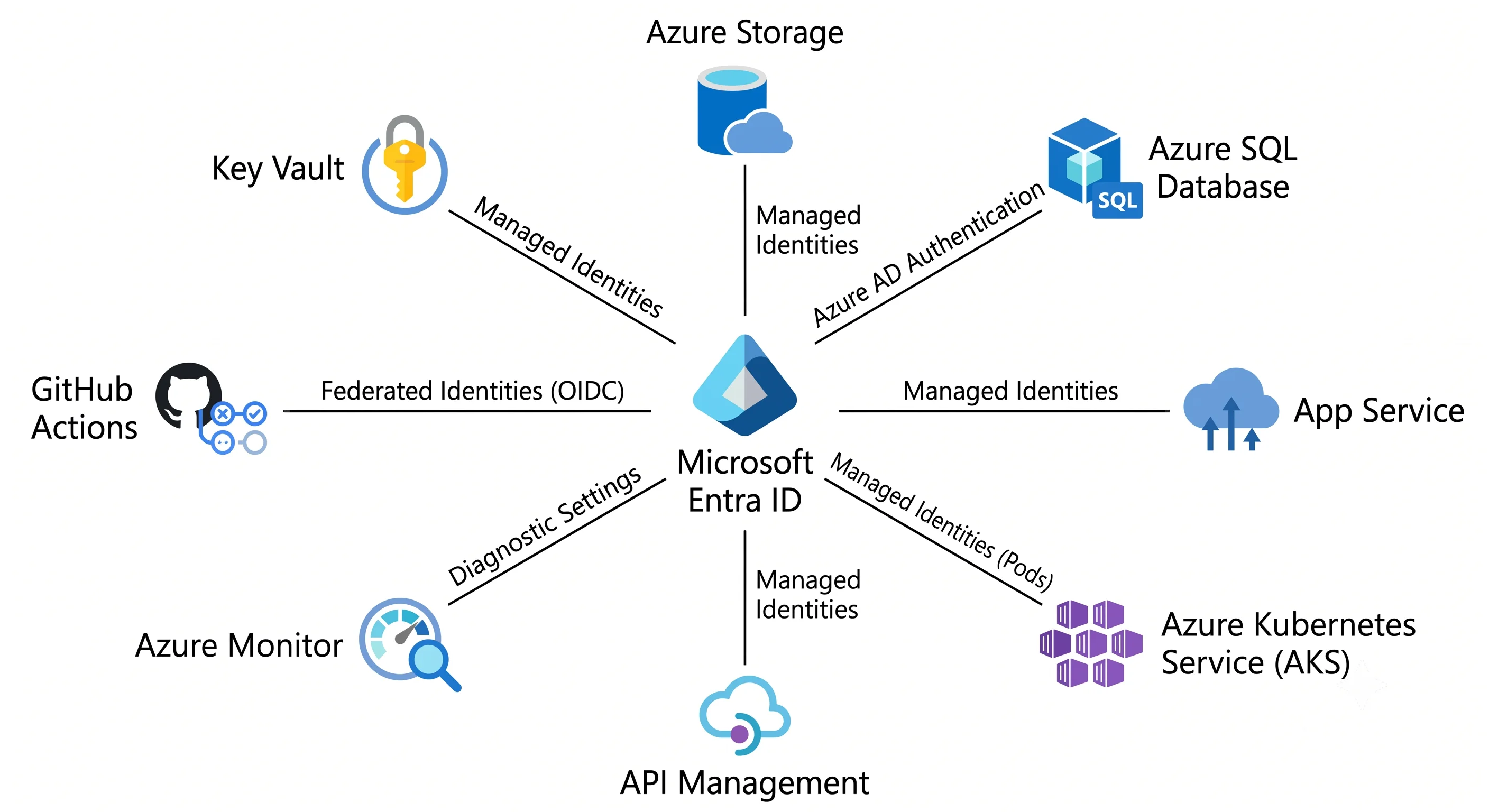
Pattern 1 — Managed identity + role assignment
The mechanism: the resource gets an identity (system-assigned, tied to its lifecycle; or user-assigned, its own ARM resource that several resources can share). Azure injects a token endpoint into the resource's environment. Code asks that endpoint for a token for a target audience, and Azure returns one — no credential ever exists in configuration. Then a role assignment at the target's scope says what the token may do.
// The same three lines regardless of where this runs.
// DefaultAzureCredential finds the managed identity in Azure, your az login locally.
var credential = new DefaultAzureCredential();
var client = new SecretClient(new Uri(vaultUri), credential);
var secret = await client.GetSecretAsync("db-password");
# and the assignment that makes it work
az role assignment create \
--assignee-object-id "$PRINCIPAL_ID" --assignee-principal-type ServicePrincipal \
--role "Key Vault Secrets User" \
--scope "$VAULT_ID"System-assigned vs. user-assigned, decided properly:
| System-assigned | User-assigned | |
|---|---|---|
| Lifecycle | Created and deleted with the resource | Independent ARM resource |
| Sharing | One resource only | Many resources share one identity |
| Role assignments | Must be recreated if the resource is recreated | Survive resource recreation |
| Best for | A single resource with a distinct permission set | Scale sets, AKS workloads, blue/green deployments, anything recreated often |
The deciding question is does this resource get recreated? If yes — immutable infrastructure, scale sets, anything from a pipeline — use user-assigned, because system-assigned identities take all their role assignments to the grave.
Services that consume this pattern: essentially all of them. VMs and scale sets, App Service, Functions, Container Apps, AKS, Logic Apps, Data Factory, API Management, Azure ML, Container Instances, Automation, Event Grid.
Pattern 2 — Workload identity federation
The mechanism: an app registration holds a federated identity credential describing an
external issuer, subject, and audience. When something outside Azure presents an OIDC token from
that issuer whose sub matches, Entra ID exchanges it for an Azure access token. No secret is
stored anywhere, and the external system's own identity does the proving.
| Pairs with | Why | The glue |
|---|---|---|
| GitHub Actions | Deploy to Azure without storing credentials in the repo | Federated credential on https://token.actions.githubusercontent.com, subject repo:owner/repo:environment:prod |
| Azure DevOps | Same, for Azure Pipelines | ARM service connection using workload identity federation |
| Azure Kubernetes Service | Pods get Azure access without node-level identity or secrets | Entra Workload ID: the cluster's OIDC issuer is the trusted issuer, the subject is system:serviceaccount:<ns>:<name>; the pod's projected service account token is exchanged |
| Other clouds / on-prem | Cross-cloud access without long-lived secrets | Any OIDC-compliant issuer, matched on issuer + subject + audience |
The security control is the subject string, and it is easy to get catastrophically wrong.
repo:contoso/api:environment:prod requires a job in the protected GitHub environment.
repo:contoso/api:pull_request lets a pull request from any fork authenticate as your production
identity. Read the subject on every federated credential you inherit.
AKS specifically deserves the callout: Entra Workload ID replaces the older AAD Pod Identity, which is retired. If you meet an AKS cluster using pod identity, that's a migration, not a working system.
Pattern 3 — App registration + OIDC/SAML for user sign-in
The mechanism: an application redirects unauthenticated users to Entra ID, which authenticates them (applying Conditional Access) and returns a token. See Architecture for the full flow.
| Pairs with | Why | The glue |
|---|---|---|
| App Service / Azure Functions | Add sign-in to a web app without writing auth code | Easy Auth (App Service Authentication) — a platform-level middleware that handles the OIDC dance and injects claims as request headers |
| Azure Static Web Apps | The same, for SPAs and static front-ends | Built-in Entra ID provider, or a custom OIDC provider |
| API Management | Validate tokens at the gateway rather than in each backend | validate-jwt policy checking the OIDC metadata endpoint, aud, and required scp/roles claims |
| Application Gateway / Front Door | Terminate at the edge | Not an authentication point themselves — pair with APIM or Easy Auth behind them |
| SaaS applications | Workforce SSO | SAML 2.0 or OIDC from the enterprise application gallery, plus SCIM provisioning to create and deprovision accounts automatically |
SCIM provisioning is the underrated half of SSO. SSO controls who can sign in; SCIM controls whether the account exists in the SaaS app at all. Without it, offboarding removes access but leaves an account — and a licence, and an audit finding. When someone says "we've integrated the SaaS app with Entra ID", ask which half they did.
Easy Auth, in one paragraph, because it's the most commonly used and least understood. App
Service intercepts requests before your code runs, redirects unauthenticated users, validates the
returned token, and passes claims through headers (X-MS-CLIENT-PRINCIPAL). Your application reads
identity without touching MSAL. The catch: it authenticates but does not authorise, so
"authenticated" alone means "anyone in the tenant". Combine it with
app_role_assignment_required = true on the service principal and app-role assignments, or check
the roles claim in your own code.
Pattern 4 — Entra-backed data-plane authentication
The pattern with the biggest security payoff, because in each case it lets you delete a shared secret that is otherwise sitting in a configuration file.
| Service | The Entra way | The legacy way it replaces | The role you'll need |
|---|---|---|---|
| Key Vault | Azure RBAC data-plane roles | Vault access policies (still the default on older vaults) | Key Vault Secrets User, Key Vault Crypto User |
| Azure Storage | Entra token + data-plane RBAC | Account keys and SAS tokens | Storage Blob Data Reader / Contributor — not Contributor, which is control plane only |
| Azure SQL Database | Entra authentication, with an Entra admin set on the server | SQL logins and passwords | CREATE USER [x] FROM EXTERNAL PROVIDER inside the database |
| Service Bus / Event Hubs | Entra token + data roles | SAS connection strings | Azure Service Bus Data Sender / Receiver |
| Cosmos DB | Entra for control plane; data-plane RBAC via a separate, Cosmos-specific role model | Account keys | Cosmos DB built-in data contributor role, assigned with az cosmosdb sql role assignment |
| Azure Container Registry | Entra token (az acr login / managed identity) |
Admin user account | AcrPull / AcrPush |
| Azure OpenAI & AI Services | Entra token | API keys | Cognitive Services OpenAI User |
Two things run through the whole table.
Control-plane roles do not grant data-plane access. Being Contributor on a storage account
lets you delete it and read its keys, but not read a blob with your own identity. Being
Key Vault Contributor lets you delete the vault but not read a secret. This is not an
inconsistency — it's the design, and it's the single most-asked interview question about Azure
identity. See Architecture.
The legacy path is usually still enabled. Turning it off is a separate, deliberate action:
--allow-shared-key-access false on storage, --enable-rbac-authorization true on Key Vault,
disabling the ACR admin user, local_authentication_disabled on Service Bus, disabling SQL
authentication in favour of Entra-only. Until you do, the keys still work and someone still has
them in a .env file.
Pattern 5 (sort of) — Entra ID as a signal source
Not authentication at all, but the integration people forget until an audit:
| Pairs with | Why | The glue |
|---|---|---|
| Azure Monitor / Log Analytics | Sign-in and audit logs are not retained usefully by default | A diagnostic setting on the tenant routing SignInLogs, AuditLogs, NonInteractiveUserSignInLogs, ServicePrincipalSignInLogs, and the risk logs to a workspace |
| Microsoft Sentinel | Detection and response over identity events | The same diagnostic setting, plus Sentinel analytics rules for impossible travel, consent grants, and privileged role changes |
| Microsoft Defender for Cloud | Identity recommendations against Azure resources | Reads Entra state; surfaces missing MFA on privileged accounts, orphaned assignments |
| Entra ID Governance | Access packages and lifecycle workflows | Ties group membership and application assignment to a request/approval/expiry process |
The diagnostic setting is the one that matters. Without it, the portal keeps a limited window of sign-in history ⚠️ verify current default retention against current Microsoft docs — and a security investigation three months later has nothing to read. Configure it on day one; it's covered with the other day-one settings in Production.
The pattern in a real architecture
An orders API on App Service, backed by Azure SQL and Key Vault, deployed by GitHub Actions:
- GitHub Actions authenticates with a federated credential on an app registration whose
subject is pinned to the
prodenvironment — no secret in the repository. - The App Service has a user-assigned managed identity, so a redeploy that recreates the site doesn't orphan its role assignments.
- That identity holds
Key Vault Secrets Useron the vault, reached over a private endpoint with theprivatelink.vaultcore.azure.netprivate DNS zone linked to the VNet. - Azure SQL has an Entra admin group, and the App Service identity is a contained database user
created
FROM EXTERNAL PROVIDER. SQL authentication is disabled on the server. - End users sign in via Easy Auth, with
app_role_assignment_requiredset, so being in the tenant is not sufficient — an app-role assignment is. - Conditional Access requires a compliant device and phishing-resistant MFA for anyone holding the admin app role.
- A diagnostic setting ships sign-in and audit logs to Log Analytics; Sentinel alerts on new consent grants and on any change to the application's credentials.
There is not a single password, connection string, or account key anywhere in that description. That is the target state, and every line of it is one row from the tables above.
Next: Production →
← Back to the Microsoft Entra ID overview · ← Previous: Deployment