
7. Production
Five pillars: security, cost, scaling, observability, reliability. The gap between a VNet that works in a demo and one you'd operate is mostly in the first two.
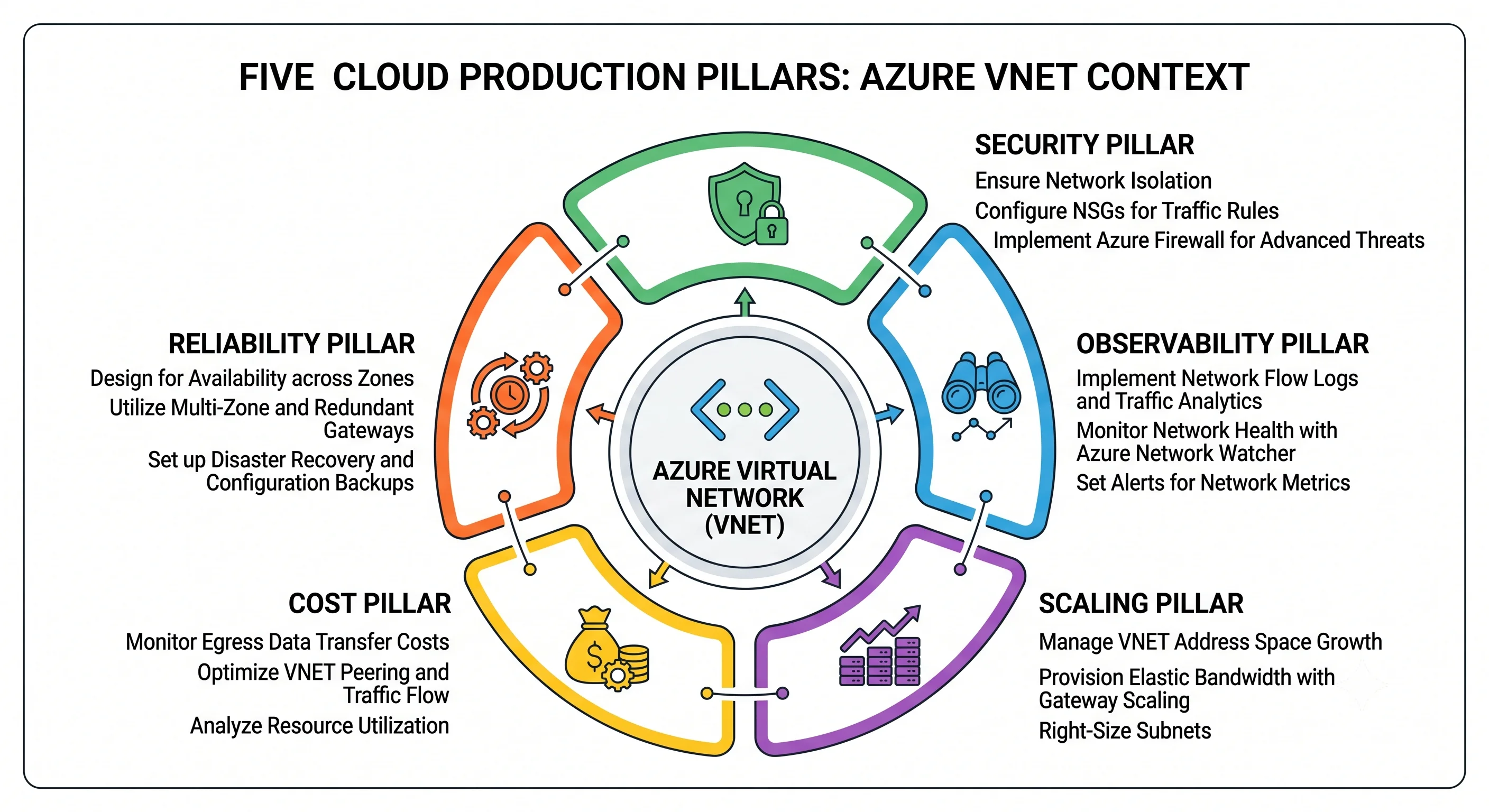
Security
Start from the default posture, because it's flat
The six undeletable default NSG rules from Core Concepts say, in effect: everything inside the VNet can reach everything else, on every port, and everything can reach the whole internet outbound. Segmentation is a thing you build. If you have written no rules, your build agent subnet can reach your database subnet.
The baseline worth applying to every workload subnet:
| Rule | Priority | Why |
|---|---|---|
| Allow only the specific inbound ports the tier needs, sourced from an ASG | 100–200 | ASG-based rules survive IP changes and scale events |
| Deny all inbound | 4000 | Overrides AllowVnetInBound and makes cross-subnet reach explicit |
Allow required outbound (service tags: Storage.uksouth, AzureKeyVault.uksouth, AzureMonitor) |
100–200 | Named destinations rather than the internet |
| Deny all outbound | 4000 | Overrides AllowInternetOutBound. Do this in stages — it will break something you forgot |
Two cautions. Deny-all outbound breaks things you didn't know were talking: Windows Update, the
guest agent's dependencies, package repositories, certificate revocation lists, and Log Analytics
ingestion. Roll it out by turning on flow logs first, watching for a week, then writing rules from
what you observed. And never block 168.63.129.16 or the AzureLoadBalancer tag — you'll break
health probes, DHCP renewal, and the guest agent simultaneously.
The management-port rule
The single highest-value network control on Azure: no NSG rule permitting inbound 22 or 3389 from
Internet or *, anywhere, ever. An exposed RDP port is the most common route to a compromised
Azure subscription, and it is entirely avoidable — use Azure Bastion for interactive access, or
just-in-time VM access in Defender for Cloud. Enforce it with an Azure Policy Deny, not a
wiki page, because the wiki page loses to a 3 a.m. incident.
Least privilege on the control plane
The network data plane has no RBAC (see Architecture) — packets carry no identity. All the RBAC work is about who may change the topology:
- Platform team:
Network Contributoron the networking resource groups. NotContributoron the subscription. - Application teams: a custom role granting only
Microsoft.Network/virtualNetworks/subnets/join/actionandreadon the specific subnets they deploy into. This is the minimum that lets them create VMs and private endpoints without letting them rewrite NSGs. Writing this role, once, prevents the usual outcome of handing outNetwork Contributoron the whole VNet. - Nobody gets standing permission to modify route tables in prod. Route changes are the most destructive network change available and belong behind the pipeline's approval gate.
Network isolation is not authorisation
Repeated because it's the error that survives the most code reviews. A private endpoint removes the public path; it does not authenticate anyone. If a workload is compromised inside your VNet, the private endpoint is helping it reach your storage account. The control that decides whether the data comes out is the Entra ID token and the data-plane role assignment. Do both, and never let "it's on the private network" close a security discussion.
Exfiltration paths worth closing
- Service endpoints let a subnet reach any account in that service, including one in an attacker's subscription. Private endpoints are per-resource and don't have this property. If you must use service endpoints, add service endpoint policies to restrict the accounts.
- Public IPs on VMs bypass your entire egress inspection story. Deny them by policy in spokes.
- DNS over HTTPS from inside a VM routes around your DNS logging. Firewall it.
- Unrestricted outbound to
Internetmeans an exfiltration channel exists by default.
Encryption
Azure encrypts VNet traffic between its own datacentres by default, and virtual network encryption extends host-to-host encryption within a VNet for supported VM SKUs ⚠️ verify current availability and SKU support against current Azure docs. This is defence in depth, not a substitute for TLS at the application layer — always terminate TLS end to end regardless.
Cost
The VNet, subnets, NSGs, ASGs, and route tables are free. This is genuinely misleading, and it's why networking bills surprise people: the free part is the part you design, and the expensive part is the part you attach without thinking.
What actually bills
| Meter | Shape | The trap |
|---|---|---|
| Azure Firewall | Per deployment-hour plus per GB processed | Almost always the largest line. Runs 24/7 by definition. Premium roughly doubles the hourly rate for TLS inspection and IDPS most teams don't use. One firewall in a shared hub, not one per spoke |
| VPN / ExpressRoute Gateway | Per hour by SKU | Bills whether or not a tunnel is connected. Forgotten dev gateways are a classic finding |
| VNet peering data | Per GB, charged on both sides, higher across regions | A chatty cross-region spoke pair can cost more than the compute. Cross-region peering is where this bites |
| NAT Gateway | Per hour + per GB processed | Cheap and worth it; just don't create one per subnet when one per VNet does |
| Public IP (Standard) | Per hour, attached or not | Orphaned IPs from deleted VMs. A subscription with 200 of them is a real and common audit finding |
| Private endpoints | Per hour per endpoint + per GB | Multiply by sub-resources × accounts × environments and a "small" design becomes hundreds of endpoints |
| Azure Bastion | Per hour + per outbound GB | Runs continuously. In dev, deploy it on demand or use the Developer SKU |
| DDoS Network Protection | Large flat monthly fee, tenant-wide | Correct for an enterprise, wildly wrong on a dev subscription. Use IP Protection for small estates |
| Egress to internet / cross-region | Per GB | The usual bandwidth meters |
⚠️ All rates vary by region and change — verify against current Azure pricing. The durable point: every expensive thing in Azure networking bills by the hour and runs continuously, so the optimisation is architectural (fewer of them, shared) rather than operational (turning them off).
The four optimisations that actually matter
One firewall in the hub, not one per spoke. This is usually the single biggest saving available, and it's a topology decision you make once.
Reap orphaned public IPs. A scheduled query for unattached Standard public IPs pays for itself immediately:
az network public-ip list --query "[?ipConfiguration==null].{name:name, rg:resourceGroup}" -o tableKeep chatty services in the same region. Cross-region peering data is charged both ways. Moving a chatty pair into one region eliminates the meter rather than reducing it.
Don't create private endpoints you don't need. One per sub-resource per account per environment adds up fast. A shared endpoint in the hub with DNS pointing at it serves many spokes — at the cost of coarser blast radius, which is a real trade-off to weigh, not a free win.
What keeps billing when nothing is using it
Firewalls, gateways, Bastion, NAT Gateways, public IPs, and private endpoints — all of them. The VNet itself costs nothing at 3 a.m. on a Sunday; everything attached to it costs exactly what it costs at peak. This is the opposite shape from compute, and it's why "we turned off the dev VMs to save money" produces a disappointing bill reduction.
Scaling and limits
The VNet has no throughput to provision. Bandwidth is a property of the VM size, not the network, and Accelerated Networking (default on supported sizes) is what gets you the advertised number by bypassing the software switch. If throughput is your problem, the answer is a bigger VM, not a network setting.
The limits that constrain designs, with the scope each is counted at — the right-hand column is the durable content:
| Limit | Approximate default | Counted at |
|---|---|---|
| VNets | ~1,000 | Per subscription per region |
| Subnets per VNet | ~3,000 | Per VNet |
| Peerings per VNet | ~500 | Per VNet |
| Private IPs per VNet | ~65,536 | Per VNet |
| NSGs | ~5,000 | Per subscription per region |
| Rules per NSG | ~1,000 | Per NSG |
| Routes per route table | ~400 | Per route table |
| Public IPs (Standard) | ~1,000 | Per subscription per region |
| Private endpoints | ~1,000 | Per subscription |
| Private DNS zones | ~1,000 | Per subscription |
| VNet links per private DNS zone | ~1,000 | Per zone |
⚠️ Every number varies by subscription type and region and changes over time — verify against current Azure docs before designing to it.
Most are soft and raisable via a quota request in the portal or az quota. The ones you design
around rather than raise: peerings per VNet (the reason Virtual WAN exists), routes per route
table, and addresses in your address plan — which isn't an Azure quota at all, it's arithmetic
you did once and can't undo.
The pattern to notice: most Azure networking quotas are per subscription per region. That's the structural argument for one subscription per environment: it isn't just blast radius, it's that a single shared subscription hits ceilings in surprising places and quota requests become a shared bottleneck between teams.
Observability
Diagnostic settings are not on by default
Nothing in this section happens automatically. A VNet with no diagnostic configuration produces no logs at all, and the first time you need them is during an incident, when it's too late to enable them retroactively.
What to turn on:
| Source | What it gives you | Where to send it |
|---|---|---|
| VNet flow logs | Every allowed and denied 5-tuple flow | Storage account → Traffic Analytics → Log Analytics |
| Azure Firewall diagnostics | Application and network rule hits, DNS proxy, threat intel | Log Analytics workspace |
| Public IP / DDoS diagnostics | Mitigation events and traffic characteristics | Log Analytics workspace |
| Gateway diagnostics | Tunnel state, BGP routes, IKE diagnostics | Log Analytics workspace |
| Activity log | Every control-plane change and who made it | Log Analytics workspace, retained ≥90 days |
VNet flow logs supersede NSG flow logs, which have been retired ⚠️ verify current status against current Azure docs. Enable Traffic Analytics on top in prod — raw flow logs are close to unreadable by hand, and Traffic Analytics is what turns them into answers about topology, top talkers, and denied flows.
The queries worth saving
Which flows are being denied, and by what — the question you'll ask most:
NTANetAnalytics
| where TimeGenerated > ago(1h)
| where FlowStatus == "Denied"
| summarize Flows = count()
    by SrcIp, DestIp, DestPort, L4Protocol, NSGList
| order by Flows desc
| take 50
Who changed the network outside the pipeline — the drift signal from Deployment, and the one worth alerting on:
AzureActivity
| where TimeGenerated > ago(24h)
| where OperationNameValue startswith "MICROSOFT.NETWORK/"
| where OperationNameValue has_any ("SECURITYRULES/WRITE", "ROUTES/WRITE",
                                    "SUBNETS/WRITE", "VIRTUALNETWORKPEERINGS/WRITE")
| where ActivityStatusValue == "Success"
| where Caller !endswith "terraform-prod"
| project TimeGenerated, Caller, OperationNameValue, _ResourceId
| order by TimeGenerated desc
What is my egress actually reaching — the input to writing outbound deny rules:
AZFWApplicationRule
| where TimeGenerated > ago(7d)
| summarize Requests = count() by Fqdn, Action
| order by Requests desc
| take 100
Metrics worth alerting on
| Metric | Alert when | Why |
|---|---|---|
| NAT Gateway SNAT connection count and dropped packets | Dropped > 0, or SNAT usage trending toward the ceiling | The leading indicator of SNAT port exhaustion, hours before users notice |
| Azure Firewall health state and throughput | Health degraded, or throughput near SKU limit | The firewall is a single point of failure for all egress |
| VPN Gateway tunnel connectivity | Any tunnel down | On-premises connectivity, often noticed by users first otherwise |
| DDoS mitigation triggered | Any | You want to know during, not after |
| ExpressRoute BGP availability | Any drop | Same |
Connection Monitor deserves a specific mention: it continuously probes a path (VM to VM, VM to on-premises, VM to a URL) and alerts on latency and reachability. It's the only tool here that tells you a path broke before someone files a ticket, and it's the right instrument for hybrid links.
Reliability
The VNet is already zone-resilient; its attachments may not be
A VNet spans every availability zone in its region automatically. There is no zone configuration on a VNet or a subnet, and nothing to do — the VNet is not your single point of failure. What you attach might be:
| Resource | Zone behaviour | What to do |
|---|---|---|
| VNet, subnet, NSG, route table | Regional, inherently zone-resilient | Nothing |
| Standard Load Balancer | Zone-redundant if you configure a zone-redundant frontend | Configure it. A zonal frontend fails with its zone |
| Public IP (Standard) | Zone-redundant or zonal, your choice at creation | Choose zone-redundant unless you specifically need pinning |
| NAT Gateway | Zonal — lives in one zone | One per zone with zone-aligned subnets, or accept the zone as a failure domain ⚠️ verify current behaviour |
| Azure Firewall | Zone-redundant if deployed across zones | Deploy across all three. A single-zone firewall takes all egress down with its zone |
| VPN Gateway | Only the AZ SKUs are zone-redundant |
Choose an AZ SKU. Changing later recreates the gateway and its public IP |
| Application Gateway v2 | Zone-redundant when zones are specified | Specify them |
The pattern: the free things are resilient, the billable things need a deliberate choice, and the deliberate choice usually costs more. A zone-redundant firewall and gateway in prod, single-zone in dev, is the standard shape.
Regional failure
A VNet cannot span regions. Multi-region means a second VNet in a second region with a non-overlapping address space, peered globally or connected through Virtual WAN, and a global traffic manager (Front Door or Traffic Manager) in front.
The address plan is what makes this possible or impossible, and it's decided on day one. If prod-UK
is 10.20.0.0/20 and you want prod-West-Europe, it needs its own block — 10.21.0.0/20 — reserved
now. Teams that used 10.0.0.0/16 for their first VNet discover this when the DR project starts,
and the answer is a renumbering exercise.
Azure's paired region concept matters less for networking than for storage — there's no automatic network failover to a paired region — but the pairing still governs how Microsoft sequences platform updates and prioritises recovery, so it's a reasonable default choice of second region.
The failure drill
Rehearse these, on a schedule, in a non-production subscription:
- Fail the firewall. Stop or deallocate it and confirm what happens to spoke egress. The answer should be "it stops" and everyone should know that in advance. If a UDR points at a dead NVA, traffic black-holes silently.
- Lose a zone. Confirm the load balancer, gateway, and NAT Gateway behave as designed.
- Break DNS. Unlink a Private DNS zone and watch how the application fails. It's almost never a clear error — usually a timeout or an authentication failure against an unexpected public endpoint. Knowing that signature saves an hour during a real incident.
- Simulate SNAT exhaustion with a load test opening many connections to a single destination, and confirm the alert fires before the application does.
- Delete a spoke VNet in dev and time the full rebuild from Terraform, including the peering and the DNS links. That number is your real RTO for a network incident, and it's usually longer than people guess — because the topology comes back fast and the resources other teams put in it don't.
Next: Interview Questions →
← Back to the Virtual Network overview · ← Previous: Integrations