
2. Core Concepts
Every noun you'll meet in the VM blade, defined. The pattern throughout is term → analogy → precise definition, because the portal will show you all of these within about ninety seconds of clicking Create and none of them are self-explanatory.
A VM lives in a resource group, in a subscription, in a region — see
the scope hierarchy rather than a re-explanation here.
Its resource provider is Microsoft.Compute, and it is joined at the hip to resources from
Microsoft.Network and Microsoft.Storage.
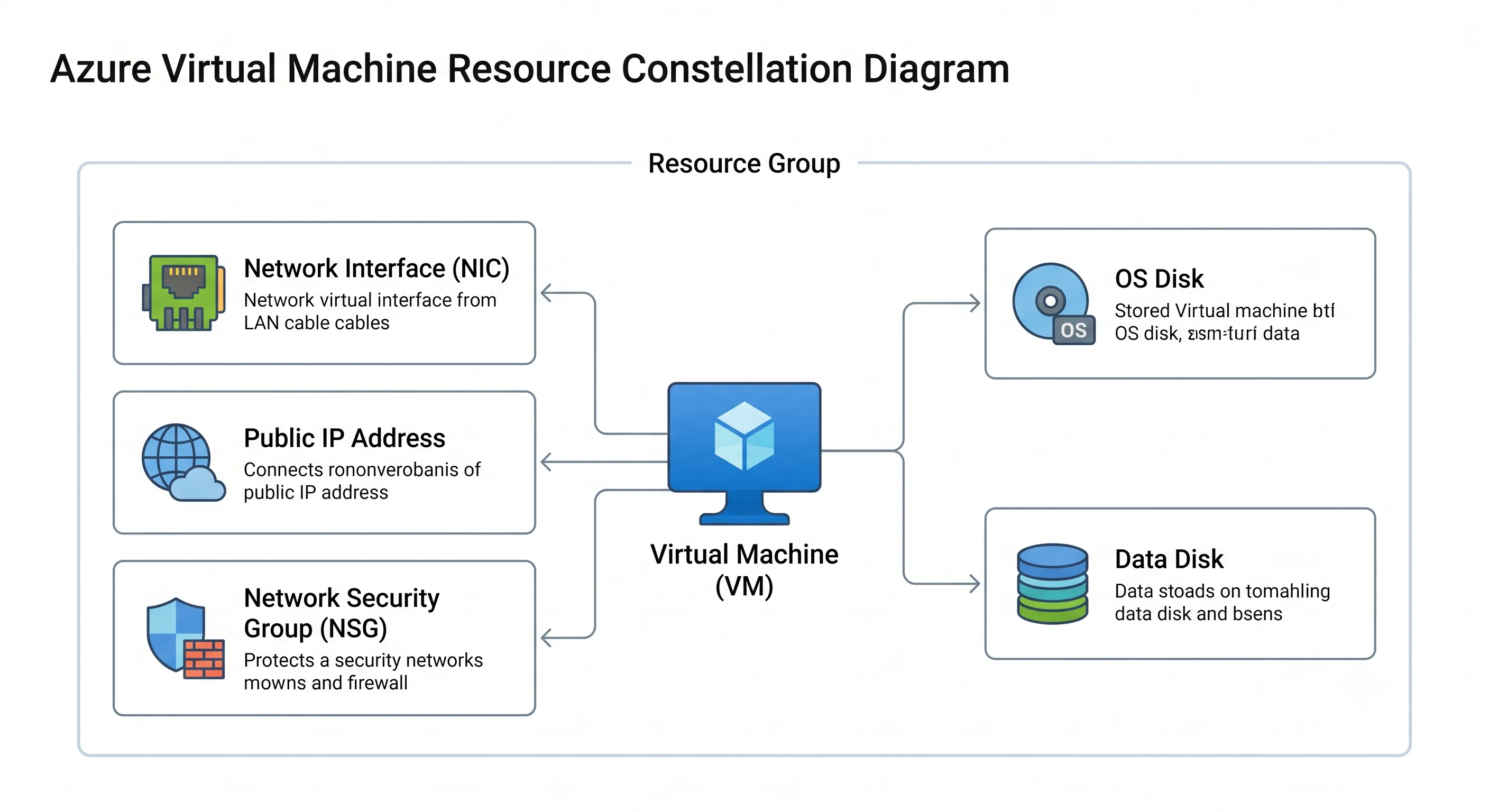
The constellation
The most important structural fact: "a VM" is not one resource. Creating one in the portal silently creates five or six ARM resources, each with its own ID, lifecycle, and bill.
| Resource | Provider/type | What it is |
|---|---|---|
| The VM | Microsoft.Compute/virtualMachines |
The compute definition: size, image reference, identity, references to disks and NICs |
| OS disk | Microsoft.Compute/disks |
A managed disk holding the boot volume. Its own resource, its own SKU, its own lifecycle |
| Data disk(s) | Microsoft.Compute/disks |
Additional block storage, attached at a LUN |
| Network interface | Microsoft.Network/networkInterfaces |
The NIC: holds the private IP config, optional public IP reference, DNS settings, and optionally an NSG |
| Public IP | Microsoft.Network/publicIPAddresses |
Optional. Basic SKU is retired; use Standard, which is zone-redundant and secure-by-default (no inbound unless an NSG allows it) |
| NSG | Microsoft.Network/networkSecurityGroups |
Stateful L3/L4 rules, attachable to the NIC, the subnet, or both |
Everything surprising about Azure VMs falls out of this: orphaned disks that keep billing after a
delete, an NSG that survives a rebuild and blocks the new VM, a public IP that can't be deleted
because a NIC still references it. AWS hides this; Azure makes you hold it.
Compute
VM size — the model number of the computer you're renting. A string like Standard_D4s_v5
that fixes vCPU count, memory, maximum disk throughput, maximum NIC count, and maximum network
bandwidth in one go. Decode it left to right:
| Part | Meaning |
|---|---|
Standard_ |
The tier prefix — effectively always this now |
D |
The series: the workload family (see below) |
4 |
Approximate vCPU count |
s |
Premium storage capable. Without it you cannot attach Premium SSD, which quietly excludes you from the single-VM SLA |
v5 |
Hardware generation. Higher is usually faster and cheaper per unit of work |
Additional letters appear: a = AMD processor, d = has a local temp disk, p = Arm (Ampere),
i = isolated, m = extra memory variant, NP/NC/ND = FPGA/GPU variants. Standard_D8ads_v5
is an 8-vCPU, AMD, temp-disk-equipped, premium-storage-capable, v5 general-purpose VM.
Series — the department the machine works in.
| Series | Purpose | Reach for it when |
|---|---|---|
| B | Burstable — accrues CPU credits while idle, spends them under load | Dev boxes, low-traffic sites. The trap: run it hot and it throttles to its baseline, which can be a fraction of a vCPU |
| D | General purpose, balanced CPU:memory (roughly 4 GiB per vCPU) | The default. Start here unless you know otherwise |
| E | Memory optimised (roughly 8 GiB per vCPU) | Databases, in-memory caches, SAP |
| F | Compute optimised (roughly 2 GiB per vCPU) | Batch processing, web front ends, game servers |
| L | Storage optimised — large local NVMe | Cassandra, Elasticsearch, anything wanting local disk throughput. Local NVMe is ephemeral |
| M | Huge memory | SAP HANA and similar |
| N (NC/ND/NV) | GPU — compute, deep learning, visualisation | Training, inference, remote graphics. Requires a quota request nearly always |
| H | HPC with InfiniBand | Tightly-coupled MPI workloads |
Resizing is possible but constrained: you can move freely within a family and generation, but crossing to a different hardware cluster requires the VM to be deallocated first, and the target size must be available in your region and zone. This is why "just make it bigger" is a maintenance window, not a click.
Spot VMs — standby airline seats. Unused Azure capacity at a steep discount, with the condition that Azure can evict the VM with 30 seconds' notice when it wants the capacity back. You set a maximum price or accept the current one, and an eviction policy of Deallocate (keep the disks, restart later) or Delete. Correct for stateless batch, CI agents, and anything checkpointed. Wrong for anything with a user waiting.
Azure Dedicated Host — renting the whole physical machine, not a slice. A physical server reserved for your subscription alone, billed for the host rather than the VMs. Chosen for compliance that forbids shared tenancy or for licence models tied to physical cores.
Images
Image — the factory-fresh disk you boot from. Three sources, and knowing which one you're on matters for both governance and repeatability:
- Marketplace image — published by Microsoft or a vendor, referenced by a four-part URN:
publisher:offer:sku:version, e.g.Canonical:ubuntu-24_04-lts:server:latest. Pinninglatestis convenient and non-reproducible; pin an explicit version for anything you'll audit. - Azure Compute Gallery (formerly Shared Image Gallery) — your own golden images, versioned, replicated across regions, and shareable across subscriptions. The right home for a hardened baseline built by Packer or Azure Image Builder.
- Managed image / snapshot — a one-off capture of an existing VM. Fine for a quick clone, poor as a distribution mechanism; the gallery exists because this doesn't scale.
VM generation — Gen1 uses BIOS boot, Gen2 uses UEFI. Gen2 is required for Trusted Launch (secure boot + vTPM), for confidential computing, and for very large OS disks. New workloads should be Gen2; a Gen1 VM cannot simply be flipped to Gen2 in place.
Trusted Launch is now the default for new Gen2 VMs and gives you secure boot, a virtual TPM, and boot-integrity monitoring. It's free, and turning it off should be a deliberate, justified choice (some third-party drivers and some nested-virtualisation setups require it off).
Storage
Managed disk — a virtual hard drive Azure owns and replicates for you. An ARM resource of type
Microsoft.Compute/disks, backed by triple-replicated Azure Storage under the covers. You pick a
size and a SKU; Azure handles the placement, replication, and fault-domain alignment. Unmanaged
(page-blob) disks are legacy — don't.
| Disk SKU | Analogy | Use it for | The catch |
|---|---|---|---|
| Standard HDD | Spinning rust | Archive, dev, backup targets | Latency is unpredictable; no meaningful IOPS guarantee |
| Standard SSD | A budget SSD | Light production, web servers, dev/test | Lower and less consistent IOPS than Premium; no single-VM SLA |
| Premium SSD | A proper SSD | Most production workloads | Performance is tied to the size tier — a P10 gets P10 IOPS whether you use 30 GiB or 128 |
| Premium SSD v2 | An SSD with dials | Production where you want IOPS and throughput set independently of capacity | Fewer regions and some feature gaps ⚠️ verify current availability and feature support against current Azure docs |
| Ultra Disk | A SAN LUN | SAP HANA, top-tier databases needing sub-millisecond latency | Most expensive; requires zone selection and has the tightest regional availability |
Three disk facts that catch people:
Premium SSD performance is bought by the gigabyte. The tiers (P1…P80) map size to IOPS and throughput. If you need more IOPS you buy a bigger disk, whether or not you need the space. Premium SSD v2 exists precisely to break that coupling.
The VM size caps the disk, not just the disk SKU. Every VM size has a maximum uncached and cached IOPS/throughput figure. Attaching an Ultra Disk to a small VM gets you the small VM's ceiling. Always check both numbers; the binding constraint is whichever is lower.
Host caching is a real decision. Each data disk can be set to None, ReadOnly, or
ReadWrite, using the host's local SSD as a cache. ReadOnly is excellent for database data files
and read-heavy workloads. ReadWrite is dangerous for anything with its own write ordering — most
database vendors explicitly require None for log disks. The default for the OS disk is ReadWrite.
Temp disk (/dev/sdb, or D: on Windows) — a scratchpad, not storage. Local SSD on the
physical host, present only on sizes with a d in the name. Fast, free — and wiped on deallocate,
resize, or host migration. Page files and tempdb belong here; anything you want tomorrow does
not.
Ephemeral OS disk — the OS disk placed on local host storage instead of remote managed storage. Free, much faster to boot and reimage, and completely lost on deallocate. Excellent for stateless scale-set instances and AKS nodes; wrong for anything stateful.
Encryption — three separate things people conflate. SSE (Storage Service Encryption) is always-on at-rest encryption of managed disks with platform-managed keys. Customer-managed keys swap that for a key in Key Vault via a Disk Encryption Set. Azure Disk Encryption (ADE) is the older in-guest approach using BitLocker or dm-crypt. Encryption at host is the modern preferred option, encrypting the temp disk and the caches too. Prefer SSE with CMK plus encryption at host.
Networking
Virtual Network (VNet) and subnet — the private network the VM plugs into. A VNet is a regional private address space; a subnet is a slice of it. Unlike AWS, a subnet spans the whole region rather than a single availability zone, so subnet choice tells you nothing about zone placement.
NIC — the network card, but as a resource you can see. Holds one or more IP configurations (a private IP, static or dynamic, plus optionally a public IP), the DNS settings, and optionally accelerated networking and an NSG. Multiple NICs are possible on larger sizes and are how network virtual appliances are built.
Accelerated Networking — SR-IOV, bypassing the host's virtual switch. Materially lower latency and jitter, free, supported on most modern sizes with 2+ vCPUs. On by default for many sizes now; worth explicitly confirming rather than assuming.
Public IP — Standard SKU only for new work (Basic is retired). Standard IPs are secure by default: no inbound traffic reaches the VM unless an NSG rule allows it. Static vs. dynamic matters — a dynamic IP is released on deallocate and you will get a different one back.
Network Security Group (NSG) — a stateful firewall list with priority numbers. Rules are evaluated by priority (low number wins), separately for inbound and outbound, and being stateful, a permitted inbound flow's response doesn't need an outbound rule. Default rules you should know: inbound traffic from within the VNet is allowed, inbound from the internet is denied, and outbound to the internet is allowed. An NSG can attach to the subnet and to the NIC; when both exist, inbound traffic must pass the subnet NSG then the NIC NSG, and outbound the reverse. Two NSGs in the path is the most common cause of "the rule is right but it still doesn't work."
Application Security Group (ASG) — a named group of NICs you can use as the source or
destination in an NSG rule, so rules read web-tier → app-tier instead of a list of IP ranges.
Underused, and the single biggest readability win available in NSG rules.
Availability and scale
Availability zone — a physically separate datacentre within the region. A VM can be pinned to zone 1, 2, or 3. Spreading instances across zones protects against a datacentre-level failure and carries the highest VM SLA. Zone numbers are per subscription — your zone 1 and another subscription's zone 1 may be different physical facilities.
Availability set — the older, within-datacentre version of the same idea. Spreads VMs across fault domains (separate racks, power, and network) and update domains (separate host-patching batches). It protects against rack failure and maintenance reboots but not against a datacentre outage. Zones are strictly stronger where available. An availability set must be chosen at VM creation and cannot be added later; a VM cannot be in both a set and a zone.
Virtual Machine Scale Set (VMSS) — a VM definition plus a number. Manages N identical instances, with autoscale rules, rolling upgrades, and automatic instance repair. Two orchestration modes:
- Flexible — the recommended default. Instances are real, individually-addressable
virtualMachinesresources; you can mix sizes, use zones and fault domains explicitly, and it behaves much more like a managed group of ordinary VMs. - Uniform — the original mode. Instances are identical and managed as a fleet, with lower per-instance control but very high scale.
If you are deploying more than one identical VM, use a Flexible scale set. It is not meaningfully harder than a VM and gives you autoscale and instance repair for free.
Proximity Placement Group (PPG) — forces VMs onto physically close hardware to minimise inter-VM latency. Real benefit for chatty tiers and HPC; the cost is a much higher chance of allocation failure, and it conflicts with spreading across zones.
Capacity Reservation — reserves capacity of a given size in a region/zone so it's there when you need it. Distinct from a Reservation (a billing commitment) — the names are confusingly close and interviewers enjoy the distinction.
Identity, agents, and configuration
Managed identity — the VM's own login, with no password to store. Either system-assigned
(created and deleted with the VM, one per VM) or user-assigned (a standalone resource that many
VMs can share). Either way, the VM fetches tokens from the Instance Metadata Service at
169.254.169.254 and presents them to Azure services. Combined with an Azure RBAC role assignment,
this replaces every connection string and key you would otherwise put in a config file.
Instance Metadata Service (IMDS) — a link-local HTTP endpoint the VM can query for its own metadata, its tokens, and Scheduled Events — advance notice of an impending reboot, redeploy, or Spot eviction. Polling Scheduled Events is how a well-behaved application drains itself gracefully.
VM extension — a small agent Azure installs into your guest on request. An ARM child resource
(Microsoft.Compute/virtualMachines/extensions) that runs something inside the VM: the Azure Monitor
Agent, custom script execution, Entra login, the Desired State Configuration agent, antimalware. They
run as root/SYSTEM and are managed through the control plane — which is exactly why control-plane
permissions on a VM are effectively guest permissions too (see Architecture).
cloud-init / custom data — first-boot configuration passed at create time. On Linux, cloud-init is the idiomatic path; on Windows, custom data plus an extension. Good for bootstrapping; not a substitute for a configuration-management tool like the Ansible playbook in Deployment.
Run Command — executes a script in the guest through the control plane, no inbound network path required. Genuinely useful for break-glass, and a security consideration for the same reason.
The running mini-table
| Term | Analogy | Technical definition |
|---|---|---|
| VM size | The model number of the computer | A named SKU fixing vCPU, memory, max disk IOPS/throughput, max NICs, and max network bandwidth |
| Series | The department it works in | The workload family letter (B/D/E/F/L/M/N/H) that sets the CPU:memory ratio and special hardware |
| Managed disk | A virtual hard drive Azure looks after | A Microsoft.Compute/disks resource with a SKU and size, replicated by the platform, billed on provisioned capacity |
| Temp disk | A scratchpad on the desk | Local host SSD, present on d-suffixed sizes, wiped on deallocate, resize, or host migration |
| Image | The factory-fresh disk | A marketplace URN, a Compute Gallery version, or a managed image used as the boot source |
| NIC | The network card, made visible | A Microsoft.Network/networkInterfaces resource holding IP configuration, DNS, and optional NSG |
| NSG | A stateful firewall list with priorities | Priority-ordered inbound/outbound allow/deny rules, attachable to a subnet, a NIC, or both |
| ASG | A name for a group of servers | A logical grouping of NICs usable as source/destination in NSG rules |
| Availability set | Spread across racks in one building | Placement across fault domains and update domains within a single datacentre |
| Availability zone | Spread across buildings | Placement in a physically separate datacentre within the region; per-subscription zone numbering |
| Scale set (Flexible) | A VM definition plus a number | A managed group of individually-addressable VMs with autoscale, rolling upgrade, and instance repair |
| Spot VM | A standby airline seat | Discounted spare capacity, evictable with ~30 seconds' notice, with a deallocate-or-delete eviction policy |
| Managed identity | The VM's own login | An Entra ID service principal bound to the VM, with tokens fetched from IMDS, granted access via Azure RBAC |
| Extension | An agent Azure installs for you | A child ARM resource that executes code inside the guest, run as root/SYSTEM |
| IMDS | The VM asking "who and where am I" | A link-local endpoint at 169.254.169.254 serving metadata, tokens, and Scheduled Events |
| Trusted Launch | A tamper-evident seal on boot | Secure boot + vTPM + boot integrity monitoring on Gen2 VMs |
| Ephemeral OS disk | A boot disk on the desk, not in the vault | OS disk on local host storage — fast, free, and lost on deallocate |
| Dedicated Host | Renting the whole machine | A physical server allocated to one subscription, billed per host |
| Capacity Reservation | Holding the seat | Reserved capacity of a size in a region/zone — distinct from a Reservation, which is a billing commitment |
The SKU traps, collected
Four choices are where money and grief accumulate:
- A missing
s. A size without premium-storage capability can't take Premium SSD, which silently removes the single-VM SLA and caps your disk performance. - B-series in production. Burstable is superb for idle-most-of-the-time boxes and terrible for sustained load — it throttles to a baseline that can be under one full vCPU, and the symptom looks like a mysterious application slowdown, not a quota error.
- An old generation.
v3versusv5of the same size is often slower and more expensive per unit of work. Generation upgrades are one of the few free performance wins available. - Premium disk sized for capacity, not IOPS. A 128 GiB P10 where the workload needed P30 IOPS is the classic "the database is slow and the CPU is idle" incident.
Next: Architecture →
← Back to the Virtual Machines overview · ← Previous: What & Why