
4. Regions and Availability
Every resilience decision in Azure is a version of the same question: what am I willing to lose, and to what? A disk can fail. A rack can lose power. A datacentre can flood. A whole region can go dark. Each of those is a different blast radius, and Azure sells you a different mechanism for each — with a different price and a different set of things it quietly does not protect against.
The mechanisms, from smallest failure to largest:
| Failure | The mechanism | Roughly costs you |
|---|---|---|
| A disk, a host | Platform-managed redundancy inside a datacentre (LRS, a single VM's local resiliency) | Nothing extra |
| A rack, a power domain | Availability set (fault and update domains) | Nothing extra, VMs only |
| A datacentre / one zone | Availability zones — zonal or zone-redundant | Modest: more instances, cross-zone traffic |
| A whole region | Multi-region — geo-replication, paired-region failover, active-active | A lot: duplicated infrastructure and real design work |
| A bad deploy, a deleted resource | None of the above | Backups, soft delete, locks, and a rollback plan |
That last row is not a joke. Availability zones do nothing whatsoever about the most common cause of outages, which is a change someone made on purpose. Zone redundancy protects you from Azure; backups and deployment discipline protect you from yourself, and most teams need the second more than the first.
Coming from AWS: regions and availability zones map cleanly enough that you'll feel at home, then three things will bite. (1) AZ numbering is per-subscription logical, not global — your "zone 1" and a colleague's "zone 1" may be different physical datacentres. (2) Not every Azure region has availability zones; AWS's do. (3) Azure has a first-class concept AWS lacks — the region pair, a predefined partner region that drives geo-replication targets and how Microsoft sequences platform updates. There's no AWS equivalent, and it shapes DR design here.
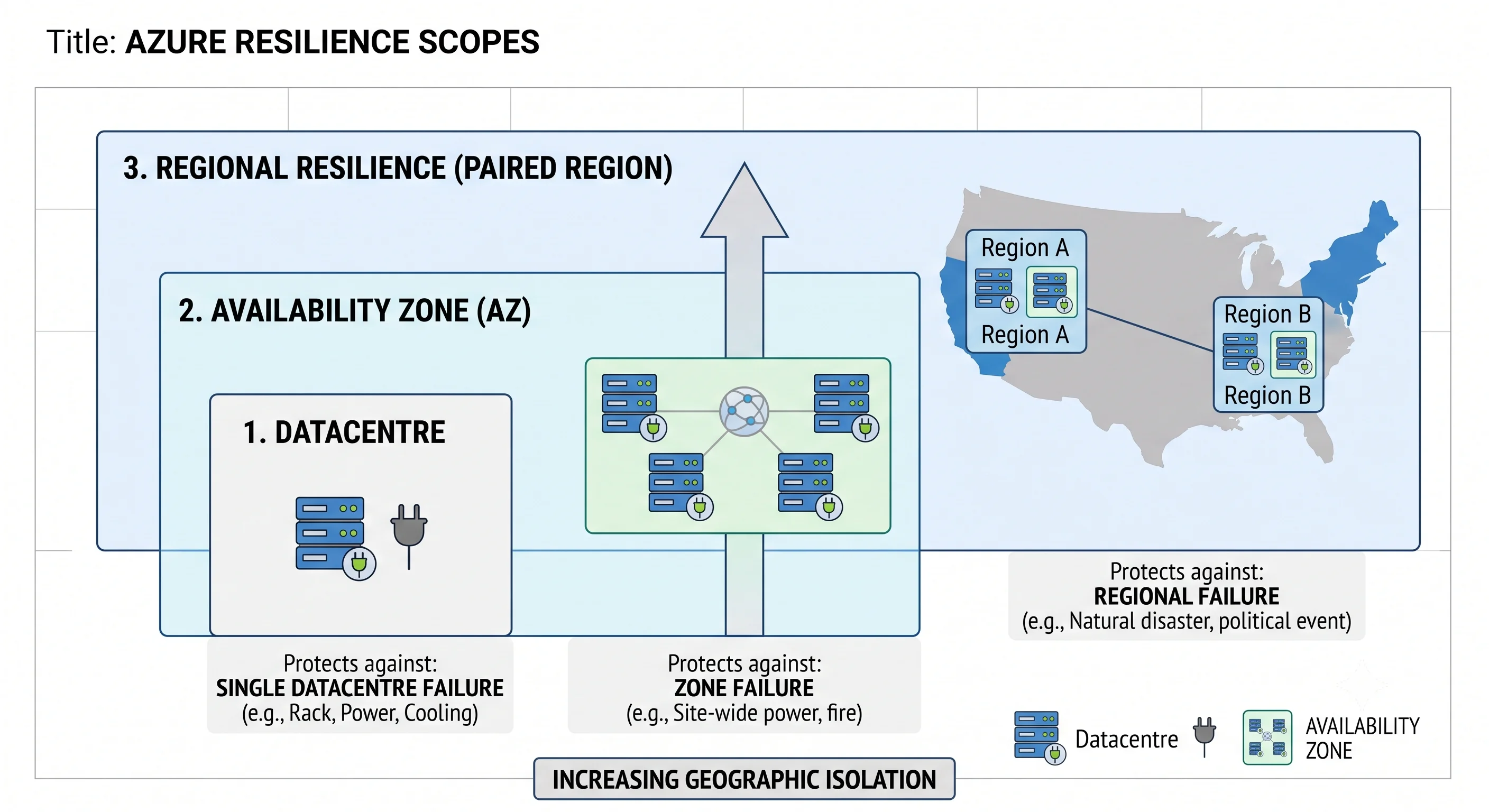
Geographies, regions, and region pairs
A region is a set of datacentres within a latency-defined perimeter, connected by a
low-latency network. uksouth, westeurope, eastus2. It's the unit you deploy into and the unit
most quotas are counted against (per subscription, per region — see
the resource hierarchy).
A geography is a data-residency boundary containing one or more regions — UK, Europe, United States, India. It matters for compliance: data in a geography stays in it, and region pairs are almost always within a geography, so geo-replication doesn't cross a sovereignty line. The famous exception is Brazil South, paired with South Central US for legal reasons, which means geo-redundant storage in Brazil South replicates out of the country. If you're doing anything residency-sensitive, verify the pairing rather than assuming ⚠️ verify current pairings against Azure docs.
A region pair is a predefined partner region, and it does three specific things:
- It's the default geo-replication target. GRS/GZRS storage, and several other services' geo-redundant options, replicate to the pair. You don't choose it.
- Platform updates are sequenced across the pair. Microsoft doesn't apply planned maintenance to both halves simultaneously, which reduces the chance that a bad platform rollout takes out both.
- Recovery is prioritised across the pair. In a broad regional outage, Microsoft's stated intent is to restore at least one region of each pair first — which matters for capacity: in a real regional failure, everyone fails over at once, and reserved or pre-provisioned capacity in the secondary is the difference between a DR plan and a DR aspiration.
Some newer regions ship without a traditional pair, relying on availability zones and in-region redundancy instead ⚠️ verify per region against Azure docs. If you're standing up in a recently-launched region, check before designing around a pair that doesn't exist.
az account list-locations -o table                       # regions available to you
az account list-locations \
  --query "[?metadata.regionType=='Physical'].{name:name, pair:metadata.pairedRegion[0].name}" -o table
Also worth knowing: some regions are access-restricted and require a request to enable, and regional feature availability is genuinely uneven — a service, or a specific SKU of it, may not exist in your preferred region. Prices differ by region too, sometimes materially. All four things (feature availability, SKU availability, quota, price) should be checked before committing, and all four move ⚠️ verify against current Azure docs.
Availability zones
Analogy: three separate buildings on the same campus. Same address for you, independent power and plumbing.
Technically: an availability zone is one or more physically separate datacentres within a region, with independent power, cooling, and networking, connected to the others by a high-bandwidth, low-latency private network. Zone-enabled regions have at least three. Cross-zone latency is low enough for synchronous replication and non-zero enough to matter for chatty workloads.
The thing that catches AWS veterans:
Zone numbers are logical and per-subscription. Your subscription's "zone 1" in
uksouthis mapped to some physical zone; another subscription's "zone 1" may be a different one. Microsoft does this deliberately, to spread load. It means you cannot coordinate placement across subscriptions by zone number alone.
If you genuinely need to (paired workloads in different subscriptions that must share or avoid a
zone), there's an API exposing the logical-to-physical mapping for your subscription; look for
availabilityZoneMappings in the subscription/locations API. For most workloads you don't need it —
you need "spread across all three", which the numbers handle fine.
Three ways a service relates to zones
This distinction is the one that decides whether your architecture actually survives a zone loss.
| Posture | Meaning | Zone failure means |
|---|---|---|
| Zonal (pinned) | The resource lives in one zone you selected | That resource is gone. You survive only if you deployed instances in other zones |
| Zone-redundant | The platform spreads the resource across three zones for you | You survive, usually transparently |
| Regional / non-zonal | The resource has no zone concept; the platform places it | Undefined — it may or may not be affected |
Concrete examples: a VM and a managed disk are zonal — you pick a zone, and one VM in one zone is one VM. ZRS storage is zone-redundant. A zone-redundant App Service Plan or Application Gateway v2 spreads instances across zones. A standard public IP can be zonal or zone-redundant, and picking zonal by accident in front of a zone-redundant backend gives you a zone-redundant application behind a single-zone front door — a real and common mistake.
The pattern to internalise: zone redundancy is only as good as the least-redundant hop in the path. Check every component — load balancer, public IP, compute, data, and the private DNS you resolve through.
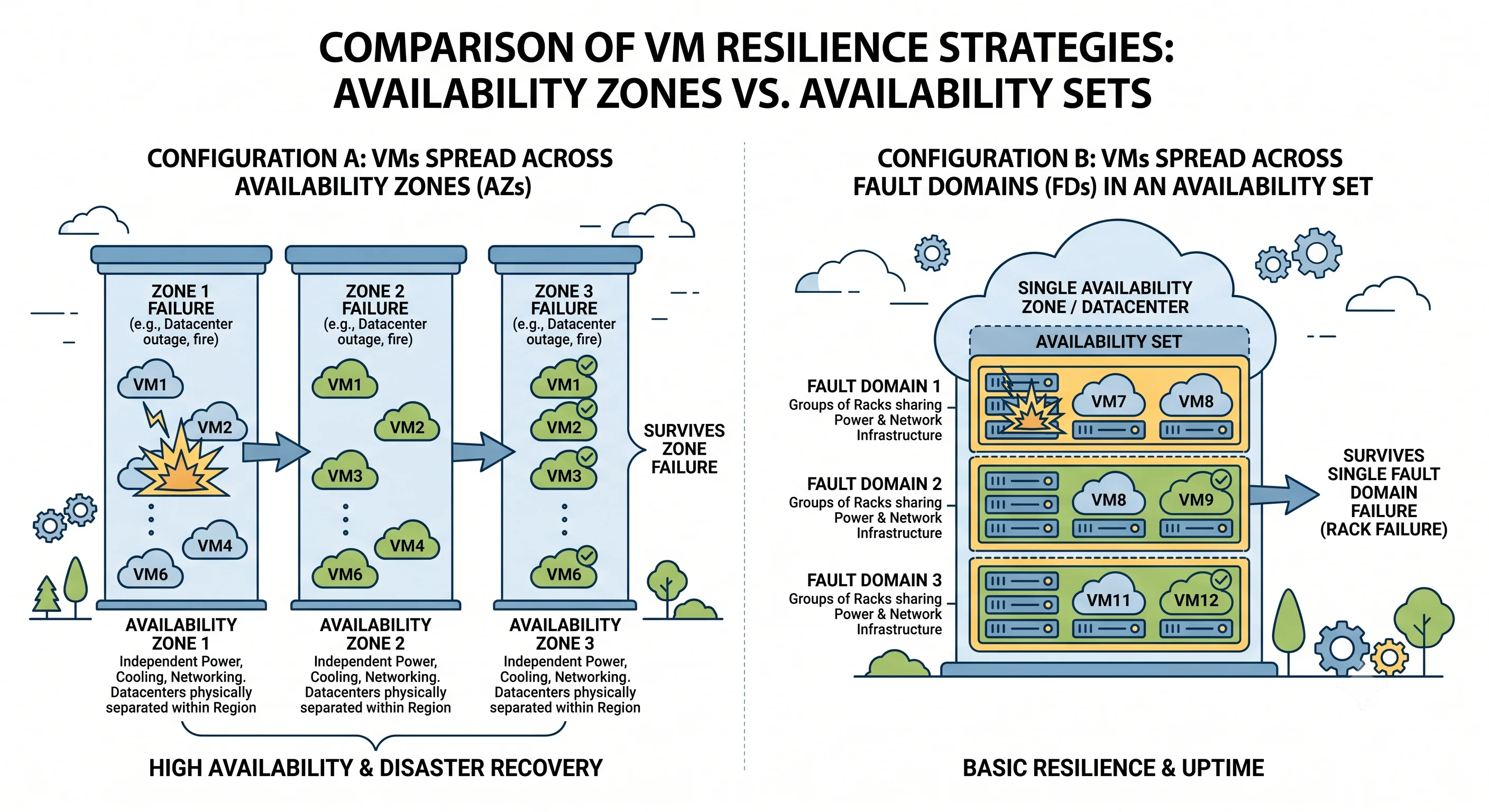
For VMs specifically, zone-redundancy is something you build rather than tick: deploy instances across zones (a VM Scale Set with zone balancing does this for you), front them with a zone-redundant Standard Load Balancer, and make sure your data layer is zone-redundant too. Azure's VM SLA is tiered — highest for instances spread across zones, lower for an availability set, lower again for a single VM with premium storage ⚠️ verify the current SLA figures against the Azure SLA documents, which are the only authoritative source and are updated regularly.
Availability sets — the pre-zone mechanism
Older, VM-only, and still relevant in regions without zones or for workloads that need rack-level rather than datacentre-level separation.
An availability set spreads VMs across:
- Fault domains — separate racks with separate power and network. Protects against a rack failure.
- Update domains — groups rebooted separately during planned platform maintenance. Protects against everything going down at once for a host update.
Availability sets protect against a rack, not a datacentre. If the region has zones, zones are the better answer and an availability set is the fallback. You cannot combine them for the same VM — a VM is in a zone or an availability set.
Redundancy settings, using storage as the worked example
Azure Storage has the clearest redundancy vocabulary in the platform, and other services borrow the shape, so it's worth learning properly.
| Setting | Copies | Spread across | Survives | Doesn't survive |
|---|---|---|---|---|
| LRS | 3 | One datacentre | Disk, rack, host failure | Losing that datacentre |
| ZRS | 3 | Three zones, one region | Losing a zone | Losing the region |
| GRS | 3 + 3 | LRS locally, async copy to the paired region | Losing the region (via failover) | A zone loss gracefully — locally it's still LRS |
| GZRS | 3 + 3 | ZRS locally, async copy to the paired region | A zone loss and a region loss | — |
| RA-GRS / RA-GZRS | as above | as above | as above, plus read access to the secondary at any time | Writes to the secondary |
Four things about this table that people get wrong:
GRS is not zone-redundant. The local copy is LRS. A zone failure in a GRS account is a real outage, and failing over to the secondary for a zone problem is a sledgehammer. If you care about both failure modes, that's GZRS.
Geo-replication is asynchronous. There's a replication lag, so a regional failover has a non-zero RPO — recent writes not yet replicated are lost. Microsoft publishes a target ⚠️ verify the current RPO figure against Azure docs; design as though you will lose the last few minutes of writes.
The secondary is not readable unless you chose an RA- variant, and even then it's read-only and serves stale data. Reading from it is a legitimate pattern for read-heavy workloads, but the consistency implications are yours to handle.
Customer-initiated failover is a real operation with real consequences. It promotes the secondary and, after the dust settles, the account's redundancy typically drops to a local-only configuration until you re-establish geo-redundancy. It's not a button to press casually, and it's absolutely a button to have practised pressing.
Other services use their own vocabulary for the same ideas — SQL Database has zone-redundant configuration and failover groups, Cosmos DB has multi-region writes with availability-zone options, Service Bus Premium has zone redundancy and geo-DR pairing. Each topic in this article states its own; the mental model here transfers.
Global services, and reading the SLA honestly
A handful of services are global — no region to pick, replicated by Microsoft across the planet: Microsoft Entra ID, Azure DNS, Traffic Manager, Front Door, and ARM itself. Their resource IDs still sit in a resource group (which has a region for its metadata), but the service isn't regional. You don't design zone redundancy for them.
Most services are regional. A few are zonal by choice. The facts table in every topic of this article states which, because it changes what you're responsible for.
Now the uncomfortable part about SLAs. Composite availability multiplies. If a request must pass through Front Door, then App Service, then SQL Database, then Key Vault, your practical availability is the product of theirs — always lower than the weakest link, never equal to the best. Two consequences:
- Adding a component to the critical path reduces availability unless that component is redundant or optional. A synchronous Key Vault call on every request is a real availability decision.
- Buying a higher SLA on one component while another stays single-instance is money spent on the wrong problem.
And the practical footnote: an SLA is a billing credit, not a promise your users care about. Your error budget is what matters, and you build to it with redundancy and graceful degradation, not by reading the SLA table.
Specific SLA percentages change with tier and with time, and the SLA documents are the only authoritative source ⚠️ verify against the current Azure SLA documentation — this article deliberately avoids quoting the numbers.
Choosing a region, and going multi-region
One region, done properly
For most workloads this is the right answer, and it means: a zone-enabled region, everything in the path zone-redundant, data geo-replicated for durability, and backups you have actually restored from. That configuration survives a datacentre loss transparently and a region loss with a documented, practised recovery.
Choosing which region: latency to your users first (the deciding factor for most interactive workloads), then data residency, then feature and SKU availability, then price, then quota headroom. Availability zones should be a hard requirement unless you have a specific reason otherwise.
Two regions, and the honest cost
Multi-region is where cost and complexity step up sharply, and where most teams over-build. Three patterns, in ascending order of price and difficulty:
Active-passive with backup restore. Data replicated (geo-redundant storage, database geo-backup), infrastructure defined in Terraform but not running. Cheap. Recovery is measured in hours and depends on secondary-region capacity being available at the moment everyone else wants it too.
Active-passive warm standby. A scaled-down deployment running in the secondary, data replicating continuously, traffic switched by Front Door or Traffic Manager. Recovery in minutes. You're paying for idle infrastructure — and in Azure, plan-based services (App Service Plans, provisioned databases) bill while idle far more than AWS equivalents do, so warm standby costs more here than the instinct suggests.
Active-active. Both regions serving traffic. Best recovery, and it forces you to solve the hard problem: write conflicts and data consistency across regions. Cosmos DB with multi-region writes will accept writes in both and resolve conflicts by policy; SQL Database failover groups give you one writable primary and readable secondaries. Choose deliberately, because "active-active" over a single-writer database is really active-passive with extra steps and a latency penalty.
The two questions that should drive the choice, before any of the above: what's the actual RTO and RPO the business will fund? Most teams cannot answer these, build for an imagined four-nines, and spend the budget on idle capacity instead of on the backup restore they've never tested.
Global routing
Traffic Manager is DNS-based: it hands out different answers by routing method (priority, weighted, performance, geographic). Cheap, works for any endpoint including non-Azure, and inherits DNS's weakness — clients cache the answer, so failover is bounded by TTL.
Front Door is an anycast L7 reverse proxy with health probes, WAF, and TLS termination at the edge. Failover is fast because it happens inside the connection, not in DNS. It's the better answer for HTTP workloads and the more expensive one.
Cross-zone and cross-region data transfer is billable, and it's a line item people discover after the fact. Chatty cross-zone traffic inside a region can be a meaningful cost on a busy system ⚠️ verify current transfer pricing against Azure docs.
Practising the failure
A DR plan that has never been executed is a document, not a capability. What to actually do:
- Restore from backup on a schedule. Not "check the backup succeeded" — restore it, somewhere, and confirm the data is usable. This catches more real problems than any other exercise.
- Fail over deliberately. SQL failover groups, storage account customer-initiated failover, and Site Recovery all support planned failovers. Run one in non-production, then in production during a low-traffic window, and write down how long it took.
- Drop a zone. Scale a zone's instances to zero, or use Azure Chaos Studio to inject a zone-down fault, and watch whether traffic actually shifts. This is where you find the single-zone public IP in front of your zone-redundant app.
- Check quota in the secondary. The failure that ends DR plans is a quota error in the region you were relying on. Quota is per subscription per region; the secondary's headroom is a separate number, and reserved capacity is how you guarantee it.
- Watch Azure Service Health, not Twitter. Service Health is subscription-scoped and tells you about incidents affecting your resources; set an alert on it. The public status page lags and is broader than you need.
The mistakes worth pre-empting
Assuming every region has availability zones. Many don't. Check before designing.
Assuming zone 1 is zone 1. Logical mapping is per subscription.
One non-redundant hop in a redundant path. A zonal public IP, a single-zone NAT gateway, or an LRS storage account behind a zone-redundant app removes the benefit you paid for.
Believing GRS covers a zone failure. Its local copy is LRS. That's GZRS's job.
Treating geo-replication as zero-RPO. It's asynchronous. You will lose the tail of your writes.
Confusing availability with durability. ZRS keeps your data safe from a zone loss; it does nothing about someone deleting it. Soft delete, versioning, and backups are separate controls — and the ones you'll actually need.
Building multi-region before defining RTO and RPO. Without those numbers you're buying insurance against an unspecified event at an unbounded price.
Never testing the failover. The most common DR failure mode by a wide margin.
Next: Naming and Tagging →
← Back to the Foundations overview · ← Previous: Identity and RBAC