
6. Integrations
No Azure service is an island, and App Configuration is less of one than most: it has no reason to exist except to be read by something else. So this page is less "here are some optional pairings" and more "here is how the value actually reaches your workload".
Two glue mechanisms recur across nearly every Azure topic, and both are central here:
- Managed identity + a role assignment — the keyless way a workload authenticates to the store.
For this service the role is a data-plane role (
App Configuration Data Reader), and using the control-plane one instead is the most common wiring error in the whole topic. - Private endpoint + Private DNS zone — the way a workload reaches the store without the public
internet. The private-endpoint sub-resource for this service is
configurationStores, and the private DNS zone isprivatelink.azconfig.io.
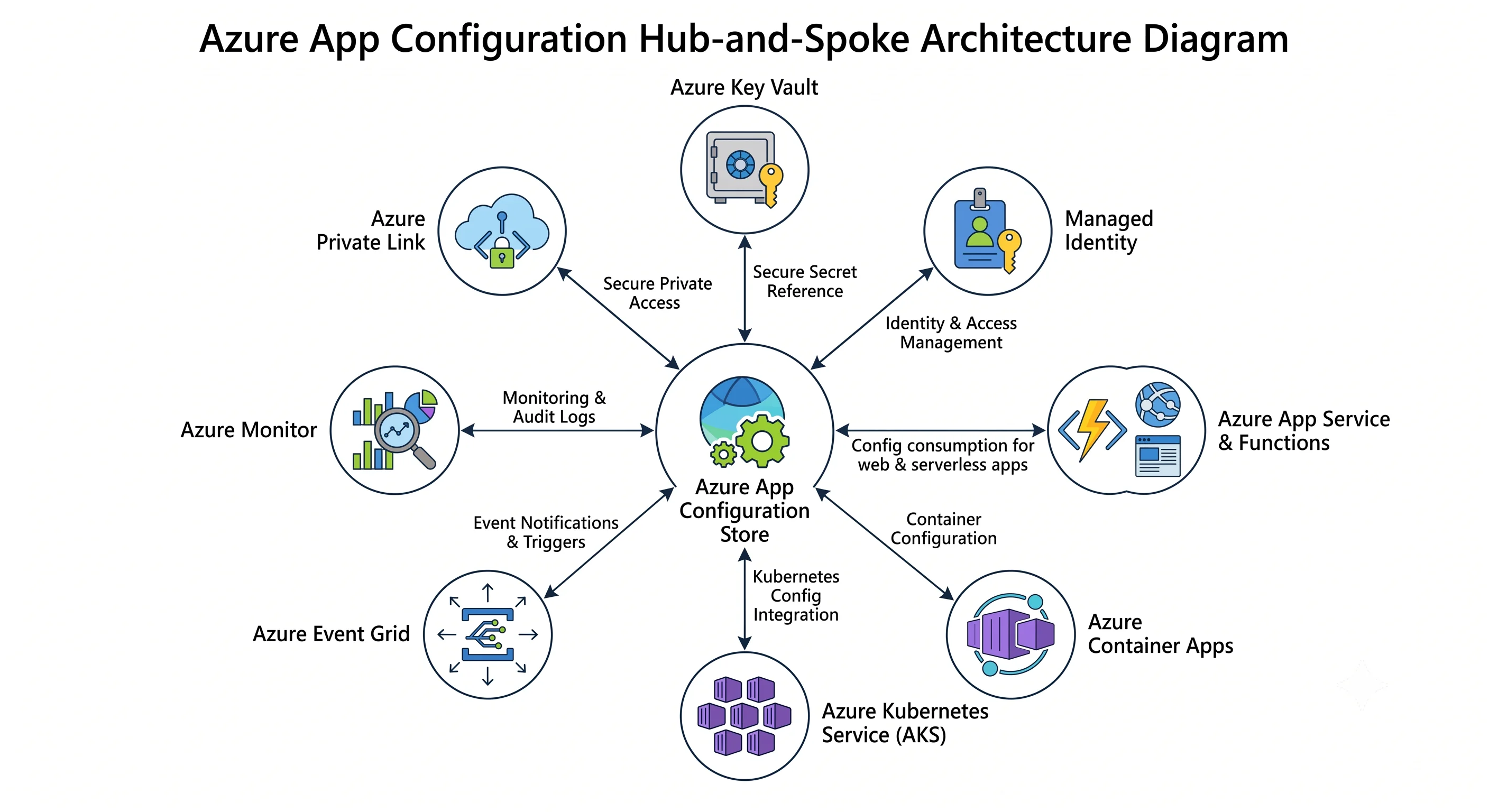
The pairings at a glance
| Pairs with | Why | The glue |
|---|---|---|
| Azure Key Vault | Secrets belong in Key Vault; you still want one lookup namespace | A Key Vault reference key-value holding the secret URI, resolved by the client's identity — the client needs Key Vault Secrets User on the vault |
| Managed Identity | The workload must authenticate without a key | System- or user-assigned identity + App Configuration Data Reader scoped to the store |
| App Service / Azure Functions | The most common consumer | The SDK provider inside the app, or an App Configuration reference in application settings for a code-free path |
| Azure Container Apps | Same, for containers | The SDK provider, with the store endpoint as an env var and a user-assigned identity for auth |
| Azure Kubernetes Service | Pods want ConfigMaps, not HTTP clients | The App Configuration Kubernetes Provider — a CRD that syncs key-values into ConfigMaps and Secrets |
| Azure Event Grid | Turn polling into push; trigger cache invalidation, audit, or a webhook | A system topic on the store emitting key-value modified/deleted events |
| Azure Monitor | You have no diagnostics until you ask for them | A diagnostic setting on the store routing HttpRequest and Audit categories to a Log Analytics workspace |
| Azure Private Link | No public data-plane exposure | Private endpoint on the configurationStores sub-resource + privatelink.azconfig.io private DNS zone |
| Microsoft Entra ID | Control who can read and write | Data-plane roles (App Configuration Data Reader / Data Owner) — not the control-plane Contributor role |
| Azure Policy | Convention isn't enforcement | deny on disableLocalAuth: false, deployIfNotExists for the diagnostic setting |
The rest of this page is the detail on the five that carry real complexity.
Key Vault: the reference pattern
This is the pairing the service was designed around, and the one people get subtly wrong.
What it is. A key-value whose content type is
application/vnd.microsoft.appconfig.keyvaultref+json;charset=utf-8 and whose value is a small JSON
document containing a uri pointing at a Key Vault secret. The store holds the pointer. The secret
never enters App Configuration, is never logged by it, and is never visible in its revision history.
az appconfig kv set-keyvault \
  --name "$STORE" --auth-mode login --yes \
  --key "Database:Password" --label prod \
  --secret-identifier "https://kv-example.vault.azure.net/secrets/db-password"
Who resolves it. The client, not the store. When the SDK sees the reference content type it makes a second call — to Key Vault, with its own credential. Three consequences that account for most Key Vault reference failures:
- Your workload needs two role assignments, not one:
App Configuration Data Readeron the store andKey Vault Secrets Useron the vault. The store's own managed identity needs nothing for this to work, which is the opposite of what most people assume. If you find yourself granting the store's identity access to the vault, stop and re-read. - You must configure the resolver explicitly. In .NET that's
.ConfigureKeyVaultReference(kv => kv.SetCredential(new DefaultAzureCredential())). Omit it and the value your app receives is the raw JSON pointer, which will parse as a nonsense connection string and fail somewhere far from the cause. - The failure surfaces as a Key Vault error, so people debug the wrong service. "403 Forbidden from kv-example.vault.azure.net" during App Configuration load means the missing role is on the vault.
Version pinning. A secret URI can include a version (/secrets/db-password/abc123…) or omit it.
Omit it. A pinned version means secret rotation never reaches the application — the rotation succeeds,
the vault holds the new value, and your app keeps resolving the old version indefinitely. This is a
genuinely nasty silent failure: everything looks healthy until the old credential is revoked.
Rotation, end to end. Key Vault emits a SecretNewVersionCreated event to Event Grid. Nothing
about that reaches App Configuration or your app automatically. If you need rotation to propagate
promptly you build it: Event Grid → a Function that bumps the sentinel key → clients refresh on their
next interval → the unversioned reference resolves to the current secret. Without that chain,
propagation waits on your refresh interval and on whatever caching the Key Vault client does.
When not to bother. If a value isn't secret, don't route it through Key Vault. Every reference is an extra round trip at startup, an extra role assignment to maintain, and an extra service in your startup dependency chain. Reserve it for actual secrets.
App Service and Azure Functions
Two paths, and the choice matters.
Path 1 — the SDK provider (recommended). The app takes a dependency on the configuration provider package and reads the store itself. You get labels, refresh, feature-flag evaluation, snapshots, and Key Vault reference resolution — the whole feature set.
// Program.cs — the endpoint comes from an application setting; everything else
// comes from the store. Note that there is always exactly one bootstrap value
// you cannot keep in the store.
builder.Configuration.AddAzureAppConfiguration(options =>
{
    options.Connect(
            new Uri(builder.Configuration["APPCONFIG_ENDPOINT"]!),
            new ManagedIdentityCredential(builder.Configuration["AZURE_CLIENT_ID"]))
        .Select("*", LabelFilter.Null)
        .Select("*", builder.Environment.EnvironmentName)
        .ConfigureKeyVaultReference(kv =>
            kv.SetCredential(new ManagedIdentityCredential(builder.Configuration["AZURE_CLIENT_ID"])))
        .ConfigureRefresh(r => r.Register("Sentinel", refreshAll: true)
                                .SetRefreshInterval(TimeSpan.FromSeconds(30)))
        .UseFeatureFlags();
});

// Required for refresh to actually fire in a web app — the middleware triggers it
// per request. A worker service must call TryRefreshAsync itself on a timer.
builder.Services.AddAzureAppConfiguration();
app.UseAzureAppConfiguration();
Wire the identity with:
az webapp identity assign -n <app> -g <rg>
PRINCIPAL=$(az webapp identity show -n <app> -g <rg> --query principalId -o tsv)

az role assignment create \
  --assignee-object-id "$PRINCIPAL" --assignee-principal-type ServicePrincipal \
  --role "App Configuration Data Reader" \
  --scope "$(az appconfig show -n "$STORE" -g "$RG" --query id -o tsv)"

az webapp config appsettings set -n <app> -g <rg> \
  --settings APPCONFIG_ENDPOINT="https://$STORE.azconfig.io"
Path 2 — App Configuration references in application settings. App Service can resolve a special application-setting syntax against a store, the same way it already resolves Key Vault references, injecting the value as an environment variable with no code change:
@Microsoft.AppConfiguration(Endpoint=https://<store>.azconfig.io; Key=Api:Timeout; Label=prod)⚠️ This feature's availability and exact syntax have changed and parts of it have been in preview — verify against current Azure docs, and note that preview features carry no SLA.
It's genuinely useful for legacy apps you can't recompile and for non-.NET stacks with no provider. The trade-offs are real, though: resolution happens at app start, so a value change needs a restart; you get no feature-flag evaluation, no snapshots, and no sentinel-key atomicity; and each setting is declared individually rather than selected by filter. Treat it as a migration aid, not the destination.
Functions-specific note. Consumption-plan Functions start cold, frequently, and a cold start that must fetch configuration is a slower cold start — with a hard dependency on the store's availability at exactly the least convenient moment. If a Function is latency-sensitive, prefer a Premium or Dedicated plan (where the host stays warm and the provider's cache survives), keep the number of selects small, and be explicit about the fallback. A Consumption Function reading a Free-tier store is a throttling incident waiting for traffic.
Azure Kubernetes Service: the Kubernetes provider
Pods generally shouldn't hold an HTTP client for configuration. The App Configuration Kubernetes Provider is a cluster add-on that watches a store and materialises key-values into native Kubernetes objects, so workloads keep reading ConfigMaps and Secrets while the source of truth is central and audited.
apiVersion: azconfig.io/v1
kind: AzureAppConfigurationProvider
metadata:
  name: appconfig-provider
  namespace: default
spec:
  endpoint: https://appcs-example-prod.azconfig.io
  target:
    configMapName: app-config          # what your pods mount or reference
  auth:
    workloadIdentity:
      managedIdentityClientId: <client-id-of-the-user-assigned-identity>
  configuration:
    selectors:
      - keyFilter: "*"
        labelFilter: prod
    refresh:
      enabled: true
      interval: 30s
      monitoring:
        keyValues:
          - key: Sentinel
            label: prod
  secret:                              # Key Vault references land in a Secret
    target:
      secretName: app-secrets
⚠️ The CRD apiVersion and field names have changed across provider releases; verify against the
current provider documentation.
Three things worth knowing before adopting it:
- Authentication is Microsoft Entra Workload Identity, which means the cluster needs the OIDC issuer and workload identity features enabled and a federated credential linking the Kubernetes service account to a user-assigned managed identity. That setup is a prerequisite, not a detail.
- A ConfigMap update does not restart your pods. Values mounted as files are updated in place (with kubelet's own propagation delay); values injected as environment variables are frozen at pod start. If your app reads env vars, you need a restart — and the provider does not do that for you. Either read from a mounted file and watch it, or pair the provider with something like Reloader.
- Key Vault references become Kubernetes Secrets, which are base64-encoded, not encrypted, unless you've enabled encryption at rest for etcd. Moving a secret from Key Vault into a Kubernetes Secret is a security posture change; make it consciously, and consider the Secrets Store CSI driver for secrets while using this provider for non-secret configuration.
Event Grid: turning polling into push
The client refresh model is polling by design, and the ceiling on how fast a change propagates is your refresh interval. Event Grid is the escape hatch.
The store publishes to a system topic with event types for key-value modified and key-value deleted, plus snapshot events. ⚠️ Verify the current event-type list and schema.
STORE_ID=$(az appconfig show -n "$STORE" -g "$RG" --query id -o tsv)

az eventgrid system-topic create \
  -n st-appconfig-prod -g "$RG" -l uksouth \
  --topic-type Microsoft.AppConfiguration.ConfigurationStores \
  --source "$STORE_ID"

az eventgrid system-topic event-subscription create \
  -n sub-config-changed -g "$RG" --system-topic-name st-appconfig-prod \
  --endpoint-type azurefunction \
  --endpoint "<function-resource-id>" \
  --included-event-types Microsoft.AppConfiguration.KeyValueModified
The three things people actually build on it:
- Near-real-time refresh. Event → Service Bus topic or Web PubSub → each app instance triggers
TryRefreshAsyncimmediately instead of waiting for its interval. Worth building only if you have a real requirement for sub-interval propagation — it's a distributed system you now own. - Change notification and audit. Event → Logic App → a Teams or Slack message: "
Api:Timeoutunder labelprodwas changed." Cheap, high-value, and the thing most teams wish they'd had after their first mysterious config change. - Validation and guardrails. Event → Function that checks the new value against a schema or a sanity range and, if it fails, restores the previous revision and shouts. This is how you get the type safety the service doesn't provide.
Note the ordering caveat: Event Grid does not guarantee ordering, and a rapid sequence of edits can arrive out of order. Use events as a trigger to go and re-read the store, never as the carrier of the new value itself. That single discipline avoids a whole category of bug.
Private Link and networking
For anything holding production configuration behind a compliance requirement:
# The sub-resource name for this service is 'configurationStores'
az network private-endpoint create \
  -n pe-appcs-prod -g "$RG" \
  --vnet-name vnet-prod --subnet snet-privatelink \
  --private-connection-resource-id "$STORE_ID" \
  --group-id configurationStores \
  --connection-name appcs-prod

az network private-dns zone create -g "$RG" -n privatelink.azconfig.io
az network private-dns link vnet create -g "$RG" \
  -n link-vnet-prod -z privatelink.azconfig.io \
  -v vnet-prod -e false

az network private-endpoint dns-zone-group create \
  -g "$RG" --endpoint-name pe-appcs-prod -n default \
  --private-dns-zone privatelink.azconfig.io --zone-name azconfig

az appconfig update -n "$STORE" -g "$RG" --enable-public-network false
What breaks the moment you run that last command, in the order you'll discover it:
- Your laptop. No VPN or Bastion path means no portal Configuration explorer either — the portal's
data-plane blades call
azconfig.iofrom your browser. - GitHub-hosted and Azure DevOps-hosted CI runners. The configuration pipeline from Deployment will time out. You need a self-hosted runner, a Container Apps job, or a managed DevOps pool on the VNet.
- Anything cross-VNet without DNS. A peered VNet needs the private DNS zone linked to it too, or
it resolves the public IP and hangs. This is the most common private-endpoint failure across all of
Azure, and it presents as a timeout rather than a
403, which sends people to look at RBAC.
Note what App Configuration does not have: there is no service endpoint for it. The choice is public endpoint (optionally with IP firewall rules) or private endpoint. If you're coming from storage or SQL and expecting a middle option, there isn't one.
Also worth naming: Entra-only auth is a stronger control than network isolation for this service, and much cheaper to operate. If you can only do one, disable local auth. Doing both is better; doing only the network half while leaving access keys enabled is the worst of the combinations.
Azure Monitor
Covered properly in Production, but it belongs in the integration list because it is the pairing people forget: diagnostic settings are not on by default, and there is no retroactive fix. The day you need to know who changed a value last Tuesday, either the setting existed then or the answer doesn't exist.
az monitor diagnostic-settings create \
  -n to-law --resource "$STORE_ID" \
  --workspace "<log-analytics-workspace-id>" \
  --logs '[{"categoryGroup":"allLogs","enabled":true}]' \
  --metrics '[{"category":"AllMetrics","enabled":true}]'
Enforce it with an Azure Policy deployIfNotExists assignment at the subscription scope, so stores
created by someone else are covered too.
Next: Production →
← Back to the Azure App Configuration overview · ← Previous: Deployment