
2. Core Concepts
Every noun you will meet in the portal, in the order the objects nest. Each is given as term → plain-English analogy → precise technical definition, because the portal will show you all of them at once and none of them are self-explanatory.
The resource hierarchy — subscription, resource group, ARM — is explained once in Foundations. This page starts at the Foundry resource itself.
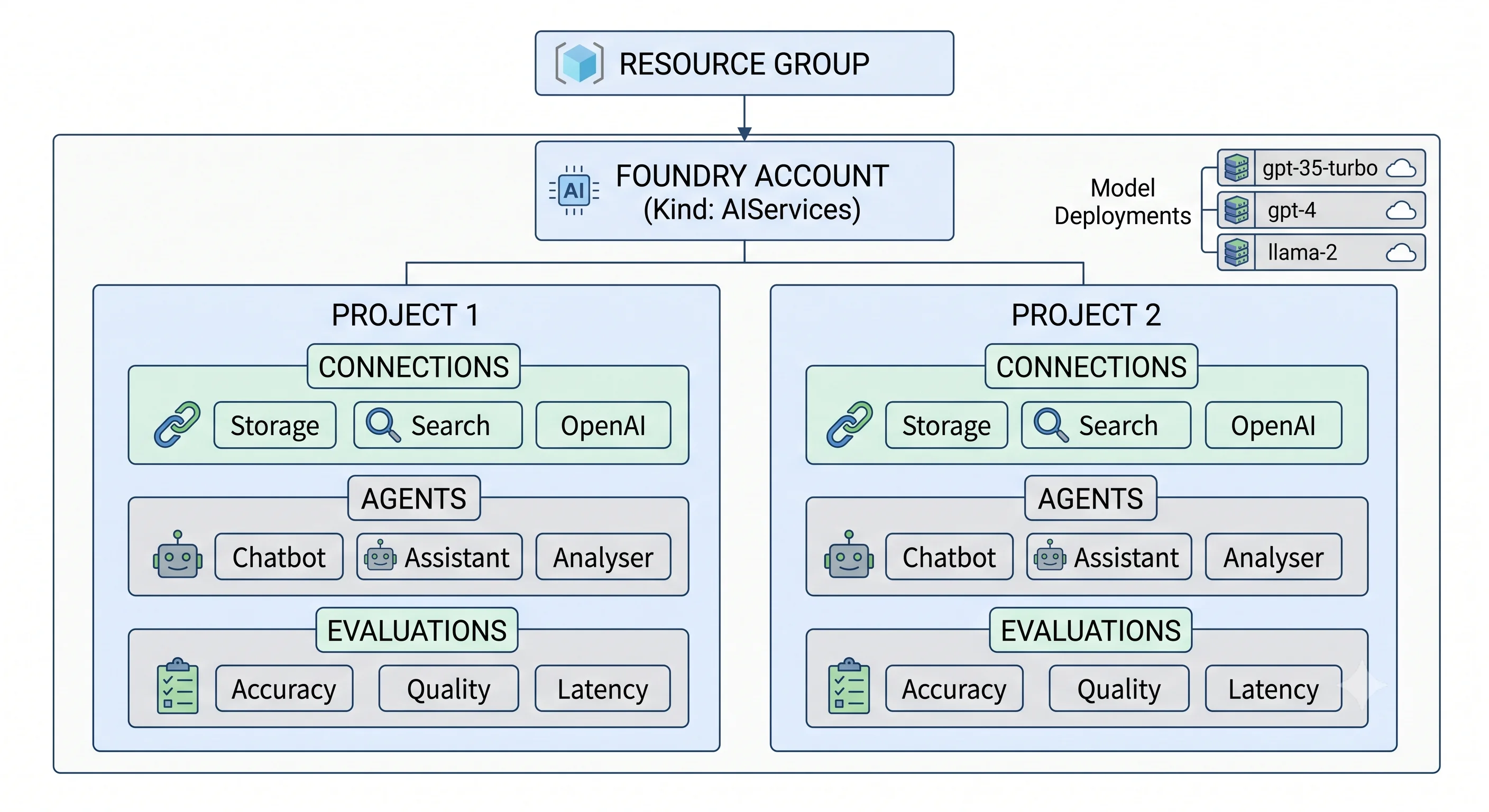
The top-level resource: the Foundry account
Foundry account → the building you rent, with one street address and one lock → a regional ARM
resource of type Microsoft.CognitiveServices/accounts with kind = AIServices, owning the endpoint
subdomain, the network rules, the customer-managed key configuration, the managed identity, and — for
standard deployments — the quota consumption in that region. Created with project management enabled
(allowProjectManagement in the API, project_management_enabled in the azurerm provider), it can
contain projects.
Three things about the account are worth fixing in your head now:
- The
kindis load-bearing.AIServicesis the superset: Foundry Models (including Azure OpenAI) plus the Foundry Tools task APIs plus projects and agents.OpenAIis the narrower legacy kind, still supported. Switching an existing account fromAIServicesback toOpenAIis a resource replacement, not an edit — and enabling project management is one-way in practice. - The SKU is
S0and tells you almost nothing. Unlike most Azure services, the account tier is not the axis. The axis lives one level down, on each deployment. - The subdomain is global and sticky.
https://<name>.services.ai.azure.commust be globally unique, and because Cognitive Services accounts are soft-deleted, a deleted account keeps its name reserved until purged. This bites during teardown-and-recreate loops; see Getting Started.
Hub (classic) → the older building, with mandatory outbuildings → a
Microsoft.MachineLearningServices/workspaces resource with kind = Hub, which requires a storage
account and a Key Vault as siblings and brings the Azure Machine Learning surface. Covered here only so
you recognise it in older material; new work uses the account above.
The unit of work: the project
Project → a floor of the building, with its own door key and its own tenants → a child resource
Microsoft.CognitiveServices/accounts/projects that scopes a body of work: its own data-plane endpoint
(https://<account>.services.ai.azure.com/api/projects/<project>), its own connections, its own agents,
its own evaluations, and its own role assignments. Projects share the parent account's model deployments,
network configuration, and quota.
That last sentence is the whole design and the whole trap. Projects isolate people and artefacts; they do not isolate capacity or networking. Two projects in one account compete for the same deployments' throughput. If a workload needs a genuinely separate blast radius — its own quota, its own private endpoint, its own key policy — it needs its own account, and usually its own subscription. Use projects for teams and workstreams inside one governance boundary; use accounts for boundaries.
The thing you actually call: the model deployment
Model deployment → the extension number on the switchboard, not the person answering it → a child
resource Microsoft.CognitiveServices/accounts/deployments that binds three things: a model (name +
version), a deployment type (see the table below), and a capacity. Your application calls the
deployment by name.
The indirection is the point. chat-default can be gpt-4o today, gpt-4.1 next month, and a cheaper
model for the batch path — no code change, no redeploy. Name deployments for the job they do, never
for the model behind them.
Model version and the upgrade policy → whether the switchboard is allowed to reroute your extension without telling you → each deployment pins a model version and carries a version-upgrade policy, typically one of: upgrade when a new default becomes available, upgrade only when the current version expires, or never upgrade automatically. Auto-upgrade keeps you off retired versions and can change your output distribution overnight; no-auto-upgrade keeps behaviour stable and will eventually strand you on a retiring version. There is no safe default — pick per workload, write down which you picked, and make sure the choice is in your IaC rather than in someone's memory. ⚠️ Verify the current policy names and model retirement dates against current Azure docs.
The SKU axis that matters: deployment types
This is the tier decision for the whole service, and you make it per deployment, not once per account.
| Deployment type | Where inference runs | Billing | What it unlocks | The trap |
|---|---|---|---|---|
| Standard (regional) | Only in the deployment's region | Per token | Tightest data-residency story | Smallest capacity pool; the fewest models are offered this way |
| DataZone Standard | Anywhere inside a Microsoft data zone (US, EU, APAC) | Per token | More capacity than regional while staying inside a compliance boundary | "EU" is a zone, not a country — check whether your obligation is country-level |
| Global Standard | Anywhere in Microsoft's global fleet | Per token | The largest capacity pools, the newest models first, usually the best price | Data may be processed outside your region. Fine for many workloads, fatal for some — and easy to pick by accident because it is often the default |
| Batch | Asynchronous, off-peak | Per token, discounted | Bulk offline work at materially lower cost | Not interactive; results arrive within a service window, not seconds ⚠️ verify current window |
Provisioned — ProvisionedManaged, GlobalProvisionedManaged, DataZoneProvisionedManaged |
Reserved capacity, scoped like the standard equivalents | Per PTU per hour, running or idle | Predictable latency and throughput, no noisy-neighbour variance, no per-call throttling surprises | You pay from creation to deletion regardless of traffic. Under-utilised PTU is the most expensive mistake available on this service |
PTU (Provisioned Throughput Unit) → a reserved lane on the motorway, paid for by the hour whether or not you drive on it → the unit of reserved model capacity. How much throughput one PTU buys depends on the model and the shape of your traffic (prompt length, output length, concurrency), so sizing is empirical: measure with a standard deployment first, then size the reservation. Azure reservations lower the hourly rate in exchange for a term commitment. ⚠️ Verify current minimum PTU increments per model and reservation terms against current Azure docs.
Capacity and quota
TPM (tokens per minute) → the meter on the water main, shared by everyone on your street → the throughput allocation for standard deployments. Quota is granted per subscription, per region, per model, per deployment type, and you divide that pool across the deployments you create. Two consequences engineers discover the hard way:
- A dev deployment in the same subscription and region takes capacity away from production. Separate subscriptions per environment are the clean fix; see Deployment.
- Exceeding your allocation returns HTTP 429 with a
Retry-Afterheader — not a queue, not a slow response. Your client must honour it, and your design must have somewhere else to go.
RPM (requests per minute) is derived alongside TPM and can bind first on chatty, small-prompt workloads. ⚠️ Verify current TPM/RPM defaults per model and region against current Azure docs — these vary by subscription type more than almost anything else in Azure.
The wiring: connections
Connection → a saved credential with a label, kept in the workshop rather than in each toolbox → a named, typed reference from a project or account to another resource: an Azure AI Search service, a storage account, a Cosmos DB account, a Bing grounding resource, another Foundry account, or a generic API key. Connections can authenticate with a key, an Entra ID identity, or the resource's own managed identity, and can be scoped to a single project or shared across the account.
Prefer identity-based connections. A key-based connection is a secret with a nice UI over it, and it still needs rotating.
The runtime: agents
Agent → an employee with a job description, a phone, and a filing cabinet → a persistent object in a project combining a model deployment, system instructions, a set of tools, and configuration. You create it once and invoke it many times; it is a resource-like object, not a request payload.
Thread → the email chain → a persistent conversation holding the message history for one interaction, so you do not resend the transcript on every call.
Run → one turn of work on that chain → a single execution of an agent against a thread: the service calls the model, executes any tool calls the model requests, loops until done, and appends the result to the thread. The orchestration loop you would otherwise write yourself is this object.
Tool → the phone and the filing cabinet → something the agent can invoke: built-ins like file search, code interpreter, or grounding with Bing; a connected Azure resource such as an AI Search index; an OpenAPI-described API of yours; a Logic App or Function; or an MCP server. Tool definitions live with the agent, which is why an agent is a deployable artefact and not just a prompt.
Capability host / agent storage → whose filing cabinet it is → agent state has to live somewhere. In the basic setup Microsoft manages the storage for threads, files, and vectors. In the standard setup you bring your own: a Cosmos DB account for thread state, an Azure AI Search service for vector stores, and a storage account for files, bound to the project through a capability host. Standard is what you use when the data must sit in your subscription, inside your network, under your keys — and it is why "we just added an agent" can quietly add three billable resources.
Agent identity → the employee's own badge, not a shared one → agents authenticate to Azure resources through managed identity and role assignments rather than embedded credentials. Note that the portal auto-assigns some data-plane roles when a human creates things; SDK and CLI paths do not, so automation must assign roles explicitly. This is a common cause of "works in the portal, 403 in the pipeline".
The feedback loop: evaluations and content safety
Evaluation → the exam, not the vibe check → a run of a dataset through a target (a model deployment, an agent, or a flow) scored by built-in or custom evaluators — groundedness, relevance, coherence, fluency, similarity, plus safety evaluators for harmful content. Evaluations produce comparable numbers across prompt and model changes, which is the only way to make a swap responsibly.
Content filter → the safety guard bolted to the machine → a configurable filter applied to prompts and completions across harm categories, at severity thresholds you set, with optional protections such as prompt-shield and protected-material detection. A default filter applies to new deployments; you can create stricter or (with approval) looser configurations and attach them per deployment. Filtered requests return a distinct error your application must handle — treating it as a generic failure is a bad user experience and a worse incident review.
Tracing → the flight recorder → OpenTelemetry-based capture of prompts, tool calls, and timings, usually routed to Application Insights. Not on by default; see Production.
Endpoints, in one place
| Endpoint | What it serves | Auth |
|---|---|---|
https://management.azure.com/... |
Control plane: create/update/delete account, project, deployment | Azure RBAC (control-plane roles) |
https://<account>.services.ai.azure.com/api/projects/<project> |
Project data plane: agents, threads, runs, evaluations | Entra ID token (data-plane roles) |
https://<account>.openai.azure.com/openai/... (also surfaced under services.ai.azure.com) |
Model inference — chat completions, embeddings, images | Entra ID token, or an API key if local auth is still enabled |
https://<account>.cognitiveservices.azure.com/... |
Foundry Tools task APIs (speech, vision, language, document) | Entra ID token or key |
⚠️ Verify exact current endpoint paths and API versions against current Azure docs; these change with API versions more often than the concepts do.
The running mini-table
| Term | Analogy | Technical definition |
|---|---|---|
| Foundry account | The building, with one address and one lock | Regional Microsoft.CognitiveServices/accounts resource, kind = AIServices, owning the endpoint, network rules, identity, keys, and regional quota consumption |
| Project | A floor with its own door key | Child resource scoping connections, agents, evaluations, and role assignments; shares the account's deployments, network, and quota |
| Model deployment | An extension number, not the person | Named binding of model + version + deployment type + capacity; the thing your code calls |
| Deployment type | Which lane of the motorway | Standard / DataZone / Global / Batch / Provisioned — sets residency, capacity pool, latency profile, and billing model |
| PTU | A reserved lane, paid by the hour | Unit of provisioned throughput; billed from creation to deletion regardless of traffic |
| TPM quota | The meter on the shared water main | Tokens-per-minute allocation, granted per subscription per region per model per deployment type, divided across deployments by you |
| Connection | A saved credential with a label | Typed, named reference to another resource, key- or identity-based, scoped to a project or the account |
| Agent | An employee with a job description | Persistent object: model deployment + instructions + tools + config, invoked many times |
| Thread | The email chain | Persistent conversation state for one interaction |
| Run | One turn of work on that chain | A single agent execution: model call, tool calls, loop, result appended to the thread |
| Capability host | Whose filing cabinet it is | Binding that points a project's agent state at your own Cosmos DB, AI Search, and Storage instead of Microsoft-managed storage |
| Content filter | The guard bolted to the machine | Configurable prompt/completion filtering by harm category and severity, attached per deployment |
| Evaluation | The exam, not the vibe check | Scored run of a dataset against a model, agent, or flow using built-in or custom evaluators |
| Hub (classic) | The older building with mandatory outbuildings | Microsoft.MachineLearningServices/workspaces, kind = Hub; requires storage and Key Vault; brings the AML surface |
Next: Architecture →
← Back to the Azure AI Foundry overview · ← Previous: What & Why