
6. Integrations
A VM on its own is a rented computer. What makes it useful — and what a real architecture actually looks like — is the eight or so services it's almost always wired to. This page is the wiring diagram.
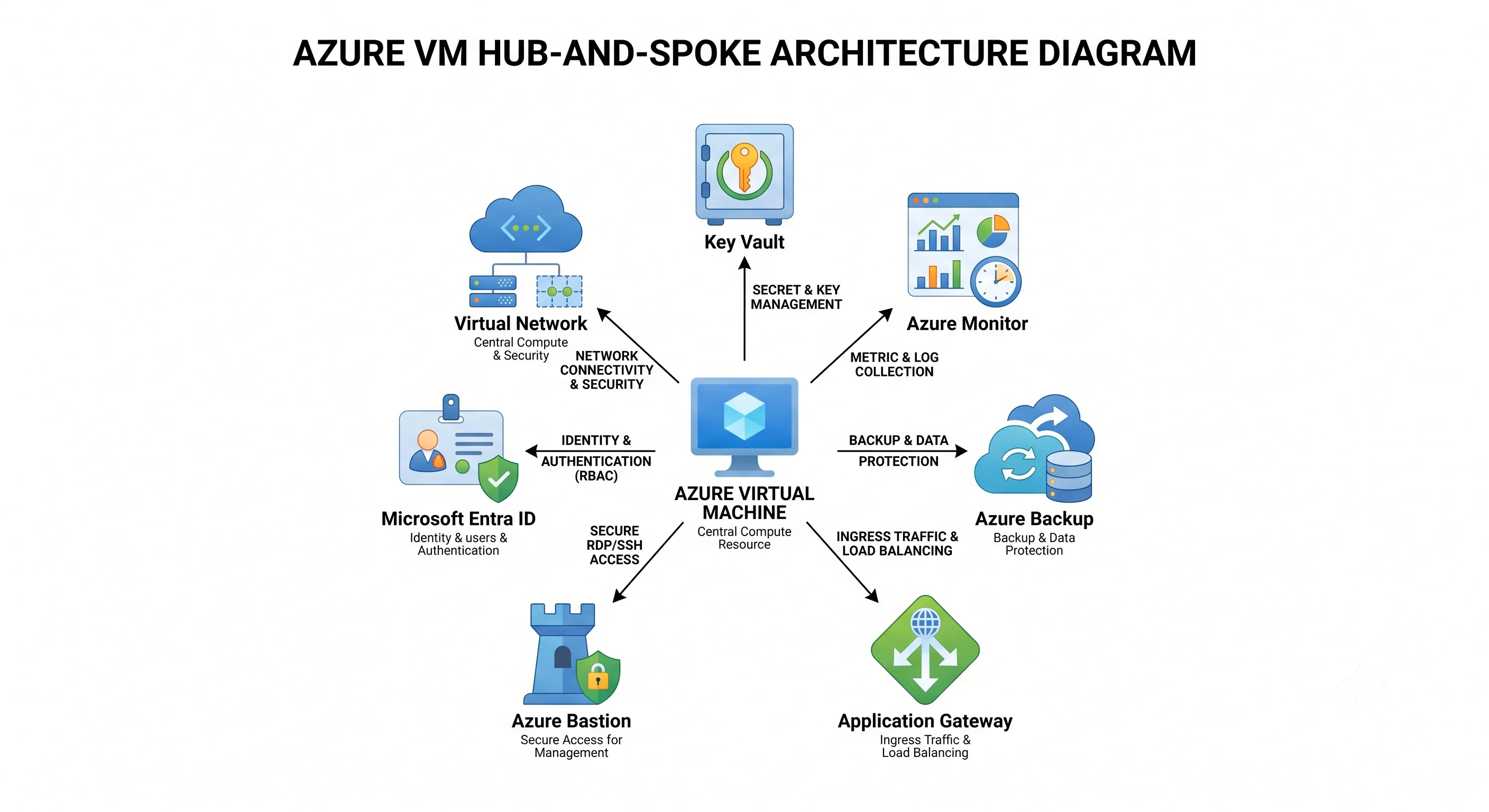
The two glue mechanisms
Nearly every "how do these talk to each other" question in Azure resolves to one of two answers. Learn these once and most of the table below explains itself.
Managed identity + a role assignment — the keyless way one Azure resource authenticates to
another. The VM gets an identity in Microsoft Entra ID, you grant that identity an Azure RBAC role at
a scope, and the VM fetches tokens from IMDS at 169.254.169.254. No connection string, no key, no
rotation, nothing to leak in a config file or a git history. Every Azure SDK's
DefaultAzureCredential picks this up automatically, which means the same code runs on a developer
laptop (using their az login) and on the VM (using the managed identity) with no branching.
# The pattern, once, in full — every row below is a variation on it
az vm identity assign -g rg-app-prod -n vm-app-01
PRINCIPAL=$(az vm show -g rg-app-prod -n vm-app-01 --query identity.principalId -o tsv)

az role assignment create \
  --assignee "$PRINCIPAL" \
  --role "Storage Blob Data Reader" \
  --scope "/subscriptions/$SUB/resourceGroups/rg-data/providers/Microsoft.Storage/storageAccounts/stappdata"
Note the role: Storage Blob Data Reader, not Reader. That's the control-plane / data-plane
split from Architecture showing up in practice — Reader lets the VM see
that the storage account exists; only the data-plane role lets it read a blob.
Private endpoint + Private DNS zone — the way a VM reaches another Azure service without the traffic leaving the virtual network. A private endpoint puts a NIC with a private IP from your subnet in front of the target service; a private DNS zone makes the service's public hostname resolve to that private IP, so no application code or connection string changes.
The part everyone gets wrong: the private DNS zone is not optional and its name must be exact. Each service has a specific zone name and a specific sub-resource the endpoint targets:
| Target service | Sub-resource | Private DNS zone |
|---|---|---|
| Key Vault | vault |
privatelink.vaultcore.azure.net |
| Blob Storage | blob |
privatelink.blob.core.windows.net |
| Azure SQL Database | sqlServer |
privatelink.database.windows.net |
| Azure Container Registry | registry |
privatelink.azurecr.io |
Without the zone linked to the VNet, the VM resolves the public IP and the connection is refused — producing a "firewall problem" that is actually a DNS problem. It's the most common private-endpoint support ticket in existence.
The pairings
| Pairs with | Why | The glue |
|---|---|---|
| Key Vault | Hold the certificates, secrets, and disk-encryption keys that shouldn't live on the disk | Managed identity + Key Vault Secrets User (data-plane role, RBAC mode); the Key Vault VM extension auto-refreshes certificates into the guest store; a Disk Encryption Set for customer-managed disk keys |
| Azure Monitor / Log Analytics | The VM has no observability at all until you add it | Azure Monitor Agent extension + a Data Collection Rule pointing at a Log Analytics workspace, plus a diagnostic setting for platform metrics |
| Azure Backup | Managed disks are replicated, not backed up | A Recovery Services vault + a backup policy; the backup extension is installed automatically |
| Azure Load Balancer | Spread L4 traffic across instances and give the fleet a stable frontend | Backend pool referencing the NICs or the scale set, a health probe, and a load-balancing rule. Also provides outbound connectivity via outbound rules |
| Application Gateway | L7 routing, TLS termination, and a WAF in front of web VMs | Backend pool of private IPs, an HTTP setting, and a listener. This is what you want in front of a web tier, not a bare public IP |
| Azure Bastion | Reach a VM with no public IP, no open 22/3389, no VPN | A AzureBastionSubnet in the VNet; connect through the portal or az network bastion ssh. Requires the RBAC Reader role on the VM, the NIC, and the Bastion |
| Virtual Network + NSG | The VM's entire network position | Subnet membership, NSGs on the subnet and/or NIC, route tables, and Application Security Groups for readable rules |
| Microsoft Entra ID (guest login) | Sign in to the VM with a corporate identity instead of a shared local account — with MFA and Conditional Access | The AADSSHLoginForLinux / Entra login extension + the Virtual Machine Administrator Login or Virtual Machine User Login RBAC role |
| Azure Update Manager | Nothing patches your guest OS by default | Maintenance configurations and assessment schedules, at scale across the fleet |
| Azure Files / Blob Storage | Shared state a VM shouldn't keep locally | SMB/NFS mount for Files (managed identity or storage key); SDK or azcopy with a data-plane role for Blob |
| Azure Compute Gallery | Golden images, versioned and region-replicated | The VM or scale set references an image version ID rather than a marketplace URN |
| Azure Site Recovery | Cross-region disaster recovery with replication and orchestrated failover | Replication policy in a Recovery Services vault + a recovery plan |
| Azure Policy | Stop the estate drifting into non-compliance | Assignments at the management group or subscription: allowed SKUs, required tags, deny public IPs, audit missing agents |
The four worth doing properly
Key Vault — stop putting secrets on the disk
The naive pattern is a secret in /etc/app/app.conf, put there by a deployment script. The problem
isn't only that it's on disk — it's that it's in the deployment pipeline, probably in a variable
group, possibly in git history, and rotating it means a redeploy.
# Grant the VM's identity read access to secrets — data-plane role, RBAC-mode vault
az role assignment create \
  --assignee "$PRINCIPAL" \
  --role "Key Vault Secrets User" \
  --scope "/subscriptions/$SUB/resourceGroups/rg-shared/providers/Microsoft.KeyVault/vaults/kv-app-prod"
# In the application — the same three lines work locally and on the VM
from azure.identity import DefaultAzureCredential
from azure.keyvault.secrets import SecretClient
client = SecretClient("https://kv-app-prod.vault.azure.net", DefaultAzureCredential())
db_password = client.get_secret("db-password").valueTwo Key Vault specifics that catch people: vaults created before RBAC mode use access policies
instead, and a role assignment on such a vault does nothing at all — check enableRbacAuthorization
before debugging permissions. And Key Vault Contributor does not let you read a secret; it lets
you manage the vault resource. This is the canonical control-plane / data-plane trap and it's an
interview favourite.
For TLS certificates specifically, the Key Vault VM extension is better than fetching in code: it polls the vault and writes renewed certificates into the guest's certificate store, so rotation happens without a deployment.
Azure Monitor — the VM is blind until you wire it
This is the integration people skip and then regret during an incident. A brand-new VM emits host-level metrics only — CPU, disk IOPS, network bytes, as seen from the hypervisor. It does not emit memory usage, disk free space, syslog, application logs, or anything from inside the guest, because Azure can't see inside the guest.
Three pieces are required:
- The Azure Monitor Agent extension, installed in the guest.
- A Data Collection Rule (DCR) saying what to collect and where to send it. This is the part that replaced the old agent's per-workspace configuration, and the part people forget — an agent with no DCR association collects nothing while looking perfectly healthy.
- A diagnostic setting on the VM resource, routing platform metrics to the workspace.
az vm extension set \
  --resource-group rg-app-prod --vm-name vm-app-01 \
  --name AzureMonitorLinuxAgent \
  --publisher Microsoft.Azure.Monitor \
  --enable-auto-upgrade true

az monitor data-collection rule association create \
  --name dcra-vm-app-01 \
  --rule-id "$DCR_ID" \
  --resource "/subscriptions/$SUB/resourceGroups/rg-app-prod/providers/Microsoft.Compute/virtualMachines/vm-app-01"
VM Insights is the packaged version of all this — agent, DCR, a curated set of performance counters, and a dependency map showing which processes talk to which hosts. For most teams it's the right starting point, and the dependency map alone justifies it during a migration.
The KQL queries worth having ready are in Production.
Bastion + Entra login — the modern access story
The combination that lets you delete every public IP and every inbound 22/3389 rule from your VM estate, which is the highest-value security change available on most Azure subscriptions.
Azure Bastion is a managed jump host that lives in your VNet in a subnet that must be named
exactly AzureBastionSubnet. You connect through the portal or the CLI; the VM needs no public IP
and no inbound internet rule at all.
Entra login replaces the shared local account. Users authenticate with their corporate identity — inheriting MFA and Conditional Access — and their access is an RBAC role assignment you can grant and revoke centrally, and can put behind Privileged Identity Management for just-in-time elevation.
# Install the extension (Linux)
az vm extension set \
  --resource-group rg-app-prod --vm-name vm-app-01 \
  --name AADSSHLoginForLinux --publisher Microsoft.Azure.ActiveDirectory

# Grant a person the ability to log in as a non-root user
az role assignment create \
  --assignee alice@contoso.com \
  --role "Virtual Machine User Login" \
  --scope "/subscriptions/$SUB/resourceGroups/rg-app-prod/providers/Microsoft.Compute/virtualMachines/vm-app-01"

# Connect through Bastion, no public IP anywhere
az network bastion ssh \
  --name bastion-hub --resource-group rg-network \
  --target-resource-id "$VM_ID" --auth-type AAD
Together with Virtual Machine Administrator Login for the small set of people who need root, this
gives you a complete, auditable, offboardable access model. Compare it honestly to the alternative:
one SSH private key, shared in a password manager, that nobody can revoke individually and which
survives someone leaving the company.
Load Balancer vs. Application Gateway — pick the right one
A recurring confusion, resolved in one table:
| Azure Load Balancer | Application Gateway | |
|---|---|---|
| Layer | 4 (TCP/UDP) | 7 (HTTP/HTTPS) |
| Routes on | IP and port | URL path, hostname, headers |
| TLS | Passes through | Terminates, and can re-encrypt |
| WAF | No | Yes, via the WAF SKU — OWASP rule sets |
| Session affinity | 5-tuple or IP-based | Cookie-based |
| Reach for it when | Non-HTTP protocols, extreme throughput, low latency, or you need outbound rules | Anything web-facing — and if it's internet-facing, the WAF SKU |
For a web tier the answer is nearly always Application Gateway with WAF, or Azure Front Door if you need global anycast, CDN, and edge WAF in front of multiple regions. Load Balancer is still what sits behind them for the internal L4 hop, and it's how a scale set gets outbound connectivity.
One networking change worth flagging: default outbound internet access for VMs is being retired. New deployments should give VMs an explicit outbound path — a NAT Gateway (the recommended choice: predictable SNAT ports, zone-resilient, no port-exhaustion surprises), a load balancer outbound rule, or a route through Azure Firewall. Relying on the implicit default is a migration you'll have to do eventually. ⚠️ verify the current retirement timeline against current Azure docs.
A reference architecture, assembled
The pieces above, in a shape you'd actually deploy for a web workload:
- Front Door or Application Gateway (WAF SKU) takes internet traffic, terminates TLS, and blocks the OWASP top ten.
- It routes to a Flexible VM Scale Set across three availability zones, with autoscale rules and automatic instance repair.
- The instances have no public IPs. Outbound goes through a NAT Gateway.
- Each instance carries a user-assigned managed identity with narrowly-scoped data-plane roles.
- Secrets and TLS certificates come from Key Vault via that identity and the Key Vault extension.
- The database is reached over a private endpoint with the matching private DNS zone linked to the VNet.
- Azure Monitor Agent with a Data Collection Rule ships metrics and logs to a Log Analytics workspace; alert rules fire on the metrics named in Production.
- Azure Backup protects the instances that hold state — and the restore is tested on a schedule.
- Azure Bastion plus Entra login is the only human access path, with
Virtual Machine Administrator Logingranted just-in-time through PIM. - Azure Policy at the management group denies public IPs on VM NICs, restricts SKUs and regions, and audits missing agents.
- Azure Update Manager owns guest patching on a maintenance schedule.
Every line of that is one of the rows in the table above. Nothing in it is exotic — which is rather the point.
Next: Production →
← Back to the Virtual Machines overview · ← Previous: Deployment